royal-system
 Mohd Arselan Khan
Build a single-page web app called "Dopamine Menu" — a playful wellness tool that reframes short, intentional micro-activities as a restaurant menu of "brain snacks." The core message: stop feeding your brain cheap dopamine (doomscrolling) and instead order a real, tangible 5/10/20-minute activity off the menu. Visual style Warm, hand-crafted "scrapbook journal" aesthetic — think a cozy zine page, not a typical SaaS UI. Background: warm cream/beige, #E8DACE Cards: slightly lighter dusty beige, #EFE4DC, with thin 1px black/dark-brown hairline borders (no heavy shadows — flat, paper-like) Tag chips / pills: dusty rose-beige, #DCC8BC, rounded corners, small uppercase or lowercase label text Text color: near-black warm brown, #1C1410 Headlines: bold, chunky, hand-drawn marker/brush font — use Google Font "Permanent Marker" (or "Kalam" Bold as fallback), always in caps for big titles like "DOPAMINE MENU" Taglines / subtext / instructions: casual cursive handwriting font — use Google Font "Caveat" (or "Gloria Hallelujah"), italicized, muted gray-brown color Decorative doodles: hand-drawn black sparkle/star icons (4-point and 8-point asterisk-style stars), and a loose hand-scribbled squiggle line accent — scattered near images, not symmetric, looks sketched not vector-perfect Photo framing: product/lifestyle photos get a thin black corner-bracket frame (4 small "L" brackets in the corners, like a viewfinder/Polaroid crop mark), NOT a full border Overall feel: warm, analog, a little whimsical, zero corporate gloss Layout & Screens 1. Top menu tabs (always visible) Three side-by-side tab cards representing time-based menu categories: "5 MINUTE" / Starters "10 MINUTE" / Curiosity Bites "20 MINUTE" / [longer activity category — pick a fitting third name, e.g. "Deep Dives"] Each tab shows a bold time label on top and a cursive italic subtitle underneath. The active/selected tab has a visible highlighted background + border; inactive tabs are muted/lower-contrast. Clicking a tab switches the active menu category. 2. Hero / landing card A large bordered card below the tabs, two columns: Left column: Giant headline: "DOPAMINE MENU" (Permanent Marker font, black, large) Cursive tagline directly under it: "Pick A Brain Snack" Lower in the card, a bold 2-line closer: "NO MORE / CHEAP DOPAMINE" A primary CTA button (e.g. "Start" / "Open the Menu") that switches the view to the Activity screen (screen 3) Right column: A square lifestyle photo (someone enjoying a simple real-world moment outdoors, e.g. eating ice cream) with the corner-bracket photo frame Two hand-drawn sparkle/star doodles overlapping the photo's left edge A scribble doodle near the bottom-right corner of the photo Easter egg interaction: on hover or click, the photo darkens/blurs and reveals overlay text: "SMASH THIS GLASS TO REVEAL" / "EMERGENCY RESET COMBO" with a white reveal button in the center. Clicking it triggers an instant 1-minute "panic reset" activity (a single ultra-quick grounding action shown in a small popup/toast) — a playful break-glass panic button for when someone really needs a dopamine hit right now. 3. Activity / Menu detail screen Replaces the hero when a menu category is opened. Two-column layout: Header (centered): "DOPAMINE MENU" (smaller) + cursive subtitle "A gentle nudge toward feeling good" Section label above the main card, cursive, muted: e.g. "5 Minutes Dopamine Appetizer" (text matches whichever tab/time-category is active) Main activity card (left, wide): Two small pill tags top-left: a mood/category tag (e.g. "Calmness," "Focus," "Reset") + a duration tag (e.g. "3 Min.") Bold marker-font activity title in caps, e.g. "ESCAPE THE ALGORITHM SPRINT" Italic handwritten-style instructions block: One setup line (e.g. "Put your phone on airplane mode.") A short intro line ("Now complete this mini-mission before the timer ends:") A bulleted list of 3–5 tiny, concrete, slightly absurd real-world micro-tasks (sensory/movement/creativity prompts — e.g. "Find 3 interesting shadows around you," "Touch something cold," "Invent a fake luxury perfume name") A closing reflective line tying it back to the dopamine-menu concept (e.g. "Your brain wanted novelty. You just gave it real novelty instead of scrolling.") Two buttons bottom-right of the card: "New Activity" (shuffle/dice icon, outlined secondary button — swaps in a different random activity card with new tags/title/instructions, no page reload) and "Done" (checkmark icon, outlined secondary button — marks it complete and increments the stats sidebar) Write at least 4–5 different activity card variants per time category so "New Activity" feels like a real shuffle (mix categories like Calmness, Reset, Focus, Curiosity, Movement) Stats sidebar (right, narrow): three stacked stat cards, each a big number above a small label: "0 Completed" "0 Streak" "0 Completed" (a second tracked stat — e.g. weekly total or category-specific count) These should live in app state and actually increment when "Done" is clicked (use localStorage or in-memory state — no backend needed) A subtle back/home control to return to the hero screen from here. Interactions / functionality summary Tab clicks switch the active time-category and its section label/copy "Start"/CTA on hero opens the Activity screen for the currently active tab "New Activity" cycles to a new random card (different tags, title, instructions) within the active category, client-side only "Done" increments the completed/streak counters and gives a small satisfying confirmation (a brief animation, color flash, or toast — keep it understated, not loud/gamey, in keeping with the "gentle nudge" tone) The hero photo's "smash glass" panel is a hidden delight feature, not part of the primary flow Fully responsive: stack the two-column layouts vertically on mobile, tabs scroll or wrap Tone of voice for any additional copy Warm, witty, slightly self-aware about phone addiction and dopamine culture — never preachy or clinical. Short punchy sentences. Lowercase/cursive for the "soft" emotional lines, bold caps marker font for the punchy declarative ones.


Comments (0)
Sign in to leave a comment
Project Tasks26
Implement Navbar for HeroScreen
As a frontend developer, implement the Navbar section for HeroScreen. Build the `Navbar` component using `useState` for mobile menu open/close toggle. Render a `nv-root` nav with `nv-inner` containing: a brand logo link (`nv-brand`) with inline SVG document icon and two-line brand text ('Dopamine Menu' + 'brain snacks' sub), a desktop `nv-links` block mapping `NAV_LINKS` array (Menu → /HeroScreen, Activity → /ActivityScreen, Dopamine Menu → /Dopamine Menu) as `nv-link` anchors plus a `nv-cta` 'Start Snacking' anchor. Include a `nv-toggle` hamburger button with three `<span>` bars that toggles `is-open` class and sets `aria-expanded`. Render a `nv-mobile` drawer with `nv-mobile-inner` containing the same links as `nv-mobile-link` elements plus `nv-mobile-cta`, all calling `closeMenu` on click. Note: this component is likely shared across pages — check if it already exists from a previous page before rebuilding.
Setup Design System Theme
As a Frontend Developer, set up the global design system and theme configuration for the Dopamine Menu app. Create a CSS/SCSS variables file or theme config with the full color palette (primary: #E8DACE, primary_light: #EFE4DC, secondary: #DCC8BC, accent: #1C1410, bg: #E8DACE, surface: rgba(239,228,220,0.8), text: #1C1410, text_muted: #7D6B64, border: rgba(28,20,16,0.2)). Configure Google Fonts imports for 'Permanent Marker' and 'Caveat' (with Kalam Bold and Gloria Hallelujah fallbacks). Define global CSS resets, base typography scales, and shared utility classes for the scrapbook/journal aesthetic. Set up framer-motion and gsap as project dependencies. This is a prerequisite for all frontend section tasks.
Define Activities Data Layer
As a Frontend Developer, create and centralize the ACTIVITIES_BY_CATEGORY data structure used across ActivityCardPreview (Dopamine Menu page) and ActivityCard (ActivityScreen). Define at least 4–5 activity objects per category (5min, 10min, 20min), each with: id, categoryLabel, mood (array of mood tags), title (caps marker font), instructions (setup line, intro, bulleted steps array, closing reflection), benefit, source, moodTags, categoryTag. Ensure sufficient variety in mood/category tags (Calmness, Focus, Reset, Curiosity, Movement) so the shuffle feels real. Export from a shared data file (e.g. src/data/activities.js) imported by both ActivityCardPreview and ActivityCard components. This data file is a prerequisite for those section tasks.
Implement HeroIntro for HeroScreen
As a frontend developer, implement the HeroIntro section for HeroScreen. Use `useRef` and `useInView` (framer-motion, `once: true, amount: 0.35`) to trigger entrance animations. Render a `hi-root` section with: a `hi-doodles` parallax layer (CSS `translateY(calc(var(--scroll, 0) * -0.2px))`) containing six decorative SVG doodles (star, swirl, squiggle, heart, spark, arrow) each in named `hi-doodle--*` divs; a `hi-texture` overlay div; and a `motion.div` with `container` stagger variant (`staggerChildren: 0.18, delayChildren: 0.1`) that animates children with the `reveal` variant (`opacity: 0→1, y: 24→0, filter: blur(8px)→blur(0px), duration: 0.7, ease [0.22,1,0.36,1]`). Children include: `motion.span.hi-eyebrow` with dot indicator, `motion.h1.hi-headline` with `<em>` wrapped 'real treat.', `motion.p.hi-tagline`, and `motion.div.hi-mission` with bold 'Our mission:' label.
Implement MenuTabs for HeroScreen
As a frontend developer, implement the MenuTabs section for HeroScreen. Use `useState` to track `active` tab (default `'5min'`). Render a `mt-root` section with a `mt-decor` parallax layer (`translateY(calc(var(--scroll,0)*-0.6px))`) containing three decorative SVGs (wavy path doodle-1, dashed circle doodle-2, star polygon doodle-3). Render `mt-inner` with a `mt-header` block (eyebrow, h2 with `<em>` on 'time', subtitle). Map the `MENU_TABS` array (5min/Starters, 10min/Curiosity Bites, 20min/Deep Dives) as `motion.button.mt-card` elements — each with `initial={{ rotateY:180, opacity:0, y:24 }}`, `whileInView={{ rotateY:0, opacity:1, y:0 }}`, `viewport={{ once:true, amount:0.3 }}`, `aria-pressed`, and `is-active` class when selected. Each card displays a time number, unit label, category name, description text, snack count badge, and a category SVG icon. Clicking a card calls `setActive(tab.id)`.
Implement HeroCard for HeroScreen
As a frontend developer, implement the HeroCard section for HeroScreen. Use `useState` for `pressed` and `burst` boolean states. Render a `hc-root` section with a `hc-decor` layer containing three parallax SVG doodles (wavy path at -0.2px, dashed circle+crosshair at -0.3px, triangle at -0.15px scroll speed). Render `hc-inner` with an eyebrow label 'Today's Pick'. Wrap the card in a `motion.div.hc-card` with `whileHover={{ scale:1.02, boxShadow }}` spring transition (`stiffness:260, damping:22`). Inside the card: display `ACTIVITY` object fields — `hc-category`, `hc-headline` (h2), `hc-tagline` (p), and `hc-tags` mapping tags array (['Calm','Creative','Screen-Free','Solo']) as `hc-tag` spans. In `hc-cta-wrap`, use `AnimatePresence` to render a `PARTICLES` array (7 particles with x/y offsets) as `motion.span` burst elements when `burst` is true, creating a confetti-burst animation on button press. Include the primary CTA button with press/burst state management.
Implement InteractivePhoto for HeroScreen
As a frontend developer, implement the InteractivePhoto section for HeroScreen. Use `useState` for `revealed` boolean, `useRef` for `messageRef`, `timelineRef` (GSAP timeline), and `driftRef` (rAF handle). First `useEffect`: build a paused GSAP timeline on `messageRef.current` — `fromTo` animating `opacity:0→1, scale:0.6→1, y:24→0, rotate:-4→-1.5` with `ease:'back.out(2.2)', duration:0.7`; set `pointerEvents` before/after. Second `useEffect`: play or reverse `timelineRef.current` based on `revealed` state. Third `useEffect`: when `revealed` is true, start a `requestAnimationFrame` scroll-drift loop using GSAP `to` — computing `delta = (scrollY - start) * 0.06`, clamped to [-18, 18], applied as `x` and `y*-0.5` with `ease:'power2.out'`; cancel rAF on cleanup or when `revealed` becomes false. Expose `show`, `hide`, `toggle` via `useCallback`. Handle keyboard accessibility with `onKeyDown` for Enter/Space keys toggling reveal. Render `ip-root` section with parallax decorative SVG doodles (star polygon `ip-doodle-1`, dashed circle) and the interactive photo container with the hidden message element ref'd by `messageRef`.
Implement CallToAction for HeroScreen
As a frontend developer, implement the CallToAction section for HeroScreen. Use `useState` for `ripples` array and `useCallback` for `spawnRipple`. The `spawnRipple` function computes click coordinates relative to the button via `getBoundingClientRect`, pushes a `{ id, x, y }` entry to `ripples`, then uses `window.setTimeout` (650ms) to remove it. `handleStart` calls `spawnRipple` then navigates to `/ActivityScreen` after 220ms via `window.location.href`. Render a `cta-root` section with two parallax `cta-deco` layers: first (speed -0.2px) with `cta-blob-a` and `cta-blob-b` spans; second (speed -0.4px) with three decorative SVGs (wavy path `cta-doodle-1`, dashed circle `cta-doodle-2`, star polygon `cta-doodle-3`). Render `cta-content` (no transform) with eyebrow 'Your table is ready', h2 heading, subtitle paragraph. Inside `cta-actions`, render a `motion.button.cta-primary` with `whileTap={{ scale:0.95 }}`, `whileHover={{ y:-2 }}`, spring transition (`stiffness:420, damping:22`), a `cta-primary-shine` span, and `AnimatePresence` wrapping `ripples.map` as `motion` ripple elements for the click-burst effect.
Implement ActivityHeader for ActivityScreen
As a frontend developer, implement the ActivityHeader section for ActivityScreen. This header renders a decorative SVG doodle layer (ah-doodle with animated ah-doodle-path elements), a breadcrumb link back to '/Dopamine Menu' with an inline arrow SVG (BRANCH_ICON), and a category tab navigation (ah-tabs) mapping over CATEGORY_KEYS ['5min', '10min', '20min']. Each tab button uses ah-tab and is-active CSS classes, renders an inline SVG icon (CLOCK_ICON, LIGHTBULB_ICON, BOOK_ICON), and calls onCategoryChange prop on click with aria-pressed for accessibility. The CATEGORIES object drives the active category's duration, unit, name, desc display below tabs. Props: activeCategory (default '5min') and onCategoryChange callback. Import ActivityHeader.css. Note: This component may reference shared layout from HeroScreen's Navbar.
Setup Client-Side State Management
As a Frontend Developer, set up global client-side state management for the Dopamine Menu app. Implement a React Context (or lightweight Zustand/Redux slice) to manage: activeCategory (5min/10min/20min), completedCount, streakCount, weeklyCompletedCount, and currentActivityIndex per category. Expose actions: setActiveCategory, markActivityDone, shuffleActivity, resetStats. Persist completed/streak counters to localStorage so stats survive page refresh. Wire up the provider at the app root. This shared state is required by MenuTabs, ActivityCard, ActivityStats, and ActivityControls components. Note: SRD specifies no backend — all state is client-side only.
Setup React Router Navigation
As a Frontend Developer, configure React Router (v6) for the Dopamine Menu SPA. Define routes for: '/' or '/HeroScreen' → HeroScreen, '/ActivityScreen' → ActivityScreen, '/Dopamine Menu' → Dopamine Menu page. Set up a root App component with BrowserRouter and route definitions. Ensure the Navbar links, CTA buttons (useNavigate in ActivityCardPreview), and back/home controls in ActivityHeader all navigate correctly between screens. This is a prerequisite for any component that uses useNavigate or links between pages.
Implement Responsive Layout Foundation
As a Frontend Developer, implement the responsive layout foundation for the Dopamine Menu SPA. Create base layout components or CSS utilities for: two-column → single-column stacking at mobile breakpoints (≤768px), responsive tab wrapping/scrolling for MenuTabs, a page-level wrapper with correct background color (#E8DACE), and mobile-specific overrides for the hero two-column card and activity two-column layout (activity card + stats sidebar). Ensure touch events work for PhotoFrame (click-only on mobile, no hover). Reference SRD non-functional requirements: 'fully responsive and accessible on mobile devices.' This should be built after the theme setup and before section-level components.
Implement ActivityCard for ActivityScreen
As a frontend developer, implement the ActivityCard section for ActivityScreen. Uses framer-motion's AnimatePresence and motion.article with key={activity.title} for enter/exit transitions (opacity 0→1, y 24→0 on enter; opacity 0, y -16 on exit; 0.5s cubic-bezier ease). Renders mood tags (acd-tag--mood with acd-tag-dot) and a category tag (acd-tag--category) from activity.moodTags array and activity.categoryTag. Displays activity.title as h2.acd-title, an acd-underline accent span, acd-instructions div with activity.description paragraph, and a numbered acd-steps ol mapping activity.steps with acd-step-num spans. Footer (acd-footer) shows activity.benefit with an inline checkmark SVG (acd-meta-icon) and activity source. Returns null if no activity prop. Import ActivityCard.css and framer-motion.
Implement ActivityControls for ActivityScreen
As a frontend developer, implement the ActivityControls section for ActivityScreen. Manages useState hooks for: shuffling (bool), done (bool), feedback ({text, type}), statsBump (bool), and shuffleIndex (cycling 0-2 via shuffleCount=3). handleShuffle (useCallback) sets shuffling=true, increments shuffleIndex, calls onShuffle prop, then after 650ms resets shuffling and sets feedback to 'New brain snack served!' (type: 'shuffle') which clears after 2200ms. handleDone (useCallback) sets done=true, then after 500ms sets feedback 'Snack completed — stats updated!' (type: 'done'), calls setStatsBump(true) and onDone prop, resets all after 2600ms. Renders animated shuffle counter badge (AnimatePresence/motion.div keyed to shuffleIndex), inline ShuffleIcon SVG with actc-icon-spin class when spinning, inline CheckIcon SVG for done button, inline SparkleIcon for decorative element. Feedback text animates in/out via AnimatePresence. CSS classes: actc-root, actc-inner, actc-shuffle-badge, actc-btn-icon. Import ActivityControls.css and framer-motion.
Implement ActivityStats for ActivityScreen
As a frontend developer, implement the ActivityStats section for ActivityScreen. Uses useState, useRef, useEffect, useCallback from React plus framer-motion AnimatePresence/motion. Renders BADGES_EARNED array (5 badges: star, zap, flame, crown, sparkles) via renderBadgeSvg(icon) switch function producing inline SVGs for each icon type; earned vs unearned badges have distinct visual states. Displays STREAK_DAYS=7 day streak tracker. Implements getMotivationalText(completed, streak) logic producing contextual main/sub text across thresholds (0 completed, streak>=7, >=5, >=3, completed>=10, etc). AnimatePresence wraps motivational text transitions. Stat counters for completed activities and current streak are animated with motion elements. Import ActivityStats.css and framer-motion.
Implement HeroCard for Dopamine Menu
As a frontend developer, implement the HeroCard section for the Dopamine Menu page. This section renders an animated hero card using framer-motion's `useMotionValue` and `useTransform` hooks for parallax tilt effects on mouse movement. The component includes 8 SVG doodle overlays (wavy lines, stars, circles, loops, dot clusters) each with individual `initialX`/`initialY` offsets and CSS classes like `hc-doodle--wavy-1`, `hc-doodle--star-1`, `hc-doodle--circle-2`, etc. Doodles use `var(--accent)` fill colors with low opacity. The card likely contains a headline, tagline, and CTA button styled with HeroCard.css. Ensure the component wires up motion values to doodle transforms for the parallax float effect. Note: A similar HeroCard component exists from HeroScreen (task 70664792) — review for reuse or extension.
Implement MenuTabs for Dopamine Menu
As a frontend developer, implement the MenuTabs section for the Dopamine Menu page. Uses `useState` for `active` (default `'5min'`) and `flippedCards` (object keyed by tab id). Renders 3 tab cards from `MENU_TABS` array (ids: `5min`, `10min`, `20min`) with categories Starters, Curiosity Bites, Deep Dives. `handleCardClick` toggles flip state and sets active tab. `sortedTabs` reorders so the active tab appears first. Each card animates via framer-motion `cardEntryVariants` with `AnimatePresence` (entry: opacity 0, y 40, scale 0.92; visible: spring overshoot). Cards have individual `rotate` values (-2.5, 1.8, -1.6 degrees) and SVG icons. A decorative `mt-decor` div contains 3 inline SVG doodles (wavy, circle, star) with CSS parallax via `--scroll` custom property. Header includes eyebrow text, styled via MenuTabs.css. Note: A MenuTabs component exists from HeroScreen (task 85d522cc) — evaluate for reuse with Dopamine Menu-specific data.
Implement PhotoFrame for Dopamine Menu
As a frontend developer, implement the PhotoFrame section for the Dopamine Menu page. Uses `useState` for `revealed`, `drawn`, and `isMobile` flags; refs: `sectionRef`, `frameRef`, `borderPathRef`, `messageRef`, `hideTimerRef`, `hasDrawnRef`. On mount, detects mobile via `window.innerWidth < 768` with resize listener. On scroll enter (ScrollTrigger at `top 78%`, once), GSAP animates `borderPathRef` `strokeDashoffset` from full `pathLength` to 0 over 1.2s (`power2.inOut`) to draw the SVG border; sets `drawn` state. Hover (`handleMouseEnter`/`handleMouseLeave`) and click (`handleClick`) trigger `reveal()`/`hideMessage()` — GSAP animates `messageRef` with `elastic.out(1.2, 0.4)` for reveal (y:0, opacity:1) and `power2.in` for hide (y:20, opacity:0). Auto-hide fires after 3 seconds via `hideTimerRef` timeout. Mobile skips hover events, uses click only. `FRAME_CORNER_POINTS` SVG data provides decorative corner markers. Requires `gsap` and `gsap/ScrollTrigger` imports. Note: Similar InteractivePhoto exists from HeroScreen (task 9ab246c2) — review for shared logic.
Integrate HeroScreen Page Assembly
As a Tech Lead, verify the end-to-end integration of the HeroScreen page by assembling all section components: Navbar, HeroIntro, HeroCard, MenuTabs (HeroScreen), InteractivePhoto, and CallToAction. Ensure: shared activeCategory state flows correctly between MenuTabs and the CTA navigation, the CTA 'Start' button navigates to ActivityScreen with the correct active category context, InteractivePhoto easter egg reveals and resets work, parallax scroll effects across sections are coordinated without conflicts between framer-motion and gsap, and the Navbar links route correctly. Verify full responsive layout on mobile. Note: depends on routing (temp_routing_setup), state management (temp_client_state), and all HeroScreen section tasks.
Implement Admin Panel UI
As a Frontend Developer, build the Admin Panel page for managing Dopamine Menu content. Implement a protected route at '/admin' that renders an admin dashboard with: a sidebar navigation (Dashboard, Activities, Categories), an Activities management table listing all activities with edit/delete actions, an Add Activity form with fields matching the activity data schema (title, category, mood tags, instructions, steps, benefit, source), an Edit Activity modal/drawer, a Delete confirmation dialog, and a Categories view showing the three time-based categories (5min, 10min, 20min) with activity counts. All CRUD operations should update the shared activities state (localStorage or context). Style consistently with the scrapbook/journal design system. Depends on theme setup (87d1c73b), routing (8f998a3e), and activities data layer (487797c7).
Implement Admin Activities State
As a Frontend Developer, extend the client-side state management (Context or Zustand) to support admin CRUD operations on activities. Add actions: addActivity(activity), updateActivity(id, updates), removeActivity(id), and reorderActivities(categoryKey, orderedIds). Persist the activities list to localStorage so admin changes survive page refresh and are reflected immediately in the user-facing ActivityCard and ActivityCardPreview components. Expose the mutable activities state via the existing provider so the Admin Panel and user-facing components share a single source of truth. Depends on the client-side state setup (af4fcfd4) and activities data layer (487797c7).
Implement Admin Route Guard
As a Frontend Developer, implement a simple client-side admin authentication guard for the '/admin' route. Since the SRD specifies no backend, implement a lightweight password-protected gate: store a hashed or plaintext admin PIN/password in an environment variable (REACT_APP_ADMIN_PASSWORD), display a login form at '/admin/login', store the authenticated session in sessionStorage (not localStorage to limit exposure), and wrap the '/admin' route with a PrivateRoute component that redirects unauthenticated users to '/admin/login'. This covers the Admin Login step shown in the Admin user flow diagram. Depends on routing setup (8f998a3e).
Implement ActivityCardPreview for Dopamine Menu
As a frontend developer, implement the ActivityCardPreview section for the Dopamine Menu page. Uses `useState` and `useCallback`; imports `useMotionValue`, `useMotionTemplate`, `AnimatePresence` from framer-motion, and `useNavigate` from react-router-dom. Activity data is organized in `ACTIVITIES_BY_CATEGORY` with keys `5min`, `10min`, `20min` — each containing 4 activities with fields: `id`, `categoryLabel`, `mood`, `title`, `instructions`. The `5min` set includes activities like 'Five Senses Check-In', 'Doodle Storm', 'Desk Plant Ritual', 'Window Wander'. The `10min` set includes 'Reverse Recipe Hunt', 'Zine Page', 'Voice Note Postcard', 'Sensory Cocoon'. The `20min` set includes 'Handwritten Letter' and 'Neighborhood...' activities. Cards likely use `useMotionValue` for mouse-tracking spotlight/tilt effects via `useMotionTemplate`. `useNavigate` enables CTA navigation to the ActivityScreen. AnimatePresence manages card transition animations when switching categories. Styled via ActivityCardPreview.css. Integrates with MenuTabs active category state or receives it as prop. Depends on MenuTabs section being built first since it shares the active category concept.
Integrate ActivityScreen Page Assembly
As a Tech Lead, verify the end-to-end integration of the ActivityScreen by assembling ActivityHeader, ActivityCard, ActivityStats, and ActivityControls. Ensure: activeCategory state from ActivityHeader propagates to ActivityCard to display the correct activity, ActivityControls' onShuffle callback triggers a new random activity within the active category (using shared data layer), ActivityControls' onDone callback increments completedCount and streakCount in global state and reflects immediately in ActivityStats, AnimatePresence card transitions are smooth when shuffling, the breadcrumb/back link in ActivityHeader navigates correctly to HeroScreen. Verify stats persist to localStorage. Note: depends on temp_client_state, temp_activity_data, and all ActivityScreen section tasks.
Integrate Admin Panel Flow
As a Tech Lead, verify the end-to-end integration of the Admin Panel flow. Ensure: the admin login guard redirects unauthenticated users correctly, authenticated admins reach the dashboard, adding a new activity via the Admin Panel form immediately reflects in the user-facing ActivityCard and ActivityCardPreview (via shared localStorage-backed state), removing an activity removes it from the shuffle pool without breaking the active category display, editing an activity updates the displayed content in real time, and the Preview Changes flow (Admin flow: Edit Activity -> ActivityScreen: Preview Changes) works by navigating to ActivityScreen with the edited activity pre-selected. Verify the admin session expires correctly on tab close. Note: depends on admin auth guard (temp_admin_auth_guard), admin state management (temp_admin_state_management), and admin panel UI (temp_admin_panel_ui).
Integrate Dopamine Menu Page Assembly
As a Tech Lead, verify the end-to-end integration of the Dopamine Menu page by assembling MenuTabs and ActivityCardPreview. Ensure: the active tab state in MenuTabs correctly filters and displays ActivityCardPreview cards for the selected category (5min/10min/20min), clicking the CTA within ActivityCardPreview navigates to ActivityScreen with the correct category pre-selected, card flip and AnimatePresence transitions work cohesively, the shared ACTIVITIES_BY_CATEGORY data is consistent between this page and ActivityScreen, and the parallax doodle decorations do not conflict. Note: depends on temp_activity_data, temp_routing_setup, temp_client_state, and both Dopamine Menu section tasks.
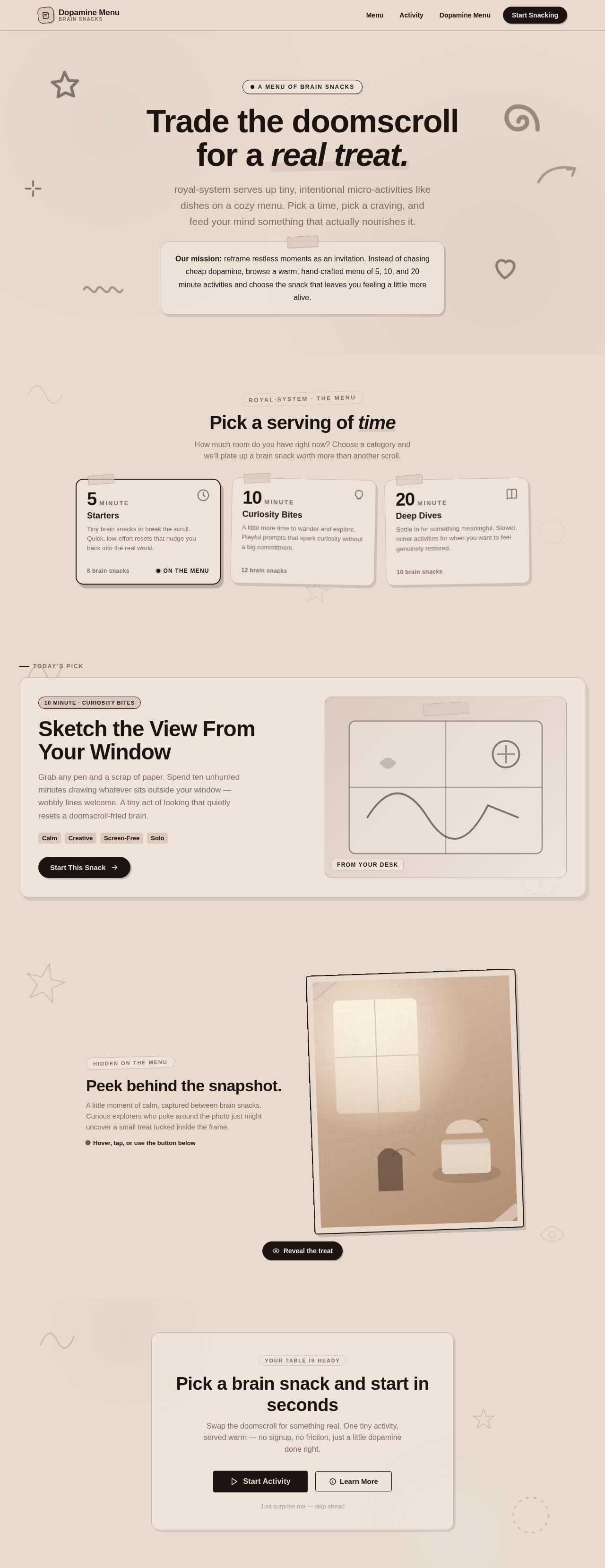
Trade the doomscroll for a real treat.
royal-system serves up tiny, intentional micro-activities like dishes on a cozy menu. Pick a time, pick a craving, and feed your mind something that actually nourishes it.
Sketch the View From Your Window
Grab any pen and a scrap of paper. Spend ten unhurried minutes drawing whatever sits outside your window — wobbly lines welcome. A tiny act of looking that quietly resets a doomscroll-fried brain.
Peek behind the snapshot.
A little moment of calm, captured between brain snacks. Curious explorers who poke around the photo just might uncover a small treat tucked inside the frame.
Hover, tap, or use the button belowPick a brain snack and start in seconds
Swap the doomscroll for something real. One tiny activity, served warm — no signup, no friction, just a little dopamine done right.
No comments yet. Be the first!