royal-system
 Mohd Arselan Khan
Build a single-page web app called "Dopamine Menu" — a playful wellness tool that reframes short, intentional micro-activities as a restaurant menu of "brain snacks." The core message: stop feeding your brain cheap dopamine (doomscrolling) and instead order a real, tangible 5/10/20-minute activity off the menu. Visual style Warm, hand-crafted "scrapbook journal" aesthetic — think a cozy zine page, not a typical SaaS UI. Background: warm cream/beige, #E8DACE Cards: slightly lighter dusty beige, #EFE4DC, with thin 1px black/dark-brown hairline borders (no heavy shadows — flat, paper-like) Tag chips / pills: dusty rose-beige, #DCC8BC, rounded corners, small uppercase or lowercase label text Text color: near-black warm brown, #1C1410 Headlines: bold, chunky, hand-drawn marker/brush font — use Google Font "Permanent Marker" (or "Kalam" Bold as fallback), always in caps for big titles like "DOPAMINE MENU" Taglines / subtext / instructions: casual cursive handwriting font — use Google Font "Caveat" (or "Gloria Hallelujah"), italicized, muted gray-brown color Decorative doodles: hand-drawn black sparkle/star icons (4-point and 8-point asterisk-style stars), and a loose hand-scribbled squiggle line accent — scattered near images, not symmetric, looks sketched not vector-perfect Photo framing: product/lifestyle photos get a thin black corner-bracket frame (4 small "L" brackets in the corners, like a viewfinder/Polaroid crop mark), NOT a full border Overall feel: warm, analog, a little whimsical, zero corporate gloss Layout & Screens 1. Top menu tabs (always visible) Three side-by-side tab cards representing time-based menu categories: "5 MINUTE" / Starters "10 MINUTE" / Curiosity Bites "20 MINUTE" / [longer activity category — pick a fitting third name, e.g. "Deep Dives"] Each tab shows a bold time label on top and a cursive italic subtitle underneath. The active/selected tab has a visible highlighted background + border; inactive tabs are muted/lower-contrast. Clicking a tab switches the active menu category. 2. Hero / landing card A large bordered card below the tabs, two columns: Left column: Giant headline: "DOPAMINE MENU" (Permanent Marker font, black, large) Cursive tagline directly under it: "Pick A Brain Snack" Lower in the card, a bold 2-line closer: "NO MORE / CHEAP DOPAMINE" A primary CTA button (e.g. "Start" / "Open the Menu") that switches the view to the Activity screen (screen 3) Right column: A square lifestyle photo (someone enjoying a simple real-world moment outdoors, e.g. eating ice cream) with the corner-bracket photo frame Two hand-drawn sparkle/star doodles overlapping the photo's left edge A scribble doodle near the bottom-right corner of the photo Easter egg interaction: on hover or click, the photo darkens/blurs and reveals overlay text: "SMASH THIS GLASS TO REVEAL" / "EMERGENCY RESET COMBO" with a white reveal button in the center. Clicking it triggers an instant 1-minute "panic reset" activity (a single ultra-quick grounding action shown in a small popup/toast) — a playful break-glass panic button for when someone really needs a dopamine hit right now. 3. Activity / Menu detail screen Replaces the hero when a menu category is opened. Two-column layout: Header (centered): "DOPAMINE MENU" (smaller) + cursive subtitle "A gentle nudge toward feeling good" Section label above the main card, cursive, muted: e.g. "5 Minutes Dopamine Appetizer" (text matches whichever tab/time-category is active) Main activity card (left, wide): Two small pill tags top-left: a mood/category tag (e.g. "Calmness," "Focus," "Reset") + a duration tag (e.g. "3 Min.") Bold marker-font activity title in caps, e.g. "ESCAPE THE ALGORITHM SPRINT" Italic handwritten-style instructions block: One setup line (e.g. "Put your phone on airplane mode.") A short intro line ("Now complete this mini-mission before the timer ends:") A bulleted list of 3–5 tiny, concrete, slightly absurd real-world micro-tasks (sensory/movement/creativity prompts — e.g. "Find 3 interesting shadows around you," "Touch something cold," "Invent a fake luxury perfume name") A closing reflective line tying it back to the dopamine-menu concept (e.g. "Your brain wanted novelty. You just gave it real novelty instead of scrolling.") Two buttons bottom-right of the card: "New Activity" (shuffle/dice icon, outlined secondary button — swaps in a different random activity card with new tags/title/instructions, no page reload) and "Done" (checkmark icon, outlined secondary button — marks it complete and increments the stats sidebar) Write at least 4–5 different activity card variants per time category so "New Activity" feels like a real shuffle (mix categories like Calmness, Reset, Focus, Curiosity, Movement) Stats sidebar (right, narrow): three stacked stat cards, each a big number above a small label: "0 Completed" "0 Streak" "0 Completed" (a second tracked stat — e.g. weekly total or category-specific count) These should live in app state and actually increment when "Done" is clicked (use localStorage or in-memory state — no backend needed) A subtle back/home control to return to the hero screen from here. Interactions / functionality summary Tab clicks switch the active time-category and its section label/copy "Start"/CTA on hero opens the Activity screen for the currently active tab "New Activity" cycles to a new random card (different tags, title, instructions) within the active category, client-side only "Done" increments the completed/streak counters and gives a small satisfying confirmation (a brief animation, color flash, or toast — keep it understated, not loud/gamey, in keeping with the "gentle nudge" tone) The hero photo's "smash glass" panel is a hidden delight feature, not part of the primary flow Fully responsive: stack the two-column layouts vertically on mobile, tabs scroll or wrap Tone of voice for any additional copy Warm, witty, slightly self-aware about phone addiction and dopamine culture — never preachy or clinical. Short punchy sentences. Lowercase/cursive for the "soft" emotional lines, bold caps marker font for the punchy declarative ones.


Comments (0)
Sign in to leave a comment
System Requirements
royal-system
Introduction
The "royal-system" project is designed to create an engaging single-page web application called "Dopamine Menu." This playful wellness tool reframes short, intentional micro-activities as a restaurant menu of "brain snacks," encouraging users to engage in real, tangible activities instead of indulging in cheap dopamine sources like doomscrolling.
System Overview
The "Dopamine Menu" is a web application that offers users a selection of time-based activities presented as menu categories. The application aims to provide a warm, hand-crafted "scrapbook journal" aesthetic, creating a cozy and whimsical user experience. The app is fully responsive and designed to work seamlessly across various devices.
Functional Requirements
- As a User, I should be able to view three time-based menu categories: "5 MINUTE" / Starters, "10 MINUTE" / Curiosity Bites, and "20 MINUTE" / Deep Dives.
- As a User, I should be able to switch between menu categories by clicking on the tabs.
- As a User, I should see a hero card with a headline, tagline, and a primary CTA button to start the activity.
- As a User, I should be able to view a lifestyle photo with interactive elements that reveal a hidden message on hover or click.
- As a User, I should be able to access the Activity screen by clicking the primary CTA button.
- As a User, I should see a detailed activity card with mood/category tags, a title, and instructions.
- As a User, I should be able to shuffle to a new random activity card within the active category by clicking "New Activity."
- As a User, I should be able to mark an activity as complete by clicking "Done," which increments the stats sidebar.
- As a User, I should see a stats sidebar with completed activities, streaks, and other tracked stats.
- As a User, I should be able to return to the hero screen from the Activity screen.
- As an Admin, I should be able to add and remove tasks/activities for users.
- As an Admin, I should have access to an admin panel to manage all aspects of the website.
User Personas
- Casual User: Interested in quick, engaging activities to break the monotony of daily life.
- Wellness Enthusiast: Actively seeking ways to improve mental health and reduce screen time.
- Curious Explorer: Enjoys discovering new activities and challenges.
- Admin: Responsible for managing the content and functionality of the application, including tasks and user interactions.
Core User Flows
- Explore Menu Categories: User clicks on a tab -> Menu category changes -> User views activities.
- Start an Activity: User clicks "Start" -> Activity screen opens -> User engages with activity.
- Shuffle Activities: User clicks "New Activity" -> New activity card appears -> User engages.
- Complete an Activity: User clicks "Done" -> Stats update -> User receives confirmation.
- Return to Hero Screen: User clicks back/home control -> Hero screen reappears.
- Admin Task Management: Admin logs into the admin panel -> Admin adds/removes tasks -> Changes are reflected in the user interface.
Visuals Colors and Theme
- primary: #E8DACE (warm cream/beige)
- primary_light: #EFE4DC (lighter dusty beige)
- secondary: #DCC8BC (dusty rose-beige)
- accent: #1C1410 (near-black warm brown)
- highlight: #1C1410 (same as accent for consistency)
- bg: #E8DACE (page background)
- surface: rgba(239, 228, 220, 0.8) (card/panel background)
- text: #1C1410 (primary text/heading color)
- text_muted: #7D6B64 (muted gray-brown for secondary text)
- border: rgba(28, 20, 16, 0.2) (subtle border color)
Signature Design Concept
The homepage of the "Dopamine Menu" will feature an interactive scrapbook journal aesthetic. Users will navigate through a virtual zine page where each section of the menu is represented as a hand-drawn card. The cards will flip and shuffle like a deck of playing cards when interacted with, using framer-motion for smooth animations. The background will have subtle, animated doodles that react to user movements, creating a dynamic and engaging experience. The photo frame interaction will use gsap for the hover effects, revealing hidden messages with a playful animation.
Interaction Model & Motion Direction
The landing page will employ a "parallax" interaction model, with layered depth achieved through scroll-triggered animations. Decorative elements will move at different speeds, creating a sense of depth and immersion. The internal pages will maintain a "static" model to ensure clarity and ease of use.
Non-Functional Requirements
- The application must be fully responsive and accessible on mobile devices.
- The design should maintain a consistent aesthetic across all devices and screen sizes.
- The application should load quickly and perform efficiently, with minimal latency.
Tech Stack
- Frontend: React for Web
- Backend: Not required for this project
- Database: Not required for this project
- AI Models: Not applicable
- AI Tools: Not applicable
- Local Orchestration: Docker
- Server-side Orchestration: Not applicable
Assumptions and Constraints
- The application will not require backend integration or persistent data storage.
- All interactions and state management will be handled client-side.
- The design will prioritize a warm, analog aesthetic over a corporate or SaaS look.
Glossary
- Dopamine Menu: The web application offering time-based wellness activities.
- Brain Snack: A short, intentional micro-activity designed to engage users.
- Hero Screen: The main landing page of the application.
- Activity Screen: The detailed view where users engage with selected activities.
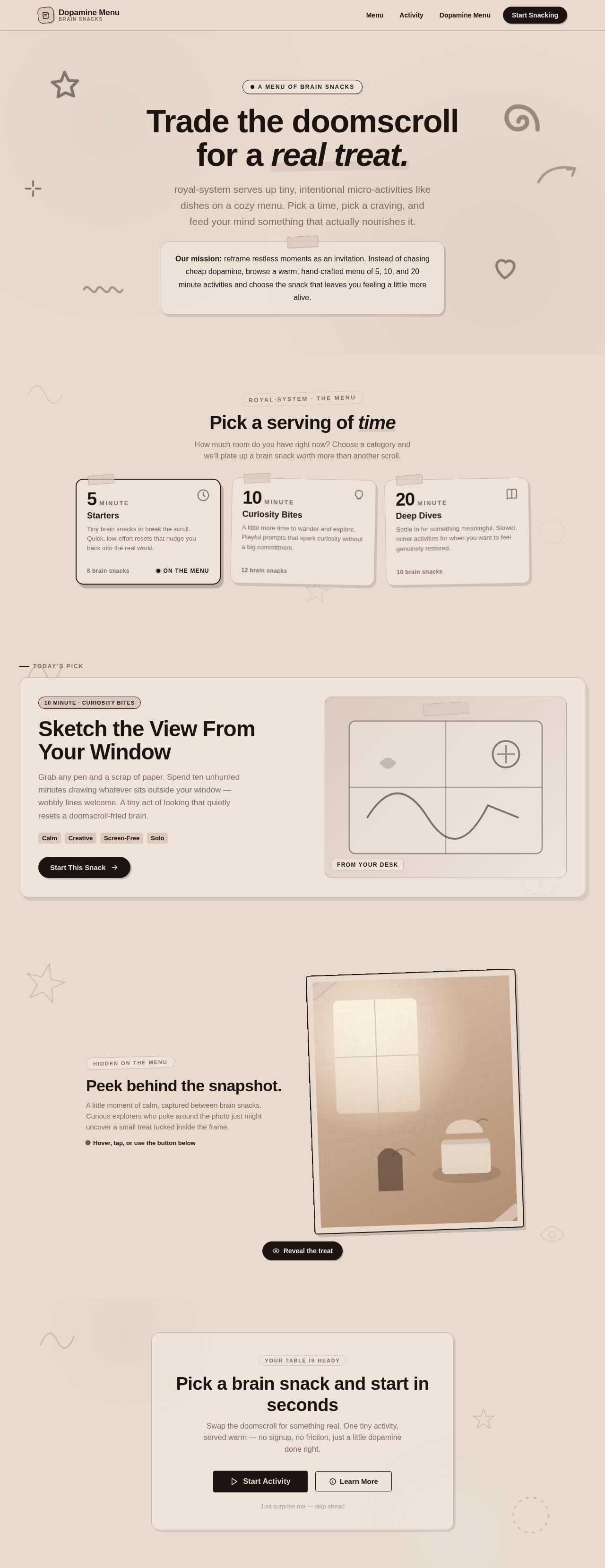
Trade the doomscroll for a real treat.
royal-system serves up tiny, intentional micro-activities like dishes on a cozy menu. Pick a time, pick a craving, and feed your mind something that actually nourishes it.
Sketch the View From Your Window
Grab any pen and a scrap of paper. Spend ten unhurried minutes drawing whatever sits outside your window — wobbly lines welcome. A tiny act of looking that quietly resets a doomscroll-fried brain.
Peek behind the snapshot.
A little moment of calm, captured between brain snacks. Curious explorers who poke around the photo just might uncover a small treat tucked inside the frame.
Hover, tap, or use the button belowPick a brain snack and start in seconds
Swap the doomscroll for something real. One tiny activity, served warm — no signup, no friction, just a little dopamine done right.
No comments yet. Be the first!