retro-pdf
 Kareena App
PRODUCT REQUIREMENTS DOCUMENT: DOCUSPHERE Version: 1.1 Date: 2026-04-21 Status: Draft (Revised) 1. EXECUTIVE SUMMARY DocuSphere is a high-performance, privacy-first PDF application designed to replace legacy tools by prioritizing: Speed: Near-instant rendering and interaction Privacy: Local-first processing with zero-knowledge defaults Usability: Seamless workflows across mobile, desktop, and web Unlike traditional PDF tools, DocuSphere minimizes reliance on cloud processing and eliminates multi-step workflows for common tasks (annotate, sign, convert). 2. PRODUCT STRATEGY 2.1 Core Differentiators Local-first architecture (default) Sub-second interaction model Cross-platform consistency (same rendering engine) Integrated workflows (no tool-switching) 2.2 Non-Goals (V1) Full PDF layout redesign tools (e.g., InDesign-level editing) Real-time multiplayer collaboration Advanced OCR pipelines (deferred to V2) 3. GOALS & SUCCESS METRICS Goals G1: 90% of common PDF actions completed within 2 seconds of file load G2: 100% of “View & Annotate” features available offline G3: Signature workflow completed in ≤ 10 seconds KPIs DAU/MAU ≥ 0.4 Crash-free sessions ≥ 99.5% Median time-to-first-interaction ≤ 800ms Free → Pro conversion ≥ 5% by Q3 Annotation usage rate ≥ 60% of active users 4. USER PERSONAS & KEY JOBS 4.1 Legal Professional (Olivia) Critical Jobs: Permanently redact sensitive data Apply standardized document markings (Bates, stamps) Non-negotiable requirement: Redaction must be irreversible at file level 4.2 Student (Alex) Critical Jobs: Annotate lecture slides without lag Read comfortably in dark environments Non-negotiable requirement: Smooth scrolling (no dropped frames) 4.3 Sales Representative (Mike) Critical Jobs: Fill forms and sign documents quickly Share mobile-friendly PDFs Non-negotiable requirement: Signature workflow must be frictionless (<10 sec) 5. FUNCTIONAL REQUIREMENTS MODULE A: CORE VIEWER & RENDERING FR-01: Rendering Performance 10MB PDF must render first page in ≤ 300ms Full document interactive in ≤ 1s Acceptance Criteria: Tested on mid-tier 5-year-old device No blocking UI thread FR-02: Text Reflow Re-wrap text for small screens without zoom Edge Cases: Multi-column layouts Tables (fallback: disable reflow) FR-03: Smart Dark Mode Invert text/background only Preserve images and charts FR-04: Navigation Table of Contents (bookmarks) Page scrubber with preview thumbnails MODULE B: ANNOTATION & MARKUP Free Tier Highlight, underline, strikethrough Freehand drawing (pressure-sensitive) Sticky notes Pro Tier Voice comments (attach to page coordinates) Stamp library (static + dynamic fields like date/user) Acceptance Criteria: Annotation latency < 50ms No frame drops during drawing MODULE C: EDITING & CREATION FR-05: Text Editing (Pro) Edit existing text inline Constraints: Preserve original font if available Fallback to closest system font Explicit Limitation: No support for complex layout reconstruction FR-06: Page Management Drag-and-drop reorder Delete, rotate, extract FR-07: Combine Files Inputs: PDF, JPG, PNG, blank pages Output: Single merged PDF FR-08: Header/Footer Add page numbers, date, custom text Batch apply across all pages MODULE D: CONVERSION (LOCAL-FIRST) User Control Toggle: Local vs Cloud processing Free HTML / Markdown → PDF Pro PDF → Word (.docx) PDF → Excel (.xlsx) with table detection PDF → Images (batch export) Acceptance Criteria: Local conversion must not exceed device memory limits Graceful fallback to cloud if enabled MODULE E: SECURITY & COMPLIANCE FR-09: Encryption AES-256 password protection FR-10: Redaction (Pro) Search + redact text patterns Critical Requirement: Remove underlying text objects from content stream Replace with black pixels (not overlays) Validation: Redacted text must not be recoverable via copy/search FR-11: e-Signature Draw, type, upload signature Snap-to-field alignment Flatten on export 6. NON-FUNCTIONAL REQUIREMENTS NFR-01: Performance Cold start ≤ 1.5s 500-page scroll ≥ 30 FPS Memory usage ≤ defined device thresholds NFR-02: Privacy Zero-knowledge by default No file upload unless explicitly enabled All processing local-first NFR-03: Platform Requirements Web (PWA) Offline support via Service Workers Max file size: 50MB Mobile Native rendering: iOS: PDFKit Android: PdfRenderer System file picker integration Desktop Batch processing support (≥100 files) Prefer Tauri over Electron (performance + size) 7. CRITICAL USER FLOW (P0) Sign & Send Document Open app Select file via system picker PDF loads (≤ 1s) Tap “Fill & Sign” Create signature (≤ 3s) Place signature (snap assist) Tap “Export” Share via system apps Success Metric: End-to-end completion ≤ 10 seconds 8. TECHNICAL ARCHITECTURE Rendering Engine: PDFium (cross-platform consistency) Optional Backend: AWS Lambda (OCR only) Local-first processing engine 9. PRICING & MONETIZATION Free Tier Limited exports (3/day) Watermarked outputs Basic annotations only Pro Tier $9.99/month or $69/year Unlimited exports Redaction, editing, voice comments No watermark 10. RISKS & MITIGATIONS Risk: Poor PDF → Word accuracy Mitigation: Set user expectation (“best effort conversion”) Offer preview before export Risk: Performance on low-end devices Mitigation: Progressive rendering Lazy loading pages Risk: Redaction liability Mitigation: Add “Verify Redaction” tool Provide warning before export 11. FUTURE ROADMAP (V2) AI summarization (local inference) Document Q&A (RAG + WebGPU) OCR pipeline for scanned PDFs What improved (and why it matters) Ambiguity removed: Engineers now know exactly what “fast” and “secure” mean Acceptance criteria added: Reduces back-and-forth during development Non-goals defined: Prevents scope creep Risk section added: Shows product maturity User flows quantified: Easier to test and optimize If you want, I can take this one step further and turn it into: a Jira-ready backlog (epics + tickets) or a system design / architecture diagram Those are usually the next bottlenecks after a PRD like this.

Comments (0)
Sign in to leave a comment
System Requirements
System Requirements Document (SRD)
Project Name: retro-pdf
1. Introduction
The retro-pdf project is a high-performance, privacy-first PDF application tailored to meet the needs of users in India (IN). It is designed to replace legacy PDF tools by prioritizing speed, usability, and privacy. The application will provide seamless workflows across mobile, desktop, and web platforms, with a retro-inspired aesthetic that appeals to users who value simplicity and nostalgia.
This document outlines the system requirements for the retro-pdf application, including functional and non-functional requirements, user personas, design concepts, and technical architecture.
2. System Overview
The retro-pdf application is a cross-platform PDF tool that emphasizes:
- Speed: Near-instant rendering and interaction for PDFs of all sizes.
- Privacy: Local-first processing with zero-knowledge defaults, ensuring user data remains secure.
- Usability: Intuitive workflows for common tasks such as annotation, signing, and conversion.
Unlike traditional PDF tools, retro-pdf minimizes reliance on cloud processing and eliminates multi-step workflows. The application will feature a retro-inspired design theme, evoking nostalgia while maintaining modern functionality.
3. Functional Requirements
Core Functional Requirements (as story points):
- As a User, I should be able to view and annotate PDFs offline.
- As a User, I should be able to sign documents and export them within 10 seconds.
- As a User, I should be able to convert PDFs to Word, Excel, and images locally.
- As a User, I should be able to redact sensitive information permanently.
- As a User, I should be able to reorder, delete, and combine PDF pages.
- As a User, I should be able to toggle between light and dark modes for comfortable reading.
- As a User, I should be able to add headers, footers, and page numbers to PDFs.
4. User Personas
4.1 Legal Professional (Olivia)
- Critical Jobs:
- Permanently redact sensitive data.
- Apply standardized document markings (e.g., stamps, Bates numbering).
- Non-Negotiable Requirement:
- Redaction must be irreversible at the file level.
4.2 Student (Alex)
- Critical Jobs:
- Annotate lecture slides without lag.
- Read comfortably in dark environments.
- Non-Negotiable Requirement:
- Smooth scrolling with no dropped frames.
4.3 Sales Representative (Mike)
- Critical Jobs:
- Fill forms and sign documents quickly.
- Share mobile-friendly PDFs.
- Non-Negotiable Requirement:
- Signature workflow must be frictionless and completed in under 10 seconds.
5. Visuals Colors and Theme
The retro-pdf application will feature a unique retro-inspired color palette that evokes nostalgia while maintaining readability and accessibility.
Color Palette:
- Background: #1E1E2E (Deep Midnight Blue)
- Surface: #2A2A3C (Muted Charcoal)
- Text: #F4F4F9 (Soft White)
- Accent: #FF6F61 (Retro Coral)
- Muted Tones: #A1A1B5 (Dusty Lavender)
6. Signature Design Concept
Retro Terminal Aesthetic with Interactive Animations
The retro-pdf homepage will feature a bold, unforgettable design inspired by vintage computer terminals. The landing page will simulate a retro command-line interface, where users can "type" commands to navigate the app.
Key Features:
- Dynamic Typing Animation: Text types itself on the screen, mimicking the feel of a classic terminal.
- Interactive Commands: Users can click on "commands" like
View PDF,Annotate, orSign Document, which trigger smooth transitions to the respective features. - Retro Animations: Subtle CRT screen effects, such as scanlines and a soft glow, enhance the nostalgic feel.
- Color Shifts: The background color subtly shifts between deep blues and purples, creating a calming yet engaging visual experience.
- Micro-Interactions: Buttons and icons "click" with satisfying retro sound effects, reinforcing the theme.
This design will make the retro-pdf application instantly fascinating and memorable, creating a unique identity in the PDF tools market.
7. Non-Functional Requirements
-
Performance:
- Cold start time ≤ 1.5 seconds.
- Smooth scrolling at ≥ 30 FPS for 500-page documents.
- Annotation latency < 50ms.
-
Privacy:
- Zero-knowledge by default.
- All processing is local-first unless explicitly enabled by the user.
-
Platform Requirements:
- Web (PWA): Offline support via Service Workers; max file size 50MB.
- Mobile: Native rendering using iOS PDFKit and Android PdfRenderer.
- Desktop: Batch processing support for ≥100 files; prefer Tauri over Electron for performance.
8. Tech Stack
Frontend:
- React for Web
- React Native for Mobile
Backend:
- Python
- FastAPI
Database:
- MySQL (with Alembic for migrations)
AI Models:
- GPT 5.4 for user-friendly responses.
- Claude 4.6 Opas for academic or coding work.
AI Tools:
- LangChain
- LiteLLM for LLM routing
Orchestration:
- Docker and Docker-Compose for local development.
- Kubernetes for server-side orchestration.
9. Assumptions and Constraints
- The application will prioritize local-first processing to ensure privacy and performance.
- Maximum file size for processing is 50MB on web platforms.
- The retro design aesthetic will not compromise accessibility standards.
- The application will support English as the primary language, with potential for localization in future versions.
10. Glossary
- Local-First Processing: All file operations are performed on the user's device by default, without uploading to a server.
- Zero-Knowledge: The system does not store or access user data unless explicitly enabled.
- Retro Aesthetic: A design style inspired by vintage computer interfaces, characterized by bold colors, pixelated fonts, and CRT-like effects.
- PWA: Progressive Web Application, a web app that can function offline and be installed like a native app.
This document provides a comprehensive foundation for the development of the retro-pdf application. Let me know if you'd like further refinements or additional details!
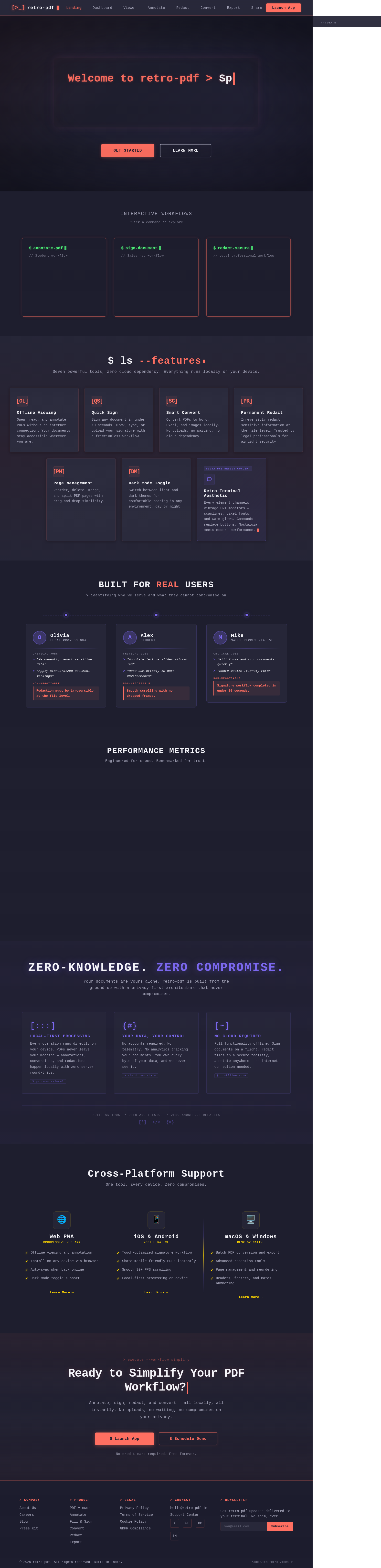
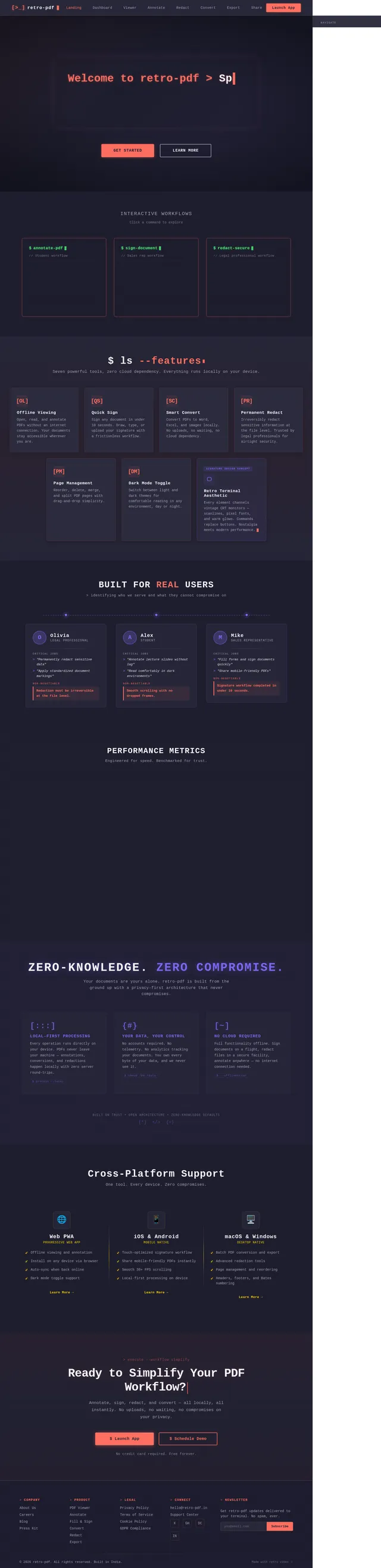
Interactive Workflows
Click a command to explore
$ ls --features
Seven powerful tools, zero cloud dependency. Everything runs locally on your device.
Built for Real Users
> identifying who we serve and what they cannot compromise on
Performance Metrics
Engineered for speed. Benchmarked for trust.
Near-instant PDF rendering on first launch, even for large documents
Butter-smooth annotation and reading with zero dropped frames
Real-time ink and highlight response for lag-free markup
Your documents never leave your device. Zero-knowledge by default
Zero-Knowledge. Zero Compromise.
Your documents are yours alone. retro-pdf is built from the ground up with a privacy-first architecture that never compromises.
Local-First Processing
Every operation runs directly on your device. PDFs never leave your machine — annotations, conversions, and redactions happen locally with zero server round-trips.
$ process --localYour Data, Your Control
No accounts required. No telemetry. No analytics tracking your documents. You own every byte of your data, and we never see it.
$ chmod 700 /dataNo Cloud Required
Full functionality offline. Sign documents on a flight, redact files in a secure facility, annotate anywhere — no internet connection needed.
$ --offline=trueCross-Platform Support
One tool. Every device. Zero compromises.
- ✓Offline viewing and annotation
- ✓Install on any device via browser
- ✓Auto-sync when back online
- ✓Dark mode toggle support
- ✓Touch-optimized signature workflow
- ✓Share mobile-friendly PDFs instantly
- ✓Smooth 30+ FPS scrolling
- ✓Local-first processing on device
- ✓Batch PDF conversion and export
- ✓Advanced redaction tools
- ✓Page management and reordering
- ✓Headers, footers, and Bates numbering
> execute --workflow simplify
Ready to Simplify Your PDF Workflow?
Annotate, sign, redact, and convert — all locally, all instantly. No uploads, no waiting, no compromises on your privacy.
No credit card required. Free forever.
No comments yet. Be the first!