resellscout
 mondeko mantas
Build the first working MVP of an app called ResellScout. IMPORTANT: Do not create fake marketplace data. Do not invent prices, products, sellers or URLs. Do not use placeholder/mock search results in the actual product flow. GOAL: The app answers: "I found this item for €X. Is it worth buying and reselling?" FIRST MVP FLOW: 1. User opens Home. 2. User clicks "Scan Product". 3. User can upload/take a product photo. 4. Send the image to a server-side Gemini multimodal API. 5. Gemini must identify: - brand - product name - exact model if visible - model number / SKU / GTIN if visible - all readable text - category - identification confidence 6. After identification, search the public web using Gemini Google Search grounding. 7. Find REAL product/listing pages. 8. Extract: - exact product title - price - currency - marketplace/store - condition - seller if available - direct product URL 9. Clearly distinguish: - EXACT MATCH - SIMILAR PRODUCT 10. Show the user the verified results. CRITICAL URL RULES: Never invent URLs. Never use: - marketplace homepage - marketplace category page - generic marketplace search page - generic Alibaba homepage - generic Amazon homepage - generic eBay homepage A result is valid only when its URL points to the actual product/listing page. If a direct product URL cannot be verified, display: "Direct product link unavailable" Do not create a URL yourself. PRICE RULES: Never invent prices. Every displayed price must have a source URL. If no verified price is found, display: "No verified price found" If the product cannot be confidently identified, display: "Not enough verified data to make a confident recommendation." SEARCH STRATEGY: Use the identified product name, brand, model number, SKU, GTIN and visible text. Search multiple variations, for example: "[brand] [exact product]" "[brand] [model]" "[model number]" "[SKU]" "[GTIN]" "[exact visible product text]" Prefer exact matches over similar products. The app must show the search source and direct URL for every verified result. TECHNICAL REQUIREMENTS: Use Next.js + TypeScript. Use a server-side API route for Gemini. The Gemini API key MUST NEVER be exposed to the browser. Use environment variable: GEMINI_API_KEY Use the official Google Gemini JavaScript SDK: @google/genai Use Gemini multimodal image input. Use Gemini Google Search grounding for current web results. Create a clean modular architecture so marketplace providers such as eBay can be added later. Create these initial files if needed: app/page.tsx app/api/analyze/route.ts lib/gemini.ts lib/types.ts lib/url-validation.ts .env.example UI: Modern premium mobile-first interface. Home: - ResellScout logo/name - large "Scan Product" button - short subtitle: "Check if an item is worth buying and reselling." Analysis screen: - uploaded product image - identified product - brand - model - confidence - verified market results - price - marketplace/source - condition - direct link - exact/similar badge Keep the UI simple for now. Do NOT build authentication, payments, subscriptions, history or settings yet. FIRST PRIORITY: Make the following real flow work end-to-end: PHOTO → GEMINI VISION → PRODUCT IDENTIFICATION → GOOGLE SEARCH GROUNDING → VERIFIED WEB RESULTS → DIRECT PRODUCT URL → PRICE After implementation, tell me exactly: 1. which files you created 2. which npm packages are required 3. which environment variables I need 4. how to run the app locally 5. what I need to do next Do not claim something works if it is not actually implemented.

Comments (0)
Sign in to leave a comment
Project Tasks
12 planning tasksGenerate system requirement document
Generate personas & user flows
Create flow for Reseller
Home
Home / Navigation
Home / Scan Entry
Home / Footer
Navigation
Footer
Analysis screen
Architecture
Workspace task plan
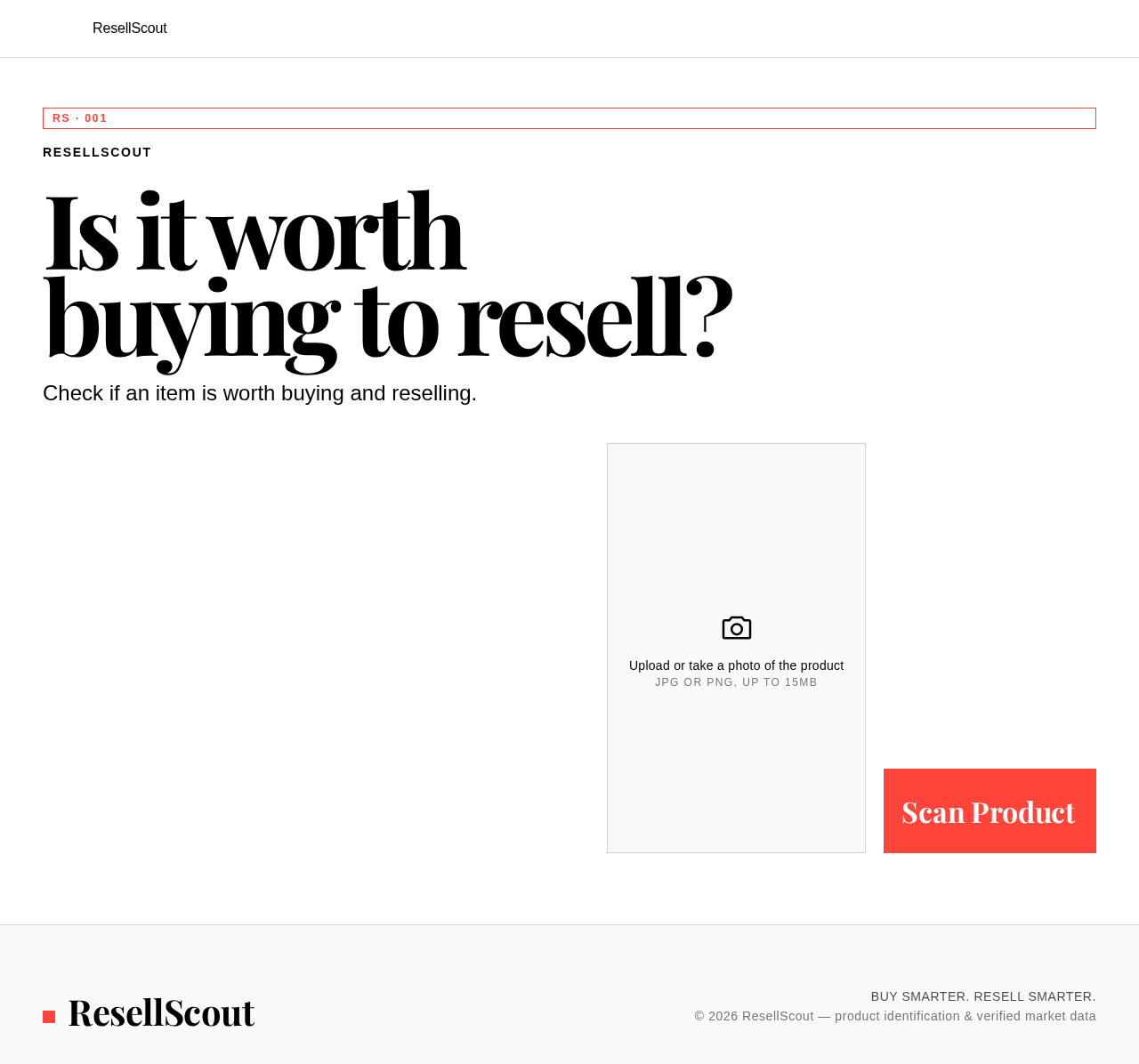
Is it worth
buying to resell?
Check if an item is worth buying and reselling.
Upload or take a photo of the product
JPG or PNG, up to 15MB
Is it worth
buying to resell?
Check if an item is worth buying and reselling.
Upload or take a photo of the product
JPG or PNG, up to 15MB
No comments yet. Be the first!