repurposeai
 SHARAN K
You are a senior full-stack engineer. Build a complete, production-ready web application called "RepurposeAI": a Social Media Content Repurposing platform using the MERN stack (MongoDB, Express.js, React, Node.js). Deliver working code for every file, end to end, with no placeholders or TODOs. ## 1. Product Goal Users paste or upload one long-form piece of content (blog post, article, YouTube transcript, podcast transcript, or raw text) and the app uses an LLM to repurpose it into platform-specific posts: Twitter/X thread, LinkedIn post, Instagram caption + hashtags, Facebook post, YouTube Shorts/Reels script, and an email newsletter blurb. ## 2. Tech Stack - Frontend: React 18 + Vite, React Router v6, Tailwind CSS, Axios, React Hot Toast, Context API (or Redux Toolkit) - Backend: Node.js + Express.js, running on PORT 8080 - Database: MongoDB with Mongoose - Auth: JWT (access token in httpOnly cookie) + bcrypt password hashing - AI: LLM API (Anthropic Claude or OpenAI), key stored in .env, called only from the backend - Validation: Joi or Zod. Security: helmet, cors, express-rate-limit, express-mongo-sanitize ## 3. Core Features 1. Auth: register, login, logout, get current user, protected routes 2. Content input: paste text, or upload .txt/.docx/.pdf (extract text server-side), or enter a blog/article URL (scrape main text) 3. Repurpose options: - Select target platforms (multi-select) - Tone: Professional, Casual, Witty, Inspirational, Educational - Audience, language, and length (short/medium/long) - Toggle for emojis and hashtags - CTA input (optional) 4. Generation: one structured LLM call per platform, returning JSON. Enforce platform rules (Twitter 280 chars per tweet, numbered thread; LinkedIn hook + line breaks; Instagram caption + 15-30 hashtags; etc.) 5. Results page: one card per platform with copy button, inline edit, regenerate (single platform), character counter, and download as .txt 6. Project library: save, rename, search, filter, and delete past projects; each project stores the original content and all generated outputs 7. Content calendar (basic): schedule a generated post to a date/time and view it in a monthly calendar view (no real posting, only scheduling data) 8. Dashboard: total projects, posts generated, most used platform (chart using Recharts) 9. Usage limits: free plan allows 10 generations/month, tracked per user 10. Dark/light mode, fully responsive UI, loading skeletons, error states ## 4. Database Models (Mongoose) - User: name, email (unique), password (hashed), plan, monthlyUsage, createdAt - Project: user (ref), title, sourceType (text|file|url), originalContent, settings {tone, audience, language, length, emojis, hashtags, cta}, createdAt - GeneratedPost: project (ref), user (ref), platform, content, version, isEdited, scheduledAt, status (draft|scheduled), createdAt ## 5. REST API (all under /api) - POST /auth/register, POST /auth/login, POST /auth/logout, GET /auth/me - POST /projects (create + generate), GET /projects, GET /projects/:id, PATCH /projects/:id, DELETE /projects/:id - POST /projects/:id/regenerate/:platform - PATCH /posts/:id (edit content), PATCH /posts/:id/schedule - POST /upload (file to text), POST /scrape (URL to text) - GET /dashboard/stats Use a central error-handling middleware, async handler wrapper, and consistent JSON responses { success, data, message }. ## 6. AI Prompt Engineering Create a services/aiService.js with a dedicated system prompt per platform. Require the model to return strict JSON, and parse it with a retry on malformed output. Include timeout handling and graceful fallback messages. ## 7. Frontend Pages Landing, Register, Login, Dashboard, New Project (content input + settings), Project Results, Projects Library, Content Calendar, Profile/Usage. Include a reusable Navbar, Sidebar, PlatformCard, Loader, and ProtectedRoute. ## 8. Folder Structure repurpose-ai/ client/ (src/components, pages, context, hooks, services, utils) server/ (config, controllers, models, routes, middleware, services, utils, server.js) README.md ## 9. Environment Variables Provide .env.example for both server (PORT=8080, MONGO_URI, JWT_SECRET, JWT_EXPIRES_IN, AI_API_KEY, CLIENT_URL) and client (VITE_API_URL=http://localhost:8080/api). ## 10. Deliverables (in this order) 1. Short architecture overview 2. Complete server code, file by file 3. Complete client code, file by file 4. package.json files with all dependencies 5. Step-by-step setup and run instructions (install, env, seed, run both apps) 6. Basic Postman/curl examples for key endpoints 7. Deployment notes (Render/Railway for backend, Vercel for frontend, MongoDB Atlas) ## Rules - Use clean, commented, modular code with async/await and proper error handling - Never expose the AI key to the frontend - Make the UI modern and polished (cards, gradients, smooth transitions) - Do not skip any file; if the output is too long, continue in the next message until the project is complete


Comments (0)
Sign in to leave a comment
System Requirements
System Requirements Document for repurposeai
1. Introduction
RepurposeAI is a Social Media Content Repurposing platform. A user supplies one long-form piece of content — a blog post, article, YouTube transcript, podcast transcript, or raw text — and the application uses a large language model (LLM) to repurpose it into platform-specific posts: a Twitter/X thread, a LinkedIn post, an Instagram caption with hashtags, a Facebook post, a YouTube Shorts/Reels script, and an email newsletter blurb.
The product is built for solo content marketers, social media managers, and founders who must produce output for six channels from a single long-form asset. Its core object is text being cut, stacked, and re-set for six different stages, and the interface treats that transformation as the visual subject rather than a neutral settings panel.
The application is delivered as a MERN-stack web application: a React 18 + Vite client, a Node.js + Express.js backend on PORT 8080, and MongoDB with Mongoose for persistence. Authentication uses JWT in an httpOnly cookie with bcrypt password hashing. The LLM API key lives in .env and is called only from the backend, never exposed to the frontend.
2. System Overview
RepurposeAI is a single-tenant-per-user productivity application with two active human roles — Content Creator and Content Planner — who share one application-owned identity and one private workspace of projects, generated posts, and scheduled posts.
Current delivery comprises:
- Public entry and identity surfaces. A Landing page explains the product before registration or login. Register creates an account with name, email, and bcrypt-hashed password. Login verifies returning users and issues an httpOnly-cookie JWT session. Logout clears the session and
GET /auth/mereturns the current user. - Protected workspace surfaces. Dashboard (totals, posts generated, most-used-platform Recharts chart), New Project (content input plus repurposing settings), Project Results (one card per platform with copy, inline edit, regenerate, character counter, and .txt download), Projects Library (rename, search, filter, delete), Content Calendar (schedule a generated post to a date/time and view a monthly calendar), and Profile/Usage (plan and monthly usage against the free-plan limit).
- Backend domain services. Auth, project creation with generation, single-platform regeneration, post editing and scheduling, file-to-text extraction, URL scraping, dashboard statistics, and per-user monthly usage enforcement.
- LLM generation. One structured LLM call per selected platform, returning strict JSON, with a dedicated system prompt per platform, retry on malformed output, timeout handling, and graceful fallback messages. The AI key is read from
.envon the server only. - Persistence. MongoDB via Mongoose with
User,Project, andGeneratedPostmodels.
Provisioned infrastructure for this project comprises a shared backend process for application APIs and domain modules, a database for application-owned persistent data, a React frontend, a LiteLLM gateway through which the backend makes model-provider calls, and a PostgreSQL instance supporting LiteLLM that is kept separate from application-owned storage. The shared backend is reused for all feature APIs; the LiteLLM gateway is the backend's route to the model provider and does not change any access decision or add product behavior.
Removed from scope
- Real posting to social platforms (the Content Calendar stores scheduling data only).
2a. Product Interpretation and Delivery Boundary
RepurposeAI is delivered as a first-party web application with application-owned identity. A visitor reaches the public Landing page and may register or log in. Registration is self-service: name, email, and password, with the password bcrypt-hashed before storage. Login verifies the returning user and issues a JWT stored in an httpOnly cookie. Every protected page and every protected API call requires that authenticated session; the client's ProtectedRoute component guards the protected pages and the backend rejects unauthenticated requests.
All product work — content input, generation, results review, library management, scheduling, dashboard, and usage — happens inside the authenticated workspace and is scoped to the signed-in user. There is no differentiated permission model: the two accepted personas share the same application-owned identity and the same private data boundary, and no role-based visibility or permission control is introduced.
The LLM is a backend-only dependency. The frontend never receives the AI key; the backend calls the model provider through the provisioned LiteLLM gateway using the key from .env. The Content Calendar is explicitly scheduling data only — no real posting to any social platform occurs now or as part of this delivery.
2c. Page Content and Component Coverage
Landing
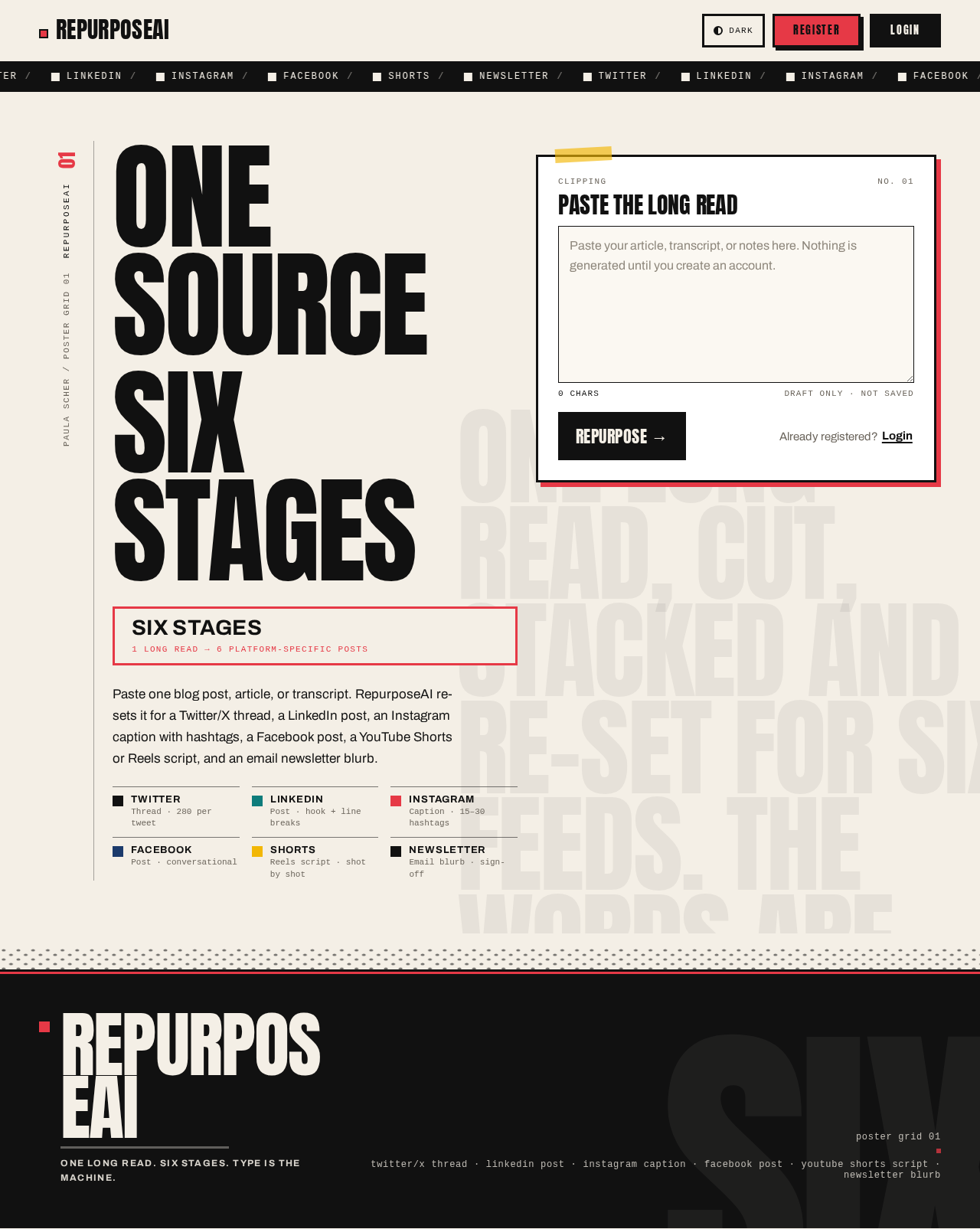
- Information/state. Public entry explaining the content repurposing product before registration or login. Presents the six target platforms (Twitter/X thread, LinkedIn post, Instagram caption + hashtags, Facebook post, YouTube Shorts/Reels script, email newsletter blurb) and the value proposition of turning one long-form source into six platform-specific posts. No authenticated data is shown.
- Primary actions. Navigate to Register; navigate to Login.
- Supporting actions. Read the platform list and product explanation.
- Domain entities. None persisted; presents the platform catalog and product concept.
- Component responsibilities. Navbar (public variant) with Register and Login entry points; hero composition; platform ticker; footer.
- States. Loading: not applicable (static content). Empty: not applicable. Success: page renders with Register and Login reachable. Error: if the session check fails, the page still renders as public. Recovery: user can proceed to Register or Login at any time.
Register
- Information/state. Self-service enrollment form collecting name, email, and password. Anonymous access; no session required to view.
- Primary actions. Submit registration, creating a user account with a bcrypt-hashed password and establishing the authenticated session.
- Supporting actions. Navigate to Login if already registered.
- Domain entities.
User(name, email unique, password hashed, plan, monthlyUsage, createdAt). - Component responsibilities. Form with field-level validation (Joi or Zod on the server, mirrored client-side); submit button with pending state; link to Login; toast feedback via React Hot Toast.
- States. Loading: submit button shows pending state. Empty: blank form. Success: account created, session established, redirect into the protected workspace. Error: duplicate email, invalid email format, weak/missing password, or server error shown inline and via toast; form retains entered values for correction. Recovery: user corrects fields and resubmits, or switches to Login.
Login
- Information/state. Returning-verification form collecting email and password. Anonymous access.
- Primary actions. Submit credentials, receiving an httpOnly-cookie JWT session.
- Supporting actions. Navigate to Register; after login, logout is available from the Navbar and
GET /auth/merestores the current user on reload. - Domain entities.
User. - Component responsibilities. Credential form; submit with pending state; link to Register; toast feedback; session bootstrap that calls
GET /auth/meto restore the current user. - States. Loading: submit pending; session-restore skeleton while
GET /auth/meresolves. Empty: blank form. Success: session cookie set, redirect to Dashboard. Error: invalid credentials or server error shown inline and via toast. Recovery: retry credentials or go to Register.
Dashboard
- Information/state. Protected. Shows total projects, posts generated, and most used platform as a Recharts chart, sourced from
GET /dashboard/statsfor the signed-in user. - Primary actions. Read totals and the most-used-platform chart; navigate to New Project.
- Supporting actions. Navigate to Projects Library, Content Calendar, and Profile/Usage via Sidebar.
- Domain entities. Aggregates over
ProjectandGeneratedPost. - Component responsibilities. Stat cards for total projects and posts generated; Recharts chart for most used platform; Sidebar; Navbar; Loader skeleton while stats load.
- States. Loading: skeleton placeholders for stat cards and chart. Empty: zero-state when the user has no projects or posts (totals show 0, chart shows an empty state). Success: totals and chart render. Error: error state with retry when
GET /dashboard/statsfails. Recovery: retry the request.
New Project
- Information/state. Protected. Collects source content and repurposing settings. Source content may be pasted text, an uploaded
.txt/.docx/.pdffile (text extracted server-side viaPOST /upload), or a blog/article URL (main text scraped viaPOST /scrape). Settings: multi-select target platforms (Twitter/X thread, LinkedIn post, Instagram caption + hashtags, Facebook post, YouTube Shorts/Reels script, email newsletter blurb); tone (Professional, Casual, Witty, Inspirational, Educational); audience; language; length (short/medium/long); emoji toggle; hashtag toggle; optional CTA. - Primary actions. Submit the project, which creates the project and triggers generation (
POST /projects), then navigates to Project Results. - Supporting actions. Switch between paste/upload/URL input modes; upload a file to extract text; scrape a URL to extract text; toggle emojis and hashtags; enter an optional CTA.
- Domain entities.
Project(user ref, title, sourceTypetext|file|url, originalContent, settings{tone, audience, language, length, emojis, hashtags, cta}, createdAt);GeneratedPostrecords created by generation. - Component responsibilities. Source-input panel with mode switch; file upload control; URL field with scrape action; platform multi-select; tone selector; audience, language, and length inputs; emoji and hashtag toggles; CTA field; submit button with pending state; Loader during extraction and generation; toast feedback.
- States. Loading: skeleton/spinner during upload extraction, scrape, and generation. Empty: no source content or platforms selected yet. Success: project created and generation completes, navigating to Project Results. Error: unsupported file type, extraction failure, scrape failure, validation failure, or generation failure shown inline and via toast. Recovery: correct the input or retry; the user remains on New Project with entered values preserved.
Project Results
- Information/state. Protected. Presents one card per platform for a project, each showing the generated content, a character counter, and edit state. Loads the project and its generated posts via
GET /projects/:id. - Primary actions. Copy a platform's content; inline-edit a post (
PATCH /posts/:id); regenerate a single platform (POST /projects/:id/regenerate/:platform); download a post as.txt. - Supporting actions. Read the character counter against the platform limit; navigate back to Projects Library or Content Calendar.
- Domain entities.
Project;GeneratedPost(platform, content, version, isEdited, scheduledAt, statusdraft|scheduled). - Component responsibilities.
PlatformCardper platform with copy button, inline edit control, regenerate control, character counter, and download-as-.txt action; Loader skeleton while results load; toast feedback on copy, save, regenerate, and download. - States. Loading: skeleton cards while the project loads. Empty: no generated posts for a platform (for example after a failed generation) shown as an empty card with a regenerate action. Success: cards render with content and counters. Error: load failure or regenerate failure shown inline and via toast. Recovery: retry load or regenerate the affected platform.
Projects Library
- Information/state. Protected. Lists the signed-in user's saved projects via
GET /projects, each storing the original content and all generated outputs. Supports search, filter, rename, and delete. - Primary actions. Open a project (navigate to Project Results); rename a project (
PATCH /projects/:id); delete a project (DELETE /projects/:id). - Supporting actions. Search projects; filter the list; navigate to New Project.
- Domain entities.
Project; associatedGeneratedPostrecords. - Component responsibilities. Project list/grid; search input; filter control; rename control; delete control with confirmation; Loader skeleton; toast feedback.
- States. Loading: skeleton list. Empty: zero-state when no projects exist, with a call to create one. Success: list renders and reflects rename/delete. Error: load, rename, or delete failure shown inline and via toast. Recovery: retry the action; deleted projects are removed from the list.
Content Calendar
- Information/state. Protected. Monthly calendar view of scheduled generated posts. Scheduling data only — no real posting to any social platform.
- Primary actions. Schedule a generated post to a date/time (
PATCH /posts/:id/schedule); view scheduled posts in the monthly calendar. - Supporting actions. Navigate between months; open a scheduled post's details.
- Domain entities.
GeneratedPostwithscheduledAtandstatus(draft|scheduled). - Component responsibilities. Monthly calendar grid; schedule control (date/time picker) on a post; event display per day; Loader skeleton; toast feedback.
- States. Loading: skeleton calendar. Empty: month with no scheduled posts. Success: scheduled posts appear on their dates and status becomes
scheduled. Error: schedule failure shown inline and via toast. Recovery: retry scheduling; the post remainsdraftuntil scheduling succeeds.
Profile/Usage
- Information/state. Protected. Shows the signed-in user's plan and monthly generation usage against the free-plan limit of 10 generations per month, tracked per user.
- Primary actions. Read plan and current monthly usage.
- Supporting actions. Navigate to Dashboard, New Project, or other workspace pages via Sidebar.
- Domain entities.
User(plan, monthlyUsage). - Component responsibilities. Plan display; usage display with the 10-per-month free-plan limit; Loader skeleton; error state.
- States. Loading: skeleton. Empty: not applicable (usage always has a value). Success: plan and usage render. Error: load failure with retry. Recovery: retry the request.
3. Functional Requirements
FR-1 — Registration. As a Content Creator or Content Planner, I should register with name, email, and password so that I can use the protected workspace. (explicit; required_inference for self-service enrollment)
- Trigger/input: name, email, password submitted on Register.
- Observable result: a
Useris created with a bcrypt-hashed password, unique email enforced, and an authenticated session is established. - Access state: anonymous entry; the session is established on success.
- Failure/recovery: duplicate email, invalid input, or server error is reported; the user corrects and resubmits.
- Continuation: redirected into the protected workspace.
FR-2 — Login. As a Content Creator or Content Planner, I should log in with email and password so that I can resume my workspace. (explicit; required_inference for returning verification)
- Trigger/input: email and password submitted on Login.
- Observable result: credentials verified and a JWT issued in an httpOnly cookie.
- Access state: anonymous entry; authenticated session on success.
- Failure/recovery: invalid credentials reported; retry or go to Register.
- Continuation: redirected to Dashboard.
FR-3 — Logout. As a Content Creator or Content Planner, I should log out so that my session ends. (explicit)
- Trigger/input: logout action from the Navbar.
- Observable result: session cookie cleared via
POST /auth/logout. - Access state: authenticated → anonymous.
- Failure/recovery: if the request fails, the user is informed and may retry.
- Continuation: returned to the public Landing/Login.
FR-4 — Current user. As a Content Creator or Content Planner, I should have the app fetch the current user so that my session is restored on reload. (explicit)
- Trigger/input: app load or navigation;
GET /auth/me. - Observable result: current user returned and session state restored.
- Access state: requires authenticated session; unauthenticated requests are rejected.
- Failure/recovery: unauthenticated or failed request routes the user to Login.
- Continuation: protected pages render for the authenticated user.
FR-5 — Protected routes. As a Content Creator or Content Planner, I should be kept out of protected pages until authenticated. (explicit)
- Trigger/input: navigation to a protected page.
- Observable result:
ProtectedRouteredirects unauthenticated users to Login; the backend rejects unauthenticated API calls. - Access state: protected pages require login.
- Failure/recovery: redirect to Login; after login the user continues.
- Continuation: access to the requested protected page.
FR-6 — Paste text input. As a Content Creator, I should paste long-form text as source content. (explicit)
- Trigger/input: pasted text on New Project.
- Observable result: text becomes the project's
originalContentwithsourceType: text. - Access state: authenticated.
- Failure/recovery: empty or invalid input is reported.
- Continuation: proceed to settings and generation.
FR-7 — File upload extraction. As a Content Creator, I should upload a .txt, .docx, or .pdf file and have its text extracted server-side. (explicit)
- Trigger/input: file upload via
POST /upload. - Observable result: extracted text returned and used as source content with
sourceType: file. - Access state: authenticated.
- Failure/recovery: unsupported type or extraction failure reported; user retries or switches input mode.
- Continuation: proceed to settings and generation.
FR-8 — URL scraping. As a Content Creator, I should enter a blog/article URL and have the main text scraped. (explicit)
- Trigger/input: URL submitted via
POST /scrape. - Observable result: main text returned and used as source content with
sourceType: url. - Access state: authenticated.
- Failure/recovery: scrape failure reported; user retries or switches input mode.
- Continuation: proceed to settings and generation.
FR-9 — Platform multi-select. As a Content Creator, I should select multiple target platforms: Twitter/X thread, LinkedIn post, Instagram caption + hashtags, Facebook post, YouTube Shorts/Reels script, and email newsletter blurb. (explicit)
- Trigger/input: multi-select on New Project.
- Observable result: selected platforms drive one generation per platform.
- Access state: authenticated.
- Failure/recovery: no platform selected is reported as validation error.
- Continuation: generation.
FR-10 — Repurposing settings. As a Content Creator, I should configure tone (Professional, Casual, Witty, Inspirational, Educational), audience, language, length (short/medium/long), emoji and hashtag toggles, and an optional CTA. (explicit)
- Trigger/input: settings controls on New Project.
- Observable result: settings stored on the
Projectundersettings {tone, audience, language, length, emojis, hashtags, cta}. - Access state: authenticated.
- Failure/recovery: invalid values reported.
- Continuation: generation.
FR-11 — Generation. As a Content Creator, I should submit the project and have the app generate one structured LLM call per selected platform returning JSON, enforcing platform rules (Twitter 280 chars per tweet with a numbered thread; LinkedIn hook + line breaks; Instagram caption + 15–30 hashtags; and the equivalent rules for the other platforms). (explicit)
- Trigger/input:
POST /projectswith source content, platforms, and settings. - Observable result: a
Projectis created and aGeneratedPostper platform is stored with content, version, and statusdraft. - Access state: authenticated; backend-only LLM call using the
.envkey. - Failure/recovery: malformed model output is retried; timeouts and failures produce graceful fallback messages; the user is informed and may regenerate.
- Continuation: navigate to Project Results.
FR-12 — Results cards. As a Content Creator, I should see one card per platform on Project Results. (explicit)
- Trigger/input: opening Project Results for a project.
- Observable result: one
PlatformCardper platform with content and character counter. - Access state: authenticated.
- Failure/recovery: load failure shows an error state with retry.
- Continuation: copy, edit, regenerate, or download.
FR-13 — Copy. As a Content Creator, I should copy a platform's content from its card. (explicit)
- Trigger/input: copy button on a
PlatformCard. - Observable result: content copied to clipboard; toast confirms.
- Access state: authenticated.
- Failure/recovery: clipboard failure reported.
- Continuation: continue reviewing other cards.
FR-14 — Inline edit. As a Content Creator, I should inline-edit a generated post. (explicit)
- Trigger/input: edit control on a
PlatformCard;PATCH /posts/:id. - Observable result: content updated and
isEditedset. - Access state: authenticated.
- Failure/recovery: save failure reported; edits retained for retry.
- Continuation: continue reviewing or download.
FR-15 — Regenerate single platform. As a Content Creator, I should regenerate one platform without regenerating the others. (explicit)
- Trigger/input: regenerate control on a
PlatformCard;POST /projects/:id/regenerate/:platform. - Observable result: that platform's
GeneratedPostis replaced with a new version. - Access state: authenticated; counts against monthly usage.
- Failure/recovery: failure or fallback message reported; user may retry.
- Continuation: review the regenerated card.
FR-16 — Character counter. As a Content Creator, I should see a character counter on each card so I can judge platform fit. (explicit)
- Trigger/input: card render and edits.
- Observable result: live character count displayed per platform.
- Access state: authenticated.
- Failure/recovery: not applicable beyond card load failure.
- Continuation: edit or regenerate as needed.
FR-17 — Download as .txt. As a Content Creator, I should download a post as a .txt file. (explicit)
- Trigger/input: download action on a
PlatformCard. - Observable result:
.txtfile containing the post content is downloaded. - Access state: authenticated.
- Failure/recovery: download failure reported.
- Continuation: continue reviewing.
FR-18 — Project library. As a Content Creator, I should have saved projects in a library, each storing the original content and all generated outputs. (explicit)
- Trigger/input:
GET /projects. - Observable result: list of the user's projects with their generated outputs.
- Access state: authenticated; scoped to the signed-in user.
- Failure/recovery: load failure shows an error state with retry.
- Continuation: open, rename, filter, search, or delete.
FR-19 — Rename. As a Content Creator, I should rename a saved project. (explicit)
- Trigger/input: rename control;
PATCH /projects/:id. - Observable result: project title updated.
- Access state: authenticated.
- Failure/recovery: failure reported; original title retained.
- Continuation: list reflects the new title.
FR-20 — Search. As a Content Creator, I should search past projects. (explicit)
- Trigger/input: search input on Projects Library.
- Observable result: list filtered to matching projects.
- Access state: authenticated.
- Failure/recovery: no matches shows an empty result state.
- Continuation: clear search to restore the list.
FR-21 — Filter. As a Content Creator, I should filter past projects. (explicit)
- Trigger/input: filter control on Projects Library.
- Observable result: list filtered by the chosen criterion.
- Access state: authenticated.
- Failure/recovery: no matches shows an empty result state.
- Continuation: adjust or clear the filter.
FR-22 — Delete. As a Content Creator, I should delete a past project. (explicit)
- Trigger/input: delete control with confirmation;
DELETE /projects/:id. - Observable result: project and its generated posts removed.
- Access state: authenticated.
- Failure/recovery: failure reported; project retained.
- Continuation: list updates.
FR-23 — Schedule a post. As a Content Planner, I should schedule a generated post to a date/time. (explicit)
- Trigger/input: schedule control with date/time;
PATCH /posts/:id/schedule. - Observable result:
scheduledAtset andstatusbecomesscheduled. - Access state: authenticated.
- Failure/recovery: invalid date/time or failure reported; post remains
draft. - Continuation: view it in the monthly calendar.
FR-24 — Monthly calendar view. As a Content Planner, I should view scheduled posts in a monthly calendar view. (explicit)
- Trigger/input: opening Content Calendar.
- Observable result: scheduled posts displayed on their dates in a monthly grid.
- Access state: authenticated.
- Failure/recovery: load failure shows an error state with retry.
- Continuation: navigate months or open a post.
FR-25 — Scheduling data only. As a Content Planner, I should rely on the calendar as scheduling data only, with no real posting to social platforms. (explicit constraint)
- Trigger/input: any scheduling action.
- Observable result: only scheduling data is stored; no outbound posting occurs.
- Access state: authenticated.
- Failure/recovery: not applicable.
- Continuation: calendar reflects stored scheduling data.
FR-26 — Dashboard statistics. As a Content Planner, I should see total projects, posts generated, and most used platform as a Recharts chart. (explicit)
- Trigger/input:
GET /dashboard/stats. - Observable result: totals and most-used-platform chart rendered.
- Access state: authenticated; scoped to the signed-in user.
- Failure/recovery: load failure shows an error state with retry.
- Continuation: navigate to other workspace pages.
FR-27 — Free-plan usage limit. As a Content Planner, I should have my generations tracked per user against a free-plan limit of 10 generations per month, enforced by the backend. (explicit; required_inference for enforcement mechanics)
- Trigger/input: each generation or regeneration request.
- Observable result:
monthlyUsageincremented per user; requests beyond 10 in the month are rejected with a clear message. - Access state: authenticated.
- Failure/recovery: limit reached is reported; the user may wait for the next month.
- Continuation: usage visible on Profile/Usage.
FR-28 — Profile/Usage. As a Content Planner, I should see my plan and monthly usage. (explicit)
- Trigger/input: opening Profile/Usage.
- Observable result: plan and current monthly usage against the 10-per-month free-plan limit displayed.
- Access state: authenticated.
- Failure/recovery: load failure shows an error state with retry.
- Continuation: return to workspace.
FR-29 — Dark/light mode. As a Content Creator or Content Planner, I should switch between dark and light mode. (explicit)
- Trigger/input: theme toggle.
- Observable result: theme applied across the UI and persisted for the session.
- Access state: available on public and protected surfaces.
- Failure/recovery: not applicable.
- Continuation: continue working in the chosen theme.
FR-30 — Responsive UI, skeletons, error states. As a Content Creator or Content Planner, I should have a fully responsive UI with loading skeletons and error states. (explicit)
- Trigger/input: any page load or data request.
- Observable result: layout adapts across viewports; skeletons show during loading; error states show on failure.
- Access state: all surfaces.
- Failure/recovery: error states offer retry where applicable.
- Continuation: normal use.
FR-31 — Backend-only AI key. As the system, the LLM API key must be stored in .env and called only from the backend, never exposed to the frontend. (explicit constraint)
- Trigger/input: any model call.
- Observable result: the key is read server-side only; no client bundle or response contains it.
- Access state: backend-only.
- Failure/recovery: missing key produces a graceful server-side error.
- Continuation: generation proceeds when configured.
FR-32 — Consistent API responses and error handling. As the system, all REST API routes under /api should return consistent JSON { success, data, message } through a central error-handling middleware and async handler wrapper. (explicit)
- Trigger/input: any API request.
- Observable result: uniform response envelope and centralized error handling.
- Access state: applies to public and protected routes.
- Failure/recovery: errors surface through the central handler with the same envelope.
- Continuation: clients handle responses uniformly.
4. User Personas
Content Creator
- Product context. Works from one long-form asset — a blog post, article, YouTube transcript, podcast transcript, or raw text — and needs it re-set for six channels. Thinks in posts and judges output by platform fit.
- Primary goal. Turn one source into platform-specific posts that respect each platform's rules, then refine and keep them.
- Distinct responsibilities. Pastes, uploads, or links source content; chooses target platforms; sets tone, audience, language, length, emoji/hashtag toggles, and an optional CTA; reviews generated posts; copies, inline-edits, regenerates single platforms, and downloads
.txtfiles; saves work as a project in the library and renames, searches, filters, and reuses past outputs. - Inputs and decisions. Source content and its input mode; platform selection; tone and length; whether to keep or regenerate a platform's output; whether to edit before copying or downloading.
- Interactions with other participants. Shares the same application-owned identity and private workspace with the Content Planner; projects and generated posts created here are the material the Content Planner schedules.
- Observable success. A project exists with one generated post per selected platform, each within its platform rules, editable, copyable, downloadable, and retrievable from the library.
Content Planner
- Product context. Owns publishing cadence. Works from generated posts and decides when each goes out, while watching overall output volume and channel mix.
- Primary goal. Place generated posts on a schedule and see the month at a glance, within the free-plan generation budget.
- Distinct responsibilities. Schedules generated posts to a date/time; reviews them in a monthly calendar view; monitors dashboard totals, posts generated, and most used platform; tracks monthly generation usage against the free-plan limit of 10 generations per month.
- Inputs and decisions. Which post to schedule and to what date/time; which month to review; whether remaining monthly generations allow more work.
- Interactions with other participants. Consumes the projects and generated posts the Content Creator produces; shares the same identity and workspace.
- Observable success. Scheduled posts appear on their dates in the monthly calendar with status
scheduled, dashboard totals and the most-used-platform chart reflect actual output, and usage is visible against the 10-per-month limit.
5. Core User Flows
Flow 1 — First-time registration and entry (Content Creator / Content Planner)
- Visitor opens the public Landing page and reads the product explanation and the six target platforms.
- Visitor selects Register and lands on Register.
- Visitor enters name, email, and password and submits.
- The backend validates input, enforces unique email, bcrypt-hashes the password, creates the
User, and establishes the httpOnly-cookie JWT session. - On success the visitor is redirected into the protected workspace (Dashboard). On failure (duplicate email, invalid input), inline and toast errors appear and the entered values are retained for correction.
Flow 2 — Returning login and session restore (Content Creator / Content Planner)
- Returning user opens Login and enters email and password.
- The backend verifies credentials and issues the httpOnly-cookie JWT.
- The user is redirected to Dashboard. On reload, the client calls
GET /auth/meto restore the current user; if unauthenticated,ProtectedRouteredirects to Login. - The user may log out from the Navbar at any time, clearing the session via
POST /auth/logoutand returning to the public surface.
Flow 3 — Create a project and generate posts (Content Creator)
- Authenticated Content Creator opens New Project.
- The Creator supplies source content by one of three modes: pasting text; uploading a
.txt/.docx/.pdffile, which the backend extracts to text viaPOST /upload; or entering a blog/article URL, which the backend scrapes for main text viaPOST /scrape. Extraction and scrape show loading states; failures are reported and the Creator retries or switches mode. - The Creator multi-selects target platforms (Twitter/X thread, LinkedIn post, Instagram caption + hashtags, Facebook post, YouTube Shorts/Reels script, email newsletter blurb).
- The Creator sets tone (Professional, Casual, Witty, Inspirational, Educational), audience, language, length (short/medium/long), emoji and hashtag toggles, and an optional CTA.
- The Creator submits. The backend checks the per-user monthly generation allowance against the free-plan limit of 10 generations per month; if exhausted, the request is rejected with a clear message and the Creator is directed to Profile/Usage.
- The backend creates the
Projectand makes one structured LLM call per selected platform through the backend-only key, requiring strict JSON, retrying on malformed output, and applying timeout handling and graceful fallback messages. Platform rules are enforced (Twitter 280 chars per tweet with a numbered thread; LinkedIn hook + line breaks; Instagram caption + 15–30 hashtags; and the equivalent rules for the other platforms). - Each platform's result is stored as a
GeneratedPostwith content, version, and statusdraft;monthlyUsageis incremented. - The Creator is taken to Project Results, where one card per platform appears. If a platform's generation failed, its card shows an empty state with a regenerate action.
Flow 4 — Review, edit, copy, regenerate, and download (Content Creator)
- On Project Results, the Creator reads each
PlatformCardand its character counter. - The Creator copies a platform's content with the copy button; a toast confirms.
- The Creator inline-edits a post;
PATCH /posts/:idsaves the content and setsisEdited. Save failures are reported and edits are retained for retry. - The Creator regenerates a single platform via
POST /projects/:id/regenerate/:platform; only that platform's post is replaced with a new version, and the regeneration counts against monthly usage. Failure or fallback messages are shown and the Creator may retry. - The Creator downloads a post as
.txt. - The Creator continues to other cards or leaves for the library or calendar.
Flow 5 — Manage the project library (Content Creator)
- The Creator opens Projects Library, which lists saved projects via
GET /projects, each storing the original content and all generated outputs. - The Creator searches and filters the list; no matches shows an empty result state.
- The Creator renames a project via
PATCH /projects/:id; the list reflects the new title. - The Creator deletes a project via
DELETE /projects/:idafter confirmation; the project and its generated posts are removed. - The Creator opens a project to return to Project Results.
Flow 6 — Schedule a post and review the month (Content Planner)
- The Content Planner opens Content Calendar.
- The Planner selects a generated post and sets a date/time via
PATCH /posts/:id/schedule. - The backend stores
scheduledAtand setsstatustoscheduled. Invalid date/time or failure is reported and the post remainsdraft. - The Planner views the monthly calendar grid with scheduled posts on their dates, navigating between months as needed.
- No real posting occurs; the calendar is scheduling data only.
Flow 7 — Monitor output and usage (Content Planner)
- The Content Planner opens Dashboard, which loads
GET /dashboard/stats. - The Planner reads total projects, posts generated, and the most-used-platform Recharts chart. With no data, totals show zero and the chart shows an empty state; load failure shows an error state with retry.
- The Planner opens Profile/Usage to read the plan and current monthly usage against the free-plan limit of 10 generations per month.
- The Planner returns to the workspace to schedule or review further work.
6. Visuals Colors and Theme
The visual system follows the Paula Scher poster-grid direction: typography as the repurposing machine — one long read explodes into six loud platforms. The surface reads as a printed poster wall, not a SaaS dashboard.
Palette (light mode)
| Role | Hex |
|---|---|
| Background (warm paper) | #F4EFE6 |
| Surface | #FFFFFF |
| Text / primary (ink) | #111111 |
| Accent (Scher red) | #E63946 |
| Muted | #6B655C |
| Mustard (YouTube chip) | #F2B705 |
| Teal (LinkedIn chip) | #0E7C7B |
| Cobalt (Facebook chip) | #1B3A6B |
Proportion: ~70% paper, 20% ink type, 10% flat colour blocks. Scher red is the hot accent used for one hero band, active nav, character-counter overruns, and the Twitter platform chip. Secondary flat blocks appear only as platform-coded colour chips (LinkedIn teal, Facebook cobalt, Instagram red, YouTube mustard, email black, Twitter ink).
Palette (dark mode). Ground flips to ink #111111, text to paper #F4EFE6, with the same red accent #E63946.
Typography
- Headings: Anton, all-caps, flush-left ragged-right, tracking
-0.02em, stacked into 2–4 lines spanning the viewport edge-to-edge. Occasional single words rotated 90° in the margin, or a word pulled out at 2× the block size in the accent colour. - Body: Archivo (400/500/700) at a generous measure.
- Monospace voice: IBM Plex Mono for character counts, tweet numbering, and API/JSON-flavoured metadata.
- Scale (1.333 modular): display
clamp(56px, 12vw, 168px)for hero; h1clamp(40px, 7vw, 96px); h2clamp(28px, 4.5vw, 56px); h324px; body17/28; small-caps label12pxtracked+0.12em. Line-height0.92on display,1.65on body.
Shape language. Hard edges only — zero border-radius on cards, buttons, and inputs. Thick 3px ink rules separate sections; diagonal colour bands (clip-path polygon) slice across the page at 4–6° between major sections. Poster-grid cards with a 1px ink hairline and a 6px offset flat shadow in the platform's colour. Buttons are solid ink rectangles with all-caps Anton labels; the primary CTA is a red block with an ink 3px border. Platform chips are small square colour swatches, never pills.
Layout. A visible 12-column poster grid with a persistent left rail (72px) carrying a vertical rotated wordmark "REPURPOSE" and section numbers 01–06. Dashboard and results pages use dense asymmetric poster grids — one platform card can span 2 columns and 2 rows (the "lead" post) while the rest stack; the calendar is a strict 7-column table with ink rules and colour-coded event blocks. Empty states are giant outlined numerals ("00 projects").
Imagery. Typography is the imagery: no photography, no illustration, no 3D. Generative content is the source text itself — snippets of the pasted article set in Anton at 120px, cropped and bled off the edge as a background texture at 6% ink opacity. A halftone dot pattern (SVG) serves as an occasional section divider. Platform cards carry a large condensed initial ("T", "L", "I", "F", "Y", "E") in the platform's flat colour.
Readability rule. Headlines, wordmarks, labels, numbers, card text, and controls stay entirely inside the viewport and their container at 375px, 768px, and 1280px, wrapping or scaling to fit; decoration may bleed, but never covers readable text or controls.
7. Signature Design Concept
The public entry is a full-bleed typographic composition on the warm paper ground — no gradient, no centred stack.
- Left 7 columns. The headline "ONE SOURCE" set in Anton at
clamp(56px, 12vw, 168px), flush-left, running past the right column edge so the final "E" is clipped by the viewport — carried by decoration only, while the readable text stays whole by wrapping at 375px. Directly beneath, a red 3px-bordered band with the subline "SIX STAGES" in Archivo 700 at 28px. - Right 5 columns. A white "clipping" card with a 3px ink border and a 6px red offset shadow, containing a real textarea labelled "Paste the long read" and a solid ink "REPURPOSE →" button. The card reads like a pasted clipping.
- Far-left rail. A rotated vertical label "PAULA SCHER / POSTER GRID 01" runs along the rail.
- Above the headline. A thin ticker strip in ink with paper text lists the six platforms.
Nothing is centred; the composition is asymmetric and poster-like. The textarea and button are the accepted entry controls — they lead to Register/Login, not to an unauthenticated generation.
8. Interaction Model & Motion Direction
Interaction Model: Animated Motion Tempo: expressive Hero Dimensionality: flat
Landing Hero Motion Brief
- Focal subject. The stacked Anton headline "ONE SOURCE" over the red-bordered "SIX STAGES" band, with the white clipping card holding the "Paste the long read" textarea and "REPURPOSE →" button.
- Input → transformation → outcome thesis. The visitor's attention lands on the stacked headline; each line slides up 24px with a 60ms stagger (
cubic-bezier(0.2, 0.7, 0.2, 1), 420ms) as the page settles; the clipping card and its controls resolve into place; the outcome is a composed poster with Register and Login reachable. - Motion vocabulary. Staggered word reveals; a slow type marquee ticker across the top listing "TWITTER · LINKEDIN · INSTAGRAM · FACEBOOK · SHORTS · NEWSLETTER" that pauses on hover; colour-block wipes (a red panel scales left to right, 300ms) when switching tabs or submitting generation; platform chips flipping to their accent colour on hover. Expressive but never bouncy — no bounce or spring easing.
- Composed first frame. Paper ground; ink ticker strip at top; "ONE SOURCE" flush-left at display scale; red-bordered "SIX STAGES" band beneath; white clipping card offset by a red flat shadow on the right; rotated rail label at far left.
- Reduced-motion state. All reveals become instant; the marquee becomes a static wrapped row so every platform name is fully readable; colour-block wipes resolve immediately.
9. Non-Functional Requirements
- Security — AI key isolation. The LLM API key is stored in
.envand called only from the backend; it is never exposed to the frontend. (explicit) - Security — authentication. JWT access token in an httpOnly cookie; bcrypt password hashing. (explicit)
- Security — middleware. helmet, cors, express-rate-limit, and express-mongo-sanitize applied on the backend. (explicit)
- Validation. Joi or Zod for request validation. (explicit)
- API consistency. All REST API routes under
/api; central error-handling middleware; async handler wrapper; consistent JSON responses{ success, data, message }. (explicit) - AI robustness. Strict JSON from the model, parsed with a retry on malformed output; timeout handling; graceful fallback messages. (explicit)
- Usage enforcement. Free plan allows 10 generations per month, tracked per user and enforced server-side. (explicit; required_inference for enforcement mechanics)
- Responsiveness and states. Fully responsive UI with loading skeletons and error states. (explicit)
- Theme. Dark/light mode. (explicit)
- Code quality. Clean, commented, modular code with async/await and proper error handling; working code for every file end to end with no placeholders or TODOs. (explicit)
- UI polish. Modern and polished UI with cards, gradients, and smooth transitions. (explicit)
- Accessibility of readable content. Readable text and controls remain whole and inside the viewport at 375px, 768px, and 1280px; reduced-motion users get a usable static arrangement. (explicit design constraint)
10. Tech Stack
- Frontend. React 18 + Vite, React Router v6, Tailwind CSS, Axios, React Hot Toast, Context API (or Redux Toolkit), Recharts for the dashboard chart. Client environment:
VITE_API_URL=http://localhost:8080/api. - Backend. Node.js + Express.js on PORT 8080. Server environment:
PORT=8080,MONGO_URI,JWT_SECRET,JWT_EXPIRES_IN,AI_API_KEY,CLIENT_URL. - Database. MongoDB with Mongoose (
User,Project,GeneratedPost). - Auth. JWT in an httpOnly cookie; bcrypt password hashing.
- AI. LLM API (Anthropic Claude or OpenAI) with the key in
.env, called only from the backend viaservices/aiService.jswith a dedicated system prompt per platform. - Validation and security. Joi or Zod; helmet, cors, express-rate-limit, express-mongo-sanitize.
- Provisioned infrastructure. A shared backend process for application APIs and domain modules; a database for application-owned persistent data; a React frontend; a LiteLLM gateway for the backend's model-provider calls; a PostgreSQL instance supporting LiteLLM, kept separate from application-owned storage.
- Folder structure.
repurpose-ai/withclient/(src/components,pages,context,hooks,services,utils),server/(config,controllers,models,routes,middleware,services,utils,server.js), andREADME.md. - Deployment. Render/Railway for the backend, Vercel for the frontend, MongoDB Atlas for the database.
11. Assumptions and Constraints
- Assumption. The two accepted personas share one application-owned identity and one private workspace; no role-based permissions or differentiated visibility are introduced. (required_inference)
- Assumption. The free plan is the only plan in scope;
planandmonthlyUsageare stored onUserand enforced server-side. (explicit) - Assumption. The Content Calendar stores scheduling data only; no outbound posting integration exists. (explicit)
- Assumption. The LLM provider is Anthropic Claude or OpenAI, selected by configuration; the backend reaches it through the provisioned LiteLLM gateway using the
.envkey. (explicit; infrastructure) - Constraint. MERN stack: MongoDB, Express.js, React 18 + Vite, Node.js. (explicit)
- Constraint. Backend runs on PORT 8080. (explicit)
- Constraint. All REST API routes are under
/api. (explicit) - Constraint. The AI key is never exposed to the frontend. (explicit)
- Constraint. Free plan allows 10 generations per month, tracked per user. (explicit)
- Constraint. Working code for every file end to end, with no placeholders or TODOs. (explicit)
- Constraint. Clean, commented, modular code with async/await and proper error handling. (explicit)
- Constraint. UI must be modern and polished with cards, gradients, and smooth transitions. (explicit)
- Constraint. The generic indigo/blue-on-white SaaS template is forbidden; the palette is paper, ink, and Scher red. (explicit design constraint)
12. Glossary
- Repurpose. Transform one long-form source into platform-specific posts.
- Platform. One of the six targets: Twitter/X thread, LinkedIn post, Instagram caption + hashtags, Facebook post, YouTube Shorts/Reels script, email newsletter blurb.
- Project. A saved repurposing job storing the original content, settings, and all generated outputs.
- GeneratedPost. A single platform's generated content for a project, with version, edit state, schedule, and status (
draft|scheduled). - Generation. One structured LLM call for one platform; counted against monthly usage.
- Monthly usage. Per-user count of generations in the current month, limited to 10 on the free plan.
- Scheduling data. Date/time and status stored for a generated post; no real posting occurs.
- LiteLLM gateway. The provisioned service through which the backend makes model-provider calls.
- httpOnly cookie. The cookie carrying the JWT access token, inaccessible to client-side scripts.
Start repurposing
One SourceSix Stages
Paste one blog post, article, or transcript. RepurposeAI re-sets it for a Twitter/X thread, a LinkedIn post, an Instagram caption with hashtags, a Facebook post, a YouTube Shorts or Reels script, and an email newsletter blurb.
- TwitterThread · 280 per tweet
- LinkedInPost · hook + line breaks
- InstagramCaption · 15–30 hashtags
- FacebookPost · conversational
- ShortsReels script · shot by shot
- NewsletterEmail blurb · sign-off
Start repurposing
One SourceSix Stages
Paste one blog post, article, or transcript. RepurposeAI re-sets it for a Twitter/X thread, a LinkedIn post, an Instagram caption with hashtags, a Facebook post, a YouTube Shorts or Reels script, and an email newsletter blurb.
- TwitterThread · 280 per tweet
- LinkedInPost · hook + line breaks
- InstagramCaption · 15–30 hashtags
- FacebookPost · conversational
- ShortsReels script · shot by shot
- NewsletterEmail blurb · sign-off
No comments yet. Be the first!