regal-https
 Umar FF 12
https://cr-remover.in/ Mujy asi website bana kar do without changing

Comments (0)
Sign in to leave a comment
Project Tasks
28 tasksGenerate system requirement document
Generate personas & user flows
Create flow for Visitor
Landing
Repair Landing JSX
Repair Landing JSX
Landing / Header
Landing / Hero
Landing / Background Tool
Landing / Result Download
Landing / How It Works
Landing / Features
Landing / Disclaimer Notice
Landing / Footer
Design remaining pages
Architecture
Create backend_modules diagram
Create frontend_modules diagram
Create sequence diagram
Create service_network diagram
Workspace task plan
Show and download the transparent result in the visitor session
Let visitors preview and download the processed image
Process the uploaded image and reveal the transparent result
Keep the result and download available through the session
Report processing status and handle download problems
Save the downloaded output image
Connect the Landing page to live processing and download
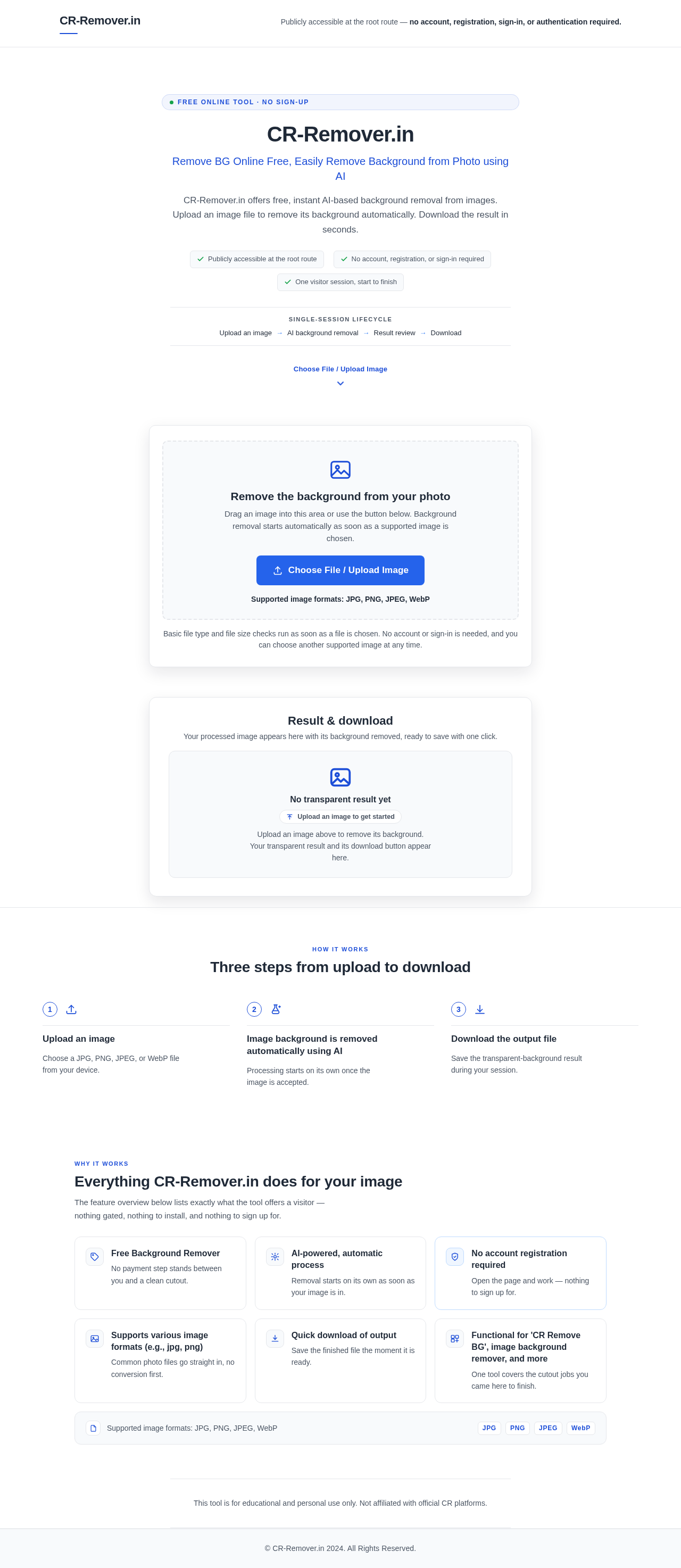
Publicly accessible at the root route — no account, registration, sign-in, or authentication required.
Free online tool · No sign-up
CR-Remover.in
Remove BG Online Free, Easily Remove Background from Photo using AI
CR-Remover.in offers free, instant AI-based background removal from images. Upload an image file to remove its background automatically. Download the result in seconds.
- Publicly accessible at the root route
- No account, registration, or sign-in required
- One visitor session, start to finish
Single-session lifecycle
- Upload an image
- AI background removal
- Result review
- Download
Upload an image to remove its background
Remove the background from your photo
Drag an image into this area or use the button below. Background removal starts automatically as soon as a supported image is chosen.
Supported image formats: JPG, PNG, JPEG, WebP
Basic file type and file size checks run as soon as a file is chosen. No account or sign-in is needed, and you can choose another supported image at any time.
Removing the background
Your image is being processed. The background is being removed automatically using AI.
Pick another supported image to try again — no account required.
Result & download
Your processed image appears here with its background removed, ready to save with one click.
No transparent result yet
Upload an image to get startedUpload an image above to remove its background. Your transparent result and its download button appear here.
Three steps from upload to download
Upload an image
Choose a JPG, PNG, JPEG, or WebP file from your device.
Image background is removed automatically using AI
Processing starts on its own once the image is accepted.
Download the output file
Save the transparent-background result during your session.
Everything CR-Remover.in does for your image
The feature overview below lists exactly what the tool offers a visitor — nothing gated, nothing to install, and nothing to sign up for.
Free Background Remover
No payment step stands between you and a clean cutout.
AI-powered, automatic process
Removal starts on its own as soon as your image is in.
No account registration required
Open the page and work — nothing to sign up for.
Supports various image formats (e.g., jpg, png)
Common photo files go straight in, no conversion first.
Quick download of output
Save the finished file the moment it is ready.
Functional for 'CR Remove BG', image background remover, and more
One tool covers the cutout jobs you came here to finish.
Supported image formats: JPG, PNG, JPEG, WebP
This tool is for educational and personal use only. Not affiliated with official CR platforms.
Publicly accessible at the root route — no account, registration, sign-in, or authentication required.
Free online tool · No sign-up
CR-Remover.in
Remove BG Online Free, Easily Remove Background from Photo using AI
CR-Remover.in offers free, instant AI-based background removal from images. Upload an image file to remove its background automatically. Download the result in seconds.
- Publicly accessible at the root route
- No account, registration, or sign-in required
- One visitor session, start to finish
Single-session lifecycle
- Upload an image
- AI background removal
- Result review
- Download
Upload an image to remove its background
Remove the background from your photo
Drag an image into this area or use the button below. Background removal starts automatically as soon as a supported image is chosen.
Supported image formats: JPG, PNG, JPEG, WebP
Basic file type and file size checks run as soon as a file is chosen. No account or sign-in is needed, and you can choose another supported image at any time.
Removing the background
Your image is being processed. The background is being removed automatically using AI.
Pick another supported image to try again — no account required.
Result & download
Your processed image appears here with its background removed, ready to save with one click.
No transparent result yet
Upload an image to get startedUpload an image above to remove its background. Your transparent result and its download button appear here.
Three steps from upload to download
Upload an image
Choose a JPG, PNG, JPEG, or WebP file from your device.
Image background is removed automatically using AI
Processing starts on its own once the image is accepted.
Download the output file
Save the transparent-background result during your session.
Everything CR-Remover.in does for your image
The feature overview below lists exactly what the tool offers a visitor — nothing gated, nothing to install, and nothing to sign up for.
Free Background Remover
No payment step stands between you and a clean cutout.
AI-powered, automatic process
Removal starts on its own as soon as your image is in.
No account registration required
Open the page and work — nothing to sign up for.
Supports various image formats (e.g., jpg, png)
Common photo files go straight in, no conversion first.
Quick download of output
Save the finished file the moment it is ready.
Functional for 'CR Remove BG', image background remover, and more
One tool covers the cutout jobs you came here to finish.
Supported image formats: JPG, PNG, JPEG, WebP
This tool is for educational and personal use only. Not affiliated with official CR platforms.
No comments yet. Be the first!