regal-https
 Umar FF 12
https://cr-remover.in/ Mujy asi website bana kar do without changing

Comments (0)
Sign in to leave a comment
System Requirements
System Requirements Document for regal-https
1. Introduction
regal-https is a public web-based AI image background removal tool that replicates the referenced website, https://cr-remover.in/, without modification to its structure, content, features, visual presentation, or workflow.
The system enables anonymous visitors to upload a supported image file, have its background removed automatically using AI, preview the processed image with a transparent background, and download the output file in seconds. The intended audience is visitors seeking a free, instant online image background remover without account registration or software installation.
2. System Overview
regal-https shall be delivered as a custom public website with a single anonymous landing experience at the root route.
The product shall provide the following current capabilities:
- Present the site identity as CR-Remover.in.
- Present the tool as a free, instant AI-based image background remover.
- Allow a visitor to choose and upload an image file.
- Accept JPG, PNG, JPEG, and WebP image formats.
- Validate the selected image using basic file type and size validation with immediate UI feedback.
- Automatically initiate AI background-removal processing after image upload.
- Show processing/loading progress while AI processing is underway.
- Display the processed image with a transparent background when processing succeeds.
- Enable one-click download of the processed output image.
- Explain the upload, automatic background removal, and download workflow.
- Present the stated feature overview, educational/personal-use disclaimer, and copyright notice.
The system shall not require account registration, authentication, profile creation, account recovery, saved image history, subscriptions, payments, social features, or other adjacent capabilities not represented by the referenced site.
2a. Product Interpretation and Delivery Boundary
The website is a public, no-account, single-session image-processing tool. A visitor arrives at the root landing page, uploads an image from local storage, waits for automatic AI background removal, reviews the resulting transparent-background image, and downloads the output.
The current delivery scope is limited to the referenced CR-Remover.in experience and its visible workflow. The site must retain the referenced content, tool structure, feature behavior, visual tone, and public access model without modification.
AI image processing requires backend integration to receive the uploaded image, perform or invoke background-removal processing, return processing status, and provide the completed image for download. The visitor does not need to create an account or return later to resume work.
2b. Source Content Inventory
The following verified source content shall be preserved in regal-https.
- Site title:
CR Remover - Background Remover, CR Remove BG Online Free - Primary heading:
CR-Remover.in - Subtitle:
Remove BG Online Free, Easily Remove Background from Photo using AI - Description:
CR-Remover.in offers free, instant AI-based background removal from images. Upload an image file to remove its background automatically. Download the result in seconds. - Primary CTA:
Choose File / Upload Image
Feature Overview Content
Free Background RemoverAI-powered, automatic processNo account registration requiredSupports various image formats (e.g., jpg, png)Quick download of outputFunctional for 'CR Remove BG', image background remover, and more
How It Works Content
Upload an imageImage background is removed automatically using AIDownload the output file
Supported Image Formats
Supported image formats: JPG, PNG, JPEG, WebP
Disclaimer
This tool is for educational and personal use only. Not affiliated with official CR platforms.
Footer Content
© CR-Remover.in 2024. All Rights Reserved.
2c. Page Content and Component Coverage
Landing
-
Access and page purpose
- Publicly accessible at the root route.
- No account, registration, sign-in, or authentication is required.
- Hosts the complete upload, AI background removal, result review, and download lifecycle for one visitor session.
-
Header
- Displays the site title:
CR-Remover.in. - Uses a simple top-of-page header presentation.
- Does not include primary navigation items because the referenced structure has no primary navigation.
- Displays the site title:
-
Hero and introductory content
- Displays the primary heading:
CR-Remover.in. - Displays the subtitle:
Remove BG Online Free, Easily Remove Background from Photo using AI. - Displays the supporting description explaining free, instant AI-based background removal and download availability.
- Displays the primary heading:
-
Image upload component
- Provides a visible file input or choose-file button using the CTA text
Choose File / Upload Image. - Allows the visitor to select a local image file.
- Accepts JPG, PNG, JPEG, and WebP files.
- Provides basic file type and file size validation.
- Gives immediate feedback when the selected file is invalid or cannot be accepted.
- Shows the supported-format text:
Supported image formats: JPG, PNG, JPEG, WebP.
- Provides a visible file input or choose-file button using the CTA text
-
Processing and status component
- Automatically begins AI background-removal processing after a valid image is uploaded.
- Shows a loading or progress state while processing is underway.
- Clearly communicates that the image is being processed.
- Handles material processing failure by showing that processing could not complete and allowing the visitor to select another supported image and retry.
- Does not require the visitor to create an account to retry.
-
Results component
- Displays the successfully processed image with its background removed and transparent.
- Makes the result visibly distinct from the upload state.
- Enables a one-click output download action.
- On successful download availability, keeps the processed output available for download during the current visitor session.
- If the output cannot be retrieved or downloaded, communicates the failure and allows the visitor to retry the download or upload another image.
-
How It Works section
- Displays the three source-defined steps:
- Upload an image.
- Image background is removed automatically using AI.
- Download the output file.
- Uses concise visual step treatment consistent with the reference, such as icons and short explanatory copy.
- Displays the three source-defined steps:
-
Features section
- Displays all source-defined feature overview items:
- Free Background Remover.
- AI-powered, automatic process.
- No account registration required.
- Supports various image formats (e.g., jpg, png).
- Quick download of output.
- Functional for
CR Remove BG, image background remover, and more.
- Displays all source-defined feature overview items:
-
Supplemental information
- Displays the disclaimer:
This tool is for educational and personal use only. Not affiliated with official CR platforms.
- Displays the disclaimer:
-
Footer
- Displays:
© CR-Remover.in 2024. All Rights Reserved. - Uses a small, subtle footer treatment.
- Displays:
3. Functional Requirements
FR-01 — Public Background Removal Tool
As a Visitor, I should be able to access regal-https publicly without creating an account so that I can remove an image background immediately.
- Provenance: explicit
- Access state: Anonymous public access; no account registration, sign-in, or authentication.
- Trigger/input: The Visitor opens the root landing page.
- Observable result: The Landing page displays the CR-Remover.in identity, explanatory content, image upload control, workflow explanation, features, disclaimer, and footer.
- Failure/recovery: If the landing page cannot load, the Visitor cannot begin processing and may retry loading the public page.
- Continuation: The Visitor may select an image file using the upload control.
FR-02 — Supported Image Selection and Upload
As a Visitor, I should be able to choose and upload a supported local image file so that AI background removal can begin.
- Provenance: explicit for file upload and supported formats; required_inference for local file selection.
- Access state: Anonymous public access.
- Trigger/input: The Visitor selects
Choose File / Upload Imageand chooses a local JPG, PNG, JPEG, or WebP image. - Observable result: The system accepts a valid image file and begins the image-processing lifecycle automatically.
- Validation: The system shall apply basic file type and file size validation and provide immediate UI feedback.
- Failure/recovery: If the selected file is unsupported or fails basic validation, the system shall present immediate feedback and allow the Visitor to select another file.
- Continuation: After a valid upload, the Visitor sees processing/loading status.
FR-03 — Automatic AI Background Removal
As a Visitor, I should have the background removed automatically from my uploaded image so that I receive an image with a transparent background.
- Provenance: explicit
- Access state: Anonymous public access.
- Trigger/input: A valid supported image file has been uploaded.
- System behavior: The system shall automatically initiate AI-based background removal without requiring a separate manual processing action.
- Observable result: The system displays processing or loading status while removal is in progress, then displays the processed image with a transparent background after successful completion.
- Failure/recovery: If AI processing cannot complete, the system shall communicate that processing failed and provide a path for the Visitor to select and upload another supported image.
- Continuation: After successful processing, the Visitor can download the processed output.
FR-04 — Processed Image Result Display
As a Visitor, I should be able to view the processed image after background removal so that I can confirm that output is available.
- Provenance: explicit
- Access state: Anonymous public access during the current visitor session.
- Trigger/input: AI background-removal processing completes successfully.
- Observable result: The system displays the processed image with a transparent background in the results area.
- Failure/recovery: If a completed output cannot be displayed, the system shall communicate the result availability issue and allow the Visitor to retry by uploading an image again.
- Continuation: The Visitor may use the one-click download action.
FR-05 — One-Click Output Download
As a Visitor, I should be able to download the processed image with one click so that I can save the background-removed output.
- Provenance: explicit
- Access state: Anonymous public access during the current visitor session.
- Trigger/input: The Visitor selects the available download action after successful processing.
- Observable result: The processed output file is made available for download.
- Failure/recovery: If the download cannot be initiated or completed, the system shall communicate the issue and allow the Visitor to retry the download while the result remains available, or upload another image if necessary.
- Continuation: The Visitor may keep the downloaded output or begin a new image upload from the Landing page.
FR-06 — Workflow Explanation
As a Visitor, I should be able to read how the tool works so that I understand the upload-to-download process.
- Provenance: explicit
- Access state: Anonymous public access.
- Trigger/input: The Visitor views the How It Works section.
- Observable result: The page displays the following ordered steps:
- Upload an image.
- Image background is removed automatically using AI.
- Download the output file.
- Failure/recovery: No interactive failure state is required for static explanatory content.
- Continuation: The Visitor can use the upload control to begin the workflow.
FR-07 — Feature and Usage Information
As a Visitor, I should be able to review the tool’s features, supported formats, and usage disclaimer so that I understand the service’s stated scope.
- Provenance: explicit
- Access state: Anonymous public access.
- Trigger/input: The Visitor views the informational sections on the Landing page.
- Observable result: The page displays the required feature overview, supported image formats, educational and personal-use disclaimer, and copyright footer.
- Failure/recovery: No interactive failure state is required for static informational content.
- Continuation: The Visitor may upload an image or leave the public page.
4. User Personas
Visitor
Product context:
The Visitor is an anonymous person who arrives at regal-https to remove the background from an image through a browser-based tool. The Visitor does not need to install software, create an account, sign in, or maintain a saved workspace.
Primary goal:
Obtain a downloadable version of an uploaded image with its background automatically removed using AI.
Distinct accepted responsibilities:
- Access the public Landing page.
- Read the site’s explanation, supported-format guidance, and workflow steps as needed.
- Select a local image file.
- Respond to file validation feedback by choosing another supported file when necessary.
- Wait while the system performs automatic AI background removal.
- Review the processed transparent-background result.
- Download the completed output file.
Relevant inputs and decisions:
- Chooses whether to upload an image.
- Selects a JPG, PNG, JPEG, or WebP image file.
- Decides whether to retry after invalid upload, processing failure, display failure, or download failure.
- Selects the download action when output is available.
Interaction with other accepted participants:
There is no additional active human participant. The Visitor interacts with the application’s upload, processing-status, result-display, and download functions.
Observable success:
The Visitor sees a processed image with a transparent background and downloads the output file successfully.
5. Core User Flows
Flow 1 — Upload an Image and Remove Its Background
- The Visitor opens the public root route at the Landing page.
- The Landing page displays
CR-Remover.in, the subtitle, the tool description, and theChoose File / Upload Imagecontrol. - The Visitor selects
Choose File / Upload Image. - The Visitor chooses a local image file in JPG, PNG, JPEG, or WebP format.
- The system performs basic file type and size validation and provides immediate feedback.
- If the file is invalid or unsupported, the Landing page communicates the validation issue.
- The Visitor selects another supported image file to recover from the validation issue.
- If the file is valid, the system uploads the image and automatically begins AI background-removal processing.
- The Landing page shows a processing/loading state while the AI operation is underway.
- If processing fails, the Landing page communicates that the image could not be processed.
- The Visitor may select and upload another supported image to retry.
- If processing succeeds, the Landing page displays the processed image with its background removed and transparent.
- The Landing page presents the output download action.
Flow 2 — Download the Background-Removed Output
- The Visitor reaches the processed-image result state on the Landing page after successful AI background removal.
- The Visitor reviews the displayed image with its transparent background.
- The Visitor selects the one-click download action.
- The system makes the processed output file available for download.
- The Visitor saves the downloaded output image.
- If the download cannot be initiated or completed, the Landing page communicates the issue.
- The Visitor retries the download while the output remains available in the current session, or uploads another image if a new processing attempt is needed.
Flow 3 — Review Tool Information Before Upload
- The Visitor opens the public Landing page.
- The Visitor reads the subtitle:
Remove BG Online Free, Easily Remove Background from Photo using AI. - The Visitor reviews the supported image formats: JPG, PNG, JPEG, and WebP.
- The Visitor reviews the How It Works sequence:
- Upload an image.
- Image background is removed automatically using AI.
- Download the output file.
- The Visitor reviews the features, disclaimer, and footer information.
- The Visitor continues by selecting
Choose File / Upload Image, or leaves the public page without starting processing.
6. Visuals Colors and Theme
The visual direction shall replicate the supplied reference website’s simple, centered, public utility-tool presentation.
Visual Character
- Tone: Minimal, clear, approachable, practical, and utility-focused.
- Layout: Center-aligned single-column layout with a top header, central upload/results card, informational sections, disclaimer, and subtle footer.
- Surface style: White page background, card-style tool area, minimal borders, gentle drop shadows, clear spacing, and uncluttered hierarchy.
- Typography: Bold sans-serif branding and headings with regular, readable supporting text.
- Calls to action: Large, centered, contrasting upload CTA.
- Informational content: Concise step and feature sections supported by simple icons where present in the reference composition.
Color Tokens
The exact source specifies a white background, dark or blue headings, and a contrasting Choose File button. The following values are implementation defaults intended to preserve that stated appearance.
- Page background:
#FFFFFF - Primary surface/card:
#FFFFFF - Primary heading and dark text:
#1F2937 - Supporting body text:
#4B5563 - Blue heading/accent:
#1D4ED8 - Primary CTA background:
#2563EB - Primary CTA hover/focus background:
#1D4ED8 - Primary CTA text:
#FFFFFF - Subtle border:
#E5E7EB - Muted background or upload-state surface:
#F8FAFC - Success state accent:
#16A34A - Error state accent:
#DC2626 - Soft shadow:
rgba(15, 23, 42, 0.10)
Typography
- Heading font family:
Arial, Helvetica, sans-serif
[Default — not specified by user] - Body font family:
Arial, Helvetica, sans-serif
[Default — not specified by user] - Site title: Bold, approximately 20–24 px.
- Primary heading: Bold, approximately 32–40 px on desktop and scaled appropriately for smaller screens.
- Subtitle and supporting copy: Regular weight, approximately 16–18 px.
- Section headings: Bold, approximately 22–28 px.
- Footer text: Regular, approximately 12–14 px.
Shape and Spacing
- Card radius: Approximately
8pxto12px.
[Default — not specified by user] - Button radius: Approximately
6pxto8px.
[Default — not specified by user] - Spacing rhythm: 8px base rhythm with visibly generous vertical spacing between the hero, tool card, workflow, features, disclaimer, and footer.
- Tool card: Centered within the page with an intentionally narrow readable measure and gentle elevation.
- Responsive behavior: The centered single-column hierarchy shall remain readable and usable on mobile, tablet, and desktop displays.
7. Signature Design Concept
The public Landing page shall use a centered “upload-to-transparent-result” utility card as its signature visual composition.
The card begins as a clean upload area with the large Choose File / Upload Image CTA. After a valid file is selected, the same central area shifts into a processing state and then reveals the processed image against a subtle checkerboard or transparency-indicating result surface. The download action appears only when the transparent-background result is available.
This concept recomposes only the accepted upload, processing, result, and download states within the reference’s central card-style layout. It does not introduce another page, image editor, manual background-selection controls, account workflow, or additional product behavior.
8. Interaction Model & Motion Direction
Interaction Model: Animated
Motion Tempo: restrained
Hero Dimensionality: flat
Landing Hero Motion Brief
- Focal subject: The central image upload and processing card on the public Landing page.
- Input → transformation → outcome thesis: A Visitor selects an image file, the card transitions into an AI processing state, and the result area reveals a transparent-background image with a download action.
- Motion vocabulary: Restrained opacity transitions, subtle loading indication, gentle card-state changes, and a concise result reveal.
- Composed first frame: The first visible state presents the CR-Remover.in heading, subtitle, supporting description, and centered upload CTA within a clean card-style tool surface.
- Reduced-motion state: All nonessential transitions shall be removed or minimized. Upload, processing, validation, result, and download availability must remain fully understandable through static text, visible state labels, and immediate content changes.
9. Non-Functional Requirements
NFR-01 — Public No-Account Access
- Requirement: The system shall allow Visitors to use the upload, AI background removal, result display, and output download workflow without account registration, sign-in, or authentication.
- Provenance: explicit
- Rationale: The referenced feature overview explicitly states that no account registration is required.
NFR-02 — Supported Image Format Handling
- Requirement: The upload interface shall accept JPG, PNG, JPEG, and WebP image files.
- Provenance: explicit
- Rationale: These formats are explicitly listed by the reference.
NFR-03 — Immediate Basic Validation Feedback
- Requirement: The upload interface shall perform basic file type and file size validation and provide immediate UI feedback when a file cannot be accepted.
- Provenance: explicit
- Rationale: The referenced file-upload behavior specifies basic file type/size validation with immediate UI feedback.
NFR-04 — Processing-State Visibility
- Requirement: The system shall show a visible loading or progress state while AI background-removal processing is underway.
- Provenance: explicit
- Rationale: The referenced image-processing behavior specifies progress/loading visibility.
NFR-05 — Result Availability and Download Usability
- Requirement: After successful processing, the system shall display the processed transparent-background image and provide a one-click download action.
- Provenance: explicit
- Rationale: The referenced workflow requires display of the processed image and one-click output download.
NFR-06 — Responsive Readability
- Requirement: The public Landing page shall preserve its centered single-column hierarchy, readable typography, visible CTA, and usable upload/download controls across common mobile, tablet, and desktop viewport sizes.
- Provenance: basic_default
- Rationale: Responsive readability is necessary for a public web tool to remain usable across browser devices without adding product scope.
NFR-07 — Accessibility of Core Workflow
- Requirement: The upload control, processing status, validation feedback, result state, and download action shall be perceivable and operable using keyboard interaction and accessible text labels.
- Provenance: basic_default
- Rationale: These are indispensable usability constraints for the accepted public upload-to-download journey.
10. Tech Stack
No implementation technology was specified by the user. The following stack is limited to what is needed for the accepted public web application and backend image-processing integration.
Frontend
- React
- Public Landing page implementation.
- Upload control, validation feedback, processing state, result display, and download action.
- Responsive single-column layout.
Backend
- Python with FastAPI
- Receives valid image uploads.
- Coordinates AI background-removal processing.
- Returns processing status and processed output availability.
- Provides or brokers access to the completed output for download.
Storage
- Temporary object/file storage appropriate for image upload and processed output handling
[Default — not specified by user]- Storage shall support the current-session upload-to-download lifecycle.
- No persistent visitor account library, user profile archive, or saved image history is required.
Containerization
- Docker and docker-compose
[Default — not specified by user]- Supports consistent local development and deployment of the React frontend, FastAPI backend, and required processing services.
Deployment
- Kubernetes is not required by the current requirements.
[Default — not specified by user]
11. Assumptions and Constraints
Constraints
- The website shall replicate https://cr-remover.in/ without changing its current structure, content, features, workflow, or visual direction.
- The product shall be publicly accessible without account registration, sign-in, or authentication.
- The product shall remain a single-page public tool experience represented by the Landing page.
- The upload workflow shall support JPG, PNG, JPEG, and WebP formats.
- The system shall perform automatic AI background removal after a valid image upload.
- The system shall provide a transparent-background processed result and one-click output download.
- The educational and personal-use disclaimer shall be displayed exactly as sourced.
- The system shall not claim affiliation with official CR platforms.
- The product shall not add manual image editing, user accounts, image history, saved projects, payment plans, subscription management, navigation modules, or other unrelated capabilities.
Assumptions
-
AI processing integration: An AI-capable backend service or processing implementation is available to remove image backgrounds from uploaded files.
Provenance: required_inference.
Rationale: Backend processing is necessary to perform the explicitly required automatic AI background-removal outcome. -
Temporary session handling: Uploaded images and processed outputs are available only for the active visitor workflow needed to view and download the result.
Provenance: required_inference.
Rationale: The accepted workflow requires result availability for download but does not establish persistent user storage or account-based history. -
File-size threshold: The specific maximum upload size may be configured during implementation, provided basic file size validation and immediate feedback are retained.
Provenance: basic_default.
Rationale: The reference requires basic file size validation but does not state an exact maximum size. -
Error wording: Exact validation, processing, display, and download error wording may be implemented in a concise style consistent with the referenced site, provided the Visitor receives immediate, understandable feedback and a retry path.
Provenance: basic_default.
12. Glossary
- AI background removal: Automated image processing that identifies and removes the background of an uploaded image.
- Anonymous Visitor: A person using the public site without account registration, sign-in, or authentication.
- Landing: The single public root page that contains the site header, upload control, processing status, result display, informational sections, disclaimer, and footer.
- Processed image: The output image produced after AI background-removal processing.
- Transparent background: A result state in which the original image background has been removed, allowing the background area to be transparent.
- Supported image formats: JPG, PNG, JPEG, and WebP image files accepted by the upload control.
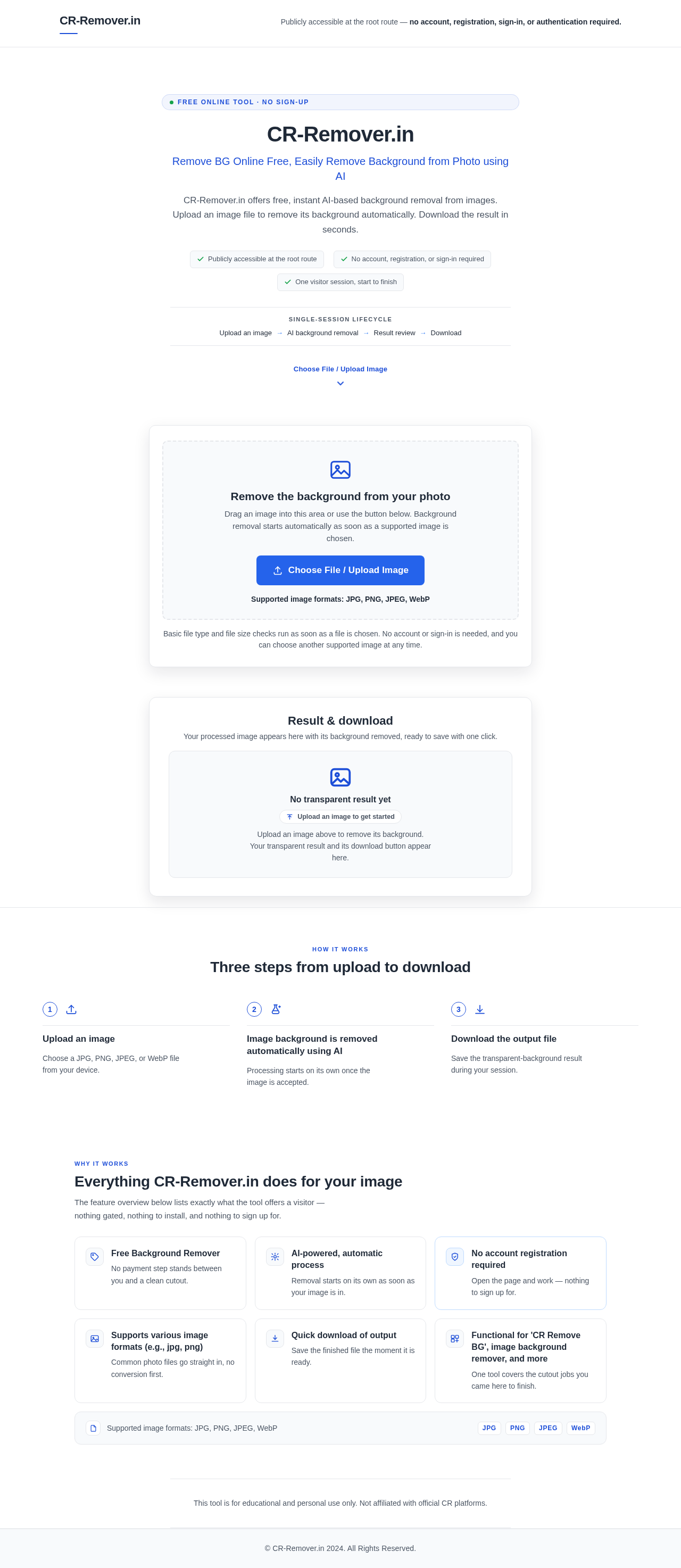
Publicly accessible at the root route — no account, registration, sign-in, or authentication required.
Free online tool · No sign-up
CR-Remover.in
Remove BG Online Free, Easily Remove Background from Photo using AI
CR-Remover.in offers free, instant AI-based background removal from images. Upload an image file to remove its background automatically. Download the result in seconds.
- Publicly accessible at the root route
- No account, registration, or sign-in required
- One visitor session, start to finish
Single-session lifecycle
- Upload an image
- AI background removal
- Result review
- Download
Upload an image to remove its background
Remove the background from your photo
Drag an image into this area or use the button below. Background removal starts automatically as soon as a supported image is chosen.
Supported image formats: JPG, PNG, JPEG, WebP
Basic file type and file size checks run as soon as a file is chosen. No account or sign-in is needed, and you can choose another supported image at any time.
Removing the background
Your image is being processed. The background is being removed automatically using AI.
Pick another supported image to try again — no account required.
Result & download
Your processed image appears here with its background removed, ready to save with one click.
No transparent result yet
Upload an image to get startedUpload an image above to remove its background. Your transparent result and its download button appear here.
Three steps from upload to download
Upload an image
Choose a JPG, PNG, JPEG, or WebP file from your device.
Image background is removed automatically using AI
Processing starts on its own once the image is accepted.
Download the output file
Save the transparent-background result during your session.
Everything CR-Remover.in does for your image
The feature overview below lists exactly what the tool offers a visitor — nothing gated, nothing to install, and nothing to sign up for.
Free Background Remover
No payment step stands between you and a clean cutout.
AI-powered, automatic process
Removal starts on its own as soon as your image is in.
No account registration required
Open the page and work — nothing to sign up for.
Supports various image formats (e.g., jpg, png)
Common photo files go straight in, no conversion first.
Quick download of output
Save the finished file the moment it is ready.
Functional for 'CR Remove BG', image background remover, and more
One tool covers the cutout jobs you came here to finish.
Supported image formats: JPG, PNG, JPEG, WebP
This tool is for educational and personal use only. Not affiliated with official CR platforms.
Publicly accessible at the root route — no account, registration, sign-in, or authentication required.
Free online tool · No sign-up
CR-Remover.in
Remove BG Online Free, Easily Remove Background from Photo using AI
CR-Remover.in offers free, instant AI-based background removal from images. Upload an image file to remove its background automatically. Download the result in seconds.
- Publicly accessible at the root route
- No account, registration, or sign-in required
- One visitor session, start to finish
Single-session lifecycle
- Upload an image
- AI background removal
- Result review
- Download
Upload an image to remove its background
Remove the background from your photo
Drag an image into this area or use the button below. Background removal starts automatically as soon as a supported image is chosen.
Supported image formats: JPG, PNG, JPEG, WebP
Basic file type and file size checks run as soon as a file is chosen. No account or sign-in is needed, and you can choose another supported image at any time.
Removing the background
Your image is being processed. The background is being removed automatically using AI.
Pick another supported image to try again — no account required.
Result & download
Your processed image appears here with its background removed, ready to save with one click.
No transparent result yet
Upload an image to get startedUpload an image above to remove its background. Your transparent result and its download button appear here.
Three steps from upload to download
Upload an image
Choose a JPG, PNG, JPEG, or WebP file from your device.
Image background is removed automatically using AI
Processing starts on its own once the image is accepted.
Download the output file
Save the transparent-background result during your session.
Everything CR-Remover.in does for your image
The feature overview below lists exactly what the tool offers a visitor — nothing gated, nothing to install, and nothing to sign up for.
Free Background Remover
No payment step stands between you and a clean cutout.
AI-powered, automatic process
Removal starts on its own as soon as your image is in.
No account registration required
Open the page and work — nothing to sign up for.
Supports various image formats (e.g., jpg, png)
Common photo files go straight in, no conversion first.
Quick download of output
Save the finished file the moment it is ready.
Functional for 'CR Remove BG', image background remover, and more
One tool covers the cutout jobs you came here to finish.
Supported image formats: JPG, PNG, JPEG, WebP
This tool is for educational and personal use only. Not affiliated with official CR platforms.
No comments yet. Be the first!