regal-app
 Mayur Gole
build a app for onloine vent booking systen


Comments (0)
Sign in to leave a comment
Project Tasks19
Implement Theme & Global Styles
As a developer, I want a consistent design system applied across the entire app so that all pages share the same color palette, typography, and spacing. Apply design tokens: Background #F9F9F9, Surface #FFFFFF, Text #333333, Accent #FF6F61, Muted #B0BEC5 as CSS variables and Tailwind/theme config for both React Web and React Native.
Remove Unused Scaffold Pages
As a developer, I want the codebase to be clean and free of unused scaffold pages so that the project structure reflects only the pages defined in the design. Remove the welcome page (post-login), dashboard/ai-assistant page, and dashboard/settings page from the scaffold.
Build Landing Page
As a visitor, I want to see an engaging landing page with an interactive animated map of India, glowing pulsating event pins, category filters, and CTA buttons so that I can explore events visually and choose to sign up or log in. Implement the Landing v2 design with hero section, dynamic event map, zoom/pan, tooltips, and smooth transitions.
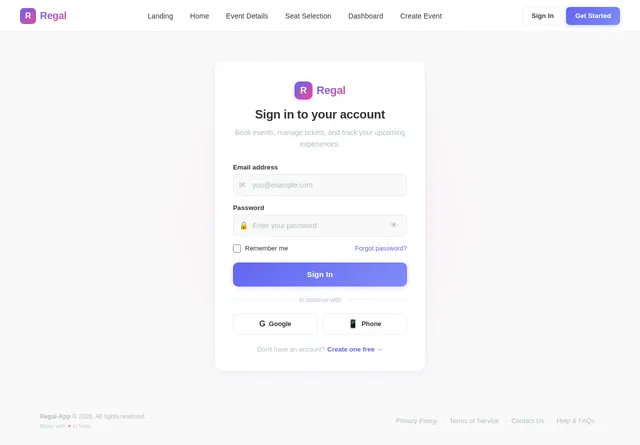
Build Login Page
As a returning user, I want to log in to my account securely so that I can access my bookings or organizer dashboard. Implement the Login v2 design with email/password form, error states, and redirect logic for Attendees and Organizers.
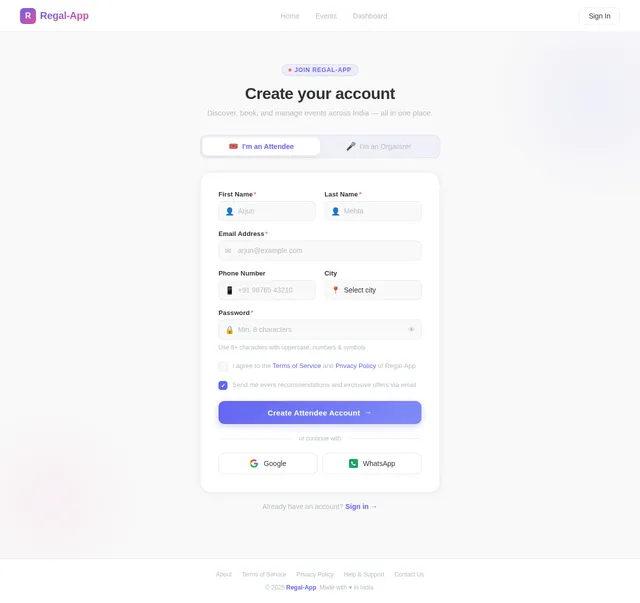
Build Signup Page
As a new user, I want to create an account as either an Attendee or Organizer so that I can start using Regal-App. Implement the Signup v2 design with role selection, registration form, validation, and post-signup redirect.
Build Home Page
As an Attendee, I want to browse and filter events on the Home page so that I can discover events that match my interests. Implement the Home v2 design including event cards, search bar, category filters (music, workshops, conferences), and navigation to Event Details.
Build Dashboard Page
As an Organizer, I want a dashboard to view analytics and manage my events so that I can track performance and bookings. Implement the Dashboard v2 design including analytics widgets, event list, booking summaries, and navigation to Create Event.
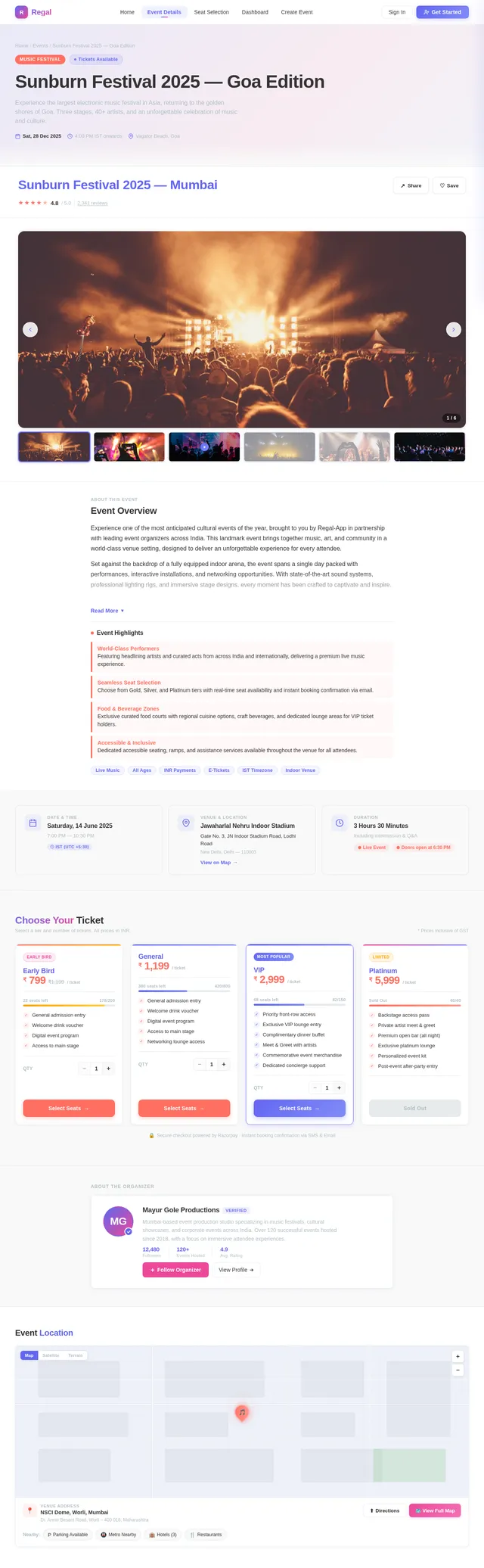
Build Event Details Page
As an Attendee, I want to view full details of an event so that I can decide whether to purchase tickets. Implement the Event Details v2 design including event description, media gallery, date/time (IST), venue, ticket types, and a CTA to proceed to Seat Selection.
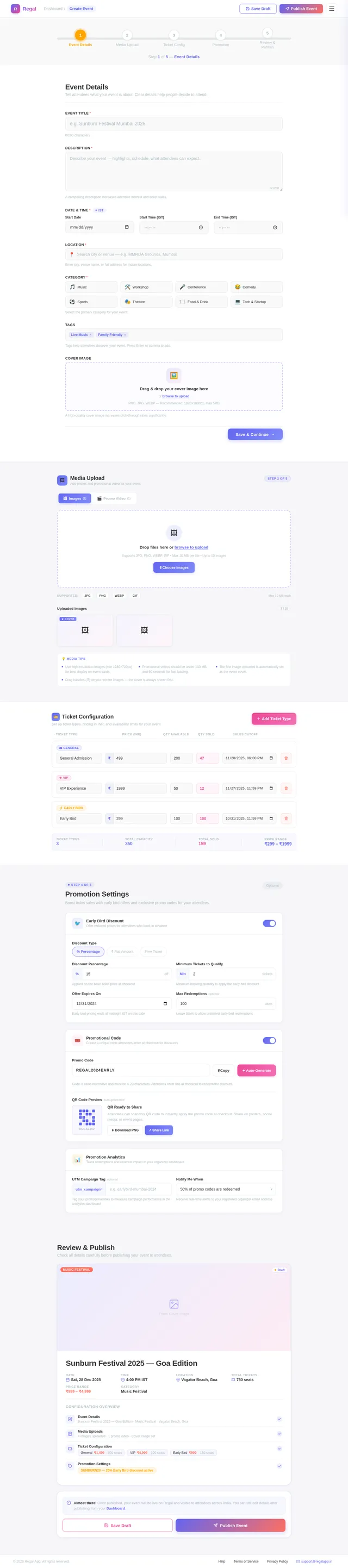
Build Create Event Page
As an Organizer, I want to create a new event with details, media, and ticket configuration so that attendees can discover and book it. Implement the Create Event v2 design with multi-step form covering event details, media upload, and ticket tier setup.
Implement Browse & Filter Events API
As a user, I want to use a backend API for browsing and filtering events so that the Home page can display relevant, paginated event listings. Implement FastAPI endpoints with search, category filter, date range filter, and pagination backed by MySQL.
Implement Dashboard Analytics API
As a user, I want to use a backend API for organizer analytics so that the Dashboard can display ticket sales, revenue, and attendee counts. Aggregate data from booking and event tables in MySQL and expose via FastAPI endpoints.
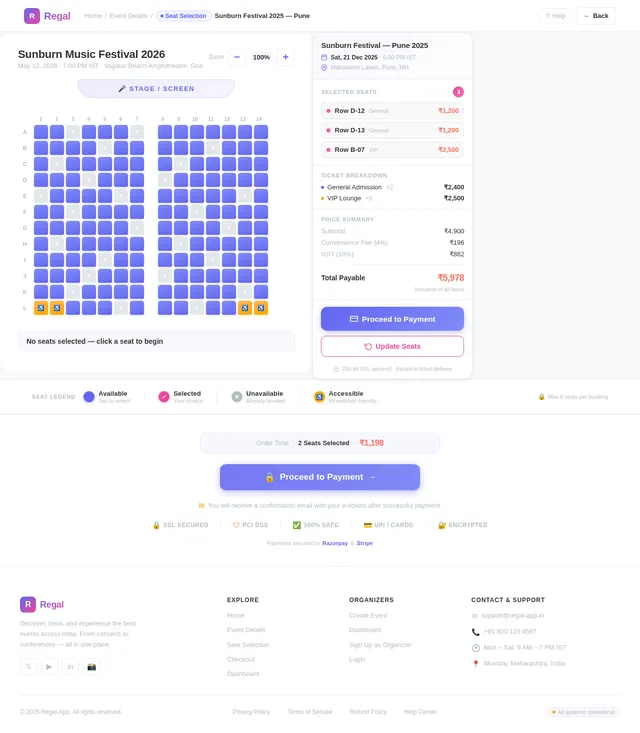
Build Seat Selection Page
As an Attendee, I want to select specific seats or ticket quantities for an event so that I can customize my booking before checkout. Implement the Seat Selection v2 design with interactive seat map, availability indicators, and total price summary in INR.
Implement Event Details API
As a user, I want to use a backend API for fetching full event details by ID so that the Event Details page renders accurate, up-to-date information. Include event metadata, media URLs, venue, ticket types, and availability.
Implement Create Event API
As a user, I want to use a backend API for creating events with details, media uploads, and ticket tier configuration so that Organizers can publish events. Handle file uploads to object storage and persist event data via Alembic-managed schema.
Implement Booking Tracking API
As a user, I want to use a backend API for tracking bookings per event in real time so that Organizers can monitor attendance and manage capacity. Include booking list, attendee details, and status filters.
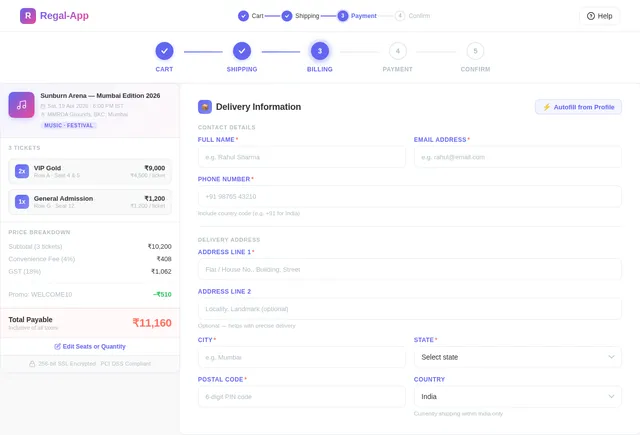
Build Checkout Page
As an Attendee, I want to complete my booking and make a secure payment in INR so that I can confirm my event tickets. Implement the Checkout v2 design with order summary, attendee details form, payment input, and booking confirmation flow.
Implement Seat Selection API
As a user, I want to use a backend API for fetching seat maps and temporarily reserving seats so that the Seat Selection page displays live availability. Include concurrency handling for seat locking and temporary hold expiry.
Implement Checkout & Payment API
As a user, I want to use a backend API for processing bookings and handling INR payments in a PCI DSS compliant manner so that attendees can complete purchases securely. Integrate a payment gateway, generate booking confirmations, and store transaction records in MySQL.
Integrate AI Assistant Feature
As a user, I want to use an AI assistant powered by GPT 5.4 and Claude Opus 4.6 via Litellm routing and Langchain so that I can receive intelligent event recommendations and support. Implement the assistant backend service, connect to FastAPI, and wire up the frontend chat interface.

Discover & Book Events Across India
Seamless ticket booking for every occasion
Explore Events Across India
Discover concerts, workshops, conferences, and more happening near you. Zoom, pan, and hover on pins to explore event details with smooth micro-transitions.
Your Journey Starts Here
Whether you are booking tickets or hosting events, Regal-App makes it effortless.
Book Your Events
For attendees looking to discover and enjoy
Browse Events
Explore a wide range of events across India by category, location, or date to find what excites you.
Select Your Seats
Choose your preferred seats with our interactive seat selection tool and customize your experience.
Pay Securely
Complete your booking with secure payment gateways supporting UPI, cards, and net banking in INR.
Manage Your Events
For organizers ready to create and grow
Create Your Event
Set up your event with details, media uploads, ticket pricing, and availability in just a few minutes.
Promote & Reach
Leverage built-in promotional tools to reach thousands of potential attendees across the platform.
Analyze Performance
Track bookings, revenue, and audience insights through a real-time analytics dashboard.
Everything You Need for Events
From discovering events to managing bookings, Regal-App equips attendees and organizers with powerful tools built for India.
Event Discovery
Browse events by category, location, or date across India. Find concerts, workshops, conferences, and more with powerful search and filters.
Secure Payments
Book tickets confidently with PCI DSS-compliant payment processing. Multiple payment options including UPI, cards, and net banking in INR.
Real-time Analytics
Track bookings, revenue, and attendee insights with a comprehensive organizer dashboard. Make data-driven decisions instantly.
Seat Selection
Choose your perfect spot with interactive seat maps. View availability in real time and pick seats that match your preference.
Category Filters
Narrow down events effortlessly with smart filters for music, sports, workshops, conferences, and more. Discover what matters to you.
Instant Notifications
Stay updated with real-time alerts for booking confirmations, event reminders, price drops, and schedule changes via email and push.
Discover Upcoming Events
Explore the hottest events happening across India. From live concerts to tech summits, find your next experience.
Bollywood Night Live with Arijit Singh
India Tech Summit 2026
Creative Photography Masterclass
IPL Finals 2026 – Stadium Experience
Stand-Up Comedy Night ft. Zakir Khan
Street Food Festival – Taste of India
Trusted by Thousands
Why Users Love Regal-App
Join a growing community of event organizers and attendees who trust us for seamless, secure event experiences across India.
What Our Users Say
Regal-App made booking concert tickets so effortless. The seat selection feature is brilliant and the whole process took less than 2 minutes!
As an event organizer, the analytics dashboard gives me real-time insights into ticket sales. Managing 7 events simultaneously has never been easier.
The payment integration is seamless and secure. I booked tickets for my family across 3 different events in one session. Highly recommended!
Enterprise-Grade Security
PCI DSS Compliant
All transactions meet global payment security standards
SSL Encryption
256-bit encryption protects your personal data end-to-end
1000+ Concurrent Users
Built to handle peak demand during popular event launches
Our Trusted Partners
Ready to Book Your Next Event?
Join thousands of users exploring events across India
Frequently Asked Questions
Everything you need to know about booking events, payments, and managing your experience on Regal-App.
How do I book tickets for an event on Regal-App?
Simply browse events on the Home page, select the event you are interested in, choose your preferred seats from the interactive seat map, and proceed to checkout. Payments are processed securely through our integrated payment gateways in Indian Rupees (INR).
Can I select specific seats for an event?
Yes! For events that support assigned seating, you can use our interactive seat selection feature to pick exactly where you want to sit. The seat map shows real-time availability, pricing tiers, and a preview of your view from the selected section.
What payment methods are accepted?
We support all major payment methods including UPI, credit and debit cards, net banking, and popular digital wallets. All transactions are processed in INR and are fully PCI DSS compliant to ensure the security of your financial data.
Can I get a refund if an event is cancelled?
If an event is cancelled by the organizer, a full refund is automatically initiated to your original payment method within 5-7 business days. For user-initiated cancellations, the refund policy varies by event and is displayed on the event details page before booking.
How do I create and list an event as an organizer?
After signing up as an Event Organizer, head to the Dashboard and click "Create Event." Fill in the event details, upload media such as images or videos, set your ticket pricing and availability, then publish. Your event will appear on the interactive map and browse listings immediately.
What analytics tools are available for organizers?
The Organizer Dashboard provides real-time analytics including ticket sales trends, revenue tracking, attendee demographics, booking conversion rates, and promotional performance metrics. You can also export reports and track up to 7 events simultaneously at launch.
Is my personal data safe on Regal-App?
Absolutely. Regal-App complies with Indian data protection regulations including the IT Act, 2000. We use SSL encryption for all data transmissions, daily backups to prevent data loss, and PCI DSS-compliant payment processing to safeguard your information.
Can I use Regal-App on both desktop and mobile?
Yes! Regal-App is built with a responsive design that works seamlessly on desktop browsers and mobile devices. We also offer a dedicated mobile app built with React Native for an optimized on-the-go experience with push notifications for your booked events.
Still have questions? We are here to help.
Contact Support
No comments yet. Be the first!