regal-app
 Mayur Gole
build a app for onloine vent booking systen


Comments (0)
Sign in to leave a comment
System Requirements
System Requirements Document (SRD) for Regal-App
1. Introduction
The Regal-App is an online event booking system designed to streamline ticket sales, reservations, and event management. Developed for users in India, the platform caters to both event organizers and attendees, ensuring a seamless experience for managing and participating in events. This document outlines the system requirements for the Regal-App, incorporating the latest updates requested by Mayur Gole.
2. System Overview
The Regal-App is a dual-purpose platform designed to serve two primary user groups: event organizers and attendees. Event organizers can create, manage, and track events, while attendees can browse, book, and pay for tickets. The system will launch with a minimum of 5-7 events for each category (organizers and attendees), ensuring a diverse range of options to engage users from the outset.
The platform will support:
- Event Organizers: Tools for event creation, ticket management, and analytics dashboards.
- Attendees: Features for event discovery, seat selection, and secure payment integration.
Locale-specific defaults, such as Indian Rupees (INR) for transactions and IST (Indian Standard Time) for scheduling, will be implemented to enhance usability for users in India.
3. Functional Requirements
Event Organizers
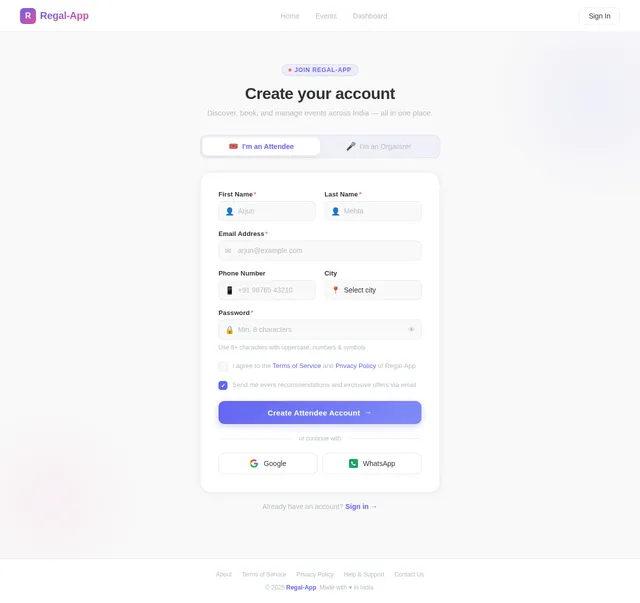
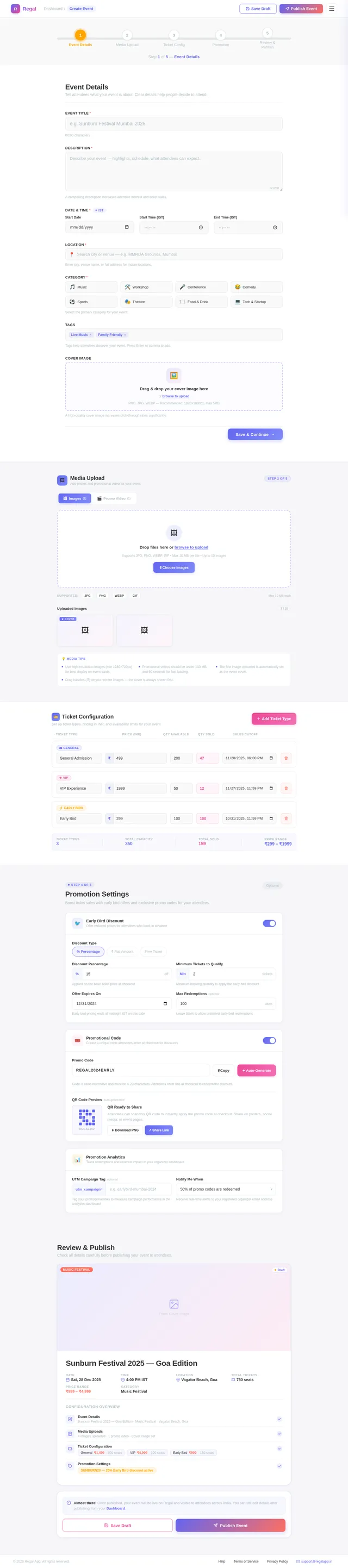
- As an Organizer, I should be able to create and manage events.
- As an Organizer, I should be able to track bookings and view analytics through a dashboard.
- As an Organizer, I should be able to set ticket prices and availability.
- As an Organizer, I should be able to upload event-related media (e.g., images, videos).
- As an Organizer, I should be able to manage at least 5-7 events at launch.
Attendees
- As an Attendee, I should be able to browse events by category, location, or date.
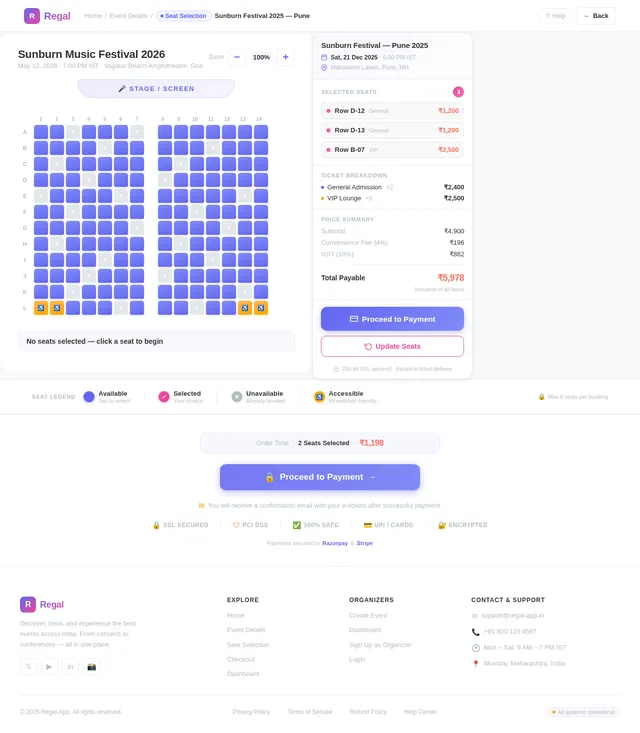
- As an Attendee, I should be able to select seats for events (if applicable).
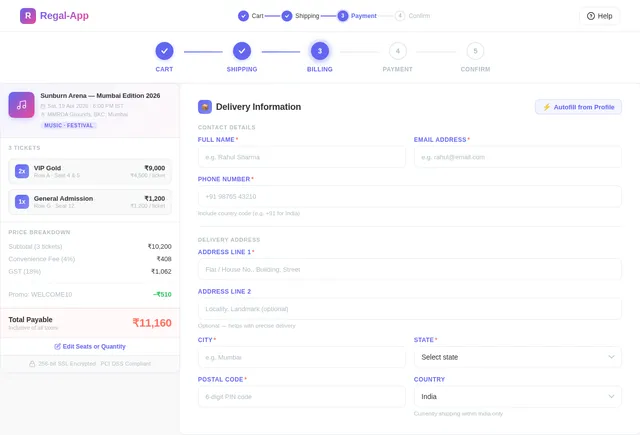
- As an Attendee, I should be able to securely purchase tickets using integrated payment gateways.
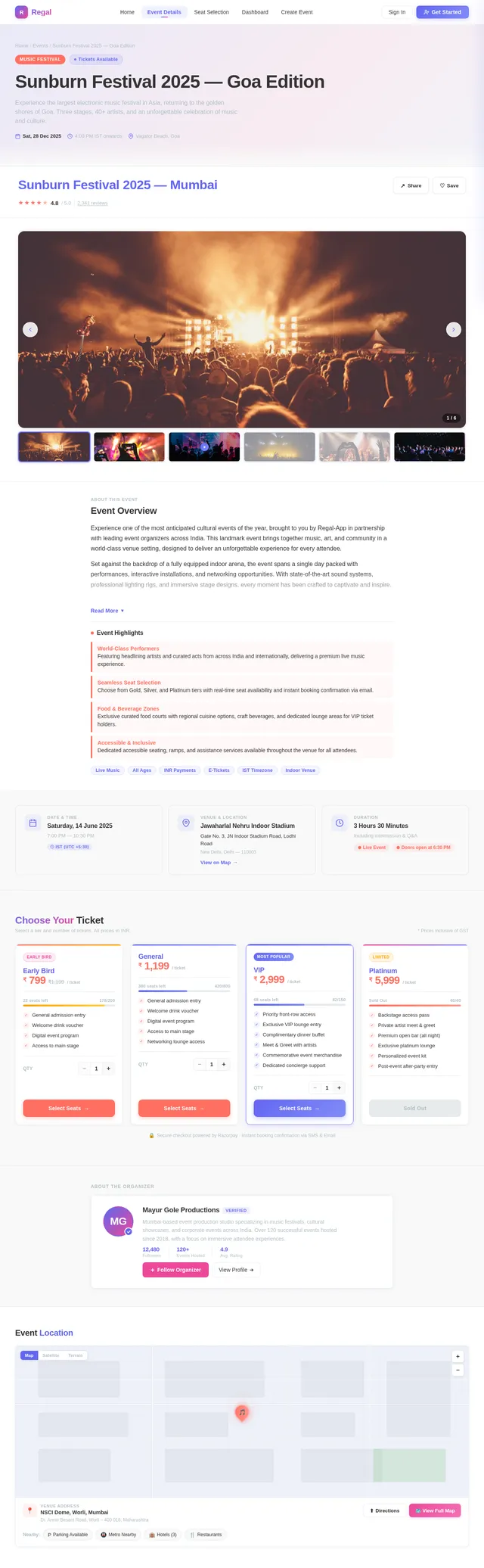
- As an Attendee, I should be able to view event details, including descriptions, schedules, and media.
- As an Attendee, I should have access to at least 5-7 events at launch.
4. User Personas
Event Organizer
- Description: Individuals or organizations hosting events, such as concerts, conferences, or workshops.
- Goals: Simplify event management, maximize ticket sales, and gain insights through analytics.
- Pain Points: Difficulty in tracking bookings, limited promotional tools, and lack of real-time data.
Attendee
- Description: Individuals looking to discover and participate in events.
- Goals: Easily find events of interest, book tickets securely, and enjoy a smooth user experience.
- Pain Points: Limited event discovery options, cumbersome booking processes, and lack of seat selection.
5. Visuals Colors and Theme
Unique Color Palette
The Regal-App will feature a vibrant and modern color scheme to evoke excitement and professionalism:
- Background: #F9F9F9 (Soft White)
- Surface: #FFFFFF (Pure White)
- Text: #333333 (Dark Charcoal)
- Accent: #FF6F61 (Coral Red)
- Muted Tones: #B0BEC5 (Cool Gray)
This palette ensures readability and a visually appealing interface while maintaining a professional aesthetic.
6. Signature Design Concept
Interactive Event Map with Dynamic Animations
The homepage of the Regal-App will feature an interactive event map that visually represents all available events. Users will see a dynamic, animated map of India, with event locations marked by glowing, pulsating pins. When a user hovers over a pin, a tooltip card will appear, showing a brief event summary, including the title, date, and a thumbnail image.
Additional features:
- Zoom and Pan: Users can zoom in on specific regions or pan across the map to explore events in different cities.
- Category Filters: A floating toolbar will allow users to filter events by category (e.g., music, workshops, conferences).
- Micro-Interactions: Clicking on a pin will trigger a smooth transition to the event details page, with a fade-in effect for content.
This unique design ensures an engaging first impression and encourages users to explore events visually.
7. Non-Functional Requirements
- The system must support at least 1,000 concurrent users at launch.
- Payment processing must comply with PCI DSS standards for secure transactions.
- The platform should load within 3 seconds on standard broadband connections.
- The system must support both desktop and mobile devices with responsive design.
- Data backups must occur daily to ensure minimal data loss in case of system failure.
8. Tech Stack
Frontend
- React for Web
- React Native for Mobile App
Backend
- Python
- FastAPI
Database
- MySQL (with Alembic for migrations)
AI Models
- GPT 5.4 for user-friendly responses
- Claude 4.6 Opas for coding-related queries
AI Tools
- Litellm for LLM Routing
- Langchain
Orchestration
- Docker and docker-compose for local development
- Kubernetes for server-side orchestration
9. Assumptions and Constraints
Assumptions
- Users will primarily access the platform from India.
- All events will initially be hosted in Indian cities.
- The platform will support English as the primary language at launch.
Constraints
- The system must comply with Indian data protection laws (e.g., IT Act, 2000).
- Payment gateways must support INR as the default currency.
- The platform must be scalable to accommodate future international expansion.
10. Glossary
- Event Organizer: A user who creates and manages events on the platform.
- Attendee: A user who browses and books tickets for events.
- PCI DSS: Payment Card Industry Data Security Standard, a set of security standards for handling cardholder data.
- IST: Indian Standard Time, the time zone used in India.

Discover & Book Events Across India
Seamless ticket booking for every occasion
Explore Events Across India
Discover concerts, workshops, conferences, and more happening near you. Zoom, pan, and hover on pins to explore event details with smooth micro-transitions.
Your Journey Starts Here
Whether you are booking tickets or hosting events, Regal-App makes it effortless.
Book Your Events
For attendees looking to discover and enjoy
Browse Events
Explore a wide range of events across India by category, location, or date to find what excites you.
Select Your Seats
Choose your preferred seats with our interactive seat selection tool and customize your experience.
Pay Securely
Complete your booking with secure payment gateways supporting UPI, cards, and net banking in INR.
Manage Your Events
For organizers ready to create and grow
Create Your Event
Set up your event with details, media uploads, ticket pricing, and availability in just a few minutes.
Promote & Reach
Leverage built-in promotional tools to reach thousands of potential attendees across the platform.
Analyze Performance
Track bookings, revenue, and audience insights through a real-time analytics dashboard.
Everything You Need for Events
From discovering events to managing bookings, Regal-App equips attendees and organizers with powerful tools built for India.
Event Discovery
Browse events by category, location, or date across India. Find concerts, workshops, conferences, and more with powerful search and filters.
Secure Payments
Book tickets confidently with PCI DSS-compliant payment processing. Multiple payment options including UPI, cards, and net banking in INR.
Real-time Analytics
Track bookings, revenue, and attendee insights with a comprehensive organizer dashboard. Make data-driven decisions instantly.
Seat Selection
Choose your perfect spot with interactive seat maps. View availability in real time and pick seats that match your preference.
Category Filters
Narrow down events effortlessly with smart filters for music, sports, workshops, conferences, and more. Discover what matters to you.
Instant Notifications
Stay updated with real-time alerts for booking confirmations, event reminders, price drops, and schedule changes via email and push.
Discover Upcoming Events
Explore the hottest events happening across India. From live concerts to tech summits, find your next experience.
Bollywood Night Live with Arijit Singh
India Tech Summit 2026
Creative Photography Masterclass
IPL Finals 2026 – Stadium Experience
Stand-Up Comedy Night ft. Zakir Khan
Street Food Festival – Taste of India
Trusted by Thousands
Why Users Love Regal-App
Join a growing community of event organizers and attendees who trust us for seamless, secure event experiences across India.
What Our Users Say
Regal-App made booking concert tickets so effortless. The seat selection feature is brilliant and the whole process took less than 2 minutes!
As an event organizer, the analytics dashboard gives me real-time insights into ticket sales. Managing 7 events simultaneously has never been easier.
The payment integration is seamless and secure. I booked tickets for my family across 3 different events in one session. Highly recommended!
Enterprise-Grade Security
PCI DSS Compliant
All transactions meet global payment security standards
SSL Encryption
256-bit encryption protects your personal data end-to-end
1000+ Concurrent Users
Built to handle peak demand during popular event launches
Our Trusted Partners
Ready to Book Your Next Event?
Join thousands of users exploring events across India
Frequently Asked Questions
Everything you need to know about booking events, payments, and managing your experience on Regal-App.
How do I book tickets for an event on Regal-App?
Simply browse events on the Home page, select the event you are interested in, choose your preferred seats from the interactive seat map, and proceed to checkout. Payments are processed securely through our integrated payment gateways in Indian Rupees (INR).
Can I select specific seats for an event?
Yes! For events that support assigned seating, you can use our interactive seat selection feature to pick exactly where you want to sit. The seat map shows real-time availability, pricing tiers, and a preview of your view from the selected section.
What payment methods are accepted?
We support all major payment methods including UPI, credit and debit cards, net banking, and popular digital wallets. All transactions are processed in INR and are fully PCI DSS compliant to ensure the security of your financial data.
Can I get a refund if an event is cancelled?
If an event is cancelled by the organizer, a full refund is automatically initiated to your original payment method within 5-7 business days. For user-initiated cancellations, the refund policy varies by event and is displayed on the event details page before booking.
How do I create and list an event as an organizer?
After signing up as an Event Organizer, head to the Dashboard and click "Create Event." Fill in the event details, upload media such as images or videos, set your ticket pricing and availability, then publish. Your event will appear on the interactive map and browse listings immediately.
What analytics tools are available for organizers?
The Organizer Dashboard provides real-time analytics including ticket sales trends, revenue tracking, attendee demographics, booking conversion rates, and promotional performance metrics. You can also export reports and track up to 7 events simultaneously at launch.
Is my personal data safe on Regal-App?
Absolutely. Regal-App complies with Indian data protection regulations including the IT Act, 2000. We use SSL encryption for all data transmissions, daily backups to prevent data loss, and PCI DSS-compliant payment processing to safeguard your information.
Can I use Regal-App on both desktop and mobile?
Yes! Regal-App is built with a responsive design that works seamlessly on desktop browsers and mobile devices. We also offer a dedicated mobile app built with React Native for an optimized on-the-go experience with push notifications for your booked events.
Still have questions? We are here to help.
Contact Support
No comments yet. Be the first!