rapid-mere
 Craft JPx
Mere ko ek website copy karna he or working chahiye

Comments (0)
Sign in to leave a comment
System Requirements
System Requirements Document for rapid-mere
1. Introduction
rapid-mere is a working website that replicates an existing website the user (Craft JPx, IN) wants copied. The intent is not a static mockup or a visual approximation: the delivered site must be a functioning website whose pages and interactive elements behave like the original the user refers to, so that a visitor can open it and use it as they would the source site.
The audience is the Website Visitor — the person who opens the replicated site and moves through its pages and interactive elements. Success is a site that works: navigation resolves, interactive elements respond, and the experience matches the site the user asked to replicate.
Because the user did not supply a reference URL, industry, brand, or content set, this document fixes the delivery, structure, and design system of the replication, and treats the specific source site's content as the input to be supplied at build time (see Assumptions and Constraints). The design language is fully specified below and is authoritative.
2. System Overview
rapid-mere is delivered as a three-service application:
- frontend — a React application that renders the replicated website's pages and interactive elements.
- backend — a shared FastAPI process that serves the application APIs and domain modules supporting the site's interactive behavior.
- database — MariaDB for application-owned persistent data required by the replicated site's working behavior.
The site is publicly reachable with no identity establishment: the accepted access requirement for both surfaces is none, and no account, login, or protected area is part of the current scope. All accepted behavior is owned by the application's own pages.
Current accepted behavior is narrow and exact: a visitor opens the site, sees a first impression that explains what the site is, and then navigates its pages and uses its interactive elements as a working website replicating the referenced site. Interactive elements that require server-side behavior are served by the shared backend; any state the replicated site must retain is stored in MariaDB.
Removed from scope
- None. No concept was removed by the user; the requirement thread contains no explicit exclusions beyond the absence of a supplied reference site.
2a. Product Interpretation and Delivery Boundary
The user's request is to copy a website and make it work. That is read here as: reproduce the referenced site's page structure, content presentation, and interactive behavior as a live, functioning web application — not a screenshot gallery, not a static HTML dump, and not a redesign.
Delivery is entirely first-party. The frontend renders every page; the backend supplies any behavior that cannot be completed in the browser alone; MariaDB holds whatever the replicated site must remember. There is no provider-owned surface, no external destination, and no headless-only delivery in the current scope.
Access is open. Both accepted surfaces are anonymously reachable and require no identity. No account creation, sign-in, session continuity, or permission differentiation is part of the current product, and none is inferred, because no accepted journey requires a visitor to privately own or resume durable state.
The boundary between current and future is the reference site itself. Everything the referenced site does is current scope once identified; anything the referenced site does not do is out of scope. No adjacent capability — content authoring, analytics dashboards, commerce, messaging, or account management — is added by this document.
2c. Page Content and Component Coverage
Landing
Purpose and information/state. The anonymous first impression. It explains what the replicated website is, who it is for, and what it does, and it is the entry point into the site proper. No identity state exists; the page renders identically for every visitor.
Primary actions.
- Read the display headline and the short explanatory statement of what the site is and does.
- Follow the primary call to action into Home.
- Read the site map panel, which lists the site's pages as a colour-coded route diagram and links each node to its page.
Supporting actions.
- Use the top navigation line to jump directly to any listed page.
- Read the numbered section openers and their ruled content rows for the site's overview and page inventory.
Domain entities. Site page (name, route, category code), site overview statement, navigation entry.
Component responsibilities.
- Hero type column (7 of 12 columns): red square mark, display headline, explanatory paragraph, solid red rectangular CTA to Home.
- Hero wayfinding plate (5 of 12 columns): white plate containing the grid-drawn site map with square station nodes and labelled route lines.
- Numbered section openers:
01 — OVERVIEW,02 — PAGES, each on a full-bleed 2px black rule. - Ruled content rows: label | value | status rows with 1px black separators and tabular numerals.
- Navigation line: colour-coded horizontal line with a solid red active indicator bar.
States.
- Loading: the page is static content; no skeleton is required. If the site map is fetched, the plate renders its frame and rules immediately and fills nodes on arrival.
- Empty: if the site map returns no pages, the plate shows a single ruled row reading that no pages are listed, and the CTA to Home remains available.
- Success: headline, explanation, CTA, and site map all render; every map node navigates.
- Error: if the site map fails to load, the plate shows a ruled error row with a retry control; the headline and CTA remain usable.
- Recovery: retry re-requests the site map without a full page reload.
Home
Purpose and information/state. The working site itself: the visitor navigates the replicated site's pages and uses its interactive elements. This surface owns the accepted outcome that the site functions like the original.
Primary actions.
- Navigate between the replicated site's pages using the top navigation line.
- Use each page's interactive elements — links, forms, filters, toggles, or other controls the referenced site provides — and observe their results.
- Submit any form the replicated site provides and see the resulting confirmation or validation state.
Supporting actions.
- Return to Landing via the wordmark.
- Read metadata, captions, and status labels in ruled rows.
Domain entities. Site page, navigation entry, interactive element, form submission record (only where the replicated site's behavior requires persistence).
Component responsibilities.
- Navigation line: renders every page as a colour-coded item; the active item carries a solid red indicator bar that snaps instantly on change.
- Page body: renders the current page's content in the 12-column grid, with ruled rows and tabular columns for data and feature content.
- Interactive element host: renders each control with its own loading, success, error, and disabled presentation.
- Form handler: validates input in place, submits to the backend, and renders the returned result.
States.
- Loading: navigation renders immediately; page body shows ruled placeholder rows in the content column while data is fetched.
- Empty: a page with no records renders a ruled row stating that there is nothing to show, with the page's controls still available.
- Success: page content and interactive results render in their final state.
- Error: a failed data request renders a ruled error row with a retry control inside the affected region only; navigation and other regions stay usable.
- Recovery: retry re-requests the affected region; a failed form submission preserves entered values and shows the reason.
3. Functional Requirements
FR-1 — Open the replicated website (explicit) As a Website Visitor I should open the site and land on a first impression that tells me what the site is, who it is for, and what it does, so that I know I am in the right place.
- Trigger: the visitor requests the site root.
- Observable result: the Landing surface renders with its headline, explanatory statement, primary CTA, and site map.
- Access: anonymous; no identity required.
- Failure/recovery: if the site map cannot load, the headline and CTA still render and the map region offers retry.
- Continuation: the visitor follows the CTA or a site map node into Home.
FR-2 — Navigate the site's pages (explicit) As a Website Visitor I should move between the site's pages using the navigation, so that I can reach any page the site offers.
- Trigger: the visitor selects a navigation item or a site map node.
- Observable result: the selected page renders and the active indicator moves to that item instantly.
- Access: anonymous.
- Failure/recovery: an unknown route renders a ruled not-found row with a link back to Home.
- Continuation: the visitor continues to another page or uses that page's controls.
FR-3 — Use the site's interactive elements (explicit) As a Website Visitor I should use the interactive elements on each page and see them respond, so that the site behaves like the original rather than a static mockup.
- Trigger: the visitor activates a control (link, toggle, filter, or other element the referenced site provides).
- Observable result: the control's state changes and the affected content updates to reflect it.
- Access: anonymous.
- Failure/recovery: a control whose action fails returns to its prior state and shows a ruled error row with retry.
- Continuation: the visitor keeps using the page or navigates onward.
FR-4 — Submit a form and see the result (required_inference) As a Website Visitor I should submit any form the replicated site provides and see a confirmation or a validation message, so that form-driven behavior is genuinely working.
- Trigger: the visitor completes the form's fields and submits.
- Observable result: on success, a confirmation state replaces or follows the form; on invalid input, field-level messages appear and the form is not submitted.
- Access: anonymous.
- Failure/recovery: a server-side failure preserves entered values and shows the reason with a retry control.
- Continuation: the visitor returns to the page or submits again.
- Rationale for inference: a working replication of a site that accepts input must return an observable result to the person who submitted it; without it the interaction is not working.
FR-5 — Retain state the replicated site must remember (required_inference) As a Website Visitor I should find that information I have submitted or selected is still reflected when I return to a page, so that the site behaves consistently.
- Trigger: the visitor revisits a page after a prior submission or selection.
- Observable result: the page renders the retained state from the backend and database.
- Access: anonymous; retention is site-wide, not tied to an identified person.
- Failure/recovery: if retained state cannot be read, the page renders its default state and a ruled notice.
- Continuation: the visitor continues normally.
- Rationale for inference: only where the referenced site's own behavior requires persistence; no visitor-specific account state is created.
4. User Personas
Website Visitor
Product context. The visitor arrives at rapid-mere knowing nothing about it except that it is a copy of a site someone wanted working. They have no account, no invitation, and no prior session. They judge the site in the first few seconds by whether it looks like a real, navigable system and whether its controls actually do something.
Primary goal. Move through the site's pages and use its interactive elements with the confidence that everything works — that links resolve, controls respond, and forms return results — exactly as the original site they were told about would.
Distinct accepted responsibilities.
- Form the first impression on Landing: read what the site is and does, and decide to continue.
- Choose a destination from the navigation line or the site map.
- Operate each page's interactive elements and read their results.
- Submit forms where the site provides them and act on confirmation or validation.
- Recover from a failed load or failed submission by retrying, without losing their place.
Relevant inputs and decisions. Which page to open next; whether a control's response is the expected one; whether to retry after an error or navigate elsewhere.
Interactions with other accepted participants. None. The Website Visitor is the only accepted human role; the backend and database act on the visitor's behalf but are not participants with their own decisions.
Observable success. Every page in the site map opens; every interactive element produces a visible response; every form returns a confirmation or a clear validation message; no dead link, silent control, or blank region is encountered.
5. Core User Flows
Flow A — First visit and orientation
- The Website Visitor opens the site root in a browser. No identity is requested.
- Landing renders: the red square mark, the display headline in the left seven columns, the explanatory statement, and the solid red CTA beneath it.
- The visitor reads the headline and explanation and understands what the site is and does.
- The visitor looks at the wayfinding plate in the right five columns and sees the site's pages drawn as a colour-coded route map with square station nodes.
- The visitor either activates the CTA or selects a node in the site map.
- Home renders the selected page and the navigation line marks it with the solid red active indicator.
- Failure path: if the site map fails to load, the plate shows a ruled error row with retry; the visitor retries, or proceeds via the CTA, which remains available.
Flow B — Navigating the site's pages
- From Home, the visitor reads the navigation line and identifies the page they want.
- The visitor selects a navigation item. The active indicator snaps to it instantly with no sliding animation.
- The selected page's content renders in the 12-column grid; ruled rows and tabular columns present its data.
- The visitor repeats until they have seen the pages they need.
- Failure path: if the visitor reaches a route the site does not define, a ruled not-found row appears with a link back to Home; the visitor follows it and continues.
- Continuation: the visitor returns to Landing at any time via the wordmark.
Flow C — Using an interactive element
- On a page in Home, the visitor activates a control the page provides.
- The control shows its in-progress state; the affected region shows ruled placeholder rows.
- The backend responds and the region renders the updated content in its final state.
- The visitor reads the result and either continues on the page or navigates onward.
- Failure path: if the request fails, the control returns to its prior state and the affected region shows a ruled error row with retry. The visitor retries; only that region reloads, and the rest of the page stays usable.
Flow D — Submitting a form
- The visitor fills in the form's fields on a page in Home.
- The visitor submits.
- If input is invalid, field-level messages appear, the form is not submitted, and the visitor's entries remain.
- If input is valid, the backend processes the submission and a confirmation state renders.
- Failure path: if the server rejects or fails the submission, the entered values are preserved and a ruled error row states the reason with a retry control; the visitor corrects and resubmits.
- Continuation: where the site retains the submission, the visitor returning to that page later finds it reflected (Flow E).
Flow E — Returning to retained state
- The visitor leaves a page after a submission or selection and later returns to it.
- The page requests its retained state from the backend.
- The page renders with the prior submission or selection reflected.
- Failure path: if retained state cannot be read, the page renders its default state with a ruled notice; the visitor can proceed normally.
6. Visuals Colors and Theme
The design language is Massimo Vignelli's signage system: systematic clarity, hard edges, functional colour, and a visible grid. Colour is wayfinding, never decoration. No gradients anywhere.
Colour tokens — light mode
| Role | Hex | Use |
|---|---|---|
| Background | #F4F1EA | Warm paper ground; carries ~70% of every page |
| Surface | #FFFFFF | Content panels and data tables, read as signage plates |
| Text | #111111 | The only text colour; set flush-left |
| Primary | #D2232A | Single signal accent: active nav indicator, primary CTA fill, category coding. Never body text |
| Accent | #F2B705 | Secondary code colour for one alternate category and thin rule highlights only |
| Muted | #6B6862 | Metadata, captions, inactive states |
At most two accent colours appear on a single screen. Blue and indigo are forbidden as the primary accent.
Typography
- One grotesque family across the whole system: Archivo for both headings and body. Hierarchy is carried by weight and scale, never by a second face.
- Headings: Archivo 700–800, tracking
-0.02em, flush-left ragged-right, sentence case for headlines. Uppercase only for micro-labels and category codes at 11–12px with0.14emtracking. - Body: Archivo 400, 17–18px, line-height 1.55, measure capped at 62ch.
- Numerals are tabular everywhere.
- Scale, 1.333 modular: display
clamp(44px, 7vw, 96px); h2clamp(30px, 4vw, 52px); h3 26px; body 18px; label 12px. Mobile display floor 44px, desktop ceiling 96px; no single fixed desktop size.
Shape language
- Hard edges only:
0pxradius on every card, button, input, and image frame. - Structure is expressed through 1px and 2px black rules, not shadows. Horizontal section rules span the full container; vertical column rules sit between grid cells like a transit map.
- Buttons are solid rectangles with square corners and a 2px black border.
- No rounded corners, no pills, no elevation of any kind.
Layout
- Visible 12-column grid, 24px gutters, max width 1240px. Content is flush-left and asymmetric, never centred.
- The hero splits 7/5: type column left, colour-coded wayfinding panel right.
- Sections are separated by full-bleed horizontal rules; each opens with a numbered label (
01 — OVERVIEW) in the left margin. - Data and feature content is presented in ruled rows and tabular columns rather than uniform cards.
- At 375px the grid collapses to a single column with labels stacked above content; the 7/5 split becomes 1/1 and the wayfinding panel becomes a horizontal scrollable strip.
Imagery. Diagrammatic and informational only: a colour-coded route map of the site's pages drawn in pure geometry, pictogram-style icons at 2px stroke, and ruled data tables. Any photography is cropped hard to the grid and treated as evidence, not atmosphere. No stock people, no decorative illustration, no blobs.
Readability constraint. Headlines, wordmarks, labels, numbers, and controls stay entirely inside the viewport and their container at 375px, 768px, and 1280px, wrapping or scaling to fit, with no other element covering them. The horizontally scrollable wayfinding strip at 375px is valid scrolling: every item becomes fully readable as it passes, and under prefers-reduced-motion it remains scrollable so each item can be brought fully into view.
7. Signature Design Concept
The navigation is the hero image.
The public entry — Landing — opens on a full-width warm paper ground (#F4F1EA) with no centred stack. A single 2px black rule runs the full viewport width beneath the composition, grounding it like a station sign.
- Left seven columns. A 96px solid red square mark sits above a display headline in Archivo 800 at
clamp(44px, 7vw, 96px), flush-left and ragged-right, wrapping to three or four lines across the viewport. Beneath it, a short explanatory statement at 18px capped to 62ch, then a solid red rectangular CTA with square corners and a 2px black border, pinned directly under the type. - Right five columns. A white plate containing a colour-coded, grid-drawn map of the site's pages: geometric route lines in red (
#D2232A), mustard (#F2B705), and black (#111111), with square station nodes marking each page and labels set at 12px uppercase with0.14emtracking. Every node is a working link into Home. - Below the rule. Numbered section openers —
01 — OVERVIEW,02 — PAGES— each in the left margin at 12px uppercase, each sitting on a full-bleed 2px black rule, with their content presented as ruledlabel | value | statusrows using tabular numerals.
The concept recomposes only accepted content: the site's own page inventory, its navigation, and its entry CTA. It adds no behavior and no destination.
8. Interaction Model & Motion Direction
Interaction Model: Static (direction) Motion Tempo: still Hero Dimensionality: flat
Landing Hero Motion Brief
- Focal subject: the site map plate in the right five columns — the navigation drawn as a transit diagram, with square station nodes and red, mustard, and black route lines.
- Input → transformation → outcome thesis: on load, the hero headline's words reveal in a single staggered sequence; once complete, the composition is final and every state change thereafter is instantaneous. The visitor's input is selection, not scroll — hovering or focusing a navigation item or map node swaps colour and underline in 150ms with no easing theatrics, and the active indicator snaps between items with no sliding animation.
- Motion vocabulary: one staggered word-reveal on the hero headline at load; 150ms colour and underline swaps on hover and focus; instant state changes everywhere else. No parallax, no scroll animation, no hover-lift, no bouncy physics.
- Composed first frame: paper ground, red square mark, headline mid-reveal in its final position, white wayfinding plate fully drawn, 2px black rule beneath both halves.
- Reduced-motion state: with
prefers-reduced-motion, the hero word-reveal is disabled and everything renders in its final state; the 375px wayfinding strip remains horizontally scrollable so each item can be brought fully into view.
9. Non-Functional Requirements
- Fidelity to the source site (explicit). The delivered site must be a copy of the site the user refers to and must be working, not a static mockup. Page structure, content presentation, and interactive behavior follow the referenced site; the design system in Sections 6–8 governs the visual language where the reference does not dictate it.
- Working interactivity (explicit). Every interactive element the site presents must produce an observable response; no control may be inert.
- Anonymous access (explicit via planning scope). Both surfaces are reachable without identity. No login, account creation, or protected area exists in the current scope.
- Responsive integrity (explicit via design constraints). Readable text and controls remain whole and uncovered at 375px, 768px, and 1280px.
- Reduced motion (explicit via design constraints).
prefers-reduced-motiondisables the hero reveal and yields a usable static arrangement, including a scrollable wayfinding strip at narrow widths. - Error containment (required_inference). A failed data request or submission degrades only the affected region; navigation and the rest of the page remain usable, and retry is available in place.
- No elevation or radius (explicit via design constraints). Zero border radius and zero drop shadows across all components.
10. Tech Stack
- Frontend: React application UI.
- Backend: shared FastAPI process serving application APIs and domain modules. New feature APIs extend this process rather than adding services.
- Database: MariaDB for application-owned persistent data.
- Orchestration: Docker and docker-compose, with the three services (
frontend,backend,database) as the runnable inventory. Kubernetes is not required for the current scope.
11. Assumptions and Constraints
- Reference site to be supplied (assumption). The user has not provided the URL, name, or content of the site to be copied. The build requires that reference before page content, page inventory, and interactive behavior can be finalized. Until then, the two accepted surfaces and the design system in this document are fixed.
- Scope equals the reference (assumption). Everything the referenced site does is current scope; anything it does not do is out of scope. No adjacent capability is added.
- No identity (constraint). Access requirement is
nonefor both surfaces; no account management, session continuity, or permission differentiation is introduced. - No designer selection (constraint). The Vignelli direction is the catalogue-supplied language for an open-ended brief; the user specified no palette, font, or designer, and none is invented beyond this direction.
- Forbidden look (constraint). The generic indigo/blue-on-white SaaS template is forbidden for this project.
12. Glossary
- Replicated site — the existing website the user asked to copy, whose pages and interactive behavior define current scope.
- Surface — a first-party page owned by the application; here, Landing and Home.
- Wayfinding plate — the white panel in the hero's right five columns containing the site map drawn as a transit diagram.
- Station node — a square marker in the site map representing one page and acting as a link to it.
- Navigation line — the colour-coded horizontal navigation with a solid red active indicator bar that snaps instantly between items.
- Ruled row — a
label | value | statuscontent row separated by 1px black rules, using tabular numerals. - Numbered section opener — a 12px uppercase label in the left margin (
01 — OVERVIEW) sitting on a full-bleed 2px black rule.
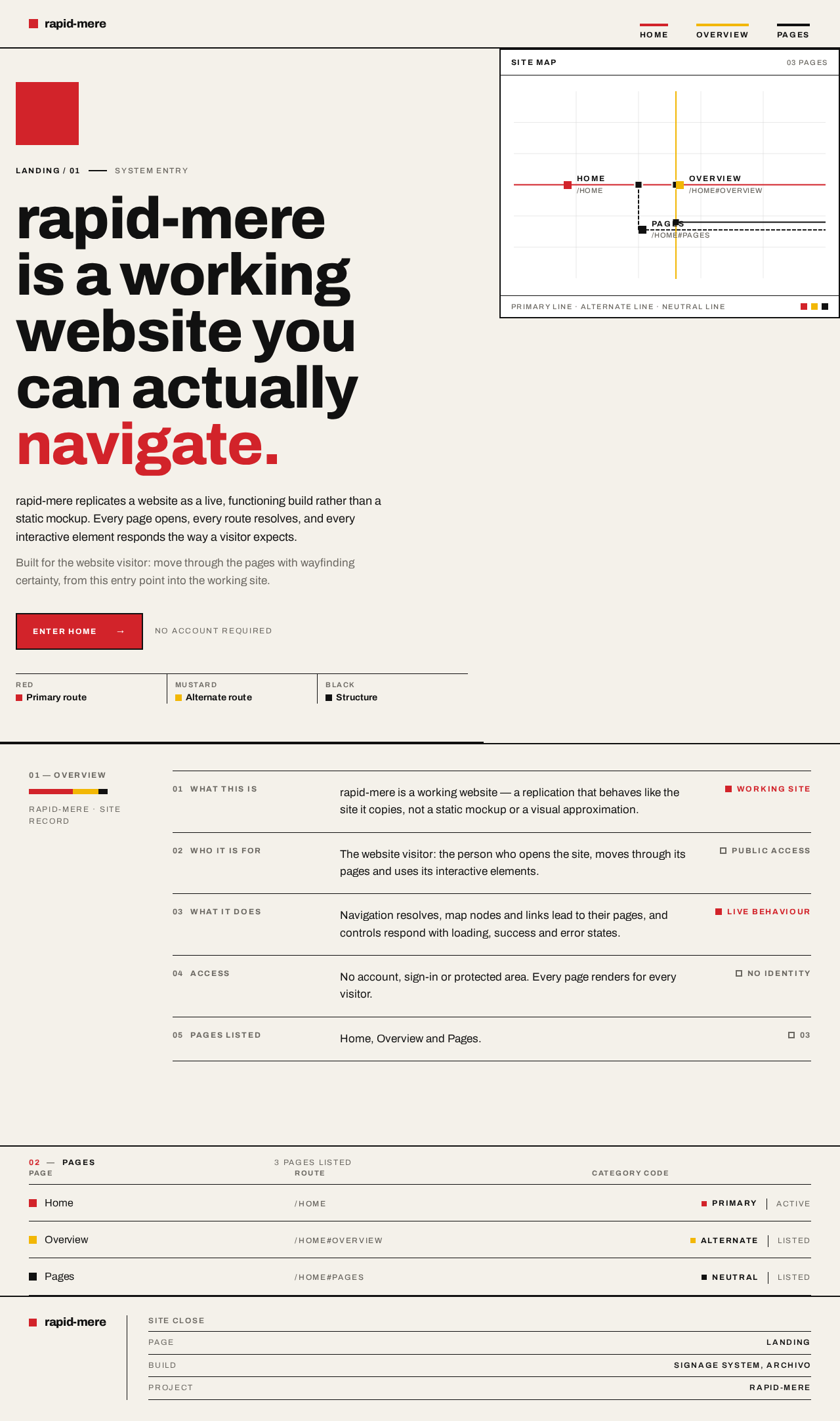
rapid-mere is a working
website you can actually
navigate.
rapid-mere replicates a website as a live, functioning build rather than a static mockup. Every page opens, every route resolves, and every interactive element responds the way a visitor expects.
Built for the website visitor: move through the pages with wayfinding certainty, from this entry point into the working site.
01 — Overview
rapid-mere · Site record
What this is
rapid-mere is a working website — a replication that behaves like the site it copies, not a static mockup or a visual approximation.
Working siteWho it is for
The website visitor: the person who opens the site, moves through its pages and uses its interactive elements.
Public accessWhat it does
Navigation resolves, map nodes and links lead to their pages, and controls respond with loading, success and error states.
Live behaviourAccess
No account, sign-in or protected area. Every page renders for every visitor.
No identityPages listed
Home, Overview and Pages.
0302Pages
3 pages listed
| Page | Route | Category code |
|---|---|---|
| Home | /home | Primaryactive |
| Overview | /home#overview | Alternatelisted |
| Pages | /home#pages | Neutrallisted |
rapid-mere is a working
website you can actually
navigate.
rapid-mere replicates a website as a live, functioning build rather than a static mockup. Every page opens, every route resolves, and every interactive element responds the way a visitor expects.
Built for the website visitor: move through the pages with wayfinding certainty, from this entry point into the working site.
01 — Overview
rapid-mere · Site record
What this is
rapid-mere is a working website — a replication that behaves like the site it copies, not a static mockup or a visual approximation.
Working siteWho it is for
The website visitor: the person who opens the site, moves through its pages and uses its interactive elements.
Public accessWhat it does
Navigation resolves, map nodes and links lead to their pages, and controls respond with loading, success and error states.
Live behaviourAccess
No account, sign-in or protected area. Every page renders for every visitor.
No identityPages listed
Home, Overview and Pages.
0302Pages
3 pages listed
| Page | Route | Category code |
|---|---|---|
| Home | /home | Primaryactive |
| Overview | /home#overview | Alternatelisted |
| Pages | /home#pages | Neutrallisted |
No comments yet. Be the first!