quotations-builders
 Nhlanhla Masuku
I am building an app that makes quotations for builders using their voice

Comments (0)
Sign in to leave a comment
System Requirements
System Requirements Document for quotations-builders
1. Introduction
quotations-builders is an application that makes quotations for builders using their voice. A builder speaks the details of a job — the client, the work, the materials, the quantities, the prices — and the app turns that spoken input into a structured, usable quotation the builder can check and use with their client.
The product is built for builders and tradespeople working on site: dusty hands, phone in one hand, a client waiting. The intent is to replace slow, error-prone manual quoting with a fast, plain-spoken voice workflow that produces a real quotation document, while keeping the builder in control of the final numbers. The audience is the individual builder who owns the quoting responsibility for their own jobs.
This document is the System Requirements Document for the product. It defines the accepted current behavior, the single active persona, the page and access contract, the visual and interaction direction, and the technical delivery boundary.
2. System Overview
quotations-builders is a web application with a React frontend, a shared FastAPI backend, and application-owned persistent storage in MariaDB. The backend calls a LiteLLM gateway to process the builder's spoken job details into a structured quotation. The builder is the only active human actor: they enroll, sign in, record or dictate job details by voice, review the generated quotation, and revisit saved quotations later.
Current delivery covers:
- A public Landing page explaining that the app makes quotations for builders from voice input.
- Self-service Sign Up and returning Login for application-owned identity.
- A Quotations ledger listing the builder's durable quotation records.
- A New Quotation workspace where the builder speaks job details and the app produces a structured quotation.
- A Quotation Details page for viewing a saved quotation generated from the builder's spoken input.
Voice input is processed into a structured quotation before it can be viewed. Quotations are durable and belong to the signed-in builder.
Removed from scope
- None. No concepts were removed by the authoritative requirement thread.
2a. Product Interpretation and Delivery Boundary
The product is a first-party, application-owned web app. Identity is application-owned: a builder enrolls themselves through Sign Up and verifies returning identity through Login to reach their own durable quotations. The Landing page is anonymously reachable and explains the product before any sign-in; Sign Up and Login are also anonymously reachable because a protected destination cannot own the interaction that establishes access to itself. The Quotations, New Quotation, and Quotation Details pages require login.
Voice capture happens in the browser on the New Quotation page. The backend receives the captured job details and calls the LiteLLM gateway to structure them into a quotation, which is persisted in MariaDB and owned by the signed-in builder. The builder reviews the resulting quotation on Quotation Details and can return to it later from the Quotations ledger.
Everything described here is current. No future-horizon features are defined by the authoritative source.
2c. Page Content and Component Coverage
Landing
- Information/state: Anonymous public entry. Explains that the app makes quotations for builders using their voice. Presents the hero band with the headline "SAY IT. WE QUOTE IT.", a microphone badge, the primary CTA "Start a quotation", and the ruled strip of three steps: SPEAK THE JOB · CHECK THE LINES · SEND THE QUOTE.
- Primary actions: "Start a quotation" routes an unauthenticated visitor to Sign Up (or Login if returning). Navigation to Login for returning builders.
- Supporting actions: Link to Sign Up and Login.
- Domain entities: None persisted on this page.
- Component responsibilities: Hero band (ink-black, oversized Alfa Slab One headline, orange colour block, chunky offset-shadow CTA), halftone-duotone timber/scaffold crop bleeding off the right edge at 20% opacity, ruled bottom strip with the three plain-spoken steps, thick-line trade icons as functional markers.
- States: Static public page. Loading not applicable. Error not applicable. Reduced-motion: all reveals instant, no waveform.
Sign Up
- Information/state: Anonymous first-use enrollment form for a builder who independently starts using the app. Collects the credentials needed to establish application-owned identity.
- Primary actions: Submit enrollment to create the builder's account and establish a session.
- Supporting actions: Navigate to Login for an existing builder.
- Domain entities: Builder account (identity owned by the application).
- Component responsibilities: Field sheet with all-caps letter-spaced labels, 2px ink-ruled inputs, chunky primary submit button with 3px offset shadow, hand-inked double rule under the section heading.
- States: Loading (submitting), empty (blank form), success (account created, session established, routed to Quotations), error (validation or enrollment failure with a plain-spoken message and recovery by correcting the form).
Login
- Information/state: Anonymous returning verification form for a builder who already has an account.
- Primary actions: Submit credentials to verify identity and reach the builder's durable quotations.
- Supporting actions: Navigate to Sign Up for a new builder.
- Domain entities: Builder account.
- Component responsibilities: Same field-sheet treatment as Sign Up; primary submit button; inline error region.
- States: Loading (verifying), empty (blank form), success (session established, routed to Quotations), error (invalid credentials with a plain-spoken message and recovery by retrying or going to Sign Up).
Quotations
- Information/state: Signed-in browse owner for the builder's durable quotation records. Rendered as a ruled ledger: each row a full-width band with job name left, client middle, total right-aligned in tabular numerals, status stamp at the far right.
- Primary actions: Open a quotation (routes to Quotation Details). Start a new quotation (routes to New Quotation).
- Supporting actions: None beyond browse and create.
- Domain entities: Quotation (job name, client, total, status).
- Component responsibilities: Ledger rows with 1px ink rules, tabular numerals, stamped status badge (DRAFT / SENT / ACCEPTED) that presses in on first view, thick-line trade icon as empty-state illustration, primary "New quotation" action.
- States: Loading (fetching the builder's quotations), empty (no quotations yet, with a trade-icon empty state and a prompt to start one), success (ledger of quotations), error (fetch failure with a retry action).
New Quotation
- Information/state: Signed-in focused workspace where the builder records or dictates job details by voice to produce a quotation. Two-column field sheet: spoken summary left, editable line items right; collapses to a single column at 768px.
- Primary actions: Press the record button to begin listening; speak the job details; stop recording; submit the captured input to generate the quotation.
- Supporting actions: Edit the generated line items before saving.
- Domain entities: Quotation draft, line items (description, quantity, price), spoken summary.
- Component responsibilities: Record button as a physical badge — a large circular outlined stamp with safety-orange fill and a live waveform inside; pressing it visibly stamps into the page and switches the label to LISTENING in caps. Spoken summary panel on the left; editable line-item ledger on the right with tabular numerals. Primary save action.
- States: Idle (record button ready), listening (waveform looping, label LISTENING), processing (voice input being structured into a quotation), success (quotation generated and saved, routed to Quotation Details), error (capture or processing failure with a plain-spoken message and recovery by re-recording or retrying). Reduced-motion: waveform replaced by a static level bar.
Quotation Details
- Information/state: Signed-in revisitable owner for viewing the resulting quotation generated from the builder's spoken input. Shows job name, client, line items with quantities and prices in tabular numerals, and the quotation total in Alfa Slab One.
- Primary actions: Review the quotation contents.
- Supporting actions: Return to the Quotations ledger.
- Domain entities: Quotation, line items, total, status.
- Component responsibilities: Ruled ledger of line items, stamped status badge, oversized total, hand-inked double rules under section headings.
- States: Loading (fetching the quotation), success (rendered quotation), error (not found or fetch failure with a recovery action back to Quotations).
3. Functional Requirements
FR-1 — Make quotations for builders (explicit) As a Builder, I should be able to produce a quotation for a job so that I have a usable quote to give my client.
- Trigger/input: The builder has job details to quote.
- Observable result: A structured quotation exists with job name, client, line items, and total.
- Access state: Signed in.
- Failure/recovery: If generation fails, the builder is shown a plain-spoken error and can retry.
- Continuation: The builder can open the quotation from the Quotations ledger.
FR-2 — Create quotations using voice input (explicit) As a Builder, I should be able to speak the details of a job so that the app captures them without manual typing.
- Trigger/input: The builder presses the record button on New Quotation and speaks.
- Observable result: The record button enters LISTENING state with a live waveform; captured speech is available for processing.
- Access state: Signed in.
- Failure/recovery: If capture fails, the builder is told and can re-record.
- Continuation: The captured input is submitted for processing.
FR-3 — Self-service enrollment (required_inference) As a Builder, I should be able to enroll myself so that I can reach my protected quotation work.
- Trigger/input: An unauthenticated visitor chooses to start on Landing and completes Sign Up.
- Observable result: An application-owned account is created and a session is established.
- Access state: Anonymous entry; protected state unavailable until identity is established.
- Failure/recovery: Validation or enrollment errors are shown with correction guidance.
- Continuation: The builder is routed to Quotations.
FR-4 — Returning identity verification (required_inference) As a Builder, I should be able to verify my identity on return so that I can reach my durable quotations.
- Trigger/input: A returning builder submits credentials on Login.
- Observable result: A session is established and the builder's quotations are reachable.
- Access state: Anonymous entry; protected state unavailable until verified.
- Failure/recovery: Invalid credentials produce a plain-spoken error and retry.
- Continuation: The builder is routed to Quotations.
FR-5 — Voice input processed into a structured quotation (required_inference) As a Builder, I should have my spoken job details turned into a structured quotation before I view it, so that what I see is a real quote rather than raw speech.
- Trigger/input: Captured voice input is submitted from New Quotation.
- Observable result: The backend calls the LiteLLM gateway and produces a structured quotation (job name, client, line items, total) persisted to MariaDB and owned by the signed-in builder.
- Access state: Signed in.
- Failure/recovery: Processing failure surfaces an error and allows re-recording or retry.
- Continuation: The builder is routed to Quotation Details for the generated quotation.
FR-6 — Browse durable quotations (required_inference) As a Builder, I should see my saved quotations in a ledger so that I can find and reopen them.
- Trigger/input: The builder opens Quotations while signed in.
- Observable result: A ruled ledger of the builder's quotations with job name, client, total, and status stamp.
- Access state: Signed in.
- Failure/recovery: Fetch failure shows a retry action.
- Continuation: Selecting a row opens Quotation Details.
FR-7 — View a generated quotation (required_inference) As a Builder, I should be able to view a quotation generated from my spoken input so that I can check it and use it with my client.
- Trigger/input: The builder opens a quotation from the ledger or arrives after generation.
- Observable result: The quotation renders with line items, tabular numerals, and total.
- Access state: Signed in.
- Failure/recovery: Not-found or fetch failure offers a return to Quotations.
- Continuation: The builder returns to the ledger or starts another quotation.
4. User Personas
Builder
- Product context: A builder or tradesperson quoting jobs on site, often with a phone in one hand and a client waiting. They own the quoting responsibility for their own jobs and need a fast way to turn spoken job details into a real quotation.
- Primary goal: Produce a usable quotation from spoken job details without slow manual typing.
- Distinct accepted responsibilities: Enroll and sign in to reach their own quotations; record or dictate job details by voice on New Quotation; review the generated quotation on Quotation Details; browse and reopen saved quotations from the Quotations ledger.
- Relevant inputs or decisions: The spoken job details (client, work, materials, quantities, prices); the decision to start, stop, and submit a recording; the decision to review and use the resulting quotation.
- Interactions with other accepted participants: None within the product — the Builder is the only active human actor. The client is the recipient of the finished quotation outside the app and is not a product participant.
- Observable success: A completed, structured quotation the builder can use with their client, reachable again later from the ledger.
5. Core User Flows
Flow A — First-time builder enrolls and creates a quotation
- The Builder opens the Landing page anonymously and reads that the app makes quotations from voice input.
- The Builder selects Start a quotation and is routed to Sign Up.
- On Sign Up, the Builder completes the enrollment form and submits. The app creates the account and establishes a session.
- The Builder lands on Quotations, which is empty and shows a trade-icon empty state prompting them to start a quotation.
- The Builder selects New quotation and is routed to New Quotation.
- On New Quotation, the Builder presses the record button. It stamps into the page, fills safety orange, shows a live waveform, and the label switches to LISTENING.
- The Builder speaks the job details. They stop recording and submit.
- The app processes the voice input through the backend and LiteLLM gateway into a structured quotation and persists it.
- The Builder is routed to Quotation Details, where the generated quotation renders with line items and total.
- Failure/recovery: If capture or processing fails, the Builder sees a plain-spoken error on New Quotation and can re-record or retry. Continuation: The Builder returns to Quotations, where the new quotation now appears in the ledger.
Flow B — Returning builder signs in and reopens a quotation
- The Builder opens Login anonymously.
- The Builder submits credentials. On success a session is established and they are routed to Quotations.
- On Quotations, the Builder sees their ruled ledger of quotations with job name, client, total, and status stamp.
- The Builder selects a row and is routed to Quotation Details, where the quotation renders.
- Failure/recovery: Invalid credentials on Login show a plain-spoken error and allow retry or navigation to Sign Up. A fetch failure on Quotations shows a retry action. Continuation: The Builder returns to the ledger or starts another quotation.
Flow C — Builder creates an additional quotation
- From Quotations, the signed-in Builder selects New quotation.
- On New Quotation, the Builder records and submits new job details.
- The app processes the input into a structured quotation and persists it.
- The Builder is routed to Quotation Details for the new quotation.
- Continuation: The Builder returns to Quotations, where both quotations appear in the ledger.
6. Visuals Colors and Theme
Muse: Aaron Draplin. Headline: "SAY IT. WE QUOTE IT." Bold, honest, hand-built — quotations spoken on the job, drawn like a field notebook.
Palette (light mode):
| Role | Hex |
|---|---|
| Background (kraft) | #EFE6D2 |
| Surface (warm paper) | #F7F1E3 |
| Text (ink black) | #191613 |
| Primary (forest green) | #1E3A2B |
| Accent (safety orange) | #E8541E |
| Muted (clay) | #8A7A5F |
| Badge accent (mustard) | #D9A227 |
| Badge accent (denim) | #2F4A63 |
Kraft is the page ground; warm paper for panels and forms; ink black for all type and 2px rules; forest green for primary actions, the top bar, and badge fills; safety orange as the single hot signal (record button, active states, stamps, one hero colour block, ~8% of surface); muted clay for secondary labels and hairlines; mustard and denim only as small badge/tag accents.
Typography:
- Headings: Alfa Slab One, all-caps, tight leading (0.92), slight negative tracking — hero line, page titles, quotation totals.
- Body/UI: Oswald at 400/500; all-caps 12–13px letter-spaced (+0.12em) labels for field names, statuses, section eyebrows.
- Numbers: Oswald 500 with tabular figures so line items align like a ledger.
- Scale: 1.25 modular with display jump — hero
clamp(44px, 9vw, 128px); page titleclamp(32px, 5vw, 64px); section headingclamp(22px, 3vw, 32px); body 17px/1.55; UI label 13px caps; data numerals 16–20px tabular.
Shape language: Hard edges and chunky borders — 2px ink rules around inputs, panels, buttons; 0–4px radii only; thick 3px bottom-shadow offsets on buttons and cards reading as physical stamps. Circular or shield-shaped outlined status marks (Draft, Sent, Accepted). Ruled panels with hand-inked double rules under section headings. Halftone dot texture as low-opacity overlay on hero imagery only.
Layout: Poster-like stacked sections on a strict 12-column grid with visible 1px ink rules between major bands. Hero is a full-width black band with an oversized headline stacked over an orange block. Quotation list is a ruled ledger. New Quotation is a two-column field sheet collapsing to one column at 768px. Generous 24–48px gutters.
Imagery: Thick-line vector icons at 2.5px strokes (hammer, tape measure, level, hard hat, clipboard) as functional markers. Halftone-duotone photography of real building materials cropped hard to the grid and bled off panel edges. Badge logos and stamp graphics. No stock people at laptops, no 3D renders, no gradient blobs.
Accessibility: Readable text and controls stay whole at 375px, 768px, and 1280px, wrapping or scaling to fit; imagery and decoration may bleed but never cover readable text or controls.
7. Signature Design Concept
The public entry is a poster, not a SaaS hero. A full-bleed ink-black band spans the top of the Landing page. The left two-thirds carries the headline "SAY IT. WE QUOTE IT." in Alfa Slab One at clamp(44px, 9vw, 128px), stacked in three lines, cream (#F7F1E3) on black, with a thin orange rule under the last line. The right third is a solid safety-orange block holding a hand-drawn-style microphone badge and the primary CTA "Start a quotation" as a chunky cream button with a 3px black offset shadow. Behind the headline, a halftone-duotone crop of timber and scaffolding bleeds off the right edge at 20% opacity. A ruled strip along the bottom of the band lists three plain-spoken steps in caps: SPEAK THE JOB · CHECK THE LINES · SEND THE QUOTE. No centred subhead, no gradient, no floating cards.
The record button on New Quotation carries the same signature: a large circular outlined stamp with safety-orange fill and a live waveform inside; pressing it visibly stamps into the page and switches the label to LISTENING in caps.
8. Interaction Model & Motion Direction
Interaction Model: Animated Motion Tempo: restrained Hero Dimensionality: flat
Landing Hero Motion Brief
- Focal subject: The oversized "SAY IT. WE QUOTE IT." headline over the ink-black band, with the orange colour block and microphone badge on the right.
- Input → transformation → outcome thesis: On load, the headline and orange block reveal instantly (no float); the halftone timber crop sits static at 20% opacity; the CTA is present and pressable. Pressing the CTA gives a 120–180ms snap with a slight overshoot (scale 0.98 then back) before routing to Sign Up. The outcome is a sturdy, mechanical first impression that reads as a workwear poster.
- Motion vocabulary: 120–180ms snap transitions; slight overshoot on button press; status stamps that press into place with a quick scale-in; a single looping waveform on the record button while listening. No parallax, no floating elements.
- Composed first frame: Black band, cream stacked headline, orange rule, orange block with microphone badge and offset-shadow CTA, halftone crop bleeding right, ruled three-step strip at the bottom.
- Reduced-motion state: All reveals instant; the record-button waveform is replaced by a static level bar; no looping animation.
9. Non-Functional Requirements
- Durable state (required_inference): Quotations persist in MariaDB and remain bound to the signed-in builder across sessions.
- Application-owned identity (required_inference): Sign Up and Login establish and verify application-owned identity; protected pages (Quotations, New Quotation, Quotation Details) require login.
- AI processing (required_inference): Voice input is structured into a quotation via the backend's call to the LiteLLM gateway before the quotation is viewable.
- Accessibility and legibility (explicit, from design direction): Readable text and controls stay whole at 375px, 768px, and 1280px; reduced-motion provides a usable static arrangement.
- Motion restraint (explicit, from design direction): 120–180ms mechanical transitions; no parallax, no springy easing; respect
prefers-reduced-motion. - Palette and typography fidelity (explicit, from design direction): The specified palette and fonts are preserved; no blue/indigo, no neutral system sans for headings, no soft shadows or glassmorphism.
10. Tech Stack
- Frontend: React application UI.
- Backend: Shared FastAPI process for application APIs and domain modules (quotation creation, voice-input processing orchestration, quotation retrieval).
- Application storage: MariaDB for application-owned persistent data (builder accounts, quotations, line items).
- Model gateway: LiteLLM gateway for the backend's model-provider calls (voice-input structuring into quotations).
- Gateway storage: PostgreSQL supporting LiteLLM; separate from application-owned storage.
- Deployment: docker-compose with the services above (backend, database, frontend, litellm, postgres).
11. Assumptions and Constraints
- Assumption (required_inference): The builder's browser provides voice capture; the backend receives the captured input and calls LiteLLM to structure it. No separate speech-to-text service is provisioned beyond the LiteLLM gateway.
- Assumption (required_inference): Quotation status values shown as stamps are DRAFT, SENT, and ACCEPTED, per the design direction; status transitions beyond creation are not defined by the authoritative source and are not implemented as product behavior.
- Constraint (explicit): The Builder is the only active human persona; the client is an out-of-app recipient and not a product participant.
- Constraint (explicit): The page and access contract is fixed: Landing (none), Sign Up (none), Login (none), Quotations (login), New Quotation (login), Quotation Details (login).
- Constraint (explicit, design): The generic indigo/blue-on-white SaaS template is forbidden; the Draplin field-notebook direction is authoritative for visuals and motion.
- Constraint (explicit, design): Readable text and controls must remain whole at all target viewports; imagery and decoration may bleed but never cover text or controls.
12. Glossary
- Builder: The single active human persona; the tradesperson who speaks job details and produces quotations.
- Quotation: A structured quote for a job, containing job name, client, line items, and total, generated from the builder's voice input.
- Line item: A single row of a quotation with description, quantity, and price, set in tabular numerals.
- Voice input: The builder's spoken job details captured on New Quotation via the record button.
- Record button: The circular safety-orange stamp control on New Quotation that starts and stops listening.
- LiteLLM gateway: The model-provider gateway the backend calls to structure voice input into a quotation.
- Status stamp: The outlined badge (DRAFT / SENT / ACCEPTED) marking a quotation's status in the ledger.
- Ledger: The ruled, tabular presentation of the builder's quotations on the Quotations page.
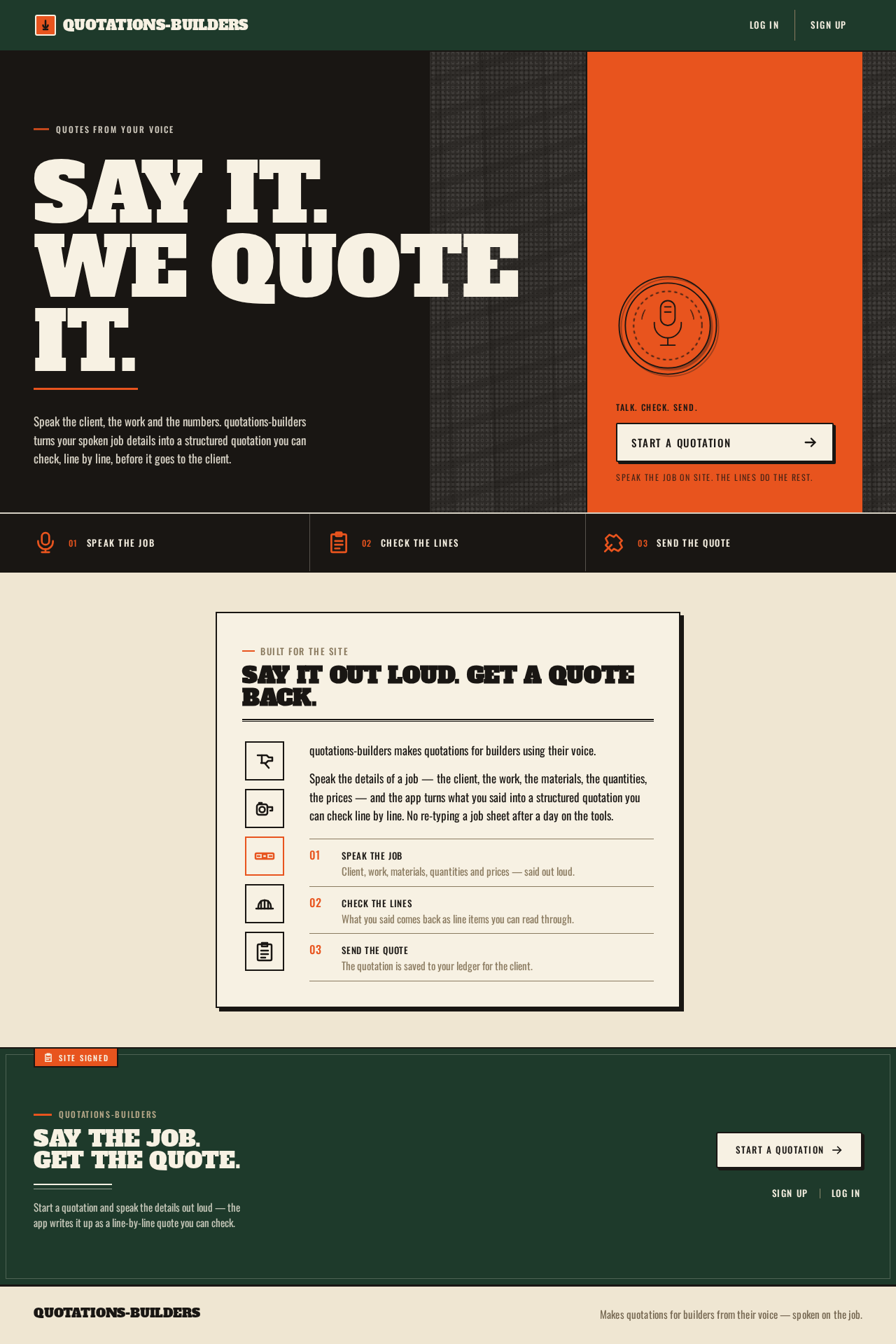
Say it.We quoteit.
Speak the client, the work and the numbers. quotations-builders turns your spoken job details into a structured quotation you can check, line by line, before it goes to the client.
- 01Speak the job
- 02Check the lines
- 03Send the quote
Built for the site
Say it out loud. Get a quote back.
quotations-builders makes quotations for builders using their voice.
Speak the details of a job — the client, the work, the materials, the quantities, the prices — and the app turns what you said into a structured quotation you can check line by line. No re-typing a job sheet after a day on the tools.
- Speak the jobClient, work, materials, quantities and prices — said out loud.
- Check the linesWhat you said comes back as line items you can read through.
- Send the quoteThe quotation is saved to your ledger for the client.
quotations-builders
Say the job. Get the quote.
Start a quotation and speak the details out loud — the app writes it up as a line-by-line quote you can check.
Say it.We quoteit.
Speak the client, the work and the numbers. quotations-builders turns your spoken job details into a structured quotation you can check, line by line, before it goes to the client.
- 01Speak the job
- 02Check the lines
- 03Send the quote
Built for the site
Say it out loud. Get a quote back.
quotations-builders makes quotations for builders using their voice.
Speak the details of a job — the client, the work, the materials, the quantities, the prices — and the app turns what you said into a structured quotation you can check line by line. No re-typing a job sheet after a day on the tools.
- Speak the jobClient, work, materials, quantities and prices — said out loud.
- Check the linesWhat you said comes back as line items you can read through.
- Send the quoteThe quotation is saved to your ledger for the client.
quotations-builders
Say the job. Get the quote.
Start a quotation and speak the details out loud — the app writes it up as a line-by-line quote you can check.
No comments yet. Be the first!