quizcraft-quiz-platform
 jay bhatt
🎯 Prompt to Build QuizCraft — AI-Powered Quiz Platform Overview Build QuizCraft, a full-stack AI-powered quiz platform for instructors to create, share, and track student performance. Instructors log in to create quizzes (AI-generated or manual), share a public link with students (no login required), and view detailed analytics. Students take quizzes via the shared link, get graded instantly, and receive their results by email. Tech Stack React + Tailwind CSS + shadcn/ui components Framer Motion for animations Recharts for analytics charts date-fns for date formatting lucide-react for icons Base44 SDK for auth, entities, and AI integration React Router for navigation Data Model (Entities) Quiz title (string, required) description (string) subject (enum: mathematics, science, history, literature, geography, technology, business, custom; default: custom) difficulty (enum: easy, medium, hard; default: medium) time_limit (number — minutes, 0 = no limit) questions (array of objects, required): question (string) type (enum: multiple_choice, true_false, short_answer) options (array of strings) correct_answer (string) explanation (string) is_public (boolean, default: true) is_active (boolean, default: true) start_date (date-time) end_date (date-time) Built-in: id, created_date, updated_date, created_by QuizAttempt quiz_id (string, required) student_name (string) quiz_owner_email (string) user_answers (array of objects, required): question_index (number) answer (string) is_correct (boolean) time_spent (number) score (number, required — percentage) total_time (number — seconds) completed_at (date-time) Built-in: id, created_date, updated_date, created_by RLS: read = creator OR quiz_owner_email OR admin; write = creator OR admin Pages (Routes) 1. Dashboard (landing page) Purpose: Instructor's home — stats, analytics, recent quizzes, quick start Header: "Welcome back, {firstName}" + "Create New Quiz" button Stats cards (4): Quizzes Created, Quiz Attempts, Average Score, Study Time — each with trend ("X this week") Detailed Analytics section: filter by quiz & time range; bar/line/pie charts showing score distributions, completion trends, hardest questions Recent Quizzes grid (2/3 width): cards with subject/difficulty badges, status (active/closed/scheduled), take/share/edit/delete actions based on ownership Quick Start (1/3 width): buttons to create quiz, view results, etc. Data loading: User.me(), Quiz.list('-created_date', 50), QuizAttempt.filter({quiz_owner_email}), QuizAttempt.filter({created_by}) 2. CreateQuiz (4-step wizard) Step 1 — Configuration (QuizCreationForm): title, description, subject, difficulty, time_limit, start/end dates, is_public, is_active → Next Step 2 — AI Generation (AIGenerationForm): textarea for source text, question count (5-20), question type (mixed/multiple_choice/true_false/short_answer), "Generate with AI" button + "Add Manually" option → calls InvokeLLM with a detailed prompt and response_json_schema returning {questions: [...]} → loads questions into editor Step 3 — Edit Questions (QuestionEditor): add/edit/delete/reorder questions, set type/options/correct_answer/explanation → Preview Step 4 — Preview (PreviewQuiz): full quiz preview → Save (create or update if editing via ?id= param) Progress indicator: 4 numbered circles with connecting lines, current step highlighted with gradient Back button: navigates between steps Editing mode: loads existing quiz when ?id= present in URL 3. TakeQuiz (student-facing, no login required for students but requires auth) States: loading, start, in_progress, completed, already_taken, unavailable Start screen (QuizStartScreen): quiz title/description, question count, time limit; student enters name + optional email → Start In progress (QuestionDisplay): one question at a time, progress bar, timer (if set), answer input (radio for MCQ/T-F, text for short answer), Next button Completion: grades all answers, saves QuizAttempt, shows results screen with score, correct/incorrect breakdown, explanations Availability checks: is_active, start_date not yet reached, end_date passed → shows "Not Available" message Already taken check: if QuizAttempt exists for this quiz + user → shows "Already Completed" with previous score Email notification: if student provided email, sends result email via SendEmail (pass = score ≥ 70%) Grading logic (shared utility): MCQ & true/false: exact match (case-insensitive, trimmed) Short answer: Levenshtein similarity ≥ 40% 4. Results (instructor's personal history) Purpose: Instructor views their own quiz-taking history Stats: average score, best score, total attempts List: chronological attempts with quiz title, date, score badge (green ≥70%, amber 50-69%, red <50%), time taken 5. QuizResults (per-quiz detailed results — instructor only) Access control: only quiz owner or admin can view; others redirect to Dashboard Quiz info card: subject, difficulty, time limit, student count Share button: copies TakeQuiz?id={quizId} URL to clipboard Download CSV: exports all attempts as CSV (name, email, score, time, date) Statistics (QuizStatistics): average score, pass rate, score distribution chart Student results list (StudentResultsList): table of each student's name, score, time, date, pass/fail badge Layout (Sidebar) QuizCraft branding with BookOpen icon + gradient Nav items: Dashboard, Create Quiz, My Results (with icons) Quick Stats section: Quizzes Created count, Average Score Active state: gradient highlight on current route Responsive: sidebar collapses on mobile, hamburger header shown Theme: purple/blue gradient background (from-slate-50 via-blue-50 to-purple-50), glass cards, rounded-xl Embedded Chatbase widget: loaded via script in index.html for in-app support AI Generation Details Uses InvokeLLM with a prompt specifying: content, question count, difficulty, subject, question type response_json_schema returns { questions: [{question, type, options, correct_answer, explanation}] } Questions load into editor for review before saving Model: default (no URL); gemini_3_flash when URL-based (with add_context_from_internet: true) Design System Primary gradient: linear-gradient(135deg, hsl(250,84%,60%) 0%, hsl(260,80%,65%) 100%) — used on buttons, icons, active states Background: bg-gradient-to-br from-slate-50 via-blue-50 to-purple-50 Glass cards: bg-white/95 backdrop-blur border-white/20 Fonts: default sans Animations: Framer Motion — fade + slide on mount, staggered delays Badges: subject (blue), difficulty (purple), status (green/amber/red) Responsive: mobile-first, grid breakpoints (1 → 2 → 3 → 4 cols) Key Behaviors Students don't need accounts — they access via share link + enter name/email One attempt per student per quiz (enforced by checking existing attempts) Quizzes have scheduling (start/end dates) and active toggle Instructor sees only their own quizzes and analytics CSV export of all student results per quiz Email notifications sent to students on completion (if email provided) You can use your own tech stack and all


Comments (0)
Sign in to leave a comment
Project Tasks
119 tasksGenerate system requirement document
Generate personas & user flows
Create flow for Instructor
Create flow for Student
Landing
Fix Landing review findings: The shared quiz-link input is too narrow to show its… (+1 more)
Landing / Navigation
Landing / Hero Panel
Landing / Audience Entry
Landing / Footer
Fix Landing: The shared quiz-link input is too narrow to show its placeholder at mobile width…
Fix Landing: The student entry is unusable when no quiz ID is already in the URL: prevents opening…
Navigation
Footer
Login
Login / Navigation Slot
Login / Access Panel
Login / Student Path Panel
Login / Footer Slot
Dashboard
Fix Dashboard review finding: Q1 as reviewed now: In…
Fix Dashboard review finding: The hero orb overlaps and obscures supporting copy in…
Dashboard / Sidebar
Dashboard / Navigation
Dashboard / Welcome Hero
Dashboard / Stats Row
Dashboard / Analytics Band
Dashboard / Recent Quizzes
Dashboard / Quick Start
Dashboard / Footer
Fix Dashboard: The hero orb overlaps and obscures supporting copy in Dashboard Welcome Hero.jsx /…
Create Quiz
Create Quiz / Navigation Slot
Create Quiz / Wizard Panel
Create Quiz / Authoring Guide
Create Quiz / Footer Slot
Take Quiz
Fix Take Quiz review findings: Q1 as reviewed now: Quiz content failed to load; (+1 more)
Fix Take Quiz: Quiz content failed to load; the student-facing quiz stage is replaced by an error state…
Fix Take Quiz: The core Take Quiz surface is not verifiable from the supplied source — the file is…
Take Quiz / Header
Take Quiz / Stage
Take Quiz / Preflight Guide
Take Quiz / Footer
Results
Fix Results review finding: Tablet results content is incorrectly constrained to the…
Results / App Sidebar
Results / Content
Results / Footer
Fix Results: Tablet results content is incorrectly constrained to the desktop sidebar column width…
Quiz Results
Fix Quiz Results review finding: Q2 as reviewed now…
Fix Quiz Results review findings: frontend/src/components/Quiz Results Info Band.jsx: the… (+3 more)
Fix Quiz Results: Access control is hardcoded to two literal emails — / and . Any quiz whose is a…
Quiz Results / Navigation
Quiz Results / Info Band
Quiz Results / Statistics Band
Quiz Results / Student Table
Quiz Results / Footer
Fix Quiz Results: The page's primary quiz identity is gated on a URL query parameter that no in-page…
Fix Quiz Results: The required Download CSV control is absent — the info band exposes only; no CSV export…
Fix Quiz Results: The statistics band reads the quiz id from the URL independently ( → ) and falls back to…
App Sidebar
Retry Failed Pages
Architecture
Create backend_modules diagram
Create er_diagram diagram
Create frontend_modules diagram
Create sequence diagram
Create service_network diagram
Workspace task plan
Gate quiz access by availability and prior attempts
Author, generate, preview, and save quizzes
Show instructor personal attempt history with states
Instructor login and protected-route identity gate
Record graded student attempts with one-attempt enforcement
Anonymous quiz-taking flow with instant grading and result email
Dashboard data, quiz card actions, and sidebar navigation
Instructor dashboard analytics scoped to own quizzes
Instructor dashboard stats, analytics filters, and scoped quiz history
Per-quiz results access, statistics, and share link
AI quiz generation, quiz save, edit load, and share link
Grading results, personal stats, and result-email pass threshold
Quiz attempt lifecycle: availability, one attempt, save, and email
Results tables, CSV export, share copy, and pass/fail badges
Result email delivery with pass threshold
Dashboard quiz management, analytics scope, and create/edit navigation
Instructor quiz builder: configure, generate, edit, preview, and save
Students take a shared quiz and get an instant graded score
Email quiz results to students who shared an address
One attempt per student, with timer expiry and invalid-link handling
Instructor sign-in gates the protected workspace
Per-quiz results view with info card, statistics, and student table
Owner-or-admin results access with CSV export
Instructor dashboard: own quizzes, analytics, sharing, and deletion
Student quiz-taking runtime: availability, start, one-attempt, grading, and result email
Instructor quiz authoring runtime: configure, AI-generate, edit, preview, and save
Instructor dashboard data: owned quizzes, attempt analytics, filters, and share
Quiz persistence and publishing: creator/admin writes, 5–20 AI bound, shareable save
Per-quiz results runtime: owner/admin access, student table, statistics, and CSV export
Embed the Chatbase support widget via index.html script
Application-owned instructor authentication
Authorization rules for quiz ownership, results access, and attempt records
Provide in-app support through the embedded Chatbase widget
Classify quiz scores as pass or fail at 70%
Load the Chatbase support widget on application load
Enforce Quiz Attempt read and write access rules
Make the Chatbase widget available to visitors
Grade short answers by Levenshtein similarity
Call the AI generation service during the AI generation step
Show an instructor their personal quiz-taking history
Compute per-quiz statistics for the results view
Wire the student quiz page to live quiz data and grading
Make instructor sign-in live on the Login page
Wire the quiz creation wizard to AI generation and saving
Wire the Results page to live attempt history
Wire per-quiz results, access control, and CSV export
Finish Landing navigation, motion, and support widget
Wire the Dashboard to live quizzes, analytics, and actions
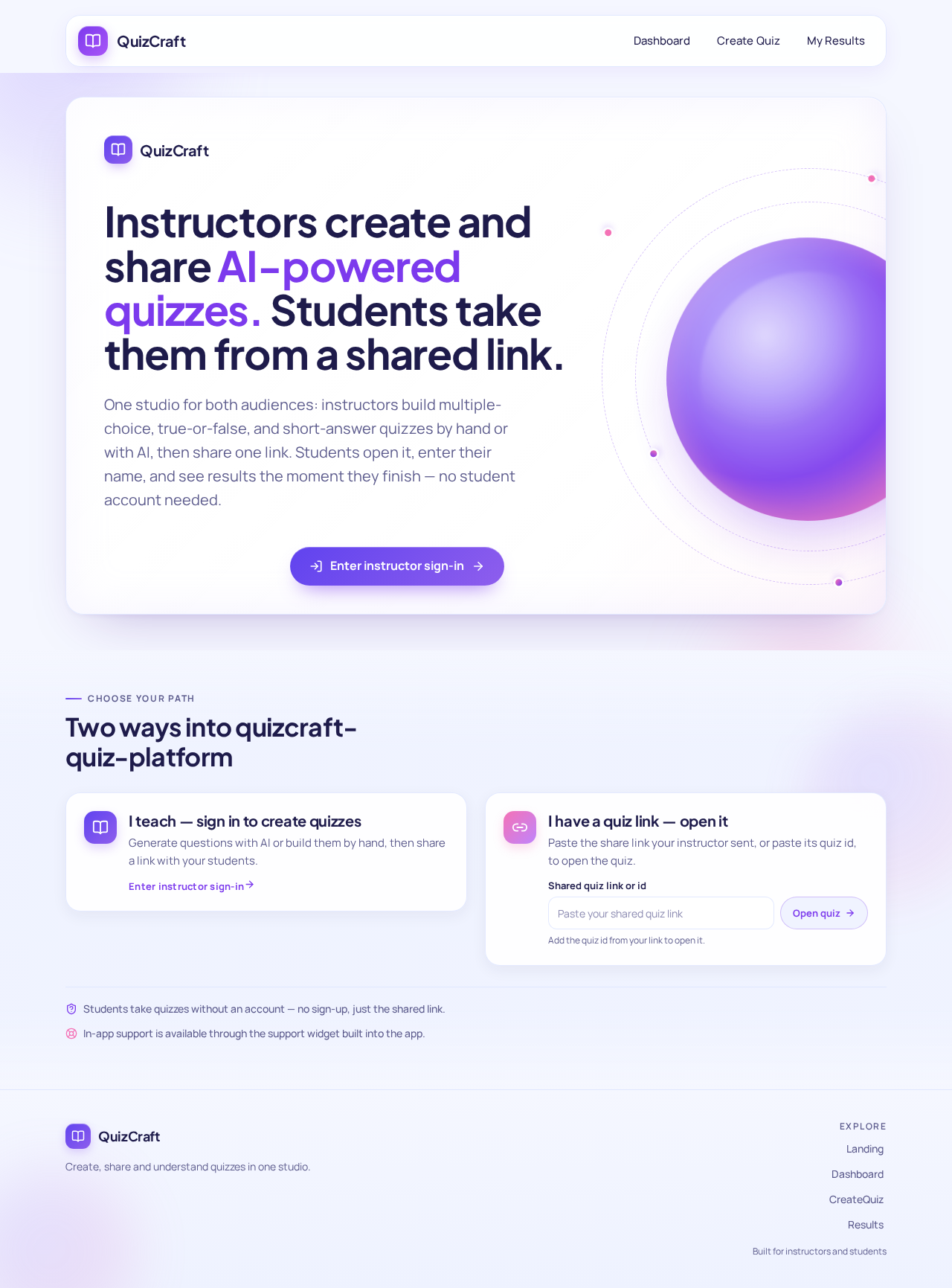
Instructors create and share AI-powered quizzes. Students take them from a shared link.
One studio for both audiences: instructors build multiple-choice, true-or-false, and short-answer quizzes by hand or with AI, then share one link. Students open it, enter their name, and see results the moment they finish — no student account needed.
Two ways into quizcraft-quiz-platform
Students take quizzes without an account — no sign-up, just the shared link.
In-app support is available through the support widget built into the app.
Instructors create and share AI-powered quizzes. Students take them from a shared link.
One studio for both audiences: instructors build multiple-choice, true-or-false, and short-answer quizzes by hand or with AI, then share one link. Students open it, enter their name, and see results the moment they finish — no student account needed.
Two ways into quizcraft-quiz-platform
Students take quizzes without an account — no sign-up, just the shared link.
In-app support is available through the support widget built into the app.
No comments yet. Be the first!