project-a2a6dcd2

byvoyivat592@lasttea.com

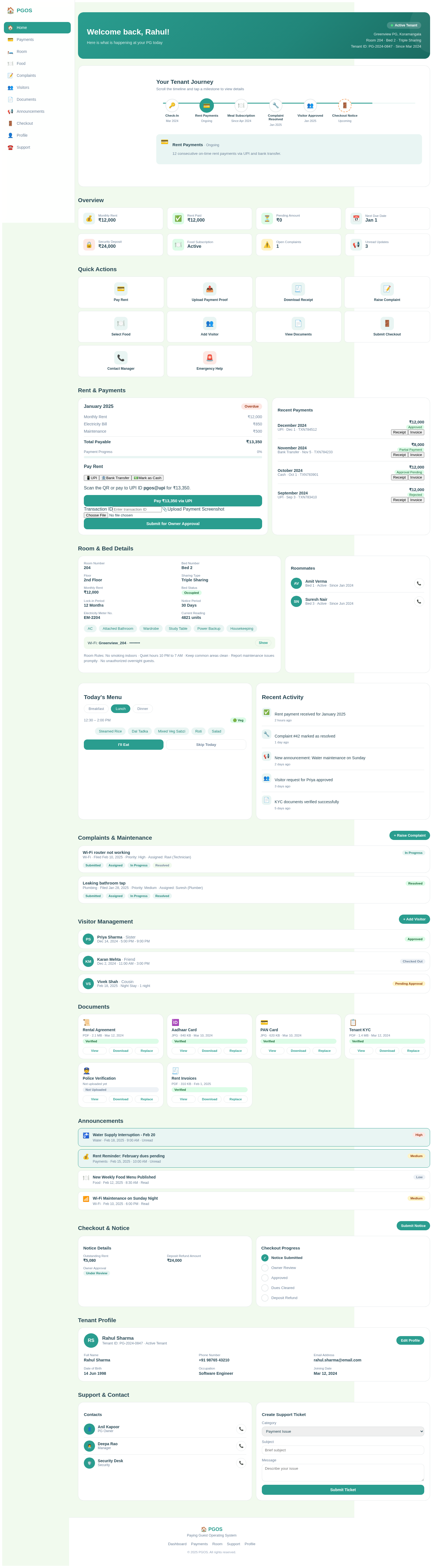
Design a complete **single-page PGOS Tenant Dashboard UI only** for a PG, hostel, or co-living management SaaS. Create a premium, modern, mobile-first dashboard with a rich but clean interface. Keep every tenant feature visible within one scrollable page using cards, tabs, expandable panels, drawers, modals, and quick-action sections. Do not build backend, database, API, login, or real functionality. This request is only for UI design. ### Tenant Header Show: * Tenant profile photo * Tenant full name * PG or property name * Room number * Bed number * Sharing type * Tenant ID * Joining date * Current occupancy status * Notification icon * Help icon * Profile menu Add a welcome message such as: “Good morning, Yogesh. Here is your PG update for today.” ### Dashboard Summary Cards Include animated summary cards for: * Monthly rent * Rent paid * Pending rent * Next due date * Security deposit * Electricity charges * Food subscription status * Open complaints * Pending visitor requests * Unread announcements Use progress bars, percentage indicators, icons, payment status badges, and small trend information. ### Quick Actions Add prominent quick-action buttons for: * Pay Rent * Upload Payment Proof * Download Receipt * Raise Complaint * Select Food * Add Visitor * View Documents * Submit Checkout Notice * Contact Manager * Emergency Help Use modern icons, hover animations, press effects, tooltips, and responsive card layouts. ### Rent and Payments Section Show a detailed rent card containing: * Monthly rent amount * Current month * Amount paid * Pending amount * Due date * Late fee * Electricity bill * Maintenance charges * Additional charges * Total payable amount * Payment status * Payment progress bar Add UI options for: * Pay through UPI * Pay through bank transfer * Mark payment as cash * Upload payment screenshot * Enter transaction ID * Submit payment for owner approval Display payment statuses: * Paid * Pending * Overdue * Partial Payment * Approval Pending * Rejected Add recent payment history with: * Month * Amount * Payment method * Payment date * Transaction ID * Approval status * Download receipt * Download invoice * View payment details ### Room and Bed Details Create a room information card showing: * Room number * Bed number * Floor * Sharing type * Monthly rent * Room images * Room amenities * Bed status * Lock-in period * Notice period * Wi-Fi name * Wi-Fi password hidden with show option * Electricity meter number * Current electricity reading * Room rules Show roommate cards with: * Profile image * Name * Bed number * Phone option * Occupancy status * Joining date ### Food and Meal Section Show today’s and weekly food menu. Include: * Breakfast * Lunch * Evening snacks * Dinner * Meal timings * Dish images * Vegetarian or non-vegetarian badge Add Eat or Skip selection for every meal. Show: * Meals selected today * Meals skipped * Weekly food calendar * Food subscription status * Special meal request * Dietary preference * Food feedback rating * Report food issue ### Complaints and Maintenance Create a complaint management section with: * Raise New Complaint button * Complaint category * Complaint title * Description * Upload image or video * Priority level * Preferred visit time * Complaint date * Assigned staff * Owner response * Resolution date * Complaint timeline Complaint categories: * Plumbing * Electricity * Cleaning * Wi-Fi * Food * Furniture * Security * Roommate issue * Payment issue * Other Complaint statuses: * Submitted * Open * Assigned * In Progress * Resolved * Reopened * Closed Show active complaints and recent complaint history. ### Visitor Management Include a visitor section with: * Add Visitor button * Visitor name * Phone number * Relationship * Visit date * Expected entry time * Expected exit time * ID proof option * Vehicle number * Night-stay request * Number of nights * Additional visitor charge * Special note Visitor statuses: * Pending Approval * Approved * Rejected * Checked In * Checked Out * Overstayed Show upcoming visitors and visitor history. ### Documents Section Display document cards for: * Rental agreement * Aadhaar card * PAN card * Passport * Driving licence * Tenant KYC * Police verification * Payment receipts * Rent invoices * Security deposit receipt * House rules * PG policy * Checkout documents Each document card should show: * Document name * Upload date * Verification status * File type * File size * View button * Download button * Replace document option Document statuses: * Verified * Pending Verification * Rejected * Expired * Not Uploaded ### Announcements and Notifications Create an announcements section for: * Rent reminders * Payment confirmation * Food menu updates * Water interruption * Electricity maintenance * Wi-Fi maintenance * Cleaning schedule * Festival events * Safety notices * Visitor approval * Complaint updates * PG rule changes * Emergency announcements Show priority, date, time, read status, and announcement category. ### Checkout and Notice Request Add a checkout section containing: * Submit Notice button * Preferred checkout date * Reason for leaving * Notice period * Remaining notice days * Outstanding rent * Pending electricity charges * Room inspection date * Key handover status * Deposit refund amount * Refund deduction * Final refund amount * Refund account details * Owner approval status Show checkout progress as a timeline: * Notice Submitted * Owner Review * Approved * Room Inspection * Dues Cleared * Key Handover * Deposit Refund * Checkout Completed ### Tenant Profile Create a detailed profile section showing: * Full name * Profile photo * Phone number * Alternate phone number * Email address * Date of birth * Gender * Blood group * Occupation * Company or college * Permanent address * Current address * Aadhaar number * PAN number * Joining date * Emergency contact * Relationship with emergency contact * Emergency phone number Add Edit Profile and Upload Document buttons. ### Support and Contact Section Show: * PG owner name * Owner phone number * Manager name * Manager phone number * Security contact * Cleaning staff contact * Emergency contact * WhatsApp support * Call support * Email support * Create support ticket Add support ticket details: * Ticket category * Subject * Message * Priority * Attachment * Ticket status * Last response ### Recent Activity Add a timeline showing recent tenant activity such as: * Rent paid * Receipt downloaded * Complaint submitted * Visitor approved * Meal skipped * Document verified * Announcement viewed * Checkout request updated ### Navigation For desktop, use a modern left sidebar with: * Dashboard * Payments * Room * Food * Complaints * Visitors * Documents * Announcements * Checkout * Profile * Support For mobile, use a fixed bottom navigation with: * Home * Payments * Food * Complaints * Profile Keep all content on one page. Sidebar and bottom navigation should scroll to the selected section instead of opening another page. ### UI Style Use: * Modern SaaS dashboard design * Premium typography * Soft gradient background * White and glass-effect cards * Rounded corners * Soft shadows * Clean spacing * Status badges * Modern charts * Progress rings * Animated counters * Skeleton loading states * Empty-state illustrations * Smooth scrolling * Hover effects * Card entrance animations * Button press animations * Micro-interactions * Notification animations * Responsive transitions Use a professional color system with clear status colors for success, warning, pending, rejected, overdue, and information. The design must feel rich and premium but should not look crowded. Prioritize readability, clear hierarchy, accessibility, mobile responsiveness, and simple navigation. Use realistic sample tenant data to visually demonstrate every section. Do not create separate pages. Do not add backend functionality. Generate only the complete one-page Tenant Dashboard UI design.

DashboardRoomAnnouncementsDocuments
Dashboard

Comments (0)

No comments yet. Be the first!

Project Tasks

No tasks generated yet.

Tasks will appear here as requirements are defined.

Dashboard design preview
Dashboard: View Summary
Dashboard: Quick Actions
Payments: View Rent Details
Payments: Pay Rent
Payments: View History
Room: View Room Details
Food: Select Meal
Complaints: Raise Complaint
Visitors: Add Visitor
Documents: View Documents
Announcements: View Announcements
Checkout: Submit Notice
Profile: Edit Profile
Support: Contact Manager
Dashboard design preview
Dashboard: View Summary
Dashboard: Quick Actions
Payments: View Rent Details
Payments: Pay Rent
Payments: View History
Room: View Room Details
Food: Select Meal
Complaints: Raise Complaint
Visitors: Add Visitor
Documents: View Documents
Announcements: View Announcements
Checkout: Submit Notice
Profile: Edit Profile
Support: Contact Manager