project-9189d428
 Diya Trivedi
Build a modern, premium AI-powered Travel Planner web application called "VoyageAI". The application should help users discover destinations, plan trips, manage bookings, track travel expenses, and receive AI-powered travel recommendations. Use a clean, modern SaaS design inspired by Airbnb, Stripe Dashboard, Linear, and Notion. The interface should include rounded cards, soft shadows, modern typography, subtle animations, responsive layouts, and a consistent design system across every page.


Comments (0)
Sign in to leave a comment
Project Tasks
95Define Database Schema
As a developer, I need to define the database schema for users, trips, bookings, and expenses to support the application's core functionalities.
Implement CTASection for Landing
As a frontend developer, implement the CTASection on the Landing page. This section includes a call-to-action with a glowing effect, an emoji, and two buttons linking to the Login and Explore pages. Ensure the buttons are styled with primary and ghost button classes. This section is accessible by both Admin and Traveler personas. Page access: shared by all personas (Admin, Traveler).
Implement DestinationsSection for Landing
As a frontend developer, implement the DestinationsSection on the Landing page. This section displays a grid of popular destinations with details such as name, tagline, rating, price, and duration. Each destination card features a gradient background and an emoji. This section is accessible by both Admin and Traveler personas. Page access: shared by all personas (Admin, Traveler).
Implement FeaturesSection for Landing
As a frontend developer, implement the FeaturesSection on the Landing page. This section showcases various features of the application, each with an icon, title, and description. The features include Destination Discovery, Smart Trip Planner, Itinerary Management, Booking Management, Expense Tracking, and AI Travel Assistant. This section is accessible by both Admin and Traveler personas. Page access: shared by all personas (Admin, Traveler).
Implement Footer for Landing
As a frontend developer, implement the Footer on the Landing page. This section includes links categorized under Product, Travel, and Company, with conditional visibility based on persona access. It also features brand information and social media links. This component may already exist from a previous page. Page access: shared by all personas (Admin, Traveler).
Implement HeroSection for Landing
As a frontend developer, implement the HeroSection on the Landing page. This section features a 3D globe with interactive pins representing different destinations. It uses @react-three/fiber for rendering and gsap for animations. The section is dynamic and responds to scroll events. This section is accessible by both Admin and Traveler personas. Page access: shared by all personas (Admin, Traveler).
Implement Navbar for Landing
As a frontend developer, implement the Navbar on the Landing page. This component includes a brand logo, navigation links, and a hamburger menu for mobile responsiveness. The Navbar changes style when scrolled. Links to restricted pages must be conditionally shown based on persona access. This component may already exist from a previous page. Page access: shared by all personas (Admin, Traveler).
Implement StatsSection for Landing
As a frontend developer, implement the StatsSection on the Landing page. This section displays key statistics about the application, such as the number of active travelers, destinations covered, satisfaction rate, and AI support availability. This section is accessible by both Admin and Traveler personas. Page access: shared by all personas (Admin, Traveler).
Implement TFA_CodeInput for 2FA
As a frontend developer, implement the TFA_CodeInput section for the 2FA page, which includes a 6-digit code input field with state management for user input, error handling, and keyboard navigation. The section uses React hooks for managing input focus and state, and is accessible by Traveler persona only. Page access: Traveler only.
Implement TFA_ResendAndOptions for 2FA
As a frontend developer, implement the TFA_ResendAndOptions section for the 2FA page, which includes a resend button with a countdown timer and options to remember the device. The section uses React hooks for managing state and effects, and is accessible by Traveler persona only. Page access: Traveler only.
Implement TFA_SupportLinks for 2FA
As a frontend developer, implement the TFA_SupportLinks section for the 2FA page, which includes expandable FAQ items and troubleshooting tips using gsap for animations. The section is accessible by Traveler persona only and provides support links and information for users experiencing issues with 2FA. Page access: Traveler only.
Implement DashboardSidebar for Dashboard
As a frontend developer, implement the DashboardSidebar section which includes navigation items with icons and active state management. Ensure the sidebar can be toggled open/closed and overlays the main content when open. This section is accessible by Admin and Traveler personas. Page access: shared by all personas (Admin, Traveler).
Implement UpcomingTripCard for Dashboard
As a frontend developer, implement the UpcomingTripCard section which displays details of an upcoming trip including name, destination, image, dates, and status. It should handle an empty state when no trips are available. This section is accessible by Admin and Traveler personas. Page access: shared by all personas (Admin, Traveler).
Implement DashboardStatsGrid for Dashboard
As a frontend developer, implement the DashboardStatsGrid section which displays various statistics such as total trips, active bookings, total expenses, and AI recommendations. Each stat includes an icon, label, value, and optional trend or detail. This section is accessible by Admin and Traveler personas. Page access: shared by all personas (Admin, Traveler).
Implement AIRecommendationsList for Dashboard
As a frontend developer, implement the AIRecommendationsList section which fetches and displays a list of AI-generated travel recommendations. It includes a loading state and handles empty results. This section is accessible by Traveler persona only. Page access: shared by all personas (Admin, Traveler).
Implement AIRecommendationActions for Dashboard
As a frontend developer, implement the AIRecommendationActions section which provides action buttons to view all recommendations and save them to the itinerary. This section is accessible by Traveler persona only. Page access: shared by all personas (Admin, Traveler).
Implement RecentActivityTimeline for Dashboard
As a frontend developer, implement the RecentActivityTimeline section which displays a timeline of recent activities with a header and a link to view all activities. This section is accessible by Admin and Traveler personas. Page access: shared by all personas (Admin, Traveler).
Implement RecentActivityDetail for Dashboard
As a frontend developer, implement the RecentActivityDetail section which displays details of a specific activity including an icon, description, timestamp, and an optional link. This section is accessible by Admin and Traveler personas. Page access: shared by all personas (Admin, Traveler).
Implement BookingsPreview for Dashboard
As a frontend developer, implement the BookingsPreview section which displays a list of active bookings with icons, names, dates, and statuses. It includes a link to view all bookings. This section is accessible by Admin and Traveler personas. Page access: shared by all personas (Admin, Traveler).
Implement ExpenseTrackerSidebar for ExpenseTracker
As a frontend developer, implement the ExpenseTrackerSidebar section which provides filters for trips, categories, and date ranges. It includes a toggle for categories, a date range picker, and a clear filters button. This section is interactive and allows users to filter expenses based on selected criteria. It is accessible by Admin and Traveler personas. Page access: shared by all personas (Admin, Traveler).
Implement ExpenseTrackerStats for ExpenseTracker
As a frontend developer, implement the ExpenseTrackerStats section which displays statistics such as Total Spent, Budget Remaining, Avg per Day, and Trip Count. Each stat includes a label, value, and trend indicator. This section uses dynamic data to reflect real-time expense tracking and is accessible by Admin and Traveler personas. Page access: shared by all personas (Admin, Traveler).
Implement ExpenseTrackerSearch for ExpenseTracker
As a frontend developer, implement the ExpenseTrackerSearch section which includes a search input field with an SVG icon. It allows users to search expenses by description, category, or amount. The section includes a clear button to reset the search term. This feature is accessible by Admin and Traveler personas. Page access: shared by all personas (Admin, Traveler).
Implement ExpenseTrackerSortExport for ExpenseTracker
As a frontend developer, implement the ExpenseTrackerSortExport section which provides sorting options for expenses and an export to CSV feature. The sorting is based on date, amount, and category, and the export function generates a CSV file of the filtered data. This section is accessible by Admin and Traveler personas. Page access: shared by all personas (Admin, Traveler).
Implement ExpenseTrackerTable for ExpenseTracker
As a frontend developer, implement the ExpenseTrackerTable section which displays a table of expenses with columns for Date, Description, Category, Amount, Payment, and Trip. It includes actions for editing and deleting expenses, and supports row expansion for additional details. This section is accessible by Admin and Traveler personas. Page access: shared by all personas (Admin, Traveler).
Implement ExpenseTrackerPagination for ExpenseTracker
As a frontend developer, implement the ExpenseTrackerPagination section which provides pagination controls for navigating through expenses. It includes page numbers, next/previous buttons, and a dropdown to select rows per page. This section is accessible by Admin and Traveler personas. Page access: shared by all personas (Admin, Traveler).
Implement ExpenseTrackerCharts for ExpenseTracker
As a frontend developer, implement the ExpenseTrackerCharts section which includes a PieChart and LineChart to visualize spending by category and over time. The PieChart uses SVG paths to display slices with tooltips, and the LineChart plots cumulative spending. This section is accessible by Admin and Traveler personas. Page access: shared by all personas (Admin, Traveler).
Implement AIAssistant_SidebarHistory for AIAssistant
As a frontend developer, implement the AIAssistant_SidebarHistory section which displays a list of past conversations with search functionality. It includes state management for collapsing the sidebar and filtering conversations based on search input. This section is accessible by the Traveler persona only. Page access: Traveler only.
Implement AIAssistant_SidebarShortcuts for AIAssistant
As a frontend developer, implement the AIAssistant_SidebarShortcuts section which provides quick suggestion buttons for common travel tasks. Each button triggers an action when clicked. This section is accessible by the Traveler persona only. Page access: Traveler only.
Implement AIAssistant_MessageList for AIAssistant
As a frontend developer, implement the AIAssistant_MessageList section which displays a list of messages with smooth scrolling to the latest message. It uses refs and effects to manage scrolling and includes conditional rendering for loading states. This section is accessible by the Traveler persona only. Page access: Traveler only.
Implement AIAssistant_MessageContent for AIAssistant
As a frontend developer, implement the AIAssistant_MessageContent section which dynamically renders different types of message content such as itineraries, recommendation lists, and price tables based on the content type. This section is accessible by the Traveler persona only. Page access: Traveler only.
Implement AIAssistant_MessageActions for AIAssistant
As a frontend developer, implement the AIAssistant_MessageActions section which provides actions for copying message text and giving feedback through thumbs up/down buttons. It uses state to manage copy status and feedback selection. This section is accessible by the Traveler persona only. Page access: Traveler only.
Implement AIAssistant_QueryInput for AIAssistant
As a frontend developer, implement the AIAssistant_QueryInput section which includes a textarea for user input, a file attachment button, and a send button. It manages input state, auto-grows the textarea, and handles file uploads. This section is accessible by the Traveler persona only. Page access: Traveler only.
Implement AIAssistant_SuggestionChips for AIAssistant
As a frontend developer, implement the AIAssistant_SuggestionChips section which displays a horizontal scrollable list of suggestion chips. Each chip triggers an action when clicked. This section is accessible by the Traveler persona only. Page access: Traveler only.
Implement ProfileSidebar for Profile
As a frontend developer, implement the ProfileSidebar section for the Profile page. This section includes navigation links to various profile settings such as Personal Information, Avatar & Photo, Travel Preferences, and more. It features an active state for the current section and a close button for mobile views. Ensure the sidebar is styled correctly and accessible to both Admin and Traveler personas. Page access: shared by all personas (Admin, Traveler).
Implement PersonalInformationSection for Profile
As a frontend developer, implement the PersonalInformationSection for the Profile page. This section allows users to edit their personal information such as full name, email, phone, location, date of birth, and bio. It includes form validation, error handling, and save/cancel functionality. Ensure the section is styled according to the design and accessible to both Admin and Traveler personas. Page access: shared by all personas (Admin, Traveler).
Implement AvatarUploadSection for Profile
As a frontend developer, implement the AvatarUploadSection for the Profile page. This section allows users to upload a profile photo with drag-and-drop functionality, file validation for supported formats and size, and preview before upload. It includes error handling and success notifications. Ensure the section is styled correctly and accessible to both Admin and Traveler personas. Page access: shared by all personas (Admin, Traveler).
Implement TravelPreferencesSection for Profile
As a frontend developer, implement the TravelPreferencesSection for the Profile page. This section allows users to set their travel preferences including season, duration, accommodations, budget range, dietary restrictions, and accessibility needs. It includes form handling, state management, and save functionality. Ensure the section is styled according to the design and accessible to both Admin and Traveler personas. Page access: shared by all personas (Admin, Traveler).
Implement NotificationSettingsSection for Profile
As a frontend developer, implement the NotificationSettingsSection for the Profile page. This section allows users to manage notification preferences for various categories and set the frequency of notifications. It includes toggle switches, save functionality, and a test notification feature. Ensure the section is styled correctly and accessible to both Admin and Traveler personas. Page access: shared by all personas (Admin, Traveler).
Implement PasswordChangeSection for Profile
As a frontend developer, implement the PasswordChangeSection for the Profile page. This section allows users to change their password with fields for current, new, and confirm password. It includes password strength calculation, validation, and save functionality. Ensure the section is styled according to the design and accessible to both Admin and Traveler personas. Page access: shared by all personas (Admin, Traveler).
Implement TwoFactorAuthSection for Profile
As a frontend developer, implement the TwoFactorAuthSection for the Profile page. This section allows Traveler personas to manage two-factor authentication settings, including enabling/disabling 2FA, viewing backup codes, and managing trusted devices. It includes a setup wizard for enabling 2FA. Ensure the section is styled correctly and accessible only to Traveler personas. Page access: shared by all personas (Admin, Traveler).
Implement SecuritySessionsSection for Profile
As a frontend developer, implement the SecuritySessionsSection for the Profile page. This section allows users to view active sessions and login history, with the ability to sign out of sessions. It includes alerts for failed login attempts. Ensure the section is styled according to the design and accessible to both Admin and Traveler personas. Page access: shared by all personas (Admin, Traveler).
fvfv
fvfd
Create Database Migrations
As a developer, I need to create database migrations using Alembic to manage schema changes over time.
Implement Navbar for Login
As a frontend developer, implement the Navbar section for the Login page. This component includes a responsive navigation bar with a brand logo, links to various pages such as Explore, Trip Planner, Dashboard, AI Assistant, and Login. It features a hamburger menu for mobile views, which toggles open and closed state using the `menuOpen` state. The Navbar also changes style when the page is scrolled, using the `scrolled` state. Ensure that links to restricted pages are conditionally shown based on the user's persona. This component may already exist from the Landing page. Page access: shared by all personas (Admin, Traveler).
Create Travel API Endpoints
As a Backend Developer, create API endpoints for destination exploration, trip planning, itinerary management, booking management, and expense tracking. Ensure endpoints are secure and optimized for performance.
Define Travel Data Models
As a Data Engineer, define and implement data models for destinations, itineraries, bookings, and expenses. Ensure models are optimized for queries and include necessary indexes.
Develop API Endpoints
As a backend developer, I need to develop API endpoints for user authentication, trip management, booking management, and expense tracking.
Implement LoginFormCard for Login
As a frontend developer, implement the LoginFormCard section for the Login page. This component includes a form with email and password fields, validation logic for both fields, and a submit handler that simulates an asynchronous login API call. It uses state hooks for managing form data, validation errors, loading state, and success state. On successful login, it displays a success message and a redirect link to the Dashboard. Ensure the form is accessible to both Admin and Traveler personas. Page access: shared by all personas (Admin, Traveler).
Implement LoginSocialDivider for Login
As a frontend developer, implement the LoginSocialDivider section for the Login page. This component is a simple divider with the text 'or' to visually separate the traditional login form from social login options. It should be styled to match the overall design of the Login page. Page access: shared by all personas (Admin, Traveler).
Implement LoginSocialButtons for Login
As a frontend developer, implement the LoginSocialButtons section for the Login page. This component includes buttons for social login options such as Google, GitHub, and Apple. Each button includes an SVG icon and a label. Ensure the buttons are styled consistently with the Login page and are accessible to both Admin and Traveler personas. Page access: shared by all personas (Admin, Traveler).
Implement LoginFooterLinks for Login
As a frontend developer, implement the LoginFooterLinks section for the Login page. This component includes links for signing up and recovering a forgotten password. Ensure the links are styled appropriately and are accessible to both Admin and Traveler personas. Page access: shared by all personas (Admin, Traveler).
Implement Footer for Login
As a frontend developer, implement the Footer section for the Login page. This component includes links categorized under Product, Travel, and Company, along with social media links. Ensure the footer is styled consistently with the rest of the application and is accessible to both Admin and Traveler personas. This component may already exist from the Landing page. Page access: shared by all personas (Admin, Traveler).
Implement TFA_Hero for 2FA
As a frontend developer, implement the TFA_Hero section for the 2FA page, which includes a 3D animated shield lock scene using @react-three/fiber and gsap for animations. The section features a floating lock with components like ShieldGeometry, LockBody, LockShackle, and Keyhole, all animated to rotate subtly. This section is accessible by Traveler persona only and must integrate with the Login page's Navbar component. Page access: Traveler only.
Implement DashboardHeader for Dashboard
As a frontend developer, implement the DashboardHeader section which includes a toggle button for the sidebar, breadcrumb navigation, a welcome message, and action buttons for 'New Trip' and 'View Recommendations'. Ensure the date is dynamically displayed and links are conditionally shown based on persona access. This section is accessible by Admin and Traveler personas. Page access: shared by all personas (Admin, Traveler).
Implement Authentication and RBAC
As a backend developer, I need to implement authentication and role-based access control to secure the application and ensure proper access levels for Admin and Traveler personas.
Integrate AI Services
As a developer, I need to integrate AI services using LiteLLM and Azure OpenAI to provide AI-powered travel recommendations.
Implement ExploreHero for Explore
As a frontend developer, implement the ExploreHero section for the Explore page. This section includes a search input for destinations, cities, or countries, with a search icon and a filter button that appears on mobile. The section features animated orbs and a title with an accent span. Ensure the search input updates the searchQuery state and the filter button toggles the filter drawer. This page is accessible by Traveler persona only. Page access: Traveler only.
Setup Frontend Shell
As a frontend developer, I need to set up the frontend shell with routing and navigation to support the application's page structure.
QA Critical Workflows
As a QA engineer, I need to test critical workflows such as user authentication, trip planning, and AI recommendations to ensure they function correctly.
Implement ExploreFilterBar for Explore
As a frontend developer, implement the ExploreFilterBar section for the Explore page. This section allows users to filter destinations by region and activity through toggle buttons. It includes an advanced filters button that triggers additional filter options. Ensure the filters update the state correctly. This page is accessible by Traveler persona only. Page access: Traveler only.
Implement ExploreFilterDrawer for Explore
As a frontend developer, implement the ExploreFilterDrawer section for the Explore page. This section provides a detailed filter interface with options for region, activity, season, budget, and duration. It uses local state to buffer changes before applying them. Ensure the apply and clear all functions update the filters correctly. This page is accessible by Traveler persona only. Page access: Traveler only.
Implement DestinationGrid for Explore
As a frontend developer, implement the DestinationGrid section for the Explore page. This section displays a grid of destination cards, each showing an image, name, region, rating, and description. It uses useMemo and useEffect hooks for performance optimization. Ensure the grid is responsive and displays destination details correctly. This page is accessible by Traveler persona only. Page access: Traveler only.
Implement ExploreLoadMore for Explore
As a frontend developer, implement the ExploreLoadMore section for the Explore page. This section includes a button to load more destinations, displaying the current count of shown destinations versus the total. Ensure the button is disabled and shows a loading state when fetching more data. This page is accessible by Traveler persona only. Page access: Traveler only.
Implement TripPlannerHero for TripPlanner
As a frontend developer, implement the TripPlannerHero section for the TripPlanner page. This section includes animated elements using GSAP, such as a plane following a motion path and staggered animations for text and icons. It features workflow steps with icons and a map with route stops. Ensure the animations are smooth and responsive. This page is accessible by Travelers only, and links to restricted pages must be conditionally shown. Page access: Traveler only.
Develop AI Recommendation Algorithm
As an AI Engineer, develop an algorithm for generating AI-powered travel recommendations based on user preferences and past behavior. Integrate with the AI services.
Setup CI/CD Pipeline
As a DevOps engineer, I need to set up a CI/CD pipeline to automate testing and deployment processes for the application.
Implement DestinationSearch for TripPlanner
As a frontend developer, implement the DestinationSearch section for the TripPlanner page. This section includes a search input with live filtering of destinations using a memoized list. It broadcasts search queries to sibling components and features animations for search icon interactions. Ensure the search functionality is efficient and responsive. This page is accessible by Travelers only. Page access: Traveler only.
Implement DestinationGrid for TripPlanner
As a frontend developer, implement the DestinationGrid section for the TripPlanner page. This section displays a grid of destination cards with animations for card appearance and selection toggles. It allows users to select and deselect destinations, with visual feedback using GSAP animations. This page is accessible by Travelers only. Page access: Traveler only.
Implement DateRangePicker for TripPlanner
As a frontend developer, implement the DateRangePicker section for the TripPlanner page. This section includes a 3D rotating compass using @react-three/fiber and a calendar widget for selecting date ranges. It features animations for date selection and updates the selected date range dynamically. Ensure the 3D elements are performant and the UI is responsive. This page is accessible by Travelers only. Page access: Traveler only.
Implement DurationPresets for TripPlanner
As a frontend developer, implement the DurationPresets section for the TripPlanner page. This section allows users to select trip duration presets or customize the number of days. It features animations for preset selection and updates the visual representation of the trip duration. Ensure the UI is intuitive and responsive. This page is accessible by Travelers only. Page access: Traveler only.
Implement TravelerConfiguration for TripPlanner
As a frontend developer, implement the TravelerConfiguration section for the TripPlanner page. This section allows users to configure trip types and travel styles with animated dropdowns and selection feedback. It includes animations for dropdown interactions and updates the selected configuration dynamically. Ensure the UI is user-friendly and responsive. This page is accessible by Travelers only. Page access: Traveler only.
Implement TravelerBreakdown for TripPlanner
As a frontend developer, implement the TravelerBreakdown section for the TripPlanner page. This section includes steppers for adjusting the number of travelers and toggles for accessibility and dietary options. It features animations for stepper interactions and updates the total traveler count dynamically. Ensure the UI is accessible and responsive. This page is accessible by Travelers only. Page access: Traveler only.
Implement BudgetSlider for TripPlanner
As a frontend developer, implement the BudgetSlider section for the TripPlanner page. This section includes a slider for adjusting the total trip budget with currency conversion and tier selection. It features animations for slider interactions and updates the budget display dynamically. Ensure the UI is intuitive and responsive. This page is accessible by Travelers only. Page access: Traveler only.
Implement ItineraryBreadcrumbs for Itinerary
As a frontend developer, implement the ItineraryBreadcrumbs section which displays a breadcrumb navigation using the ItineraryBreadcrumbs component. This component maps over an array of breadcrumb items, rendering each as a link unless it is the last item, which is displayed as plain text. The breadcrumb separator is an SVG arrow. This section is accessible by the Traveler persona only. Ensure that the breadcrumb links are conditionally shown based on access permissions. This section depends on the TripPlanner page. Page access: Traveler only.
Implement SelectedDestinations for TripPlanner
As a frontend developer, implement the SelectedDestinations section for the TripPlanner page. This section displays a list of selected destinations with animations for adding and removing items. It includes functionality to clear all selections with a button. Ensure the animations are smooth and the UI is responsive. This page is accessible by Travelers only. Page access: Traveler only.
Implement ItineraryTripHeader for Itinerary
As a frontend developer, implement the ItineraryTripHeader section which displays the trip's title, destination, date range, and status using the ItineraryTripHeader component. The status is styled dynamically based on its value, using predefined color schemes. This section is accessible by the Traveler persona only. Page access: Traveler only.
Implement ItineraryActionBar for Itinerary
As a frontend developer, implement the ItineraryActionBar section which provides action buttons for sharing, exporting, AI recommendations, and editing the trip using the ItineraryActionBar component. Each button triggers a corresponding callback function. This section is accessible by the Traveler persona only. Page access: Traveler only.
Implement ItineraryDayList for Itinerary
As a frontend developer, implement the ItineraryDayList section which displays a list of days in the itinerary using the ItineraryDayList component. This component supports drag-and-drop reordering of days and toggling day expansion. This section is accessible by the Traveler persona only. Page access: Traveler only.
Implement ItineraryActivityList for Itinerary
As a frontend developer, implement the ItineraryActivityList section which displays a list of activities for a specific day using the ItineraryActivityList component. This component allows adding, editing, deleting, and reordering activities, with drag-and-drop support. This section is accessible by the Traveler persona only. Page access: Traveler only.
Implement ItineraryCostBreakdown for Itinerary
As a frontend developer, implement the ItineraryCostBreakdown section which displays a breakdown of costs by category using the ItineraryCostBreakdown component. This component includes a bar chart representation of each category's cost as a percentage of the total. This section is accessible by the Traveler persona only. Page access: Traveler only.
Implement ItineraryTripStats for Itinerary
As a frontend developer, implement the ItineraryTripStats section which displays various trip statistics using the ItineraryTripStats component. This component shows stats like total activities, duration, distance, cities visited, and carbon footprint. This section is accessible by the Traveler persona only. Page access: Traveler only.
Implement BookingsHeader for Bookings
As a frontend developer, implement the BookingsHeader section for the Bookings page. This section includes a breadcrumb navigation linking to the Dashboard and a title with a subtitle explaining the purpose of the page. It also features a 'New Booking' button that triggers the onNewBooking function. This section is accessible by both Admin and Traveler personas. Ensure that the breadcrumb links are conditionally shown based on persona access. This section depends on the Itinerary page's ItineraryBreadcrumbs task. Page access: shared by all personas (Admin, Traveler).
Implement BookingsStatusFilter for Bookings
As a frontend developer, implement the BookingsStatusFilter section for the Bookings page. This section includes a dropdown to filter bookings by status (All, Confirmed, Pending, Cancelled) with a badge showing the filtered count. It uses a useState hook to manage the dropdown's open state and a useEffect hook to close the dropdown when clicking outside. This section is accessible by both Admin and Traveler personas. Page access: shared by all personas (Admin, Traveler).
Implement BookingsDateSearch for Bookings
As a frontend developer, implement the BookingsDateSearch section for the Bookings page. This section allows users to search bookings by date range and destination or reference. It includes date inputs for start and end dates and a text input for search queries. The section is accessible by both Admin and Traveler personas. Page access: shared by all personas (Admin, Traveler).
Implement BookingsSortControls for Bookings
As a frontend developer, implement the BookingsSortControls section for the Bookings page. This section provides sorting options for bookings by newest, oldest, price, and status. It also includes a toggle for switching between list and grid views. This section is accessible by both Admin and Traveler personas. Page access: shared by all personas (Admin, Traveler).
Implement BookingsList for Bookings
As a frontend developer, implement the BookingsList section for the Bookings page. This section displays a list of bookings with details such as destination, dates, reference, status, and price. It supports both list and grid view modes and allows users to view booking details by clicking on a booking card. This section is accessible by both Admin and Traveler personas. Page access: shared by all personas (Admin, Traveler).
Implement BookingsEmpty for Bookings
As a frontend developer, implement the BookingsEmpty section for the Bookings page. This section is displayed when there are no bookings available. It includes a message encouraging users to explore destinations and a button to trigger the onExplore function. This section is accessible by both Admin and Traveler personas. Page access: shared by all personas (Admin, Traveler).
Implement ExpenseTrackerHeader for ExpenseTracker
As a frontend developer, implement the ExpenseTrackerHeader section which includes a breadcrumb navigation to the Dashboard, a title and subtitle for the Expense Tracker, and an 'Add Expense' button with an SVG icon. This button triggers the onAddExpense callback. This section is accessible by Admin and Traveler personas and should conditionally show links based on persona access. Ensure it integrates with the Bookings page as per the dependency. Page access: shared by all personas (Admin, Traveler).
Implement BookingDetailModal for Bookings
As a frontend developer, implement the BookingDetailModal section for the Bookings page. This modal displays detailed information about a booking, including destination, reference, dates, status, and cancellation policy. It includes a close button and closes on Escape key press or backdrop click. This section is accessible by both Admin and Traveler personas. Page access: shared by all personas (Admin, Traveler).
Implement AIAssistant_Header for AIAssistant
As a frontend developer, implement the AIAssistant_Header section which includes a header with a title and subtitle, buttons for starting a new conversation, accessing settings, and toggling view modes. The header uses state to manage the view mode and includes SVG icons for visual elements. This section is accessible by the Traveler persona only. Ensure it integrates with the ExpenseTracker page as per the dependency. Page access: Traveler only.
Implement BookingPriceBreakdown for Bookings
As a frontend developer, implement the BookingPriceBreakdown section for the Bookings page. This section displays a detailed breakdown of the booking price, including lodging, activities, transfers, taxes, and total price. It also shows payment method, status, and refund eligibility. This section is accessible by both Admin and Traveler personas. Page access: shared by all personas (Admin, Traveler).
Implement BookingActionPanel for Bookings
As a frontend developer, implement the BookingActionPanel section for the Bookings page. This section provides buttons for managing a booking, including modifying dates, adding activities, requesting a refund, cancelling the booking, and downloading the itinerary. Buttons are disabled if the booking is cancelled. This section is accessible by both Admin and Traveler personas. Page access: shared by all personas (Admin, Traveler).
Implement ProfileHeader for Profile
As a frontend developer, implement the ProfileHeader section for the Profile page. This section includes a cover photo with an edit button, a profile avatar with initials and an edit button, user details such as name, email, and membership information, and a profile completeness bar. The section uses a state hook to manage the completeness percentage. Ensure that the header is styled according to the design specifications and is accessible to both Admin and Traveler personas. Page access: shared by all personas (Admin, Traveler).
Integrate Travel Backend and Frontend
As a Tech Lead, verify the end-to-end integration between the travel planning frontend implementation and the backend API. Ensure data flows correctly, API responses are handled properly in the UI, and all interactions work as expected.
QA End-to-End Tests
As a QA Engineer, develop end-to-end tests for critical user flows including login, trip planning, booking management, and AI recommendations to ensure seamless user experience.
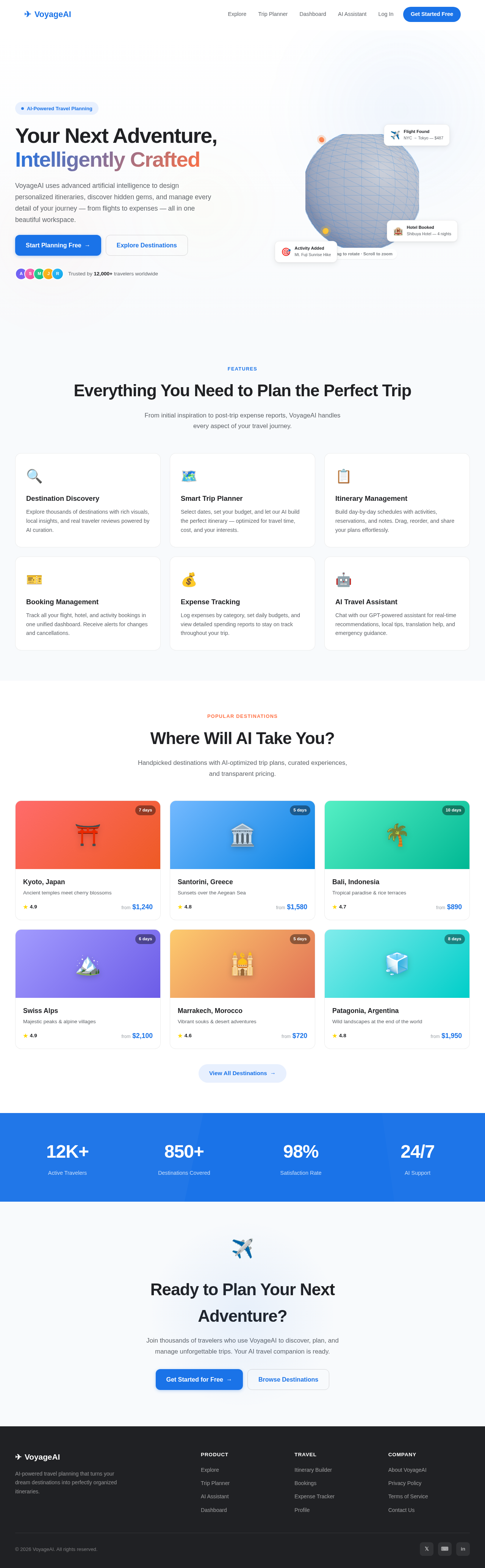
Your Next Adventure, Intelligently Crafted
VoyageAI uses advanced artificial intelligence to design personalized itineraries, discover hidden gems, and manage every detail of your journey — from flights to expenses — all in one beautiful workspace.
Everything You Need to Plan the Perfect Trip
From initial inspiration to post-trip expense reports, VoyageAI handles every aspect of your travel journey.
Destination Discovery
Explore thousands of destinations with rich visuals, local insights, and real traveler reviews powered by AI curation.
Smart Trip Planner
Select dates, set your budget, and let our AI build the perfect itinerary — optimized for travel time, cost, and your interests.
Itinerary Management
Build day-by-day schedules with activities, reservations, and notes. Drag, reorder, and share your plans effortlessly.
Booking Management
Track all your flight, hotel, and activity bookings in one unified dashboard. Receive alerts for changes and cancellations.
Expense Tracking
Log expenses by category, set daily budgets, and view detailed spending reports to stay on track throughout your trip.
AI Travel Assistant
Chat with our GPT-powered assistant for real-time recommendations, local tips, translation help, and emergency guidance.
Where Will AI Take You?
Handpicked destinations with AI-optimized trip plans, curated experiences, and transparent pricing.
Kyoto, Japan
Ancient temples meet cherry blossoms
Santorini, Greece
Sunsets over the Aegean Sea
Bali, Indonesia
Tropical paradise & rice terraces
Swiss Alps
Majestic peaks & alpine villages
Marrakech, Morocco
Vibrant souks & desert adventures
Patagonia, Argentina
Wild landscapes at the end of the world
Ready to Plan Your Next Adventure?
Join thousands of travelers who use VoyageAI to discover, plan, and manage unforgettable trips. Your AI travel companion is ready.
Your Next Adventure, Intelligently Crafted
VoyageAI uses advanced artificial intelligence to design personalized itineraries, discover hidden gems, and manage every detail of your journey — from flights to expenses — all in one beautiful workspace.
Everything You Need to Plan the Perfect Trip
From initial inspiration to post-trip expense reports, VoyageAI handles every aspect of your travel journey.
Destination Discovery
Explore thousands of destinations with rich visuals, local insights, and real traveler reviews powered by AI curation.
Smart Trip Planner
Select dates, set your budget, and let our AI build the perfect itinerary — optimized for travel time, cost, and your interests.
Itinerary Management
Build day-by-day schedules with activities, reservations, and notes. Drag, reorder, and share your plans effortlessly.
Booking Management
Track all your flight, hotel, and activity bookings in one unified dashboard. Receive alerts for changes and cancellations.
Expense Tracking
Log expenses by category, set daily budgets, and view detailed spending reports to stay on track throughout your trip.
AI Travel Assistant
Chat with our GPT-powered assistant for real-time recommendations, local tips, translation help, and emergency guidance.
Where Will AI Take You?
Handpicked destinations with AI-optimized trip plans, curated experiences, and transparent pricing.
Kyoto, Japan
Ancient temples meet cherry blossoms
Santorini, Greece
Sunsets over the Aegean Sea
Bali, Indonesia
Tropical paradise & rice terraces
Swiss Alps
Majestic peaks & alpine villages
Marrakech, Morocco
Vibrant souks & desert adventures
Patagonia, Argentina
Wild landscapes at the end of the world
Ready to Plan Your Next Adventure?
Join thousands of travelers who use VoyageAI to discover, plan, and manage unforgettable trips. Your AI travel companion is ready.
No comments yet. Be the first!