project-9189d428
 Diya Trivedi
Build a modern, premium AI-powered Travel Planner web application called "VoyageAI". The application should help users discover destinations, plan trips, manage bookings, track travel expenses, and receive AI-powered travel recommendations. Use a clean, modern SaaS design inspired by Airbnb, Stripe Dashboard, Linear, and Notion. The interface should include rounded cards, soft shadows, modern typography, subtle animations, responsive layouts, and a consistent design system across every page.


Comments (0)
Sign in to leave a comment
System Requirements
project-9189d428 System Requirements Document
Introduction
The purpose of this document is to outline the system requirements for "VoyageAI," a modern, premium AI-powered Travel Planner web application. VoyageAI aims to help users discover destinations, plan trips, manage bookings, track travel expenses, and receive AI-powered travel recommendations. The application will feature a clean, modern SaaS design inspired by platforms like Airbnb, Stripe Dashboard, Linear, and Notion.
System Overview
VoyageAI will be a web-based application designed to provide users with a seamless travel planning experience. The application will include features such as destination exploration, trip planning, itinerary management, booking management, expense tracking, and AI-powered travel assistance. The design will focus on usability, aesthetics, and responsiveness across devices.
Functional Requirements as Story Points
- As a User, I should be able to view a visually appealing Landing Page to understand the application's offerings.
- As a User, I should be able to sign up or log in to access personalized travel planning features.
- As a User, I should be able to access a Dashboard to view my travel plans and recommendations.
- As a User, I should be able to explore various travel destinations with detailed information.
- As a User, I should be able to plan trips by selecting destinations and dates.
- As a User, I should be able to create and manage a detailed Trip Itinerary.
- As a User, I should be able to manage my Bookings for accommodations and activities.
- As a User, I should be able to track my travel expenses and view reports.
- As a User, I should be able to receive AI-powered travel recommendations and assistance.
- As a User, I should be able to update my Profile & Settings for a personalized experience.
User Personas
- Traveler: A user who plans and manages personal or business trips using the application.
- Admin: A user who manages the application content, user accounts, and system settings.
Core User Flows
- Traveler logs in -> explores destinations -> plans a trip -> creates itinerary -> manages bookings -> tracks expenses -> receives AI recommendations.
- Admin logs in -> manages user accounts -> updates content -> monitors system performance.
Visuals Colors and Theme
- primary: #1A73E8 (a deep blue for brand identity)
- primary_light: #E8F0FE (a light blue for hover states)
- secondary: #FF7043 (a coral hue for emphasis)
- accent: #FFD700 (a vibrant gold for CTAs and active states)
- highlight: #FFA726 (a warm orange for notifications)
- bg: #FFFFFF (a clean white background)
- surface: rgba(255, 255, 255, 0.8) (a translucent white for cards/panels)
- text: #202124 (a dark gray for primary text)
- text_muted: #5F6368 (a softer gray for secondary text)
- border: rgba(0, 0, 0, 0.1) (a subtle gray for borders)
Signature Design Concept
The homepage of VoyageAI will feature an interactive 3D globe that users can rotate and zoom into to explore destinations. Each destination will be marked with a glowing pin, and clicking on a pin will open a detailed card with information and images. This concept will be implemented using @react-three/fiber for 3D rendering and gsap for smooth animations and transitions. The globe will provide an engaging and immersive experience, making the exploration of destinations both fun and informative.
Interaction Model & Motion Direction
The landing page will utilize a "parallax" interaction model, providing a layered depth effect as users scroll through the page. Decorative elements will move at different speeds to create a dynamic visual experience, while content remains in the natural flow. Internal pages will adopt a "static" model for clarity and ease of use, focusing on data-heavy interactions like itinerary management and expense tracking.
Non-Functional Requirements
- The application must be responsive and function seamlessly on desktop, tablet, and mobile devices.
- It should maintain high performance with fast load times and smooth transitions.
- The system should be secure, ensuring user data privacy and protection.
- The application should be scalable to accommodate a growing user base and feature set.
Tech Stack
- Frontend: React for Web
- Backend: Python with FastAPI
- Database: MySQL or MariaDB, using Alembic for migrations
- AI Models: GPT 5.4 for user-friendly responses
- AI Tools: Litellm for LLM Routing, Langchain
- Local Orchestration: Docker, docker-compose
- Server-side Orchestration: Kubernetes
Assumptions and Constraints
- The application will be developed for the web platform, with potential future expansion to mobile.
- The design will adhere to modern SaaS aesthetics, ensuring a premium user experience.
- The system will integrate AI capabilities for enhanced travel recommendations.
Glossary
- SaaS: Software as a Service
- UI: User Interface
- UX: User Experience
- AI: Artificial Intelligence
- CTA: Call to Action
This document outlines the comprehensive requirements for developing VoyageAI, ensuring a production-ready platform with a focus on modern design, usability, and AI-powered features.
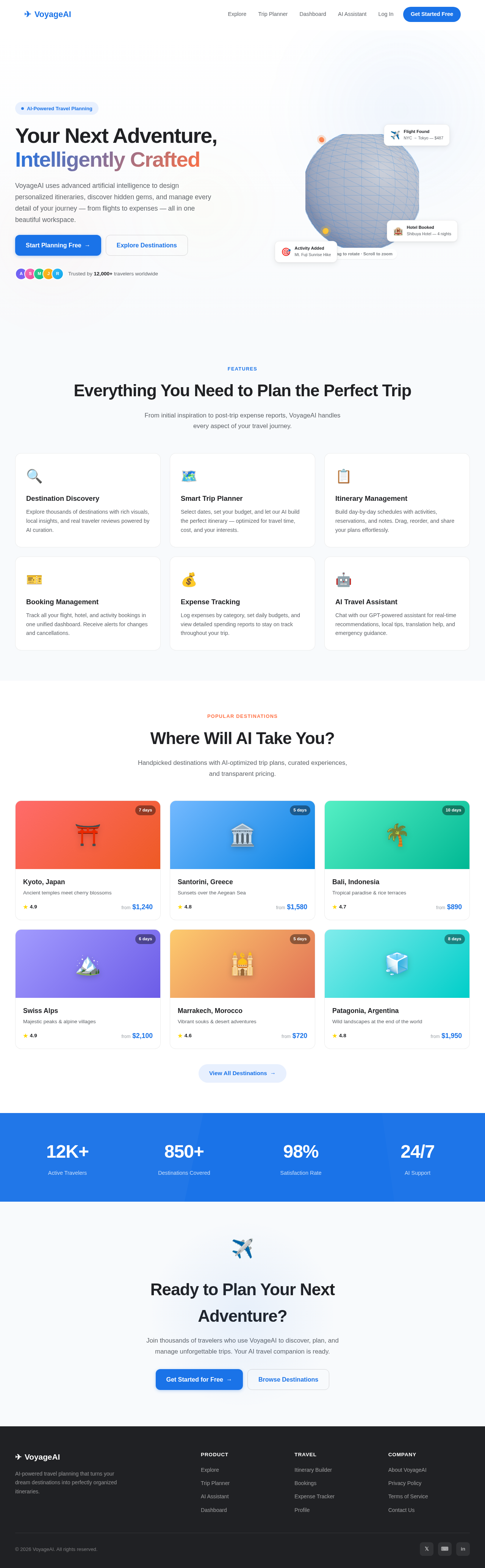
Your Next Adventure, Intelligently Crafted
VoyageAI uses advanced artificial intelligence to design personalized itineraries, discover hidden gems, and manage every detail of your journey — from flights to expenses — all in one beautiful workspace.
Everything You Need to Plan the Perfect Trip
From initial inspiration to post-trip expense reports, VoyageAI handles every aspect of your travel journey.
Destination Discovery
Explore thousands of destinations with rich visuals, local insights, and real traveler reviews powered by AI curation.
Smart Trip Planner
Select dates, set your budget, and let our AI build the perfect itinerary — optimized for travel time, cost, and your interests.
Itinerary Management
Build day-by-day schedules with activities, reservations, and notes. Drag, reorder, and share your plans effortlessly.
Booking Management
Track all your flight, hotel, and activity bookings in one unified dashboard. Receive alerts for changes and cancellations.
Expense Tracking
Log expenses by category, set daily budgets, and view detailed spending reports to stay on track throughout your trip.
AI Travel Assistant
Chat with our GPT-powered assistant for real-time recommendations, local tips, translation help, and emergency guidance.
Where Will AI Take You?
Handpicked destinations with AI-optimized trip plans, curated experiences, and transparent pricing.
Kyoto, Japan
Ancient temples meet cherry blossoms
Santorini, Greece
Sunsets over the Aegean Sea
Bali, Indonesia
Tropical paradise & rice terraces
Swiss Alps
Majestic peaks & alpine villages
Marrakech, Morocco
Vibrant souks & desert adventures
Patagonia, Argentina
Wild landscapes at the end of the world
Ready to Plan Your Next Adventure?
Join thousands of travelers who use VoyageAI to discover, plan, and manage unforgettable trips. Your AI travel companion is ready.
Your Next Adventure, Intelligently Crafted
VoyageAI uses advanced artificial intelligence to design personalized itineraries, discover hidden gems, and manage every detail of your journey — from flights to expenses — all in one beautiful workspace.
Everything You Need to Plan the Perfect Trip
From initial inspiration to post-trip expense reports, VoyageAI handles every aspect of your travel journey.
Destination Discovery
Explore thousands of destinations with rich visuals, local insights, and real traveler reviews powered by AI curation.
Smart Trip Planner
Select dates, set your budget, and let our AI build the perfect itinerary — optimized for travel time, cost, and your interests.
Itinerary Management
Build day-by-day schedules with activities, reservations, and notes. Drag, reorder, and share your plans effortlessly.
Booking Management
Track all your flight, hotel, and activity bookings in one unified dashboard. Receive alerts for changes and cancellations.
Expense Tracking
Log expenses by category, set daily budgets, and view detailed spending reports to stay on track throughout your trip.
AI Travel Assistant
Chat with our GPT-powered assistant for real-time recommendations, local tips, translation help, and emergency guidance.
Where Will AI Take You?
Handpicked destinations with AI-optimized trip plans, curated experiences, and transparent pricing.
Kyoto, Japan
Ancient temples meet cherry blossoms
Santorini, Greece
Sunsets over the Aegean Sea
Bali, Indonesia
Tropical paradise & rice terraces
Swiss Alps
Majestic peaks & alpine villages
Marrakech, Morocco
Vibrant souks & desert adventures
Patagonia, Argentina
Wild landscapes at the end of the world
Ready to Plan Your Next Adventure?
Join thousands of travelers who use VoyageAI to discover, plan, and manage unforgettable trips. Your AI travel companion is ready.
No comments yet. Be the first!