project-3eb838c0
 Diya Trivedi
start a project to build a simple single page design of todo


Comments (0)
Sign in to leave a comment
Project Tasks
21Create Task Model and Migration
As a developer, I want to create a Task model with fields for title, description, is_completed, created_at, and updated_at, and set up the initial database migration.
Implement CTASection for Landing
As a frontend developer, implement the CTASection for the Landing page. This section uses the 'motion' library to animate the entrance of the content with an initial opacity of 0 and y-offset of 24, transitioning to full opacity and y-offset of 0. It includes a call-to-action button linking to the Home page. Ensure animations trigger once when the section enters the viewport. Page access: shared by all personas (User).
Implement Task API Endpoints
As a developer, I want to implement API endpoints for adding, viewing, editing, marking as completed, and deleting tasks, so that users can manage their tasks through the API.
Implement FeaturesSection for Landing
As a frontend developer, implement the FeaturesSection for the Landing page. This section displays a list of features with icons and descriptions. Each feature card uses 'motion' animations for entrance effects, with staggered delays for each card. Ensure the animations are smooth and trigger once when the section enters the viewport. Page access: shared by all personas (User).
Implement Footer for Landing
As a frontend developer, implement the Footer for the Landing page. This section includes branding elements and navigation links to the Landing and Home pages. Ensure the footer is responsive and maintains consistent styling across different screen sizes. Page access: shared by all personas (User).
Implement HeroSection for Landing
As a frontend developer, implement the HeroSection for the Landing page. This section features animated task rows that cycle through different states, using 'motion' for animations. It includes a dynamic background and text color changes to illustrate task lifecycle. Ensure animations are smooth and repeat infinitely. Page access: shared by all personas (User).
Implement Navbar for Landing
As a frontend developer, implement the Navbar for the Landing page. This component includes a logo and navigation links with a toggle button for mobile view. The state hook manages the open/close state of the navigation links. Ensure the navbar is responsive and the toggle functionality works correctly. Page access: shared by all personas (User).
Implement TaskCarouselSection for Landing
As a frontend developer, implement the TaskCarouselSection for the Landing page. This interactive section allows users to click task cards to mark them as complete, triggering a flip animation. Use state hooks to manage the completion state of tasks. Ensure the animations are smooth and accessible via keyboard interactions. Page access: shared by all personas (User).
Implement Navbar for Home
As a frontend developer, implement the Navbar section for the Home page. This component includes a logo link to the homepage, a toggle button for mobile navigation, and links to the Landing and Signup pages. The Navbar should manage its open state using the useState hook and conditionally render the menu based on this state. Ensure that links to restricted pages are conditionally shown based on user access. Page access: shared by all personas (User).
Add Validation to Task API
As a developer, I want to add validation to the Task API endpoints to ensure data integrity and prevent invalid data from being processed.
Implement Task API Authorization
As a developer, I want to implement authorization for the Task API endpoints to ensure only authenticated users can manage their tasks.
Implement HomePageTitle for Home
As a frontend developer, implement the HomePageTitle section for the Home page. This component displays a static header with the text 'My Tasks'. Ensure the styling matches the design specifications. Page access: shared by all personas (User).
Implement TaskSummary for Home
As a frontend developer, implement the TaskSummary section for the Home page. This component uses useMemo to calculate the current date and a greeting based on the time of day. It also displays the count of active tasks. Ensure the component updates dynamically as tasks change. Page access: shared by all personas (User).
Implement TaskInputField for Home
As a frontend developer, implement the TaskInputField section for the Home page. This component includes an input field for entering new tasks. It handles the Enter key to trigger the onEnter callback. Ensure accessibility by providing appropriate aria-labels. Page access: shared by all personas (User).
Implement TaskPrioritySelector for Home
As a frontend developer, implement the TaskPrioritySelector section for the Home page. This component provides a dropdown to select task priority. It should update the selected value and trigger the onChange callback. Page access: shared by all personas (User).
Implement AddTaskButton for Home
As a frontend developer, implement the AddTaskButton section for the Home page. This component is a button that triggers the onClick callback to add a new task. It should be styled to indicate when it is disabled. Page access: shared by all personas (User).
Implement FilterPills for Home
As a frontend developer, implement the FilterPills section for the Home page. This component provides buttons to filter tasks by status (All, Active, Completed). It should highlight the active filter and trigger the onFilterChange callback. Page access: shared by all personas (User).
Implement SortDropdown for Home
As a frontend developer, implement the SortDropdown section for the Home page. This component provides a dropdown to sort tasks by Date, Priority, or A-Z. It should update the selected sort option and trigger the onSortChange callback. Page access: shared by all personas (User).
Implement TaskCards for Home
As a frontend developer, implement the TaskCards section for the Home page. This component displays a list of tasks, allowing users to toggle completion, edit, or delete tasks. It manages editing state with useState and provides inline editing functionality. Page access: shared by all personas (User).
Implement EmptyState for Home
As a frontend developer, implement the EmptyState section for the Home page. This component displays a message and icon when there are no tasks. It encourages users to add their first task. Page access: shared by all personas (User).
Create Task API Integration Tests
As a QA engineer, I want to create integration tests for the Task API endpoints to ensure they function correctly and handle edge cases.
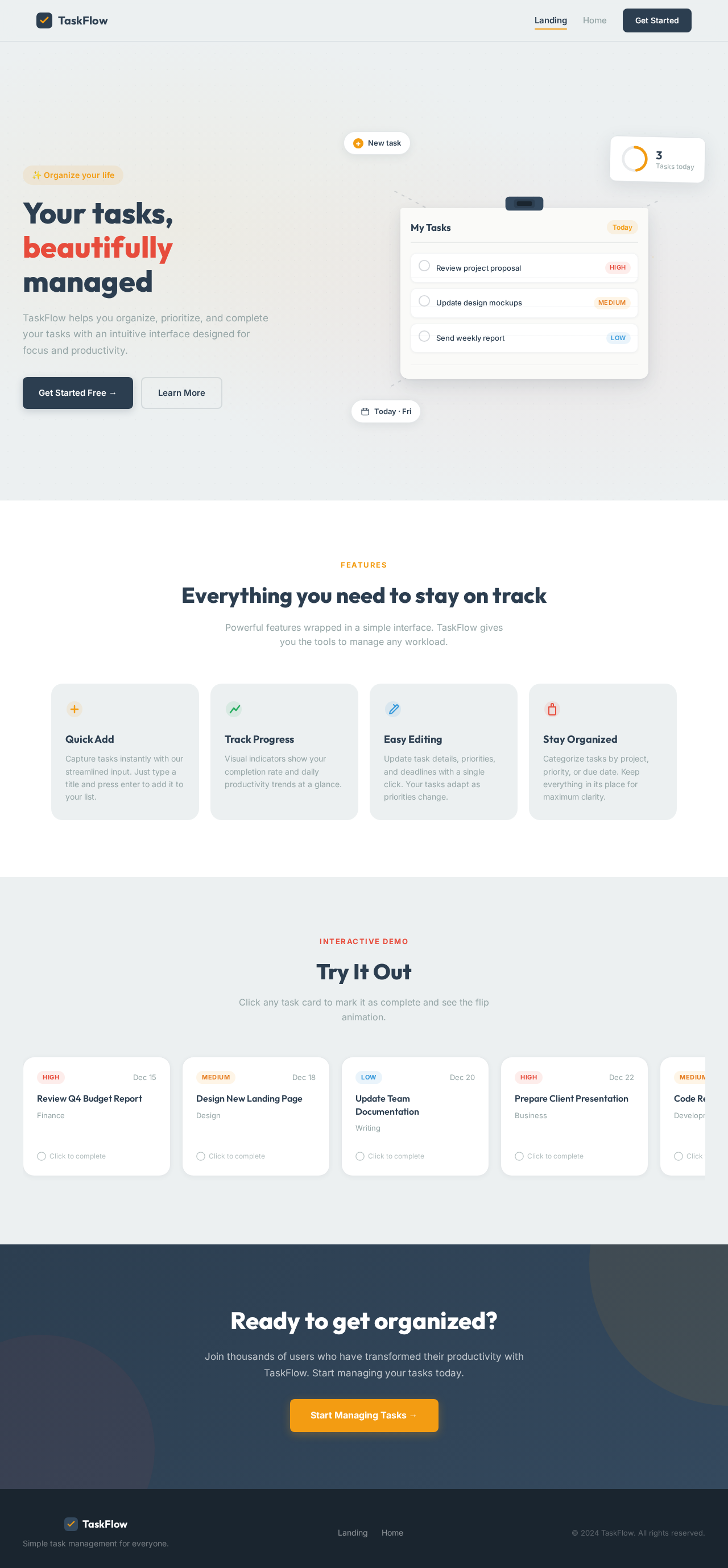
Your tasks, beautifully managed
TaskFlow helps you organize, prioritize, and complete your tasks with an intuitive interface designed for focus and productivity.
Everything you need to stay on track
Powerful features wrapped in a simple interface. TaskFlow gives you the tools to manage any workload.
Quick Add
Capture tasks instantly with our streamlined input. Just type a title and press enter to add it to your list.
Track Progress
Visual indicators show your completion rate and daily productivity trends at a glance.
Easy Editing
Update task details, priorities, and deadlines with a single click. Your tasks adapt as priorities change.
Stay Organized
Categorize tasks by project, priority, or due date. Keep everything in its place for maximum clarity.
Try It Out
Click any task card to mark it as complete and see the flip animation.
Review Q4 Budget Report
FinanceTask Completed!
Review Q4 Budget Report
Click to undoDesign New Landing Page
DesignTask Completed!
Design New Landing Page
Click to undoUpdate Team Documentation
WritingTask Completed!
Update Team Documentation
Click to undoPrepare Client Presentation
BusinessTask Completed!
Prepare Client Presentation
Click to undoCode Review for Sprint 12
DevelopmentTask Completed!
Code Review for Sprint 12
Click to undoReady to get organized?
Join thousands of users who have transformed their productivity with TaskFlow. Start managing your tasks today.
Start Managing Tasks →Your tasks, beautifully managed
TaskFlow helps you organize, prioritize, and complete your tasks with an intuitive interface designed for focus and productivity.
Everything you need to stay on track
Powerful features wrapped in a simple interface. TaskFlow gives you the tools to manage any workload.
Quick Add
Capture tasks instantly with our streamlined input. Just type a title and press enter to add it to your list.
Track Progress
Visual indicators show your completion rate and daily productivity trends at a glance.
Easy Editing
Update task details, priorities, and deadlines with a single click. Your tasks adapt as priorities change.
Stay Organized
Categorize tasks by project, priority, or due date. Keep everything in its place for maximum clarity.
Try It Out
Click any task card to mark it as complete and see the flip animation.
Review Q4 Budget Report
FinanceTask Completed!
Review Q4 Budget Report
Click to undoDesign New Landing Page
DesignTask Completed!
Design New Landing Page
Click to undoUpdate Team Documentation
WritingTask Completed!
Update Team Documentation
Click to undoPrepare Client Presentation
BusinessTask Completed!
Prepare Client Presentation
Click to undoCode Review for Sprint 12
DevelopmentTask Completed!
Code Review for Sprint 12
Click to undoReady to get organized?
Join thousands of users who have transformed their productivity with TaskFlow. Start managing your tasks today.
Start Managing Tasks →
No comments yet. Be the first!