project-3eb838c0
 Diya Trivedi
start a project to build a simple single page design of todo


Comments (0)
Sign in to leave a comment
System Requirements
Project-3eb838c0
Introduction
This System Requirements Document (SRD) outlines the requirements for the development of a basic single-page design for a to-do application, titled "project-3eb838c0". The goal is to create a user-friendly interface that allows users to efficiently manage their tasks.
System Overview
The to-do application will be a simple, single-page web application designed to help users manage their tasks effectively. The application will focus on providing a clean and intuitive user interface with essential features for task management.
Functional Requirements as Story Points
- As a User, I should be able to add new tasks to my to-do list.
- As a User, I should be able to view all my tasks in a list format.
- As a User, I should be able to mark tasks as completed.
- As a User, I should be able to delete tasks from my list.
- As a User, I should be able to edit existing tasks.
User Personas
- User: The primary user of the application who will manage their personal tasks. They need a straightforward interface to add, view, edit, and delete tasks.
Core User Flows
- User opens the application -> User adds a new task -> Task appears in the list.
- User views the list of tasks -> User marks a task as completed -> Task status updates.
- User selects a task -> User edits the task details -> Task updates in the list.
- User selects a task -> User deletes the task -> Task is removed from the list.
Visuals Colors and Theme
- primary: #2C3E50 (a deep blue for a professional look)
- primary_light: #34495E (a lighter tint of the primary color for hover states)
- secondary: #E74C3C (a coral hue for emphasis and links)
- accent: #F39C12 (a vibrant orange for CTAs and active states)
- highlight: #F1C40F (a warm yellow for hover states and notifications)
- bg: #ECF0F1 (a light grey for the page background)
- surface: rgba(236, 240, 241, 0.8) (a semi-transparent light grey for cards/panels)
- text: #2C3E50 (the primary text color)
- text_muted: #95A5A6 (a softer grey for secondary text)
- border: rgba(44, 62, 80, 0.2) (a subtle border color)
Signature Design Concept
The homepage will feature an interactive "Task Carousel" where tasks are displayed as cards that users can swipe through horizontally. Each card will represent a task, and users can swipe left or right to navigate through their tasks. When a task is marked as completed, the card will flip to reveal a congratulatory message. This interactive element will make task management engaging and visually appealing.
Landing Hero Motion Brief
The landing page will feature a dynamic illustration of a task list that transforms as users interact with it. The animation will show tasks being added to a list, checked off, and removed, demonstrating the application's core functionalities. This will be achieved using motion/react for smooth transitions and animations. The animation will loop every 10 seconds, showing the lifecycle of a task from creation to completion.
Interaction Model & Motion Direction
- Interaction Model: Animated
- The landing page will feature moderate scroll-triggered reveals and hover transitions. Interactive elements like task cards will have spring physics for a polished user experience.
Non-Functional Requirements
- The application should load quickly and respond to user interactions without noticeable delay.
- The design should be responsive and work well on both desktop and mobile devices.
- The application should be accessible, adhering to WCAG 2.1 guidelines.
Tech Stack
- Frontend: React for Web
- Backend: Not applicable for a single-page design
- Database: Not applicable for a single-page design
- AI Models: Not applicable
- Local Orchestration: Not applicable
- Server-Side Orchestration: Not applicable
Assumptions and Constraints
- The application will be a single-page design with no backend integration.
- The application will not store data persistently; it will be a front-end demonstration.
- The design will focus on simplicity and ease of use.
Glossary
- Task: An item on the to-do list that a user can add, edit, complete, or delete.
- User: The individual using the application to manage their tasks.
- Single-page application: A web application that interacts with the user by dynamically rewriting the current page rather than loading entire new pages from the server.
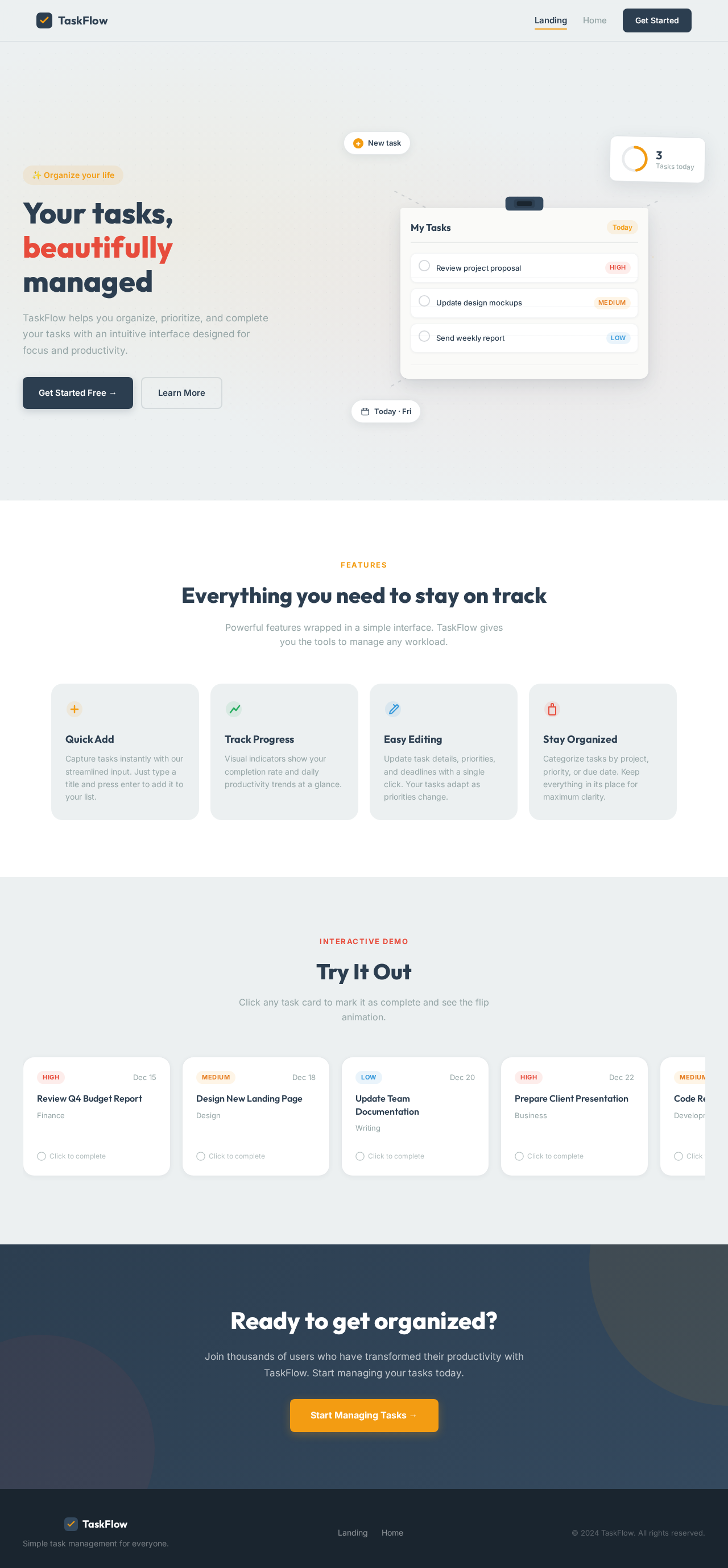
Your tasks, beautifully managed
TaskFlow helps you organize, prioritize, and complete your tasks with an intuitive interface designed for focus and productivity.
Everything you need to stay on track
Powerful features wrapped in a simple interface. TaskFlow gives you the tools to manage any workload.
Quick Add
Capture tasks instantly with our streamlined input. Just type a title and press enter to add it to your list.
Track Progress
Visual indicators show your completion rate and daily productivity trends at a glance.
Easy Editing
Update task details, priorities, and deadlines with a single click. Your tasks adapt as priorities change.
Stay Organized
Categorize tasks by project, priority, or due date. Keep everything in its place for maximum clarity.
Try It Out
Click any task card to mark it as complete and see the flip animation.
Review Q4 Budget Report
FinanceTask Completed!
Review Q4 Budget Report
Click to undoDesign New Landing Page
DesignTask Completed!
Design New Landing Page
Click to undoUpdate Team Documentation
WritingTask Completed!
Update Team Documentation
Click to undoPrepare Client Presentation
BusinessTask Completed!
Prepare Client Presentation
Click to undoCode Review for Sprint 12
DevelopmentTask Completed!
Code Review for Sprint 12
Click to undoReady to get organized?
Join thousands of users who have transformed their productivity with TaskFlow. Start managing your tasks today.
Start Managing Tasks →Your tasks, beautifully managed
TaskFlow helps you organize, prioritize, and complete your tasks with an intuitive interface designed for focus and productivity.
Everything you need to stay on track
Powerful features wrapped in a simple interface. TaskFlow gives you the tools to manage any workload.
Quick Add
Capture tasks instantly with our streamlined input. Just type a title and press enter to add it to your list.
Track Progress
Visual indicators show your completion rate and daily productivity trends at a glance.
Easy Editing
Update task details, priorities, and deadlines with a single click. Your tasks adapt as priorities change.
Stay Organized
Categorize tasks by project, priority, or due date. Keep everything in its place for maximum clarity.
Try It Out
Click any task card to mark it as complete and see the flip animation.
Review Q4 Budget Report
FinanceTask Completed!
Review Q4 Budget Report
Click to undoDesign New Landing Page
DesignTask Completed!
Design New Landing Page
Click to undoUpdate Team Documentation
WritingTask Completed!
Update Team Documentation
Click to undoPrepare Client Presentation
BusinessTask Completed!
Prepare Client Presentation
Click to undoCode Review for Sprint 12
DevelopmentTask Completed!
Code Review for Sprint 12
Click to undoReady to get organized?
Join thousands of users who have transformed their productivity with TaskFlow. Start managing your tasks today.
Start Managing Tasks →
No comments yet. Be the first!