procurement-team
 Tahir P
i want to build an app for my procurement team

Comments (0)
Sign in to leave a comment
System Requirements
System Requirements Document for procurement-team
1. Introduction
procurement-team is an internal web application built for Tahir P's procurement team. The product intent is stated directly by the requester: build an app for the procurement team to use as its shared working tool for day-to-day purchasing work, with a team lead able to see and keep the team's purchasing activity on track. The app is delivered as a first-party, application-owned product with its own identity and its own custom interface, and it persists durable state so that team members can return to their work.
The audience is the procurement team itself: procurement practitioners who carry out purchasing work, and the procurement team lead who is accountable for the team's activity. The specific purchasing workflows (quotes, purchase orders, supplier terms, and similar) are not yet defined by the requester; this document therefore specifies the accepted product shell — public entry, identity establishment and returning verification, the protected procurement workspace, and the lead's oversight destination — and leaves the detailed purchasing workflows as an open, explicitly acknowledged gap rather than inventing them.
This document is the System Requirements Document for the project named procurement-team.
2. System Overview
procurement-team is a single first-party web application with a shared backend and durable storage. It currently delivers:
- A public Landing page that explains the procurement app, its audience, and what it does before any sign-in.
- A Login page that supports self-service enrollment on first use and returning identity verification on later visits.
- A protected Workspace where procurement team members carry out their purchasing work.
- A role-restricted Team Overview where the procurement team lead sees and keeps the team's purchasing activity on track.
Actors are the two accepted human personas — Procurement team member and Procurement team lead — plus the application itself as the system actor that owns identity, session continuity, and durable state. Access is application-owned: the Landing and Login pages are anonymously reachable, while the Workspace and Team Overview require an established, verified identity, with Team Overview additionally restricted to the team lead role.
The current delivery horizon covers only the accepted shell and the identity/access lifecycle. Detailed purchasing workflows are not yet specified and are not invented here. No external provider, third-party marketplace, or headless delivery surface is part of the accepted scope.
Removed from scope
- None. No concept has been explicitly removed by the requester.
2a. Product Interpretation and Delivery Boundary
The requester asked for an app for their procurement team. That request is a current commitment to a first-party application the team uses as its working tool. Because the team must return to the same work across visits and because the lead's oversight must remain bound to the correct team, the application owns identity and durable state: a visitor can read the Landing page anonymously, establishes an identity through self-service enrollment on the Login page at first use, and verifies that identity on returning visits. Only after verification does the protected Workspace become available; the Team Overview is further restricted to the team lead.
The boundary between current and future is deliberate. Current scope is the public entry, the identity lifecycle, the protected workspace shell, and the lead's oversight destination. The concrete purchasing workflows that the team will perform inside the Workspace — and the specific activity the lead will review in Team Overview — are not yet defined by the requester and are treated as future detail to be specified, not as capabilities to be assumed. Nothing in this document adds supplier management, quote comparison, purchase-order issuance, approval chains, or reporting beyond what the requester stated.
2c. Page Content and Component Coverage
Landing
- Purpose and information: Anonymous public entry that explains the procurement app, its audience (the procurement team), and what it does before any sign-in. Presents the product's editorial identity and a single path into the workspace.
- States: Default anonymous state; no loading or empty state required beyond static content; error state limited to a failed navigation to Login.
- Primary action: "Enter workspace" — routes an anonymous visitor to Login.
- Supporting actions: Navigate to Login for returning members.
- Domain entities: None persisted; static product explanation only.
- Component responsibilities: Hero type block, product explanation, primary call to action, and a route into Login. No data fetching, no identity required.
- Access: Anonymous (
access_requirement: none).
Login
- Purpose and information: Identity access surface for both personas. Supports self-service enrollment on first use and returning verification on later visits.
- States: Enrollment form (first use); verification form (returning); submitting/loading; validation error (missing or malformed input); authentication error (verification fails); success (redirect to the appropriate protected destination).
- Primary actions: Enroll a new team member identity; verify an existing identity.
- Supporting actions: Switch between enrollment and returning verification; return to Landing.
- Domain entities: Team member identity (name/identifier and credential), role association (member or lead) established at enrollment or provisioning.
- Component responsibilities: Enrollment form, verification form, validation and error messaging, session establishment on success, and role-aware redirect (member → Workspace, lead → Team Overview or Workspace).
- Access: Anonymous (
access_requirement: none) — a protected destination cannot own the interaction that establishes access to itself, so this anonymous entry is a distinct access boundary.
Workspace
- Purpose and information: Protected procurement workspace where team members carry out their purchasing work. Presents the member's working context and the entry point to their purchasing activity.
- States: Loading (initial workspace fetch); empty (no purchasing activity yet); success (workspace with the member's activity); error (fetch failure with retry); session-expired (redirect to Login).
- Primary actions: Begin and continue the member's purchasing work within the workspace.
- Supporting actions: Navigate to available sections; sign out.
- Domain entities: Team member identity (session-bound), purchasing work items owned by the member (structure to be defined when workflows are specified).
- Component responsibilities: Session guard, workspace shell, member's activity surface, and error/recovery handling.
- Access: Role-restricted — requires a verified identity for the Procurement team member.
Team Overview
- Purpose and information: Oversight destination for the team lead to see and keep the team's purchasing activity on track.
- States: Loading; empty (no team activity yet); success (team activity summary); error (fetch failure with retry); access-denied (verified identity without lead role); session-expired (redirect to Login).
- Primary actions: Review the team's purchasing activity.
- Supporting actions: Drill into activity detail as defined when workflows are specified; sign out.
- Domain entities: Team member identities, team purchasing activity records (structure to be defined when workflows are specified).
- Component responsibilities: Lead-role guard, team activity surface, access-denied handling, and error/recovery handling.
- Access: Role-restricted — requires a verified identity with the Procurement team lead role.
3. Functional Requirements
Each requirement is a distinct story point with provenance, lifecycle facts, and observable acceptance.
FR-1 — Build the procurement app for the team (explicit) As Tahir P, I should have an application built for my procurement team to use, so that the team has a shared working tool for its purchasing work.
- Trigger: Requester initiates the project.
- Observable result: A running first-party web application with the accepted pages and identity lifecycle.
- Access: Application-owned identity; custom UI.
- Failure/recovery: Build or deployment failure is retried; the app is not considered delivered until the accepted pages are reachable.
- Continuation: Team members proceed to Landing → Login → Workspace.
FR-2 — Anonymous visitor reaches the Landing page (required_inference) As an anonymous visitor, I should reach the Landing page before any identity establishment, so that I can understand what the procurement app is, who it is for, and what it does.
- Trigger: Visitor opens the application root.
- Observable result: Landing page renders with product explanation and an "Enter workspace" action.
- Access: Anonymous (
none). - Failure/recovery: If navigation to Login fails, the visitor remains on Landing and can retry.
- Continuation: Visitor selects "Enter workspace" to go to Login.
FR-3 — Self-service enrollment on first use (required_inference) As a procurement team member, I should complete self-service enrollment on the Login page on first use, so that I have an application-owned identity bound to my role.
- Trigger: First-time member selects enrollment on Login.
- Input: Identity details and credential; role association (member or lead).
- Observable result: Identity is created and persisted; the member is signed in and routed to the appropriate protected destination.
- Access: Anonymous entry on Login.
- Failure/recovery: Validation errors are shown inline; a failed enrollment leaves no partial identity and allows retry.
- Continuation: Member lands in Workspace (or Team Overview if lead).
FR-4 — Returning identity verification (required_inference) As a procurement team member, I should verify my identity on returning visits, so that I can resume my protected work.
- Trigger: Returning member submits credentials on Login.
- Observable result: Session established; member routed to Workspace (or Team Overview if lead).
- Access: Anonymous entry on Login; protected destinations unlocked after verification.
- Failure/recovery: Invalid credentials show an authentication error and allow retry; repeated failure does not lock the account beyond the stated behavior.
- Continuation: Member resumes work in Workspace.
FR-5 — Protected Workspace for members (required_inference) As a procurement team member, I should reach the protected Workspace after verification, so that I can carry out my purchasing work in one shared place.
- Trigger: Verified member navigates to Workspace.
- Observable result: Workspace renders the member's working context.
- Access: Role-restricted — verified member identity required.
- Failure/recovery: Unauthenticated access redirects to Login; fetch failure shows an error with retry.
- Continuation: Member continues purchasing work; signs out when done.
FR-6 — Lead verifies identity before Team Overview (required_inference) As a procurement team lead, I should verify my identity before reaching the role-restricted Team Overview, so that oversight is bound to the correct accountable person.
- Trigger: Lead navigates to Team Overview.
- Observable result: After verification with lead role, Team Overview renders team activity.
- Access: Role-restricted — verified lead identity required.
- Failure/recovery: Verified non-lead identity sees access-denied; unauthenticated access redirects to Login.
- Continuation: Lead reviews activity and returns to oversight work.
FR-7 — Lead keeps team activity on track (required_inference) As a procurement team lead, I should see the team's purchasing activity in Team Overview, so that I can keep it on track.
- Trigger: Lead opens Team Overview.
- Observable result: Team activity is presented for review.
- Access: Role-restricted lead identity.
- Failure/recovery: Empty state when no activity; error state with retry on fetch failure.
- Continuation: Lead drills into activity detail as workflows are specified.
4. User Personas
Procurement team member
- Product context: A procurement practitioner on Tahir P's team who uses the app as their daily working tool for purchasing work. The specific workflows are not yet defined; the member's current responsibility is to establish identity, reach the protected Workspace, and carry out purchasing work there.
- Primary goal: Carry out procurement tasks in one shared place and reach completed purchasing outcomes.
- Distinct responsibilities: Self-service enrollment on first use; returning verification; working inside the protected Workspace.
- Inputs and decisions: Identity details and credential at enrollment; credentials at returning verification; purchasing decisions within the Workspace (to be specified).
- Interactions with other participants: Shares the Workspace context with the team; their activity is visible to the team lead in Team Overview.
- Observable success: Signed in, Workspace loaded, purchasing work progressing; activity reflected in the lead's Team Overview.
Procurement team lead
- Product context: The person accountable for the team's procurement work. Their oversight responsibilities are inferred from the team-oriented premise and remain to be confirmed.
- Primary goal: See what the team is handling and keep purchasing activity on track.
- Distinct responsibilities: Verifying identity with lead role; reviewing team activity in the role-restricted Team Overview.
- Inputs and decisions: Credentials at verification; oversight judgements about team activity.
- Interactions with other participants: Observes the activity of procurement team members; does not replace their working role.
- Observable success: Team Overview renders current team activity; the lead can identify what needs attention.
5. Core User Flows
Flow A — Anonymous visitor learns about the app (Procurement team member or lead)
- Visitor opens the application root and lands on Landing (anonymous).
- Visitor reads the product explanation: what the procurement app is, who it is for, and what it does.
- Visitor selects "Enter workspace".
- System routes the visitor to Login.
- If navigation fails, the visitor remains on Landing and can retry.
Flow B — First-use self-service enrollment (Procurement team member)
- Member arrives at Login from Landing.
- Member selects enrollment (first use).
- Member enters identity details and a credential; role association is established (member).
- System validates input; on validation error, inline messages appear and the member corrects and resubmits.
- On success, the system creates and persists the identity and establishes a session.
- Member is routed to Workspace.
- Member begins purchasing work; signs out when finished.
Flow C — Returning verification (Procurement team member)
- Member arrives at Login.
- Member selects returning verification and submits credentials.
- On invalid credentials, an authentication error is shown and the member retries.
- On success, the system establishes a session and routes the member to Workspace.
- Member resumes purchasing work.
Flow D — Lead verifies identity and reviews team activity (Procurement team lead)
- Lead arrives at Login (from Landing or directly).
- Lead enrolls on first use or verifies on return, with lead role association.
- On success, the system establishes a session and routes the lead to Team Overview (or Workspace, then Team Overview).
- Team Overview loads team purchasing activity; loading state shows while fetching.
- If no activity exists, an empty state is shown; if fetch fails, an error with retry is shown.
- If a verified non-lead identity attempts Team Overview, access-denied is shown.
- Lead reviews activity and continues oversight work; signs out when finished.
Flow E — Session expiry and recovery (any persona)
- A verified member or lead attempts a protected action after session expiry.
- System redirects to Login.
- User re-verifies identity.
- System returns the user to the appropriate protected destination (Workspace for member, Team Overview for lead).
6. Visuals Colors and Theme
The creative direction is authoritative for this section.
- Muse and headline: Tobias van Schneider — editorial swagger for procurement: oversized type, one hot signal, no chrome.
- Mode: Light mode.
- Palette (exact hex by role):
- Background (paper):
#F4F1EA - Surface (data planes only — tables, quote cards):
#FFFFFF - Text / primary / ink:
#121212 - Accent (vermilion, single hot signal):
#E03616 - Muted (metadata, labels):
#8A857C - Proportion: ~70% paper, 20% ink, 8% white surface, 2% vermilion.
- Background (paper):
- Typography:
- Headings: Fraunces — display serif, weight 600–700, optical-size axis pushed high, leading 0.92, tracking -0.02em, sentence case (never all-caps).
- Body and UI: Archivo — carries every table, form, and control.
- Section labels: Archivo 600, 12px, letterspaced 0.14em, uppercase (the only small-caps moment).
- Type scale: display
clamp(56px, 11vw, 128px); h2 32→56; h3 22→28; body 16→17; data numerals 15/18 tabular; micro-label 12.
- Shape language: 0px radius everywhere (cards, inputs, buttons); 2px hairline rules in ink at 20% opacity; buttons are solid ink rectangles with 14px/20px padding; accent appears as a 4px left rule on the one active row or a solid vermilion chip; no shadows, no pills, no rounded avatars — square 32px monogram tiles.
- Layout: Asymmetric 12-column editorial grid; persistent 220px left rail on desktop (wordmark, section list, user monogram); content column starts at column 4; full-bleed section transitions with headings spanning edge to edge and tables inset by one column. At 375px the rail collapses to a top bar with a square menu tile, and tables become stacked label/value lists with 12px muted caps labels.
- Imagery: Large-scale editorial photography, monochrome-treated — macro shots of materials the team buys (steel coil, cardboard flute, textile weave, coffee sack), bled off the right edge of the landing hero. No stock people, no 3D blobs. Supplier rows carry a 40px square monochrome crop that flips to colour on hover.
- Accessibility of text and controls: Headlines, wordmarks, labels, numbers, card text, and controls stay entirely inside the viewport and their container at 375px, 768px, and 1280px, wrapping or scaling via
clamp(...); imagery and decoration may bleed, crop, or overlap but never cover readable text or controls.
7. Signature Design Concept
The public entry (Landing) is a split asymmetric composition. The left seven columns sit on warm paper #F4F1EA and carry a Fraunces headline set at clamp(56px, 11vw, 128px), stacked over four lines — "Buy / better. / Prove / it." — with a single vermilion 4px bar under the second line only, a 12px letterspaced label above the headline, and a single solid ink rectangle CTA "Enter workspace" pinned beneath. The right five columns are a full-bleed monochrome macro photograph of stacked cardboard flute running off the top-right and bottom-right edges, cut by a vertical 2px ink rule at the column boundary. There is no centred stack, no blue button, and no gradient — the type and the photograph are the whole hero. The CTA routes the anonymous visitor to Login, which is the only accepted behavior the hero exposes.
8. Interaction Model & Motion Direction
Interaction Model: Animated Motion Tempo: restrained Hero Dimensionality: flat
Landing Hero Motion Brief
- Focal subject: The oversized Fraunces headline "Buy / better. / Prove / it." on warm paper, paired with the monochrome cardboard-flute macro photograph bleeding off the right edge.
- Input → transformation → outcome thesis: On first load, the headline words reveal in a single staggered sequence (60ms per word, once), settling into the composed editorial frame; the photograph is present at rest and does not animate. The only interactive transformation is the "Enter workspace" CTA, which routes the anonymous visitor to Login.
- Motion vocabulary: 400ms
cubic-bezier(0.16, 1, 0.3, 1)crossfades for route changes; a single staggered word reveal on the landing headline (60ms per word, once); hover on supplier rows swaps a monochrome thumbnail for its colour version. No bounce, no lift, no gradient drift. - Composed first frame: Warm paper ground, four-line Fraunces headline at full scale with the vermilion 4px rule under line two, the 12px letterspaced label above, the ink CTA beneath, and the monochrome photograph occupying the right five columns cut by a 2px ink rule.
- Reduced-motion state: Everything appears at rest instantly; the headline is fully visible with no stagger; thumbnails stay monochrome; route changes are instant.
9. Non-Functional Requirements
- Identity and access (required_inference): Application-owned identity with self-service enrollment and returning verification; Landing and Login anonymously reachable; Workspace and Team Overview protected; Team Overview restricted to the lead role. Rationale: durable, actor-specific state and role-bound oversight require continuity.
- Durable state (explicit via planning scope): The application persists identities, roles, sessions, and purchasing activity so members can resume work and the lead can review activity.
- Role differentiation (required_inference): The lead role is distinguished from the member role solely to gate Team Overview; no other permission differentiation is specified.
- Readability and responsiveness (creative direction): Readable text and controls remain whole at 375px, 768px, and 1280px; imagery and decoration may bleed but never cover text or controls.
- Motion accessibility (creative direction):
prefers-reduced-motionyields a fully usable static arrangement. - Error and recovery (required_inference): Every protected fetch has loading, empty, success, and error-with-retry states; unauthenticated access redirects to Login; session expiry returns the user to Login and back to the appropriate destination after re-verification.
10. Tech Stack
- Frontend: React (web), custom UI per the creative direction.
- Backend: Python / FastAPI, extending a single shared backend process for identity, session, and workspace/overview APIs.
- Storage: Relational database for identities, roles, sessions, and purchasing activity records.
- Deployment: Docker / docker-compose for the frontend, backend, and database; Kubernetes only if deployment requires it.
- Fonts: Fraunces and Archivo (self-hosted or via a font service), per the creative direction.
11. Assumptions and Constraints
- Assumption: The requester's team is small enough that a single shared backend and database suffice; no speculative scaling is introduced.
- Assumption: Self-service enrollment is the chosen identity bootstrap; no invitation or provisioning flow is specified.
- Assumption: The lead role is assigned at enrollment or by an administrative step to be defined; the exact assignment mechanism is not specified.
- Constraint: Detailed purchasing workflows (quotes, purchase orders, supplier terms) are not yet defined and are not invented in this document.
- Constraint: No external provider, marketplace, or headless delivery surface is in scope.
- Constraint: The generic indigo/blue-on-white SaaS template is forbidden; the creative direction's palette, fonts, and layout are binding.
12. Glossary
- Procurement team member: A procurement practitioner who uses the app as their working tool.
- Procurement team lead: The person accountable for the team's procurement work, with access to Team Overview.
- Workspace: The protected destination where members carry out purchasing work.
- Team Overview: The role-restricted destination where the lead reviews team purchasing activity.
- Self-service enrollment: First-use identity creation on the Login page.
- Returning verification: Identity verification on later visits.
- Role-restricted: Accessible only to a verified identity with the required role.
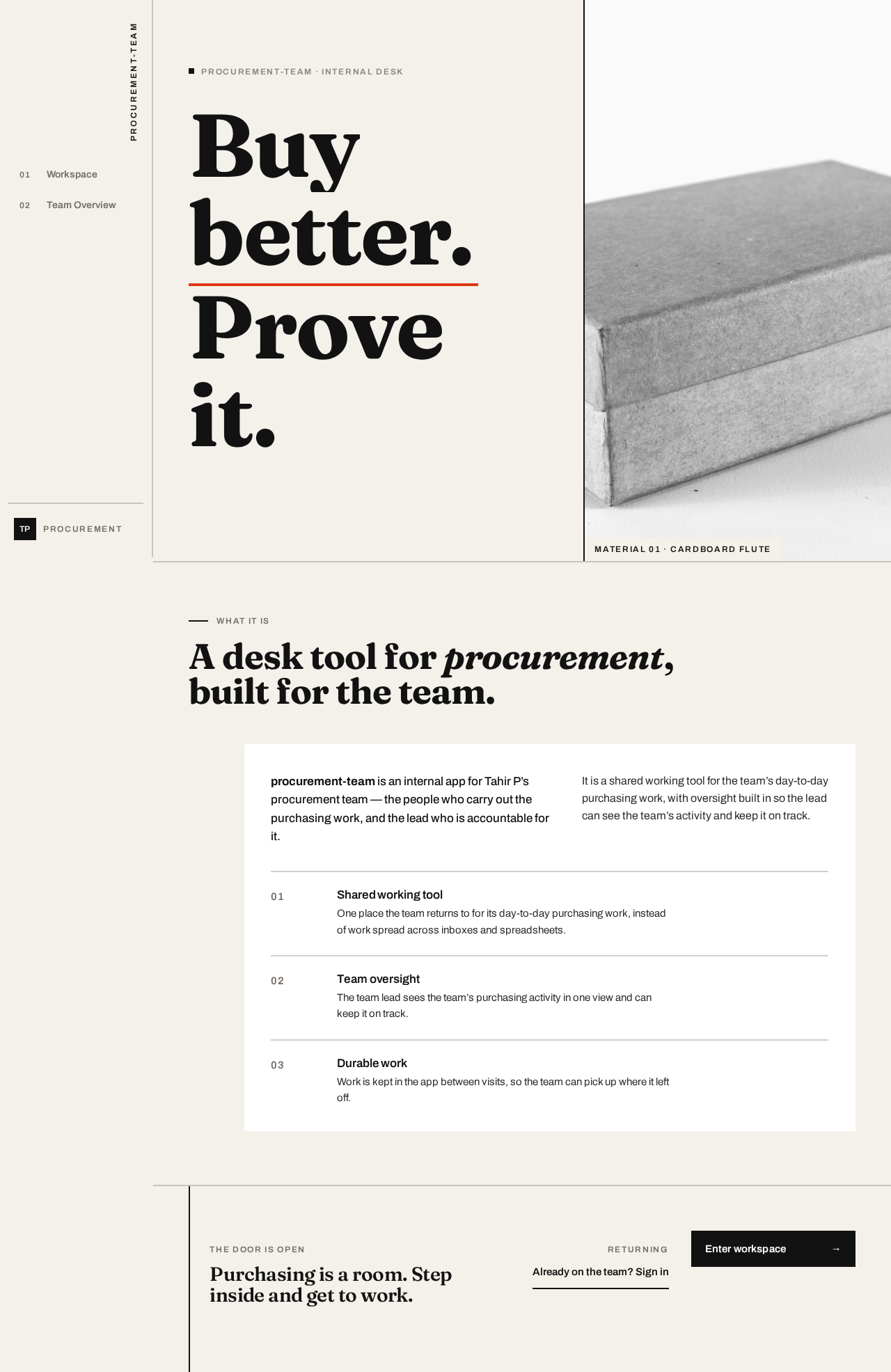
procurement-team · internal desk
Buybetter.Proveit.

What it is
A desk tool for procurement, built for the team.
procurement-team is an internal app for Tahir P’s procurement team — the people who carry out the purchasing work, and the lead who is accountable for it.
It is a shared working tool for the team’s day-to-day purchasing work, with oversight built in so the lead can see the team’s activity and keep it on track.
01 Shared working tool
One place the team returns to for its day-to-day purchasing work, instead of work spread across inboxes and spreadsheets.
02 Team oversight
The team lead sees the team’s purchasing activity in one view and can keep it on track.
03 Durable work
Work is kept in the app between visits, so the team can pick up where it left off.
Purchasing is a room. Step inside and get to work.
procurement-team · internal desk
Buybetter.Proveit.
What it is
A desk tool for procurement, built for the team.
procurement-team is an internal app for Tahir P’s procurement team — the people who carry out the purchasing work, and the lead who is accountable for it.
It is a shared working tool for the team’s day-to-day purchasing work, with oversight built in so the lead can see the team’s activity and keep it on track.
01 Shared working tool
One place the team returns to for its day-to-day purchasing work, instead of work spread across inboxes and spreadsheets.
02 Team oversight
The team lead sees the team’s purchasing activity in one view and can keep it on track.
03 Durable work
Work is kept in the app between visits, so the team can pick up where it left off.
No comments yet. Be the first!