privacy-browser
 Alexander Powell
Top of the line privacy browser


Comments (0)
Sign in to leave a comment
System Requirements
System Requirements Document for privacy-browser
1. Introduction
privacy-browser is a top-of-the-line privacy browser: a web browser whose defining promise is that strong privacy protections are built in and active by default, so that users browse the web without being tracked or profiled and without having to configure anything to be protected. The product is for people who treat their digital safety like expedition gear — security-literate everyday users who expect protection to work silently and correctly, and a settings manager who tunes protection strength and per-site exceptions to match a chosen privacy posture.
This document is the System Requirements Document for the product. It specifies the current delivery: an anonymous public entry that explains the browser and its built-in protections, the primary browsing destination where protections are active by default, and a recurring settings destination for reviewing and adjusting tracking, cookie, and fingerprinting protections and per-site exceptions.
Success criteria. A user can open the browser, navigate to any site, and be protected by tracking, cookie, and fingerprinting defenses without taking any configuration action; the browser's protection state is legible at all times; and a settings manager can review and change protection strength and per-site exceptions, with the resulting browsing behavior matching the chosen posture.
2. System Overview
privacy-browser is delivered as a first-party web application with three destinations: Landing (anonymous public entry), Browser (primary browsing surface with built-in privacy protections active by default), and Privacy Settings (recurring surface for reviewing and adjusting tracking, cookie, and fingerprinting protections and per-site exceptions). All three are anonymously reachable; no account, sign-in, or identity establishment is required or provided.
The application runs on a React frontend, a shared FastAPI backend process that hosts all application APIs and domain modules, and a MariaDB database for application-owned persistent data. The backend is the single service for feature APIs; no additional services are required for the current scope.
Active human actors are the Privacy-focused browser user, who browses with protections on by default, and the Privacy settings manager, who reviews and tunes protection strength and per-site exceptions. Web pages the user visits are external destinations rendered inside the Browser; the browser itself is the first-party owner of the browsing chrome, protection state, and settings.
Removed from scope: none. No concept from the requirement thread has been removed.
2a. Product Interpretation and Delivery Boundary
The product is a browser, not a privacy dashboard bolted onto a browser. Its delivery boundary is first-party: the application owns the browsing surface, the protection engine's user-visible state, and the settings that govern protection strength and per-site exceptions. Third-party websites are external destinations — the browser renders them and applies protections to them, but does not own their content.
Access is anonymous throughout. The source establishes no accounts, no sign-in, and no per-user continuity requirement; protections and settings are properties of the browser installation and its current session, not of an authenticated identity. Accordingly, no identity establishment, verification, or account-management capability is specified, and none of the three destinations is protected.
Current scope covers: anonymous entry and explanation of the browser and its protections; browsing with tracking, cookie, and fingerprinting protections active by default; legible protection state during browsing; and review/adjustment of protection strength and per-site exceptions. Future ideas are not part of current acceptance and are not represented in any page.
2c. Page Content and Component Coverage
Landing
- Information/state: product identity (privacy-browser wordmark), a statement of what the browser is and who it is for, and a presentation of the built-in protections (tracking protection, cookie protection, fingerprinting protection) as always-on defaults. A live-feeling protection readout (trackers blocked today, fingerprint noise active) presented as instrument data, not as a claim requiring a session.
- Primary action: enter the Browser.
- Supporting actions: open Privacy Settings to review protections before browsing.
- Domain entities: protection layer (name, description, default state), protection summary readout.
- Component responsibilities: fixed top rail with wordmark, live protection status, and settings entry; hero with oversized headline, amber rule, and primary CTA; circular protection dial with concentric rings, amber needle, and tabular readouts; full-width ruled data bands describing each protection layer with hairline dividers; topographic contour texture layer behind dark sections.
- States: loading — dial and counters render at final values without a network dependency, so no spinner state is required; empty — not applicable (static explanatory content); success — CTA navigates to Browser; error — if the protection summary cannot be fetched, the bands render with their static descriptions and the dial shows the default protection posture; recovery — a retry affordance on the summary band re-requests the readout.
Browser
- Information/state: current URL/address, page render area, and a persistent protection status indicator showing that tracking, cookie, and fingerprinting protections are active for the current site, including any per-site exception currently in effect.
- Primary action: navigate to a web address and read the page.
- Supporting actions: navigate back/forward, reload, open Privacy Settings for the current site, and view which protections applied to the current page.
- Domain entities: browsing session, current site, protection status for the current site, per-site exception (read-only reflection of settings), blocked-tracker count for the current page.
- Component responsibilities: address/navigation bar; page viewport rendering the external site; protection status indicator with per-layer state; per-page blocked-tracker counter; entry point into Privacy Settings scoped to the current site.
- States: loading — page load progress indicator while the external site loads; empty — new-tab state with address bar focused and a prompt to enter an address; success — page rendered with protection indicator showing active layers; error — unreachable site or load failure shows an in-viewport error with retry; recovery — retry reloads the address; if a site is broken by protections, the status indicator surfaces the per-site exception control that leads to Privacy Settings.
Privacy Settings
- Information/state: current protection strength for each layer (tracking, cookie, fingerprinting), the default posture, and the list of per-site exceptions with the site and the layers excepted.
- Primary action: change protection strength for a layer, or add/edit/remove a per-site exception.
- Supporting actions: review current posture, reset a layer to default, remove an exception.
- Domain entities: protection layer setting (layer, strength, is-default), per-site exception (site, layer(s), effect).
- Component responsibilities: aligned label/value rows per protection layer with physical-style bezel toggles/strength selectors; per-site exception list with add and remove controls; save/apply feedback; reset-to-default control per layer.
- States: loading — rows render in a pending state until settings load; empty — no per-site exceptions shows an explicit "no exceptions" row; success — change persists and a confirmation is shown, with the new posture reflected on return to Browser; error — failed save shows an inline error on the affected row and retains the prior value; recovery — retry the save, or reset the layer to default.
3. Functional Requirements
FR-1 — Browse with built-in privacy protections active by default (explicit) As a Privacy-focused browser user, I should navigate to any web address and have tracking, cookie, and fingerprinting protections active without configuring anything, so that my browsing is private from the first page.
- Trigger/input: user enters a URL in the Browser address bar.
- Observable result: the page renders and the protection status indicator shows tracking, cookie, and fingerprinting protections active for that site.
- Access state: anonymous; no sign-in.
- Failure/recovery: if the site fails to load, an in-viewport error with retry is shown; if protections break the site, the status indicator exposes the per-site exception path into Privacy Settings.
- Continuation: user continues browsing; protections remain active on subsequent navigations.
FR-2 — See protection state while browsing (explicit) As a Privacy-focused browser user, I should see, for the page I am on, which protections are active and how many trackers were blocked, so that I can trust the browser is protecting me.
- Trigger/input: page load completes, or user inspects the protection status indicator.
- Observable result: per-layer protection state and a blocked-tracker count for the current page are displayed.
- Access state: anonymous.
- Failure/recovery: if the count is unavailable, the indicator shows the layer states without a count rather than failing.
- Continuation: indicator updates on each navigation.
FR-3 — Understand the browser and its protections before browsing (explicit) As a Privacy-focused browser user, I should read, on an anonymous landing surface, what the browser is, who it is for, and which protections are built in and on by default, so that I can decide to use it.
- Trigger/input: user opens the application root.
- Observable result: Landing renders product identity, audience statement, and the protection layers with their default-on state.
- Access state: anonymous, no identity required.
- Failure/recovery: if the protection summary cannot be fetched, static descriptions render and the dial shows the default posture, with a retry on the summary band.
- Continuation: user enters the Browser or opens Privacy Settings.
FR-4 — Review and adjust protection strength (explicit) As a Privacy settings manager, I should review the current strength of tracking, cookie, and fingerprinting protections and adjust each to my comfort level, so that browsing matches my chosen privacy posture.
- Trigger/input: user opens Privacy Settings and changes a layer's strength or toggle.
- Observable result: the change persists, a confirmation is shown, and the Browser reflects the new posture on the next navigation.
- Access state: anonymous.
- Failure/recovery: a failed save shows an inline error on the affected row and retains the prior value; the user can retry or reset the layer to default.
- Continuation: user returns to the Browser, where the new posture governs protections.
FR-5 — Manage per-site exceptions (explicit) As a Privacy settings manager, I should add, edit, and remove per-site exceptions for specific protection layers, so that sites I trust or sites that break under protection behave as I intend while everything else stays protected.
- Trigger/input: user adds a site with the layer(s) to except, edits an existing exception, or removes one.
- Observable result: the exception list reflects the change, and the Browser's protection indicator shows the exception when that site is loaded.
- Access state: anonymous.
- Failure/recovery: an invalid site entry or failed save shows an inline error and does not alter the list; the user can correct and retry.
- Continuation: user browses the excepted site and sees the exception reflected; removing the exception restores default protection.
FR-6 — Reset a protection layer to default (required_inference) As a Privacy settings manager, I should reset a layer to its default posture, so that I can recover from a configuration I no longer want.
- Trigger/input: user activates reset on a layer row.
- Observable result: the layer returns to its default strength and the row shows it as default.
- Access state: anonymous.
- Failure/recovery: failed reset shows an inline error and retains the current value; retry is available.
- Continuation: Browser reflects the default posture on next navigation.
4. User Personas
Privacy-focused browser user
- Product context: A security-literate everyday user who treats digital safety as gear. They open the browser expecting protection to already be on; they do not want to configure anything to be private.
- Primary goal: Browse the web without being tracked or profiled, in private, uninterrupted sessions.
- Distinct accepted responsibilities: Enters addresses and reads pages in the Browser; relies on tracking, cookie, and fingerprinting protections being active by default; observes the protection state and blocked-tracker count; when a site breaks under protection, follows the per-site exception path into Privacy Settings.
- Inputs/decisions: The URL to visit; whether to trust the protection indicator; whether a broken site warrants an exception.
- Interactions with other participants: Shares the same browser installation and settings with the Privacy settings manager; the posture the manager sets is what the user experiences while browsing. Interacts with external websites as destinations the browser protects against.
- Observable success: Pages load with the protection indicator showing active layers, and the user never has to configure protection to be protected.
Privacy settings manager
- Product context: The person who tunes the browser's protection posture — often the same individual wearing a different hat, but with a distinct responsibility: deciding how strong each protection is and where exceptions apply.
- Primary goal: Make browsing behavior match a chosen privacy posture, layer by layer and site by site.
- Distinct accepted responsibilities: Reviews current strength of tracking, cookie, and fingerprinting protections; adjusts each layer; adds, edits, and removes per-site exceptions; resets layers to default; verifies the result in the Browser.
- Inputs/decisions: Comfort level per protection layer; which sites to except and for which layers; when to revert to default.
- Interactions with other participants: Changes made here govern what the Privacy-focused browser user experiences in the Browser; the manager may enter Privacy Settings from the Browser scoped to the current site.
- Observable success: After saving, the Browser's protection indicator reflects exactly the chosen posture and exceptions, and no unintended site is left unprotected.
5. Core User Flows
Flow A — First visit and entry (Privacy-focused browser user)
- User opens the application root and lands on Landing (anonymous, no sign-in).
- User reads the headline, the audience statement, and the ruled data bands describing tracking, cookie, and fingerprinting protections as on by default; the protection dial renders at its value with tabular readouts.
- User activates the primary CTA and arrives at Browser with the address bar focused.
- If the protection summary failed to load, the bands show static descriptions and the dial shows the default posture; the user can retry the summary band or proceed.
Flow B — Private browsing with default protections (Privacy-focused browser user)
- From Browser, user enters a web address.
- The page loads; the protection status indicator shows tracking, cookie, and fingerprinting protections active for that site, with a blocked-tracker count.
- User reads the page and continues navigating; protections remain active on each subsequent page.
- If the site fails to load, an in-viewport error with retry appears; the user retries or enters another address.
- If the site breaks under protection, the user opens the status indicator's per-site exception path, which leads to Privacy Settings scoped to that site (Flow D).
Flow C — Review and adjust protection strength (Privacy settings manager)
- Manager opens Privacy Settings (from Landing's settings entry, from the Browser, or directly).
- Manager reviews the aligned label/value rows for tracking, cookie, and fingerprinting protections and their current strength.
- Manager changes a layer's strength via its bezel toggle/selector.
- The change saves; a confirmation is shown and the row reflects the new value.
- If the save fails, an inline error appears on that row and the prior value is retained; the manager retries or resets the layer to default (Flow E).
- Manager returns to Browser; on the next navigation the protection indicator reflects the new posture.
Flow D — Manage a per-site exception (Privacy settings manager)
- Manager arrives at Privacy Settings, either directly or scoped to the current site from the Browser.
- Manager adds a site and selects the layer(s) to except, or edits/removes an existing exception in the exception list.
- The exception list updates and the change persists.
- If the site entry is invalid or the save fails, an inline error appears and the list is unchanged; the manager corrects and retries.
- Manager returns to Browser and loads the excepted site; the protection indicator shows the exception in effect. Removing the exception later restores default protection.
Flow E — Reset a layer to default (Privacy settings manager)
- Manager opens Privacy Settings and activates reset on a layer row.
- The layer returns to its default strength and is shown as default.
- If the reset fails, an inline error appears and the current value is retained; the manager retries.
- Manager verifies in Browser that the default posture is in effect.
6. Visuals Colors and Theme
The creative direction is authoritative: a precision luxury instrument after MARQ by Garmin — instrument-grade trust, quiet capability, a sealed engineered object. Dark mode only.
Color tokens (dark mode):
- Background:
#0E1012(graphite titanium, dominant ~70%) - Surface / ruled panels:
#171A1D - Text (primary):
#F2EFE9(warm off-white, ~16:1 on background) - Primary / instrument accent:
#C9A227(champagne amber — primary actions, active dial arcs, protection needle) - Accent / signal:
#3FB8AF(teal — protected/verified states, data ticks) - Muted:
#8A8F94(labels and secondary metadata only, never body copy; 12px+ bold) - Hairline dividers:
#2A2E33 - No blue or indigo anywhere.
Typography:
- Headings: Saira Condensed, 600–700 weight; uppercase for instrument labels and section plates; tracking −0.01em on display, +0.14em on 11–12px micro-labels; display headlines in mixed case at enormous scale.
- Body: Barlow, 16–18px, 1.6 leading.
- Scale: 1.333 modular on a 12/14/16/21/28/40/56/80/112 ramp; hero
clamp(44px, 9vw, 112px); section headsclamp(28px, 4.2vw, 56px); instrument numeralsclamp(32px, 5vw, 64px)in tabular Saira Condensed.
Shape language: circular gauges and bezels as the recurring form; near-square panels with 2px radii and 1px brushed-steel borders (never soft cards); machined rectangular buttons with a 1px inset top highlight like a bezel chamfer; topographic contour lines as texture behind dark sections.
Layout: edge-to-edge dark instrument chassis; fixed top rail with wordmark, live protection status, and settings entry; hero split 7/5 with macro dial right and oversized type left; full-width ruled data bands separated by hairline rules rather than cards; Privacy Settings uses aligned label/value rows with physical bezel toggles. Single column at 375px with the dial scaling down and data rows stacking into labelled pairs.
Imagery: no stock people; macro material studies (brushed titanium, sapphire-glass bezel rings, engraved topographic lines) and a crafted CSS/SVG instrument dial; product screens shown as inset glass panels with real privacy data.
7. Signature Design Concept
The public entry is a dark instrument chassis filling the first screen. On the left, an oversized mixed-case Saira Condensed headline — "Privacy, engineered like an instrument" — sits above a single amber rule, with the primary CTA as a machined amber-edged button. On the right, a large circular protection dial (min 320px, up to 520px) with concentric titanium rings, an amber needle at 94%, and live teal readouts ("trackers blocked today", "fingerprint noise active") in tabular numerals inside the bezel. A thin topographic contour layer drifts behind both at 0.02 opacity. No centred stack, no gradient blob, no blue button. Below the hero, full-width ruled data bands present tracking, cookie, and fingerprinting protections as gauge values with amber tick marks, not cards. The concept recomposes only accepted content — product identity, protection layers, protection readout, and the entry CTA.
8. Interaction Model & Motion Direction
Interaction Model: Animated Motion Tempo: restrained Hero Dimensionality: layered_2d
Landing Hero Motion Brief
- Focal subject: the circular protection dial with concentric titanium rings and amber needle, paired with the oversized headline.
- Thesis: on load, the amber needle sweeps from zero to its value (94%) while the tabular readouts tick up digit by digit and the contour layer drifts at 0.02 opacity — input is the page load, transformation is the instrument settling to its reading, outcome is a legible, trusted protection state.
- Motion vocabulary: precise instrument motion only — needle sweep, digit ticking, slow contour drift, 120ms rule-light on data-row hover to
#C9A227. No bounce, no particles, no parallax excess. - Composed first frame: dial at rest with needle at zero and readouts at zero, headline and amber rule fully rendered, contour layer faintly visible.
- Reduced-motion state: dial renders at final value and counters show static numbers; hover rule-light remains as a non-motion state change.
9. Non-Functional Requirements
- Privacy by default (explicit): tracking, cookie, and fingerprinting protections are active without user configuration on every navigation.
- Anonymous access (explicit via planning scope): all three destinations are reachable without an account; no identity establishment or account management is provided.
- Legibility (explicit via creative direction): readable text and controls stay whole inside the viewport and their container at 375px, 768px, and 1280px; muted labels at 12px+ bold; primary text contrast ~16:1.
- Reduced motion (explicit via creative direction): with
prefers-reduced-motion, the dial renders at final value and counters are static. - Persistence (required_inference): protection settings and per-site exceptions persist in application-owned storage (MariaDB) so that posture survives reloads and governs subsequent browsing.
- Failure transparency (required_inference): failed saves and failed loads surface inline errors with retry and never silently discard the prior value.
10. Tech Stack
- Frontend: React application UI.
- Backend: shared FastAPI process hosting all application APIs and domain modules (browsing session state, protection settings, per-site exceptions).
- Database: MariaDB for application-owned persistent data (protection layer settings, per-site exceptions).
- Deployment: docker-compose with the three services above; no additional services are required for the current scope.
11. Assumptions and Constraints
- Assumption (required_inference): protection settings and per-site exceptions are properties of the browser installation/session, not of an authenticated user, consistent with anonymous access across all destinations.
- Assumption (required_inference): the Browser renders external websites as external destinations; the application owns the chrome, protection state, and settings, not third-party content.
- Constraint (explicit): no blue or indigo accents; no soft rounded cards with hover-lift; no gradient-blob or glassmorphism hero; no friendly shield mascots or cartoon icons; no Inter, Roboto, Poppins, or system-ui in headings or body; no bouncy micro-interactions; no white/near-white dominant ground.
- Constraint (explicit): the generic indigo/blue-on-white SaaS template is forbidden.
- Constraint (explicit): readable text and controls must remain whole at 375px, 768px, and 1280px; decoration may crop or bleed but must not cover readable text or controls.
12. Glossary
- Protection layer: one of the browser's built-in defenses — tracking protection, cookie protection, or fingerprinting protection.
- Protection posture: the combined strength of all protection layers plus any per-site exceptions.
- Per-site exception: a rule that relaxes one or more protection layers for a specific site.
- Protection dial: the circular instrument readout on Landing showing overall protection strength with an amber needle and tabular readouts.
- Blocked-tracker count: the number of trackers blocked on the current page, shown in the Browser's protection indicator.
- Instrument chassis: the dark, ruled, gauge-driven visual frame of the application.
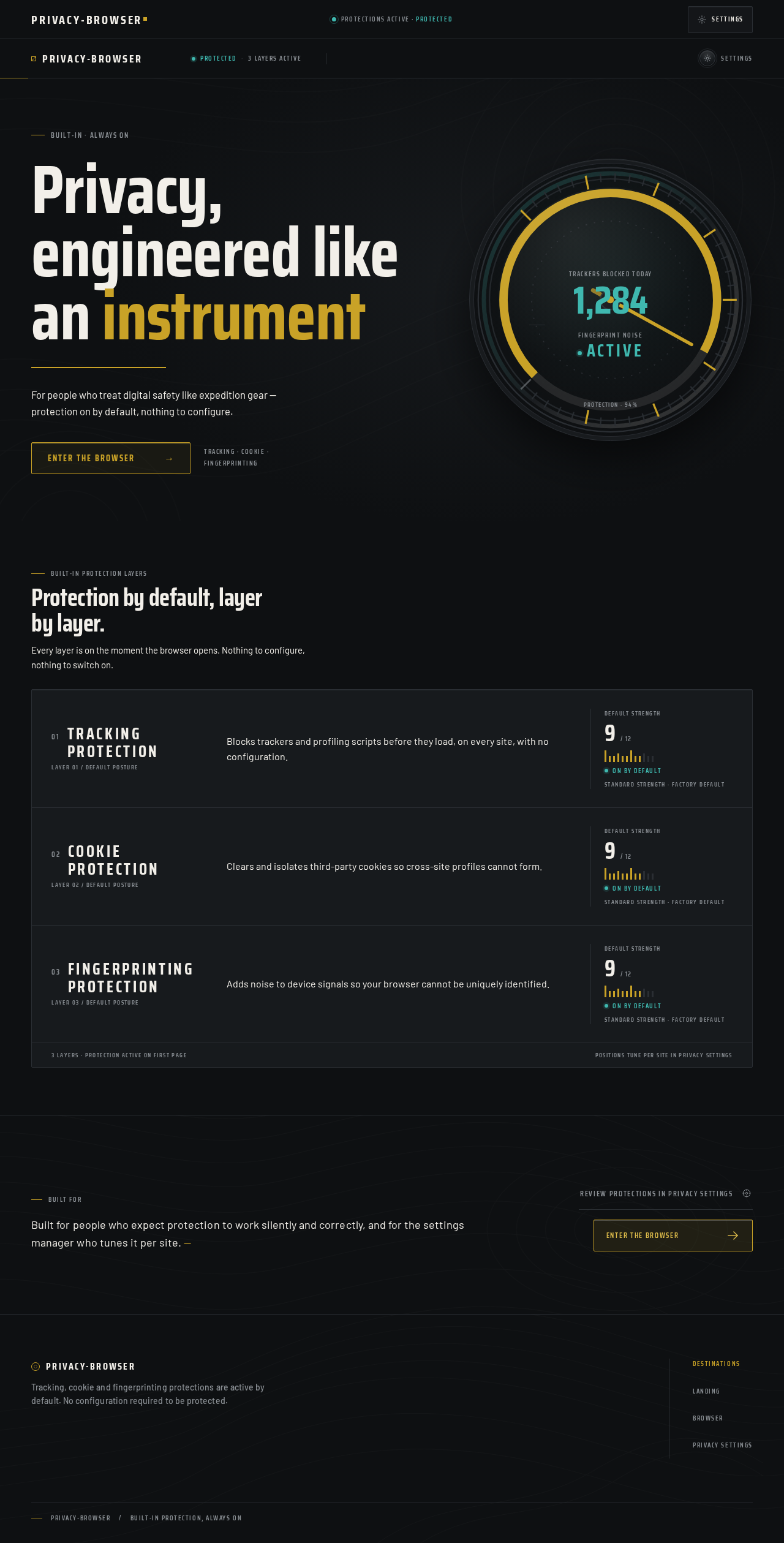
Built-in · Always on
Privacy, engineered like an instrument
For people who treat digital safety like expedition gear — protection on by default, nothing to configure.
Tracking · Cookie · Fingerprinting
Protection by default, layer by layer.
Every layer is on the moment the browser opens. Nothing to configure, nothing to switch on.
- 01
Tracking protection
Layer 01 / Default postureBlocks trackers and profiling scripts before they load, on every site, with no configuration.
Default strength9/ 12On by defaultStandard strength · Factory default - 02
Cookie protection
Layer 02 / Default postureClears and isolates third-party cookies so cross-site profiles cannot form.
Default strength9/ 12On by defaultStandard strength · Factory default - 03
Fingerprinting protection
Layer 03 / Default postureAdds noise to device signals so your browser cannot be uniquely identified.
Default strength9/ 12On by defaultStandard strength · Factory default
Built for
Built for people who expect protection to work silently and correctly, and for the settings manager who tunes it per site.
Built-in · Always on
Privacy, engineered like an instrument
For people who treat digital safety like expedition gear — protection on by default, nothing to configure.
Tracking · Cookie · Fingerprinting
Protection by default, layer by layer.
Every layer is on the moment the browser opens. Nothing to configure, nothing to switch on.
- 01
Tracking protection
Layer 01 / Default postureBlocks trackers and profiling scripts before they load, on every site, with no configuration.
Default strength9/ 12On by defaultStandard strength · Factory default - 02
Cookie protection
Layer 02 / Default postureClears and isolates third-party cookies so cross-site profiles cannot form.
Default strength9/ 12On by defaultStandard strength · Factory default - 03
Fingerprinting protection
Layer 03 / Default postureAdds noise to device signals so your browser cannot be uniquely identified.
Default strength9/ 12On by defaultStandard strength · Factory default
Built for
Built for people who expect protection to work silently and correctly, and for the settings manager who tunes it per site.
No comments yet. Be the first!