prime-safety
 Faizan Ali
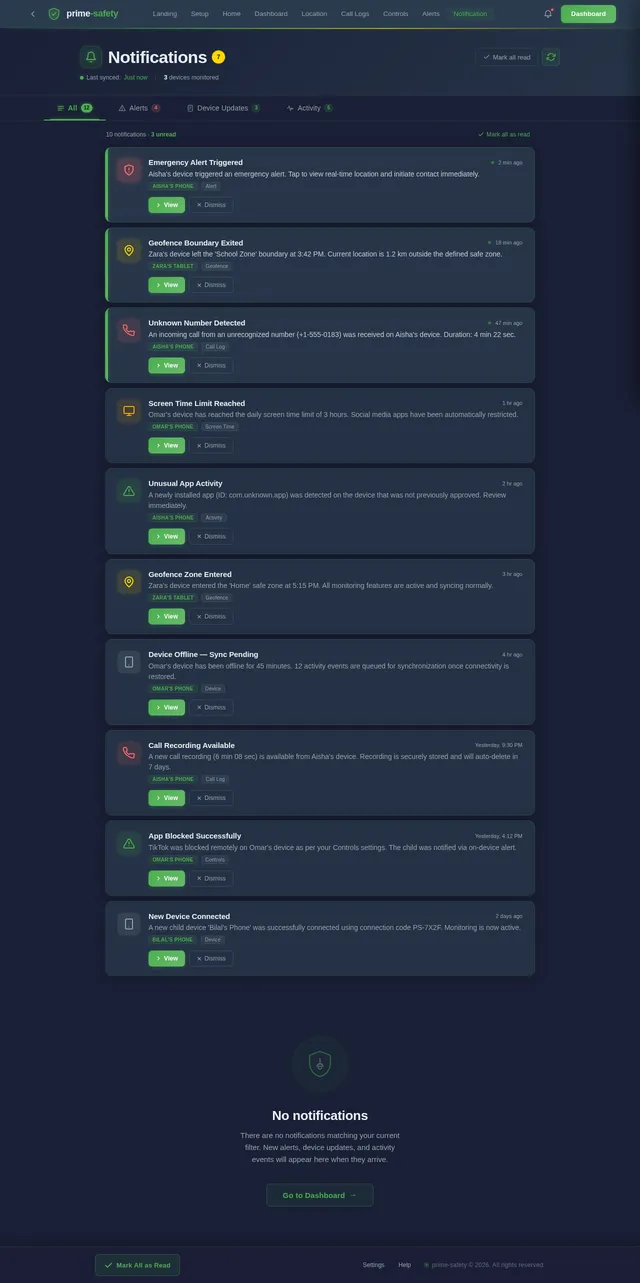
Create a parental safety and monitoring mobile application with a unique code-based connection system and no login/signup or subscription. Core System: - Generate a unique connection code on the parent device - Allow up to 10 child devices to connect using the code - Parent dashboard to manage all connected devices Permissions & Consent: - Show a clear setup screen on child device requesting permissions: - Location - Usage access - Camera - Microphone - Notifications - Clearly inform that monitoring features are active - Show persistent notification when monitoring is running Features: - Real-time location tracking - Screen time and app usage tracking - Live screen sharing (with visible notification) - Camera access (front/back) only when activated and visible - Microphone access with clear indicator - App blocking and device lock - Alerts for unusual activity - Geofencing alerts - Emergency alert button Offline Mode: - When internet is off, store activity data locally on child device - Sync all stored data automatically when internet is restored Data Storage: - Store activity logs for up to 7 days - Allow parents to view past records (usage, alerts, etc.) - Automatically delete older data after 7 days Design: - Clean and modern UI - Parent dashboard with device list and controls - Simple child setup flow Technical: - Secure encrypted communication - Stable background service - Optimized for Android devices Monetization: - Completely free app - No ads, no subscription, no in-app purchases The app should focus on family safety, privacy, and transparency.Add a call monitoring feature to the application: Call Monitoring: - Detect incoming and outgoing calls on the child device - Record call audio where supported by the device and system - Clearly notify the user when call recording is active - Store recorded call logs and audio securely - If recording is not supported, log call details (number, duration, time) - Automatically sync call logs and recordings to the parent device - Store call data for up to 7 days and then auto-deleteApp Identity: Name: - The app name should be "Safety App" Logo Design: - Create a security-themed logo - Use elements like a shield, lock, or protection icon - The logo should represent safety, protection, and trust - Use simple and modern design with clean lines - Preferred colors: blue, green, or dark theme (to represent security and trust) - The logo should look professional and suitable for a parental safety application


Comments (0)
Sign in to leave a comment

Protect What Matters
Peace of mind for families through transparent, privacy-focused monitoring
Choose Your Role
Select how you want to use prime-safety
Parent Mode
Monitor, protect, and stay connected with real-time insights into your child's digital world.
Child Mode
Provide transparency and build trust with your family through open, respectful monitoring.
Powerful Safety Features
Everything you need to keep your family safe and connected, built with privacy and transparency at its core.
Real-Time Location Tracking
Monitor your child's whereabouts with live GPS tracking. View precise locations on an interactive map with historical route playback and movement alerts.
Learn More→Screen Time Management
Set healthy screen time limits and monitor app usage patterns. Schedule device downtime for homework, meals, and bedtime with flexible controls.
Learn More→Call Monitoring & Logs
View incoming and outgoing call logs with duration, timestamps, and contact details. Securely stored for up to 7 days with automatic sync.
Learn More→Geofencing Alerts
Create custom safe zones around school, home, or other locations. Receive instant notifications when your child enters or exits a defined area.
Learn More→Emergency SOS
One-tap emergency button on the child's device sends instant alerts with location data to parents. Quick response when your child needs help most.
Learn More→Offline Data Sync
All monitoring data is stored locally when offline and automatically syncs once the device reconnects. Never miss critical information, even without network access.
Learn More→For Parents
Stay connected and informed with powerful monitoring tools designed to keep your family safe without compromising trust.
Complete Visibility
Get instant notifications and detailed activity logs so you always know what matters most.
For Children
Built with trust and transparency at its core, prime-safety keeps children informed and empowered while ensuring their safety.
- Transparent monitoring — always know what is being tracked and why
- Emergency SOS button — one-tap alert to instantly notify your parent
- Privacy respected — clear indicators when monitoring features are active
Trust & Transparency
Built on the Guardian Shield philosophy — protecting families through openness, security, and mutual respect.
Privacy First
Encrypted communication, no data sales. Your family data stays with your family.
Secure
Industry-standard AES-256 encryption protects every connection and data transfer.
Family Focused
Designed to build trust, not distrust. Transparent monitoring both parents and children can see.
How It Works
Get started in four simple steps. Connect your family devices securely in minutes.
Parent
Generate Code
Create a unique connection code on your parent device to securely link with your child.
Share with Child
Send the generated code to your child so they can connect their device to yours.
Child
Grant Permissions
Your child approves transparent monitoring permissions on their Android device.
Start Monitoring
Begin real-time location tracking, screen time management, and safety alerts instantly.
Parent
Generate Code
Create a unique connection code on your parent device to securely link with your child.
Share with Child
Send the generated code to your child so they can connect their device to yours.
Child
Grant Permissions
Your child approves transparent monitoring permissions on their Android device.
Start Monitoring
Begin real-time location tracking, screen time management, and safety alerts instantly.
Security & Compliance
Your family deserves the highest standard of digital protection. prime-safety is built on a foundation of trust, encryption, and transparency.
End-to-End Encryption
All communication between parent and child devices is secured with AES-256 industry-standard encryption protocols.
AES-256 ProtectedNo Third-Party Access
Your family data stays within your devices. We never sell, share, or expose your information to third parties.
Zero Data SharingGDPR Compliant
Built with privacy by design. Data is automatically deleted after 7 days, and all monitoring is fully transparent.
Privacy FirstReady to Protect Your Family?
Download prime-safety today and connect with peace of mind. Free, secure, and designed for families who care.
No comments yet. Be the first!