prime-safety
 Faizan Ali
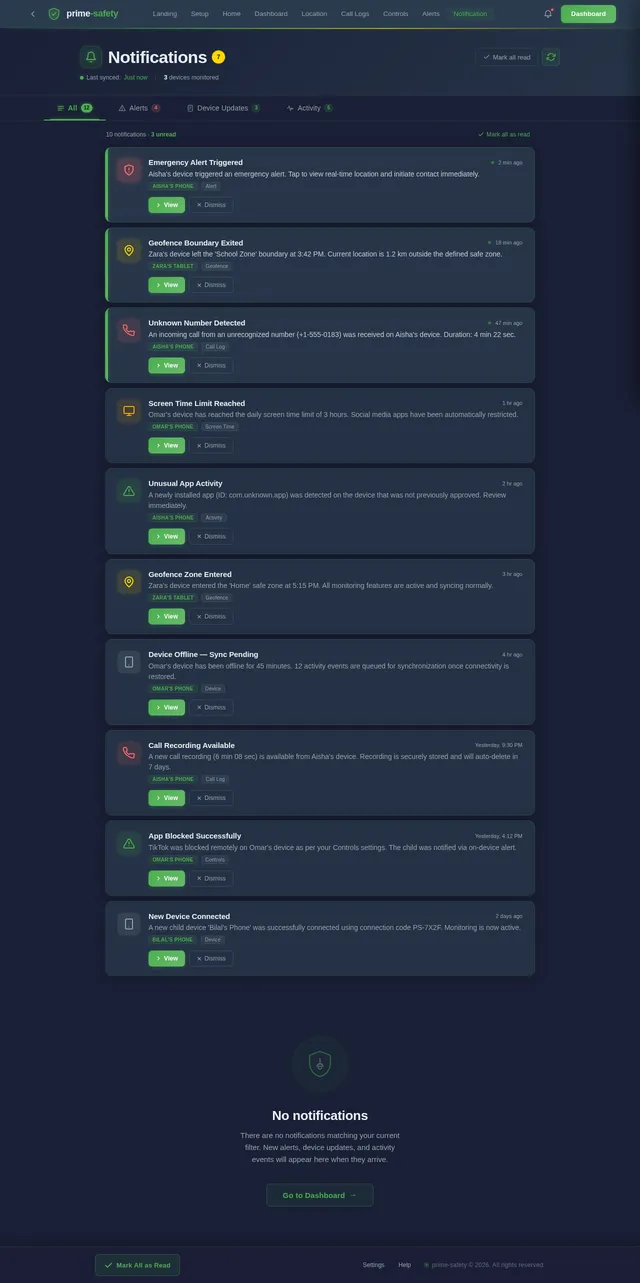
Create a parental safety and monitoring mobile application with a unique code-based connection system and no login/signup or subscription. Core System: - Generate a unique connection code on the parent device - Allow up to 10 child devices to connect using the code - Parent dashboard to manage all connected devices Permissions & Consent: - Show a clear setup screen on child device requesting permissions: - Location - Usage access - Camera - Microphone - Notifications - Clearly inform that monitoring features are active - Show persistent notification when monitoring is running Features: - Real-time location tracking - Screen time and app usage tracking - Live screen sharing (with visible notification) - Camera access (front/back) only when activated and visible - Microphone access with clear indicator - App blocking and device lock - Alerts for unusual activity - Geofencing alerts - Emergency alert button Offline Mode: - When internet is off, store activity data locally on child device - Sync all stored data automatically when internet is restored Data Storage: - Store activity logs for up to 7 days - Allow parents to view past records (usage, alerts, etc.) - Automatically delete older data after 7 days Design: - Clean and modern UI - Parent dashboard with device list and controls - Simple child setup flow Technical: - Secure encrypted communication - Stable background service - Optimized for Android devices Monetization: - Completely free app - No ads, no subscription, no in-app purchases The app should focus on family safety, privacy, and transparency.Add a call monitoring feature to the application: Call Monitoring: - Detect incoming and outgoing calls on the child device - Record call audio where supported by the device and system - Clearly notify the user when call recording is active - Store recorded call logs and audio securely - If recording is not supported, log call details (number, duration, time) - Automatically sync call logs and recordings to the parent device - Store call data for up to 7 days and then auto-deleteApp Identity: Name: - The app name should be "Safety App" Logo Design: - Create a security-themed logo - Use elements like a shield, lock, or protection icon - The logo should represent safety, protection, and trust - Use simple and modern design with clean lines - Preferred colors: blue, green, or dark theme (to represent security and trust) - The logo should look professional and suitable for a parental safety application

Comments (0)
Sign in to leave a comment
System Requirements
System Requirements Document (SRD)
Project Name: prime-safety
1. Introduction
The prime-safety project is a parental safety and monitoring mobile application designed to provide families with a secure, privacy-focused solution for monitoring child devices. This Android-only application eliminates the need for login/signup or subscriptions, relying instead on a unique code-based connection system. The app focuses on family safety, transparency, and trust, ensuring parents can monitor their children's activities while respecting their privacy.
This document outlines the system requirements for the prime-safety application, including functional and non-functional requirements, user personas, design elements, and technical specifications.
2. System Overview
The prime-safety application is a free parental monitoring tool optimized for Android devices. It allows parents to connect up to 10 child devices using a unique code generated on the parent device. The app provides real-time monitoring features such as location tracking, screen time management, app usage tracking, and call monitoring, all while maintaining a transparent and privacy-respecting approach.
Key features include:
- Real-time location tracking and geofencing alerts.
- Screen time and app usage tracking.
- Call monitoring with secure storage of call logs and recordings.
- Offline data storage and automatic synchronization.
- A clean, modern UI with a parent dashboard for managing connected devices.
The app is designed to operate seamlessly on Android devices, ensuring secure, encrypted communication and optimized performance.
3. Functional Requirements
Core System
- As a Parent, I should be able to generate a unique connection code to connect child devices.
- As a Parent, I should be able to connect up to 10 child devices using the unique code.
- As a Parent, I should be able to view and manage all connected devices from a dashboard.
Permissions & Consent
- As a Child, I should see a clear setup screen requesting permissions for location, usage access, camera, microphone, and notifications.
- As a Child, I should be clearly informed that monitoring features are active.
- As a Child, I should see a persistent notification when monitoring is running.
Monitoring Features
- As a Parent, I should be able to track the real-time location of connected child devices.
- As a Parent, I should be able to monitor screen time and app usage on child devices.
- As a Parent, I should be able to view live screen sharing with a visible notification on the child device.
- As a Parent, I should be able to access the camera (front/back) on the child device, with a visible indicator when active.
- As a Parent, I should be able to access the microphone on the child device, with a clear indicator when active.
- As a Parent, I should be able to block specific apps or lock the child device remotely.
- As a Parent, I should receive alerts for unusual activity on the child device.
- As a Parent, I should receive geofencing alerts when the child device enters or exits predefined zones.
- As a Child, I should have access to an emergency alert button to notify my parent in case of emergencies.
Call Monitoring
- As a Parent, I should be able to detect incoming and outgoing calls on the child device.
- As a Parent, I should be able to record call audio where supported by the device and system, with a clear notification on the child device.
- As a Parent, I should be able to view call logs (number, duration, time) if recording is not supported.
- As a Parent, I should be able to search and filter call logs by date, number, or duration on the dashboard.
- As a Parent, I should be able to securely store call logs and recordings for up to 7 days.
- As a Parent, I should be able to automatically sync call logs and recordings to my device.
Offline Mode
- As a Child, I should be able to store activity data locally when the internet is off.
- As a Parent, I should be able to automatically sync stored data when the internet is restored.
Data Storage
- As a Parent, I should be able to view activity logs for up to 7 days.
- As a Parent, I should be able to view past records, including usage and alerts.
- As a Parent, I should have older data automatically deleted after 7 days.
4. User Personas
Parent
- Primary user of the app.
- Manages connected child devices.
- Monitors activity, sets restrictions, and receives alerts.
Child
- Secondary user of the app.
- Provides consent for monitoring.
- Can trigger emergency alerts and view active monitoring notifications.
5. Visuals Colors and Theme
Unique Color Palette
- Background: #1A1F36 (Dark Blue)
- Surface: #2C3E50 (Slate Gray)
- Text: #E8F1F2 (Soft White)
- Accent: #4CAF50 (Safety Green)
- Muted: #95A5A6 (Muted Gray)
6. Signature Design Concept
The prime-safety app will feature a "Guardian Shield" landing page.
Concept Details:
- Visual Design: The homepage will display a dynamic 3D shield icon that rotates slowly when the app is opened. The shield will have glowing edges in the accent color (#4CAF50), symbolizing safety and protection.
- Interactive Animation: As users swipe or tap, the shield will "open" to reveal the parent dashboard or child setup screen, creating a sense of unlocking safety.
- Micro-Interactions: Hover effects on buttons will create a ripple effect, and transitions between screens will feature smooth sliding animations.
- Background: A subtle animated gradient that shifts between dark blue and slate gray, reinforcing the theme of trust and security.
This design will make the app visually striking and memorable while aligning with its core mission of safety and trust.
7. Non-Functional Requirements
- The app must operate seamlessly on Android devices running Android 8.0 (Oreo) or higher.
- All communication between parent and child devices must be encrypted using industry-standard protocols (e.g., AES-256).
- The app must maintain a stable background service for real-time monitoring.
- The app must be optimized for minimal battery and data usage.
8. Tech Stack
Frontend
- React Native for mobile app development (Android).
Backend
- Python with FastAPI for API development.
Database
- MySQL for relational data storage (e.g., user connections, activity logs).
- Alembic for database migrations.
AI Tools
- Litellm for LLM routing.
Orchestration
- Docker and docker-compose for local development.
9. Assumptions and Constraints
- The app will only support Android devices.
- Call recording functionality will depend on device and system-level support.
- Data older than 7 days will be automatically deleted to ensure privacy and optimize storage.
- The app will not include any monetization features (e.g., ads, subscriptions).
10. Glossary
- Parent Device: The device used by the parent to monitor child devices.
- Child Device: The device being monitored by the parent.
- Geofencing: A virtual boundary set by the parent to receive alerts when the child device enters or exits the area.
- Call Monitoring: The ability to detect, log, and record calls on the child device.
- Dashboard: The interface on the parent device for managing connected devices and viewing activity.
This concludes the updated SRD for prime-safety. Let me know if you'd like to refine or add anything further, Faizan!

Protect What Matters
Peace of mind for families through transparent, privacy-focused monitoring
Choose Your Role
Select how you want to use prime-safety
Parent Mode
Monitor, protect, and stay connected with real-time insights into your child's digital world.
Child Mode
Provide transparency and build trust with your family through open, respectful monitoring.
Powerful Safety Features
Everything you need to keep your family safe and connected, built with privacy and transparency at its core.
Real-Time Location Tracking
Monitor your child's whereabouts with live GPS tracking. View precise locations on an interactive map with historical route playback and movement alerts.
Learn More→Screen Time Management
Set healthy screen time limits and monitor app usage patterns. Schedule device downtime for homework, meals, and bedtime with flexible controls.
Learn More→Call Monitoring & Logs
View incoming and outgoing call logs with duration, timestamps, and contact details. Securely stored for up to 7 days with automatic sync.
Learn More→Geofencing Alerts
Create custom safe zones around school, home, or other locations. Receive instant notifications when your child enters or exits a defined area.
Learn More→Emergency SOS
One-tap emergency button on the child's device sends instant alerts with location data to parents. Quick response when your child needs help most.
Learn More→Offline Data Sync
All monitoring data is stored locally when offline and automatically syncs once the device reconnects. Never miss critical information, even without network access.
Learn More→For Parents
Stay connected and informed with powerful monitoring tools designed to keep your family safe without compromising trust.
Complete Visibility
Get instant notifications and detailed activity logs so you always know what matters most.
For Children
Built with trust and transparency at its core, prime-safety keeps children informed and empowered while ensuring their safety.
- Transparent monitoring — always know what is being tracked and why
- Emergency SOS button — one-tap alert to instantly notify your parent
- Privacy respected — clear indicators when monitoring features are active
Trust & Transparency
Built on the Guardian Shield philosophy — protecting families through openness, security, and mutual respect.
Privacy First
Encrypted communication, no data sales. Your family data stays with your family.
Secure
Industry-standard AES-256 encryption protects every connection and data transfer.
Family Focused
Designed to build trust, not distrust. Transparent monitoring both parents and children can see.
How It Works
Get started in four simple steps. Connect your family devices securely in minutes.
Parent
Generate Code
Create a unique connection code on your parent device to securely link with your child.
Share with Child
Send the generated code to your child so they can connect their device to yours.
Child
Grant Permissions
Your child approves transparent monitoring permissions on their Android device.
Start Monitoring
Begin real-time location tracking, screen time management, and safety alerts instantly.
Parent
Generate Code
Create a unique connection code on your parent device to securely link with your child.
Share with Child
Send the generated code to your child so they can connect their device to yours.
Child
Grant Permissions
Your child approves transparent monitoring permissions on their Android device.
Start Monitoring
Begin real-time location tracking, screen time management, and safety alerts instantly.
Security & Compliance
Your family deserves the highest standard of digital protection. prime-safety is built on a foundation of trust, encryption, and transparency.
End-to-End Encryption
All communication between parent and child devices is secured with AES-256 industry-standard encryption protocols.
AES-256 ProtectedNo Third-Party Access
Your family data stays within your devices. We never sell, share, or expose your information to third parties.
Zero Data SharingGDPR Compliant
Built with privacy by design. Data is automatically deleted after 7 days, and all monitoring is fully transparent.
Privacy FirstReady to Protect Your Family?
Download prime-safety today and connect with peace of mind. Free, secure, and designed for families who care.
No comments yet. Be the first!