prime-calculator
create a basic calculator with basic arthmetic operations with strictly single page design

Comments (0)
Sign in to leave a comment
Project Tasks6
Implement CalculatorHeader for Calculator
As a frontend developer, implement the CalculatorHeader section for the Calculator page. This section renders a `<header className='ch-header'>` containing a `motion.h1` with three spans (`ch-title-prime`, `ch-title-dot`, `ch-title-calculator`) that animate in via Framer Motion (opacity 0→1, y -16→0, cubic-bezier ease). Below the title, a `ch-underline` div is animated via GSAP timeline using `useRef` — scaleX 0→1 over 0.8s with `power3.out` ease. A `ch-tagline` paragraph also animates in via GSAP (opacity 0→1, y 8→0). Both GSAP animations are triggered in a `useEffect` on mount. Apply CalculatorHeader.css with the provided 2014-char stylesheet for layout and typography styling.
Implement CalculatorCard for Calculator
As a frontend developer, implement the CalculatorCard section for the Calculator page. This is the core interactive calculator component. It manages state via `useState` hooks: `display`, `expression`, `firstOperand`, `operator`, `waitingForSecond`, and `activeOp`. A static `BUTTONS` array defines 16 buttons with types `clear`, `op`, `digit`, and `equals`. Helper functions `formatDisplay`, `evaluate` (supporting +, -, *, / with divide-by-zero guard returning 'Error'), and `formatResult` (rounding to 1e10, toPrecision(8) for overflow, capping at 12 chars) handle display formatting. A `displayRef` is used for GSAP animation (`fromTo` opacity 0.4→1, y 8→0 over 0.25s with `power2.out`) triggered via `useEffect` on `display` change, tracked by `prevDisplayRef`. `handleDigit` (useCallback) handles digit input with 12-char cap and `waitingForSecond` branching. `handleOperator` (useCallback) chains operations and manages `activeOp` highlight state. Framer Motion is used for button press animations. Apply CalculatorCard.css with the provided 3552-char stylesheet.
Implement CalculatorFooter for Calculator
As a frontend developer, implement the CalculatorFooter section for the Calculator page. This section renders a `motion.footer` with className `cf-footer` that fades in via Framer Motion (opacity 0→1, duration 0.6s, delay 0.3s, easeOut). Inside a `cf-inner` div, it displays a dynamic copyright string using `new Date().getFullYear()` in a `cf-copyright` span, a decorative `cf-dot` span, and a `cf-version` span showing 'v1.0'. Apply CalculatorFooter.css with the provided 1223-char stylesheet for layout and footer typography.
Setup Design System Theme
As a Frontend Developer, set up the global design system and theme for the Prime-Calculator application. Configure CSS variables for the full color palette: primary (#4A90E2), primary_light (#A6C8F0), secondary (#F5A623), accent (#50E3C2), highlight (#F8E71C), bg (#FFFFFF), surface (rgba(255,255,255,0.9)), text (#333333), text_muted (#888888), and border (rgba(0,0,0,0.1)). Set up global reset styles, base typography, and responsive breakpoints to ensure the calculator functions correctly across all modern browsers. Install and configure framer-motion and gsap dependencies.
Configure Docker Dev Environment
As a DevOps Engineer, configure the Docker development environment for the Prime-Calculator frontend application. Set up a Dockerfile for the React frontend service with hot-reload support, and a docker-compose.yml that orchestrates the frontend dev server. Ensure the setup supports local development with volume mounts for live code changes. This complements the existing docker-compose setup by tailoring it specifically for the Prime-Calculator project structure.
Assemble Calculator Page
As a Frontend Developer, assemble the full Calculator single-page application by composing CalculatorHeader, CalculatorCard, and CalculatorFooter sections into the main Calculator page component. Set up React app entry point (index.html, main.jsx/index.jsx), routing (or confirm no routing needed for single-page), and global CSS imports. Ensure the page loads within 2 seconds on a standard broadband connection and is fully responsive across modern browsers. This task depends on all three section tasks: CalculatorHeader (8a347374), CalculatorCard (7dea797f), and CalculatorFooter (0885b572), as well as the theme setup (temp_theme_setup).
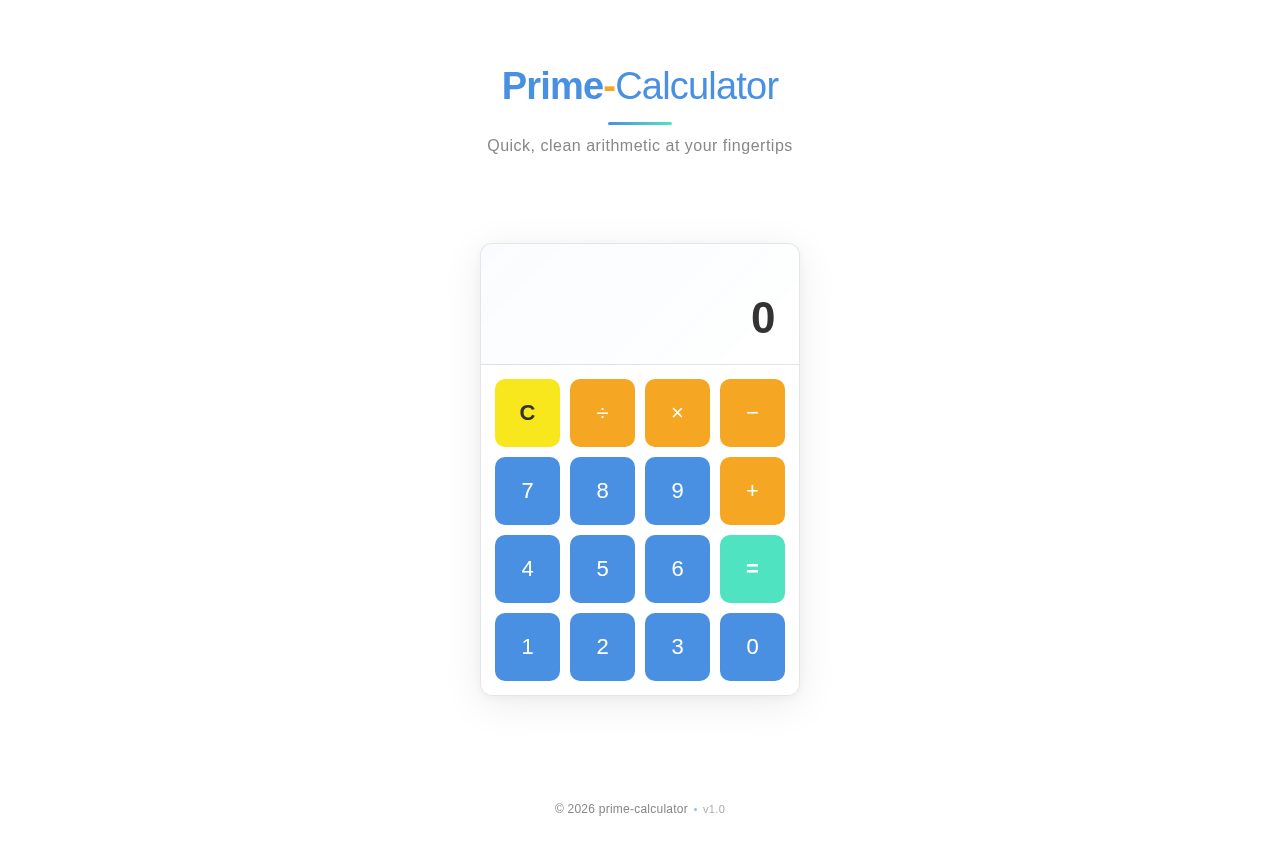
Prime-Calculator
Quick, clean arithmetic at your fingertips
No comments yet. Be the first!