polar-excel
 Abhishek Tiwari
I want a excel to table converter. Here each excel may contain multiple sheets and each sheet may contain multiple tables. There is no dwfined boundaries for tables.
Comments (0)
Sign in to leave a comment
Project Tasks18
Implement Theme & Color System
As a developer, I want to implement the polar-excel global theme and color system so that all pages share a consistent design language. Set up CSS custom properties for Polar Blue (#1E90FF), Arctic White (#F8F9FA), Ice Gray (#D3D3D3), Sunset Red (#FF4500), dark background (#0A1628), surface tokens, border tokens, and the Inter font family. Apply the Arctic night animated background (snowfall particles, aurora radial glow, star dots) at the root level. Remove any scaffold pages not present in the design (welcome page, ai-assistant page). This task is independent and must be completed before all other frontend page tasks.
Implement File Upload API
As a user, I want to use a backend API for uploading Excel files so that my files are securely received, validated, and stored for processing. Implement a FastAPI endpoint (POST /api/v1/files/upload) that accepts .xls, .xlsx, .csv files up to 50MB, validates file type and size, stores the file, creates a processing job record in MySQL, and returns a job ID and file metadata. Includes multipart form handling, file size enforcement, and basic virus/format checks.
Implement User Management API
As an admin, I want to use backend APIs for user management so that I can view, invite, assign roles to, and deactivate users within the system. Implement FastAPI endpoints: GET /api/v1/admin/users (list users with role, status, last active), POST /api/v1/admin/users/invite (invite by email with role assignment), PATCH /api/v1/admin/users/{user_id}/role (update role), PATCH /api/v1/admin/users/{user_id}/status (activate/deactivate). Enforces role-based access control (Admin only). Integrates with existing auth system.
Build Landing Page
As a user, I want to see a visually engaging Landing page so that I understand polar-excel's features before signing up or logging in. Implement the Landing page based on the existing v2 JSX design. Includes: interactive polar landscape with floating icebergs representing key features (Upload Excel, View Tables, Customize Logic), snowfall animation, drag-and-drop upload zone on the central iceberg with crack visual cue, time-of-day color transitions, micro-interactions on buttons/icons, and CTAs linking to Login and Signup. Remove any scaffold home page and replace with this design.
Build Login Page
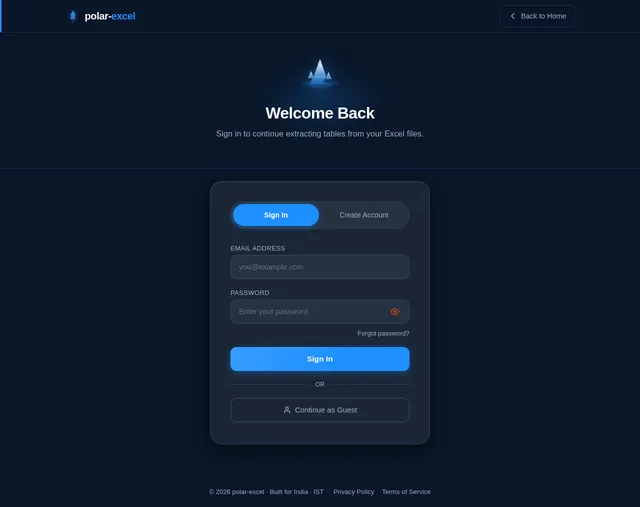
As a user, I want to use a Login page so that I can sign in to my polar-excel account and access upload and preview features. Implement the Login page based on the existing v2 JSX design. Includes: frosted-glass card, email/password fields, 'Sign In' CTA, link to Signup, and error handling for invalid credentials. Connects to: Landing (back link), Dashboard/Upload (on success). Integrate with existing basic authentication backend.
Build Signup Page
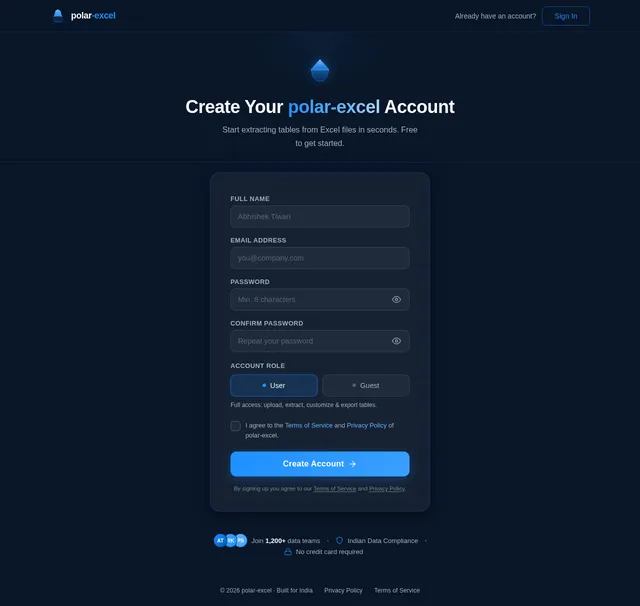
As a guest, I want to use a Signup page so that I can create a polar-excel account and unlock full upload and export capabilities. Implement the Signup page based on the existing v2 JSX design. Includes: name, email, password fields, 'Create Account' CTA, link to Login, and validation feedback. Connects to: Landing (Register Prompt → Signup), Login (already have account). Integrate with existing basic authentication backend.
Build Upload Page
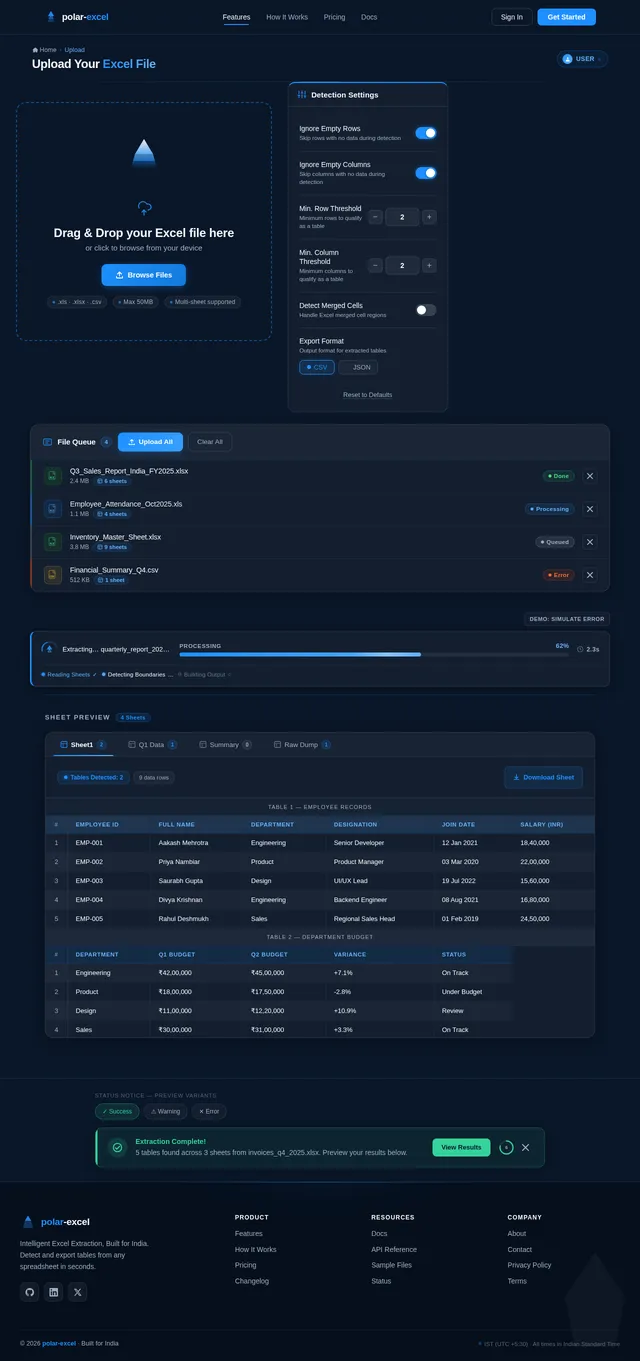
As a user, I want to use an Upload page so that I can upload my Excel files (.xls, .xlsx, .csv up to 50MB) for table extraction. Implement the Upload page based on the existing v2 JSX design. Includes: drag-and-drop zone with visual feedback, file type/size validation, upload progress indicator, file metadata preview (name, size, sheet count estimate), and navigation to the Preview page on successful upload. Connects to: Login (post sign-in), Preview (on upload success).
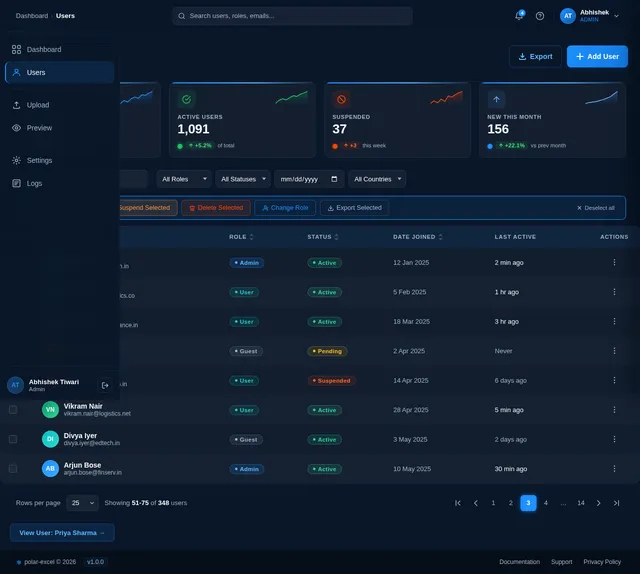
Build Users Management Page
As an admin, I want to use a Users page so that I can manage user access, roles, and accounts within the polar-excel system. Implement the Users page based on the existing v2 JSX design. Includes: user table with name, email, role (Admin/User/Guest), status, last active columns; role assignment controls; invite user flow; deactivate/activate user actions; search and filter. Connects to: Dashboard (back), Settings (configure system). Depends on Users API.
Implement Table Detection Engine
As a user, I want to use a backend API for table detection so that my uploaded Excel sheets are analyzed and all tables are dynamically extracted without predefined boundaries. Implement the core detection engine in Python: parse multi-sheet Excel files using openpyxl/xlrd, detect table boundaries using heuristic algorithms (empty row/column gaps, data density thresholds), support configurable options (ignore empty rows, ignore empty cols, min row/col thresholds), and store detected table records in MySQL. Expose a FastAPI endpoint (POST /api/v1/jobs/{job_id}/detect) to trigger detection with custom params.
Implement Admin Dashboard API
As an admin, I want to use backend APIs for the dashboard so that I can monitor system performance metrics, processing logs, and usage statistics in real time. Implement FastAPI endpoints: GET /api/v1/admin/metrics (system health, files processed, tables extracted, avg processing time, concurrent users), GET /api/v1/admin/logs (paginated processing logs with IST timestamps, filterable by level/date), GET /api/v1/admin/activity (recent upload activity feed). Secured with admin role middleware.
Implement Settings Configuration API
As an admin, I want to use backend APIs for system settings so that I can configure global detection defaults and system parameters that apply across all users. Implement FastAPI endpoints: GET /api/v1/admin/settings (retrieve current system settings), PATCH /api/v1/admin/settings (update settings: default thresholds, file size limit, supported formats, timezone, notification preferences). Settings persisted in MySQL. Admin role required.
Build Dashboard Page
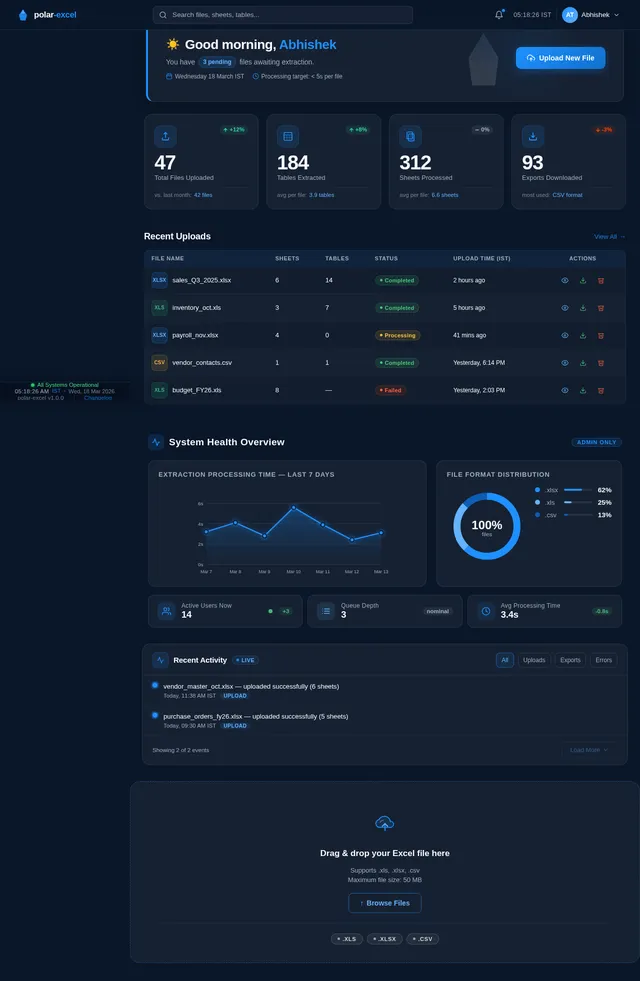
As an admin, I want to use a Dashboard page so that I can monitor system performance, view processing logs, and get an overview of usage metrics. Implement the Dashboard page based on the existing v2 JSX design. Includes: sticky frosted-glass TopBar, system health stats, recent upload activity feed, processing metrics (files processed, tables extracted, avg processing time), log viewer panel, and navigation to Users and Settings pages. Connects to: Login (post admin sign-in), Users (manage access), Settings (configure system).
Build Settings Page
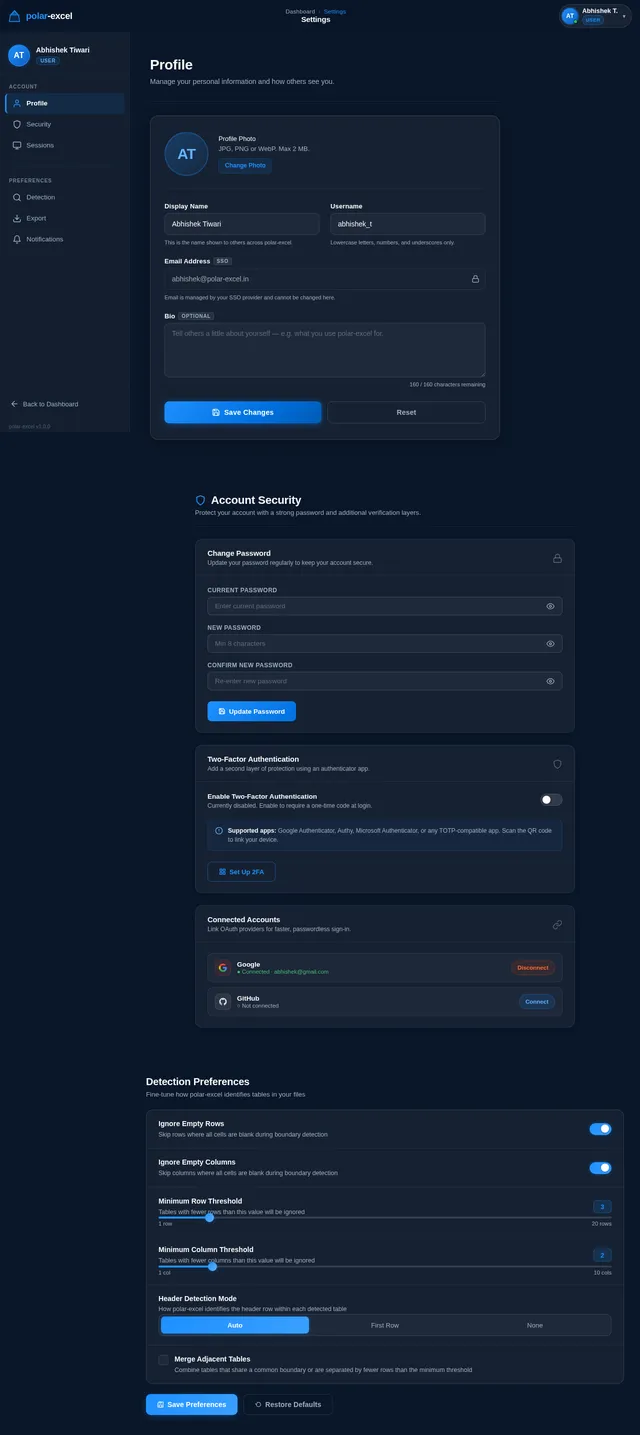
As an admin, I want to use a Settings page so that I can configure system-wide detection defaults, data retention policies, and notification preferences. Implement the Settings page based on the existing v2 JSX design. Includes: detection defaults (empty row/col ignore toggles, threshold sliders), file size limit configuration, supported format toggles, system timezone (IST), notification preferences, and save/reset controls. Connects to: Dashboard, Users.
Implement Tables Preview API
As a user, I want to use a backend API for previewing detected tables so that I can view table data paginated by sheet in the Preview page. Implement FastAPI endpoints: GET /api/v1/jobs/{job_id}/sheets (list sheets with table counts), GET /api/v1/jobs/{job_id}/sheets/{sheet_id}/tables (list tables with dimensions), GET /api/v1/jobs/{job_id}/tables/{table_id}/data (paginated table rows and headers). Supports filtering and pagination parameters.
Implement Notification Service
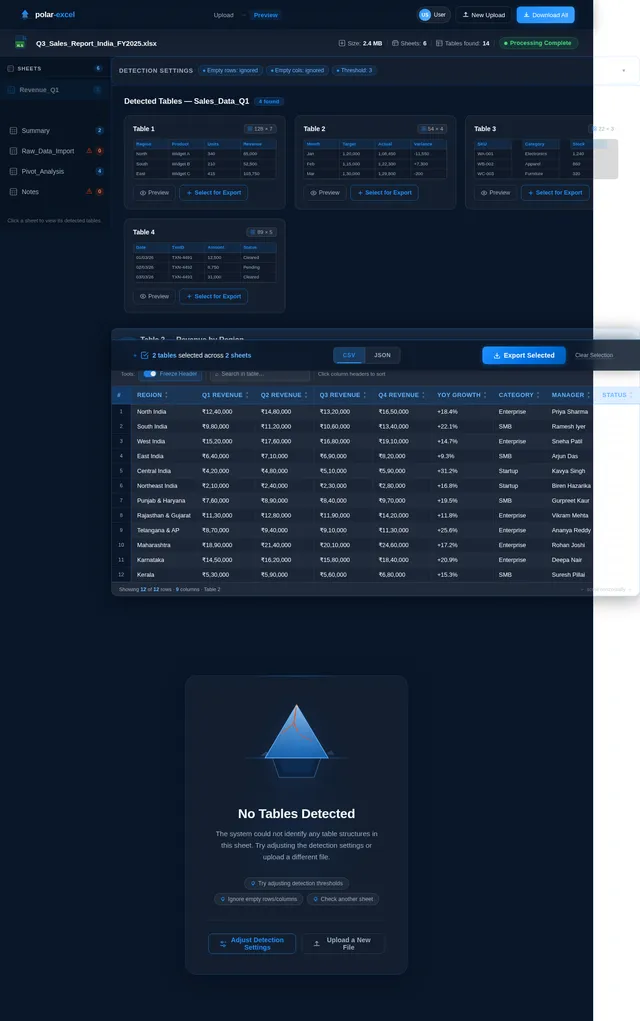
As a user, I want to be notified via the backend when no tables are detected in my uploaded file so that I can take corrective action. Implement a notification service that triggers when the detection engine returns zero tables for a sheet or file. Expose GET /api/v1/jobs/{job_id}/notifications endpoint returning structured notification objects (type: warning/info/error, message, timestamp in IST). Frontend polls this endpoint to display the EmptyStateNotice on the Preview page.
Build Preview Page
As a user, I want to use a Preview page so that I can view all detected tables from each sheet, customize detection logic, and select tables for export before downloading. Implement the Preview page based on the existing v2 JSX design. Includes: TopBar with breadcrumb, FileInfoBanner, SheetSidebar (sheet list with table counts), DetectionControls (ignore empty rows/cols, threshold settings, re-run detection), TableResultsGrid (card tiles per table with mini-preview, row×col dimensions, select for export), TableDetailView (expanded grid with sticky header, sortable columns, search), ExportPanel (format selector CSV/JSON, export CTA), EmptyStateNotice (no tables detected). On mobile: sidebar collapses to horizontal tabs, grids scroll horizontally. Connects to: Upload (back), Download (on export).
Implement Export/Download API
As a user, I want to use a backend API for exporting tables so that I can download selected tables in CSV, JSON, or XLSX format. Implement FastAPI endpoints: POST /api/v1/jobs/{job_id}/export (accepts list of table IDs and format choice, triggers export job), GET /api/v1/jobs/{job_id}/export/status (poll export status with progress percentage), GET /api/v1/jobs/{job_id}/export/download (stream the export file). Generates ZIP archive when multiple tables selected. Enforces Guest user restrictions (no download).
Build Download Page
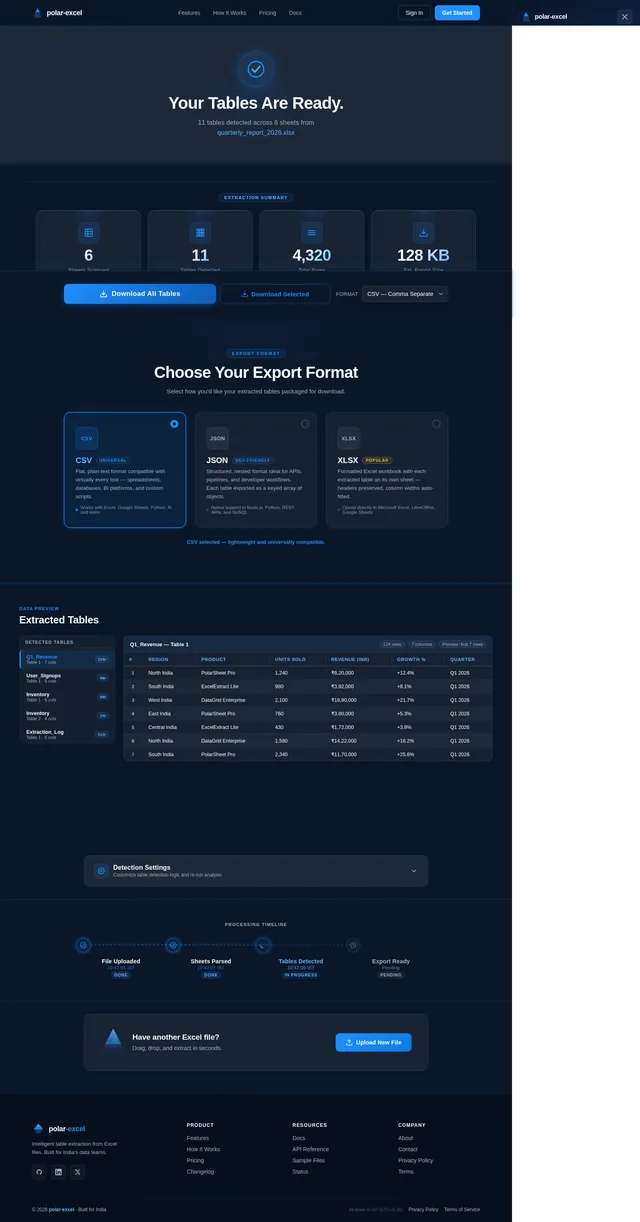
As a user, I want to use a Download page so that I can confirm extraction is complete and download my extracted tables in my chosen format (CSV or JSON). Implement the Download page based on the existing v2 JSX design. Includes: DownloadHero (animated checkmark, 'Your Tables Are Ready' headline, file metadata, confetti burst), ExportSummary (stat cards: sheets scanned, tables detected, total rows, est. size), FormatSelector (CSV/JSON/XLSX toggle cards), TablePreviewPanel (sidebar table list + data grid), DownloadActions (Download All / Download Selected buttons, progress bar, success toast), DetectionSettings (collapsible re-run panel), ProcessingTimeline (step indicators with IST timestamps), UploadAnother (CTA band), NavBar, Footer. Connects to: Preview (back/source), Landing (upload another).
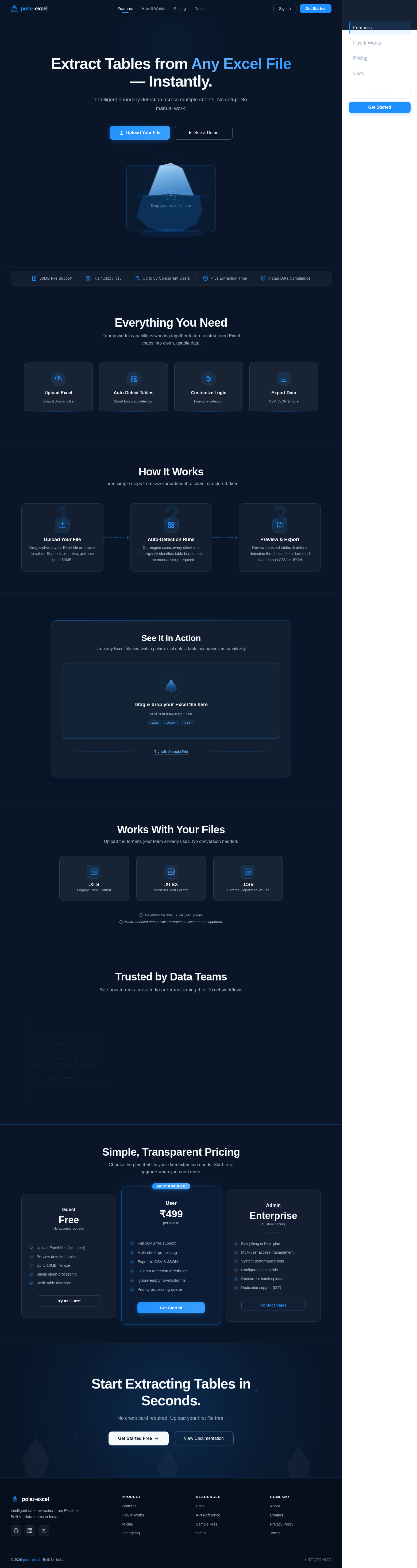
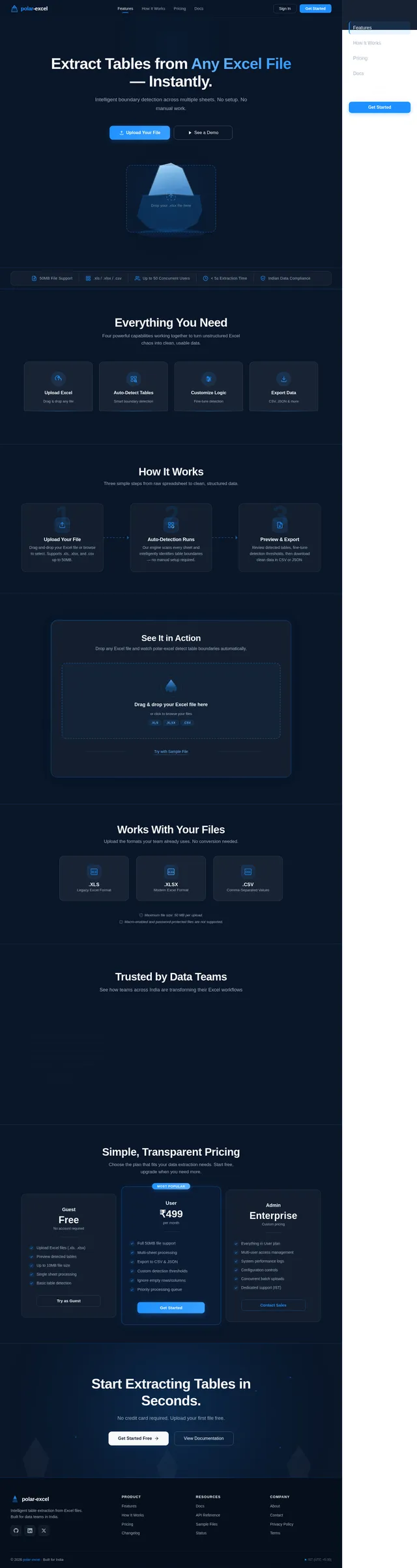
Extract Tables from Any Excel File — Instantly.
Intelligent boundary detection across multiple sheets. No setup. No manual work.
Everything You Need
Four powerful capabilities working together to turn unstructured Excel chaos into clean, usable data.
Simply drag and drop your .xls, .xlsx, or .csv files up to 50MB. Our system instantly ingests multi-sheet workbooks and prepares them for intelligent table extraction.
Intelligent algorithms scan every sheet and dynamically identify table boundaries — no predefined ranges needed. Handles merged cells, empty rows, and irregular layouts automatically.
Set your own thresholds for empty rows and columns, toggle header detection, and configure extraction rules. Tailor the detection engine to match your specific data patterns.
Preview every detected table before exporting. Download cleanly structured data in CSV or JSON format — ready for your database, analytics pipeline, or reporting dashboard.
How It Works
Three simple steps from raw spreadsheet to clean, structured data.
Upload Your File
Drag-and-drop your Excel file or browse to select. Supports .xls, .xlsx, and .csv up to 50MB.
Auto-Detection Runs
Our engine scans every sheet and intelligently identifies table boundaries — no manual setup required.
Preview & Export
Review detected tables, fine-tune detection thresholds, then download clean data in CSV or JSON.
See It in Action
Drop any Excel file and watch polar-excel detect table boundaries automatically.
Drag & drop your Excel file here
or click to browse your files
Works With Your Files
Upload the formats your team already uses. No conversion needed.
Maximum file size: 50 MB per upload.
Macro-enabled and password-protected files are not supported.
Trusted by Data Teams
See how teams across India are transforming their Excel workflows
polar-excel saved us hours of manual work every week. We upload messy multi-sheet files and it detects every table boundary automatically. Game-changer for our reporting pipeline.
Priya Sharma
Data Analyst, Fintech Startup, Mumbai
The auto-detection is incredibly accurate, even with our legacy .xls files that have no clear structure. We customized the threshold rules and now extraction is nearly flawless.
Rahul Menon
Analytics Lead, E-commerce Platform, Bengaluru
We process hundreds of Excel exports from partner banks daily. polar-excel handles them in seconds with zero manual intervention. The CSV and JSON export options fit right into our workflow.
Ananya Desai
Operations Manager, Insurance Firm, Pune
Simple, Transparent Pricing
Choose the plan that fits your data extraction needs. Start free, upgrade when you need more.
- Upload Excel files (.xls, .xlsx)
- Preview detected tables
- Up to 10MB file size
- Single sheet processing
- Basic table detection
- Full 50MB file support
- Multi-sheet processing
- Export to CSV & JSON
- Custom detection thresholds
- Ignore empty rows/columns
- Priority processing queue
- Everything in User plan
- Multi-user access management
- System performance logs
- Configuration controls
- Concurrent batch uploads
- Dedicated support (IST)
Start Extracting Tables in Seconds.
No credit card required. Upload your first file free.
No comments yet. Be the first!