polar-excel
 Abhishek Tiwari
I want a excel to table converter. Here each excel may contain multiple sheets and each sheet may contain multiple tables. There is no dwfined boundaries for tables.
Comments (0)
Sign in to leave a comment
System Requirements
System Requirements Document (SRD) for polar-excel
1. Introduction
The polar-excel project, envisioned by Abhishek Tiwari, aims to create a robust and dynamic Excel-to-table converter. This tool will process Excel files containing multiple sheets and extract tables from them, even when table boundaries are undefined. The solution is tailored for users in India (IN) and will address the challenges of handling unstructured data in Excel files. The project will provide a seamless and automated workflow for extracting meaningful data from complex spreadsheets.
2. System Overview
The polar-excel system will dynamically detect and extract tables from Excel files with multiple sheets. Since the tables may not have predefined boundaries, the system will use intelligent algorithms to identify and extract data. The tool will cater to users who need to process unstructured Excel data efficiently, saving time and reducing manual effort.
The system will:
- Accept Excel files with multiple sheets.
- Dynamically detect and extract tables without relying on predefined boundaries.
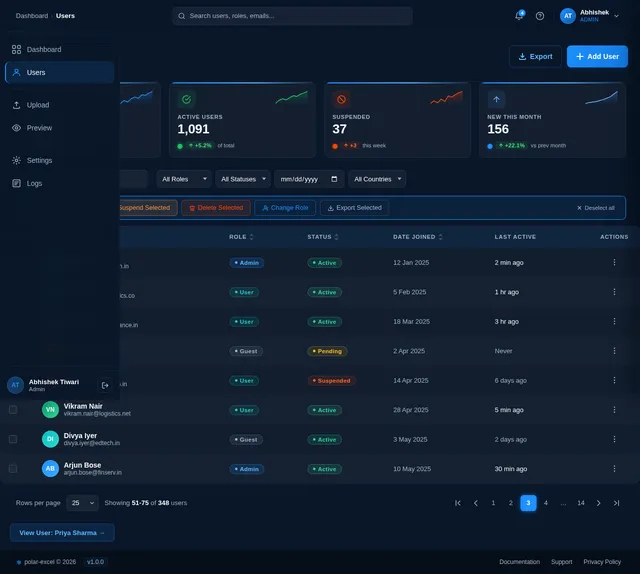
- Provide a user-friendly interface for uploading files and viewing extracted tables.
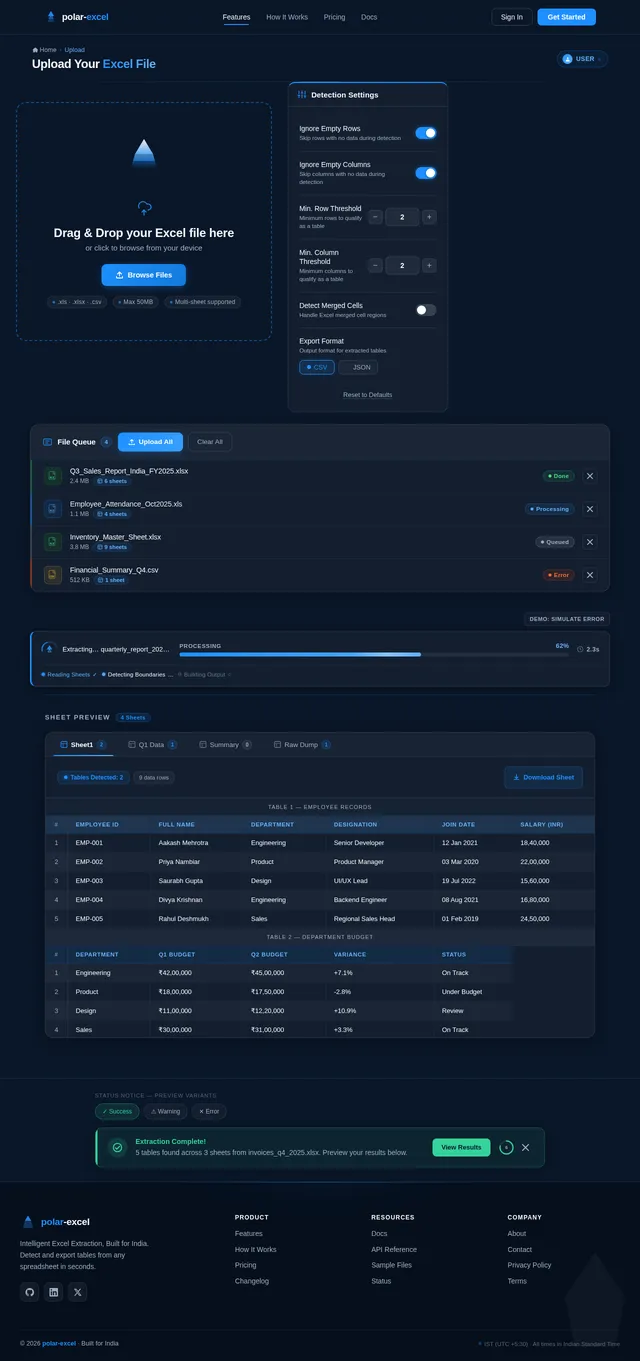
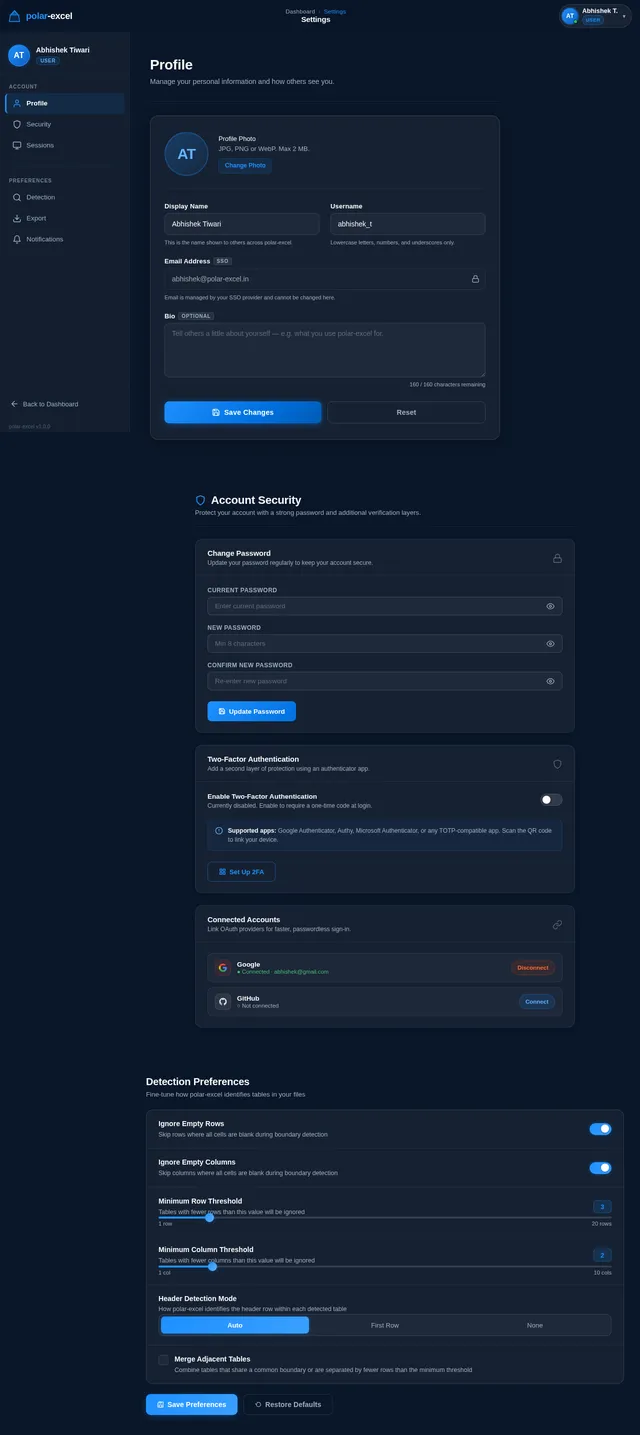
- Offer customization options for table detection logic, such as ignoring empty rows/columns or applying threshold rules.
3. Functional Requirements
- As a User, I should be able to upload Excel files containing multiple sheets.
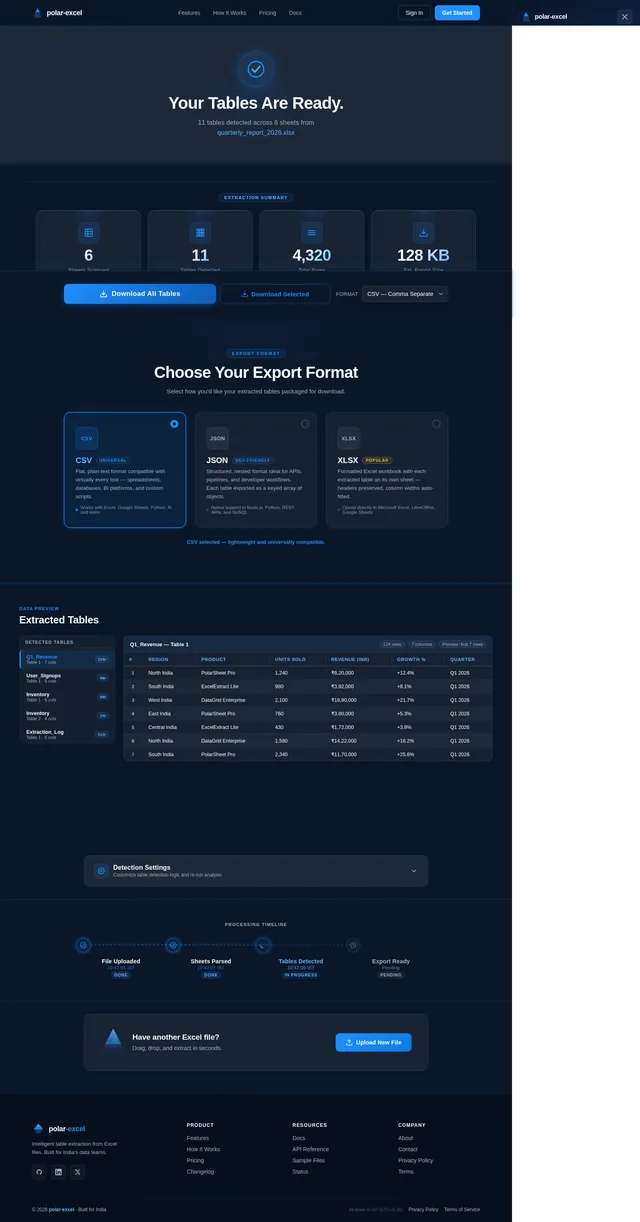
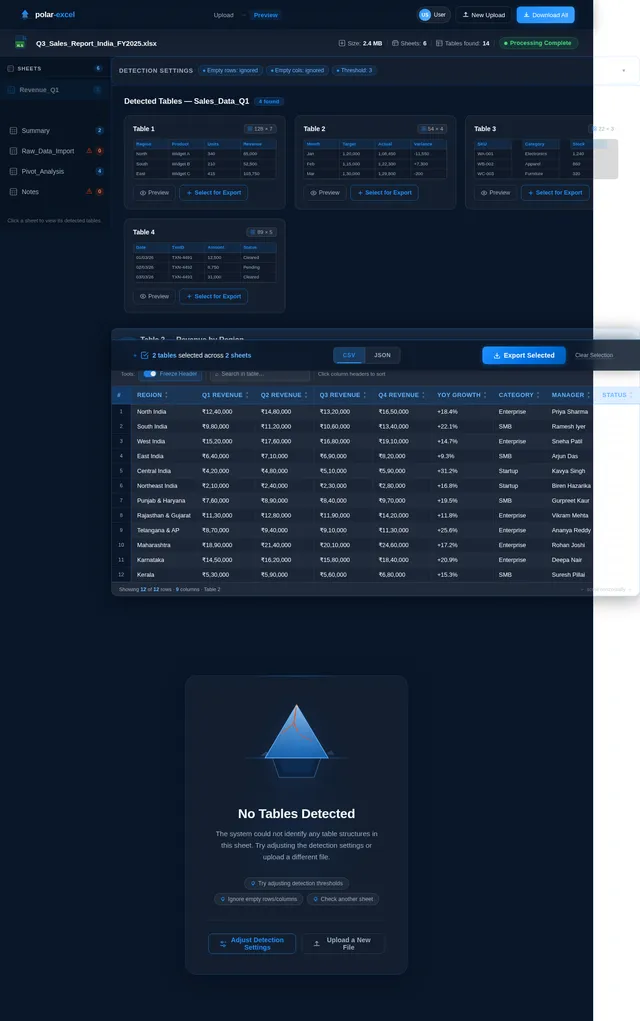
- As a User, I should be able to view all detected tables from each sheet in a structured format.
- As a User, I should be able to download the extracted tables in a preferred format (e.g., CSV, JSON).
- As a User, I should be able to customize table detection logic (e.g., ignore empty rows/columns, set thresholds).
- As a User, I should be able to preview the extracted tables before downloading.
- As a User, I should be notified if the system cannot detect any tables in the uploaded file.
4. User Personas
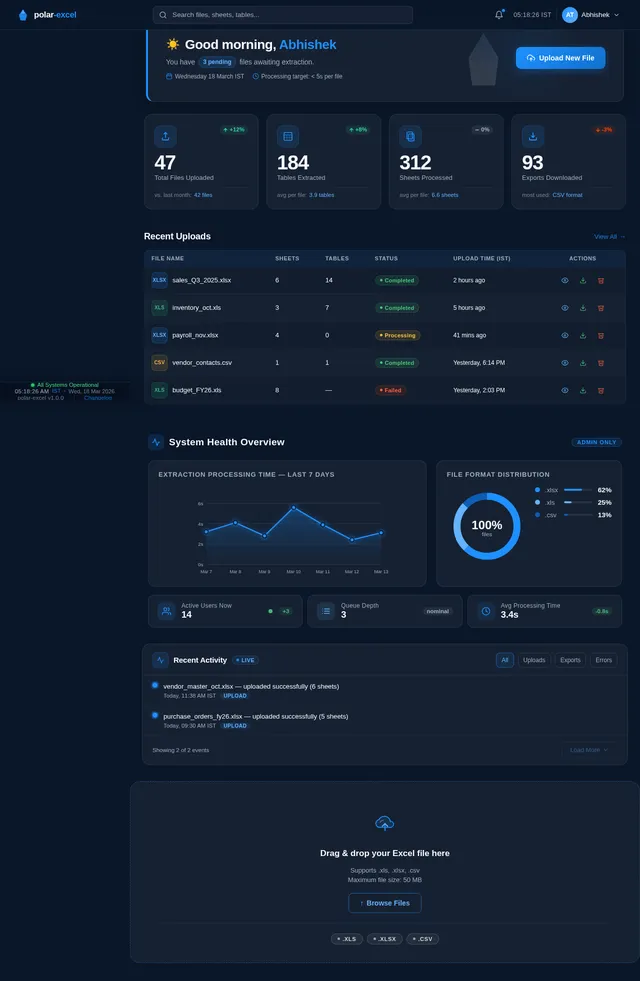
1. Admin
- Manages user access and system configurations.
- Monitors system performance and logs.
2. User
- Uploads Excel files and extracts tables.
- Customizes table detection logic.
- Downloads extracted tables in desired formats.
3. Guest
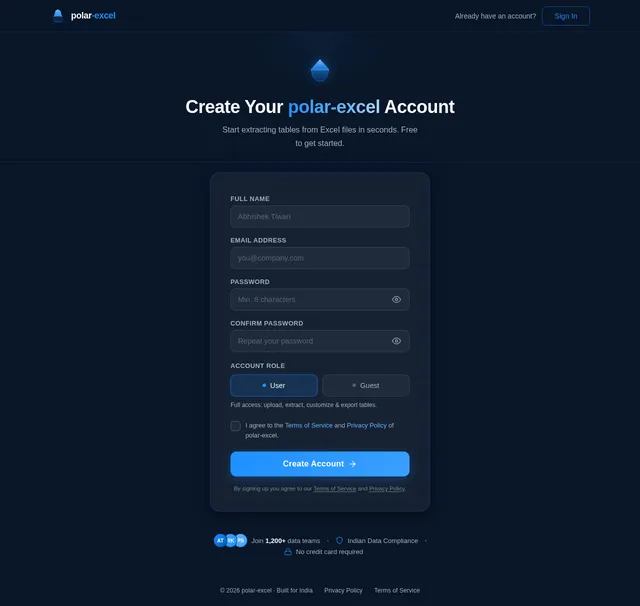
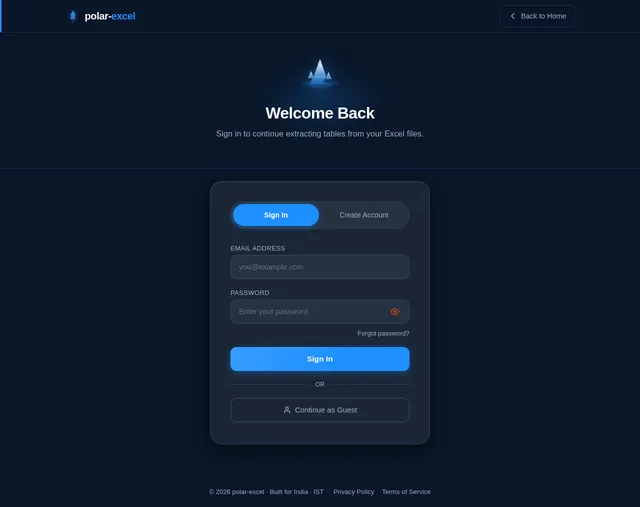
- Limited access to upload and preview functionality.
- Cannot download extracted tables or customize detection logic.
5. Visuals Colors and Theme
The polar-excel project will adopt a clean and professional theme to ensure usability and clarity. The proposed color scheme is as follows:
- Primary Color: Polar Blue (#1E90FF) – Represents trust and reliability.
- Secondary Color: Arctic White (#F8F9FA) – Ensures a clean and minimalistic interface.
- Accent Color: Ice Gray (#D3D3D3) – Used for borders, separators, and subtle highlights.
- Error/Warning Color: Sunset Red (#FF4500) – For error messages and warnings.
The interface will be intuitive, with a focus on simplicity and functionality.
6. Signature Design Concept
The polar-excel homepage will feature an interactive polar landscape design. The landing page will resemble a serene Arctic scene with floating icebergs. Each iceberg will represent a key feature of the tool (e.g., "Upload Excel", "View Tables", "Customize Logic").
Key Features:
- Dynamic Icebergs: As the user hovers over an iceberg, it will gently bob up and down, revealing a tooltip with more information about the feature.
- Snowfall Animation: A subtle snowfall animation will create a calming effect, reinforcing the "polar" theme.
- Interactive Upload Zone: The central iceberg will feature a drag-and-drop upload zone. When a file is dragged over it, the iceberg will "crack" slightly, creating a visual cue for interaction.
- Color Transitions: The background will shift from a soft blue hue in the morning to a darker, starry sky at night, reflecting the time of day.
- Micro-Interactions: Buttons and icons will have smooth hover effects, such as glowing edges or slight enlargements.
This design will make the tool memorable and engaging while maintaining a professional appearance.
7. Non-Functional Requirements
- The system should process Excel files of up to 50MB in size.
- The system should support .xls, .xlsx, and .csv file formats.
- The table extraction process should complete within 5 seconds for files with up to 10 sheets.
- The system should handle concurrent uploads by up to 50 users.
- The interface should be responsive and accessible on both desktop and mobile devices.
- The system should comply with Indian data protection regulations.
8. Tech Stack
Frontend:
- React for Web
Backend:
- Python
- FastAPI
Database:
- MySQL (with Alembic for migrations)
AI Models:
- GPT 5.2 for user-friendly responses.
AI Tools:
- Langchain
- Litellm for LLM Routing
Orchestration:
- Docker
- Kubernetes
9. Assumptions and Constraints
Assumptions:
- Users will primarily upload Excel files with unstructured data.
- The system will operate in the IST (Indian Standard Time) timezone.
- Users will have basic knowledge of Excel and table structures.
Constraints:
- The system will not support Excel files with macros or password protection.
- Table detection accuracy may vary depending on the complexity of the data.
10. Glossary
- Excel File: A spreadsheet file with the extension .xls or .xlsx.
- Sheet: A single page within an Excel file.
- Table: A structured set of data within a sheet, typically organized in rows and columns.
- Boundary: The edges or limits of a table within a sheet.
- IST: Indian Standard Time, the time zone used in India (UTC+5:30).
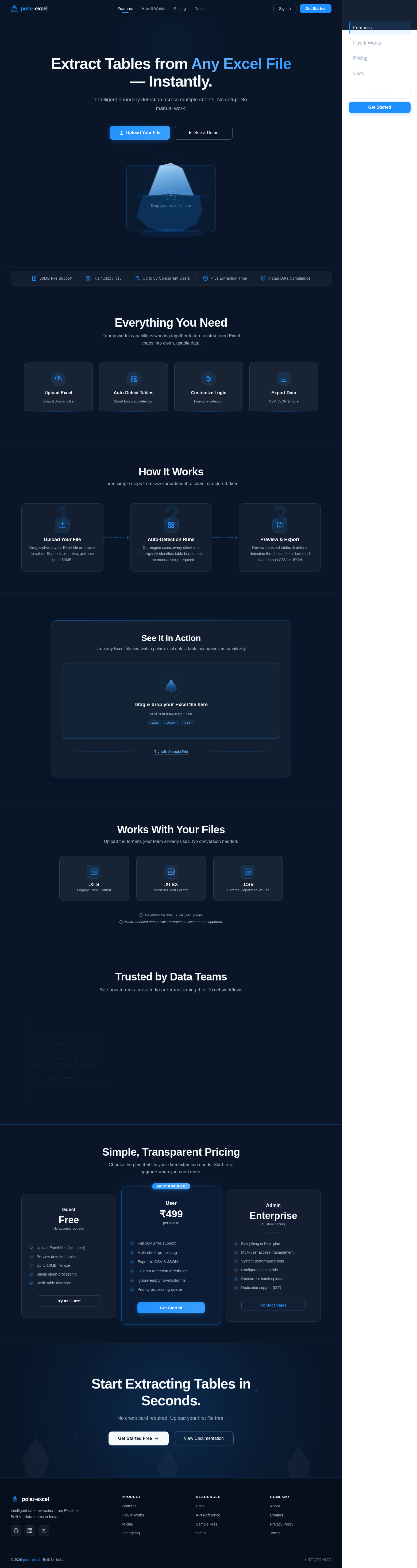
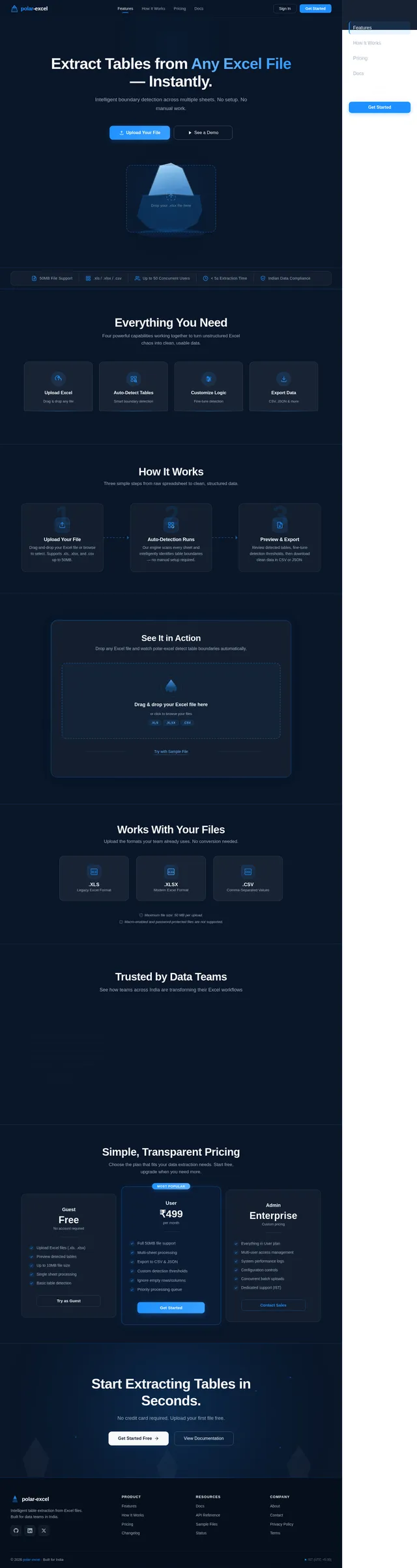
Extract Tables from Any Excel File — Instantly.
Intelligent boundary detection across multiple sheets. No setup. No manual work.
Everything You Need
Four powerful capabilities working together to turn unstructured Excel chaos into clean, usable data.
Simply drag and drop your .xls, .xlsx, or .csv files up to 50MB. Our system instantly ingests multi-sheet workbooks and prepares them for intelligent table extraction.
Intelligent algorithms scan every sheet and dynamically identify table boundaries — no predefined ranges needed. Handles merged cells, empty rows, and irregular layouts automatically.
Set your own thresholds for empty rows and columns, toggle header detection, and configure extraction rules. Tailor the detection engine to match your specific data patterns.
Preview every detected table before exporting. Download cleanly structured data in CSV or JSON format — ready for your database, analytics pipeline, or reporting dashboard.
How It Works
Three simple steps from raw spreadsheet to clean, structured data.
Upload Your File
Drag-and-drop your Excel file or browse to select. Supports .xls, .xlsx, and .csv up to 50MB.
Auto-Detection Runs
Our engine scans every sheet and intelligently identifies table boundaries — no manual setup required.
Preview & Export
Review detected tables, fine-tune detection thresholds, then download clean data in CSV or JSON.
See It in Action
Drop any Excel file and watch polar-excel detect table boundaries automatically.
Drag & drop your Excel file here
or click to browse your files
Works With Your Files
Upload the formats your team already uses. No conversion needed.
Maximum file size: 50 MB per upload.
Macro-enabled and password-protected files are not supported.
Trusted by Data Teams
See how teams across India are transforming their Excel workflows
polar-excel saved us hours of manual work every week. We upload messy multi-sheet files and it detects every table boundary automatically. Game-changer for our reporting pipeline.
Priya Sharma
Data Analyst, Fintech Startup, Mumbai
The auto-detection is incredibly accurate, even with our legacy .xls files that have no clear structure. We customized the threshold rules and now extraction is nearly flawless.
Rahul Menon
Analytics Lead, E-commerce Platform, Bengaluru
We process hundreds of Excel exports from partner banks daily. polar-excel handles them in seconds with zero manual intervention. The CSV and JSON export options fit right into our workflow.
Ananya Desai
Operations Manager, Insurance Firm, Pune
Simple, Transparent Pricing
Choose the plan that fits your data extraction needs. Start free, upgrade when you need more.
- Upload Excel files (.xls, .xlsx)
- Preview detected tables
- Up to 10MB file size
- Single sheet processing
- Basic table detection
- Full 50MB file support
- Multi-sheet processing
- Export to CSV & JSON
- Custom detection thresholds
- Ignore empty rows/columns
- Priority processing queue
- Everything in User plan
- Multi-user access management
- System performance logs
- Configuration controls
- Concurrent batch uploads
- Dedicated support (IST)
Start Extracting Tables in Seconds.
No credit card required. Upload your first file free.
No comments yet. Be the first!