pitchtrack-drs
 Muneeb Ahmad
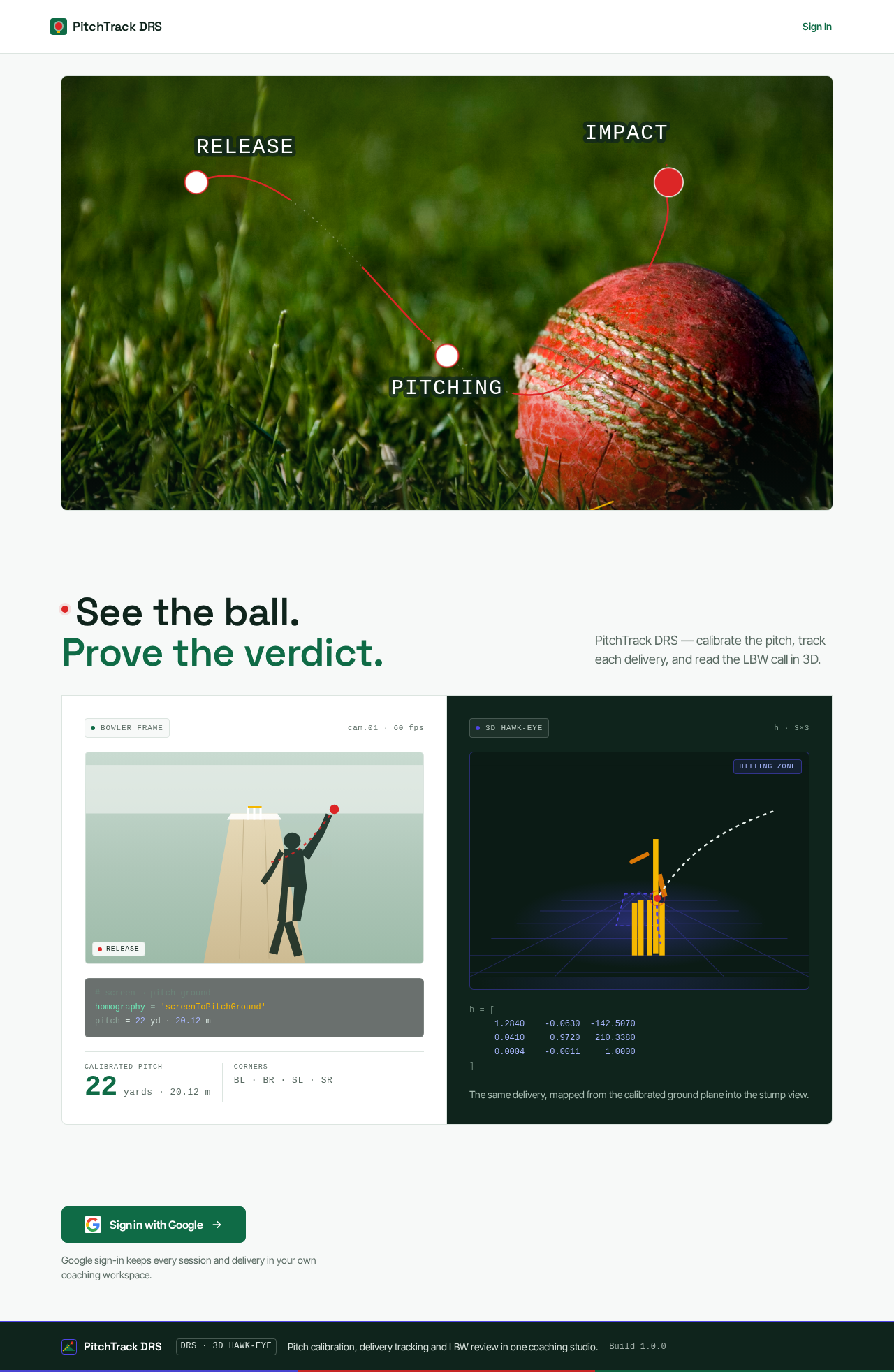
Build a production-grade Android Cricket DRS (Decision Review System) & 3D Hawk-Eye Coaching app named "PitchTrack DRS" using Kotlin, Jetpack Compose (Material Design 3), CameraX, Firebase, and Clean MVVM architecture. 1. Visual Design, Theme & Hero Art - Palette ("Clean Light Coaching Studio"): Studio Alabaster background (#F7F9F8), crisp white surfaces (#FFFFFF), soft borders (#DCE5E0), Pitch Emerald primary (#0F6B46), Hawk-Eye Indigo accent (#4F46E5), Ball Crimson (#DC2626), and Stump Gold/Amber (#F5B700 / #D97706). - Support adaptive Edge-to-Edge layouts using WindowInsets.safeDrawing, with a bottom NavigationBar on compact phones (<600dp) and a side NavigationRail on tablets/foldables (>=600dp). - Navigation destinations: Dashboard, Track & Record (Capture & Calibration), Sessions, and full-screen 3D Hawk-Eye Review. - Custom adaptive launcher icon and a 16:9 photorealistic stadium hero banner (displayed unclipped at 16:9 aspectRatio on the sign-in screen and empty dashboard) showing a fast bowler releasing a red cricket ball from a raised hand, a smooth single-bounce crimson Hawk-Eye trajectory down the pitch, and the ball smashing cleanly into the striker's stumps with wooden bails flying into the air. 2. Authentication & Cloud Persistence (Firebase) - Gate access behind Google Sign-In using Jetpack CredentialManager + Firebase Auth (no anonymous sign-in). - Configure Firebase App Check before Compose initialization. - Store BowlingSessions and DeliveryRecords in Cloud Firestore scoped per authenticated userId, with real-time snapshot listeners, create/delete/refine operations, and strict field validation. - Include offline/empty-state handling and a snackbar feedback host. 3. Pitch Calibration & 4-Corner Perspective Mapping (Behind-Bowler View) - Support both live stationary camera recording (CameraX VideoCapture with a manual Record/Stop button per individual delivery) and gallery video upload (Android Photo Picker / PickVisualMedia). - Pitch presets: 22 yards (20.12 m regulation), 16 yards (indoor/nets), or custom 10–30 yards, plus selectable bowler/batsman target objects (Wickets, Bricks, Blocks, Chairs) with real-world dimensions, bowler style (Pace/Seam or Spin), and ball color (Red Leather, White Ball, Tape/Tennis). - AI Auto-Detect Stumps & Pitch: Run Gemini multimodal vision/image auto-detection on a captured frame or uploaded video frame to detect the near (bowler) and far (striker) targets and return normalized coordinates. - Interactive 4-Corner Calibration Overlay & Zoom Loupe: Render draggable 4-corner pitch pins (BL Bowler Left, BR Bowler Right, SL Striker Left, SR Striker Right), top height handles, and a 22-yard perspective pitch grid. Dragging any corner displays a live zoomed magnifier loupe for pixel-accurate alignment, plus a "Lock Pitch" toggle so calibration persists across consecutive deliveries when the camera is mounted in one spot. - Compute a true 3x3 perspective Homography (screenToPitchGround, pitchGroundToScreen, and height projection) from the 4 calibrated pitch corners to map normalized screen pixels (u, v) accurately to real-world lateral meters (x) and pitch distance yards (z). 4. High-Precision Ball Tracking, Physics & Speed Calculation - Frame-by-frame video ball tracker (ProBallTracker): - Sample video frames with exact MediaMetadataRetriever timestamps and restrict search within the calibrated homography corridor. - Combine motion-delta foreground masking (suppressing stationary background, bowler arm clutter, and batsman stance) with HSV/color filtering tuned to the selected ball type (Red Leather, White Ball, Tape/Tennis). - Run RANSAC parabolic trajectory fitting in calibrated 3D coordinates to identify Release Point -> Bounce Point (Pitching) -> Pad/Bat Impact Point -> Projected Stump Path. - Strict Real-World Speed Calculation: - Derive speed (both km/h and mph side by side) strictly from calibrated 3D world distance between release/bounce/crease divided by exact elapsed video frame timestamps (never NaN, 0, or pixel-guesswork). - Compute bounce distance (yards from bowler end), lateral pitching/impact offsets, spin angle (degrees) + spin RPM, swing factor, and tracking confidence. - Manual Frame-by-Frame Scrubber Correction: - In the Hawk-Eye Review screen, provide a frame-by-frame video scrubber with Previous Frame / Next Frame buttons and Release / Bounce / Impact keypoint selectors so the user can tap directly on any frame to correct the ball position and recalculate trajectory, speed, and LBW verdict from the calibrated homography and timestamps. - Also provide a Calibrated 3D LBW Simulator mode for testing deliveries directly from calibrated telemetry. 5. Interactive 360-Degree 3D Hawk-Eye Viewer & Broadcast LBW UI - Build a responsive Jetpack Compose 3D Canvas stadium/pitch renderer (HawkEye3DCanvas) supporting: - Smooth 360-degree touch orbit rotation (yaw & pitch drag), pinch-to-zoom, and double-tap camera reset. - One-tap preset camera angles: Bowler's End, Striker's End, Side-On, and Top-Down, plus an optional Transparent AR Video Overlay mode projected onto the recorded delivery clip via the calibrated Homography3D. - 3D stadium turf, pitch strip, popping/bowling/return creases, 3D wickets/targets with bails, translucent blue/red wicket-hitting zone box, ball animation replay slider/replay button, solid trajectory curve up to impact, and glowing dotted predicted path from impact into the stumps. - Display a crisp TV-broadcast style DRS overlay card showing: - PITCHING: In Line / Outside Off / Outside Leg - IMPACT: In Line / Outside Off / Outside Leg / Umpire's Call - WICKETS: Hitting / Umpire's Call / Missing - FINAL VERDICT badge: OUT / NOT OUT / UMPIRE'S CALL - SPEED: exact km/h and mph side by side, plus spin (° / RPM) and swing metrics. 6. Dashboard, Sessions & Gemini AI Coaching - Dashboard: Overview KPI cards (Avg Speed in km/h & mph, Avg Spin RPM, Avg Swing, LBW Out %), visual Pitch Map (bounce length & line heatmap), Stump Beehive impact chart, filter chips (All, LBW Out, Fast >=70 mph, Spin), and tappable delivery history cards. - Sessions Screen: Create, switch, and delete bowling sessions with custom pitch yardage, target types, and bowler style, plus session-wide statistics. - AI Bowling Coach (Firebase AI Logic — Gemini): Stream concise delivery-level coaching (analyzing telemetry + up to 3 extracted delivery keyframes for line, length, execution, and next-ball tactical adjustment) and full-session 3-bullet coaching summaries.


Comments (0)
Sign in to leave a comment
Project Tasks
44 planning tasksGenerate system requirement document
Generate personas & user flows
Architecture
Workspace task plan
Create flow for Bowler
Create flow for Coach
Landing
Sign In
Dashboard
Track & Record
Capture & Calibration
Sessions
3D Hawk-Eye Review
AI Bowling Coach
Landing / Hero Banner
Landing / Split Hero
Landing / Sign In Cta
Landing / Navigation
Landing / Footer
Navigation
Footer
Fix Landing: On desktop the split hero is squeezed into the left half of the page, leaving the right…
Fix Landing: Desktop code/matrix panels clip their text at the right edge, so the homography values…
Fix Landing: The line and the matrix rows () are cut off at the right edge of their panel, so…
Fix Landing review findings: On desktop the split hero is squeezed into the left half… (+2 more)
Sign In / Navigation
Sign In / Split Hero
Sign In / Access Panel
Sign In / Footer
Dashboard / Navigation
Dashboard / Session Context
Dashboard / Kpi Row
Dashboard / Pitch Map
Dashboard / Stump Beehive
Dashboard / Delivery History
Dashboard / Empty State
Dashboard / Footer
Fix Sign In: Desktop hero subline overlaps the delivery-frame tag and top of the video frame
Fix Sign In: Homography panel covers the 3D Hawk-Eye tag and the 3D render on mobile
Fix Sign In review findings: Desktop hero subline overlaps the delivery-frame tag and… (+1 more)
Track & Record / Track Record Navigation
Track & Record / Track Record Heading
Track & Record / Track Record Capture Stage
Track & Record / Track Record Footer
PitchTrack DRS stadium delivery frame
See the ball.Prove the verdict.
PitchTrack DRS — calibrate the pitch, track each delivery, and read the LBW call in 3D.
# screen → pitch ground
homography = 'screenToPitchGround'
pitch = 22 yd · 20.12 m
h = [
     1.2840    -0.0630  -142.5070
     0.0410     0.9720   210.3380
     0.0004    -0.0011     1.0000
]
Google sign-in keeps every session and delivery in your own coaching workspace.
PitchTrack DRS stadium delivery frame
See the ball.Prove the verdict.
PitchTrack DRS — calibrate the pitch, track each delivery, and read the LBW call in 3D.
# screen → pitch ground
homography = 'screenToPitchGround'
pitch = 22 yd · 20.12 m
h = [
     1.2840    -0.0630  -142.5070
     0.0410     0.9720   210.3380
     0.0004    -0.0011     1.0000
]
Google sign-in keeps every session and delivery in your own coaching workspace.
No comments yet. Be the first!