personal-finance-finnote
 azis 01
Build a production-ready personal finance SaaS web app called **FinNote**. ## Objective Create a fully functional personal finance app for individual users to manage: - Income - Expenses - Transfers - Accounts/wallets - Monthly budgets - Savings goals - Recurring bills - Reports Do NOT build only a static UI. Implement real CRUD, calculations, authentication, database, validation, responsive UI, and secure user data isolation. ## Default - Language: Indonesian - Currency: IDR (Rp) - Locale: id-ID - Date: DD MMM YYYY - Timezone: user local timezone - Currency can be changed in Settings ## Preferred Stack Use the platform's best supported stack. Prefer: - Next.js + TypeScript + React - Tailwind CSS + shadcn/ui + Lucide - Supabase PostgreSQL + Auth + Row Level Security - Recharts Use reusable components, clean architecture, strict typing, no hardcoded production data, proper loading/empty/error states. ## Authentication Implement: - Register - Login - Logout - Forgot/reset password - Persistent session - Protected routes Every user's data must be isolated. Users must never access another user's accounts, transactions, budgets, categories, goals, bills, or settings. Use RLS when available. ## Main Navigation Desktop: left sidebar + top header. Mobile: compact header + bottom navigation. Pages: - Dashboard - Transaksi - Akun - Anggaran - Target Tabungan - Tagihan - Laporan - Kategori - Pengaturan ## Dashboard Show selected period: Hari Ini / Minggu Ini / Bulan Ini / Tahun Ini / Custom Range Summary cards: - Total Saldo - Pemasukan - Pengeluaran - Sisa Anggaran - Comparison vs previous period Charts: - Income vs Expense - Expense by Category - Monthly Cash Flow - Balance Trend Sections: - Transaksi Terbaru - Pengeluaran Terbesar - Progress Anggaran - Target Tabungan - Tagihan Mendatang Quick actions: + Pemasukan + Pengeluaran + Transfer ## Transactions Types: - Income - Expense - Transfer Fields: - Type - Amount - Account - Destination account for transfer - Category - Date/time - Note - Tags - Optional receipt attachment - Recurring toggle Support: - Create - Edit - Delete - Duplicate - Search - Filter - Sort - Pagination Filters: - Date range - Type - Category - Account - Amount - Tag Financial rule: Never use floating-point arithmetic for money. Use database NUMERIC/DECIMAL or integer smallest units. Transfers must: - decrease source balance - increase destination balance - NOT count as income or expense ## Accounts Account types: - Cash - Bank - E-Wallet - Credit Card - Savings Fields: - Name - Type - Initial balance - Current balance - Currency - Icon Balances must update automatically from transactions. ## Categories Default expense: Makanan, Transportasi, Belanja, Tagihan, Hiburan, Kesehatan, Pendidikan, Rumah, Travel, Lainnya. Default income: Gaji, Bonus, Bisnis, Freelance, Investasi, Hadiah, Lainnya. Users can create, rename, delete, and select icons. Prevent category deletion if linked transactions are not handled safely. ## Budgets Monthly category budgets. Show: - Limit - Amount used - Remaining - Percentage - Progress bar Statuses: - Normal - Hampir Habis - Melebihi Anggaran Warn at 80% and 100%. Budget usage must be calculated automatically from expense transactions. ## Savings Goals Fields: - Goal name - Target amount - Current amount - Target date - Notes Show progress %, remaining amount, and remaining time. Allow goal contributions. ## Recurring Bills Support recurring income/expense: - Daily - Weekly - Monthly - Yearly Bill statuses: - Upcoming - Due Soon - Paid - Overdue Prevent duplicate recurring transaction generation. ## Reports Filters: - Month - Year - Custom range - Account - Category Reports: - Income - Expenses - Net Cash Flow - Expense by Category - Income by Category - Monthly Trend - Account Balances Charts: - Bar - Line - Donut/Pie Comparison: - This month vs last month - This year vs last year ## Import / Export Export transactions to CSV with: Date, Type, Category, Account, Amount, Description. CSV import must: - Validate data - Preview rows - Detect invalid rows - Reduce duplicate imports - Show success/error summary ## Database Create normalized tables similar to: profiles accounts categories transactions tags transaction_tags budgets savings_goals goal_contributions recurring_transactions attachments user_preferences transactions should include: id user_id type amount account_id destination_account_id nullable category_id nullable transaction_date description created_at updated_at Use: - foreign keys - constraints - indexes - timestamps - user ownership Index important columns: user_id, transaction_date, category_id, account_id. ## Validation Client + server validation. Rules: - amount > 0 - account required - category required for income/expense - destination required for transfer - source and destination cannot be same - reject invalid dates - reject missing required fields Use confirmation dialogs before destructive actions. ## UI / UX Style: - Premium fintech - Minimal - Modern - Professional - Clean - Natural - Not visually AI-generated Use: - strong visual hierarchy - readable typography - subtle borders - soft shadows - rounded cards - balanced spacing - meaningful icons Avoid: - excessive gradients - excessive animation - oversized cards - decorative elements with no function Support: - Light - Dark - System theme Use semantic styling: - Income = positive - Expense = negative - Transfer = neutral ## Responsive Must work well at: 320, 375, 768, 1024, 1440, 1920 px. No normal-page horizontal scrolling. Make tables mobile-friendly. ## Settings Provide: - Profile - Name - Password - Currency - Language - Date format - Theme - Delete account Require confirmation for destructive actions. ## Onboarding After registration: 1. Welcome 2. Select currency (default IDR) 3. Create first account 4. Optional monthly budget 5. Go to Dashboard ## UX States Use: - Skeleton loading - Empty states - Toast notifications - Clear validation errors - Network/database error handling - Session expired handling Example empty state: "Belum ada transaksi" Button: "+ Tambah Transaksi" Do not show fake financial data in production when the user has no data. ## Security Implement: - Authentication - Authorization - RLS - Protected APIs/routes - Input validation/sanitization - Secure sessions Never expose: - secrets - service keys - stack traces - database credentials Never store online banking credentials. ## Performance Optimize: - dashboard queries - financial aggregation - transaction pagination - search - charts - React rendering Use database/server aggregation when appropriate. ## Final QA Before completion, test and fix: - Auth - CRUD - Financial calculations - Account balances - Transfers - Budgets - Savings goals - Recurring bills - Reports - Import/export - User data isolation - Responsive UI - Form validation - Empty/loading/error states - TypeScript errors - Broken imports - Runtime errors - Database errors Preserve a consistent design system and deliver a polished, usable production application, not a mockup.


Comments (0)
Sign in to leave a comment
System Requirements
System Requirements Document for personal-finance-finnote
1. Introduction
FinNote is a production-ready personal finance SaaS web application for individual users in Indonesia. It gives one person a private, precise register for their own money: income, expenses, transfers, accounts and wallets, monthly category budgets, savings goals, recurring bills, and reports — all in Indonesian, denominated in IDR (Rp), formatted with the id-ID locale and DD MMM YYYY dates, and rendered in the user's local timezone.
The product intent is a working financial instrument, not a mockup. Every figure the user sees must be produced by real CRUD operations, real database-backed aggregation, and real validation — never by hardcoded production data. Money is never computed with floating-point arithmetic. Each user's records are isolated from every other user's records at the database layer through Row Level Security, so a user can never reach another user's accounts, transactions, budgets, categories, goals, bills, or settings.
The audience is a single human role: an individual managing their own personal finances across cash, bank accounts, e-wallets, credit cards, and savings. They open FinNote in the morning on a phone and in the evening on a laptop. They want to feel in control of their spending, not entertained by it. The interface therefore recedes so the numbers can be read.
2. System Overview
FinNote is delivered as a responsive web application built on Next.js with TypeScript and React, styled with Tailwind CSS and shadcn/ui components, iconography from Lucide, charts from Recharts, and persisted in Supabase PostgreSQL with Supabase Auth and Row Level Security.
The single accepted human actor is the Individual Finance User. They register themselves, verify their identity on return, recover a forgotten password, complete a short post-registration onboarding, and then work inside nine protected destinations: Dashboard, Transaksi, Akun, Anggaran, Target Tabungan, Tagihan, Laporan, Kategori, and Pengaturan. Anonymous entry surfaces — Landing, Sign Up, Login, and Account Recovery — sit outside the protected shell, and Onboarding sits inside the authenticated shell but before normal dashboard use.
All financial state is owned by the user who created it. Balances are derived from transactions rather than typed in by hand. Transfers move value between two of the user's own accounts without ever being counted as income or expense. Budget usage is derived from expense transactions. Savings goal progress is derived from contributions. Recurring bills generate transactions on their schedule without producing duplicates.
The system also performs background work that the user never directly operates: scheduled generation of due recurring transactions, and server-side aggregation of dashboard and report figures. These are supporting processes behind user-facing surfaces, not destinations.
Narrow exclusions. FinNote never stores online banking credentials. It never exposes secrets, service keys, stack traces, or database credentials. It does not show fake financial data in production when the user has no data. It does not build only a static UI.
2a. Product Interpretation and Delivery Boundary
Delivery ownership. FinNote is a first-party application. The user-facing surfaces — the anonymous entry and identity surfaces, onboarding, and all nine protected destinations — are owned and rendered by FinNote itself. Supabase provides the underlying PostgreSQL database, the authentication service, and Row Level Security enforcement; it is a provider of infrastructure, not a surface the user navigates to for product work. Recharts renders charts inside FinNote pages. No accepted capability is delegated to a third-party destination the user must leave FinNote to reach.
Access ownership. FinNote owns application identity. Because the user must privately own and resume durable financial records — balances, budgets, goals, bills, and settings that must remain bound to the correct person — identity is indispensable and is established by the application itself. First use is self-service registration; returning use is verified login; a forgotten password is recovered through a dedicated recovery surface. The anonymous entry surfaces (Landing, Sign Up, Login, Account Recovery) are reachable without a session. Onboarding and all nine product destinations require a session. A protected destination never owns the interaction that establishes access to itself.
Current versus future boundary. Everything described in this document is current. There is no accepted future horizon in the authoritative requirements: no deferred phase, no planned module, and no capability reserved for later. The only forward-looking statements in the source are prohibitions and quality gates, which are binding now.
Explicit exclusions that remain binding. No online banking credentials are ever stored. No secrets, service keys, stack traces, or database credentials are ever exposed. No fake financial data appears in production when the user has no data. No floating-point arithmetic is used for money. No normal-page horizontal scrolling. No excessive gradients, excessive animation, oversized cards, or decorative elements with no function. No blue or indigo anywhere in the interface.
2b. Source Content Inventory
Not applicable. No reference directive in this project declares a content_source, so no external factual inventory is carried into this document.
2c. Page Content and Component Coverage
The page inventory is the closed, ordered contract: Landing, Sign Up, Login, Onboarding, Account Recovery, Dashboard, Transaksi, Akun, Anggaran, Target Tabungan, Tagihan, Laporan, Kategori, Pengaturan. Each appears exactly once below.
Landing
- Information and state. Anonymous entry surface. Explains what FinNote is, who it is for, and which personal-finance capabilities it covers: income, expenses, transfers, accounts and wallets, monthly budgets, savings goals, recurring bills, and reports. States the Indonesian-language, IDR,
id-IDdefaults. No financial data of any kind is shown, because no user is signed in. - Primary actions. Go to Sign Up. Go to Login.
- Supporting actions. Navigate to Account Recovery for a user who already has an account but cannot sign in.
- Domain entities. None persisted. Product capability descriptions only.
- Component responsibilities. A composed entry surface built from the balance-plate language: a warm off-white field, a single oversized light-weight tabular figure as the focal subject, hairline rules, and small-caps section labels. Capability descriptions are set as ruled text blocks, not as a grid of identical cards. No centred headline-plus-subtext-plus-CTA marketing hero.
- States. Loading: static content, no skeleton required. Empty: not applicable. Success: the user selects Sign Up or Login and proceeds. Error: if the session check fails, the surface still renders and both entry actions remain available. Recovery: the user can always reach Login or Account Recovery from here.
Sign Up
- Information and state. Anonymous identity surface. Collects the credentials needed to create a FinNote account. Explains that the account is for one individual and that their financial data will be private to them.
- Primary actions. Submit registration.
- Supporting actions. Navigate to Login for an existing account. Navigate to Account Recovery.
- Domain entities. User identity (email and password credentials). No financial entities are created here.
- Component responsibilities. A single-column form with 10px-radius inputs, hairline borders, inline field-level validation messages, and a submit control in graphite ink. Password entry follows secure-session practice.
- States. Loading: submit control shows a pending state and is disabled against double submission. Empty: fields start empty with no prefilled production data. Success: the account is created and the user is taken into Onboarding. Error: duplicate email, weak password, and malformed email produce clear inline validation errors; network or database failure produces a toast with a retry path and no stack trace. Recovery: the user can correct fields and resubmit, or switch to Login.
Login
- Information and state. Anonymous identity surface. Collects credentials for a returning user and verifies them.
- Primary actions. Submit login.
- Supporting actions. Navigate to Sign Up. Navigate to Account Recovery.
- Domain entities. User identity (email and password credentials).
- Component responsibilities. A single-column form matching Sign Up, with inline validation and a graphite submit control.
- States. Loading: submit control pending and disabled. Empty: fields start empty. Success: a persistent session is established and the user lands on Dashboard, or on Onboarding if onboarding is not yet complete. Error: invalid credentials produce a clear, non-revealing message; network or database failure produces a toast with retry. Recovery: the user can retry, or move to Account Recovery.
Onboarding
- Information and state. Authenticated surface reached after registration, before normal dashboard use. Presents the accepted five-step sequence: 1 Welcome, 2 Select currency (default IDR), 3 Create first account, 4 Optional monthly budget, 5 Go to Dashboard. Shows which step the user is on and what remains.
- Primary actions. Advance through each step; confirm currency selection; create the first account; optionally create a monthly budget; finish and go to Dashboard.
- Supporting actions. Go back to a previous step. Skip the optional monthly budget step.
- Domain entities. User preferences (currency, defaulting to IDR), the first account (name, type, initial balance, currency, icon), and optionally a monthly category budget (category, limit).
- Component responsibilities. A stepped sequence with a visible progress indicator, one focused task per step, hairline-separated sections, and a persistent primary action. Account type selection offers Cash, Bank, E-Wallet, Credit Card, and Savings with their Lucide glyphs.
- States. Loading: skeleton placeholders while existing preferences and accounts are read. Empty: a user with no accounts yet sees the create-first-account step as the active task. Success: the first account exists, currency is stored, and the user reaches Dashboard. Error: invalid account fields or an invalid budget limit produce inline validation errors; network or database failure produces a toast with retry and preserves entered values. Recovery: the user can retry the failed step without losing earlier steps, and can leave and resume onboarding later.
Account Recovery
- Information and state. Anonymous identity surface for the accepted forgot/reset password flow. Accepts the account identifier and, once a reset is initiated, accepts a new password.
- Primary actions. Request a password reset. Set a new password.
- Supporting actions. Return to Login.
- Domain entities. User identity (password credential).
- Component responsibilities. A two-phase single-column form: request phase, then reset phase. Inline validation, hairline borders, graphite submit control, and a confirmation message that does not disclose whether an account exists.
- States. Loading: submit control pending and disabled. Empty: fields start empty. Success: the reset request is acknowledged, and after a valid reset the user can sign in with the new password. Error: invalid or expired reset token, weak new password, and network failure each produce a clear message with a retry path. Recovery: the user can request a new reset link and return to Login at any point.
Dashboard
- Information and state. The primary authenticated surface. Shows the selected period — Hari Ini, Minggu Ini, Bulan Ini, Tahun Ini, or Custom Range — and everything below is scoped to it. Presents the balance plate: Total Saldo as the hero figure, with Pemasukan, Pengeluaran, and Sisa Anggaran as hairline-split sub-figures beneath a full-width rule, plus a comparison against the previous period. Presents four charts: Income vs Expense, Expense by Category, Monthly Cash Flow, and Balance Trend. Presents five sections: Transaksi Terbaru, Pengeluaran Terbesar, Progress Anggaran, Target Tabungan, and Tagihan Mendatang.
- Primary actions. Change the selected period. Use quick actions: + Pemasukan, + Pengeluaran, + Transfer.
- Supporting actions. Open a recent transaction, a budget, a savings goal, or an upcoming bill from its section. Open Transaksi, Anggaran, Target Tabungan, or Tagihan for the full view.
- Domain entities. Accounts and their derived balances; transactions of type income, expense, and transfer; categories; monthly budgets with limit, used amount, remaining, percentage, and status; savings goals with target amount, current amount, target date, and progress; recurring bills with their statuses.
- Component responsibilities. A full-width balance plate with no card chrome: 11px letterspaced small-caps label, 64px weight-300 tabular total with the currency symbol at reduced opacity and rupiah decimals dropped, a full-bleed 1px hairline, and a strict three-column sub-figure split. Only Sisa Anggaran carries the burnt-orange accent, beside a 2px orange progress rule. The period selector is a row of text buttons whose active item is underlined with a 1px ink rule. Charts occupy the 8-column region of the 12-column grid; secondary lists occupy the 4-column region. Charts use a single hairline grid with no fills except a 6% area wash under the balance trend line. Budget and goal progress render as 2px straight rules with a small circular percentage ring at the right end.
- States. Loading: skeleton placeholders for the plate, the charts, and each section; no fabricated numbers appear. Empty: when the user has no data, sections show the accepted empty state — a centred 32px hairline Lucide glyph over a 15px muted line, with a single ink-outline text button below. Transaksi Terbaru reads "Belum ada transaksi" with the button "+ Tambah Transaksi". No fake financial data is shown. Success: the plate, charts, and sections reflect the selected period and the comparison against the previous period. Error: a failed aggregation shows a scoped error message with retry inside the affected region rather than blanking the page; no stack trace is exposed. Recovery: retry reloads the affected region; changing the period re-queries.
Transaksi
- Information and state. The transaction register. Lists the user's transactions as ruled ledger lines with a 1px hairline between rows, tabular right-aligned amounts, and a small semantic dot before the category — forest for income, brick for expense, graphite for transfer. Shows the active search term, filters, sort order, and current page. Hosts the focused creation, editing, duplication, import, and export workflows.
- Primary actions. Create a transaction of type Income, Expense, or Transfer. Edit a transaction. Delete a transaction. Duplicate a transaction. Search. Filter. Sort. Paginate. Export to CSV. Import from CSV.
- Supporting actions. Attach an optional receipt. Toggle recurring on a transaction. Add and remove tags. Clear filters.
- Domain entities. Transaction with id, user_id, type, amount, account_id, destination_account_id (nullable), category_id (nullable), transaction_date, description, created_at, updated_at. Accounts. Categories. Tags and transaction_tags. Attachments. Recurring transactions.
- Component responsibilities. A filter bar covering date range, type, category, account, amount, and tag. A sort control. A paginated list that collapses into ruled definition rows on mobile rather than scrolling horizontally. A transaction form whose fields are Type, Amount, Account, Destination account for transfer, Category, Date/time, Note, Tags, optional receipt attachment, and a recurring toggle. Amount entry is integer-safe and never uses floating-point arithmetic. Confirmation dialogs guard deletion. Import presents a preview of parsed rows, flags invalid rows, reduces duplicate imports, and reports a success/error summary. Export produces CSV with the columns Date, Type, Category, Account, Amount, Description.
- States. Loading: skeleton ledger rows while the page is fetched. Empty: "Belum ada transaksi" with the button "+ Tambah Transaksi". Success: the new or edited transaction appears in the list and account balances update automatically. Error: validation failures — amount not greater than zero, missing account, missing category for income or expense, missing destination for transfer, source and destination identical, invalid date, missing required fields — appear as clear inline errors; network or database failure produces a toast with retry; import errors are itemized per row. Recovery: the user corrects and resubmits, retries the failed request, or cancels the import without partial writes.
Akun
- Information and state. The account and wallet register. Lists each account with its name, type, initial balance, current balance, currency, and icon. Current balance is derived automatically from transactions and is never hand-entered.
- Primary actions. Create an account. Edit an account. Delete an account.
- Supporting actions. Choose an account type — Cash, Bank, E-Wallet, Credit Card, or Savings — and its icon. Open the transactions that affect an account.
- Domain entities. Account with name, type, initial balance, current balance, currency, and icon. Transactions that move its balance.
- Component responsibilities. Account rows with a 24px hairline Lucide glyph per type — Banknote for cash, Landmark for bank, Smartphone for e-wallet, CreditCard for credit, PiggyBank for savings — each with a small category mark. Balances render as tabular numerals. Confirmation dialogs guard deletion.
- States. Loading: skeleton account rows. Empty: a centred hairline glyph with a muted line and a single ink-outline button to create the first account. Success: the account appears with its derived current balance. Error: invalid or missing fields produce inline errors; network or database failure produces a toast with retry. Recovery: the user corrects and resubmits, or retries.
Anggaran
- Information and state. Monthly category budgets. Each budget shows its Limit, Amount used, Remaining, Percentage, and a progress bar, with a status of Normal, Hampir Habis, or Melebihi Anggaran. Usage is calculated automatically from expense transactions. Warnings fire at 80% and at 100%.
- Primary actions. Create a monthly category budget. Edit a budget's limit. Delete a budget.
- Supporting actions. Change the month being viewed. Open the expense transactions behind a budget's usage.
- Domain entities. Budget bound to a category and a month, with limit, derived used amount, derived remaining, derived percentage, and derived status. Expense transactions that feed usage.
- Component responsibilities. Budget rows rendering a 2px straight progress rule with a small circular percentage ring at the right end — the only circular element in the data area. Status is expressed in the muted semantic palette, never as a saturated filled pill. The 80% and 100% thresholds surface as warnings. Confirmation dialogs guard deletion.
- States. Loading: skeleton budget rows. Empty: a centred hairline glyph with a muted line and a single ink-outline button to create the first budget. Success: the budget appears with its derived usage, remaining, percentage, and status. Error: a non-positive or missing limit produces an inline error; network or database failure produces a toast with retry. Recovery: the user corrects and resubmits, or retries.
Target Tabungan
- Information and state. Savings goals. Each goal shows its Goal name, Target amount, Current amount, Target date, and Notes, together with progress %, remaining amount, and remaining time.
- Primary actions. Create a savings goal. Edit a goal. Delete a goal. Add a goal contribution.
- Supporting actions. View the contribution history that produced the current amount.
- Domain entities. Savings goal with goal name, target amount, current amount, target date, and notes. Goal contributions that increase the current amount.
- Component responsibilities. Goal rows with a 2px straight progress rule and a small circular percentage ring at the right end, tabular amounts, and a remaining-time readout derived from the target date. Confirmation dialogs guard deletion.
- States. Loading: skeleton goal rows. Empty: a centred hairline glyph with a muted line and a single ink-outline button to create the first goal. Success: the goal appears with its progress %, remaining amount, and remaining time, and a contribution raises the current amount. Error: a non-positive target amount, a missing goal name, or an invalid target date produces an inline error; network or database failure produces a toast with retry. Recovery: the user corrects and resubmits, or retries.
Tagihan
- Information and state. Recurring income and expense bills. Each bill shows its recurrence — Daily, Weekly, Monthly, or Yearly — and its status: Upcoming, Due Soon, Paid, or Overdue.
- Primary actions. Create a recurring bill. Edit a bill. Delete a bill. Mark a bill paid.
- Supporting actions. View the transactions a bill has generated.
- Domain entities. Recurring transaction with its type, amount, account, category, recurrence frequency, next due date, and status. The transactions it generates.
- Component responsibilities. Bill rows with a status expressed in the muted semantic palette, a next-due readout in
DD MMM YYYY, and tabular amounts. Generation is guarded so a duplicate recurring transaction is never produced for the same occurrence. Confirmation dialogs guard deletion. - States. Loading: skeleton bill rows. Empty: a centred hairline glyph with a muted line and a single ink-outline button to create the first bill. Success: the bill appears with its status, and marking it paid records the transaction and advances the schedule without duplicating. Error: missing required fields, an invalid amount, or an invalid date produces an inline error; network or database failure produces a toast with retry. Recovery: the user corrects and resubmits, or retries; a failed generation attempt is safe to repeat because duplicates are prevented.
Laporan
- Information and state. Filtered financial reports. Filters are Month, Year, Custom range, Account, and Category. Reports cover Income, Expenses, Net Cash Flow, Expense by Category, Income by Category, Monthly Trend, and Account Balances. Charts are Bar, Line, and Donut/Pie. Comparisons are this month vs last month and this year vs last year.
- Primary actions. Apply filters. Change the comparison basis. Switch chart type where a report supports more than one.
- Supporting actions. Export the underlying transactions to CSV. Open a category or account from a report into its detail.
- Domain entities. Transactions, categories, accounts, and their server-side aggregations.
- Component responsibilities. A filter bar, a report summary region, and chart components using a single hairline grid with no fills except a 6% area wash under the balance trend line. Charts draw their lines left-to-right once on mount. Aggregation is performed by the database or server rather than in the browser.
- States. Loading: skeleton placeholders for each report and chart. Empty: a centred hairline glyph with a muted line and a single ink-outline button when the filtered range contains no data. Success: every report and comparison reflects the active filters. Error: a failed aggregation shows a scoped error with retry; no stack trace is exposed. Recovery: retry reloads the affected report; changing filters re-queries.
Kategori
- Information and state. User-managed income and expense categories. Default expense categories are Makanan, Transportasi, Belanja, Tagihan, Hiburan, Kesehatan, Pendidikan, Rumah, Travel, and Lainnya. Default income categories are Gaji, Bonus, Bisnis, Freelance, Investasi, Hadiah, and Lainnya. Each category shows its name, its type, and its icon.
- Primary actions. Create a category. Rename a category. Delete a category. Select an icon.
- Supporting actions. Filter the list by income or expense.
- Domain entities. Category with name, type, and icon. Transactions linked to it.
- Component responsibilities. Category rows with a 20px icon inside a 40px rounded-square tile tinted at 8% of the category colour. Deletion is guarded: a category cannot be deleted if linked transactions are not handled safely, and the user is told what blocks it. Confirmation dialogs guard deletion.
- States. Loading: skeleton category rows. Empty: a centred hairline glyph with a muted line and a single ink-outline button to create the first category. Success: the category appears and is selectable in transaction forms. Error: a duplicate or empty name produces an inline error; an unsafe deletion is refused with a clear explanation; network or database failure produces a toast with retry. Recovery: the user renames, reassigns the linked transactions, or retries.
Pengaturan
- Information and state. Profile, credentials, locale, currency, theme, and account settings. Provides Profile, Name, Password, Currency, Language, Date format, Theme, and Delete account. Shows the current values, defaulting to Indonesian, IDR (Rp),
id-ID,DD MMM YYYY, and the user's local timezone. - Primary actions. Update profile and name. Change password. Change currency. Change language. Change date format. Change theme. Delete account.
- Supporting actions. Choose Light, Dark, or System theme.
- Domain entities. Profile, user preferences (currency, language, date format, theme), and the user's identity credentials.
- Component responsibilities. Grouped settings sections separated by hairlines, with 10px-radius inputs and graphite controls. Destructive actions require confirmation. No secrets, service keys, stack traces, or database credentials are ever displayed.
- States. Loading: skeleton settings sections. Empty: not applicable; settings always have current values. Success: a change is saved and a toast confirms it, and currency, language, date format, and theme take effect across the app. Error: an invalid value or a failed password change produces a clear inline error; network or database failure produces a toast with retry. Recovery: the user corrects and resubmits, or retries; a cancelled delete-account confirmation leaves the account untouched.
3. Functional Requirements
Identity and Access
FR-1 — Self-service registration. As an Individual Finance User I should be able to register a FinNote account myself so that I can begin managing my own finances. Provenance: required_inference. Lifecycle: the user initiates from Sign Up; the system creates the identity and establishes a session; the observable result is an authenticated user entering Onboarding. Access state: anonymous entry. Failure/recovery: duplicate email, weak password, or malformed email produce clear inline errors; network or database failure produces a toast with retry and preserves entered values. Continuation: the user proceeds into Onboarding.
FR-2 — Returning login verification. As an Individual Finance User I should be able to log in with my credentials so that I can reach my own financial records. Provenance: required_inference. Lifecycle: the user initiates from Login; the system verifies the credentials and establishes a persistent session; the observable result is arrival at Dashboard, or at Onboarding if onboarding is incomplete. Access state: anonymous entry. Failure/recovery: invalid credentials produce a clear, non-revealing message; network or database failure produces a toast with retry. Continuation: the user reaches their protected destinations.
FR-3 — Logout. As an Individual Finance User I should be able to log out so that my financial data is not left accessible on a shared device. Provenance: explicit. Lifecycle: the user initiates from the authenticated shell; the session ends; the observable result is return to an anonymous surface. Access state: authenticated.
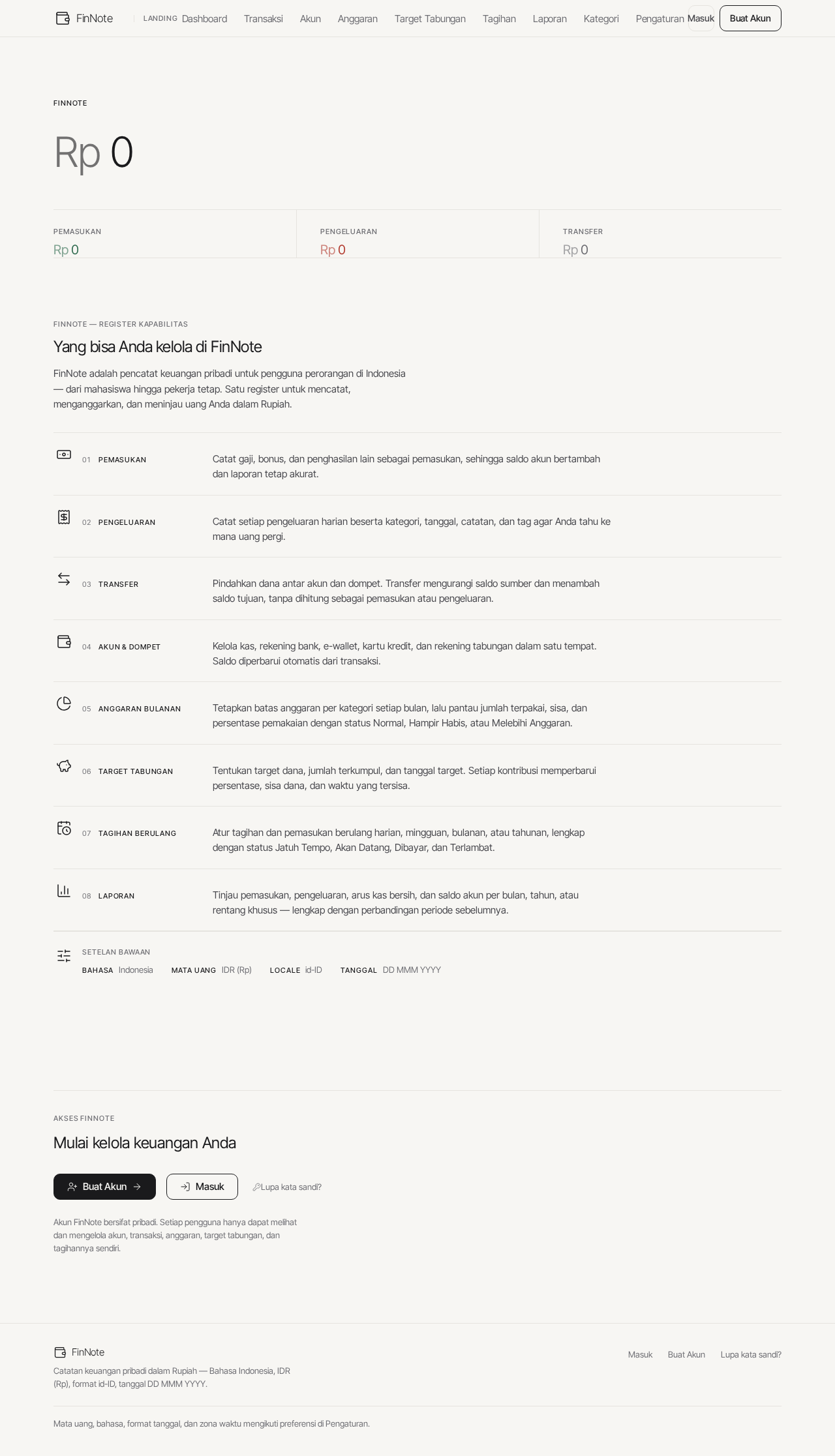
0total saldo saat ini
FinNote — Register Kapabilitas
Yang bisa Anda kelola di FinNote
FinNote adalah pencatat keuangan pribadi untuk pengguna perorangan di Indonesia — dari mahasiswa hingga pekerja tetap. Satu register untuk mencatat, menganggarkan, dan meninjau uang Anda dalam Rupiah.
Setelan bawaan
- BahasaIndonesia
- Mata UangIDR (Rp)
- Localeid-ID
- TanggalDD MMM YYYY
Mulai kelola keuangan Anda
Akun FinNote bersifat pribadi. Setiap pengguna hanya dapat melihat dan mengelola akun, transaksi, anggaran, target tabungan, dan tagihannya sendiri.
0total saldo saat ini
FinNote — Register Kapabilitas
Yang bisa Anda kelola di FinNote
FinNote adalah pencatat keuangan pribadi untuk pengguna perorangan di Indonesia — dari mahasiswa hingga pekerja tetap. Satu register untuk mencatat, menganggarkan, dan meninjau uang Anda dalam Rupiah.
Setelan bawaan
- BahasaIndonesia
- Mata UangIDR (Rp)
- Localeid-ID
- TanggalDD MMM YYYY
Mulai kelola keuangan Anda
Akun FinNote bersifat pribadi. Setiap pengguna hanya dapat melihat dan mengelola akun, transaksi, anggaran, target tabungan, dan tagihannya sendiri.
No comments yet. Be the first!