permit-tracker
I want to create 1 application that is able to handle viewing the most recent O&G well permits from multiple different states. This web app will pull information from Colorado Pending Permits: https://ecmc.state.co.us/documents/data/downloads/gis/PERMITS_PENDING_SHP.ZIP and Colorado Active Permits: https://ecmc.state.co.us/documents/data/downloads/gis/PERMITS_SHP.ZIP for Colorado. And: https://gis-cnra.hub.arcgis.com/api/download/v1/items/3a70e2e40b03403fb4504f2566a193e2/csv?layers=1 for California. Read these datasets (unzip the shapefile and read the shapefile for Colorado permits). I want to basically see from these 3 datasets the last 7 days of activity + any future activity. From the SCHEMA of these tables, make all the right connections so I can see in 1 view, all the new things that are happening with these permits. There is more to come with other states like Texas/North Dakota, but leave those out for now. Develop the plan, and ask any undefined questions at the end of the plan that I will answer before implementation.


Comments (0)
Sign in to leave a comment
System Requirements
System Requirements Document for permit-tracker
1. Introduction
The permit-tracker application is designed to provide a unified view of the most recent oil and gas well permits from multiple states, specifically focusing on Colorado and California. The application will pull data from authoritative sources to display the last seven days of activity and any future activity related to these permits. The primary audience includes public users, researchers, and state agencies interested in monitoring permit activities.
2. System Overview
The permit-tracker application is a web-based platform that integrates datasets from Colorado and California to present a cohesive view of recent and upcoming oil and gas well permit activities. The application will process data from Colorado's pending and active permits and California's well permits, standardizing the information into a unified schema for display. The system will support both automatic and manual data refreshes to ensure up-to-date information is available to users.
2a. Product Interpretation and Delivery Boundary
The application is a single web-based platform that currently includes data from Colorado and California. It excludes Texas and North Dakota, with potential future expansion. The application will not require user accounts, allowing anonymous access to the permit activity data. The system will handle data ingestion, processing, and display, ensuring regulatory and public transparency.
2b. Source Content Inventory
- Colorado Pending Permits: ESRI Shapefile format, includes fields such as API_NUMBER, LOCATION, OPERATOR, PERMIT_TYPE, REC_STATUS, SPUD_DATE, PERMIT_ISSUE_DATE, PERMIT_EXP_DATE, FIELD, COUNTY, STATE, LATITUDE, LONGITUDE.
- Colorado Active Permits: ESRI Shapefile format, similar fields as pending permits.
- California Well Permits: CSV format, includes fields such as API, Permit_Number, Permit_Issue_Date, Permit_Expiration_Date, Permit_Status, County, Operator_Name, Well_Location, Latitude, Longitude.
2c. Page Content and Component Coverage
Landing
- Introduction: Overview of the application, its purpose, and current state coverage.
- Audience Explanation: Description of the intended users and their interests.
- Scope Clarification: Current inclusion of Colorado and California, with future potential for other states.
Activity
- Unified Permit View: Display of recent and future permit activities.
- Data Fields: State, County, Operator, API Number, Permit Type, Permit Status, Issue Date, Expire Date, Spud Date, Location, Latitude, Longitude.
- Filters and Sorting: Options to filter and sort by State, Permit Status, Date.
- Data Refresh: Manual and automatic refresh options.
- Highlighting: New entries since the last user session.
3. Functional Requirements
- As a permit activity reviewer, I should be able to view the most recent and future oil and gas well permits from Colorado and California in a unified view. (explicit)
- As a permit activity reviewer, I should be able to filter and sort permit data by state, permit status, and date. (explicit)
- As a permit activity reviewer, I should be able to see highlighted new entries since my last session. (explicit)
- As a permit activity reviewer, I should be able to manually refresh the data to see the most current information. (required_inference)
4. User Personas
Permit Activity Reviewer
- Context: Engages with the application to monitor recent and upcoming oil and gas well permit activities.
- Primary Goal: To understand all newly occurring or upcoming permit events from the connected datasets in one view.
- Responsibilities: Reviewing permit data, filtering and sorting information, and identifying new permit activities.
- Interactions: Uses the application to access up-to-date permit information without needing an account.
5. Core User Flows
5.1 Viewing Recent and Future Permit Activities
- Start: User accesses the Landing page of the application.
- Navigate: User proceeds to the Activity page.
- View Data: User sees a unified view of permit activities from the last seven days and any future activities.
- Filter/Sort: User applies filters or sorts data as needed.
- Highlight: User identifies new entries since the last session.
- Refresh: User manually refreshes the data to ensure it is current.
6. Visuals Colors and Theme
- Muse: Gleb Kuznetsov
- Palette:
- Background: #000022
- Surface: #111133
- Text: #FFFFFF
- Primary: #00FFFF
- Accent: #FF00FF
- Muted: #444466
- Typography:
- Headings: Orbitron, Uppercase, Bold
- Body: Space Grotesk
- Scale: 1.414 modular, 48/34/24/16/12
- Shape Language: Floating glass panels with luminous strokes
- Layout: Full-bleed 3D scenes with floating data panels
7. Signature Design Concept
The landing page will feature a full-bleed 3D scene of a rotating globe with volumetric data points highlighting recent permit activities. The design will use deep navy backgrounds with glowing cyan and magenta highlights to create an immersive and futuristic experience.
8. Interaction Model & Motion Direction
- Interaction Model: Animated
- Motion Tempo: Cinematic
- Hero Dimensionality: WebGL
- Landing Hero Motion Brief: A rotating globe with interactive data points, using scroll-linked parallax effects to transition between data sections. The globe will highlight recent permit activities with electric cyan and magenta glows on hover interactions.
9. Non-Functional Requirements
- The application must support both manual and automatic data refreshes to ensure up-to-date information.
- The system should handle data ingestion and processing efficiently to provide real-time updates.
10. Tech Stack
- Frontend: React
- Backend: Python/FastAPI
- Data Storage: Appropriate storage solution for shapefile and CSV data
- Deployment: Docker/docker-compose, Kubernetes if required for deployment
11. Assumptions and Constraints
- The application will initially support only Colorado and California datasets.
- Future expansion to include other states is possible but not within the current scope.
- The application will not require user accounts for access.
12. Glossary
- API Number: A unique identifier for each oil and gas well permit.
- Permit Status: The current status of a permit (e.g., Pending, Active).
- Spud Date: The expected or actual drilling date for a well.
- Unified View: A combined display of permit data from multiple datasets.
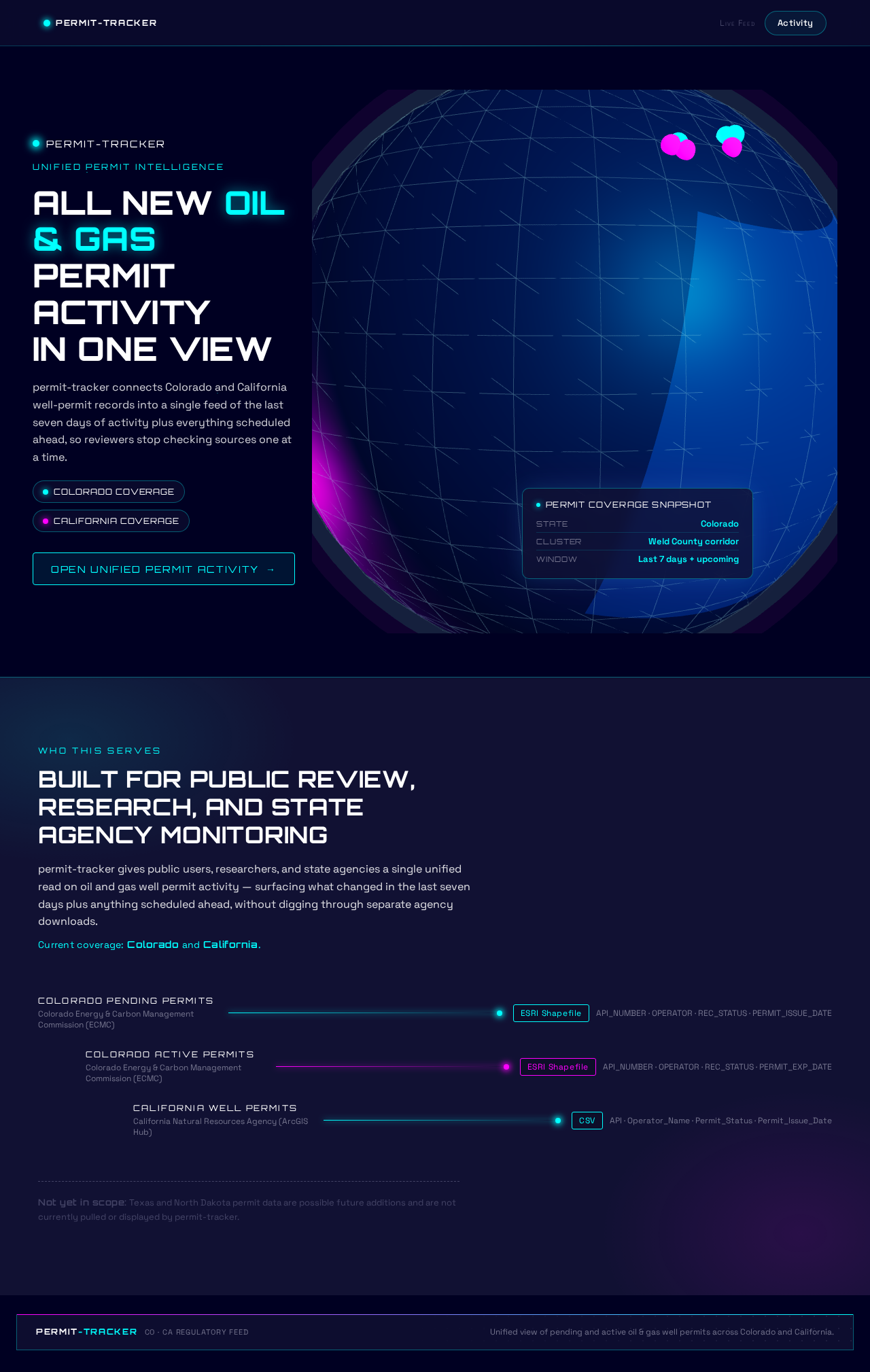
ALL NEW OIL & GAS
PERMIT ACTIVITY
IN ONE VIEW
permit-tracker connects Colorado and California well-permit records into a single feed of the last seven days of activity plus everything scheduled ahead, so reviewers stop checking sources one at a time.
Built for public review, research, and state agency monitoring
permit-tracker gives public users, researchers, and state agencies a single unified read on oil and gas well permit activity — surfacing what changed in the last seven days plus anything scheduled ahead, without digging through separate agency downloads.
Current coverage: Colorado and California.
- Colorado Pending Permits
- Colorado Active Permits
- California Well Permits
Not yet in scope: Texas and North Dakota permit data are possible future additions and are not currently pulled or displayed by permit-tracker.
ALL NEW OIL & GAS
PERMIT ACTIVITY
IN ONE VIEW
permit-tracker connects Colorado and California well-permit records into a single feed of the last seven days of activity plus everything scheduled ahead, so reviewers stop checking sources one at a time.
Built for public review, research, and state agency monitoring
permit-tracker gives public users, researchers, and state agencies a single unified read on oil and gas well permit activity — surfacing what changed in the last seven days plus anything scheduled ahead, without digging through separate agency downloads.
Current coverage: Colorado and California.
- Colorado Pending Permits
- Colorado Active Permits
- California Well Permits
Not yet in scope: Texas and North Dakota permit data are possible future additions and are not currently pulled or displayed by permit-tracker.
No comments yet. Be the first!