penny

byHemen Ashodia

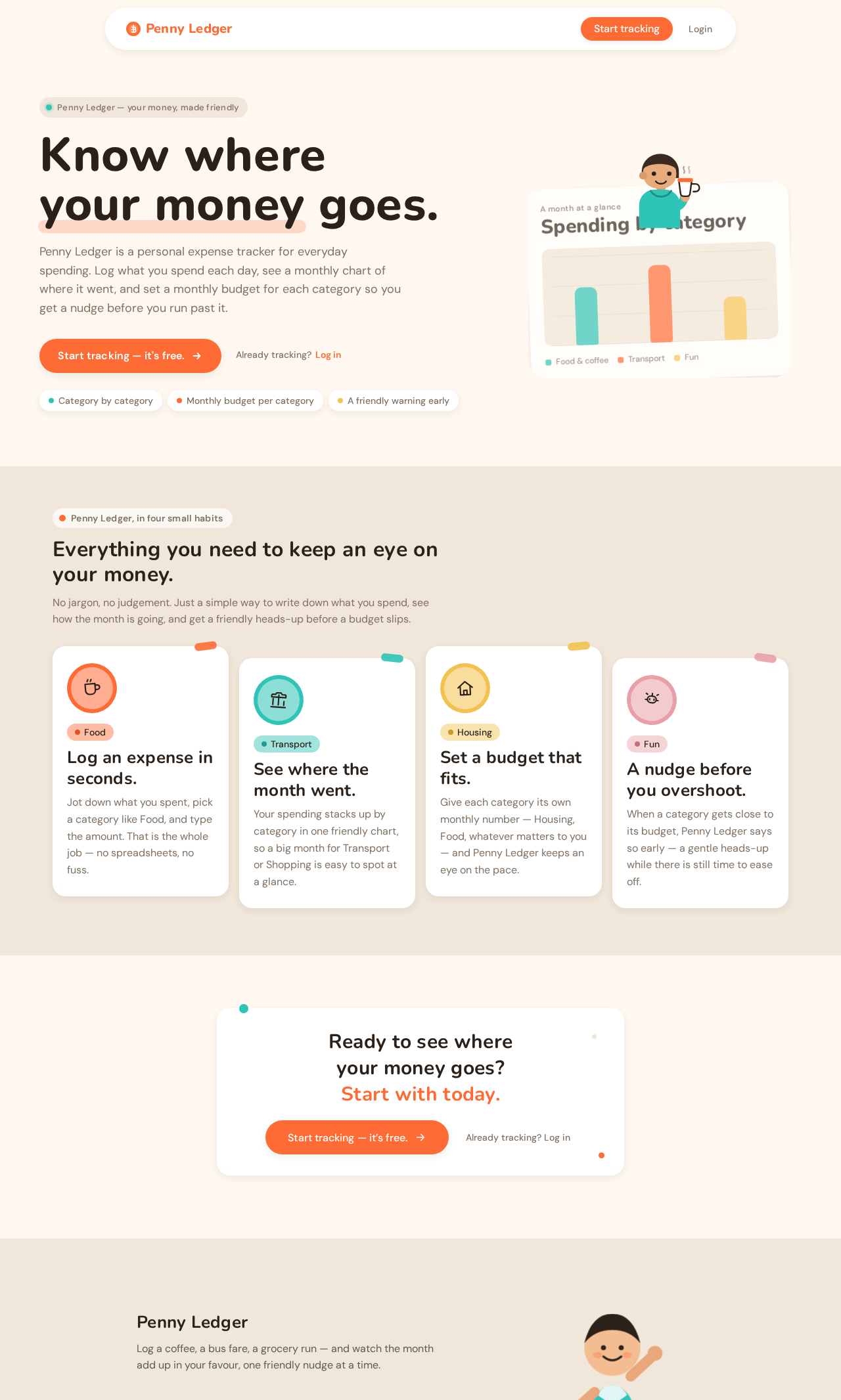
A personal expense tracker web app called Penny Ledger. Users sign up, log daily expenses with a category and amount, see a monthly spending chart by category, and set a monthly budget per category with a warning when they get close to it.

LandingDashboardAdd ExpenseExpensesBudget DetailsBudgetsLoginSign Up
Landing

Comments (0)

No comments yet. Be the first!

Project Tasks

96 tasks
#1

Generate system requirement document

0m 57s0 cr used
Done
#2

Generate personas & user flows

0m 7s0 cr used
Done
#7

Create flow for Penny Ledger User

0m 6sCredits in parent
Done
#8

Landing

4m 54sCredits in subtasks
Done
#24

Fix Landing review finding: The hero character overlaps and obscures chart-card text…

0m 28s0 cr used
Done
#23

Fix Landing review findings: Navigation action overlaps and obscures the wordmark on mobile… (+1 more)

0m 52s0 cr used
Done
#19

Landing / Navigation

1m 16s0 cr used
Done
#16

Landing / Hero

1m 18s0 cr used
Done
#17

Landing / Capability Strip

1m 18s0 cr used
Done
#18

Landing / Start Cta

1m 18s0 cr used
Done
#20

Landing / Footer

0m 48s0 cr used
Done
#21

Navigation

1m 16sCredits in parent
Done
#22

Footer

0m 48sCredits in parent
Done
#9

Login

3m 17sCredits in subtasks
Done
#39

Fix Login review findings: frontend/src/components/Login Sign In Card.jsx: the sign-in… (+1 more)

0m 45s0 cr used
Done
#25

Login / Navigation Slot

0m 0s0 cr used
Done
#26

Login / Sign In Card

0m 56s0 cr used
Done
#27

Login / Reassurance Band

0m 26s0 cr used
Done
#28

Login / Footer Slot

0m 0s0 cr used
Done
#10

Sign Up

2m 30sCredits in subtasks
Done
#29

Sign Up / Navigation Slot

0m 0s0 cr used
Done
#30

Sign Up / Enrollment Card

0m 56s0 cr used
Done
#31

Sign Up / Reassurance Band

0m 19s0 cr used
Done
#32

Sign Up / Footer Slot

0m 0s0 cr used
Done
#11

Dashboard

3m 34sCredits in subtasks
Done
#48

Fix Dashboard Monthly Overview.jsx: ✗ Build failed in 372ms

0m 10s0 cr used
Done
#33

Dashboard / Navigation Slot

0m 0s0 cr used
Done
#34

Dashboard / Month Header

0m 19s0 cr used
Done
#35

Dashboard / Monthly Overview

0m 54s0 cr used
Done
#36

Dashboard / Budget Progress

0m 42s0 cr used
Done
#37

Dashboard / Quick Links

0m 24s0 cr used
Done
#38

Dashboard / Footer Slot

0m 0s0 cr used
Done
#12

Expenses

4m 12sCredits in subtasks
Done
#40

Expenses / Navigation

0m 0s0 cr used
Done
#41

Expenses / Ledger Header

0m 17s0 cr used
Done
#42

Expenses / Ledger

1m 21s0 cr used
Done
#43

Expenses / Footer

0m 0s0 cr used
Done
#13

Add Expense

4m 50sCredits in subtasks
Done
#44

Add Expense / Navigation

0m 0s0 cr used
Done
#45

Add Expense / Entry Card

1m 27s0 cr used
Done
#46

Add Expense / Category Band

0m 43s0 cr used
Done
#47

Add Expense / Footer

0m 0s0 cr used
Done
#14

Budgets

4m 57sCredits in subtasks
Done
#49

Budgets / Navigation Slot

0m 0s0 cr used
Done
#50

Budgets / Orientation Band

0m 18s0 cr used
Done
#51

Budgets / Overview

1m 0s0 cr used
Done
#52

Budgets / Guidance Band

0m 26s0 cr used
Done
#53

Budgets / Footer Slot

0m 0s0 cr used
Done
#15

Budget Details

14m 16sCredits in subtasks
Done
#59

Fix Budget Details review findings: The Budget Details page content is not rendered in any… (+3 more)

8m 26s0 cr used
Done
#54

Budget Details / Navigation

0m 0s0 cr used
Done
#55

Budget Details / Orientation Band

0m 24s0 cr used
Done
#56

Budget Details / Workspace

0m 50s0 cr used
Done
#57

Budget Details / Progress Band

0m 25s0 cr used
Done
#58

Budget Details / Footer

0m 0s0 cr used
Done
#5

Architecture

1m 45s0 cr used
Done
#60

Create backend_modules diagram

1m 12sCredits in parent
Done
#61

Create er_diagram diagram

1m 12sCredits in parent
Done
#62

Create frontend_modules diagram

1m 12sCredits in parent
Done
#63

Create sequence diagram

1m 12sCredits in parent
Done
#64

Create service_network diagram

1m 12sCredits in parent
Done
#6

Workspace task plan

2m 41s0 cr used
Done
#65

Persist and resume each user's ledger, budgets, and warning state

120 cr estimated
To Do
#66

Save, adjust, and clear per-category monthly budgets with progress and warnings

120 cr estimated
To Do
#67

Set a category's monthly budget and show its progress on Budget Details

120 cr estimated
To Do
#68

Log a daily expense and reflect it in the ledger, chart, and budgets

100 cr estimated
To Do
#69

Verify a returning user's identity and load their own Dashboard

120 cr estimated
To Do
#70

Browse the expense ledger with month and category filtering

100 cr estimated
To Do
#71

Render the monthly Dashboard summary, chart, progress, and warnings

120 cr estimated
To Do
#72

Keep Dashboard progress and warning state accurate as spending changes

120 cr estimated
To Do
#73

Create a Penny Ledger account from email and password

120 cr estimated
To Do
#74

Record a daily expense with amount, category, and date

120 cr estimated
To Do
#75

Browse the durable expense ledger with month and category filters

120 cr estimated
To Do
#76

Review monthly category budgets with progress and near-budget warnings

120 cr estimated
To Do
#77

Review all budgets and open a category's budget details

120 cr estimated
To Do
#78

Enroll a new user on Sign Up and sign them in

120 cr estimated
To Do
#79

Gate anonymous and signed-in page access

100 cr estimated
To Do
#80

Show the monthly category chart and near-budget warning on Dashboard

140 cr estimated
To Do
#81

Durable per-user ledger data with consistent near-budget warnings

120 cr estimated
To Do
#82

Budget overview cards with 80% warning and load-failure retry

100 cr estimated
To Do
#83

Dashboard monthly spending view with month switching and 80% warning

120 cr estimated
To Do
#84

Dashboard monthly data load, retry, and warning computation

120 cr estimated
To Do
#85

Set and view a category's monthly budget in Budget Details

100 cr estimated
To Do
#86

Save a recorded expense with category, amount, and date

80 cr estimated
To Do
#87

Set, clear, and warn on a category's monthly budget

120 cr estimated
To Do
#88

Durable expense ledger with month and category filtering

100 cr estimated
To Do
#89

Application-owned sign-up and sign-in sessions

120 cr estimated
To Do
#90

Keep every user's expenses, budgets, and warnings private

140 cr estimated
To Do
#98

Make Landing CTA and Login link navigate

60 cr estimated
To Do
#91

Make Add Expense log real expenses

120 cr estimated
To Do
#92

Make Dashboard show live monthly spending and warnings

140 cr estimated
To Do
#93

Make Budget Details set and clear a category budget

120 cr estimated
To Do
#94

Make Budgets show live category budgets and progress

100 cr estimated
To Do
#95

Make Login verify returning users and open Dashboard

100 cr estimated
To Do
#96

Make Expenses show the live daily expense ledger

100 cr estimated
To Do
#97

Wire Sign Up to live account creation and Login navigation

120 cr estimated
To Do
Landing design preview
Landing: Read capabilities
Sign Up: Create account
Dashboard: View empty first month
Login: 1. Sign in with credentials
Dashboard: 1. Read monthly total
Dashboard: 2. Review category chart
Dashboard: 3. Switch viewed month
Dashboard: 4. Retry monthly load
Expenses: 5. Browse expense ledger
Expenses: 6. Filter by month and category
Expenses: 7. Retry ledger load
Add Expense: 8. Enter amount
Add Expense: 9. Choose category
Add Expense: 10. Save expense
Add Expense: 11. Retry failed save
Budgets: 12. Review budget progress
Budgets: 13. Retry budgets load
Budget Details: 14. Set category budget
Budget Details: 15. Retry budget save
Budget Details: 16. Clear category budget
Dashboard: 17. See near-budget warning
Budget Details: 18. Adjust unrealistic budget
Landing design preview
Landing: Read capabilities
Sign Up: Create account
Dashboard: View empty first month
Login: 1. Sign in with credentials
Dashboard: 1. Read monthly total
Dashboard: 2. Review category chart
Dashboard: 3. Switch viewed month
Dashboard: 4. Retry monthly load
Expenses: 5. Browse expense ledger
Expenses: 6. Filter by month and category
Expenses: 7. Retry ledger load
Add Expense: 8. Enter amount
Add Expense: 9. Choose category
Add Expense: 10. Save expense
Add Expense: 11. Retry failed save
Budgets: 12. Review budget progress
Budgets: 13. Retry budgets load
Budget Details: 14. Set category budget
Budget Details: 15. Retry budget save
Budget Details: 16. Clear category budget
Dashboard: 17. See near-budget warning
Budget Details: 18. Adjust unrealistic budget