pearl-rag
 Janvi shah
Summary I'm looking for a developer who has hands-on experience with RAG (Retrieval-Augmented Generation) to help build a small document Q&A prototype. The idea is to let users upload a PDF or text file and ask questions about its contents. The system should retrieve relevant sections from the document and use an LLM to generate an answer based on the retrieved information. I am looking for something simple that demonstrates the complete RAG workflow. I don't need a polished application or a complicated architecture at this stage. What I need - Basic PDF/text document upload - Text extraction and chunking - Embedding generation using an embedding model - Vector storage using Chroma or a similar solution - Semantic search to retrieve relevant chunks - LLM integration for generating answers from retrieved context - A simple interface or API for asking questions - Return relevant source snippets with answers - Basic handling of questions that cannot be answered from the document I would prefer to keep the implementation lightweight and use existing libraries where appropriate rather than building everything from scratch. Preferred Tech Stack I am open to your recommendations, but something along these lines would work well: - Python and FastAPI - OpenAI API or a similar LLM provider - Chroma or FAISS for vector search - Basic PDF parsing library - LangChain or LlamaIndex, if useful A simple frontend is fine, but an API-based implementation is also acceptable if it keeps the project focused. Expected Deliverables - Working RAG prototype using a sample document - Source code with a reasonably clear structure - Basic document ingestion and retrieval pipeline - Setup instructions and environment configuration - Short explanation of how the indexing and retrieval process works - Quick demo showing questions being answered from the uploaded document Scope and Timeline This is intended to be a small proof of concept, with little development work for the initial implementation. I would like to focus on getting the core pipeline working first. Features such as user authentication, multi-user document management, advanced reranking, hybrid search, and production deployment can be considered separately if needed. Make a prototype as mentioned

Comments (0)
Sign in to leave a comment
System Requirements
System Requirements Document for pearl-rag
1. Introduction
pearl-rag is a small, working proof of concept that demonstrates the complete Retrieval-Augmented Generation (RAG) workflow for document question answering. A user uploads a PDF or plain-text file; the system extracts and chunks its text, generates embeddings with an embedding model, stores the vectors in a vector store (Chroma or a similar solution), semantically retrieves the chunks most relevant to a question, and uses an LLM to generate an answer grounded in those retrieved chunks. Every answer is returned alongside the relevant source snippets it was built from, and questions the document cannot answer are handled gracefully rather than answered with fabricated content.
The product is deliberately lightweight: it is a prototype, not a polished application, and it favors existing libraries over bespoke components. Its audience is developers and technical evaluators who want to see the retrieval pipeline work end to end and who read the retrieved source snippets as closely as the generated answer. The intent is to prove the core pipeline first; authentication, multi-user document management, advanced reranking, hybrid search, and production deployment are explicitly deferred.
2. System Overview
pearl-rag is delivered as a single lightweight web application backed by one Python/FastAPI service. The application has three first-party pages — Landing, Documents, and Ask — all reachable without authentication. The single active human actor is the Document Q&A User, who uploads a document, waits for ingestion to complete, then asks natural-language questions and reads the grounded answer together with the retrieved source snippets.
Current accepted behavior:
- Document ingestion — upload a PDF or text file, extract its text, split it into chunks, generate embeddings, and persist the vectors in a vector store.
- Semantic retrieval — embed the incoming question and retrieve the most relevant chunks from the store.
- Grounded answer generation — pass the retrieved chunks to an LLM and return an answer built from that context.
- Source snippets — return the relevant retrieved chunks alongside every answer.
- Unanswerable handling — when the document does not contain the answer, respond with a clear refusal rather than fabricated content, while still showing the closest retrieved chunks.
- Simple interface — a minimal frontend for upload and asking; the same pipeline is exposed through the FastAPI backend.
Narrow exclusions (current): user authentication, multi-user document management, advanced reranking, hybrid search, and production deployment are out of scope for this prototype and may be considered separately later.
2a. Product Interpretation and Delivery Boundary
pearl-rag is a first-party prototype application with no account system. All three pages are open to any visitor; there is no login, no per-user document ownership, and no differentiated permissions. The application owns the ingestion and retrieval pipeline and the interface for driving it. The LLM provider and the embedding model are external services the backend calls; the vector store is application-managed storage. The prototype is intended to run locally with a sample document and a short demo, not as a production deployment.
The current delivery boundary is the working RAG pipeline plus a minimal interface. Everything beyond that — authentication, multi-user document management, advanced reranking, hybrid search, production deployment — is a future consideration, not part of this prototype's acceptance.
2b. Page Content and Component Coverage
Landing
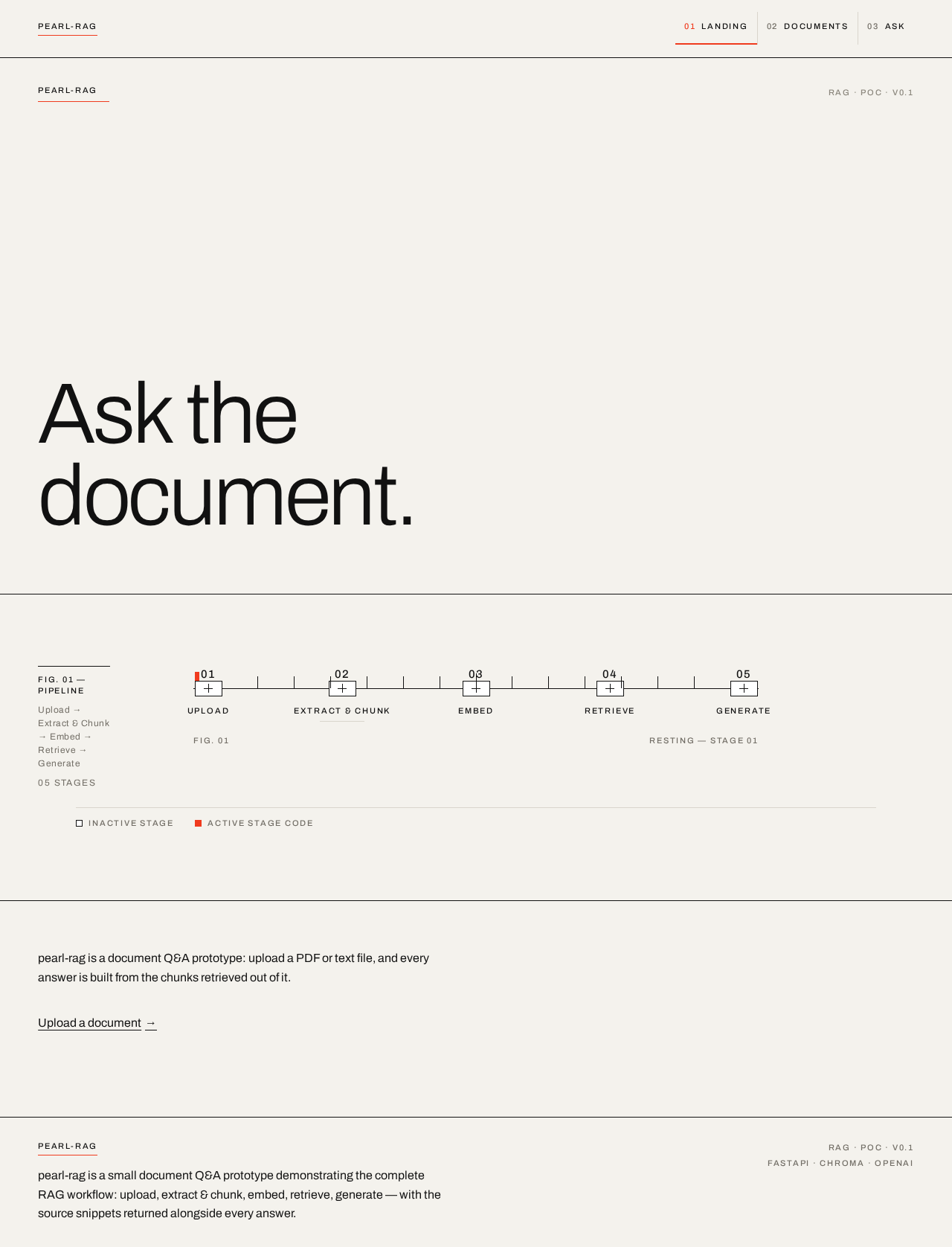
- Information/state: The public entry surface. Explains what pearl-rag is (a document Q&A prototype demonstrating the RAG workflow) and its purpose before any work begins. Presents the five-stage pipeline as the central artefact: Upload → Extract & Chunk → Embed → Retrieve → Generate.
- Primary action: A single underlined text link, "Upload a document →", leading to the Documents page.
- Supporting actions: None beyond navigation into the prototype.
- Domain entities: Pipeline stage (name, ordinal 01–05, active/inactive state); product metadata (name, version label).
- Component responsibilities:
- Wordmark "pearl-rag" in tracked uppercase metadata type with a single vermilion hairline beneath it.
- Corner metadata block reading "RAG · POC · v0.1".
- Oversized display line "Ask the document." set flush-left.
- Hand-built 5-node pipeline diagram in 1px black rules, each node numbered 01–05 above and labelled in uppercase metadata beneath.
- One line of body copy and the underlined upload link.
- States: Static informational page; no loading, empty, or error states. Reduced-motion users see the diagram in its resting state with no fades.
Documents
- Information/state: The ingestion surface. Shows the upload control, the current ingestion state of the uploaded document, and the pipeline stage indicator (Upload, Extract & Chunk, Embed) advancing as ingestion runs. Displays the ingested document's name and chunk count once complete.
- Primary action: Select and upload a PDF or text file to ingest.
- Supporting actions: Re-upload / replace the current document; navigate to Ask once ingestion succeeds.
- Domain entities: Document (filename, file type, ingestion status, chunk count); pipeline stage (active marker); chunk (count, ordinal).
- Component responsibilities:
- File selection control accepting PDF and text files.
- Pipeline stage indicator with a vermilion marker that advances instantly as each stage completes.
- Status line reporting ingestion progress and completion.
- Error surface for unsupported file types or extraction failures.
- States:
- Empty: No document uploaded; prompt to upload.
- Loading: Ingestion in progress with the active stage marked.
- Success: Document ingested; chunk count shown; link to Ask.
- Error: Unsupported file type or extraction failure; message with a retry/re-upload path.
Ask
- Information/state: The question surface. Holds the question input, the generated answer, and the retrieved source snippets rendered as specimen mounts with citation numerals and relevance bars. When the document cannot answer, shows the typographic refusal "Not in this document." with the closest retrieved chunks beneath at reduced opacity.
- Primary action: Submit a natural-language question about the ingested document.
- Supporting actions: Read the answer; inspect each source snippet; ask another question.
- Domain entities: Question (text); answer (text, grounded/unanswerable state); retrieved chunk (text, citation index, relevance score); document reference.
- Component responsibilities:
- Question input and submit control (hairline-outlined, not a filled button).
- Answer panel on the single full-bleed vermilion band, answer text in black.
- Retrieved-chunk specimen mounts: 1px black frame, 4px vermilion left edge, large tabular citation numeral, hairline relevance bar encoding the retrieval score.
- Refusal treatment for unanswerable questions.
- States:
- Empty: No question asked yet; prompt to ask.
- Loading: Retrieval and generation in progress.
- Success (answered): Grounded answer plus source snippets in retrieval-rank order.
- Success (unanswerable): Refusal line plus closest chunks at reduced opacity.
- Error: Retrieval or LLM failure; message with a retry path.
3. Functional Requirements
FR-1 — Upload a PDF or text document (explicit) As a Document Q&A User, I should upload a PDF or plain-text file so that its contents can be ingested for question answering.
- Trigger/input: file selection on the Documents page.
- Observable result: the file is accepted and ingestion begins; the pipeline stage indicator advances.
- Access state: open, no authentication.
- Failure/recovery: unsupported file type or unreadable file shows an error with a re-upload path.
- Continuation: on success, the user proceeds to ask questions.
FR-2 — Extract and chunk text (explicit) As a Document Q&A User, I should have the uploaded document's text extracted and split into chunks so that it can be embedded and retrieved.
- Trigger/input: a successfully uploaded document.
- Observable result: the document's text is extracted and divided into chunks; the chunk count is reported.
- Failure/recovery: extraction failure surfaces an error and allows re-upload.
- Continuation: chunks feed embedding.
FR-3 — Generate embeddings (explicit) As a Document Q&A User, I should have each chunk embedded with an embedding model so that semantic search is possible.
- Trigger/input: extracted chunks.
- Observable result: each chunk has a vector representation stored for retrieval.
- Failure/recovery: embedding failure surfaces an error and allows retry.
- Continuation: vectors are persisted in the vector store.
FR-4 — Store vectors in a vector store (explicit) As a Document Q&A User, I should have chunk vectors stored in Chroma or a similar vector store so that they can be searched later.
- Trigger/input: generated embeddings.
- Observable result: vectors and their chunk text are persisted and available for retrieval.
- Continuation: retrieval can query the store.
FR-5 — Semantic search for relevant chunks (explicit) As a Document Q&A User, I should have my question semantically matched against stored chunks so that the most relevant sections are retrieved.
- Trigger/input: a submitted question.
- Observable result: the top relevant chunks are returned with relevance scores.
- Failure/recovery: retrieval failure surfaces an error with a retry path.
- Continuation: retrieved chunks feed answer generation.
FR-6 — Generate a grounded answer with an LLM (explicit) As a Document Q&A User, I should receive an LLM-generated answer built from the retrieved context so that the answer reflects the document.
- Trigger/input: the question plus retrieved chunks.
- Observable result: an answer grounded in the retrieved chunks is displayed.
- Failure/recovery: LLM failure surfaces an error with a retry path.
- Continuation: the answer is shown with its source snippets.
FR-7 — Return relevant source snippets with answers (explicit) As a Document Q&A User, I should see the relevant source snippets alongside each answer so that I can verify the answer against the document.
- Trigger/input: a completed answer.
- Observable result: retrieved chunks are shown as specimen mounts with citation numerals and relevance bars, in retrieval-rank order.
- Continuation: the user can inspect snippets and ask another question.
FR-8 — Handle unanswerable questions (explicit) As a Document Q&A User, I should receive a clear refusal when the document cannot answer my question so that I am not given fabricated content.
- Trigger/input: a question whose retrieved context does not support an answer.
- Observable result: the refusal "Not in this document." is shown, with the closest retrieved chunks beneath at reduced opacity.
- Continuation: the user can rephrase or ask another question.
FR-9 — Simple interface for asking questions (explicit) As a Document Q&A User, I should have a simple interface (or API) for asking questions so that I can drive the pipeline without a complex client.
- Observable result: the Ask page and the FastAPI backend both expose the question flow.
- Access state: open, no authentication.
FR-10 — Lightweight implementation using existing libraries (explicit) As a developer, I should have the prototype built on existing libraries rather than bespoke components so that the implementation stays small and focused.
- Observable result: the pipeline uses established libraries for parsing, embedding, vector storage, and LLM calls.
FR-11 — Document must be ingested before questions can be answered (required_inference) As a Document Q&A User, I should be required to ingest a document before asking questions so that answers are always grounded in an available document.
- Trigger/input: attempting to ask before ingestion.
- Observable result: the Ask page prompts the user to upload a document first.
- Continuation: after ingestion, questions can be asked.
4. User Personas
Document Q&A User
- Product context: A developer or technical evaluator exploring pearl-rag to see the complete RAG pipeline work end to end. They are comfortable with technical tooling and read retrieved source snippets as closely as the generated answer.
- Primary goal: Upload a PDF or text document, ask natural-language questions about its contents, and receive LLM-generated answers grounded in the document — with the relevant source snippets shown so the answer can be verified.
- Distinct accepted responsibilities: Uploading and ingesting a document (FR-1 through FR-4); asking questions and reading grounded answers (FR-5, FR-6, FR-9); inspecting source snippets (FR-7); and recognizing graceful refusals for unanswerable questions (FR-8).
- Relevant inputs or decisions: Choosing which document to upload; phrasing questions; deciding whether an answer is supported by the shown snippets; rephrasing when refused.
- Interactions with other accepted participants: None — this is a single-actor prototype with no other human participants. The LLM provider and embedding model are external services the backend calls, not personas.
- Observable success: Answers cite the document's relevant passages via the shown snippets, and questions the document cannot answer are refused rather than answered with fabricated content.
- Constraints: No authentication, no multi-user document management, no advanced reranking, no hybrid search, no production deployment in this prototype.
5. Core User Flows
Flow A — Ingest a document
- The Document Q&A User opens the Landing page and reads the pipeline explanation.
- The user follows the "Upload a document →" link to the Documents page.
- On Documents, the user selects a PDF or text file.
- The system accepts the file and begins ingestion; the pipeline stage indicator marks Upload active.
- The system extracts and chunks the text; the marker advances to Extract & Chunk and the chunk count is reported.
- The system generates embeddings; the marker advances to Embed.
- The system stores the vectors in the vector store; ingestion completes and the document's name and chunk count are shown.
- Failure/recovery: If the file type is unsupported or extraction fails, an error is shown with a re-upload path; the user selects a valid file and retries.
- Continuation: The user proceeds to the Ask page.
Flow B — Ask an answerable question
- On the Ask page, the user enters a natural-language question about the ingested document.
- The user submits the question.
- The system embeds the question and semantically retrieves the most relevant chunks from the vector store.
- The system passes the retrieved chunks to the LLM and generates an answer grounded in that context.
- The Ask page displays the answer on the vermilion band and shows the retrieved source snippets as specimen mounts with citation numerals and relevance bars, in retrieval-rank order.
- The user inspects the snippets to verify the answer.
- Continuation: The user asks another question.
Flow C — Ask an unanswerable question
- On the Ask page, the user enters a question the document does not address.
- The user submits the question.
- The system retrieves the closest chunks but determines the context does not support an answer.
- The Ask page displays the refusal "Not in this document." with the closest retrieved chunks beneath at reduced opacity.
- The user rephrases the question or asks a different one.
- Continuation: The user returns to Flow B or ends the session.
Flow D — Ask before ingesting
- The user navigates to the Ask page before uploading a document.
- The page prompts the user to upload a document first.
- The user follows the prompt to the Documents page and completes Flow A.
- The user returns to Ask and proceeds with Flow B.
6. Visuals Colors and Theme
Muse: Peter Saville. Headline: "Ask the document." — a single exact colour code carries the whole document.
Palette (light mode):
- Background:
#F4F2ED(gallery-paper off-white, ~70% of every screen as deliberate silence) - Surface:
#FFFFFF(reserved for the one evidentiary surface — retrieved-chunk card and answer panel) - Text:
#111111 - Primary:
#111111 - Accent:
#F03B1E(vermilion — used only as a code: retrieval-score bar, active pipeline stage, citation numerals, one hairline under the wordmark; never as a button fill) - Muted:
#8A867C(metadata labels and secondary text at 12px with wide tracking)
Typography:
- Headings: Archivo at light 300 for oversized display lines with tight
-0.03emtracking and sentence case; a single word or numeral per line at extreme scale. - Labels/metadata: Archivo at 500, uppercase 11px,
+0.16emletterspacing, like catalogue accession tags. - Body: Archivo at 400/16px with 1.6 leading and a 62ch measure.
- Scale (1.5 modular): 14/16/24/36/56/84/128px. Display clamps from 56px at 375px to 128px at 1280px; section headings 36→56px; body 16px fixed; metadata 11–12px fixed.
Shape language: Sharp corners everywhere, zero border radius. Hairline 1px rules in #111111 at 100% for structural dividers and #D9D5CC for subordinate ones. Retrieved chunks are framed by a single 1px black rule with a 4px vermilion left edge — a specimen mount, not a card. Numerals set in tabular figures at large size act as ornament. No shadows, no fills except the one white evidence surface and one full-bleed vermilion band per page.
Layout: A strict 12-column grid with a persistent left metadata rail (columns 1–2) holding stage labels, chunk counts, and model names in small-caps metadata; content occupies columns 3–12. The landing page is a single centred artefact — the pipeline diagram — surrounded by silence, with metadata blocks in the four corners like a record sleeve. Documents and Ask use the same rail, so the app feels like one continuous catalogue rather than separate screens. Sections are separated by full-width hairlines, never by cards.
Imagery: The interface is the image. The hero artefact is a hand-built SVG pipeline diagram: five nodes (Upload, Extract & Chunk, Embed, Retrieve, Generate) connected by hairline rules, with tick marks and small tabular numerals beneath each node. Retrieved chunks are shown as typographic specimens with citation numerals and a thin vermilion relevance bar. No photography, no illustration, no icons beyond a minimal geometric set drawn at 1px weight.
Avoid: Filled coloured buttons; rounded corners, drop shadows, or card grids; gradient or blob backgrounds; photography, illustration, or decorative icons; vermilion as a button or large background fill on more than one band per page; animated marquees, parallax, or hover-lift effects; a chat-bubble interface; any blue, indigo, or violet in the palette.
7. Signature Design Concept
The public entry is a full-viewport gallery mount, not a SaaS hero. Top-left holds the wordmark "pearl-rag" in 11px uppercase tracked metadata with a single vermilion hairline beneath it. Top-right holds a metadata block: "RAG · POC · v0.1". The dominant element is a centred 5-node pipeline diagram spanning roughly 60% of the viewport width, drawn in 1px black rules with vermilion marking the active node, each node labelled in 11px uppercase metadata beneath it and numbered 01–05 above it. Above the diagram, a single oversized Archivo Light line at 56–128px, "Ask the document.", set flush-left and breaking across two lines, occupying the full content width. Beneath the diagram, one line of 16px body copy and a single underlined text link "Upload a document →" in black — no filled button. The remaining space is deliberate silence on #F4F2ED.
The signature moves carry through the app: the pipeline diagram as the hero artefact with a vermilion marker that advances as ingestion runs; retrieved chunks rendered as specimen mounts with a 1px black frame, 4px vermilion left edge, large tabular citation numeral, and a hairline relevance bar encoding the retrieval score; a persistent left metadata rail on every page; one full-bleed vermilion band per page holding the answer on the Ask page; and unanswerable questions returned as a deliberate typographic refusal — "Not in this document." in large Archivo Light, with the closest retrieved chunks still shown beneath at reduced opacity.
8. Interaction Model & Motion Direction
Interaction Model: Static Motion Tempo: still Hero Dimensionality: flat
Landing Hero Motion Brief
- Focal subject: The hand-built 5-node pipeline diagram (Upload, Extract & Chunk, Embed, Retrieve, Generate) drawn in 1px black rules with numbered nodes 01–05.
- Input → transformation → outcome thesis: The user's upload and question drive the pipeline; the vermilion marker advances instantly along the diagram as ingestion progresses, and retrieved chunks appear as specimens in retrieval-rank order — the product's architecture is the identity.
- Motion vocabulary: Precise 180ms linear fades on state change; the vermilion stage marker slides instantly along the pipeline diagram with no easing flourish; retrieved chunk cards appear with a single 120ms opacity fade in retrieval-rank order. No parallax, no hover lift, no marquees.
- Composed first frame: Full-viewport gallery mount on
#F4F2ED; wordmark top-left with vermilion hairline; "RAG · POC · v0.1" top-right; oversized "Ask the document." flush-left above the centred pipeline diagram; one line of body copy and the underlined "Upload a document →" link beneath. - Reduced-motion state: All fades removed; final states shown immediately; the diagram rests in its static arrangement.
9. Non-Functional Requirements
- NFR-1 — Lightweight implementation (explicit): The prototype must stay small and simple, with no polished application or complicated architecture. Rationale: explicit user constraint.
- NFR-2 — Use existing libraries (explicit): The implementation must use existing libraries where appropriate rather than building components from scratch. Rationale: explicit user constraint.
- NFR-3 — Core pipeline first (explicit): Development must focus on getting the core pipeline working first. Rationale: explicit user constraint.
- NFR-4 — Scope exclusions (explicit): User authentication, multi-user document management, advanced reranking, hybrid search, and production deployment are out of scope for this prototype and may be considered separately. Rationale: explicit user constraint.
- NFR-5 — Readable text and controls (explicit): Headlines, wordmarks, labels, numbers, and card text and controls must stay entirely inside the viewport and their container at 375px, 768px, and 1280px, wrapping or scaling (e.g.,
clamp()) to fit, with no other element covering them. Rationale: explicit design constraint. - NFR-6 — Reduced motion (explicit): With
prefers-reduced-motion, all fades are removed and final states shown immediately. Rationale: explicit design constraint.
10. Tech Stack
- Backend: Python with FastAPI (explicit preferred stack).
- LLM provider: OpenAI API or a similar LLM provider (explicit preferred stack).
- Vector store: Chroma or FAISS for vector search (explicit preferred stack).
- PDF parsing: A basic PDF parsing library (explicit preferred stack).
- Orchestration: LangChain or LlamaIndex if useful (explicit preferred stack).
- Frontend: A simple frontend is acceptable; an API-based implementation is also acceptable if it keeps the project focused (explicit). The prototype delivers a minimal first-party frontend (Landing, Documents, Ask) backed by the FastAPI service.
- Deployment: Local prototype; production deployment is out of scope (explicit).
11. Assumptions and Constraints
- A-1: The prototype runs locally with a sample document for the demo; no production deployment is required (explicit).
- A-2: No authentication or multi-user document management; all pages are open (explicit exclusion).
- A-3: The LLM provider and embedding model are external services the backend calls; API credentials are supplied via environment configuration (required_inference).
- A-4: A single document is ingested at a time for the prototype demo (required_inference).
- A-5: The vector store persists locally for the prototype session (required_inference).
- A-6: Setup instructions and environment configuration are part of the deliverables (explicit).
12. Glossary
- RAG (Retrieval-Augmented Generation): A workflow that retrieves relevant document sections and uses them as context for an LLM to generate an answer.
- Chunk: A contiguous segment of extracted document text that is embedded and stored for retrieval.
- Embedding: A vector representation of text produced by an embedding model, used for semantic search.
- Vector store: A storage system (Chroma or FAISS) that holds embeddings and supports similarity search.
- Semantic search: Retrieval of chunks whose embeddings are most similar to the question's embedding.
- Source snippet: A retrieved chunk shown alongside an answer so the user can verify it against the document.
- Relevance score: A numeric measure of how closely a retrieved chunk matches the question, encoded by the relevance bar.
- Unanswerable question: A question whose retrieved context does not support an answer; handled with a clear refusal rather than fabricated content.
Ask thedocument.
Retrieval pipeline
pearl-rag is a document Q&A prototype: upload a PDF or text file, and every answer is built from the chunks retrieved out of it.
Upload a documentAsk thedocument.
Retrieval pipeline
pearl-rag is a document Q&A prototype: upload a PDF or text file, and every answer is built from the chunks retrieved out of it.
Upload a document
No comments yet. Be the first!