pearl-pdf
 msk ahmad
ملف pdf هذا يحوي برميت انشاء تطبيق قم بفتحه وفهم المطلوب والعمل عليه


Comments (0)
Sign in to leave a comment
Project Tasks
197 tasksGenerate system requirement document
Generate personas & user flows
Create flow for Document Preparation Operator (المستخدم الرئيسي)
Create flow for Document Type Maintainer
Create flow for Personal Photo Preparation User
Landing
Fix Landing review findings: The mobile document-types table breaks into overlapping… (+3 more)
Landing / Header Slot
Landing / App Header
Landing / Hero Bench
Landing / Hero
Landing / Workflow Rail
Landing / Document Type Index
Landing / Document Type Reference
Landing / Offline Assurance
Landing / Footer Slot
Landing / Access Panel
Landing / App Footer
App Header
App Footer
Login
Login / App Header Slot
Login / Credential Panel
Login / App Footer Slot
Sign Up
Sign Up / Header Slot
Sign Up / Enrollment Panel
Sign Up / Footer Slot
Dashboard
Fix Dashboard review finding: Desktop workflow cards are too narrow for their text…
Dashboard / App Header Slot
Dashboard / Workflow Rail
Dashboard / Workflow Hub
Dashboard / Recent Projects
Dashboard / Layout Preview
Dashboard / Document Type Summary
Dashboard / App Footer Slot
Acquisition
Fix Acquisition review findings: The mobile scanner-bed preview shows only part of the… (+2 more)
Acquisition / Header Slot
Acquisition / Scan Parameters
Acquisition / Import Bench
Acquisition / Source Queue
Acquisition / Footer Slot
Processing
Fix Processing review finding: Q1 as reviewed now: The mobile separated-document row…
Fix Processing review finding: Q1 as reviewed now: The current mobile screenshot still…
Fix Processing review finding: Mobile separated-document rows have overlapping true-size…
Processing / App Header Slot
Processing / Correction Bench
Processing / Separation Bench
Processing / App Footer Slot
Recognition
Fix Recognition review finding: Q1 as reviewed now: Ruler labels remain clipped at the…
Fix Recognition review finding: Ruler labels are clipped at the canvas edges in the…
Recognition / Header Slot
Recognition / Type Resolution Bench
Recognition / Signal Readout
Recognition / Document Type Reference
Recognition / Footer Slot
Measurements
Fix Measurements review finding: Malformed dimension values appear in the…
Fix Measurements Calculation Readout.jsx: PRINTABLE_AREA_ACCURACY_LABEL is not defined
Measurements / App Header
Measurements / True Size Bench
Measurements / Calculation Readout
Measurements / Document Type Reference
Measurements / App Footer
Layout
Layout / App Header Slot
Layout / Sheet Canvas
Layout / Manual Arrangement Panel
Layout / Sheet Strip
Layout / Print Settings Panel
Layout / Document Type Reference
Layout / App Footer Slot
Editor
Fix Editor review finding: Desktop tool console is too narrow for its controls and…
Editor / Header Slot
Editor / Tool Console
Editor / Document Type Reference
Editor / Footer Slot
Quality Check
Fix Quality Check review findings: The sheet tag is clipped at the sheet/felt boundary in the… (+1 more)
Quality Check / Header Slot
Quality Check / Findings Console
Quality Check / Document Type Reference
Quality Check / Footer Slot
Print Preview
Fix Print Preview review finding: The requested document queue is missing across desktop…
Print Preview / Header Slot
Print Preview / Sheet Bench
Print Preview / Document Type Reference
Print Preview / Footer Slot
Fix Print review finding: Q1 as reviewed now: The current desktop and tablet…
Fix Print review finding: Document-type rows have a broken desktop/tablet grid…
Print / App Header
Print / Configuration Console
Print / Document Type Reference
Print / App Footer
Export
Fix Export review finding: The mobile sheet preview is wider than its stage and is…
Export / App Header Slot
Export / Format Destination Console
Export / Document Type Reference
Export / App Footer Slot
Projects
Fix Projects review findings: Tablet saved-project rows collapse into narrow… (+1 more)
Projects / App Header
Projects / Library Tray
Projects / Save Console
Projects / Document Type Reference
Projects / App Footer
Document Types
Fix Document Types review finding: Q1 as reviewed now: Registry table columns collapse into…
Fix Document Types review findings: Registry table columns are clipped at mobile and tablet; (+1 more)
Document Types / Header Slot
Document Types / Registry Bench
Document Types / Reference Band
Document Types / Footer Slot
Personal Photos
Fix Personal Photos review finding: Q1 as reviewed now: The current mobile screenshot still…
Fix Personal Photos review finding: The arrangement sheet and its empty-state text are clipped…
Personal Photos / App Header Slot
Personal Photos / Size Specification Bench
Personal Photos / Arrangement Bench
Personal Photos / Document Type Reference
Personal Photos / App Footer Slot
App Header
App Footer
Architecture
Create backend_modules diagram
Create er_diagram diagram
Create frontend_modules diagram
Create sequence diagram
Create service_network diagram
Workspace task plan
Update Landing
Send arrangements to Direct Print and prepare printing offline
Show true-size measurements, print calculations, and protect true size
Process documents offline, persist local projects, and run heavy operations asynchronously
Validate document quality before printing and surface findings
Arrange documents on the sheet at true size with protected manual adjustment
Render a dimension-accurate print preview
Maintain the central Document Types store and Custom Document measurements
Manually adjust documents and revisit Editor and Quality Check
Automatically detect, correct, recognize, and lay out imported documents
Determine and store true document measurements offline
Manual arrangement, insufficient-space guidance, and true-size photo layout
Auto Layout with reordering, page addition, and orientation changes
Self-service sign-up creating an app-owned account
Save, reopen, and resume projects with preserved state
Project persistence of images, paper size, margins, and copies
Offline core processing with original preserved and processed copy
Print documents at true size with pre-print quality warnings
Arrange documents on sheets at true size with automatic page creation
Maintain document types with measurements, hints, and Custom Document
Store and edit central document type measurements without rebuilding
Acquire documents from scanner, phone, or computer with recognition and quality checks
Auto Layout and manual arrangement at true size with insufficient-space advisory
Export prepared documents to PDF, JPG, or PNG at correct dimensions
Select scanner and paper settings, measure documents, and review accurate preview
Verify returning users and open an authenticated session
Save and reopen projects with originals, processing state, positions, and margins
Configure a printer and print or export documents directly at true size
Prepare, arrange, and directly print personal photos at true size
Render an accurate, dimension-preserving print preview
Add items to the sheet and adjust saturation and noise reduction
Route operators from the Dashboard and confirm type, paper, and preview
Detect, separate, and correct documents from source images
Document preparation tools: color mode, crop, rotate, enhance, and sheet arrangement
Personal photo printing and automatic photo layout
Offline local processing engine with progress, cancellation, and OCR
Acquire documents from scanner, computer, and phone, and enhance phone photos
Smart document recognition with confidence and manual fallback
Direct printing with printer settings, Duplex, and saved print configuration
Offline recognition results, honest confidence, and extensible document types
Application authentication for protected workflow surfaces
Correct each separated document individually
Bring the Landing hero loop and controls to life
Wire Document Types page to live document-type store
Wire Layout page to live Auto Layout and manual arrangement
Wire Sign Up page to live account enrollment
Wire Dashboard hub to live recent projects and workflow routing
Wire Print page to live printer configuration and direct print
Wire Personal Photos page to live size, auto-crop, and arrangement
Wire Editor page to live correction and enhancement tools
Wire Login page to live returning verification
Wire Acquisition page to live scanner and import flows
Wire Measurements page to live true-size calculations
Wire Projects page to live save and resume
Wire Recognition page to live local recognition and fallback
Wire Export page to live PDF, JPG, and PNG export
Wire Quality Check page to live pre-print validation
Wire Processing page to live detection and correction
Wire Print Preview to live sheet layout and true dimensions
Recognition runs locally. Images never leave this machine.
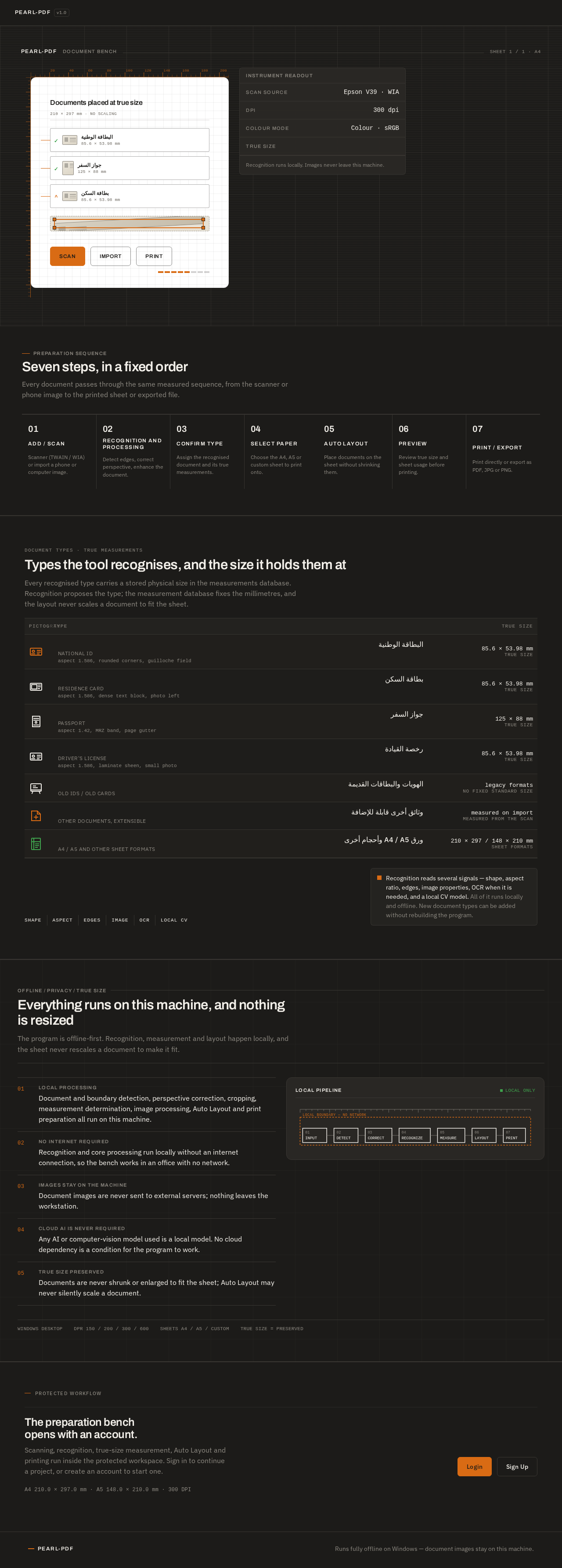
Seven steps, in a fixed order
Every document passes through the same measured sequence, from the scanner or phone image to the printed sheet or exported file.
- 01Add / ScanScanner (TWAIN / WIA) or import a phone or computer image.
- 02Recognition and ProcessingDetect edges, correct perspective, enhance the document.
- 03Confirm TypeAssign the recognised document and its true measurements.
- 04Select PaperChoose the A4, A5 or custom sheet to print onto.
- 05Auto LayoutPlace documents on the sheet without shrinking them.
- 06PreviewReview true size and sheet usage before printing.
- 07Print / ExportPrint directly or export as PDF, JPG or PNG.
DOCUMENT TYPES · TRUE MEASUREMENTS
Types the tool recognises, and the size it holds them at
Every recognised type carries a stored physical size in the measurements database. Recognition proposes the type; the measurement database fixes the millimetres, and the layout never scales a document to fit the sheet.
Recognition reads several signals — shape, aspect ratio, edges, image properties, OCR when it is needed, and a local CV model. All of it runs locally and offline. New document types can be added without rebuilding the program.
Everything runs on this machine, and nothing is resized
The program is offline-first. Recognition, measurement and layout happen locally, and the sheet never rescales a document to make it fit.
- 01Local processing
Document and boundary detection, perspective correction, cropping, measurement determination, image processing, Auto Layout and print preparation all run on this machine.
- 02No internet required
Recognition and core processing run locally without an internet connection, so the bench works in an office with no network.
- 03Images stay on the machine
Document images are never sent to external servers; nothing leaves the workstation.
- 04Cloud AI is never required
Any AI or computer-vision model used is a local model. No cloud dependency is a condition for the program to work.
- 05True size preserved
Documents are never shrunk or enlarged to fit the sheet; Auto Layout may never silently scale a document.
Recognition runs locally. Images never leave this machine.
Seven steps, in a fixed order
Every document passes through the same measured sequence, from the scanner or phone image to the printed sheet or exported file.
- 01Add / ScanScanner (TWAIN / WIA) or import a phone or computer image.
- 02Recognition and ProcessingDetect edges, correct perspective, enhance the document.
- 03Confirm TypeAssign the recognised document and its true measurements.
- 04Select PaperChoose the A4, A5 or custom sheet to print onto.
- 05Auto LayoutPlace documents on the sheet without shrinking them.
- 06PreviewReview true size and sheet usage before printing.
- 07Print / ExportPrint directly or export as PDF, JPG or PNG.
DOCUMENT TYPES · TRUE MEASUREMENTS
Types the tool recognises, and the size it holds them at
Every recognised type carries a stored physical size in the measurements database. Recognition proposes the type; the measurement database fixes the millimetres, and the layout never scales a document to fit the sheet.
Recognition reads several signals — shape, aspect ratio, edges, image properties, OCR when it is needed, and a local CV model. All of it runs locally and offline. New document types can be added without rebuilding the program.
Everything runs on this machine, and nothing is resized
The program is offline-first. Recognition, measurement and layout happen locally, and the sheet never rescales a document to make it fit.
- 01Local processing
Document and boundary detection, perspective correction, cropping, measurement determination, image processing, Auto Layout and print preparation all run on this machine.
- 02No internet required
Recognition and core processing run locally without an internet connection, so the bench works in an office with no network.
- 03Images stay on the machine
Document images are never sent to external servers; nothing leaves the workstation.
- 04Cloud AI is never required
Any AI or computer-vision model used is a local model. No cloud dependency is a condition for the program to work.
- 05True size preserved
Documents are never shrunk or enlarged to fit the sheet; Auto Layout may never silently scale a document.
No comments yet. Be the first!