pearl-pdf
 msk ahmad
ملف pdf هذا يحوي برميت انشاء تطبيق قم بفتحه وفهم المطلوب والعمل عليه


Comments (0)
Sign in to leave a comment
System Requirements
System Requirements Document
Project: pearl-pdf — المستمسكات والوثائق والطباعة — Document, ID & Photo Preparation and Printing Application Document Type: System Requirements Document (SRD) Source: برومبت تطوير برنامج المستمسكات والوثائق والطباعة (development brief) + user chat
1. Introduction
Product name: pearl-pdf. This SRD defines the requirements for transforming the existing project into a professional, fast desktop tool that prepares documents, IDs (المستمسكات), and photos for accurate printing. Inputs arrive from a Scanner, a phone camera, or the computer; outputs are a printed sheet or an exported PDF/JPG/PNG file.
The tool must:
- Detect, correct, and enhance document images automatically.
- Recognize the document type where possible and assign its true physical size.
- Arrange one or many documents on a printable sheet (Auto Layout) with real-size preservation.
- Allow manual adjustment and provide an accurate Print Preview and Direct Print.
- Operate fully offline on Windows, without sending document images to external servers.
The priority order that governs all decisions is: true document size + image quality + document arrangement + print accuracy.
The brief also mandates a strict implementation discipline: the existing project must be inspected and understood before any code is written, and existing functionality must be preserved and reused.
2. System Overview
The system is a Windows desktop application organized around an end-to-end workflow:
Scanner / Phone / Computer → Document Detection → Crop / Deskew / Perspective Correction / Enhancement → Document Recognition → Real Size → A4 / A5 / Custom sheet → Auto Layout → Manual Adjustment → Print Preview → Direct Print or PDF/JPG/PNG export.
Core subsystems:
- Input / Acquisition — scanner (TWAIN/WIA) and image import.
- Detection & Correction — edge/corner detection, boundary removal, deskew, perspective transform.
- Document Recognition — multi-signal (shape, aspect ratio, image properties, edges, OCR, local CV models).
- Measurement & Real-Size Engine — central DocumentTypes measurement database and Pixels/DPI/mm/physical-size calculations.
- Layout Engine — Auto Layout plus manual arrangement with real-size preservation.
- Image Editor — enhancement and cleanup tools.
- Quality Check — pre-print validation.
- OCR — optional, pluggable, local.
- Print Pipeline — Print Preview, Direct Print, export.
- Project Persistence — save/open project.
- Personal Photo Subsystem — separate component for personal photos.
The system is offline-first and privacy-preserving.
3. Functional Requirements (User Stories)
3.1 Scanner Acquisition
- As a user, I want TWAIN/WIA scanner support that matches the existing project architecture, so that I can scan documents directly.
- As a user, I want to select the scanning device, so that I can choose among available scanners.
- As a user, I want to scan from inside the program, so that I do not need external scanning software.
- As a user, I want to choose DPI: 150 / 200 / 300 / 600, so that I can control scan quality.
- As a user, I want to choose the color mode: Color / Grayscale / Black & White, so that I can match the document needs.
- As a user, I want to choose the scan page size (A4/A5 and other sizes), so that scans match the source sheet.
3.2 Phone & Computer Image Import
- As a user, I want to import images from my computer, so that I can process existing photos.
- As a user, I want the system to process phone photos that contain tilt, shadow, perspective, uneven lighting, or background, so that they become usable document images.
3.3 Document Detection
- As a user, I want the system to detect the document edges and the four corners, so that the document is isolated from the background.
- As a user, I want the system to determine the document boundaries, so that the correct region is processed.
- As a user, I want the system to remove the background and excess surrounding space, so that only the document remains.
- As a user, I want the system to correct tilt (deskew), so that the document is straight.
3.4 Perspective Correction
- As a user, I want Perspective Transform correction, so that I get a straight, flat document even if it was photographed at an angle.
3.5 Smart Document Recognition (التعرف الذكي)
- As a user, I want the system to recognize البطاقة الوطنية (National ID) as a document type.
- As a user, I want the system to recognize بطاقة السكن (Residence card) as a document type.
- As a user, I want the system to recognize جواز السفر (Passport) as a document type.
- As a user, I want the system to recognize رخصة القيادة (Driver's License) as a document type.
- As a user, I want the system to recognize old IDs / old cards (الهويات/البطاقات القديمة) as a document type.
- As a user, I want the system to recognize other documents (وثائق أخرى قابلة للإضافة) that can be added over time.
- As a user, I want the system to recognize A4/A5 and other sheet formats as document types.
- As a user, I want recognition to use multiple signals — document shape, aspect ratio, image properties, edges, OCR when needed, and local Computer Vision models — rather than relying on OCR alone, so that recognition is robust.
- As a user, I want to be able to add new document types without rebuilding the program, so the system stays extensible.
3.6 Offline Operation (شرط أساسي)
- As a user, I want document recognition and core processing to run locally without internet, so the tool works fully offline.
- As a user, I want document images to never be sent to external servers, so my data stays private.
- As a user, I want the following to specifically work offline: document & boundary detection, perspective correction & cropping, recognition (to the extent possible), measurement determination, image processing, Auto Layout, and print preparation.
- As a user, I want any AI/Computer Vision model used to be a local model, so that no cloud dependency is required.
3.7 Real Size of the Document (الحجم الحقيقي)
- As a user, I want each document type to have centrally stored true measurements, so that documents are handled by their real physical size rather than arbitrary scaling.
- As a user, I want the system to accurately compute the relationship between Pixels, DPI, Millimeters, and Physical Print Size, so that the document prints at its true size.
3.8 Measurement Database (قاعدة بيانات القياسات)
- As a user or maintainer, I want a DocumentTypes structure containing ID, Name, WidthMM, HeightMM, DefaultOrientation, Category, RecognitionHints, and Active, so measurements are managed centrally.
- As a user, I want a Custom Document entry, so that I can define the real measurement for a document type that does not exist.
3.9 Multiple Documents in One Image
- As a user, I want the system to detect and separate multiple documents within a single image, so each is handled individually.
- As a user, I want each detected document to be corrected individually.
- As a user, I want the type of each detected document to be recognized.
- As a user, I want the measurement of each detected document to be determined.
- As a user, I want each detected document to be inserted into the sheet as an independent element.
3.10 Auto Layout
- As a user, I want single or multiple documents to be arranged automatically inside the sheet, so layout is fast and consistent.
- As a user, I want the Auto Layout to compute sheet space, margins, each document's size, orientation, spacing, and remaining space.
- As a user, I want Auto Layout to achieve the best use of available space while preserving the true size of each document.
3.11 Real Size Must Not Change Due to Auto Layout
- As a user, I want the system to never shrink or enlarge a document merely to fit the sheet.
- As a user, I want the system to change position, order, or orientation instead when real size must be preserved and reordering is allowed.
- As a user, I want to be informed when there is insufficient space, with suggestions for another page, another sheet, or splitting the documents.
3.12 Multiple Pages
- As a user, I want the system to create Page 1 / Page 2 / Page 3 as needed, while preserving true measurements across pages.
3.13 Manual Arrangement
- As a user, I want to drag documents to reposition them.
- As a user, I want to change a document's position.
- As a user, I want to change a document's orientation.
- As a user, I want to delete a document.
- As a user, I want to add a document.
- As a user, I want to reorder documents.
- As a user, I want to adjust margins and spacing.
- As a user, I want a warning whenever an action would change the true size.
3.14 Document Editor Tools (محرر المستمسكات)
- As a user, I want a Crop tool.
- As a user, I want a Rotate tool.
- As a user, I want a Flip tool.
- As a user, I want a Brightness adjustment.
- As a user, I want a Contrast adjustment.
- As a user, I want a Sharpness adjustment.
- As a user, I want a Saturation adjustment.
- As a user, I want a Grayscale conversion.
- As a user, I want a Black & White conversion.
- As a user, I want Noise Reduction.
- As a user, I want Shadow Reduction.
- As a user, I want Background Whitening.
- As a user, I want Text Enhancement.
- As a user, I want Deskew.
- As a user, I want Perspective Correction.
- As a user, I want an Auto Enhance function.
3.15 Phone Image Enhancement
- As a user, I want the system to detect and crop the document in phone photos.
- As a user, I want the system to correct perspective and tilt.
- As a user, I want the system to correct lighting.
- As a user, I want the system to remove shadows as much as possible.
- As a user, I want the system to whiten the background when needed.
- As a user, I want the system to improve text clarity.
- As a user, I want the system to avoid distorting document data during enhancement.
3.16 Quality Check (فحص الجودة)
- As a user, I want a Quality Check that detects low resolution.
- As a user, I want a Quality Check that detects blurry images.
- As a user, I want a Quality Check that detects a cropped portion of the document.
- As a user, I want a Quality Check that detects a bad angle.
- As a user, I want a Quality Check that detects strong reflection.
- As a user, I want a Quality Check that detects unclear text.
- As a user, I want a warning before printing when any quality issue is detected.
3.17 OCR
- As a user, I want OCR as a pluggable component used to help recognize the document type, read specific words, verify, and search, preferably running locally.
3.18 Paper Sizes
- As a user, I want the supported paper sizes A4 / A5 / A6 / Letter / Custom.
- As a user, I want Portrait / Landscape orientation per sheet.
- As a user, I want to configure margins for the sheet.
3.19 Print Preview
- As a user, I want an accurate Print Preview that preserves ratios and true dimensions and shows the sheet, documents, margins, positions, sizes, and orientations.
3.20 Direct Print
- As a user, I want to print directly with the ability to select the printer.
- As a user, I want to set the number of copies.
- As a user, I want to set the paper size.
- As a user, I want to set the orientation.
- As a user, I want to select Color / Grayscale.
- As a user, I want to select the quality.
- As a user, I want Duplex printing when the printer supports it.
- As a user, I want Print Preview to remain a separate option from Direct Print.
3.21 Save / Open Project
- As a user, I want to Save/Open a project that preserves the original and processed images.
- As a user, I want the project to preserve document types.
- As a user, I want the project to preserve measurements.
- As a user, I want the project to preserve positions.
- As a user, I want the project to preserve paper size.
- As a user, I want the project to preserve margins.
- As a user, I want the project to preserve print settings.
- As a user, I want the project to preserve the number of copies.
- As a user, I want the system to keep the original and work on a processed copy.
3.22 Export
- As a user, I want to export to PDF / JPG / PNG while preserving correct print dimensions.
3.23 User Interface
- As a user, I want a simple, professional, and fast interface with a clear workflow:
- Add / Scan
- Recognition and Processing
- Confirm Type
- Select Paper
- Auto Layout
- Preview
- Print / Export
3.24 Measurements Display
- As a user, I want to see measurements in mm, with accurate calculations of DPI, Pixels, physical dimensions, printer accuracy, printable area, and margins.
3.25 Privacy
- As a user, I want the program to not automatically upload images to any external service.
- As a user, I want Cloud AI to never be a condition for the program to work.
3.26 Performance
- As a user, I want the interface to not freeze when processing large images.
- As a user, I want Async / Background Processing for heavy operations.
- As a user, I want a Progress Indicator during long operations.
- As a user, I want a Cancellation option for long operations.
3.27 Preserving the Current Project
- As a maintainer, before any modification, I want to examine the whole project.
- As a maintainer, I want to understand the architecture, interfaces, image system, and printing system.
- As a maintainer, I want to identify the responsible files and classes.
- As a maintainer, I want to not rebuild the project without reason.
- As a maintainer, I want to not delete existing functions.
- As a maintainer, I want to not break current functionality.
- As a maintainer, I want to reuse existing components where suitable.
3.28 Implementation Method
- As a maintainer, I want the work to start with an analysis of Framework, programming language, Architecture, Image Libraries, Printing System, Scanner Support, Existing UI, Existing Database, and Project/File Format.
- As a maintainer, I want a determination of what can be reused.
- As a maintainer, I want an architecture for the new features.
- As a maintainer, I want features implemented gradually, with Build and Runtime testing after each group of changes.
- As a maintainer, when more than one technical option exists, I want the most stable, least complex, and best option for offline operation on Windows to be chosen.
3.29 Uncertain Recognition (التعرف غير المؤكد)
- As a user, I want the system to not claim 100% accuracy.
- As a user, when confidence is low, I want the message "لم يتم التعرف على المستند بشكل مؤكد." to be displayed.
- As a user, in that case I want to select the type manually.
- As a user, in that case I want to use Custom Document.
- As a user, in that case I want to reprocess the image.
3.30 Scalability
- As a maintainer, I want adding new documents in the future to be easy without editing dozens of files.
3.31 Personal Photos (صور شخصية)
- As a user, I want personal photo preparation to remain within the program, including photo size specification.
- As a user, I want automatic crop for personal photos.
- As a user, I want face detection when needed.
- As a user, I want to arrange multiple photos.
- As a user, I want personal photos handled at true size.
- As a user, I want Auto Layout for personal photos.
- As a user, I want direct printing of personal photos.
- As a maintainer, I want the personal photo system to be a separate component from the document system.
3.32 Final Target Behavior
- As a user, I want to insert a document and have the program recognize it, correct it, and set its size, place it with other documents in the best arrangement, and then press print.
4. User Personas
Only active product personas with materially distinct accepted workflows are included. Scanner and Printer are treated as system actors, not personas.
4.1 Document Preparation Operator (المستخدم الرئيسي)
The primary user. Imports documents from scanner / phone / computer, relies on detection, correction, recognition, real-size assignment, Auto Layout, manual adjustment, preview, and printing/export. Works offline. Needs speed, accuracy, and a simple professional UI.
4.2 Document Type Maintainer
Extends the system by adding new document types and their measurements (DocumentTypes / Custom Document) and recognition hints, without rebuilding the program or editing many files. Works within the offline, local-model environment.
4.3 Personal Photo Preparation User
Prepares personal photos in a separate subsystem: chooses photo size, uses auto-crop and face detection, arranges multiple photos at true size, applies Auto Layout, and prints directly.
System actors (not personas): Scanner (TWAIN/WIA device), Printer.
External recipients (outbound only, not personas): PDF / JPG / PNG export targets.
5. Core User Flows
5.1 Document Preparation Operator — Scan and Print
- Add / Scan — pick a scanner (TWAIN/WIA), choose DPI (150/200/300/600), color mode (Color/Grayscale/B&W), and page size.
- The system detects the document (edges + four corners), determines boundaries, removes background, and deskews.
- Perspective Transform is applied to straighten the document.
- The system runs smart recognition (shape, aspect ratio, image properties, edges, OCR, local CV) to identify the type.
- If confidence is low, the message "لم يتم التعرف على المستند بشكل مؤكد." appears, and the user selects the type manually, uses Custom Document, or reprocesses the image.
- The true measurement is assigned from DocumentTypes, and the system computes Pixels/DPI/mm/physical size.
- The user selects the paper size (A4/A5/A6/Letter/Custom), orientation, and margins.
- Auto Layout arranges documents, computing space, margins, sizes, orientations, spacing, and remaining space — without changing true size.
- If there is not enough space, the system suggests another page, another sheet, or splitting documents; if more space is needed, additional pages (Page 1/Page 2/Page 3) are created.
- The user adjusts manually (drag, position, orientation, delete, add, reorder, margins, spacing) with a warning on any true-size change.
- The user reviews the accurate Print Preview.
- The user either prints directly (printer, copies, paper, orientation, Color/Grayscale, quality, Duplex if supported) or exports to PDF/JPG/PNG, preserving true dimensions.
5.2 Document Preparation Operator — Phone Photo Flow
- Import the phone photo (containing tilt, shadow, perspective, uneven lighting, or background).
- Detection crops the document; tilt and perspective are corrected.
- Enhancement corrects lighting, removes shadows as far as possible, whitens the background when needed, and improves text clarity without distorting document data.
- Recognition identifies the type (with manual fallback on low confidence).
- The Quality Check flags low resolution, blur, cropped content, bad angle, strong reflection, or unclear text, warning before printing.
- Continue through measurement → Auto Layout → preview → print/export.
5.3 Document Preparation Operator — Multiple Documents in One Image
- The system detects and separates each document in the image.
- Each document is corrected individually.
- The type of each is recognized and its measurement determined.
- Each is inserted as an independent element for Auto Layout and manual arrangement.
5.4 Document Type Maintainer
- Open the DocumentTypes store (ID, Name, WidthMM, HeightMM, DefaultOrientation, Category, RecognitionHints, Active).
- Add a new document type with its real measurements and recognition hints, or define a Custom Document.
- Save without rebuilding the program or editing many files.
5.5 Personal Photo Preparation User
- Work inside the separate personal-photo subsystem.
- Choose the photo size and apply auto-crop (with face detection when needed).
- Arrange multiple photos at true size using Auto Layout.
- Print directly.
5.6 Save / Resume Project
- Save the project preserving original and processed images, document types, measurements, positions, paper size, margins, print settings, and number of copies (original retained; work performed on a processed copy).
- Reopen the project and continue editing or printing.
6. Visuals, Colors and Theme
Not specified in the source. The following are restrained, domain-appropriate defaults for a professional offline desktop utility focused on document precision.
- Theme: Light, neutral, professional desktop utility theme optimized for long document-preparation sessions and clear image viewing.
- Primary surface: Near-white / very light gray (e.g., #F5F6F8) to keep document images visually dominant.
- Panel chrome: Medium neutral gray (#3C4048) for toolbars and panels, providing high contrast against white document backgrounds.
- Accent: A single restrained blue-gray accent (e.g., #2F6FED or #3B6E8F) used only for primary actions (Print, Export, Auto Layout) and active states.
- State colors: Amber for quality warnings and low-confidence recognition, red reserved only for true-size-changing warnings, green for confirmed/successful recognition.
- Measurement display: Monospaced, tabular figures for mm / DPI / px values so numbers align and read precisely.
- Document canvas: Checkerboard or dark neutral backdrop behind white document cards to make document edges and margins visible.
7. Signature Design Concept
Defaults, in keeping with the source's core value of true size and print accuracy.
"Precision Sheet" — a measurement-first workspace. The document sheet is the centerpiece, rendered as an accurate, to-scale page with visible margins and true-size document cards placed on it. Every document card carries a small, persistent real-size badge showing its type and mm dimensions, reinforcing that the tool never scales documents to fit. Recognition confidence, quality warnings, and true-size-change warnings surface inline on the affected document rather than as modal interruptions, so the user always sees which document is uncertain and why.
8. Interaction Model & Motion Direction
Defaults, in keeping with the source's speed and offline requirements.
- Model: Desktop drag-and-drop workspace. Direct manipulation on the sheet (drag, reposition, rotate, reorder, delete, add) with snap guides for margins and spacing.
- Workflow clarity: A persistent, ordered step rail matching the required flow (Add/Scan → Recognition → Confirm Type → Select Paper → Auto Layout → Preview → Print/Export), highlighting the current step.
- Feedback on true size: Any action that would alter true size triggers a non-destructive inline warning and is blocked by default unless the user explicitly confirms.
- Responsiveness: All heavy image and recognition operations run asynchronously with a progress indicator and a cancellation control; the UI never freezes.
- Motion: Minimal and fast. Short, functional transitions (card placement fades/slides into Auto Layout position, ~120–180 ms). No decorative animation. Progress shown via determinate indicators tied to real processing stages.
- Recognition uncertainty: Low-confidence results surface as a calm inline banner with three clear actions (manual selection, Custom Document, reprocess) rather than an error dialog.
9. Non-Functional Requirements
- Offline-first / privacy: Recognition and core processing must work with no internet; document images must never be sent to external servers; Cloud AI must never be required. Any AI/CV model must be local.
- Accuracy: The Pixels / DPI / mm / physical-print-size relationship must be computed accurately so documents print at true size. Auto Layout must never distort true size.
- Performance: No UI freezing on large images; use async/background processing, progress indicators, and cancellation for long operations.
- Reliability / stability: Choose the most stable, least complex option; do not break existing functionality; test Build and Runtime after each group of changes.
- Scalability / extensibility: New document types and measurements must be addable easily without rebuilding the program or editing dozens of files.
- Platform: Windows desktop (offline operation explicitly required).
- Data integrity: Enhancement must not distort document data.
- Quality assurance: A pre-print Quality Check must warn on low resolution, blur, cropped content, bad angle, strong reflection, and unclear text.
- Honesty of recognition: The system must not claim 100% accuracy and must clearly communicate low confidence.
10. Tech Stack
The brief explicitly requires the implementer to first inspect the existing project and determine the framework, language, architecture, libraries, printing system, scanner support, UI, database, and project/file format, then reuse what is suitable. The technologies below are the ones stated or required by the source, plus minimal implementation layers implied by those requirements. Layers not required by the accepted delivery shape are not added.
Required / stated by the source:
- Platform: Windows desktop application, fully offline.
- Scanner integration: TWAIN and/or WIA (chosen per project architecture).
- Image correction: Perspective Transform (Perspective Correction), Deskew.
- Computer Vision: Local Computer Vision models for document recognition and processing.
- OCR: OCR as a pluggable component, preferably local.
- Measurement model: DocumentTypes structure (ID, Name, WidthMM, HeightMM, DefaultOrientation, Category, RecognitionHints, Active) with a Custom Document entry.
- Printing: System printer access with printer selection, copies, paper size (A4/A5/A6/Letter/Custom), orientation (Portrait/Landscape), Color/Grayscale, quality, Duplex (when supported), and printable-area/margins calculation.
- Export formats: PDF, JPG, PNG.
- Processing model: Async / Background Processing with progress and cancellation.
Default implementation layers (labeled as defaults — to be confirmed against the existing project during the mandated inspection phase):
- Existing project stack (default assumption for a Windows offline scanner + print tool): a native Windows desktop framework following the current project's language and architecture; the brief forbids rebuilding without reason, so the existing stack takes precedence over any default.
- Local CV / image library: a local, offline-capable image-processing library providing edge detection, perspective transform, deskew, and enhancement (e.g., OpenCV-family bindings), consistent with the "most stable, least complex, offline-on-Windows" selection rule.
- Local model runtime: a local inference runtime for the CV model, with no cloud dependency.
- Local persistence: local project file format storing original + processed images, document types, measurements, positions, paper size, margins, print settings, and copies; plus the central DocumentTypes measurement store.
11. Assumptions and Constraints
Constraints (from the source):
- Core recognition and processing must operate offline; images must not be uploaded; Cloud AI must not be required.
- Documents must never be scaled up or down merely to fit the sheet.
- The system must not claim 100% recognition accuracy.
- The existing project must be fully inspected before any code is written, and existing functionality must not be deleted or broken.
- The implementation must be gradual, with Build and Runtime testing after each change group.
- When multiple technical options exist, choose the most stable, least complex, and most offline-friendly option for Windows.
- The priority order is fixed: true size + image quality + arrangement + print accuracy.
Assumptions:
- A printer (local or network) is available to the Windows desktop.
- Supported scanners expose TWAIN and/or WIA interfaces.
- The existing project already contains some image and printing subsystems to be reused.
- Local CV/OCR models can run within the offline desktop environment.
12. Glossary
- المستمسك (Document/ID): A physical document or card (e.g., national ID, residence card, passport, driver's license) prepared for printing.
- TWAIN / WIA: Standard Windows interfaces for communicating with scanners.
- Deskew: Correcting the tilt of a scanned/photographed document.
- Perspective Correction / Perspective Transform: Transforming a document photographed at an angle into a straight, flat representation.
- Document Detection: Locating the document edges and four corners, determining boundaries, and removing background/excess space.
- Document Recognition (التعرف الذكي): Identifying the document type using shape, aspect ratio, image properties, edges, OCR, and local CV models — not OCR alone.
- Real Size (الحجم الحقيقي): The true physical dimensions of a document, stored centrally and preserved in layout and printing.
- DocumentTypes: The central measurement database (ID, Name, WidthMM, HeightMM, DefaultOrientation, Category, RecognitionHints, Active).
- Custom Document: A user-defined document type for a measurement not present in the database.
- Auto Layout: Automatic arrangement of one or many documents on a sheet that maximizes space usage while preserving true size.
- Print Preview: An accurate, ratio- and dimension-preserving preview of sheet, documents, margins, positions, sizes, and orientations.
- Direct Print: Printing without opening the separate preview, with printer, copies, paper, orientation, color mode, quality, and Duplex options.
- Quality Check (فحص الجودة): Pre-print detection of low resolution, blur, cropped content, bad angle, strong reflection, and unclear text.
- Confidence: The recognition certainty level; low confidence triggers the manual/Custom/Reprocess fallback.
- Personal Photos (صور شخصية): A separate subsystem for preparing individual photos (size, auto-crop, face detection, arrangement, true size, Auto Layout, direct print).
13. Landing Hero Motion Brief
Tempo: restrained (per the CREATIVE DIRECTION
Motion Tempo:line). Hero dimensionality: flat; hero drama: composed. The first screen is a working bench, not a marketing page — no centred headline, no subtext paragraph, no gradient.
Input → transformation → outcome thesis. The hero takes the operator's raw input — a tilted, shadowed phone photo of an ID — and transforms it, in one contained loop, into a corrected, measured, true-size document card placed on a paper-white A4 sheet. The outcome the visitor sees is the product's whole promise in one gesture: the machine measures, it does not guess.
Focal subject. A single paper-white A4 sheet, floating centre-right at roughly 60% of viewport height, lit as if on a scanner bed, with a millimetre ruler running along its top and left edges in orange (#D96B14). The sheet bleeds slightly past the right edge of the viewport; the composition is asymmetric and off-centre.
Visible layers (back to front).
- Full-bleed dark warm-grey ground (#1C1B19) with a faint 12-column / 4px-baseline grid in #3A3733 hairlines.
- The A4 sheet (#FFFFFF paper) with its orange mm ruler along top and left edges and hairline tick marks.
- Three document thumbnails already placed on the sheet, each tagged with its real dimensions in IBM Plex Mono (e.g.
85.6 × 53.98 mm). - A live edge-detection overlay on the incoming photo: a thin orange quad with four corner handles.
- Left: the app wordmark
pearl-pdf, small and uppercase, top-left. - Right: a vertical column of aligned label/value pairs —
SCAN SOURCE/DPI/COLOUR MODE/TRUE SIZE— uppercase 11px labels in #8C8880 against mono values in #F2EFE9. - Bottom-left of the sheet baseline: a solid orange rectangular
Scanbutton, withImportandPrintas hairline-outlined siblings beside it.
Loop (one contained cycle, restrained tempo). The loop runs once on load and then repeats on a slow, non-decorative cadence:
- The edge-detection quad appears over the tilted photo and its four corner handles blink once.
- The quad snaps to the corrected rectangle in a 400 ms linear wipe — the single purposeful motion moment in the app.
- The corrected document card drops onto the sheet and snaps to the grid with a hairline tick.
- Its real-size badge and the right-rail
TRUE SIZEvalue resolve to their final monospace figures. - A green (#3FA34D) state tick confirms recognition; the loop holds, then resets.
Composed first frame. The sheet is already on screen with three documents placed and their dimensions legible; the fourth document is mid-wipe, its quad half-corrected. Nothing is empty, nothing is centred, nothing is animating for its own sake — the frame reads as a bench that was already in use.
Optional interaction. Hovering the sheet raises the mm ruler's contrast and reveals the grid; clicking Scan depresses the button 1px and steps the scan-progress bar in discrete ticks. No hover-lift, no bounce, no spring.
Responsive behavior. At 1280px the three-column instrument bench is intact (left rail 3 cols, canvas 6 cols, right rail 3 cols, 24px gutters). At 768px the rails collapse into two stacked drawers under the canvas and the sheet scales down while keeping its ruler legible. At 375px the canvas becomes a scrollable sheet view with the queue and properties as full-width accordions above and below it; the wordmark, labels, numbers and the Scan / Import / Print controls stay whole inside the viewport and their containers, scaling via clamp() rather than overflowing.
Reduced-motion fallback. Under prefers-reduced-motion the 400 ms wipe becomes an instant swap, the corner-handle blink and all progress ticks become static states, and the loop does not repeat — the composed first frame is shown as a still.
14. Page Content and Component Coverage
Presentation contract for the accepted pages. Each page owns its primary working context; tightly coupled visual regions are named nested subcomponents under their one mutable-state owner. This section adds no personas, routes, behaviors, integrations, or adjacent modules.
14.1 Landing
- Purpose: Anonymous first impression explaining pearl-pdf as an offline document, ID, and photo preparation and printing tool.
- Primary content:
pearl-pdfwordmark; the working-bench hero (A4 sheet, mm ruler, placed document thumbnails with real dimensions); the right-rail label/value readout (SCAN SOURCE,DPI,COLOUR MODE,TRUE SIZE); theScan/Import/Printcontrol row. - Actions:
Scan,Import,Print(entry points into the protected workflow), and navigation to Login / Sign Up. - States: default; reduced-motion still frame.
- Nested subcomponents:
LandingHero(owner of the hero's mutable state) containingHeroSheetCanvas,MillimetreRuler,PlacedDocumentThumbnails,EdgeDetectionOverlay,InstrumentReadoutPanel,HeroControlRow.
14.2 Login
- Purpose: Shared returning-verification surface for the protected operator, maintainer, and personal-photo workflows.
- Primary content: credential fields; submit control; link to Sign Up.
- Actions: submit credentials; navigate to Sign Up.
- States: idle; submitting; invalid credentials; success (routes to Dashboard).
14.3 Sign Up
- Purpose: Self-service first-use enrollment for an independently starting application user.
- Primary content: enrollment fields; submit control; link to Login.
- Actions: create an account; navigate to Login.
- States: idle; submitting; validation error; success (routes to Dashboard).
14.4 Dashboard
- Purpose: Protected workflow hub routing the operator to acquisition, projects, layout, preview, and output.
- Primary content: entry points to Acquisition, Projects, Layout, Print Preview, Print, Export, Editor, Quality Check, Measurements, Recognition, Processing, Document Types, Personal Photos.
- Actions: navigate to any workflow surface; resume a recent project.
- States: empty (no projects); populated (recent projects listed).
14.5 Acquisition
- Purpose: Scanner selection and computer or phone image import workspace.
- Primary content: scanner device list (TWAIN/WIA); DPI selector (150 / 200 / 300 / 600); colour mode selector (Color / Grayscale / Black & White); scan page size selector (A4 / A5 and other sizes); computer image import; phone photo import.
- Actions: select device; set DPI; set colour mode; set scan page size; scan; import from computer; import phone photo.
- States: no device detected; device ready; scanning (progress + cancel); import complete.
14.6 Processing
- Purpose: Detection, separation, deskew, perspective correction, and source preparation workspace.
- Primary content: source image with edge/corner overlay; detected boundaries; background-removal result; deskew result; perspective-corrected result; per-document separation for multi-document images.
- Actions: run detection; adjust boundaries; run deskew; run perspective transform; separate multiple documents; proceed to Recognition.
- States: idle; processing (progress + cancel); detected; corrected; multiple documents separated.
14.7 Recognition
- Purpose: Smart document recognition, confidence handling, manual type selection, and Custom Document fallback.
- Primary content: recognised type per document; multi-signal confidence readout (shape, edges, OCR); the low-confidence message
"لم يتم التعرف على المستند بشكل مؤكد."; manual type selector; Custom Document entry; reprocess control. - Actions: confirm type; select type manually; use Custom Document; reprocess the image.
- States: recognised (green tick); low confidence (orange caret + message); manual selection in progress; reprocessing.
14.8 Measurements
- Purpose: True-size assignment and visible DPI, pixels, millimeters, and physical print calculations.
- Primary content: assigned true measurement per document from DocumentTypes; computed Pixels / DPI / mm / physical print size; printer accuracy, printable area, and margins figures.
- Actions: confirm measurement; open Custom Document definition; proceed to Layout.
- States: measurement assigned; measurement missing (prompts Custom Document); calculation displayed.
14.9 Layout
- Purpose: Paper configuration, Auto Layout, multiple pages, and protected manual arrangement.
- Primary content: paper size selector (A4 / A5 / A6 / Letter / Custom); orientation (Portrait / Landscape); margins; spacing; remaining space; the sheet canvas with mm ruler and grid; the sheet strip (Page 1..n with usage percentage); the orange insufficient-space advisory block.
- Actions: set paper size; set orientation; set margins; run Auto Layout; drag / reposition / rotate / add / delete / reorder documents; adjust spacing; add a page; accept another sheet; split the set.
- States: layout empty; Auto Layout running; layout complete; insufficient space (advisory block with three choices); true-size-change warning (blocked by default unless explicitly confirmed).
- Nested subcomponents:
SheetCanvas(owner of the sheet's mutable state) containingMillimetreRuler,DocumentCards,SnapGuides,InsufficientSpaceAdvisory;SheetStripcontainingPageThumbnailsandUsagePercentage.
14.10 Editor
- Purpose: Document and phone-photo correction and enhancement tools.
- Primary content: tool set — Crop, Rotate, Flip, Brightness, Contrast, Sharpness, Saturation, Grayscale, Black & White, Noise Reduction, Shadow Reduction, Background Whitening, Text Enhancement, Deskew, Perspective Correction, Auto Enhance; original vs. processed copy indicator.
- Actions: apply any listed tool; run Auto Enhance; revert to original.
- States: idle; tool active; processing (progress + cancel); applied; reverted.
14.11 Quality Check
- Purpose: Pre-print detection and warning for image and document quality issues.
- Primary content: findings for low resolution, blurry images, cropped portion of the document, bad angle, strong reflection, and unclear text; pre-print warning.
- Actions: review findings; return to Editor or Processing to fix; acknowledge and continue.
- States: all clear; issues detected (warning before printing); acknowledged.
14.12 Print Preview
- Purpose: Dimension-accurate review of sheets, documents, margins, positions, and orientations.
- Primary content: ratio- and true-dimension-preserving preview showing sheet, documents, margins, positions, sizes, and orientations.
- Actions: review; proceed to Print; proceed to Export; return to Layout.
- States: preview rendered; preview stale (layout changed).
14.13 Print
- Purpose: Direct printer configuration and print execution, separate from preview.
- Primary content: printer selector; number of copies; paper size; orientation; Color / Grayscale; quality; Duplex (when the printer supports it).
- Actions: select printer; set copies; set paper size; set orientation; set colour mode; set quality; enable Duplex; print.
- States: printer unavailable; ready; printing (progress + cancel); printed; error.
14.14 Export
- Purpose: PDF, JPG, and PNG output at correct print dimensions.
- Primary content: format selector (PDF / JPG / PNG); destination; dimension-preservation indicator.
- Actions: choose format; choose destination; export.
- States: idle; exporting (progress + cancel); exported; error.
14.15 Projects
- Purpose: Save, open, and resume projects while preserving originals and processing state.
- Primary content: project list; save/open controls; preserved-state summary (original and processed images, document types, measurements, positions, paper size, margins, print settings, number of copies).
- Actions: save project; open project; resume project.
- States: no projects; project list; saving; opening; open.
14.16 Document Types
- Purpose: Maintainer workspace for extensible document definitions, measurements, hints, and Custom Document.
- Primary content: DocumentTypes rows (ID, Name, WidthMM, HeightMM, DefaultOrientation, Category, RecognitionHints, Active); Custom Document entry.
- Actions: add a document type; edit measurements; edit recognition hints; toggle Active; define a Custom Document; save.
- States: list; editing; saved; validation error.
14.17 Personal Photos
- Purpose: Separate personal-photo subsystem for size specification, face-aware cropping, true-size layout, and direct printing.
- Primary content: photo size specification; auto-crop; face detection (when needed); multiple-photo arrangement; true-size handling; Auto Layout; direct print.
- Actions: specify photo size; auto-crop; run face detection; arrange multiple photos; run Auto Layout; print directly.
- States: no photos; photos loaded; cropping; arranged; ready to print.
15. Reconciled Current Page Manifest
Internal reconciliation of the accepted current journeys against the accepted pages. Destinations are grouped only while their primary working context, authoritative state/history, access, lifecycle, expected return point, and outcome remain cohesive.
| Destination | Primary working context | Authoritative state / history | Access | Lifecycle | Expected return point | Outcome |
|---|---|---|---|---|---|---|
| Landing | Anonymous first impression of pearl-pdf | none | none | entry | Login / Sign Up | visitor understands the offline true-size promise |
| Login | Returning verification | session | none | entry | Dashboard | authenticated session |
| Sign Up | First-use enrollment | account | none | entry | Dashboard | account created |
| Dashboard | Workflow routing | recent projects | authenticated | hub | any workflow surface | operator enters the right workflow |
| Acquisition | Scanner / import | source images | authenticated | start | Processing | source images acquired |
| Processing | Detection & correction | corrected images | authenticated | step | Recognition | documents corrected and separated |
| Recognition | Type identification | recognised types + confidence | authenticated | step | Measurements | type confirmed or manually selected |
| Measurements | True-size assignment | measurements | authenticated | step | Layout | true size assigned and visible |
| Layout | Paper, Auto Layout, manual arrangement | sheet layout + pages | authenticated | step | Print Preview | documents arranged at true size |
| Editor | Correction & enhancement | original + processed copy | authenticated | step | Quality Check / Layout | document enhanced without distortion |
| Quality Check | Pre-print validation | findings | authenticated | step | Print Preview / Editor | quality issues surfaced before printing |
| Print Preview | Dimension-accurate review | preview state | authenticated | step | Print / Export | layout verified |
| Direct print configuration | print settings | authenticated | terminal | Dashboard / Projects | sheet printed | |
| Export | PDF / JPG / PNG output | export settings | authenticated | terminal | Dashboard / Projects | file exported at correct dimensions |
| Projects | Save / open / resume | project file | authenticated | hub | any workflow surface | work preserved and resumed |
| Document Types | Document definitions & measurements | DocumentTypes store | authenticated (maintainer) | hub | Recognition / Measurements | new types addable without rebuilding |
| Personal Photos | Personal-photo preparation | photo set | authenticated | start | photos prepared and printed at true size |
Journey coverage. The Document Preparation Operator journey (scan → detect → correct → recognise → measure → layout → preview → print/export) is covered by Acquisition → Processing → Recognition → Measurements → Layout → Print Preview → Print / Export, with Editor and Quality Check available as revisitable steps and Projects as the save/resume hub. The phone-photo journey enters at Acquisition and rejoins at Processing. The multiple-documents-in-one-image journey is handled inside Processing (separation) and Layout (independent elements). The Document Type Maintainer journey is covered by Document Types. The Personal Photo Preparation User journey is covered by Personal Photos → Print. The Save / Resume journey is covered by Projects.
16. Planning Scope Baseline
Delivery shape: custom UI, app-owned identity, background automation, generated documents.
Current requirements baseline. The accepted current requirements are the functional requirements in §3, the non-functional requirements in §9, the constraints in §11, and the page coverage in §14. The priority order true size + image quality + arrangement + print accuracy governs all of them.
Current pages baseline. Landing, Login, Sign Up, Dashboard, Acquisition, Processing, Recognition, Measurements, Layout, Editor, Quality Check, Print Preview, Print, Export, Projects, Document Types, Personal Photos.
Current personas baseline. Document Preparation Operator (المستخدم الرئيسي), Document Type Maintainer, Personal Photo Preparation User. Scanner (TWAIN/WIA device) and Printer remain system actors, not personas. PDF / JPG / PNG export targets remain external recipients (outbound only), not personas.
Identity continuity. Self-service enrollment (Sign Up) and returning verification (Login) are required so that an independently starting user can reach the protected workflow surfaces. Identity continuity does not by itself establish differentiated authorization.
Authorization. The Document Type Maintainer's responsibility for the DocumentTypes store and Custom Document definitions is the only differentiated authorization established by the accepted scope; it is scoped to the Document Types surface and does not restrict the operator's or the personal-photo user's accepted workflows.
Local backend execution. Durable projects, document definitions, measurements, processing, and print workflows execute locally on the Windows desktop, consistent with the offline-first constraint.
Hard constraints carried forward. Offline operation; no external upload of document images; Cloud AI never required; local AI/CV models only; documents never scaled to fit the sheet; no claim of 100% recognition accuracy; full inspection of the existing project before any code is written; no deletion or breakage of existing functionality; no rebuild without reason; gradual implementation with Build and Runtime testing after each change group; most stable, least complex, most offline-friendly option for Windows; Print Preview separate from Direct Print; personal photo system separate from the document system; original image kept and work performed on a processed copy; enhancement must not distort document data; Windows desktop platform.
Unverified facts. The existing project's framework, language, architecture, image libraries, printing system, scanner support, existing UI, existing database, and project/file format are not yet verified and must be determined during the mandated inspection phase; the default implementation layers in §10 remain labeled defaults until then.
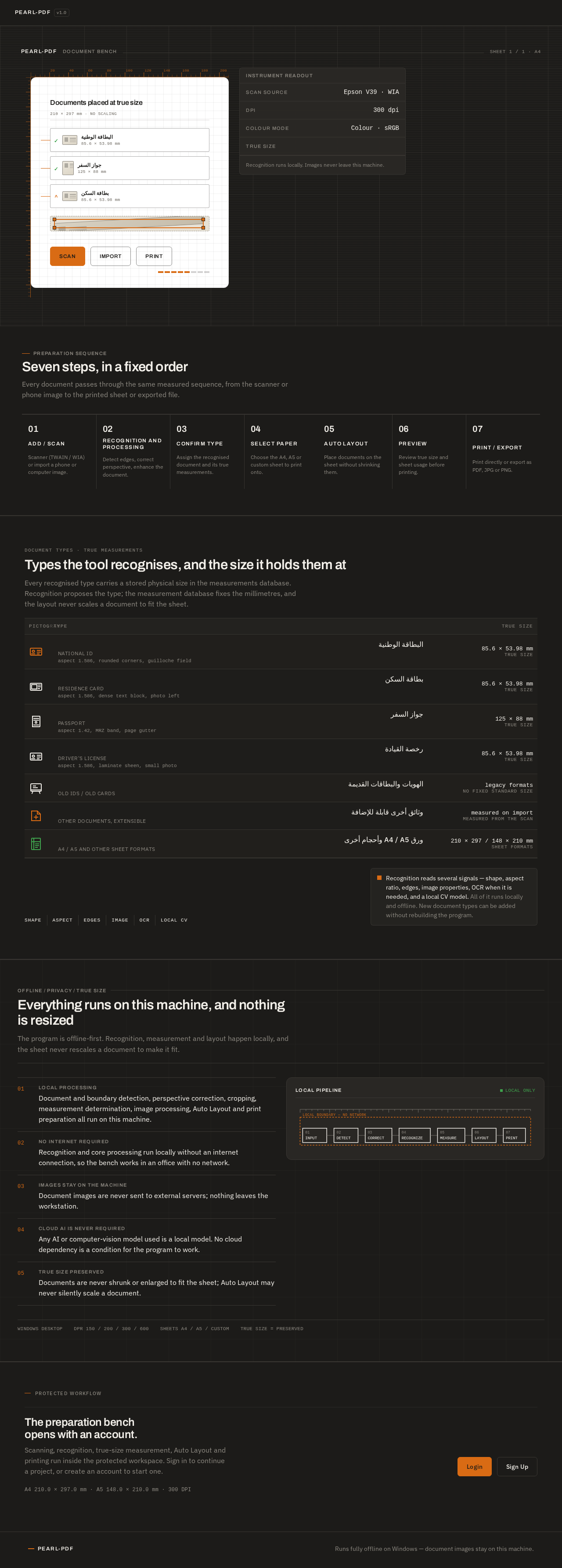
Recognition runs locally. Images never leave this machine.
Seven steps, in a fixed order
Every document passes through the same measured sequence, from the scanner or phone image to the printed sheet or exported file.
- 01Add / ScanScanner (TWAIN / WIA) or import a phone or computer image.
- 02Recognition and ProcessingDetect edges, correct perspective, enhance the document.
- 03Confirm TypeAssign the recognised document and its true measurements.
- 04Select PaperChoose the A4, A5 or custom sheet to print onto.
- 05Auto LayoutPlace documents on the sheet without shrinking them.
- 06PreviewReview true size and sheet usage before printing.
- 07Print / ExportPrint directly or export as PDF, JPG or PNG.
DOCUMENT TYPES · TRUE MEASUREMENTS
Types the tool recognises, and the size it holds them at
Every recognised type carries a stored physical size in the measurements database. Recognition proposes the type; the measurement database fixes the millimetres, and the layout never scales a document to fit the sheet.
Recognition reads several signals — shape, aspect ratio, edges, image properties, OCR when it is needed, and a local CV model. All of it runs locally and offline. New document types can be added without rebuilding the program.
Everything runs on this machine, and nothing is resized
The program is offline-first. Recognition, measurement and layout happen locally, and the sheet never rescales a document to make it fit.
- 01Local processing
Document and boundary detection, perspective correction, cropping, measurement determination, image processing, Auto Layout and print preparation all run on this machine.
- 02No internet required
Recognition and core processing run locally without an internet connection, so the bench works in an office with no network.
- 03Images stay on the machine
Document images are never sent to external servers; nothing leaves the workstation.
- 04Cloud AI is never required
Any AI or computer-vision model used is a local model. No cloud dependency is a condition for the program to work.
- 05True size preserved
Documents are never shrunk or enlarged to fit the sheet; Auto Layout may never silently scale a document.
Recognition runs locally. Images never leave this machine.
Seven steps, in a fixed order
Every document passes through the same measured sequence, from the scanner or phone image to the printed sheet or exported file.
- 01Add / ScanScanner (TWAIN / WIA) or import a phone or computer image.
- 02Recognition and ProcessingDetect edges, correct perspective, enhance the document.
- 03Confirm TypeAssign the recognised document and its true measurements.
- 04Select PaperChoose the A4, A5 or custom sheet to print onto.
- 05Auto LayoutPlace documents on the sheet without shrinking them.
- 06PreviewReview true size and sheet usage before printing.
- 07Print / ExportPrint directly or export as PDF, JPG or PNG.
DOCUMENT TYPES · TRUE MEASUREMENTS
Types the tool recognises, and the size it holds them at
Every recognised type carries a stored physical size in the measurements database. Recognition proposes the type; the measurement database fixes the millimetres, and the layout never scales a document to fit the sheet.
Recognition reads several signals — shape, aspect ratio, edges, image properties, OCR when it is needed, and a local CV model. All of it runs locally and offline. New document types can be added without rebuilding the program.
Everything runs on this machine, and nothing is resized
The program is offline-first. Recognition, measurement and layout happen locally, and the sheet never rescales a document to make it fit.
- 01Local processing
Document and boundary detection, perspective correction, cropping, measurement determination, image processing, Auto Layout and print preparation all run on this machine.
- 02No internet required
Recognition and core processing run locally without an internet connection, so the bench works in an office with no network.
- 03Images stay on the machine
Document images are never sent to external servers; nothing leaves the workstation.
- 04Cloud AI is never required
Any AI or computer-vision model used is a local model. No cloud dependency is a condition for the program to work.
- 05True size preserved
Documents are never shrunk or enlarged to fit the sheet; Auto Layout may never silently scale a document.
No comments yet. Be the first!