pearl-pdf
 msk ahmad
ملف pdf هذا يحوي برميت انشاء تطبيق قم بفتحه وفهم المطلوب والعمل عليه


Comments (0)
Sign in to leave a comment
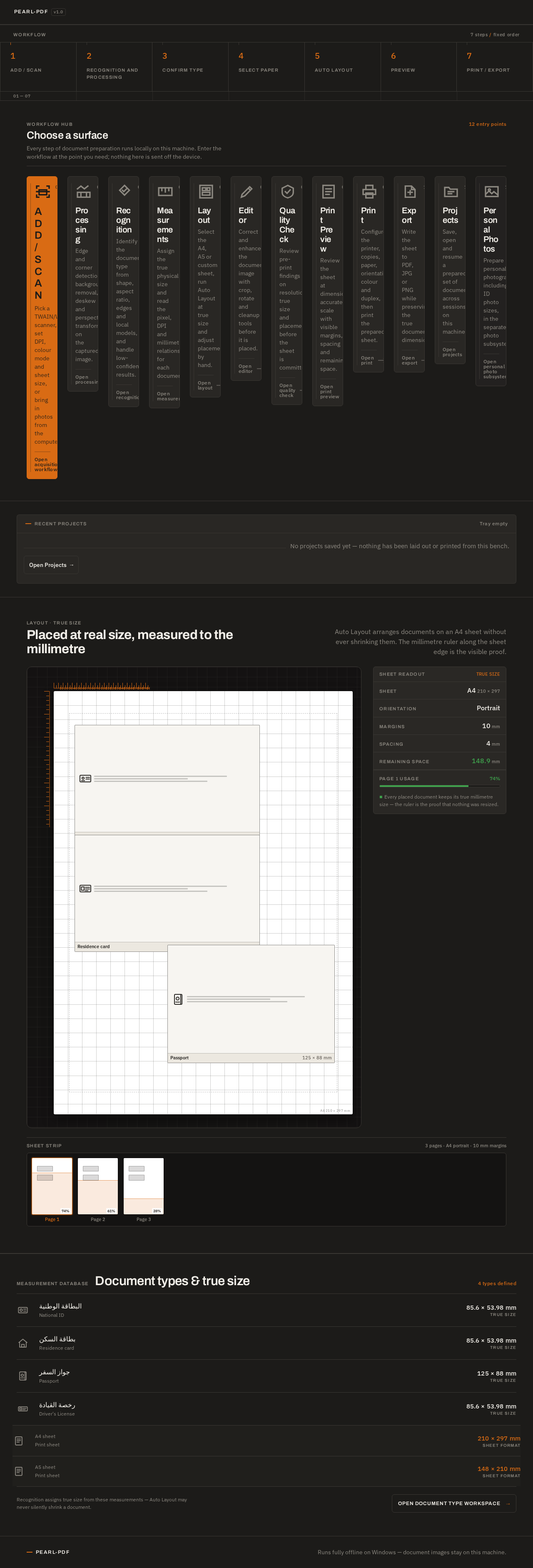
- 1Add / Scan
- 2Recognition and Processing
- 3Confirm Type
- 4Select Paper
- 5Auto Layout
- 6Preview
- 7Print / Export
Choose a surface
Every step of document preparation runs locally on this machine. Enter the workflow at the point you need; nothing here is sent off the device.
- 01
Add / Scan
Pick a TWAIN/WIA scanner, set DPI, colour mode and sheet size, or bring in photos from the computer.
Open acquisition workflow - 02
Processing
Edge and corner detection, background removal, deskew and perspective transform on the captured image.
Open processing - 03
Recognition
Identify the document type from shape, aspect ratio, edges and local models, and handle low-confidence results.
Open recognition - 04
Measurements
Assign the true physical size and read the pixel, DPI and millimetre relationship for each document.
Open measurements - 05
Layout
Select the A4, A5 or custom sheet, run Auto Layout at true size and adjust placement by hand.
Open layout - 06
Editor
Correct and enhance the document image with crop, rotate and cleanup tools before it is placed.
Open editor - 07
Quality Check
Review pre-print findings on resolution, true size and placement before the sheet is committed.
Open quality check - 08
Print Preview
Review the sheet at dimension-accurate scale with visible margins, spacing and remaining space.
Open print preview - 09
Print
Configure the printer, copies, paper, orientation, colour and duplex, then print the prepared sheet.
Open print - 10
Export
Write the sheet to PDF, JPG or PNG while preserving the true document dimensions.
Open export - 11
Projects
Save, open and resume a prepared set of documents across sessions on this machine.
Open projects - 12
Personal Photos
Prepare personal photographs, including ID photo sizes, in the separate photo subsystem.
Open personal photo subsystem
Recent Projects
No projects saved yet — nothing has been laid out or printed from this bench.
Placed at real size, measured to the millimetre
Auto Layout arranges documents on an A4 sheet without ever shrinking them. The millimetre ruler along the sheet edge is the visible proof.
Every placed document keeps its true millimetre size — the ruler is the proof that nothing was resized.
Measurement database
Document types & true size
4 types defined
- البطاقة الوطنيةNational ID85.6 × 53.98 mmTrue size
- بطاقة السكنResidence card85.6 × 53.98 mmTrue size
- جواز السفرPassport125 × 88 mmTrue size
- رخصة القيادةDriver's License85.6 × 53.98 mmTrue size
- A4 sheetPrint sheet210 × 297 mmSheet format
- A5 sheetPrint sheet148 × 210 mmSheet format
Recognition assigns true size from these measurements — Auto Layout may never silently shrink a document.
Open document type workspace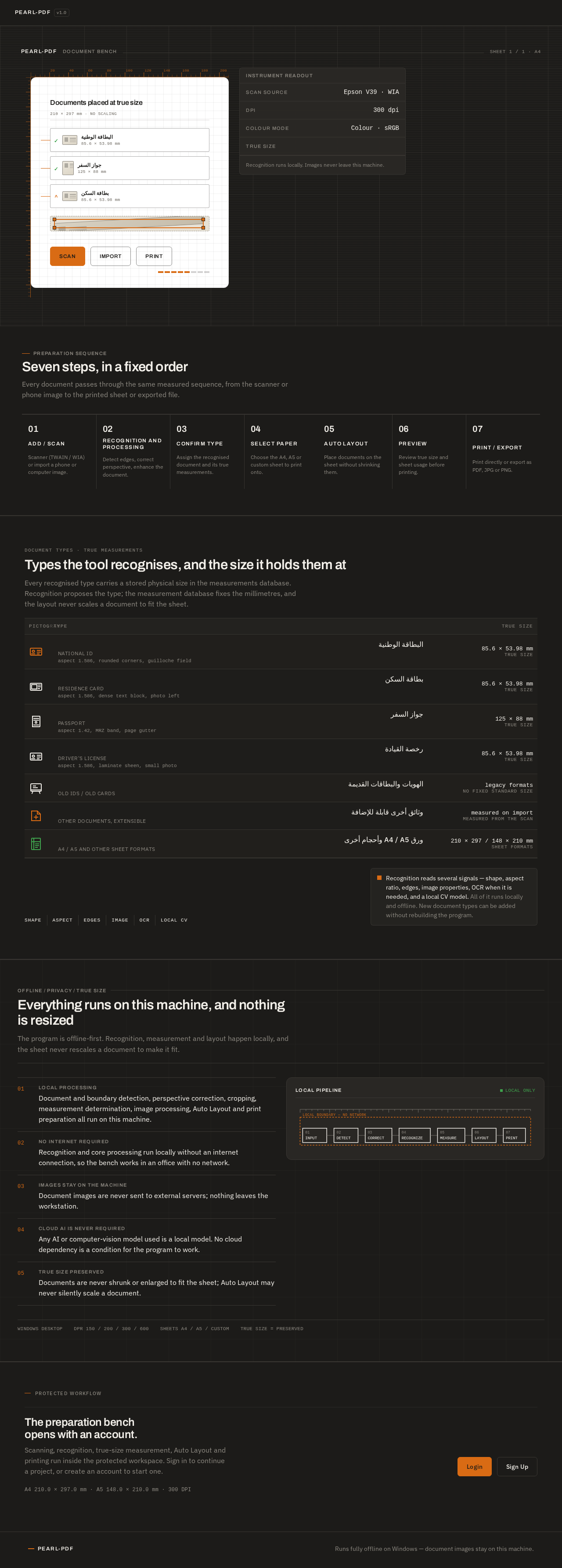
Recognition runs locally. Images never leave this machine.
Seven steps, in a fixed order
Every document passes through the same measured sequence, from the scanner or phone image to the printed sheet or exported file.
- 01Add / ScanScanner (TWAIN / WIA) or import a phone or computer image.
- 02Recognition and ProcessingDetect edges, correct perspective, enhance the document.
- 03Confirm TypeAssign the recognised document and its true measurements.
- 04Select PaperChoose the A4, A5 or custom sheet to print onto.
- 05Auto LayoutPlace documents on the sheet without shrinking them.
- 06PreviewReview true size and sheet usage before printing.
- 07Print / ExportPrint directly or export as PDF, JPG or PNG.
DOCUMENT TYPES · TRUE MEASUREMENTS
Types the tool recognises, and the size it holds them at
Every recognised type carries a stored physical size in the measurements database. Recognition proposes the type; the measurement database fixes the millimetres, and the layout never scales a document to fit the sheet.
Recognition reads several signals — shape, aspect ratio, edges, image properties, OCR when it is needed, and a local CV model. All of it runs locally and offline. New document types can be added without rebuilding the program.
Everything runs on this machine, and nothing is resized
The program is offline-first. Recognition, measurement and layout happen locally, and the sheet never rescales a document to make it fit.
- 01Local processing
Document and boundary detection, perspective correction, cropping, measurement determination, image processing, Auto Layout and print preparation all run on this machine.
- 02No internet required
Recognition and core processing run locally without an internet connection, so the bench works in an office with no network.
- 03Images stay on the machine
Document images are never sent to external servers; nothing leaves the workstation.
- 04Cloud AI is never required
Any AI or computer-vision model used is a local model. No cloud dependency is a condition for the program to work.
- 05True size preserved
Documents are never shrunk or enlarged to fit the sheet; Auto Layout may never silently scale a document.
No comments yet. Be the first!