parking-memory-app
 Aslaliya Jagdishbhai
Build ParkBack, a premium mobile-first parking memory app for Android/iOS. Users can quickly save where they parked a car, bike, or rental vehicle and easily find it later. Design: modern, premium, calm automotive aesthetic. Deep teal #0F6B66, warm amber #F2A93B, success #2E8B57, light #FAFAF8, dark #14181A/#1E2426. Rounded cards, generous spacing, smooth 150–300ms animations, 48px+ touch targets, excellent accessibility, responsive mobile UI, system light/dark mode. Screens: Home, Save Parking, Active Parking, History, Privacy/Settings. Home empty: clear Save Parking CTA and short explanation. Active state: premium parking card showing saved time, location accuracy, floor/section/row/spot/landmark/photo, Navigate Back, Mark Found, Edit. Save Parking: request location only after user taps Save Parking, explain permission first, support GPS or manual entry, show accuracy warning if >30m, optional photo/note/floor/section/row/spot/landmark/reminder. History: reverse chronological records with date/time and thumbnails. Allow edit/delete. Mark Found moves active record to history. Privacy: explain data is stored locally, no tracking/ads/analytics/login, and provide Delete All Data with confirmation. Make all core flows functional, including permission denial, GPS unavailable, offline use, photo/reminder handling, loading/success/error states. Never use fake data, fake maps, placeholder buttons, or unnecessary permissions.


Comments (0)
Sign in to leave a comment
System Requirements
System Requirements Document for parking-memory-app
1. Introduction
parking-memory-app is the project name; the product it delivers is ParkBack, a premium, mobile-first parking memory app for Android and iOS. ParkBack exists for one narrow, high-confidence purpose: a person leaves a car, a bike, or a rental vehicle somewhere and must be able to save that spot quickly and return to it later without doubt.
The product intent derived from the authoritative requirement thread is:
- Save fast, find surely. A user records where a vehicle was parked — by GPS or by manual entry — with optional photo, note, and structured identifiers (floor, section, row, spot, landmark) and an optional reminder, then uses that record to walk back to the vehicle.
- Instrument-grade confidence under imperfect conditions. The experience must stay truthful when GPS is poor (an accuracy warning above 30 m), denied, or unavailable, and when the device is offline.
- Privacy as the default posture, not a setting. Data is stored locally on the device. There is no tracking, no ads, no analytics, and no login.
- Nothing fabricated. No fake data, no fake maps, no placeholder buttons, and no unnecessary permissions.
The audience is any driver, rider, or rental-vehicle user who needs to remember a parking location — including frequent parkers in structured car parks, riders in informal parking, and rental users in unfamiliar cities where the cost of forgetting a spot is highest.
2. System Overview
ParkBack is a five-screen, mobile-first application with a calm automotive instrument aesthetic. It records a parking event, presents the currently active parking as a premium instrument plate, archives completed parkings in reverse chronological history, and states its local-only privacy posture with a full data-erasure control.
- Actors. Three accepted human roles operate the product: Driver / Vehicle Owner (saves, navigates to, finds, and edits the active parking), History Reviewer (reviews, edits, and deletes past parking sessions), and Privacy-Conscious User (inspects the local-data posture and erases all data). The device operating system supplies location, camera, local notification, photo storage, and navigation-handoff services; these are supporting system capabilities, not product participants.
- Accepted behavior, in outline. Permission is explained before it is requested and requested only after the user taps Save Parking. A record may be created from a GPS fix or from manual entry. Accuracy worse than 30 m is surfaced as a warning. Photo, note, floor, section, row, spot, landmark, and reminder are optional. The active parking card shows saved time, location accuracy, those identifiers and photo, and exposes Navigate Back, Mark Found, and Edit. Mark Found moves the active record into History. History is reverse chronological with date/time and thumbnails, and supports edit and delete. Privacy/Settings explains local-only storage and offers Delete All Data behind a confirmation.
- Ownership. All accepted behavior is application-owned and rendered on the five accepted pages. Navigation directions are handed off to the user's own installed navigation application using the real saved coordinates; ParkBack renders no map of its own.
- Exclusions. No account, login, or identity of any kind. No cloud sync, no server-side storage, no analytics, no advertising, no tracking, no social or sharing features, no embedded or simulated map rendering, and no permission requested for a capability the user has not invoked.
2a. Product Interpretation and Delivery Boundary
Delivery ownership. ParkBack is a native-mobile experience delivered as an application for Android and iOS. Every accepted screen is first-party custom UI owned by the application: Home, Save Parking, Active Parking, History, and Privacy/Settings. There is no web surface and no server surface in the current scope.
Access boundary. The application is usable immediately on first launch. There is no sign-up, no sign-in, no account, and no session identity — this is an explicit, binding constraint of the product. Local device storage is the only place parking records exist, and that storage is private to the application on the device. No protected destination requires identity, so no access-establishment journey exists and none is implied.
External handoffs. Two capabilities leave the application boundary by design and are handled truthfully rather than simulated:
- Navigate Back hands the real saved coordinates to the device's installed navigation application. ParkBack does not draw, fetch, or infer a map. If no navigation application is available, or if the record holds no usable coordinates because it was entered manually, ParkBack says so plainly and offers the edit path.
- Reminders are scheduled as local device notifications, so they keep working without network access.
Operating conditions. Core flows — saving, viewing, editing, finding, reviewing, and deleting records — must work fully offline. Offline is the normal condition, not a degraded one, because no core feature depends on network services.
Current versus future. The current scope is exactly the five accepted pages and the behavior described in this document. Nothing else is committed.
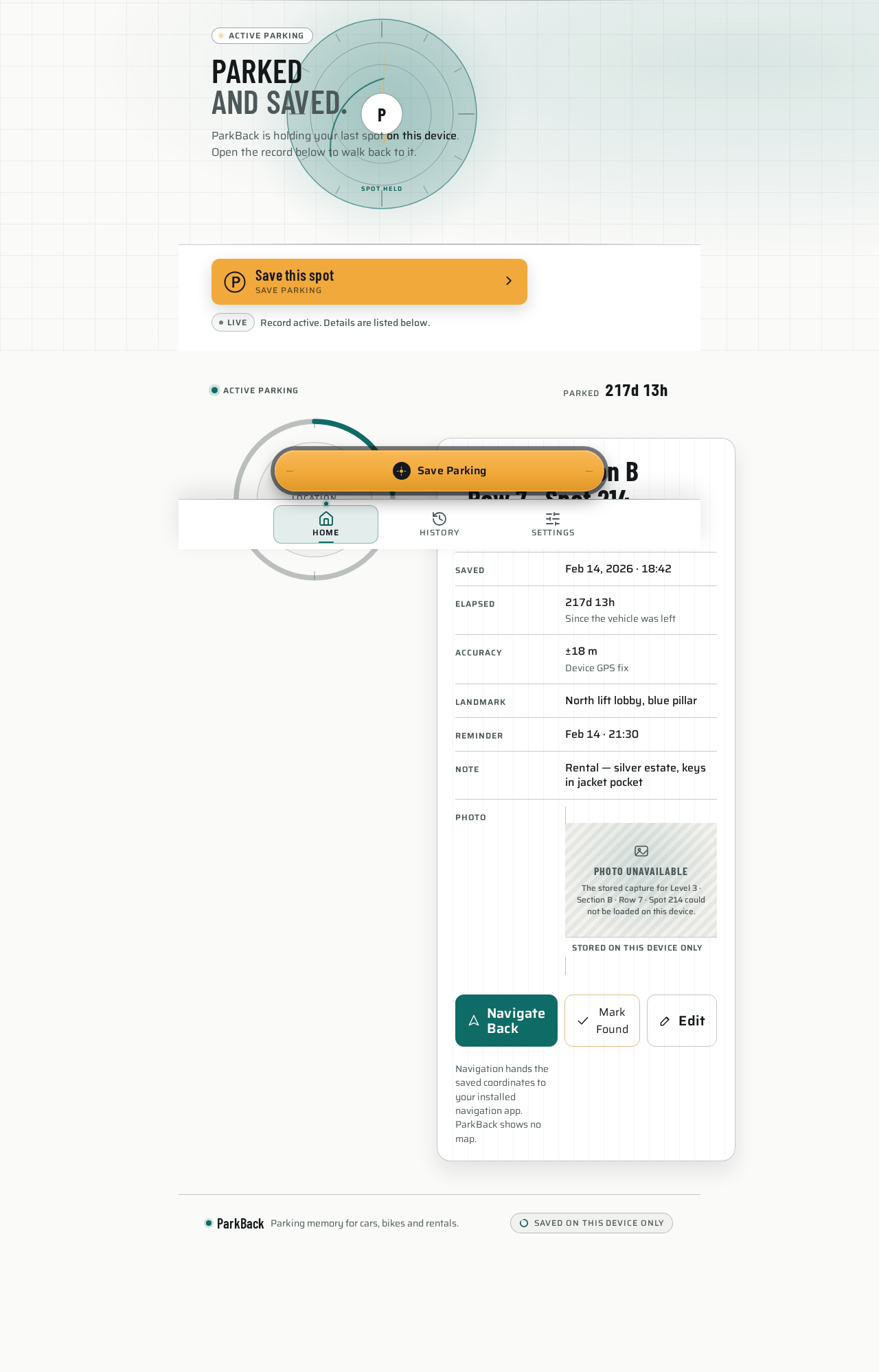
Parkedand saved.
ParkBack is holding your last spot on this device. Open the record below to walk back to it.
LiveRecord active. Details are listed below.
Active parking record
Level 3 · Section B · Row 7 · Spot 214
Navigation hands the saved coordinates to your installed navigation app. ParkBack shows no map.
Parkedand saved.
ParkBack is holding your last spot on this device. Open the record below to walk back to it.
LiveRecord active. Details are listed below.
Active parking record
Level 3 · Section B · Row 7 · Spot 214
Navigation hands the saved coordinates to your installed navigation app. ParkBack shows no map.
No comments yet. Be the first!