otp-smsplog
 Abdullahi Olarewaju
Build a virtual number /OTP saas called SMSPLOG- Nigeria’s #1 virtual number store for verifications. CORE IDEA: Users buy temporary and rent virtual numbers to receive OTP for apps. We resell numbers from API providers. COMPLIANCE FIRST: -Users must be 16+ and verify phone number before buying -Show warning on signup: “numbers must not be used for fraud, spam or impersonation. ALL orders are logged. Account will be banned for illegal use.” -Add terms page. USER ROLES: -User: buy numbers, fund wallet -Admin: manage pricing, orders, users SCREEN 1-Auth: -signup with phone + email +password -login SCREEN 2 – Home /buy number (main screen): -Top: wallet balance with deposit button ( paystack mock –add funds ) -Filter row: service icons to filter: Whatsapp, Telegram, Facebook, Signal, Instagram, Google/Gmail, Tiktok, Twitter/X, Discord, Uber\Bolt, Amazon . - Country Selector: Dropdown – USA, UK, NIGERIA, CANADA, POLAND, NETHERLANDS, INDONESIA, (most popular for OTP) -number list: show available numbers with price in naira, e. g “USA whatsapp- ₦850”, “UK telegram -₦600”, USA facebook - ₦1200”. Button “buy” -After buy: deduct from wallet, show screen with: Phone number, service name, status “waiting for SMS”, Timer 15 minutes, Area to show OTP”, “cancel number (refund 70% if no SMS)”, “ BUY another” SCREEN 3 – My Orders: -Tabs: Active, comp0leted, cancelled -show number, service, country, OTP received, time, price SCREEN 4 – wallet: -Balance, deposit via paystack, withdraw, transaction history -All purchases deduct from wallet. No negative balance. SCREEN 5 – Pricing logic (backend): -create table for providers: 5sim.net / SMS-activate API mock -Admin can set: Base Cost + profit Margin. Example: Base $0.50, sell for ₦1000. System auto calculates profit. -when user buys, backend should call mock external API: POST https://api.provider.com/getnumber (service, country) returns number. Then poll for SMS. SCREEN 6 – Admin panel / admin (Admin only): - Dashboard: Total users, total orders today, profit today - User Management: List users, ban user - Number Management: Add/Edit services (WhatsApp, Signal, Telegram, Facebook, etc), Set price per service per country - Orders Management: View all orders, manually input OTP if needed, refund - Provider Settings: Set API key for 5SIM, set markup % - Transaction Logs: All wallet activity DESIGN: - Clean white, orange and dark blue like Paystack dashboard. Mobile first, big buttons, copy number with one tap. - Show WhatsApp, Telegram, Facebook, Signal logos as filter chips. TECH: - React + Tailwind frontend - FastAPI + Postgres backend - Tables: users, kyc, wallet_transactions, orders, services, countries, pricing - Mock the SMS provider API but structure code so real API key can be added later in env file. - Seed data: 20 numbers for WhatsApp, Telegram, Facebook, Signal. Generate full working code with seed data and test wallet deduction.

Comments (0)
Sign in to leave a comment
System Requirements
System Requirements Document for otp-smsplog
1. Introduction
otp-smsplog (product name: SMSPLOG) is Nigeria's #1 virtual number store for verifications. It is a mobile-first SaaS where users buy temporary and rent virtual numbers to receive OTP (one-time password) SMS codes for apps, reselling numbers sourced from external API providers.
The product's core intent is a trustworthy, compliance-first, naira-denominated utility: a 16+ verified user funds a wallet via a mocked Paystack deposit, filters available numbers by service and country, buys a number, watches a 15-minute "waiting for SMS" countdown, reads and copies the received OTP with one tap, and reviews their order and wallet history. Every purchase deducts from the wallet, and no negative balance is ever allowed. All orders are logged, and accounts are banned for illegal use.
The audience is mobile-first Nigerian consumers aged 16 and over who need a foreign or local number to receive a verification code, plus the SMSPLOG operator (Admin) who manages pricing, orders, users, provider configuration, and wallet transaction logs.
The product is delivered as a first-party web application with application-owned identity, a mocked SMS provider API (structured so a real API key can be added later via an env file), and a mocked Paystack deposit flow.
2. System Overview
SMSPLOG is delivered as a React + Tailwind frontend backed by a FastAPI + Postgres backend. The current delivery includes:
- Anonymous public entry (Landing) explaining SMSPLOG and its virtual-number OTP verification service.
- Application-owned identity (Auth) supporting signup with phone + email + password, phone verification, and login for both Users and Admins.
- A Terms page carrying the required compliance and terms information.
- A protected User marketplace (Home / buy number) with wallet balance, deposit button, service filter chips, country selector, and a priced number list.
- A protected Active Number continuation surface showing the purchased number, service, "waiting for SMS" status, 15-minute timer, OTP display area, cancel-with-70%-refund, and Buy another.
- A protected My Orders surface with Active / Completed / Cancelled tabs.
- A protected Wallet surface with balance, mock Paystack deposit, withdraw, and transaction history.
- A protected Admin panel with Dashboard metrics, User Management, Number Management, Orders Management, Provider Settings, and Transaction Logs.
Actors: the accepted active-human personas are User and Admin (closed set). The mock SMS provider (POST https://api.provider.com/getnumber) and the mock Paystack deposit service are typed non-persona external actors.
Narrow exclusions and boundaries: the SMS provider API is mocked (not live); the Paystack deposit is mocked; no real money movement occurs. Real provider API keys are added later via an env file. Admin access is admin-only. Purchases never create a negative wallet balance. Cancellation refunds are 70% and only when no SMS was received.
2a. Product Interpretation and Delivery Boundary
SMSPLOG is a first-party web application. Identity is application-owned: a User establishes an account with phone, email, and password, verifies their phone number, and must be 16 or older before buying. The Landing and Terms pages are anonymously reachable; Auth is the anonymous entry boundary that establishes access to the protected marketplace. The protected destinations (Home / buy number, Active Number, My Orders, Wallet) require an authenticated User session; the Admin panel requires an admin-provisioned role.
The current delivery horizon covers everything described in this document: the full buy flow, wallet, orders, admin console, mocked provider integration, mocked Paystack deposit, seed data, and wallet-deduction behavior. Future work is limited to swapping the mocked provider API for a real provider using an env-file API key; no other future capabilities are accepted.
2b. Source Content Inventory
Not applicable — no reference directive declares content_source.
2c. Page Content and Component Coverage
Landing
- Information/state: Anonymous public entry explaining SMSPLOG as Nigeria's #1 virtual number store for verifications; the value proposition (buy a number, get the OTP, move on); the compliance posture (16+, phone verification, all orders logged, illegal use banned); a link to Terms; a call to enter Auth.
- Primary actions: Enter Auth (signup or login); open Terms.
- Supporting actions: Read the compliance warning; view the service chips preview.
- Domain entities: Service (WhatsApp, Telegram, Facebook, Signal, Instagram, Google/Gmail, TikTok, Twitter/X, Discord, Uber/Bolt, Amazon), Country (USA, UK, Nigeria, Canada, Poland, Netherlands, Indonesia).
- Component responsibilities: Split hero (white "you" half with headline and wallet strip; dark-blue "engine" half with a live request panel); service chip row; compliance strip; Terms link; Auth CTA.
- States: Loading (hero request panel typing in); empty (no live request yet — panel shows the schematic poll loop); success (request panel resolves a number); error (request panel shows a failed request with retry affordance); recovery (retry re-runs the panel animation).
Auth
- Information/state: Signup form (phone, email, password) with the mandatory warning: "numbers must not be used for fraud, spam or impersonation. ALL orders are logged. Account will be banned for illegal use."; login form; phone-verification step; 16+ confirmation; Terms acknowledgement.
- Primary actions: Sign up; log in; verify phone number; accept the warning and Terms.
- Supporting actions: Switch between signup and login; resend phone verification code.
- Domain entities: User, KYC (age/phone verification record), Terms acceptance.
- Component responsibilities: Signup form; login form; warning banner; 16+ checkbox; Terms acknowledgement control; phone-verification code entry; error and success messaging.
- States: Loading (submitting credentials / sending verification code); empty (blank form); success (account created, phone verified, redirected to Home / buy number); error (invalid credentials, duplicate email/phone, unverified phone, under-16 rejection); recovery (resend code, correct field errors, retry login).
Terms
- Information/state: The terms of use for SMSPLOG, including the prohibition on using numbers for fraud, spam, or impersonation, the statement that all orders are logged, and that accounts will be banned for illegal use; the 16+ requirement; the phone-verification requirement; the 70% no-SMS cancellation refund rule; the no-negative-balance rule.
- Primary actions: Read terms; return to Auth or Landing.
- Supporting actions: Scroll to sections; navigate back.
- Domain entities: Terms document, compliance rules.
- Component responsibilities: Terms content sections; back navigation; acknowledgement link into Auth.
- States: Loading (content fetch); empty (not applicable — static content); success (rendered); error (content unavailable with retry); recovery (retry).
Home / buy number
- Information/state: Sticky wallet bar with balance and Deposit button; service filter chip row (WhatsApp, Telegram, Facebook, Signal, Instagram, Google/Gmail, TikTok, Twitter/X, Discord, Uber/Bolt, Amazon); country selector dropdown (USA, UK, Nigeria, Canada, Poland, Netherlands, Indonesia); ruled number list showing available numbers with naira prices (e.g. "USA whatsapp -\x20\xe2\x82\xa6850", "UK telegram -\x20\xe2\x82\xa6600", "USA facebook -\x20\xe2\x82\xa61200") and a Buy button per row.
- Primary actions: Deposit funds (mock Paystack); filter by service; select country; buy a number.
- Supporting actions: Copy a number with one tap; clear filters; view wallet balance.
- Domain entities: Service, Country, Pricing, Number, Order, Wallet, WalletTransaction.
- Component responsibilities: Sticky wallet bar; Deposit button; service chip row (brand marks as monochrome SVG silhouettes, accent when active); country selector (right-aligned select on desktop, full-width sheet on mobile); ruled number rows (phone string left in mono, service + country mid, naira price and Buy button right); one-tap copy control.
- States: Loading (number list fetching); empty (no numbers match the selected service/country — show a clear empty message and a reset-filters action); success (rows render with prices; Buy deducts wallet and routes to Active Number); error (insufficient wallet balance — block purchase and prompt deposit; provider failure — show error and allow retry); recovery (retry purchase, deposit funds, reset filters).
Active Number
- Information/state: Purchased phone number (mono, one-tap copy); service name; status "waiting for SMS"; 15-minute countdown timer ring; OTP display area (six-cell mono grid); cancel number (refund 70% if no SMS); Buy another.
- Primary actions: Copy the number; read the OTP; cancel the number (70% refund if no SMS); buy another number.
- Supporting actions: Copy the OTP; watch the timer; view the provider request log.
- Domain entities: Order, Number, Service, Country, Wallet, WalletTransaction, Provider request log.
- Component responsibilities: Split panel (white half: number, service, timer ring, OTP slot; dark half: live provider request log reflecting real order state); cancel control; Buy another control; one-tap copy controls.
- States: Loading (provider request in flight — "polling provider" dot pulse); empty (no OTP yet — dashed hairline cells); success (OTP received — cells fill dark blue with white digits, timer stops); error (provider failed to return a number, or timer expired with no SMS); recovery (cancel for 70% refund when no SMS; retry; buy another).
My Orders
- Information/state: Tabs Active, Completed, Cancelled with counts; each order shows number, service, country, OTP received, time, and price.
- Primary actions: Switch tabs; open an order; copy number or OTP.
- Supporting actions: Filter within a tab; refresh.
- Domain entities: Order, Number, Service, Country, OTP, WalletTransaction.
- Component responsibilities: Tab strips with counts; ruled order rows; order detail split panel; copy controls.
- States: Loading (orders fetching); empty (no orders in a tab — clear empty message); success (rows render); error (fetch failure with retry); recovery (retry, switch tab).
Wallet
- Information/state: Balance; Deposit via Paystack (mock); Withdraw; transaction history; all purchases deduct from wallet; no negative balance.
- Primary actions: Deposit funds (mock Paystack); withdraw; view transaction history.
- Supporting actions: Filter history; copy transaction references.
- Domain entities: Wallet, WalletTransaction, Order.
- Component responsibilities: Balance display (mono); Deposit control; Withdraw control; transaction history list; no-negative-balance guard.
- States: Loading (balance and history fetching); empty (no transactions yet — clear empty message); success (deposit credited, withdrawal recorded, history updated); error (deposit failure, withdrawal failure, insufficient balance); recovery (retry deposit/withdrawal, correct amount).
Admin panel / admin
- Information/state: Dashboard (total users, total orders today, profit today); User Management (list users, ban user); Number Management (add/edit services, set price per service per country); Orders Management (view all orders, manually input OTP if needed, refund); Provider Settings (set API key for 5SIM, set markup %); Transaction Logs (all wallet activity).
- Primary actions: View dashboard metrics; ban a user; add/edit a service; set price per service per country; view all orders; manually input an OTP; issue a refund; set provider API key; set markup %; review transaction logs.
- Supporting actions: Search/filter users, orders, and logs; edit pricing rows.
- Domain entities: User, Order, Service, Country, Pricing, Provider, WalletTransaction, KYC.
- Component responsibilities: Dashboard metric tiles; user list with ban control; service editor; per-service-per-country price editor; order list with manual OTP input and refund controls; provider settings form (API key, markup %); transaction log table.
- States: Loading (metrics, lists, logs fetching); empty (no users/orders/logs — clear empty messages); success (metrics render, ban applied, service/price saved, OTP entered, refund issued, settings saved); error (save failure, refund failure, unauthorized access); recovery (retry, correct input, re-authenticate).
3. Functional Requirements
Each requirement is a distinct story point with provenance, lifecycle facts, and observable acceptance.
FR-1 — Signup with phone, email, and password (explicit) As a User, I should sign up with my phone number, email, and password so that I can create an SMSPLOG account.
- Trigger/input: phone, email, password submitted on Auth.
- Observable result: account created; phone-verification step initiated.
- Access state: anonymous (Auth).
- Failure/recovery: duplicate email/phone or invalid input shows a field error and allows correction.
- Continuation: proceed to phone verification.
FR-2 — Login (explicit) As a User, I should log in so that I can access my protected SMSPLOG surfaces.
- Trigger/input: credentials submitted on Auth.
- Observable result: authenticated session; redirect to Home / buy number.
- Access state: anonymous (Auth) → authenticated.
- Failure/recovery: invalid credentials show an error and allow retry.
- Continuation: enter the marketplace.
FR-3 — 16+ age requirement (explicit) As a User, I should confirm I am 16 or older so that I meet SMSPLOG's compliance requirement.
- Trigger/input: 16+ confirmation on Auth.
- Observable result: account eligible to proceed; under-16 is rejected.
- Access state: anonymous (Auth).
- Failure/recovery: under-16 rejection blocks account creation.
- Continuation: proceed to phone verification.
FR-4 — Phone number verification before buying (explicit) As a User, I should verify my phone number so that I am permitted to buy numbers.
- Trigger/input: verification code sent to my phone and entered on Auth.
- Observable result: phone marked verified; buying unlocked.
- Access state: anonymous (Auth) → authenticated and verified.
- Failure/recovery: incorrect code shows an error; resend code available.
- Continuation: enter Home / buy number.
FR-5 — Signup compliance warning (explicit) As a User, I should see the warning "numbers must not be used for fraud, spam or impersonation. ALL orders are logged. Account will be banned for illegal use." on signup so that I understand the compliance rules.
- Trigger/input: signup screen display.
- Observable result: warning visible; acknowledgement required.
- Access state: anonymous (Auth).
- Failure/recovery: cannot proceed without acknowledgement.
- Continuation: complete signup.
FR-6 — Terms page (explicit) As a User, I should read the Terms page so that I understand the rules of using SMSPLOG.
- Trigger/input: open Terms.
- Observable result: terms content rendered.
- Access state: anonymous.
- Failure/recovery: content unavailable shows a retry.
- Continuation: return to Auth or Landing.
FR-7 — Wallet balance and deposit button on Home (explicit) As a User, I should see my wallet balance at the top of Home with a Deposit button so that I can add funds.
- Trigger/input: open Home / buy number.
- Observable result: balance displayed; Deposit button available.
- Access state: authenticated User.
- Failure/recovery: balance fetch failure shows an error and retry.
- Continuation: deposit funds or buy a number.
FR-8 — Mock Paystack deposit (explicit) As a User, I should deposit funds via a mocked Paystack flow so that my wallet is credited.
- Trigger/input: Deposit action with an amount.
- Observable result: wallet balance increases; transaction recorded.
- Access state: authenticated User.
- Failure/recovery: deposit failure shows an error and allows retry.
- Continuation: buy a number.
FR-9 — Service filter chips (explicit) As a User, I should filter numbers by service icons (WhatsApp, Telegram, Facebook, Signal, Instagram, Google/Gmail, TikTok, Twitter/X, Discord, Uber/Bolt, Amazon) so that I see only relevant numbers.
- Trigger/input: tap a service chip.
- Observable result: number list filtered to the selected service.
- Access state: authenticated User.
- Failure/recovery: no matches show an empty state with reset.
- Continuation: select a country or buy.
FR-10 — Country selector (explicit) As a User, I should select a country (USA, UK, Nigeria, Canada, Poland, Netherlands, Indonesia) so that I see numbers for that country.
- Trigger/input: choose a country from the dropdown.
- Observable result: number list filtered to the selected country.
- Access state: authenticated User.
- Failure/recovery: no matches show an empty state with reset.
- Continuation: buy a number.
FR-11 — Number list with naira prices and Buy button (explicit) As a User, I should see available numbers with prices in naira (e.g. "USA whatsapp -\x20\xe2\x82\xa6850", "UK telegram -\x20\xe2\x82\xa6600", "USA facebook -\x20\xe2\x82\xa61200") and a Buy button so that I can purchase.
- Trigger/input: view the number list; tap Buy.
- Observable result: purchase initiated; wallet deducted.
- Access state: authenticated User.
- Failure/recovery: insufficient balance blocks purchase and prompts deposit; provider failure shows an error and retry.
- Continuation: proceed to Active Number.
FR-12 — Wallet deduction on purchase (explicit) As a User, I should have the purchase price deducted from my wallet when I buy so that payment is settled.
- Trigger/input: Buy action.
- Observable result: wallet balance reduced by the price; transaction recorded.
- Access state: authenticated User.
- Failure/recovery: insufficient balance blocks the purchase; no negative balance is ever allowed.
- Continuation: view the Active Number.
FR-13 — Active Number screen after buy (explicit) As a User, I should see a screen after buying with the phone number, service name, status "waiting for SMS", a 15-minute timer, an area to show the OTP, "cancel number (refund 70% if no SMS)", and "BUY another" so that I can receive and use the OTP.
- Trigger/input: successful purchase.
- Observable result: Active Number rendered with number, service, status, timer, OTP area, cancel, and Buy another.
- Access state: authenticated User.
- Failure/recovery: provider failure or timer expiry shows an error and offers cancel/retry.
- Continuation: read OTP, cancel, or buy another.
FR-14 — OTP display (explicit) As a User, I should see the received OTP in the OTP area so that I can use it for verification.
- Trigger/input: SMS received from the provider.
- Observable result: OTP displayed in the six-cell mono grid.
- Access state: authenticated User.
- Failure/recovery: no SMS within the timer shows an expired state and offers cancel for 70% refund.
- Continuation: copy the OTP and use it.
FR-15 — Cancel number with 70% refund if no SMS (explicit) As a User, I should cancel a number and receive a 70% refund if no SMS was received so that I am not charged for a failed number.
- Trigger/input: Cancel action on Active Number.
- Observable result: order cancelled; 70% of the price refunded to the wallet.
- Access state: authenticated User.
- Failure/recovery: cancel is unavailable if an SMS was received; refund failure shows an error and retry.
- Continuation: buy another number.
FR-16 — Buy another (explicit) As a User, I should buy another number from the Active Number screen so that I can continue without leaving the flow.
- Trigger/input: Buy another action.
- Observable result: return to Home / buy number to select a new number.
- Access state: authenticated User.
- Failure/recovery: insufficient balance prompts deposit.
- Continuation: complete a new purchase.
FR-17 — My Orders with Active/Completed/Cancelled tabs (explicit) As a User, I should view My Orders with Active, Completed, and Cancelled tabs showing number, service, country, OTP received, time, and price so that I can review my history.
- Trigger/input: open My Orders; switch tabs.
- Observable result: orders listed per tab with the required fields.
- Access state: authenticated User.
- Failure/recovery: fetch failure shows an error and retry; empty tabs show a clear empty message.
- Continuation: open an order or copy details.
FR-18 — Wallet screen (explicit) As a User, I should view my Wallet with balance, deposit via Paystack, withdraw, and transaction history so that I can manage funds.
- Trigger/input: open Wallet; deposit; withdraw.
- Observable result: balance displayed; deposit credited; withdrawal recorded; history listed.
- Access state: authenticated User.
- Failure/recovery: deposit/withdrawal failure shows an error and retry; insufficient balance blocks withdrawal.
- Continuation: buy a number.
FR-19 — No negative balance (explicit) As a User, I should never have a negative wallet balance so that purchases are always funded.
- Trigger/input: any purchase or withdrawal.
- Observable result: transactions that would create a negative balance are blocked.
- Access state: authenticated User.
- Failure/recovery: blocked transaction shows an insufficient-balance error and prompts deposit.
- Continuation: deposit funds and retry.
FR-20 — Providers table and pricing logic (explicit) As an Admin, I should have a providers table (5sim.net / SMS-activate API mock) and set Base Cost + profit Margin (e.g. Base $0.50, sell for\x20\xe2\x82\xa61000) so that the system auto-calculates profit.
- Trigger/input: configure provider base cost and margin.
- Observable result: sell price and profit auto-calculated.
- Access state: Admin.
- Failure/recovery: invalid values show an error and allow correction.
- Continuation: prices apply to the number list.
FR-21 — Mock provider getnumber call (explicit)
As the system, I should call the mock external API POST https://api.provider.com/getnumber (service, country) on purchase so that a number is returned.
- Trigger/input: purchase action.
- Observable result: provider returns a number; order proceeds.
- Access state: system process (backend).
- Failure/recovery: provider failure shows an error on Active Number and allows retry or cancel.
- Continuation: poll for SMS.
FR-22 — SMS polling (explicit) As the system, I should poll for SMS after the number is returned so that the OTP is delivered to the user.
- Trigger/input: number returned from provider.
- Observable result: OTP received and displayed; order marked completed.
- Access state: system process (backend).
- Failure/recovery: no SMS within the 15-minute timer marks the order eligible for cancel with 70% refund.
- Continuation: display OTP or expire.
FR-23 — Admin Dashboard (explicit) As an Admin, I should see total users, total orders today, and profit today so that I can monitor the business.
- Trigger/input: open Admin panel.
- Observable result: metrics rendered.
- Access state: Admin only.
- Failure/recovery: fetch failure shows an error and retry.
- Continuation: manage users, numbers, orders, or settings.
FR-24 — Admin User Management (explicit) As an Admin, I should list users and ban a user so that I can enforce compliance.
- Trigger/input: open User Management; ban a user.
- Observable result: user list rendered; banned user blocked from buying.
- Access state: Admin only.
- Failure/recovery: ban failure shows an error and retry.
- Continuation: review other users.
FR-25 — Admin Number Management (explicit) As an Admin, I should add/edit services (WhatsApp, Signal, Telegram, Facebook, etc.) and set price per service per country so that the catalog is accurate.
- Trigger/input: add/edit a service; set a price.
- Observable result: service and price saved; reflected in the number list.
- Access state: Admin only.
- Failure/recovery: save failure shows an error and retry.
- Continuation: manage other services.
FR-26 — Admin Orders Management (explicit) As an Admin, I should view all orders, manually input an OTP if needed, and refund so that I can resolve order issues.
- Trigger/input: open Orders Management; input an OTP; issue a refund.
- Observable result: OTP recorded on the order; refund credited to the user's wallet.
- Access state: Admin only.
- Failure/recovery: refund failure shows an error and retry.
- Continuation: review other orders.
FR-27 — Admin Provider Settings (explicit) As an Admin, I should set the API key for 5SIM and set markup % so that provider integration and pricing are configured.
- Trigger/input: enter API key and markup %.
- Observable result: settings saved.
- Access state: Admin only.
- Failure/recovery: save failure shows an error and retry.
- Continuation: monitor orders.
FR-28 — Admin Transaction Logs (explicit) As an Admin, I should view all wallet activity so that I can audit transactions.
- Trigger/input: open Transaction Logs.
- Observable result: all wallet activity listed.
- Access state: Admin only.
- Failure/recovery: fetch failure shows an error and retry.
- Continuation: review other logs.
FR-29 — Admin-only access (explicit) As an Admin, I should have the Admin panel restricted to admins so that users cannot access it.
- Trigger/input: attempt to open Admin panel.
- Observable result: non-admins are blocked; admins gain access.
- Access state: Admin only (admin-provisioned role).
- Failure/recovery: unauthorized access shows a denial and returns to Home.
- Continuation: use admin tools.
FR-30 — Seed data (explicit) As the system, I should seed 20 numbers for WhatsApp, Telegram, Facebook, and Signal so that the marketplace is populated on first run.
- Trigger/input: initial deployment/seed run.
- Observable result: 20 seeded numbers available in the number list.
- Access state: system process (backend).
- Failure/recovery: seed failure logs an error and can be re-run.
- Continuation: users can buy seeded numbers.
FR-31 — Mock provider with env-file API key (explicit) As the system, I should mock the SMS provider API but structure the code so a real API key can be added later in an env file so that the integration can go live without code changes.
- Trigger/input: provider configuration.
- Observable result: mock provider used now; real key pluggable via env.
- Access state: system process (backend).
- Failure/recovery: missing key falls back to mock.
- Continuation: provider calls proceed.
FR-32 — Wallet deduction test (explicit) As the system, I should have a test for wallet deduction so that purchase settlement is verified.
- Trigger/input: test run.
- Observable result: wallet deduction verified.
- Access state: system process (backend).
- Failure/recovery: failing test reports the discrepancy.
- Continuation: deployment confidence.
FR-33 — One-tap copy (explicit) As a User, I should copy a number with one tap so that I can paste it into the target app.
- Trigger/input: tap the copy control on a number.
- Observable result: number copied to clipboard; visual confirmation.
- Access state: authenticated User.
- Failure/recovery: clipboard failure shows a fallback selection.
- Continuation: paste into the app.
FR-34 — Service logos as filter chips (explicit) As a User, I should see WhatsApp, Telegram, Facebook, and Signal logos as filter chips so that I can identify services quickly.
- Trigger/input: view the filter row.
- Observable result: brand marks rendered as chips.
- Access state: authenticated User.
- Failure/recovery: missing logo falls back to a text label.
- Continuation: filter by service.
4. User Personas
User
Product context: A 16+ verified customer in Nigeria who needs a virtual number to receive an OTP for an app. They are mobile-first, pay in naira, and expect a fast, honest flow: fund a wallet, pick a number, watch a countdown, copy the code.
Primary goal: Receive the OTP in time with a wallet balance that never goes negative.
Distinct accepted responsibilities: Sign up with phone, email, and password; confirm 16+; verify phone number; acknowledge the fraud/spam/impersonation warning and Terms; deposit funds via mocked Paystack; filter numbers by service and country; buy a number; watch the 15-minute waiting-for-SMS timer; read the received OTP; copy the number with one tap; cancel a number for a 70% refund when no SMS arrives; buy another number; review active/completed/cancelled orders and wallet transaction history.
Relevant inputs or decisions: Which service and country to filter by; whether to deposit more funds; whether to cancel or wait when no SMS arrives; whether to buy another number.
Interactions with other accepted participants: The User interacts with the mock SMS provider indirectly (the provider returns the number and the SMS); the User interacts with the mock Paystack deposit flow; the User's orders and wallet activity are visible to the Admin.
Observable success: OTP received within the 15-minute window; wallet balance never negative; order appears in the correct My Orders tab.
Admin
Product context: The SMSPLOG operator who runs the marketplace: pricing, orders, users, provider configuration, and wallet audit. They work from the same grid and dark-blue chrome as the customer app, with orange data accents.
Primary goal: Profitable, compliant order fulfillment with accurate pricing and provider configuration.
Distinct accepted responsibilities: View dashboard totals for users, orders today, and profit today; list and ban users; add/edit services and set price per service per country; view all orders; manually input an OTP when needed; issue refunds; configure provider API keys and markup percentage; review all wallet transaction logs.
Relevant inputs or decisions: Base cost and profit margin per provider; markup %; which users to ban; which orders need a manual OTP or refund.
Interactions with other accepted participants: The Admin acts on User accounts, orders, and wallet transactions; the Admin configures the provider integration that the system uses on the User's behalf.
Observable success: Accurate pricing, resolved orders, banned bad actors, and a clean transaction log.
5. Core User Flows
Flow 1 — User signs up, verifies phone, and accepts compliance (User)
- User opens Landing (anonymous) and reads the SMSPLOG value proposition and compliance strip.
- User taps the Auth CTA and lands on Auth.
- User selects signup and enters phone, email, and password.
- User sees the warning: "numbers must not be used for fraud, spam or impersonation. ALL orders are logged. Account will be banned for illegal use." and confirms they are 16+.
- User acknowledges the warning and the Terms (opens Terms if needed, then returns).
- System sends a verification code to the phone; User enters it.
- Observable result: account created, phone verified, redirected to Home / buy number.
- Failure/recovery: duplicate email/phone or invalid input shows a field error; incorrect code shows an error with resend; under-16 is rejected.
- Continuation: User proceeds to fund the wallet or buy a number.
Flow 2 — User deposits funds via mocked Paystack (User)
- User is on Home / buy number (authenticated) and sees the sticky wallet bar with balance and Deposit button.
- User taps Deposit and enters an amount.
- System runs the mocked Paystack deposit.
- Observable result: wallet balance increases; a wallet transaction is recorded and visible on Wallet.
- Failure/recovery: deposit failure shows an error and allows retry.
- Continuation: User returns to the number list to buy.
Flow 3 — User buys a number and receives the OTP (User)
- User is on Home / buy number (authenticated).
- User taps a service chip (e.g. WhatsApp) and selects a country (e.g. USA).
- User sees the filtered number list with naira prices (e.g. "USA whatsapp -\x20\xe2\x82\xa6850") and taps Buy.
- System deducts the price from the wallet (no negative balance allowed) and calls the mock provider
POST https://api.provider.com/getnumber(service, country). - System routes the User to Active Number, showing the phone number, service name, status "waiting for SMS", a 15-minute timer, and the OTP area.
- System polls for SMS; the dark half of the split panel shows the live provider request log reflecting the real order state.
- Observable result: the OTP arrives and fills the six-cell mono grid; the order is marked completed.
- Failure/recovery: if the provider fails, an error shows with retry; if no SMS arrives within 15 minutes, the User can cancel for a 70% refund.
- Continuation: User copies the number and OTP with one tap and uses them in the target app, or taps Buy another.
Flow 4 — User cancels a number for a 70% refund (User)
- User is on Active Number with status "waiting for SMS" and no SMS received.
- User taps Cancel number.
- System cancels the order and refunds 70% of the price to the wallet.
- Observable result: order moves to the Cancelled tab on My Orders; wallet balance increases by the refund; a wallet transaction is recorded.
- Failure/recovery: cancel is unavailable if an SMS was received; refund failure shows an error and retry.
- Continuation: User taps Buy another and returns to Home / buy number.
Flow 5 — User reviews orders and wallet history (User)
- User opens My Orders (authenticated) and switches between Active, Completed, and Cancelled tabs.
- User sees number, service, country, OTP received, time, and price per order.
- User opens Wallet and reviews balance, deposit, withdraw, and transaction history.
- Observable result: accurate order and wallet records.
- Failure/recovery: fetch failure shows an error and retry; empty tabs show a clear empty message.
- Continuation: User buys another number or withdraws funds.
Flow 6 — Admin monitors the dashboard and manages users (Admin)
- Admin logs in on Auth and is routed to Admin panel / admin (admin-only).
- Admin views the Dashboard: total users, total orders today, profit today.
- Admin opens User Management, lists users, and bans a user who violated the rules.
- Observable result: banned user is blocked from buying.
- Failure/recovery: ban failure shows an error and retry; unauthorized access is denied.
- Continuation: Admin reviews orders or settings.
Flow 7 — Admin manages services and pricing (Admin)
- Admin opens Number Management in Admin panel / admin.
- Admin adds or edits a service (WhatsApp, Signal, Telegram, Facebook, etc.) and sets the price per service per country.
- Admin opens Provider Settings and sets the 5SIM API key and markup %.
- System auto-calculates profit from Base Cost + profit Margin (e.g. Base $0.50, sell for\x20\xe2\x82\xa61000).
- Observable result: updated prices appear in the User's number list; profit is reflected on the Dashboard.
- Failure/recovery: save failure shows an error and retry.
- Continuation: Admin monitors orders.
Flow 8 — Admin resolves an order (Admin)
- Admin opens Orders Management in Admin panel / admin and views all orders.
- Admin manually inputs an OTP for an order if needed, or issues a refund.
- Observable result: OTP recorded on the order; refund credited to the User's wallet.
- Failure/recovery: refund failure shows an error and retry.
- Continuation: Admin reviews Transaction Logs for all wallet activity.
6. Visuals Colors and Theme
The CREATIVE DIRECTION is authoritative for this section. Muse: Adham Dannaway. Headline: "Buy a number. Get the OTP. Move on."
Palette (light mode):
- Background:
#FFFFFF - Surface:
#F4F6FA - Text:
#0B1B3A - Primary:
#F26522 - Accent:
#0B1B3A - Muted:
#5B6B85 - Hairline border:
#E2E7F0
Ratio roughly 60% white, 25% dark blue, 10% orange, 5% tint. Never orange text on dark blue below 18px — use white on #0B1B3A, and #0B1B3A on #F26522.
Typography:
- Headings: Space Grotesk at 600/700, tight tracking (-0.02em), sentence case for product headings and uppercase for micro-labels with 0.14em letterspacing.
- Numbers, phone strings, OTP codes, naira amounts, order IDs, and timers: IBM Plex Mono at 700.
- Body: IBM Plex Sans.
- Scale: 1.25 modular on mobile, 1.333 on desktop. Display 40px mobile → 88px desktop (hero headline), H1 32→48, H2 24→32, H3 20→24, body 16→17, micro-label 11→12 uppercase, mono data 15→18. Line-height 1.05 on display, 1.5 on body.
Shape language: Precise 8-pt craft with a hard split. Cards and inputs use 12px radius, buttons 10px, filter chips full-pill. One hairline 1px #E2E7F0 border everywhere instead of shadows; the only shadow is 0 1px 0 rgba(11,27,58,0.06) under sticky bars. The signature shape is the split: a vertical seam (2px #0B1B3A) dividing hero, order-detail, and receipt panels into a white "surface" half and a dark-blue "engine" half, mirrored left/right on alternating sections.
Spacing rhythm: 8-pt base; mobile-first single column to 768px; at 1280px a 12-column grid with a 720px max reading measure.
Imagery style: The interface is the imagery. No stock photography, no 3D blobs. The dark half of each split carries a live "request panel" with monospace lines like POST /getnumber {service: "whatsapp", country: "USA"} → 200 {number: "+1 415 ••• 8842"} typed at 28ms/char, plus a small schematic of the poll loop. Service chips use real brand marks rendered as monochrome SVG silhouettes that take the accent colour when active. The OTP slot is a six-cell mono grid; empty cells are dashed hairlines, filled cells are solid dark blue with white digits.
7. Signature Design Concept
The public entry (Landing) is a full-bleed split hero, not a centred SaaS block.
- Left half (white, 55% width at 1280px, stacked above on mobile): an oversized Space Grotesk headline at 40px mobile → 88px desktop, flush-left, set in three tight lines — "Buy a number. / Get the OTP. / Move on." — with a single orange underline rule under "Get the OTP". Beneath it a live wallet strip in IBM Plex Mono: "\xe2\x82\xa612,400.00" at 28→44px with an orange Deposit button pinned to its right.
- Right half (solid
#0B1B3A, 45%): the request panel described above, with a real-looking number resolving into a phone-shaped card that bleeds off the right edge, and a 15:00 timer ring in orange at its base. - The vertical seam between halves is a 2px dark-blue rule that runs the full viewport height; on mobile the seam becomes a 2px horizontal rule and the panel sits directly under the headline. No gradient, no blob, no centred CTA.
This concept recomposes only accepted content, states, and controls: the headline, the wallet strip, the Deposit button, the provider request panel, the number card, and the timer ring.
8. Interaction Model & Motion Direction
Interaction Model: Animated Motion Tempo: restrained Hero Dimensionality: layered_2d
Landing Hero Motion Brief:
- Focal subject: the split hero — the white "you" half with the headline and wallet strip, and the dark-blue "engine" half with the live provider request panel and the resolving number card.
- Input → transformation → outcome thesis: the user's intent (buy a number) is expressed as a provider request (
POST /getnumber) that transforms into a returned number and a 15:00 timer ring, ending in an OTP landing in the six-cell slot. The motion uses only accepted behaviour: the request panel types in, the number resolves, the timer ring pulses, and the OTP slot fills. - Motion vocabulary: one loop only — the timer ring and the "polling provider" dot pulse. Reveal-on-scroll is a 180ms opacity + 6px translate on each ruled row, staggered 30ms. Hover on a row slides the seam 4px and inverts the Buy button from outline to solid orange. Copy-to-clipboard flashes the mono string to a
#F26522background for 220ms and swaps the icon to a check. No bounce, no parallax, no gradient drift. - Composed first frame: the split hero at rest — headline flush-left, wallet strip in mono, request panel showing the schematic poll loop, timer ring at 15:00, OTP slot empty with dashed hairlines.
- Reduced-motion state: the timer ring and polling dot stop pulsing; the request panel shows the completed log statically; ruled rows appear without stagger; the OTP slot shows filled cells without animation.
9. Non-Functional Requirements
- NFR-1 — Mobile-first responsive layout (explicit): the UI is mobile-first with big buttons; readable text and controls stay whole at 375px, 768px, and 1280px.
- NFR-2 — One-tap copy (explicit): phone numbers and OTP codes are one-tap copy targets with visual confirmation.
- NFR-3 — Mocked provider API (explicit): the SMS provider API is mocked but structured so a real API key can be added later in an env file.
- NFR-4 — Mocked Paystack deposit (explicit): the Paystack deposit flow is mocked.
- NFR-5 — No negative balance (explicit): all purchases deduct from the wallet; no negative balance is allowed.
- NFR-6 — Compliance logging (explicit): all orders are logged; accounts are banned for illegal use.
- NFR-7 — Admin-only access (explicit): the Admin panel is admin-only.
- NFR-8 — Provider endpoint (explicit): the provider endpoint is
POST https://api.provider.com/getnumber(service, country). - NFR-9 — Seed data (explicit): 20 numbers are seeded for WhatsApp, Telegram, Facebook, and Signal.
- NFR-10 — Wallet deduction test (explicit): a test verifies wallet deduction.
- NFR-11 — Accessibility (required_inference): contrast and focus states meet accessible standards; the direction's contrast rules are enforced (no orange text on dark blue below 18px).
10. Tech Stack
- Frontend: React + Tailwind (explicit).
- Backend: FastAPI + Postgres (explicit).
- Tables: users, kyc, wallet_transactions, orders, services, countries, pricing (explicit).
- Provider integration: mocked SMS provider API, structured for a real API key via env file (explicit).
- Deposit: mocked Paystack (explicit).
- Fonts: Space Grotesk (headings), IBM Plex Sans (body), IBM Plex Mono (data) — from the CREATIVE DIRECTION.
- Deployment: Docker/docker-compose
[Default — not specified by user].
11. Assumptions and Constraints
- A-1 (explicit): Users must be 16 or older.
- A-2 (explicit): Users must verify their phone number before buying.
- A-3 (explicit): Signup must display the warning: "numbers must not be used for fraud, spam or impersonation. ALL orders are logged. Account will be banned for illegal use."
- A-4 (explicit): Numbers must not be used for fraud, spam, or impersonation; all orders are logged and accounts will be banned for illegal use.
- A-5 (explicit): A terms page must be provided.
- A-6 (explicit): The Admin panel is admin only.
- A-7 (explicit): All purchases deduct from the wallet; no negative balance is allowed.
- A-8 (explicit): Cancel refund is 70% and applies only if no SMS was received.
- A-9 (explicit): The SMS provider API must be mocked, but code must be structured so a real API key can be added later in an env file.
- A-10 (explicit): Paystack deposit is a mock.
- A-11 (explicit): Provider API endpoint is
POST https://api.provider.com/getnumber(service, country). - A-12 (required_inference): Admin access requires an admin-provisioned role.
- A-13 (required_inference): The mock provider must return a number before an active order can proceed, and SMS polling must continue for OTP delivery.
- A-14 (required_inference): Cancellation refund is available only when no SMS was received and is limited to 70%.
12. Glossary
- OTP: One-time password; the verification code received by SMS.
- Virtual number: A temporary or rented phone number sourced from an API provider, used to receive an OTP.
- Provider: An external SMS-number API (5sim.net / SMS-activate) mocked in the current delivery.
- Wallet: The user's naira balance used to pay for numbers; never allowed to go negative.
- WalletTransaction: A record of wallet activity (deposit, purchase, refund, withdrawal).
- Order: A purchase of a virtual number, tracked through Active, Completed, and Cancelled states.
- KYC: The record of a user's age and phone verification.
- Pricing: The per-service, per-country sell price derived from Base Cost + profit Margin.
- Markup %: The admin-configured percentage applied to provider base cost.
- Seam: The 2px dark-blue rule dividing a surface into a white "you" half and a dark-blue "engine" half.
- Request panel: The live monospace provider log on the dark half of the split, reflecting the order's real state.
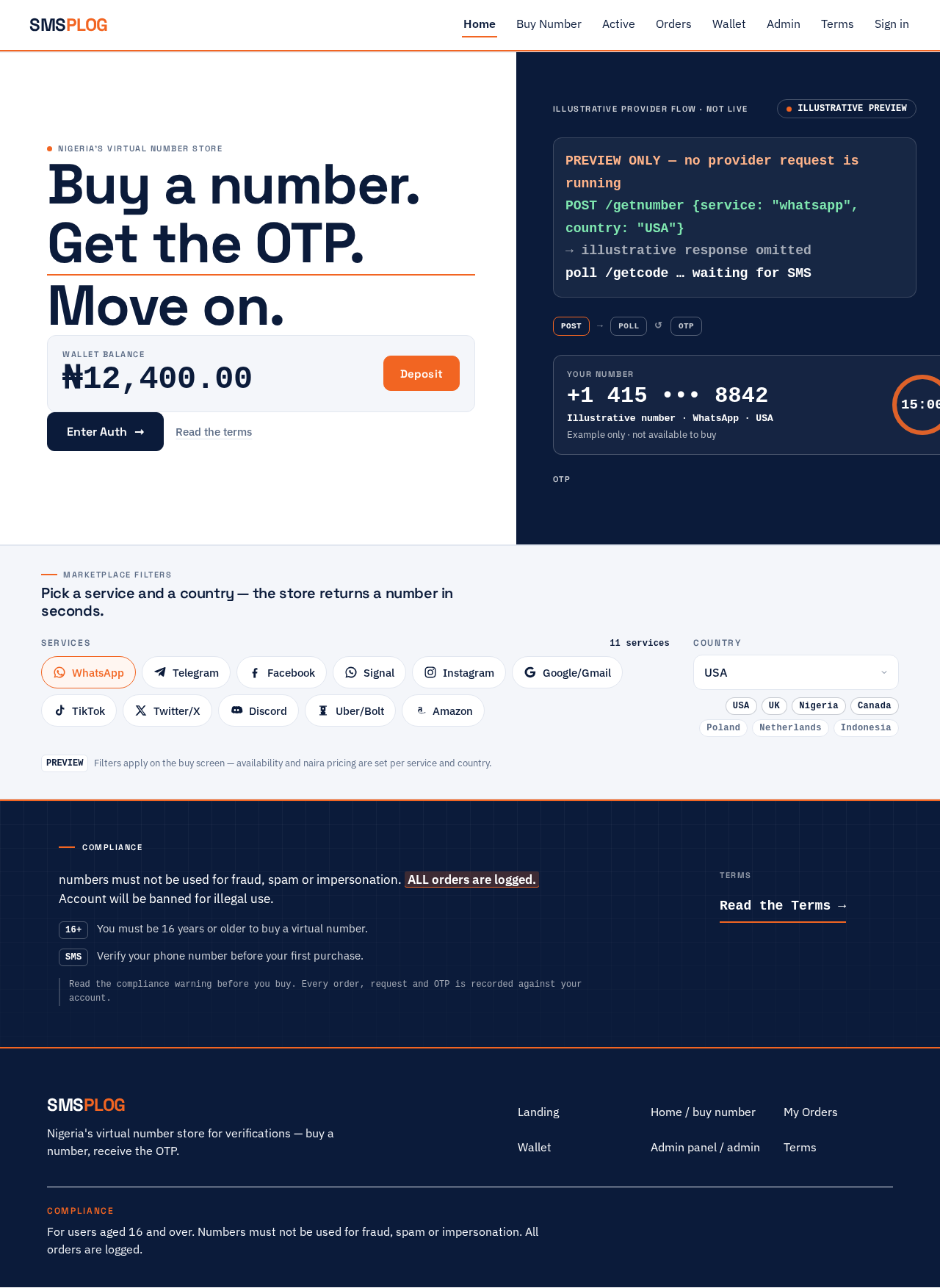
PREVIEW ONLY — no provider request is runniPick a service and a country — the store returns a number in seconds.
PREVIEWFilters apply on the buy screen — availability and naira pricing are set per service and country.
Compliance
numbers must not be used for fraud, spam or impersonation. ALL orders are logged. Account will be banned for illegal use.
- You must be 16 years or older to buy a virtual number.
- Verify your phone number before your first purchase.
Read the compliance warning before you buy. Every order, request and OTP is recorded against your account.
PREVIEW ONLY — no provider request is runniPick a service and a country — the store returns a number in seconds.
PREVIEWFilters apply on the buy screen — availability and naira pricing are set per service and country.
Compliance
numbers must not be used for fraud, spam or impersonation. ALL orders are logged. Account will be banned for illegal use.
- You must be 16 years or older to buy a virtual number.
- Verify your phone number before your first purchase.
Read the compliance warning before you buy. Every order, request and OTP is recorded against your account.
No comments yet. Be the first!