opal-cctv
 Ashraf Khan
Build a complete, production-ready CCTV Video Management System (VMS) using React (with Vite) for the frontend. The system should be modular, scalable, and follow modern best practices (hooks, functional components, clean architecture). 🔧 Tech Stack React + Vite React Router Zustand or Redux Toolkit (state management) Tailwind CSS or Material UI WebRTC / HLS.js for video streaming Socket.io or WebSockets (real-time updates) Axios / Fetch API JWT Authentication 🔐 Authentication & User Management Login / Logout system Role-based access (Admin, Operator, Viewer) User management dashboard Password reset & session handling 📹 Live CCTV Monitoring Live camera grid view (1x1, 2x2, 4x4, 8x8 layouts) Add/remove cameras dynamically PTZ controls (Pan-Tilt-Zoom) Fullscreen mode Snapshot capture Audio toggle (if supported) 🎥 Video Playback System Timeline-based playback UI Date & time picker Playback controls (play, pause, fast-forward, rewind) Event-based playback (motion detection, alerts) Download/export recorded footage 📂 Camera Management Add/Edit/Delete cameras Support RTSP, HTTP, ONVIF streams Camera grouping (locations, buildings, floors) Camera status (online/offline) Thumbnail preview 🚨 Alerts & Events System Motion detection alerts Intrusion / AI detection (optional) Real-time notifications Alert history logs Email / push notification integration 🗺️ Smart Features Map view (show camera locations using Google Maps or Leaflet) Drag & drop camera placement Geo-based filtering 📊 Dashboard & Analytics System overview (total cameras, active streams, alerts) Usage stats Event analytics charts ⚙️ Settings & Configuration Storage settings Recording quality settings User preferences System health monitoring 🌐 UI/UX Requirements Responsive design (desktop-first) Dark/light theme Clean modern UI (like Hikvision / Dahua VMS) Sidebar navigation + topbar 🔄 Real-Time Features Live camera status updates Real-time alerts via WebSockets Multi-user synchronization 🔌 API Integration Use mock APIs or Node.js backend Structure API services cleanly Handle loading, error, retry states 📁 Project Structure Feature-based folder structure Reusable components Custom hooks Services layer for API calls 🧪 Additional Features (Advanced) Multi-screen support AI detection overlays (bounding boxes) Face recognition placeholder UI Cloud sync support Multi-language support (i18n) 🧱 Deliverables Full React Vite project code Component breakdown Routing setup State management setup Example mock data Instructions to run locally Ensure code is clean, well-commented, and production-ready.
Comments (0)
Sign in to leave a comment
Project Tasks25
Implement Theme & Base Structure
As a user, I want the application to have a consistent visual theme and structure so that all pages look identical to the mock-design pages. This task involves: applying the color palette (#1A1A2E background, #16213E surface, #EAEAEA text, #F05454 accent, #30475E muted), setting up Tailwind CSS theme config, implementing dark/light theme toggle, creating shared layout components (Sidebar, Topbar), and removing any pages not defined in the design. Scope includes aligning all existing scaffold pages (home, login, signup, welcome, dashboard/overview, dashboard/ai-assistant, dashboard/settings) to the design system and removing pages not needed (e.g., signup, welcome, ai-assistant if not in user flows).
Implement Authentication Backend API
As a user, I want to be able to use the backend API for authentication so that I can securely sign in, receive a JWT token, and have my role-based access enforced. Implement FastAPI endpoints: POST /auth/login, POST /auth/logout, GET /auth/me. Includes JWT token generation, role-based access control middleware (Admin, Operator, Viewer), and session handling.
Build Login Page
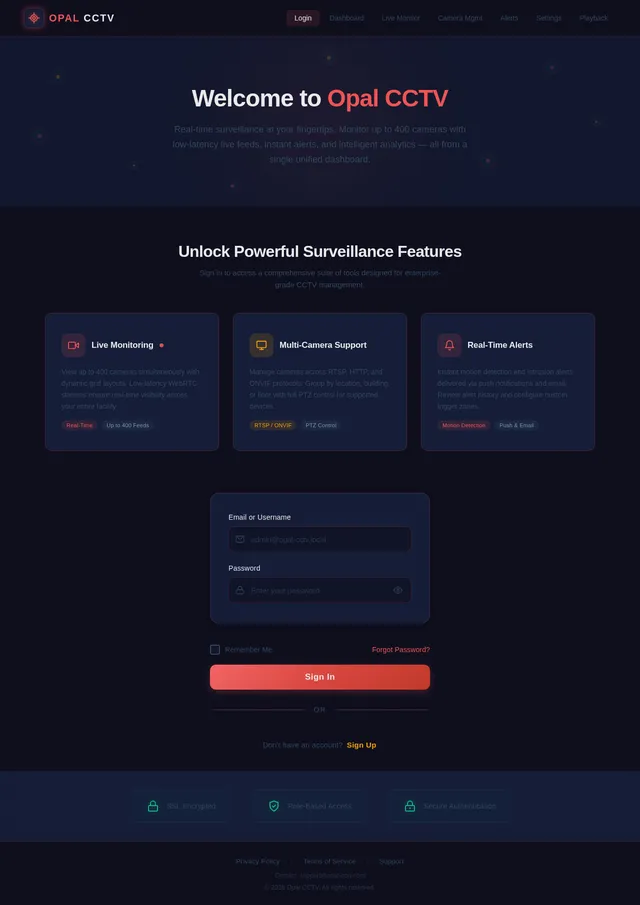
As a user, I want to be able to use the frontend Login page so that I can sign in with my credentials and access the system. Implement the Login page based on the existing JSX design (Login v2). Includes role-based routing after login (Admin → Dashboard, Operator → Live Monitor, Viewer → Live Monitor), JWT token handling, and form validation. This page is the entry point for all personas per the user flow diagrams.
Implement Camera Management API
As an admin, I want to be able to use the backend API for camera management so that I can add, edit, delete, and retrieve camera configurations with RTSP/HTTP/ONVIF stream details. Implement FastAPI endpoints: GET /cameras, POST /cameras, PUT /cameras/{id}, DELETE /cameras/{id}. Includes MySQL metadata storage, camera grouping logic, and status tracking (online/offline). Integrates with FFmpeg for stream validation on add/edit.
Implement Alerts & Events Backend API
As an admin, I want to be able to use the backend API for alerts and events so that I can receive real-time motion detection alerts, retrieve alert history, and configure notifications. Implement FastAPI endpoints: GET /alerts, POST /alerts, GET /alerts/history. Includes Socket.io real-time alert broadcasting, motion detection event processing pipeline (TensorFlow integration hook), email/push notification dispatcher, and alert log storage in MySQL.
Implement Settings Backend API
As an admin, I want to be able to use the backend API for settings so that I can save and retrieve storage configurations, recording quality preferences, and system settings. Implement FastAPI endpoints: GET /settings, PUT /settings. Includes storage path configuration (local DB, external/NAS), recording quality parameters, system health monitoring data endpoints, and user preference persistence in MySQL.
Build Dashboard Page
As an admin, I want to be able to use the frontend Dashboard page so that I can view analytics, system health, active streams, total cameras, and navigate to other modules. Implement the Dashboard page based on the existing JSX design (Dashboard v1). Includes system overview widgets (total cameras, active streams, alerts count), usage stats, event analytics charts, and navigation links to Live Monitor, Camera Management, Alerts, and Settings. This is the hub page for Admins per the user flow.
Build Live Monitor Page
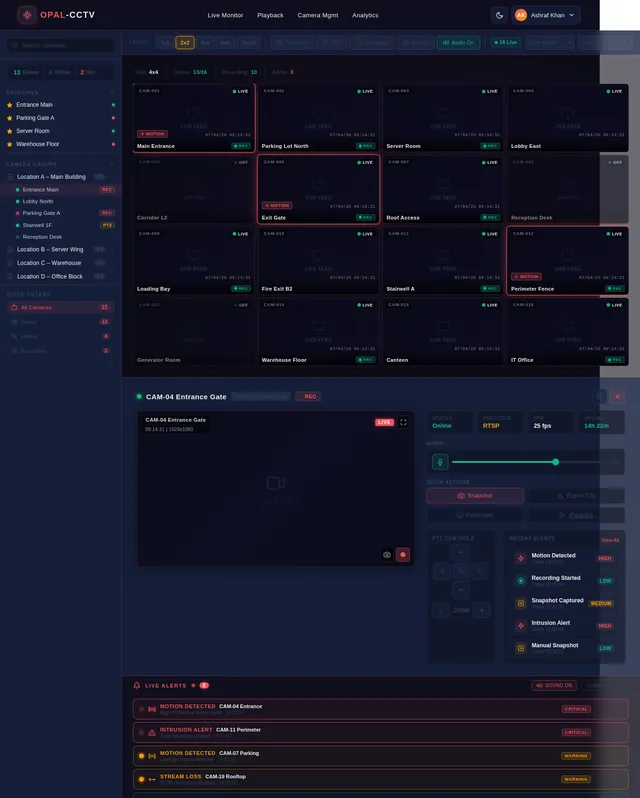
As a user, I want to be able to use the frontend Live Monitor page so that I can view live camera feeds in a dynamic grid layout (1x1, 2x2, 4x4, 8x8, 20x20 up to 400 cameras). Implement the Live Monitor page based on the existing JSX design (Live Monitor v2). Includes: dynamic camera grid, audio toggle, snapshot capture, PTZ controls, fullscreen mode per feed, real-time camera status indicators, glowing red border for active alerts, zoom/pan on grid, hover quick-actions. Uses WebRTC/HLS.js for stream rendering. This page is accessible by all personas.
Build Camera Management Page
As an admin, I want to be able to use the frontend Camera Management page so that I can add, edit, delete, and configure cameras with RTSP/HTTP/ONVIF stream settings. Implement the Camera Management page based on the existing JSX design (Camera Mgmt v1). Includes: camera list/grid view with status indicators (online/offline), add/edit/delete modals, RTSP/HTTP/ONVIF configuration forms, camera grouping by location/building/floor, thumbnail previews. Navigation flows from Dashboard → Camera Mgmt → Configure RTSP.
Build Alerts & Events Page
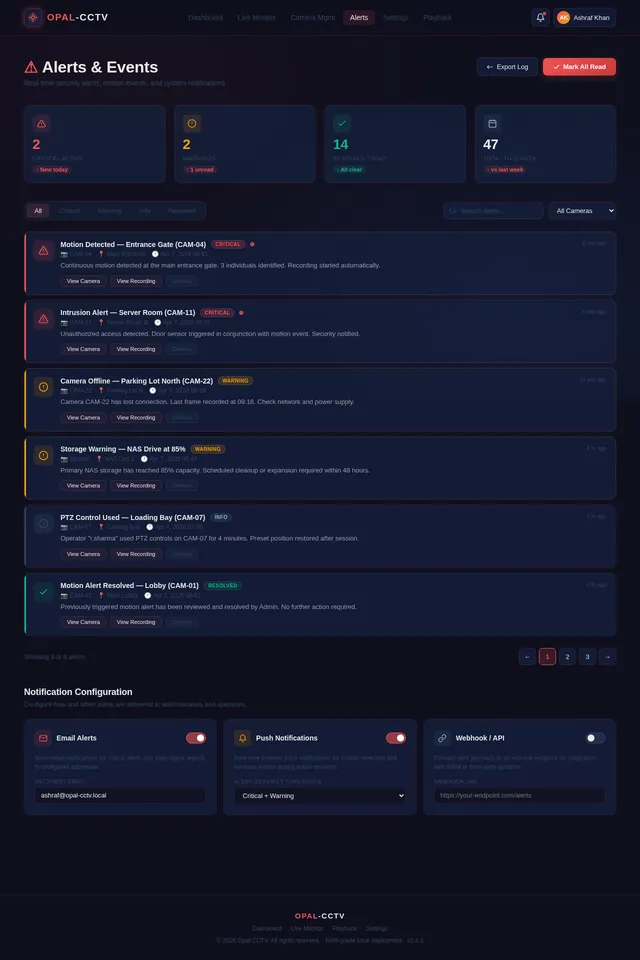
As an admin, I want to be able to use the frontend Alerts & Events page so that I can view real-time motion detection alerts, browse alert history logs, and configure email/push notifications. Implement the Alerts page based on the existing JSX design (Alerts v2). Includes: real-time alert feed via WebSockets, alert history table with filters, notification configuration panel (email/push). Navigation flows from Dashboard → Alerts → Configure Notifications.
Build Playback Page
As a user, I want to be able to use the frontend Playback page so that I can select a date/time range, browse recordings, play/pause/fast-forward/rewind footage, view event-based clips, and download/export recorded footage. Implement the Playback page based on the existing JSX design (Playback v1). Includes: timeline UI with date/time picker, playback controls bar, event-based clip filtering (motion detection), download/export button, and camera selector. Accessible by all personas. Navigation flows from Live Monitor → Playback.
Build Settings Page
As an admin, I want to be able to use the frontend Settings page so that I can configure storage settings, recording quality preferences, and user preferences (dark/light theme). Implement the Settings page based on the existing JSX design (Settings v1). Includes: storage configuration panel (local DB path, external/NAS settings), recording quality selector, dark/light theme toggle, system health monitoring display. Navigation flows from Dashboard → Settings: Configure Storage.
Implement RTSP Stream Service
As a user, I want to be able to use the backend RTSP/WebRTC streaming service so that live camera feeds are transcoded and delivered with low latency (<200ms). Implement FFmpeg-based RTSP ingestion pipeline, transcode streams to WebRTC-compatible format, expose WebSocket signaling endpoint for WebRTC peer connections, and support HLS fallback. Handles up to 400 concurrent streams with GPU transcoding support.
Implement Dashboard Analytics API
As an admin, I want to be able to use the backend API for analytics so that the Dashboard can display system health metrics, usage stats, and event analytics charts. Implement FastAPI endpoints: GET /analytics/system-health (CPU, memory, storage), GET /analytics/usage (active streams, total cameras), GET /analytics/events (chart data for event trends). Data aggregated from MySQL and real-time system metrics.
Implement PTZ Controls Backend API
As an operator, I want to be able to use the backend API for PTZ controls so that I can pan, tilt, and zoom supported cameras from the Live Monitor page. Implement FastAPI endpoints: POST /cameras/{id}/ptz with direction/speed params. Integrates ONVIF PTZ command dispatch for supported cameras and WebSocket real-time acknowledgment.
Implement Live Monitor WebRTC Integration
As a user, I want the Live Monitor page to connect to real WebRTC streams from the backend so that I can view actual live camera feeds in the grid. Integrate the Live Monitor frontend with the RTSP Stream Service backend: WebRTC peer connection setup per camera cell, WebSocket signaling client, HLS.js fallback for non-WebRTC browsers, and stream error/retry handling. Connects the t4 frontend with the t11 backend service.
Implement Playback & Recording API
As a user, I want to be able to use the backend API for video playback so that I can retrieve recorded footage by date/time range, download clips, and access event-based recordings. Implement FastAPI endpoints: GET /recordings, GET /recordings/{id}/stream, GET /recordings/{id}/download, GET /recordings/events. Includes FFmpeg-based clip extraction, date/time range filtering, event-based clip indexing (motion timestamps), and file serving for export/download.
Implement Motion Detection AI Service
As an admin, I want to be able to use the AI motion detection service so that camera feeds are analyzed in real-time and motion/intrusion events are automatically detected and logged. Implement TensorFlow-based motion detection model inference pipeline: frame extraction from FFmpeg streams, model inference per frame, threshold-based event triggering, and event publishing to the Alerts API. Supports AI detection overlays (bounding boxes) for Live Monitor page.
Connect Camera Mgmt Frontend to API
As an admin, I want the Camera Management frontend page to be connected to the live backend API so that camera CRUD operations, RTSP configuration, and status updates are persisted and real-time. Integrate t5 Camera Management page with t10 Camera Management API: Axios service layer for all endpoints, loading/error/retry states, real-time online/offline status via Socket.io, and stream validation feedback on add/edit.
Connect Alerts Frontend to Real-Time API
As an admin, I want the Alerts & Events frontend page to be connected to the live backend so that I receive real-time alerts via WebSockets and can interact with alert history and notification settings. Integrate t6 Alerts page with t13 Alerts API: Socket.io client for live alert push, Axios for history fetch and notification config save, and dynamic alert badge on Topbar/Sidebar navigation.
Connect Dashboard Frontend to API
As an admin, I want the Dashboard frontend page to be connected to the live backend analytics API so that system health, usage stats, and event charts display real data. Integrate t3 Dashboard page with t15 Analytics API: Axios service for all analytics endpoints, chart rendering with real data (e.g., Recharts/Chart.js), and auto-refresh polling for live system health metrics.
Connect Settings Frontend to API
As an admin, I want the Settings frontend page to be connected to the live backend settings API so that storage and recording configurations are persisted. Integrate t8 Settings page with t16 Settings API: Axios service for GET/PUT settings, form state management with Zustand, and live system health display from API.
Implement Snapshot Capture Service
As an operator, I want to be able to use the backend snapshot service so that I can capture and store still images from live camera feeds. Implement POST /cameras/{id}/snapshot endpoint: FFmpeg frame extraction from active RTSP stream, save to local storage (SQLite metadata + file path), and return snapshot URL. Frontend Live Monitor page calls this and displays confirmation.
Implement Real-Time Camera Status Service
As an admin, I want to be able to use the real-time camera status service so that online/offline status changes are instantly reflected in the Live Monitor and Camera Management pages. Implement Socket.io broadcaster: periodic health check pings to all RTSP stream endpoints, status change event emission, and MySQL status log updates. Frontend consumes via Socket.io client in both Live Monitor and Camera Management pages.
Connect Playback Frontend to API
As a user, I want the Playback frontend page to be connected to the live backend API so that I can browse, play, and download real recorded footage. Integrate t7 Playback page with t14 Playback API: Axios service for recordings retrieval and download, video player integration (HLS.js) for clip streaming, event-based clip loading, and date/time range query handling.
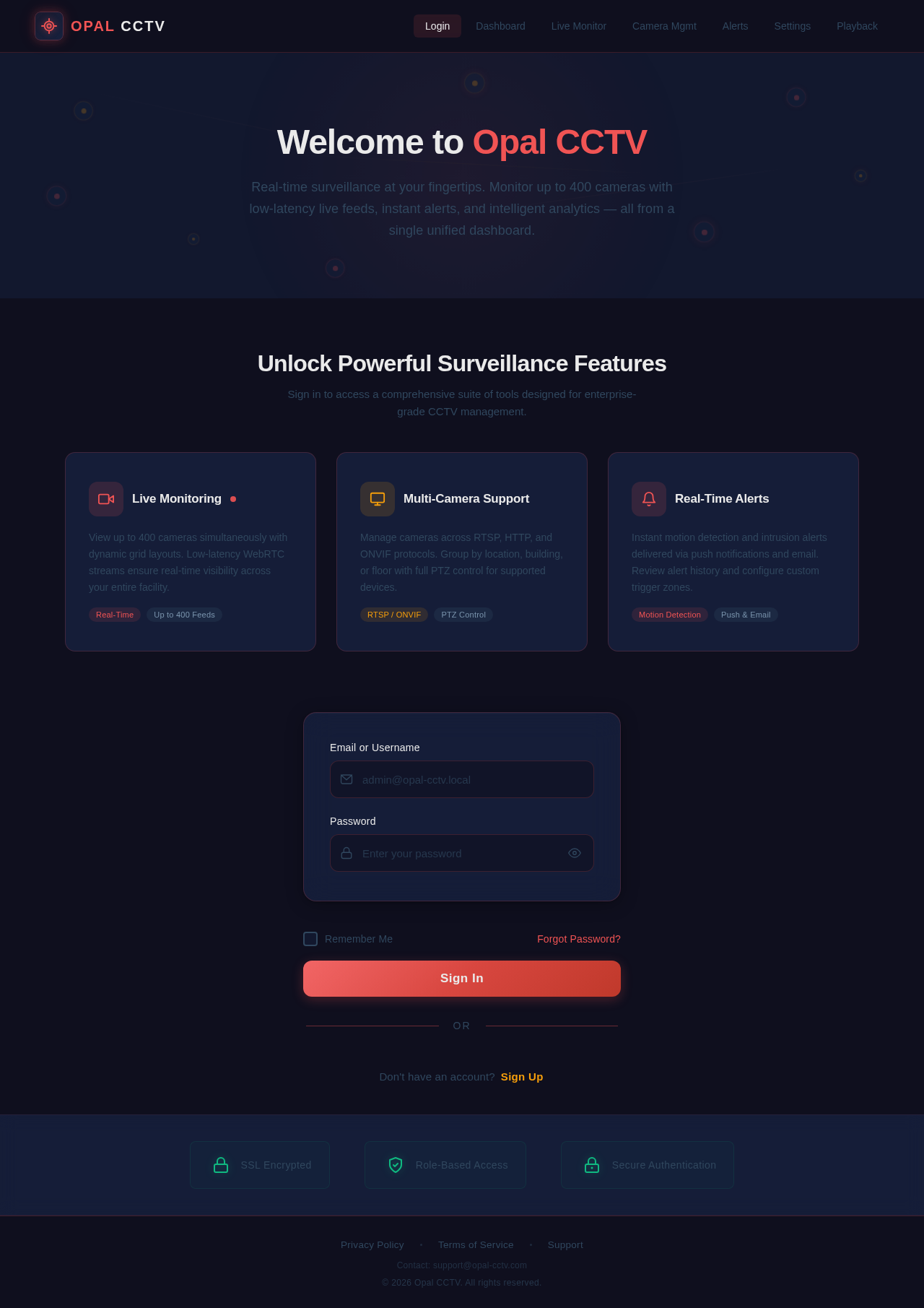
Welcome to Opal CCTV
Real-time surveillance at your fingertips. Monitor up to 400 cameras with low-latency live feeds, instant alerts, and intelligent analytics — all from a single unified dashboard.
Unlock Powerful Surveillance Features
Sign in to access a comprehensive suite of tools designed for enterprise-grade CCTV management.
View up to 400 cameras simultaneously with dynamic grid layouts. Low-latency WebRTC streams ensure real-time visibility across your entire facility.
Manage cameras across RTSP, HTTP, and ONVIF protocols. Group by location, building, or floor with full PTZ control for supported devices.
Instant motion detection and intrusion alerts delivered via push notifications and email. Review alert history and configure custom trigger zones.
No comments yet. Be the first!