opal-cctv
 Ashraf Khan
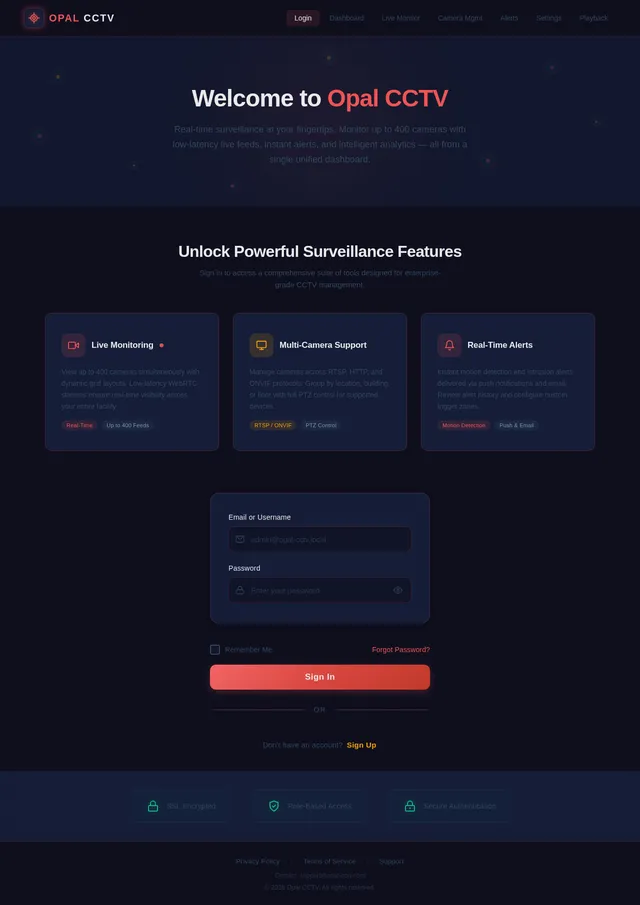
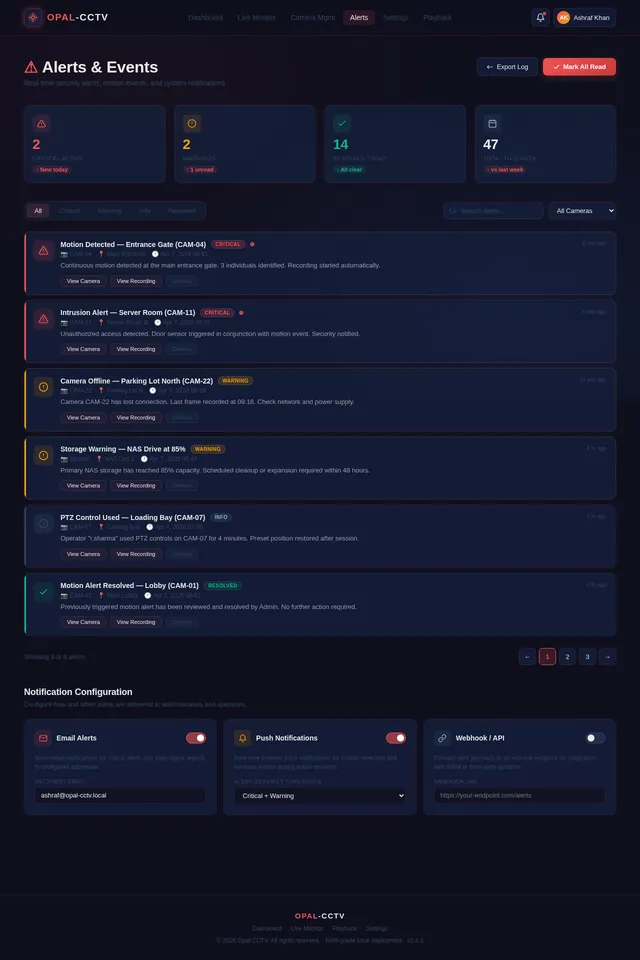
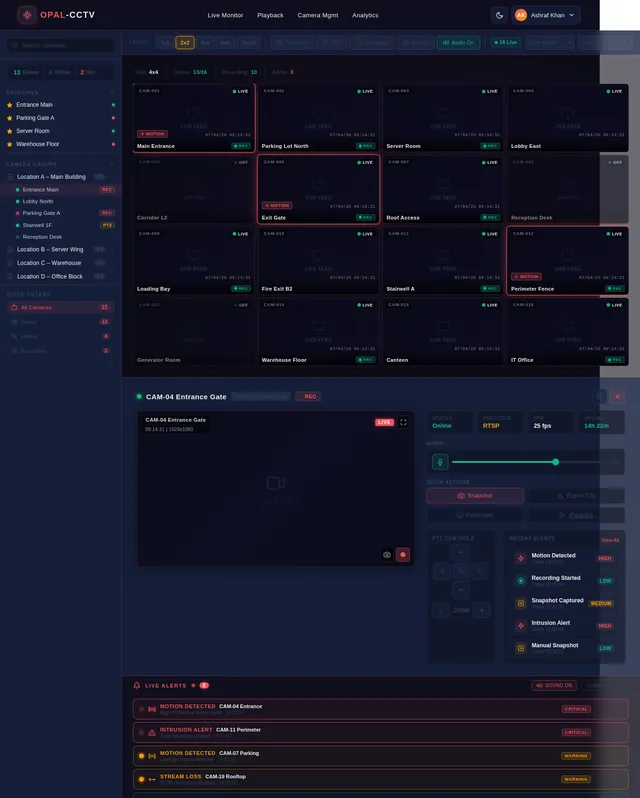
Build a complete, production-ready CCTV Video Management System (VMS) using React (with Vite) for the frontend. The system should be modular, scalable, and follow modern best practices (hooks, functional components, clean architecture). 🔧 Tech Stack React + Vite React Router Zustand or Redux Toolkit (state management) Tailwind CSS or Material UI WebRTC / HLS.js for video streaming Socket.io or WebSockets (real-time updates) Axios / Fetch API JWT Authentication 🔐 Authentication & User Management Login / Logout system Role-based access (Admin, Operator, Viewer) User management dashboard Password reset & session handling 📹 Live CCTV Monitoring Live camera grid view (1x1, 2x2, 4x4, 8x8 layouts) Add/remove cameras dynamically PTZ controls (Pan-Tilt-Zoom) Fullscreen mode Snapshot capture Audio toggle (if supported) 🎥 Video Playback System Timeline-based playback UI Date & time picker Playback controls (play, pause, fast-forward, rewind) Event-based playback (motion detection, alerts) Download/export recorded footage 📂 Camera Management Add/Edit/Delete cameras Support RTSP, HTTP, ONVIF streams Camera grouping (locations, buildings, floors) Camera status (online/offline) Thumbnail preview 🚨 Alerts & Events System Motion detection alerts Intrusion / AI detection (optional) Real-time notifications Alert history logs Email / push notification integration 🗺️ Smart Features Map view (show camera locations using Google Maps or Leaflet) Drag & drop camera placement Geo-based filtering 📊 Dashboard & Analytics System overview (total cameras, active streams, alerts) Usage stats Event analytics charts ⚙️ Settings & Configuration Storage settings Recording quality settings User preferences System health monitoring 🌐 UI/UX Requirements Responsive design (desktop-first) Dark/light theme Clean modern UI (like Hikvision / Dahua VMS) Sidebar navigation + topbar 🔄 Real-Time Features Live camera status updates Real-time alerts via WebSockets Multi-user synchronization 🔌 API Integration Use mock APIs or Node.js backend Structure API services cleanly Handle loading, error, retry states 📁 Project Structure Feature-based folder structure Reusable components Custom hooks Services layer for API calls 🧪 Additional Features (Advanced) Multi-screen support AI detection overlays (bounding boxes) Face recognition placeholder UI Cloud sync support Multi-language support (i18n) 🧱 Deliverables Full React Vite project code Component breakdown Routing setup State management setup Example mock data Instructions to run locally Ensure code is clean, well-commented, and production-ready.
Comments (0)
Sign in to leave a comment
System Requirements
System Requirements Document (SRD)
Project Name: opal-cctv
1. Introduction
The opal-cctv project aims to deliver a full-featured, production-grade Network Video Recorder (NVR)-like solution tailored for real-world CCTV video management needs. Designed for scalability, modularity, and high performance, this system will support up to 400 cameras in a grid layout, integrate local database storage, and leverage cutting-edge technologies such as WebRTC, FFmpeg, and RTSP for seamless connectivity and live monitoring.
Ashraf Khan, based in India, envisions this project as a robust, standalone solution optimized for local deployment, ensuring maximum compatibility with diverse camera protocols and delivering a user-friendly experience for administrators, operators, and viewers.
2. System Overview
The opal-cctv system is a modular and scalable Video Management System (VMS) designed to function as an NVR-grade solution. It will provide real-time live monitoring, video playback, camera management, event alerts, and analytics while supporting up to 400 cameras in a grid layout. The system will utilize WebRTC and FFmpeg for RTSP stream handling, ensuring low latency and compatibility across camera types. Local database storage will be implemented to manage metadata, snapshots, and event logs, while recorded footage can be stored on external storage devices or NAS systems.
Key features include:
- Live Monitoring: Real-time camera feeds with dynamic grid layouts (up to 20x20).
- Video Playback: Timeline-based playback with advanced controls.
- Camera Management: Add, edit, and delete cameras with multi-protocol support.
- Alerts & Events: Motion detection, intrusion alerts, and real-time notifications.
- Analytics Dashboard: System health, usage stats, and event analytics.
- Local Storage: Metadata and snapshots stored in a lightweight database.
3. Functional Requirements
Live Monitoring
- As Admin, I should be able to view up to 400 cameras in a grid layout (1x1, 2x2, 4x4, 8x8, 20x20).
- As Admin, I should be able to toggle audio for cameras that support it.
- As Operator, I should be able to capture snapshots from live feeds.
- As Operator, I should be able to use PTZ (Pan-Tilt-Zoom) controls for supported cameras.
- As Viewer, I should be able to enter fullscreen mode for individual camera feeds.
Video Playback
- As Admin, I should be able to select a date and time to playback recorded footage.
- As Operator, I should be able to fast-forward, rewind, pause, and play footage.
- As Admin, I should be able to download/export recorded footage.
- As Operator, I should be able to view event-based playback (e.g., motion detection).
Camera Management
- As Admin, I should be able to add, edit, and delete cameras.
- As Admin, I should be able to group cameras by location, building, or floor.
- As Admin, I should be able to view camera status (online/offline).
- As Admin, I should be able to configure RTSP, HTTP, and ONVIF streams.
Alerts & Events
- As Admin, I should be able to receive real-time motion detection alerts.
- As Admin, I should be able to view alert history logs.
- As Admin, I should be able to configure email and push notifications for alerts.
Analytics Dashboard
- As Admin, I should be able to view system health metrics (CPU, memory, storage usage).
- As Admin, I should be able to view usage stats (active streams, total cameras).
- As Admin, I should be able to view event analytics charts.
Settings & Configuration
- As Admin, I should be able to configure storage settings for local database and external storage.
- As Admin, I should be able to set recording quality preferences.
- As Admin, I should be able to customize user preferences (e.g., dark/light theme).
4. User Personas
Admin
- Responsible for system configuration, camera management, and user management.
- Access to all features, including analytics, alerts, and settings.
Operator
- Manages live monitoring and video playback.
- Limited access to camera management and alerts.
Viewer
- Can view live feeds and playback footage.
- Restricted access to administrative features.
5. Visuals Colors and Theme
Color Palette
- Background:
#1A1A2E(Deep Midnight Blue) - Surface:
#16213E(Dark Navy) - Text:
#EAEAEA(Soft White) - Accent:
#F05454(Vibrant Red for alerts and notifications) - Muted Tones:
#30475E(Steel Blue for secondary elements)
6. Signature Design Concept
"Interactive Surveillance Hub"
The homepage will feature a dynamic 3D grid interface representing all connected cameras. Each camera feed will appear as a live thumbnail within the grid, and users can interact with the grid in real-time. Features include:
- Zoom and Pan: Users can zoom into specific sections of the grid and pan across the layout.
- Hover Interactions: Hovering over a camera thumbnail will display quick actions (e.g., PTZ controls, snapshot capture).
- Dynamic Alerts: Cameras with active alerts will pulse with a glowing red border.
- Real-Time Animations: The grid will subtly shift and adjust as cameras are added or removed.
- Dark/Light Theme Toggle: The interface will seamlessly transition between themes with smooth animations.
This design ensures the system feels alive and responsive, creating an unforgettable first impression.
7. Non-Functional Requirements
- Performance: The system must support up to 400 live streams with minimal latency (<200ms).
- Scalability: Modular architecture to allow future expansion (e.g., AI integrations).
- Security: Role-based access control and encrypted data storage.
- Reliability: Failover handling for critical services.
- Usability: Intuitive UI/UX for all user personas.
8. Tech Stack
Frontend
- React with Vite
- Zustand for state management
- Tailwind CSS for styling
- WebRTC and HLS.js for video streaming
Backend
- Python with FastAPI
- Socket.io for real-time updates
Database
- MySQL for metadata storage
- SQLite for local storage optimization
AI Models
- TensorFlow for motion detection and face recognition
Tools
- FFmpeg for RTSP stream handling
- Docker for local orchestration
9. Assumptions and Constraints
- The system will be deployed on high-performance servers with GPU support for FFmpeg transcoding.
- Local storage will handle metadata and snapshots, while recorded footage will be stored externally.
- Maximum camera grid layout is 20x20 (400 cameras).
- RTSP streams will be the primary protocol for camera connectivity.
10. Glossary
- NVR: Network Video Recorder, a device for recording and managing video streams.
- RTSP: Real-Time Streaming Protocol, used for video streaming.
- WebRTC: Web Real-Time Communication, enabling low-latency video streaming.
- PTZ: Pan-Tilt-Zoom, camera controls for adjusting view angles.
- FFmpeg: A multimedia framework for handling video streams.
End of Document.
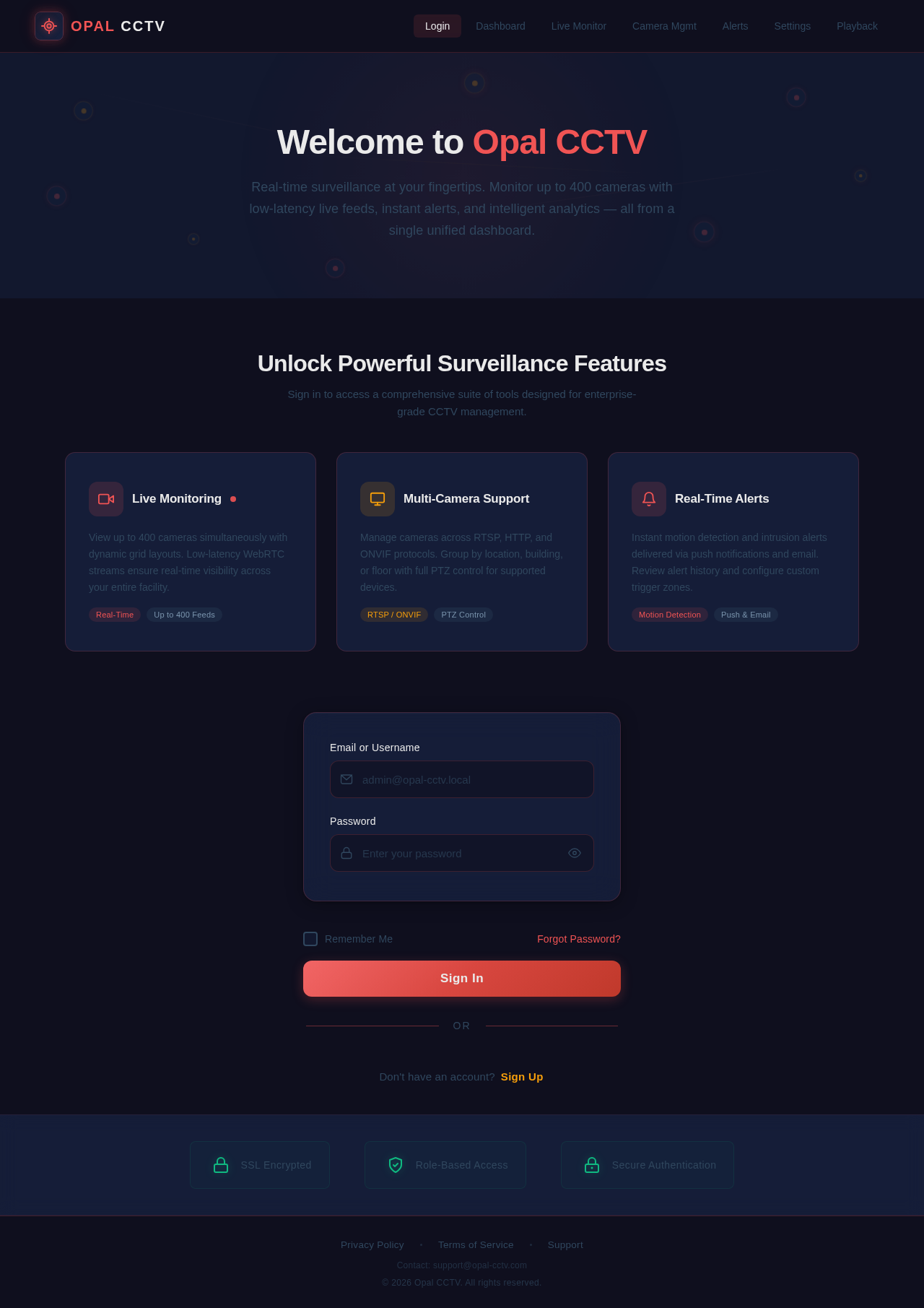
Welcome to Opal CCTV
Real-time surveillance at your fingertips. Monitor up to 400 cameras with low-latency live feeds, instant alerts, and intelligent analytics — all from a single unified dashboard.
Unlock Powerful Surveillance Features
Sign in to access a comprehensive suite of tools designed for enterprise-grade CCTV management.
View up to 400 cameras simultaneously with dynamic grid layouts. Low-latency WebRTC streams ensure real-time visibility across your entire facility.
Manage cameras across RTSP, HTTP, and ONVIF protocols. Group by location, building, or floor with full PTZ control for supported devices.
Instant motion detection and intrusion alerts delivered via push notifications and email. Review alert history and configure custom trigger zones.
No comments yet. Be the first!