ocean-system
 Miles Lee
设计一款流程图应用,包含pc/web/mobile,包含多个页面,首页有推荐流程图,点击可以进入编辑页,编辑页包含流程图绘制的所有操作,注意p c


Comments (0)
Sign in to leave a comment
Project Tasks42
Define Database Schema
Design and implement the database schema for users and flowcharts, including necessary indexes and constraints.
Implement CTASection for Homepage
As a frontend developer, implement the CTASection on the Homepage. This section includes a background with animated bubbles and two primary actions: 'Get Started Free' and 'Sign In'. Ensure the links navigate to the Register and Login pages, respectively. This section is accessible to both General and Registered Users. Page access: shared by all personas (General User, Registered User).
Implement FeaturesSection for Homepage
As a frontend developer, implement the FeaturesSection on the Homepage. This section displays a grid of features, each with an icon, title, and description. The features include 'Intuitive Editor', 'Multi-Format Export', 'Cross-Platform', and 'Team Collaboration'. Ensure the layout is responsive and visually appealing for both General and Registered Users. Page access: shared by all personas (General User, Registered User).
Implement Footer for Homepage
As a frontend developer, implement the Footer on the Homepage. This section includes brand information, product links, and account links. Ensure that links to restricted pages like 'Dashboard' are conditionally shown based on user persona. The footer should be consistent across all pages. Page access: shared by all personas (General User, Registered User).
Implement HeroSection for Homepage
As a frontend developer, implement the HeroSection on the Homepage. This section features a dynamic background with glows and bubbles, a prominent title, and statistics about the platform. It includes actions to 'Start Creating Free' and 'View Templates'. Ensure animations and transitions are smooth and the section is accessible to both General and Registered Users. Page access: shared by all personas (General User, Registered User).
Implement Navbar for Homepage
As a frontend developer, implement the Navbar on the Homepage. This component includes a logo, a hamburger menu for mobile view, and navigation links. Ensure the menu toggles correctly and links are conditionally displayed based on user persona. The Navbar should be consistent across all pages. Page access: shared by all personas (General User, Registered User).
Implement RecommendedSection for Homepage
As a frontend developer, implement the RecommendedSection on the Homepage. This section displays a grid of recommended flowchart templates, each represented by a sea creature icon. Implement hover effects to reveal live previews and ensure clicking a template navigates to the Editing page with a 3D-style transition. This section is accessible to both General and Registered Users. Page access: shared by all personas (General User, Registered User).
Create Database Migrations
Develop Alembic migrations for the initial database schema setup.
Implement Authentication API
Develop the authentication API using FastAPI, including login, registration, and JWT token generation.
Develop Flowchart API
Create API endpoints for flowchart creation, editing, and exporting functionalities.
Implement Navbar for Register Page
As a frontend developer, implement the Navbar section for the Register page. This component includes a logo, a hamburger menu for mobile navigation, and links to various pages such as Homepage, Editing, Dashboard, Login, and Register. The 'Register' link should be styled as a call-to-action. Ensure that the menu state is managed using the useState hook to toggle the menu open and closed. Note that links to restricted pages like Dashboard should be conditionally shown based on user persona. This component may already exist from the Homepage. Page access: shared by all personas (General User, Registered User).
Implement User Registration API
Develop the API endpoints for user registration, including validation and error handling. Ensure secure password storage using bcrypt and return appropriate responses for success and failure cases.
Implement User Login API
Develop the API endpoints for user login, including JWT token generation and validation. Ensure secure password verification and return appropriate responses for success and failure cases.
Implement Flowchart Export API
Develop the API endpoints for exporting flowcharts in jpg, png, and svg formats. Ensure the export process is efficient and handles large flowcharts without performance issues.
Implement User Management API
Develop the API endpoints for managing user accounts, including updating user information and handling account settings. Ensure secure access and proper validation.
Setup Database Indexes
Implement necessary database indexes to optimize query performance for user and flowchart data retrieval.
Implement Data Retention Policy
Define and implement a data retention policy for user and flowchart data, ensuring compliance with privacy and security standards.
Setup Role-Based Access Control
Implement RBAC for the application to manage access to different pages based on user roles.
Develop API Client
Create a shared API client for frontend to interact with backend services.
QA Authentication Flow
Test the authentication flow including login and registration for both general and registered users.
QA Flowchart API
Test the flowchart API endpoints for creation, editing, and exporting functionalities.
Implement RegisterHero for Register Page
As a frontend developer, implement the RegisterHero section for the Register page. This section features a visually appealing background with animated orbs and glows, and includes a headline inviting users to create an OceanFlow account. The section should be styled to highlight the 'Dive In' accent and provide a welcoming introduction to the registration process. Ensure the design is responsive and visually consistent across devices. Page access: shared by all personas (General User, Registered User).
Implement RegisterForm for Register Page
As a frontend developer, implement the RegisterForm section for the Register page. This form includes fields for full name, email, password, confirm password, and a checkbox to agree to terms. Implement form validation to ensure all fields are correctly filled, passwords match, and terms are agreed to before submission. Use the useState hook to manage form state and errors. Simulate an API call on form submission and handle success and error states appropriately. Page access: shared by all personas (General User, Registered User).
Implement Footer for Register Page
As a frontend developer, implement the Footer section for the Register page. This component includes branding elements, product and account links, and copyright information. Ensure that links to restricted pages like Dashboard are conditionally shown based on user persona. This component may already exist from the Homepage. Page access: shared by all personas (General User, Registered User).
Implement LoginForm for Login Page
As a frontend developer, implement the LoginForm section for the Login page. This form includes fields for email and password, with state hooks to manage their values. It features a toggle for showing/hiding the password and handles form submission with validation and simulated API call. The form displays error messages and redirects to the Dashboard upon successful login. Ensure the form is accessible to both General and Registered Users. Page access: shared by all personas (General User, Registered User).
Implement LoginSocialAuth for Login Page
As a frontend developer, implement the LoginSocialAuth section for the Login page. This component provides buttons for social login options, such as Google and GitHub, with handlers to simulate OAuth provider redirection. Ensure the component is styled according to the design and accessible to both General and Registered Users. Page access: shared by all personas (General User, Registered User).
Implement EditingShapeTools for Editing Page
As a frontend developer, implement the EditingShapeTools section for the Editing page. This component provides a set of drawing tools such as Select, Rectangle, Circle, Diamond, Connector, and Text. Each tool is represented by a button with an icon and label, and the active tool is highlighted. The component uses props to manage the active tool state and handle tool selection. Page access: shared by all personas (General User, Registered User).
Implement EditingCanvas for Editing Page
As a frontend developer, implement the EditingCanvas section for the Editing page. This component provides an interactive canvas for drawing shapes and connectors. It supports panning, zooming, and shape manipulation through mouse events. The component uses useRef and useState hooks to manage canvas interactions and state, including dragging shapes and handling zoom levels. Page access: shared by all personas (General User, Registered User).
Implement EditingStatusBar for Editing Page
As a frontend developer, implement the EditingStatusBar section for the Editing page. This component displays the number of selected shapes, the current zoom level, and the canvas coordinates. It uses props to receive the necessary data and renders it in a simple status bar format. Page access: shared by all personas (General User, Registered User).
Implement EditingColorPanel for Editing Page
As a frontend developer, implement the EditingColorPanel section for the Editing page. This component allows users to change the fill and stroke colors of selected shapes. It includes preset color swatches and a custom color picker. The component uses useState to manage color states and updates the selected shape's colors via props. Page access: shared by all personas (General User, Registered User).
Implement EditingTextPanel for Editing Page
As a frontend developer, implement the EditingTextPanel section for the Editing page. This component allows users to edit text properties of selected shapes, including content, font size, font family, and text alignment. It uses useState to manage text-related states and updates the selected shape's text properties via props. Page access: shared by all personas (General User, Registered User).
Implement EditingExportDialog for Editing Page
As a frontend developer, implement the EditingExportDialog section for the Editing page. This component provides a modal dialog for selecting export formats (PNG, JPG, SVG) for flowcharts. It includes buttons for each format and handles dialog close events. The component uses props to manage format selection and dialog visibility. Page access: shared by all personas (General User, Registered User).
Implement EditingExportOptions for Editing Page
As a frontend developer, implement the EditingExportOptions section for the Editing page. This component provides options for customizing export settings such as quality, scale, background inclusion, text as paths, and metadata inclusion. It uses useState to manage these settings and triggers the download process via props. Page access: shared by all personas (General User, Registered User).
QA Flowchart Export API
Test the flowchart export API endpoints for exporting functionalities in jpg, png, and svg formats.
Implement DashboardSidebar for Dashboard
As a frontend developer, implement the DashboardSidebar section for the Dashboard page. This section includes a sidebar with navigation items such as 'My Flowcharts', 'Shared with me', 'Trash', and 'Settings'. It features a profile display with avatar and user information, a close button with SVG icon, and quick action buttons for creating a new flowchart and importing. Ensure that the sidebar visibility toggles based on the 'isOpen' prop and that the 'onClose' function is triggered when the close button is clicked. This section is accessible only to Registered Users. Page access: Registered User only.
Integrate Login Backend and Frontend
As a Tech Lead, verify the end-to-end integration between the Login frontend implementation and the Login backend API. Ensure data flows correctly, API responses are handled properly in the UI, and all interactions work as expected.
Integrate Registration Backend and Frontend
As a Tech Lead, verify the end-to-end integration between the Registration frontend implementation and the Registration backend API. Ensure data flows correctly, API responses are handled properly in the UI, and all interactions work as expected.
Integrate Export Backend and Frontend
As a Tech Lead, verify the end-to-end integration between the Export frontend implementation and the Export backend API. Ensure data flows correctly, API responses are handled properly in the UI, and all interactions work as expected.
Implement DashboardHeader for Dashboard
As a frontend developer, implement the DashboardHeader section for the Dashboard page. This section includes a header with a menu toggle button that triggers the 'onMenuToggle' function, a title 'My Flowcharts', a search input with an SVG icon, and action buttons for filtering and creating new flowcharts. Ensure the header is styled according to the design and is accessible only to Registered Users. Page access: Registered User only.
Implement DashboardStats for Dashboard
As a frontend developer, implement the DashboardStats section for the Dashboard page. This section displays statistical cards with information such as 'Total Flowcharts', 'Total Exports', and 'Disk Space Used'. Each card includes an icon, value, label, and a progress bar for disk space usage. Ensure the stats are styled with accent colors and are accessible only to Registered Users. Page access: Registered User only.
Implement DashboardFlowcharts for Dashboard
As a frontend developer, implement the DashboardFlowcharts section for the Dashboard page. This section displays a list of flowchart cards, each with a thumbnail, title, creation and modification dates, and an action menu toggle. Implement state management for toggling the action menu using 'useState'. Ensure the flowcharts are styled according to the design and are accessible only to Registered Users. Page access: Registered User only.
Implement DashboardRecentActivity for Dashboard
As a frontend developer, implement the DashboardRecentActivity section for the Dashboard page. This section lists recent activities with icons, descriptions, and timestamps. Each activity item includes an icon with a background color and a description of the action taken. Ensure the recent activity list is styled according to the design and is accessible only to Registered Users. Page access: Registered User only.
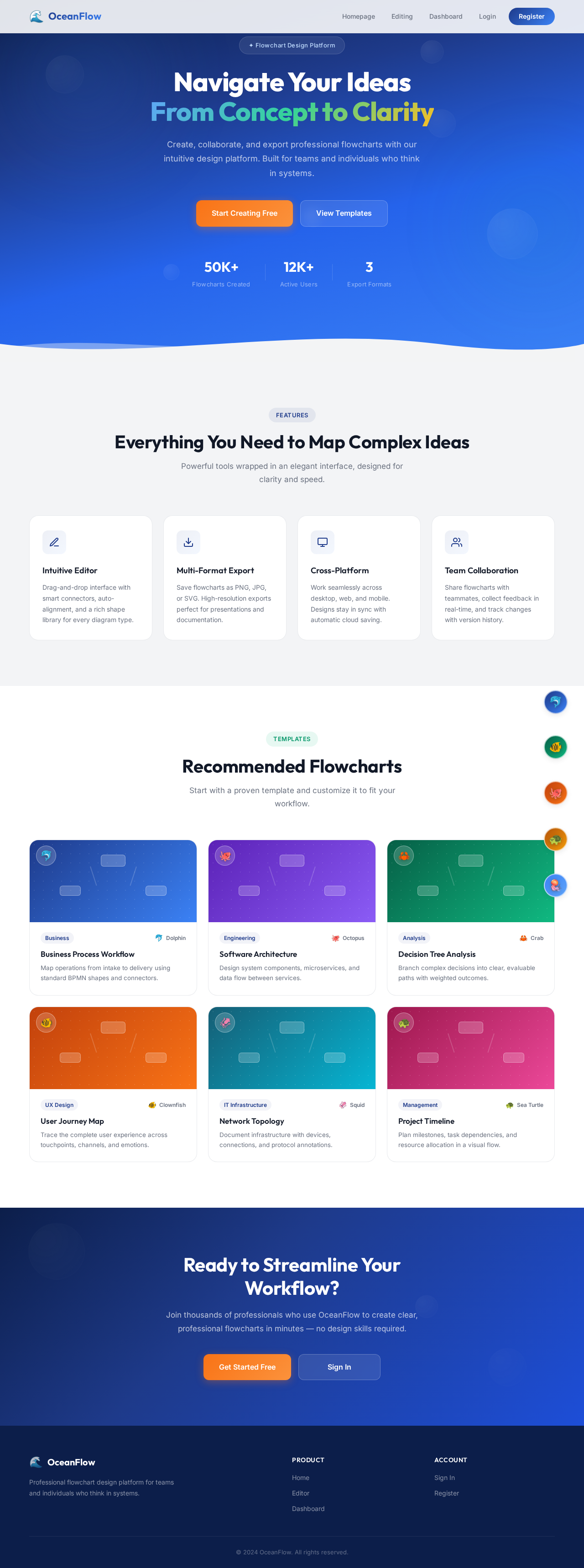
Navigate Your Ideas
From Concept to Clarity
Create, collaborate, and export professional flowcharts with our intuitive design platform. Built for teams and individuals who think in systems.
Everything You Need to Map Complex Ideas
Powerful tools wrapped in an elegant interface, designed for clarity and speed.
Intuitive Editor
Drag-and-drop interface with smart connectors, auto-alignment, and a rich shape library for every diagram type.
Multi-Format Export
Save flowcharts as PNG, JPG, or SVG. High-resolution exports perfect for presentations and documentation.
Cross-Platform
Work seamlessly across desktop, web, and mobile. Designs stay in sync with automatic cloud saving.
Team Collaboration
Share flowcharts with teammates, collect feedback in real-time, and track changes with version history.
Recommended Flowcharts
Start with a proven template and customize it to fit your workflow.
Business Process Workflow
Map operations from intake to delivery using standard BPMN shapes and connectors.
Software Architecture
Design system components, microservices, and data flow between services.
Decision Tree Analysis
Branch complex decisions into clear, evaluable paths with weighted outcomes.
User Journey Map
Trace the complete user experience across touchpoints, channels, and emotions.
Network Topology
Document infrastructure with devices, connections, and protocol annotations.
Project Timeline
Plan milestones, task dependencies, and resource allocation in a visual flow.
Ready to Streamline Your Workflow?
Join thousands of professionals who use OceanFlow to create clear, professional flowcharts in minutes — no design skills required.
No comments yet. Be the first!