ocean-system
 Miles Lee
设计一款流程图应用,包含pc/web/mobile,包含多个页面,首页有推荐流程图,点击可以进入编辑页,编辑页包含流程图绘制的所有操作,注意p c


Comments (0)
Sign in to leave a comment
System Requirements
Ocean-System
Introduction
The Ocean-System project aims to develop a comprehensive flowchart application that is accessible across PC, web, and mobile platforms. The application will feature distinct user interfaces for each platform, ensuring an optimized user experience. Key functionalities include a homepage with recommended flowcharts, an editing page with full drawing capabilities, and export options for various image formats. Additionally, the application will support user login and registration.
System Overview
Ocean-System is designed to be a versatile flowchart application that caters to users on different devices, including PCs, web browsers, and mobile devices. The system will provide a seamless experience across platforms with tailored user interfaces. Users will be able to create, edit, and export flowcharts in multiple formats, enhancing their productivity and creativity.
Functional Requirements
- As a User, I should be able to view recommended flowcharts on the homepage.
- As a User, I should be able to click on a recommended flowchart to enter the editing page.
- As a User, I should be able to perform all drawing operations on the editing page.
- As a User, I should be able to export flowcharts in jpg, png, and svg formats.
- As a User, I should be able to register for an account.
- As a User, I should be able to log in to my account.
- As a User, I should be able to use a redesigned editing page on mobile for proper functionality.
- As a User, I should be able to access the application on PC, web, and mobile platforms with distinct UIs for each.
User Personas
- General User: Individuals who use the application to create and manage flowcharts for personal or professional purposes.
- Registered User: Users who have created an account to save and manage their flowcharts across devices.
Core User Flows
- User visits the homepage -> views recommended flowcharts -> clicks on a flowchart -> enters the editing page -> performs drawing operations -> exports the flowchart in desired format.
- User accesses the application -> registers for an account -> logs in -> creates a flowchart -> saves and manages flowcharts across devices.
Visuals Colors and Theme
- primary: #1E3A8A (Deep Blue)
- primary_light: #3B82F6 (Light Blue)
- secondary: #F97316 (Vibrant Orange)
- accent: #10B981 (Emerald Green)
- highlight: #F59E0B (Amber)
- bg: #F3F4F6 (Light Gray)
- surface: rgba(255, 255, 255, 0.8)
- text: #111827 (Dark Gray)
- text_muted: #6B7280 (Muted Gray)
- border: rgba(209, 213, 219, 0.2)
Signature Design Concept
The Ocean-System homepage will feature an interactive ocean-themed interface. Users will navigate through a virtual underwater world where each section of the homepage is represented by a different sea creature. Hovering over a creature will reveal a preview of a recommended flowchart, and clicking will smoothly transition the user into the editing page. The editing page will simulate a diver's workspace, with tools and options floating in a dynamic, water-like environment. This concept will be brought to life using @react-three/fiber for 3D interactions and gsap for smooth animations and transitions.
Interaction Model & Motion Direction
- Landing/Home Page: Parallax interaction model with layered depth via scroll. The ocean-themed elements will translate at different speeds to create a sense of depth and immersion.
- Internal Pages: Animated interaction model with moderate scroll-triggered reveals and hover transitions to maintain a polished and engaging user experience.
Non-Functional Requirements
- The application must be responsive and provide a consistent experience across all supported devices.
- The system should ensure data security and user privacy, particularly for login and registration processes.
- The application should perform efficiently, with minimal load times and smooth transitions.
Tech Stack
- Frontend: React for Web, React Native for mobile app
- Backend: Python, FastAPI
- Database: MySQL or MariaDB, using Alembic for migrations
- AI Models: Not applicable
- AI Tools: Not applicable
- Local Orchestration: Docker, docker-compose
- Server-side Orchestration: Kubernetes
Assumptions and Constraints
- The application will support English as the primary language.
- The system will be designed to handle a moderate number of concurrent users.
- The application will require internet connectivity for full functionality.
Glossary
- Flowchart: A diagram that represents a process, system, or computer algorithm.
- UI: User Interface, the space where interactions between humans and machines occur.
- Export: The process of saving a file in a different format for use outside the application.
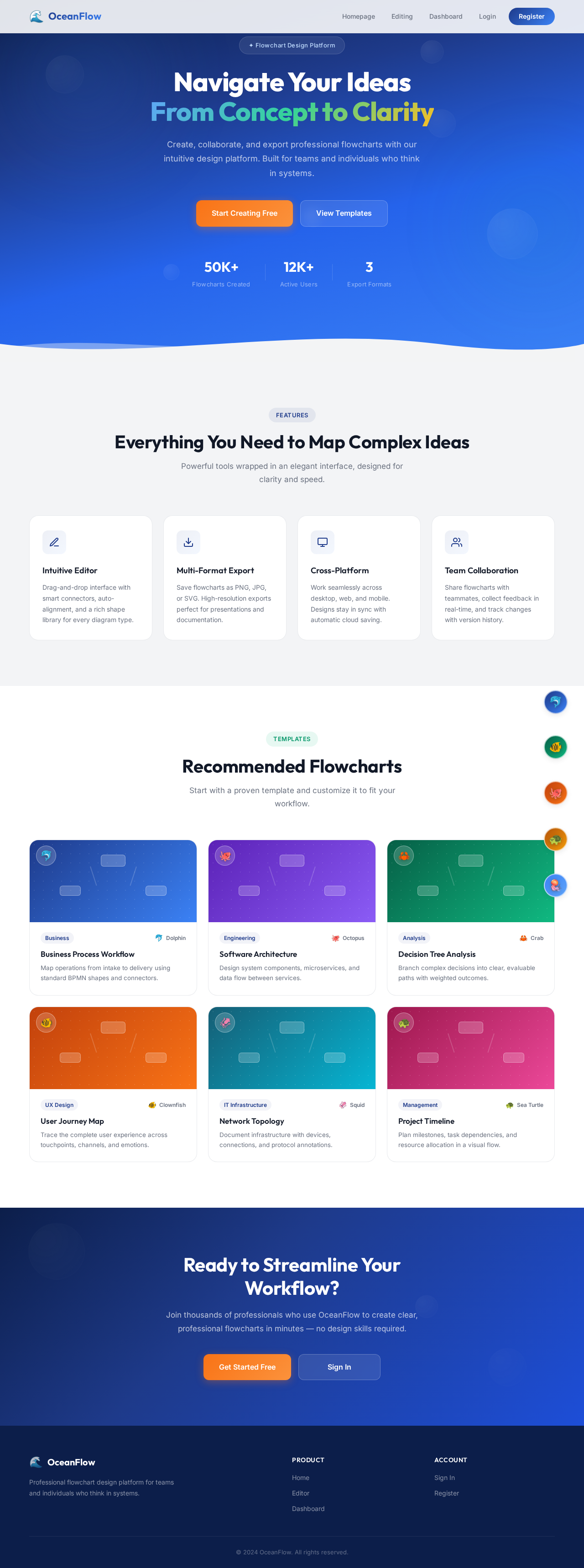
Navigate Your Ideas
From Concept to Clarity
Create, collaborate, and export professional flowcharts with our intuitive design platform. Built for teams and individuals who think in systems.
Everything You Need to Map Complex Ideas
Powerful tools wrapped in an elegant interface, designed for clarity and speed.
Intuitive Editor
Drag-and-drop interface with smart connectors, auto-alignment, and a rich shape library for every diagram type.
Multi-Format Export
Save flowcharts as PNG, JPG, or SVG. High-resolution exports perfect for presentations and documentation.
Cross-Platform
Work seamlessly across desktop, web, and mobile. Designs stay in sync with automatic cloud saving.
Team Collaboration
Share flowcharts with teammates, collect feedback in real-time, and track changes with version history.
Recommended Flowcharts
Start with a proven template and customize it to fit your workflow.
Business Process Workflow
Map operations from intake to delivery using standard BPMN shapes and connectors.
Software Architecture
Design system components, microservices, and data flow between services.
Decision Tree Analysis
Branch complex decisions into clear, evaluable paths with weighted outcomes.
User Journey Map
Trace the complete user experience across touchpoints, channels, and emotions.
Network Topology
Document infrastructure with devices, connections, and protocol annotations.
Project Timeline
Plan milestones, task dependencies, and resource allocation in a visual flow.
Ready to Streamline Your Workflow?
Join thousands of professionals who use OceanFlow to create clear, professional flowcharts in minutes — no design skills required.
No comments yet. Be the first!