nutrition-vegetarian-food
 Ashwini S K
Basic nutrition vegetarian food which contains dialy needful Protein fibre iron calcium website

Comments (0)
Sign in to leave a comment
System Requirements
System Requirements Document for nutrition-vegetarian-food
1. Introduction
nutrition-vegetarian-food is a public website that presents basic nutrition information for vegetarian food, focused on the four nutrients a person needs daily: protein, fibre, iron and calcium. A visitor can read the nutrient values for each vegetarian food and can find vegetarian foods that supply the daily needful amounts of those four nutrients.
The audience is people in India who eat vegetarian food and want a clear, warm, trustworthy reference for planning daily meals — vegetarian meal planners and nutrition-aware home cooks. The site is a read-only nutrition guide: it explains and lists food and nutrient data. It does not track a person's intake, give medical advice, or manage accounts.
2. System Overview
2a. Product Interpretation and Delivery Boundary
The product is a first-party, publicly readable website with three destinations: Landing, Foods, and Daily Needs. All three are open to any visitor with no sign-in, no account, and no stored personal state. Nothing a visitor does on the site creates a durable, private, actor-specific record, so no identity, login, or session continuity is required or provided.
The site is delivered as a React frontend served alongside a shared FastAPI backend that reads application-owned nutrition data from a MariaDB database. The backend supplies the food list, each food's protein, fibre, iron and calcium values, and the daily-need reference values used by the Daily Needs page. All reading is public; there is no visitor-authored content and no write path exposed to visitors.
Everything described in this document is current. No future features are committed.
2b. Source Content Inventory
Not applicable — no reference directive with content_source was supplied.
2c. Page Content and Component Coverage
Landing
- Information/state: The public entry explains that the site gives basic nutrition for vegetarian food covering protein, fibre, iron and calcium for daily needs. It presents the four nutrients as the site's organising idea and offers the way into the food data.
- Primary actions: Go to Foods to read nutrient values per food; go to Daily Needs to find foods that supply daily needful amounts.
- Supporting actions: Read the short explanation of what each of the four nutrients is and why it matters daily.
- Domain entities: Nutrient (protein, fibre, iron, calcium); Food (referenced, not listed in full here).
- Component responsibilities:
- Hero panel: full-bleed overhead vegetarian-bowl photograph on cream cloth, with the oversized headline in a tomato-red block overlapping the photograph edge at left.
- Four nutrient chips in a ruled row below the hero: red dot = protein, teal dot = fibre, mustard dot = iron, mustard dot = calcium.
- Short nutrient explainer block: one line per nutrient.
- Entry links to Foods and Daily Needs.
- States:
- Loading: hero and chips render immediately from static content; no data fetch blocks the page.
- Empty: not applicable (static explanatory content).
- Success: visitor sees the four nutrients and both entry links.
- Error: if the nutrient summary is served from the backend and fails, the static hero and entry links remain usable and a short inline notice offers retry.
- Recovery: retry re-requests the summary; entry links never depend on it.
Foods
- Information/state: A list of vegetarian foods, each shown as an aligned ledger row of the food name and its four nutrient values — protein, fibre, iron and calcium.
- Primary actions: Read the four nutrient values for any food; scan the list.
- Supporting actions: Identify which nutrient each column/dot represents via the colour-coded legend (red protein, teal fibre, mustard iron and calcium).
- Domain entities: Food (name); Nutrient values per food (protein, fibre, iron, calcium) with their units.
- Component responsibilities:
- Ledger list: ruled rows with thin walnut rules, food name at left, four large tabular numbers in Fraunces at right.
- Nutrient legend: four colour-coded dots with all-caps labels.
- Row reveal: gentle fade and slow pan as rows enter view; numbers count up once per row on first entry.
- States:
- Loading: ruled placeholder rows while the food list is fetched.
- Empty: if no foods are available, a plain message states that no food data is available yet, with a retry action.
- Success: every food row shows its name and all four values.
- Error: a short inline error with a retry action; previously loaded rows, if any, stay visible.
- Recovery: retry re-requests the list; the page never shows partial rows with missing values presented as zero.
Daily Needs
- Information/state: The daily needful amounts of protein, fibre, iron and calcium, and the vegetarian foods that supply them, so a visitor can see which foods contribute to daily needs.
- Primary actions: Read the daily needful amount for each of the four nutrients; see vegetarian foods associated with meeting those daily needs.
- Supporting actions: Compare a food's contribution against the daily needful amount for each nutrient.
- Domain entities: Daily need reference value per nutrient (protein, fibre, iron, calcium); Food; per-food nutrient values.
- Component responsibilities:
- Daily-need summary: four entries, one per nutrient, each with its colour-coded dot and its daily needful amount.
- Food contribution rows: ruled ledger rows showing each food's values against the daily need, using the same tabular-number treatment as Foods.
- Nutrient legend reused from Foods.
- States:
- Loading: placeholder rows while daily-need values and food contributions are fetched.
- Empty: if no daily-need data is available, a plain message with a retry action.
- Success: four daily-need amounts and the contributing food rows are shown.
- Error: short inline error with retry; any already-loaded section stays visible.
- Recovery: retry re-requests the data; the page never presents a missing value as zero.
3. Functional Requirements
FR-1 — Read basic vegetarian nutrition As a Vegetarian meal planner, I should see basic nutrition information for vegetarian food, so that I know what each food provides.
- Provenance: explicit.
- Lifecycle: Trigger — visitor opens Foods. Input — none beyond navigation. Observable result — a list of vegetarian foods, each with its nutrient values. Access — public, no sign-in. Failure/recovery — if the list fails to load, an inline error with retry appears and the visitor can retry. Continuation — the visitor keeps scanning the list or moves to Daily Needs.
- Acceptance: every listed food shows a name and its nutrient values; no food row is shown with a missing value presented as zero.
FR-2 — See protein, fibre, iron and calcium for each food As a Vegetarian meal planner, I should see protein, fibre, iron and calcium values for each vegetarian food, so that I can compare foods on the four nutrients I care about.
- Provenance: explicit.
- Lifecycle: Trigger — a food row is visible on Foods. Input — none. Observable result — the row shows four values, one per nutrient, each identified by its colour-coded dot and label (red protein, teal fibre, mustard iron and calcium). Access — public. Failure/recovery — a value that cannot be loaded is shown as unavailable, never as zero, and the row remains readable. Continuation — the visitor compares rows.
- Acceptance: each food row carries exactly the four nutrients protein, fibre, iron and calcium, each with a visible label or legend association.
FR-3 — Find foods that supply daily needful amounts As a Nutrition-aware home cook, I should find vegetarian foods that supply the daily needful protein, fibre, iron and calcium, so that I can plan meals that meet daily needs.
- Provenance: explicit.
- Lifecycle: Trigger — visitor opens Daily Needs. Input — none beyond navigation. Observable result — the daily needful amount for each of the four nutrients and the vegetarian foods that contribute to them. Access — public. Failure/recovery — if daily-need data fails, an inline error with retry appears; loaded sections stay visible. Continuation — the visitor returns to Foods to read a specific food's values.
- Acceptance: all four nutrients appear with a daily needful amount, and contributing vegetarian foods are shown against them.
FR-4 — Understand the four nutrients from the public entry As a Vegetarian meal planner, I should understand from the Landing page that the site covers protein, fibre, iron and calcium for daily needs, so that I know whether the site answers my question.
- Provenance: required_inference (grounded in the explicit nutrient scope and the public entry surface).
- Lifecycle: Trigger — visitor arrives at Landing. Observable result — the four nutrients are presented with their colour-coded chips and a short explanation, plus links to Foods and Daily Needs. Access — public. Failure/recovery — if the nutrient summary fails, the static hero and links remain usable with an inline retry. Continuation — the visitor chooses Foods or Daily Needs.
- Acceptance: the four nutrients are named on Landing and both entry links work without any data load.
4. User Personas
Vegetarian meal planner
- Product context: Eats vegetarian food and wants a straightforward reference for what vegetarian foods provide, so daily meals are not guesswork.
- Primary goal: Know the protein, fibre, iron and calcium content of vegetarian foods and which foods supply the daily needful amounts.
- Distinct responsibilities: Reads and compares nutrient values across foods on Foods; uses Daily Needs to see which foods contribute to daily requirements; uses Landing to confirm the site covers the four nutrients.
- Inputs/decisions: Chooses which foods to look at and which nutrient to compare; decides which foods to favour for daily needs.
- Interactions with other participants: None required — the site is read-only and public; the same data serves the Nutrition-aware home cook.
- Observable success: Can name the four nutrient values for a food and identify vegetarian foods that supply daily needful amounts.
Nutrition-aware home cook
- Product context: Prepares vegetarian meals at home and needs per-food nutrient values to plan meals that meet daily needs.
- Primary goal: Plan home vegetarian meals that cover daily protein, fibre, iron and calcium.
- Distinct responsibilities: Uses Daily Needs to see the daily needful amounts and the foods that contribute to them; cross-checks specific foods on Foods before cooking.
- Inputs/decisions: Decides which foods to combine for a meal based on their nutrient values against daily needs.
- Interactions with other participants: None required — reads the same public data as the Vegetarian meal planner.
- Observable success: Can select vegetarian foods whose combined values move toward the daily needful amounts for all four nutrients.
5. Core User Flows
Flow A — Vegetarian meal planner checks a food's nutrients
- The planner opens Landing and sees the four nutrient chips (protein, fibre, iron, calcium) and the short explanation.
- The planner selects the link to Foods.
- Foods loads the vegetarian food list as ruled ledger rows; each row fades in and its numbers count up once.
- The planner reads a food's four values, using the colour-coded legend to identify each nutrient.
- If the list fails to load, an inline error with retry appears; the planner retries and the list loads.
- The planner continues scanning other foods, or moves to Daily Needs.
Flow B — Nutrition-aware home cook plans meals against daily needs
- The cook opens Daily Needs (directly or from Landing).
- The page shows the daily needful amount for protein, fibre, iron and calcium, each with its colour-coded dot.
- The page shows vegetarian foods with their values against those daily needs in ruled ledger rows.
- The cook notes which foods contribute to each nutrient.
- If daily-need data fails, an inline error with retry appears; the cook retries and the data loads.
- The cook moves to Foods to read a specific food's full values before deciding the meal.
Flow C — First-time visitor decides whether the site helps
- A visitor arrives at Landing and sees the hero with the oversized headline in the tomato-red block and the four nutrient chips.
- The visitor reads the short explanation of protein, fibre, iron and calcium.
- The visitor chooses Foods to read values or Daily Needs to see daily needful amounts.
- If the nutrient summary fails to load, the hero and both links remain usable and an inline retry is offered.
6. Visuals Colors and Theme
Warm modernism after Charles & Ray Eames — natural, edible, orderly, never clinical.
- Mode: Light.
- Colours by role:
- Background (cream ground, ~60% of surface):
#F4EBDC - Surface (panels):
#FBF6EC - Text (walnut ink):
#2B2723 - Primary (tomato red — protein, main actions):
#C24A2B - Accent (teal — fibre):
#2F6F6A - Mustard (iron and calcium):
#D9A227 - Muted (labels, rules):
#8A7A5F
- Background (cream ground, ~60% of surface):
- Typography:
- Headings: Jost, medium weight at large sizes with tight tracking; all-caps labels at small sizes.
- Body: Fraunces.
- Scale (1.333 modular): display 56/72/96/128px, section 40px, lead 24px, body 17px, label 13px. Display sizes use
clamp()so headlines stay whole at 375px, 768px and 1280px.
- Shape language: Organic-modern panels with soft 12px radii; thin walnut rules divide data rows; small circular nutrient dots.
- Layout: Gallery-like stacked panels on a 12-column grid; food data in aligned rows of name and four nutrient values.
- Imagery: Warm overhead food photography on cream cloth; simple hand-drawn seed and leaf marks as accents.
- Avoid: Cold clinical white dashboards; blue or indigo accents; gradient blobs; identical hover-lift cards; stock photos of people eating.
7. Signature Design Concept
The Landing hero is a full-bleed overhead photograph of a vegetarian bowl on cream cloth. An oversized Jost headline sits in a solid tomato-red (#C24A2B) block that overlaps the photograph's left edge — the block is the anchor, the photograph bleeds behind and beyond it. Below, a ruled row of four nutrient chips carries colour-coded dots: red protein, teal fibre, mustard iron, mustard calcium. A hand-drawn seed mark sits above a small all-caps label opening the nutrient explanation. The gesture of overlap and bleed is carried by the photograph and the red block only; all headline text, labels and links stay whole inside the viewport and their containers at every width.
8. Interaction Model & Motion Direction
Interaction Model: Animated Motion Tempo: restrained Hero Dimensionality: layered_2d
Landing Hero Motion Brief
- Focal subject: the overhead vegetarian bowl photograph on cream cloth, with the tomato-red headline block overlapping its left edge.
- Thesis: on load, the photograph fades in with a slow pan while the tomato-red block and headline settle into place; the four nutrient chips then appear in their ruled row — input is arrival, transformation is a gentle film-like reveal, outcome is a composed, readable hero with all four nutrients visible.
- Motion vocabulary: gentle film-like fade, slow pan, one-time number count-up on data rows entering view.
- Composed first frame: cream ground, photograph partially revealed, red block and headline fully legible, chips in a ruled row beneath.
- Reduced-motion state: all elements appear immediately in their final positions; no pan, no fade, no count-up; the hero remains fully readable and the chips wrap into rows if needed.
9. Non-Functional Requirements
- Readability at every viewport (explicit, from design constraints): headlines, wordmarks, labels, numbers, cards' text and controls stay entirely inside the viewport and their containers at 375px, 768px and 1280px, wrapping or scaling to fit; no element covers readable text or controls. Imagery and decoration may bleed, overlap or crop.
- Reduced motion (explicit): with
prefers-reduced-motion, provide a usable static arrangement — no pan, fade or count-up; content wraps or scrolls so every item can be brought fully into view. - Public read-only access (explicit via planning scope): all three pages are reachable without sign-in; no account, login or personal data collection.
- Data integrity (required_inference): a missing nutrient value is never rendered as zero; it is shown as unavailable.
- Performance (required_inference): the Landing page's static hero and links render without waiting on any data request.
- Accessibility (required_inference): colour-coded nutrient dots are always paired with a text label so colour is not the only identifier.
10. Tech Stack
- Frontend: React application UI.
- Backend: shared FastAPI process for application APIs and domain modules (food list, per-food nutrient values, daily-need reference values).
- Database: MariaDB for application-owned persistent nutrition data.
- Deployment: Docker / docker-compose with the provisioned services
frontend,backend, anddatabase.
11. Assumptions and Constraints
- Assumption: The site is a read-only nutrition reference; it does not track individual intake, give medical advice, or store visitor data. (required_inference from the explicit scope.)
- Assumption: Daily needful amounts are reference values stored in the application database and shown as guidance, not personalised to a visitor. (required_inference.)
- Constraint: Only the four nutrients protein, fibre, iron and calcium are in scope; no other nutrients are presented.
- Constraint: No accounts, authentication, or personalisation — all pages are public.
- Constraint: The palette, fonts, surfaces, layout and tone from the creative direction are preserved; the indigo/blue-on-white SaaS template is forbidden.
12. Glossary
- Vegetarian food: A food item in the site's list that contains no meat, fish or poultry.
- Nutrient: One of the four tracked values — protein, fibre, iron, calcium.
- Daily needful amount: The reference quantity of a nutrient a person needs per day, shown on Daily Needs.
- Ledger row: A ruled data row on Foods or Daily Needs showing a food name and its tabular nutrient numbers.
- Nutrient chip: A small labelled element with a colour-coded dot identifying one nutrient (red protein, teal fibre, mustard iron and calcium).
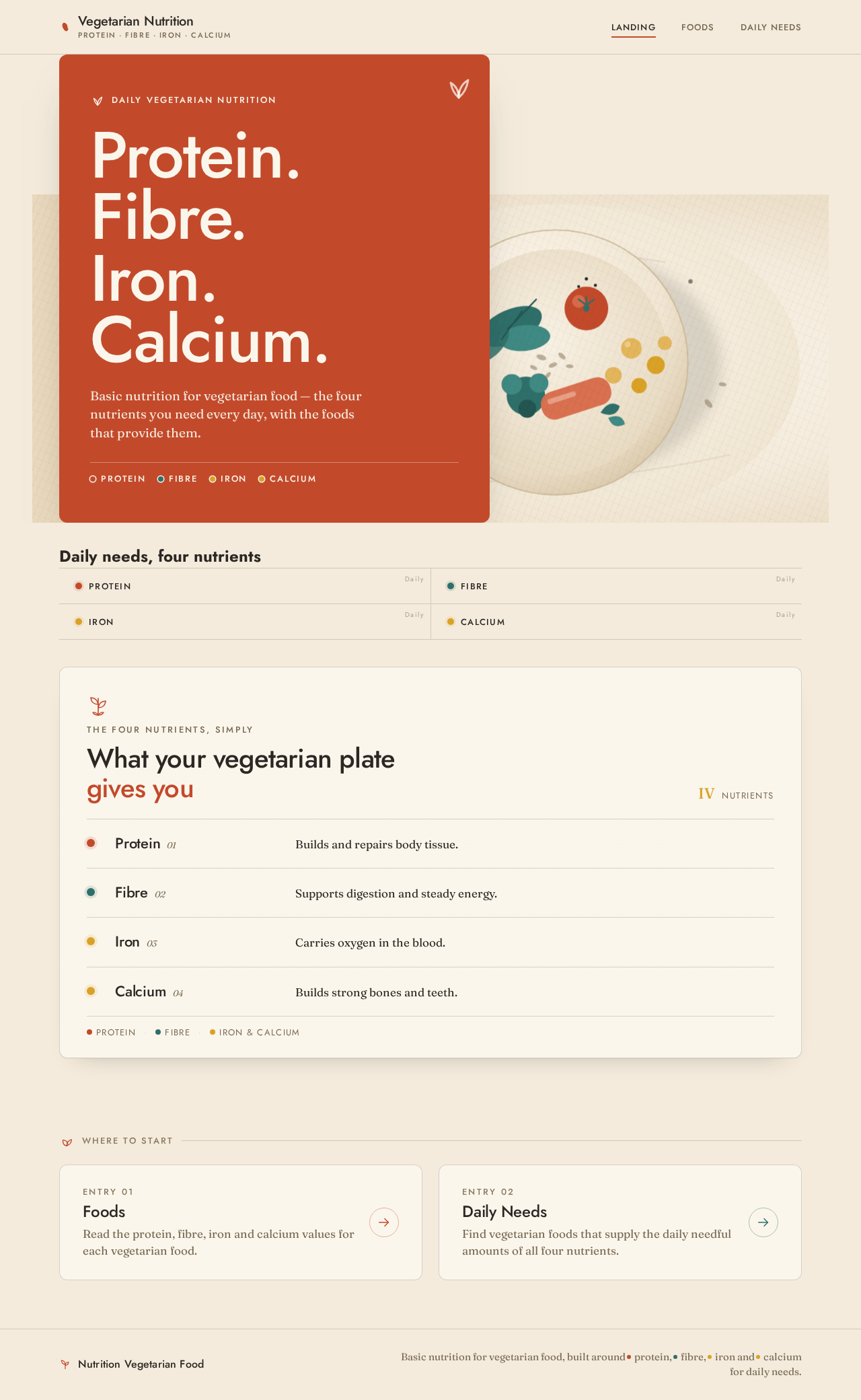
Daily vegetarian nutrition
Protein.
Fibre.
Iron.
Calcium.
Basic nutrition for vegetarian food — the four nutrients you need every day, with the foods that provide them.
Daily needs, four nutrients
- Protein
- Fibre
- Iron
- Calcium
The four nutrients, simply
What your vegetarian plate gives you
Protein
Builds and repairs body tissue.
Fibre
Supports digestion and steady energy.
Iron
Carries oxygen in the blood.
Calcium
Builds strong bones and teeth.
Daily vegetarian nutrition
Protein.
Fibre.
Iron.
Calcium.
Basic nutrition for vegetarian food — the four nutrients you need every day, with the foods that provide them.
Daily needs, four nutrients
- Protein
- Fibre
- Iron
- Calcium
The four nutrients, simply
What your vegetarian plate gives you
Protein
Builds and repairs body tissue.
Fibre
Supports digestion and steady energy.
Iron
Carries oxygen in the blood.
Calcium
Builds strong bones and teeth.
No comments yet. Be the first!