BUILD A COMPLETE AI EDUCATION APP CALLED NORIS STUDY AI
Create a production-ready mobile application for Android and iPhone called Noris Study AI.
The app is an AI-powered education assistant designed for students around the world. It helps students study, prepare for exams, understand difficult topics, practice questions, and work through assignments.
The app must have its own original branding, logo, colors, interface, and user experience. Do not copy ChatGPT, OpenAI, or another company's branding.
TAGLINE:
“Learn. Practice. Succeed.”
1. MAIN AI FEATURES
The app should allow students to:
- Ask questions about any school subject.
- Get step-by-step explanations.
- Upload photos of questions.
- Scan questions using the camera.
- Upload PDFs and study documents.
- Summarize notes.
- Generate practice questions.
- Generate quizzes.
- Generate flashcards.
- Create mock examinations.
- Get help understanding assignments.
- Ask follow-up questions.
- Use voice input.
- Listen to explanations using text-to-speech.
- Search previous conversations.
- Save important answers.
- Create separate conversations for different subjects.
Support subjects such as:
- Mathematics
- English
- Biology
- Chemistry
- Physics
- Computer Science
- Geography
- History
- Economics
- Accounting
- Business
- Literature
- Languages
- And other subjects.
The system should be flexible enough to support students from different countries and education systems.
2. DAILY FREE MESSAGE SYSTEM
Every new user receives:
10 FREE AI MESSAGES EVERY DAY
Display the remaining messages clearly in the app.
Example:
“8 of 10 free messages remaining today.”
When the user sends a message:
1. Check their daily usage.
2. If they have remaining free messages, process the request.
3. Reduce their remaining daily message count by 1.
4. Show the updated number.
When they reach 0:
Display a friendly upgrade screen:
“You've used your 10 free messages for today.”
Then show:
Continue learning with Premium
Buttons:
Upgrade Now
View Plans
The free allowance should automatically reset every 24 hours according to the account's configured reset period.
Prevent users from bypassing the limit simply by logging out and creating another account. Use authenticated accounts and server-side usage tracking.
3. PREMIUM SUBSCRIPTION
Create a paid subscription system.
Premium users should receive significantly higher usage limits or unlimited AI messages subject to reasonable fair-use limits.
Create subscription options that can be configured from the backend, for example:
- Monthly
- Yearly
Do not hard-code prices. Make prices configurable from the app's subscription/payment system so they can be changed later.
Premium users should receive:
- More AI messages
- Advanced AI tutoring
- More file uploads
- More image/question scans
- Larger documents
- More mock exams
- Advanced study plans
- Full conversation history
- Priority processing
The free plan should still provide useful functionality.
4. HOME SCREEN
Create a modern student-focused dashboard.
Top:
- Noris Study AI logo
- Profile picture
- Settings icon
Main section:
“What do you want to learn today?”
Large AI input box:
“Ask Noris anything…”
Buttons:
- Ask Question
- Scan Question
- Upload File
- Voice Question
Study shortcuts:
Exam Prep
Homework Help
Practice Quiz
Flashcards
Study Plan
Show the user's daily free-message counter.
Example:
10 / 10 messages remaining
5. AI TUTOR CHAT
Create a clean conversation screen.
Features:
- Student messages
- AI responses
- Typing indicator
- Voice input
- Attach file
- Camera
- Image upload
- Copy answer
- Save answer
- Regenerate explanation
- Ask follow-up question
AI responses should prioritize explanations and learning rather than simply giving unexplained answers.
For mathematics and science, show calculations and steps clearly.
6. ASSIGNMENT HELPER
Create an Assignment Helper section.
User can:
- Type a question.
- Upload a picture.
- Upload a document.
- Paste assignment instructions.
The AI should:
1. Understand the assignment.
2. Explain what the student is being asked to do.
3. Break the task into steps.
4. Provide guidance and examples.
5. Help the student develop their own answer.
6. Check the student's completed work.
Include a clear educational-use message encouraging students to understand and complete their own work.
7. EXAM PREPARATION
Create an Exam Prep section.
User selects:
- Country
- Education level
- Subject
- Topic
- Difficulty
- Number of questions
Then generate a practice examination.
Include:
- Multiple choice
- Short answer
- True/false
- Calculation questions
- Essay questions where appropriate
Add:
Start Exam
Include a timer.
After completion:
Show:
- Score
- Correct answers
- Incorrect answers
- Explanation for each question
- Weak topics
- Recommended revision topics
8. QUESTION SCANNER
Allow students to take a photo of a question.
Process:
Camera → Scan → Detect Question → Explain → Answer/Working
For mathematics, display the calculation step-by-step.
Allow users to ask:
“Explain this more simply.”
“Show me another example.”
“Give me a similar question to practice.”
9. STUDY PLANNER
Create a study planner.
User enters:
- Exam date
- Subjects
- Available study hours
- Current level
- Topics they find difficult
Generate a personalized revision schedule.
Display the schedule as:
Today
Tomorrow
This Week
Exam Countdown
Allow students to mark tasks as completed.
10. QUIZ GENERATOR
Allow users to create quizzes.
Options:
- Subject
- Topic
- Difficulty
- Number of questions
After the quiz:
Show score and explanations.
Save quiz results to the user's profile.
11. FLASHCARDS
Automatically generate flashcards from:
- Notes
- PDFs
- Topics
- Text entered by the student
Allow:
- Swipe through cards
- Mark difficult cards
- Review difficult cards
- Track progress
12. FILE UPLOADS
Support common formats such as:
- PDF
- DOC/DOCX
- TXT
- Images
After uploading a document, allow:
Summarize
Explain
Create Quiz
Create Flashcards
Ask Questions
13. USER ACCOUNTS
Create:
- Email registration
- Email login
- Google sign-in where supported
- Password reset
- Profile management
Store:
- User profile
- Subscription status
- Daily AI usage
- Conversations
- Saved answers
- Quiz results
- Study plans
- Flashcards
- Uploaded learning materials
14. NAVIGATION
Use bottom navigation:
Home
Study
Chat
Progress
Profile
Study should contain:
- Exam Prep
- Assignments
- Quizzes
- Flashcards
- Study Planner
15. PROGRESS DASHBOARD
Show:
- Quiz scores
- Study time
- Completed study tasks
- Strong subjects
- Topics needing improvement
- Exam countdowns
- Recent activity
Use simple visual charts.
16. PREMIUM SCREEN
Create a professional subscription page.
Headline:
“Unlock your full learning potential.”
Show benefits:
✓ More AI messages
✓ Advanced AI tutoring
✓ More document uploads
✓ More question scans
✓ Unlimited practice tools
✓ Personalized study plans
✓ Advanced exam preparation
Buttons:
Start Premium
View Plans
Also provide:
Restore Purchases
17. BACKEND
Use a secure backend.
Important:
- Never expose AI API keys inside the mobile application.
- Process AI requests through a secure backend.
- Store user usage server-side.
- Track daily message usage server-side.
- Track subscription status server-side.
- Validate purchases securely.
- Protect uploaded documents.
- Use secure authentication.
- Apply rate limiting.
Create database tables/collections for:
Users
Subscriptions
Usage
Conversations
Messages
Files
Quizzes
Quiz Results
Flashcards
Study Plans
Saved Answers
18. ADMIN DASHBOARD
Create an admin dashboard where authorized administrators can see:
- Total users
- Active users
- Free users
- Premium users
- Daily AI requests
- Subscription statistics
- Usage statistics
- Error logs
Allow administrators to configure:
- Free daily message limit
- Subscription plans
- Pricing
- AI models
- Maximum upload size
- Feature availability
Default free limit:
10 messages per day
19. DESIGN
Make the app:
- Modern
- Fast
- Clean
- Premium
- Student-friendly
- Easy to navigate
Use a distinctive Noris Study AI visual identity.
Create:
- App icon
- Splash screen
- Empty states
- AI tutor avatar
- Loading animations
- Smooth transitions
Do not use OpenAI or ChatGPT logos.
20. SAFETY AND EDUCATIONAL USE
The app should encourage learning and understanding.
For active tests, examinations, or assessments where assistance is prohibited, do not present the product as a cheating tool.
Focus on:
- Explanation
- Practice
- Revision
- Tutoring
- Feedback
- Learning
21. APP STORE READINESS
Prepare the application for:
- Google Play Store
- Apple App Store
Include:
- Privacy policy page
- Terms of service
- Account deletion
- Subscription management
- Support page
- App permissions explanations
- Secure authentication
- Error handling
- Loading states
- Offline-friendly UI where possible
Make the architecture scalable so thousands or millions of students can eventually use the application.
The final result should feel like a real global education platform, not a basic chatbot.
Landing
Comments (0)
No comments yet. Be the first!
Sign in to leave a comment
Project Tasks
39 planning tasks
#1
Generate system requirement document
0m 59s0.1 cr used
Done
#2
Generate personas & user flows
0m 17s0.1 cr used
Done
#7
Create flow for Student
0m 15sCredits in parent
Done
#8
Create flow for Premium Subscriber
0m 15sCredits in parent
Done
#9
Create flow for Administrator
0m 15sCredits in parent
Done
#10
Landing
6m 34sCredits in subtasks
Done
#41
Repair Landing JSX
1m 22s0.2 cr used
Done
#39
Landing / Navigation
0m 42s0.8 cr used
Done
#35
Landing / Hero
0m 53s0.8 cr used
Done
#36
Landing / Value Explanation
0m 52s0.8 cr used
Done
#37
Landing / Entry
0m 52s0.8 cr used
Done
#38
Landing / Legal Support
0m 51s0.8 cr used
Done
#40
Navigation
0m 42sCredits in parent
Done
#11
Login
Credits in subtasks
Backlog
#12
Sign Up
Credits in subtasks
Backlog
#13
Account Recovery
Credits in subtasks
Backlog
#14
Home
Credits in subtasks
Backlog
#15
Study
Credits in subtasks
Backlog
#16
Chat
Credits in subtasks
Backlog
#17
Progress
Credits in subtasks
Backlog
#18
Profile
Credits in subtasks
Backlog
#19
Exam Prep
Credits in subtasks
Backlog
#20
Assignments
Credits in subtasks
Backlog
#21
Quizzes
Credits in subtasks
Backlog
#22
Flashcards
Credits in subtasks
Backlog
#23
Study Planner
Credits in subtasks
Backlog
#24
Assignment Helper
Credits in subtasks
Backlog
#25
Question Scanner
Credits in subtasks
Backlog
#26
Quiz Generator
Credits in subtasks
Backlog
#27
Premium
Credits in subtasks
Backlog
#28
Privacy policy
Credits in subtasks
Backlog
#29
Terms of service
Credits in subtasks
Backlog
#30
Account deletion
Credits in subtasks
Backlog
#31
Subscription management
Credits in subtasks
Backlog
#32
Support
Credits in subtasks
Backlog
#33
App permissions explanations
Credits in subtasks
Backlog
#34
Admin dashboard
Credits in subtasks
Backlog
#5
Architecture
0.1 cr needed
Backlog
#6
Workspace task plan
0.1 cr needed
Backlog
Preview data'Changes will reset when this preview closes.'
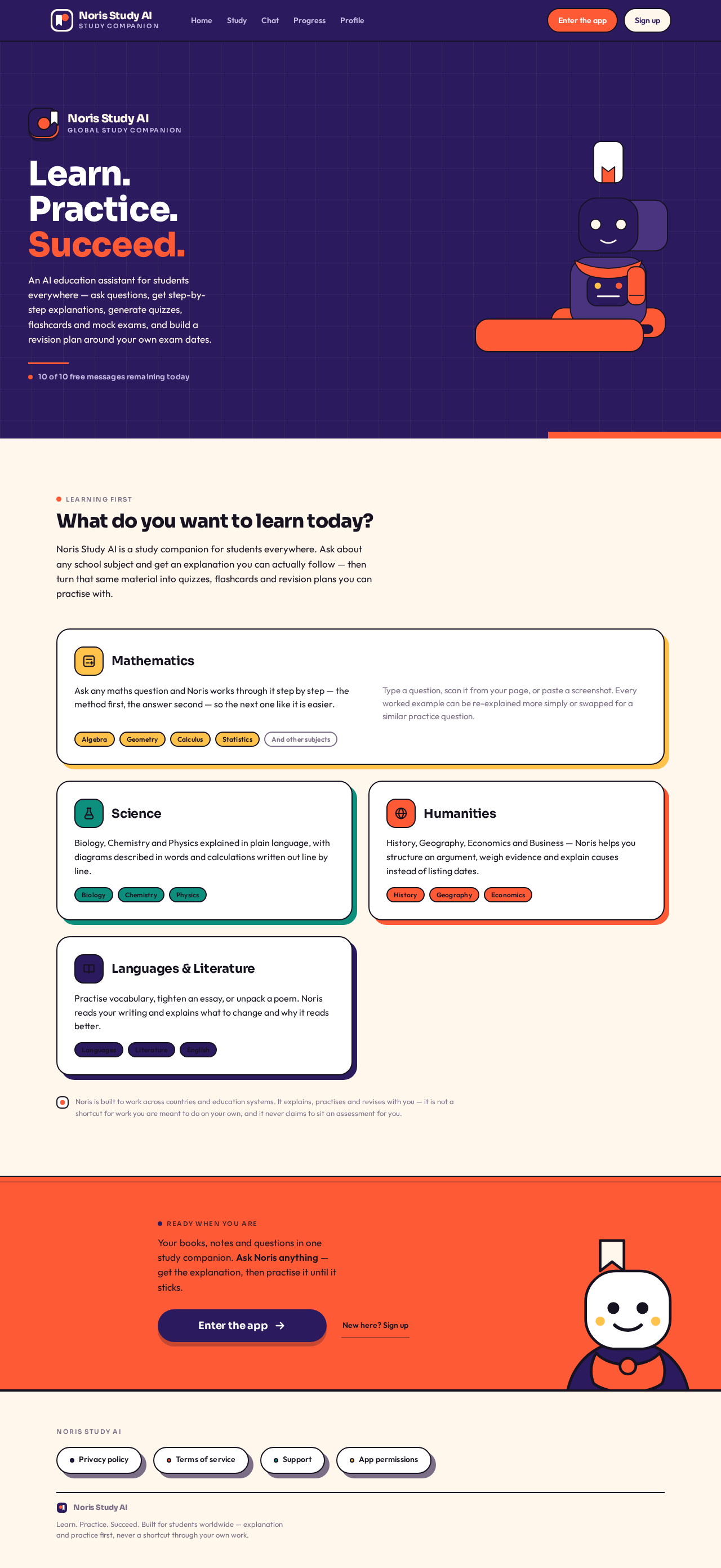
An AI education assistant for students everywhere — ask questions, get step-by-step explanations, generate quizzes, flashcards and mock exams, and build a revision plan around your own exam dates.
10 of 10 free messages remaining today
Learning first
What do you want to learn today?
Noris Study AI is a study companion for students everywhere. Ask about any school subject and get an explanation you can actually follow — then turn that same material into quizzes, flashcards and revision plans you can practise with.
Mathematics
Ask any maths question and Noris works through it step by step — the method first, the answer second — so the next one like it is easier.
Type a question, scan it from your page, or paste a screenshot. Every worked example can be re-explained more simply or swapped for a similar practice question.
AlgebraGeometryCalculusStatisticsAnd other subjects
Science
Biology, Chemistry and Physics explained in plain language, with diagrams described in words and calculations written out line by line.
BiologyChemistryPhysics
Humanities
History, Geography, Economics and Business — Noris helps you structure an argument, weigh evidence and explain causes instead of listing dates.
HistoryGeographyEconomics
Languages & Literature
Practise vocabulary, tighten an essay, or unpack a poem. Noris reads your writing and explains what to change and why it reads better.
LanguagesLiteratureEnglish
Noris is built to work across countries and education systems. It explains, practises and revises with you — it is not a shortcut for work you are meant to do on your own, and it never claims to sit an assessment for you.
Ready when you are
Your books, notes and questions in one study companion. Ask Noris anything — get the explanation, then practise it until it sticks.
An AI education assistant for students everywhere — ask questions, get step-by-step explanations, generate quizzes, flashcards and mock exams, and build a revision plan around your own exam dates.
10 of 10 free messages remaining today
Learning first
What do you want to learn today?
Noris Study AI is a study companion for students everywhere. Ask about any school subject and get an explanation you can actually follow — then turn that same material into quizzes, flashcards and revision plans you can practise with.
Mathematics
Ask any maths question and Noris works through it step by step — the method first, the answer second — so the next one like it is easier.
Type a question, scan it from your page, or paste a screenshot. Every worked example can be re-explained more simply or swapped for a similar practice question.
AlgebraGeometryCalculusStatisticsAnd other subjects
Science
Biology, Chemistry and Physics explained in plain language, with diagrams described in words and calculations written out line by line.
BiologyChemistryPhysics
Humanities
History, Geography, Economics and Business — Noris helps you structure an argument, weigh evidence and explain causes instead of listing dates.
HistoryGeographyEconomics
Languages & Literature
Practise vocabulary, tighten an essay, or unpack a poem. Noris reads your writing and explains what to change and why it reads better.
LanguagesLiteratureEnglish
Noris is built to work across countries and education systems. It explains, practises and revises with you — it is not a shortcut for work you are meant to do on your own, and it never claims to sit an assessment for you.
Ready when you are
Your books, notes and questions in one study companion. Ask Noris anything — get the explanation, then practise it until it sticks.


No comments yet. Be the first!