170+
Target languages
Choose the language your audience speaks.
 Aryan Jadhav
Build a professional AI-powered video dubbing application called **LingoDub Studio**. ### Core Features 1. Allow users to upload **MP4 and other common video formats**. 2. Automatically detect the video's **source language**. 3. Let users select a **target language** from 170+ supported languages. 4. Transcribe the entire video from beginning to end with accurate **timestamps and speaker identification**. 5. Detect speaker changes and support **20+ different speakers/characters**. 6. Translate every dialogue naturally while preserving the original meaning, context, emotion, and timing. 7. Generate natural-sounding dubbed voices with different **male/female voices, accents, emotions, and speaking styles**. 8. Allow optional **voice cloning from an uploaded voice sample**, where supported. 9. Preserve the original **background music, sound effects, ambience, and cinematic audio**. 10. Separate dialogue from background audio before dubbing, then mix the new dialogue with the original background. 11. Synchronize dubbed speech with the original video's timing as closely as possible. 12. Keep the original video quality and resolution. 13. Provide **subtitles/captions** with the option to enable, disable, or edit them. 14. Provide an **audio/voice editor** where users can change speaker voices, volume, timing, emotion, pitch, and speed. 15. Process the **entire uploaded video**, not just a short sample. 16. Show processing progress and clear error messages. 17. When dubbing is complete, provide a separate **Dubbed Video** output that users can preview and save. 18. Make sure the final video has both **working video and audible dubbed audio**. ### UI Create a clean, modern, professional interface with: * Upload Video button * Video preview/player * Source Language * Target Language * Speaker Detection * Voice Selection * Voice Cloning * Subtitle Settings * Audio Mixing * Voice Editor * Start Dubbing button * Processing progress bar * Original Video and Dubbed Video sections * Download/Save output button Use a scalable architecture so additional AI models, languages, voices, and video-processing features can be added later. Use reliable speech-to-text, translation, text-to-speech/voice-generation, speaker-detection, audio-separation, and FFmpeg-based video/audio processing services. Handle long videos efficiently and never silently drop the original video or dubbed audio.

Sign in to leave a comment
neongreen is the project under which LingoDub Studio is built: a professional, AI-powered video dubbing application. The product exists to take a full-length video in one language and deliver a complete, separately saved dubbed video in another language, where the original picture quality and resolution are preserved, the original background music, sound effects, ambience, and cinematic audio survive intact, and the newly generated dialogue sits on top of that preserved bed in the original timing.
The intent is deliberately end-to-end rather than sample-based. A user uploads MP4 or another common video format; the system detects the source language; the user picks a target language from 170+ supported languages; the entire video — beginning to end, not a short sample — is transcribed with accurate timestamps and speaker identification; speaker changes are detected and 20+ different speakers/characters are supported; every line of dialogue is translated naturally while preserving meaning, context, emotion, and timing; natural-sounding dubbed voices are generated across male/female voices, accents, emotions, and speaking styles; optional voice cloning from an uploaded voice sample is available where supported; dialogue is separated from background audio and then remixed with the preserved original background; the dubbed speech is synchronized to the original video's timing as closely as possible; subtitles/captions can be enabled, disabled, or edited; a voice editor lets users change speaker voices, volume, timing, emotion, pitch, and speed; progress and clear error messages are always visible; and the finished work is delivered as a separate Dubbed Video that can be previewed and saved, with working video and audible dubbed audio.
Audience: creators who need their own videos speaking in another language, localization teams working through multi-speaker content, studios and post-production operators handling emotionally nuanced multilingual video, and media operators processing long-form material. The interface is a dark production cockpit for that audience — technically advanced and cinematic, but operationally precise, because the pipeline it exposes is genuinely complex and must remain legible and controllable.
LingoDub Studio is a first-party web application with custom UI and application-owned identity. It orchestrates a chain of specialized services — speech-to-text, translation, text-to-speech and voice generation, speaker detection, audio separation, and FFmpeg-based video/audio processing — and never silently drops the original video or the dubbed audio at any point in that chain.
Current delivery boundary. Six surfaces carry all current accepted behavior: Landing (anonymous public entry), Sign Up and Login (anonymous identity access), Dubbing Studio (upload through processing, behind login), Voice Editor (voice/audio editing, subtitle settings, and audio mixing, behind login), and Outputs (Original Video and Dubbed Video sections with preview and download/save, behind login). No other product surfaces are in scope for the current horizon.
Actors. Two human personas do the accepted work: the Video Dubbing Creator, who owns the upload-to-processing lifecycle, and the Voice and Audio Editor, who owns the refinement lifecycle on the produced dub — speaker voice assignment, volume, timing, emotion, pitch, speed, subtitle enable/disable/edit, and the audio mix of new dialogue against the preserved background. Supporting non-human participants are the speech-to-text, translation, text-to-speech/voice-generation, speaker-detection, audio-separation, and FFmpeg-based processing services, which are typed as system/service actors and are not personas.
Ownership. All accepted human-facing work is owned by first-party destinations. Landing, Sign Up, and Login are anonymously reachable. Dubbing Studio, Voice Editor, and Outputs require an authenticated session. Background automation performs the pipeline execution itself; every human initiation, selection, decision, edit, preview, and save is owned by a first-party page.
Exclusions. The current scope does not include subtitle export files, per-role permission models, team invitation or provisioning, billing, or a public gallery of dubbed videos. These are not current capabilities and must not appear as current pages, requirements, or acceptance criteria.
LingoDub Studio is delivered as a first-party web application with custom UI. The whole user-facing pipeline — upload, source language detection review, target language selection, speaker detection review, voice selection, optional voice cloning, dubbing with live progress and errors, voice/audio editing, subtitle settings, audio mixing, and the paired Original/Dubbed output with download — is owned by first-party pages and is not delegated to an external surface.
Access ownership. Landing, Sign Up, and Login sit outside the protected boundary. Dubbing Studio, Voice Editor, and Outputs require login, because each of them depends on durable, actor-specific project state: an uploaded video and its detected language, a dub that is still processing, a speaker cast and caption set that must survive a return visit, and a completed output that must remain retrievable and bound to the correct creator. The interaction that establishes access lives on Sign Up and Login, which are anonymously reachable; no protected page owns the interaction that grants access to itself. Self-service enrollment is used because the sources establish no invitation, provisioning, or deployment bootstrap boundary. No differentiated permissions or role-based visibility are established by the sources, so access is a single authenticated continuity boundary rather than a permission model.
Service ownership. Speech-to-text, translation, text-to-speech/voice generation, speaker detection, audio separation, and FFmpeg-based video/audio processing are reliable third-party or first-party services invoked by the application. Their internal surfaces are not product pages and are not exposed to users as destinations; users see their progress, results, and errors through first-party pages.
Current versus future. Everything in this document is current. The scalable-architecture requirement is a current architectural obligation whose results — additional AI models, additional languages beyond the current set, additional voices, and additional video-processing features — are future-facing. Those future additions must be able to arrive without rework, but no future model, language, voice, or video-processing feature is a current capability, destination, or acceptance criterion.
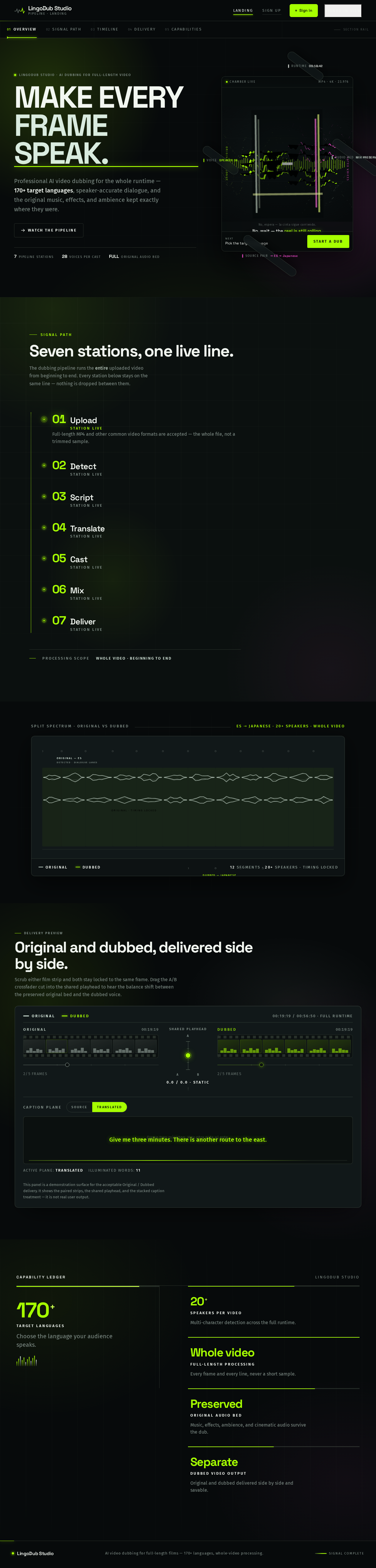
LingoDub Studio · AI dubbing for full-length video
Professional AI video dubbing for the whole runtime — 170+ target languages, speaker-accurate dialogue, and the original music, effects, and ambience kept exactly where they were.
Signal Path
The dubbing pipeline runs the entire uploaded video from beginning to end. Every station below stays on the same line — nothing is dropped between them.
Scrub either film strip and both stay locked to the same frame. Drag the A/B crossfader cut into the shared playhead to hear the balance shift between the preserved original bed and the dubbed voice.
This panel is a demonstration surface for the acceptable Original / Dubbed delivery. It shows the paired strips, the shared playhead, and the stacked caption treatment — it is not real user output.
170+
Target languages
Choose the language your audience speaks.
20+
Speakers per video
Multi-character detection across the full runtime.
Whole video
Full-length processing
Every frame and every line, never a short sample.
Preserved
Original audio bed
Music, effects, ambience, and cinematic audio survive the dub.
Separate
Dubbed video output
Original and dubbed delivered side by side and savable.
LingoDub Studio · AI dubbing for full-length video
Professional AI video dubbing for the whole runtime — 170+ target languages, speaker-accurate dialogue, and the original music, effects, and ambience kept exactly where they were.
Signal Path
The dubbing pipeline runs the entire uploaded video from beginning to end. Every station below stays on the same line — nothing is dropped between them.
Scrub either film strip and both stay locked to the same frame. Drag the A/B crossfader cut into the shared playhead to hear the balance shift between the preserved original bed and the dubbed voice.
This panel is a demonstration surface for the acceptable Original / Dubbed delivery. It shows the paired strips, the shared playhead, and the stacked caption treatment — it is not real user output.
170+
Target languages
Choose the language your audience speaks.
20+
Speakers per video
Multi-character detection across the full runtime.
Whole video
Full-length processing
Every frame and every line, never a short sample.
Preserved
Original audio bed
Music, effects, ambience, and cinematic audio survive the dub.
Separate
Dubbed video output
Original and dubbed delivered side by side and savable.
No comments yet. Be the first!