neon-todo
 Diya Trivedi
start a project to build a simple single page design of todo

Comments (0)
Sign in to leave a comment
System Requirements
System Requirements Document for neon-todo
1. Introduction
neon-todo is a simple todo application delivered as a single page design. The product intent is deliberately narrow: a person opens one page, types a task, adds it, and sees their todo items listed on that same page. There is no navigation, no secondary screen, and no workflow beyond capturing and viewing tasks.
The audience is a single individual — Diya Trivedi's personal productivity use case — who wants to dump tasks quickly and see them in one place. "Simple" is a hard constraint: the personality of the product comes from its framing and typography (a readymade, label-tag visual language), not from additional features.
This document is the System Requirements Document for the project; it specifies the product's features and workflows in full, together with the visual direction, interaction model, and technical delivery boundary.
2. System Overview
2a. Product Interpretation and Delivery Boundary
neon-todo is a first-party, single-page web application. The one accepted page, Todo, is the public entry surface and the entire product: it anonymously introduces the app and hosts both the add-task interaction and the visible task list. No account, sign-in, or identity establishment is required or implied — the accepted access requirement for the page is none, and no accepted journey requires durable actor-specific state to be privately owned or resumed across sessions.
Delivery is split across the provisioned scaffold:
- frontend — the React application that renders the single Todo page, its hero, add-task slab, and ruled task rows.
- backend — the shared FastAPI process that exposes the application API used to add and list todo items.
- database — MariaDB, holding the application-owned todo records.
The backend and database exist to make adding and viewing tasks work; they do not introduce authentication, accounts, or any additional product surface. All current behavior is delivered now; there is no future-horizon feature set in this document beyond what is stated in Section 11.
2b. Source Content Inventory
Not applicable — no reference directive with content_source was supplied.
2c. Page Content and Component Coverage
Todo
The single page of the product. It is anonymously reachable and contains the whole accepted experience: the hero framing, the add-task slab, and the task list.
Information and state
- The oversized quoted headline “THINGS TO DO” in Archivo Black, ALL CAPS, flush-left, with the quotation marks rendered as part of the type.
- A small orange quoted tag above the headline's first letter reading '01 — TODAY'.
- A narrow left rail of quoted micro-labels in tracked Space Mono caps: '01 — COUNT' (the number of todo items currently listed) and '02 — DATE' (the current date), separated from the task column by a single vertical rule.
- The current list of todo items, each rendered as a ruled row with a square checkbox, the task text, and a small quoted tag right-aligned.
- Page states: loading (list area shows a neutral placeholder while items are fetched), empty (no items yet — the list area shows a quiet, non-decorative empty line; the add slab remains fully usable), success (items listed as ruled rows), error (the list area shows a plain inline message that items could not be loaded, with a retry control).
Primary actions
- Type a task into the add-task slab's white full-width field with a 2px black border.
- Press the solid black ADD button (which turns safety orange on hover) to add the task. The field clears and the new task appears as a ruled row in the list.
Supporting actions and states
- Check a task's square checkbox: a left-to-right strike-through draws across the task text and a small orange 'DONE' tag stamps onto the row in ~140ms.
- The add button is disabled or inert while the field is empty; submitting a blank task does nothing.
- If adding a task fails, the typed text remains in the field and a plain inline error is shown so the user can retry.
Domain entities
- Todo item: an identifier, the task text, and a completion state (open / done). The quoted tag shown on a row is presentation of the row's status or category label, not a separate user-managed entity.
Component responsibilities
- Hero block — renders the quoted headline, the '01 — TODAY' tag, and the edge-to-edge diagonal hazard-stripe band beneath it.
- Left rail — renders the quoted micro-labels, the live count, and the date; collapses above the list at 768px and stacks at 375px.
- Add-task slab — owns the text input and the ADD button; validates non-empty input; emits the add action.
- Task list — renders ruled rows from the fetched items; owns the checkbox interaction and the DONE stamp; renders loading, empty, and error states.
- Task row — square checkbox, task text, right-aligned quoted tag; applies the strike-through and DONE stamp when checked.
Layout and responsive behavior
- Single column, asymmetric: narrow left rail against a wide task column, with the add-field pinned as a full-width slab at the top of the task column.
- Generous outer margins at 1280px; rail collapses above the list at 768px; everything stacks to one column at 375px with the add-field and button staying whole.
- Headlines, labels, numbers, task text, and controls stay entirely inside the viewport and their container at 375px, 768px, and 1280px, wrapping or scaling to fit; no element covers any part of them.
3. Functional Requirements
FR-1 — Single-page delivery (explicit) As a Todo user, I should use the entire product on one page, so that I never have to navigate elsewhere to capture or review tasks.
- Trigger: opening the application.
- Observable result: the Todo page renders with the hero, add-task slab, and task list; there are no other routes or destinations.
- Access state: anonymous; no identity required.
- Failure/recovery: if the page fails to load its data, the list area shows an inline error with retry while the add slab remains usable.
- Continuation: the user can immediately add a task or review the list.
FR-2 — Add a todo item (explicit) As a Todo user, I should type a task and add it, so that it is captured in my list.
- Trigger/input: the user types non-empty text into the add-task field and presses ADD.
- Observable result: the task is persisted through the backend and appears as a ruled row in the list; the input field clears.
- Access state: anonymous.
- Failure/recovery: on a failed add, the typed text stays in the field and a plain inline error is shown; the user can retry. Submitting blank input does nothing.
- Continuation: the user can add another task or check the new one.
FR-3 — View todo items on the single page (explicit) As a Todo user, I should see my todo items listed on the page, so that I can review everything in one place.
- Trigger: opening the page or returning to it.
- Observable result: the current todo items render as ruled rows with checkbox, task text, and right-aligned quoted tag; the left rail shows the live count.
- Access state: anonymous.
- Failure/recovery: if items cannot be loaded, the list area shows an inline error with a retry control; the rest of the page stays usable.
- Continuation: the user can add a new task or check an existing one.
FR-4 — Mark a task done (required_inference) As a Todo user, I should check a task's checkbox, so that I can see at a glance that it is complete.
- Trigger: the user clicks the square checkbox on a task row.
- Observable result: a left-to-right strike-through draws across the task text and a small orange 'DONE' tag stamps onto the row in ~140ms; the completion state is persisted through the backend.
- Access state: anonymous.
- Failure/recovery: if persisting the completion state fails, the row reverts to its open state and a plain inline error is shown; the user can retry.
- Continuation: the user can continue reviewing or adding tasks.
- Rationale: a todo list whose items can be captured and viewed but never marked complete would not be a usable todo lifecycle; the completion state is the indispensable observable result of a task row.
4. User Personas
Todo user
Product context. A single individual using neon-todo as a personal productivity utility. They open one page to dump tasks and see them in one place. The product is deliberately simple; the personality comes from the readymade, label-tag framing rather than from features.
Primary goal. Capture a task quickly and see the current list of tasks on the same page, without navigating anywhere.
Distinct accepted responsibilities.
- Types a task into the add-task slab and presses ADD.
- Reviews the current list of todo items rendered as ruled rows.
- Checks a task's checkbox to mark it done and sees the strike-through and DONE stamp.
Relevant inputs and decisions.
- The task text they type.
- Whether to add another task or check an existing one.
- Whether to retry after an inline error.
Interactions with other accepted participants. None beyond the user themselves; the backend and database are supporting system actors, not human participants. No other persona is affected by the user's actions.
Observable success. Their tasks are visible as ruled rows on the single page, newly added tasks appear immediately, and checked tasks show the strike-through and DONE stamp — all without leaving the page.
5. Core User Flows
Flow 1 — Add a task and see it listed
- The Todo user opens the application. The Todo page renders anonymously: the quoted “THINGS TO DO” headline, the '01 — TODAY' tag, the hazard-stripe band, the left rail with '01 — COUNT' and '02 — DATE', the add-task slab, and the current task list (or its empty state).
- The user clicks into the white add-task field and types a task.
- The user presses the solid black ADD button (which turns safety orange on hover). If the field is empty, nothing happens.
- The frontend sends the task to the backend, which persists it in MariaDB.
- On success, the field clears and the new task appears as a ruled row in the list; the left rail's count updates.
- Failure/recovery: if the add fails, the typed text remains in the field and a plain inline error is shown; the user presses ADD again to retry.
- Continuation: the user can add another task or check the new one.
Flow 2 — Review the current list
- The Todo user opens the application. The Todo page renders and the frontend fetches the current items from the backend.
- While loading, the list area shows a neutral placeholder.
- On success, the items render as ruled rows — square checkbox, task text, right-aligned quoted tag — and the left rail shows the live count.
- If there are no items, the list area shows a quiet empty line and the add slab remains fully usable.
- Failure/recovery: if the fetch fails, the list area shows a plain inline message that items could not be loaded, with a retry control; the user presses retry to reload.
- Continuation: the user can add a new task or check an existing one.
Flow 3 — Mark a task done
- From the Todo page's task list, the user clicks the square checkbox on a task row.
- A left-to-right strike-through draws across the task text and a small orange 'DONE' tag stamps onto the row in ~140ms; the frontend persists the completion state through the backend.
- Failure/recovery: if persisting fails, the row reverts to its open state and a plain inline error is shown; the user can click the checkbox again to retry.
- Continuation: the user continues reviewing or adding tasks on the same page.
6. Visuals Colors and Theme
The CREATIVE DIRECTION is authoritative for this section. Muse: Virgil Abloh — readymade language, quotation marks, label tags, hazard stripes, exposed grid, industrial neutrals with one safety accent. Headline framing: “THINGS TO DO”.
Color tokens (light mode)
- Background / ground:
#EDEBE6(concrete-and-paper light ground) - Surface:
#FFFFFF(pure white task slabs and add-field) - Text / primary ink:
#111111(type, rules, add-field border, wordmark) - Primary (controls):
#111111(solid black ADD button) - Accent:
#FF4D00(safety orange — add button hover, checked-state strike, one quoted label, hazard stripe, DONE tag) - Muted:
#8A8782(timestamps, counts, secondary labels) - Ratio: roughly 70% neutral ground, 25% black ink, 5% orange.
Typography
- Headings: Archivo Black, ALL CAPS, wide
0.06emletterspacing, oversized and flush-left; the wordmark and hero headline are wrapped in literal quotation marks as part of the type. Weight stays at 400 (the family's only weight); scale and tracking do the shouting. - Body: Space Mono.
- Scale: 1.414 modular — hero
clamp(56px, 11vw, 168px); section label 13px caps tracked0.18em; task text 18–20px Space Mono 400; meta 12px caps. Body measure capped at 62ch.
Shape language
- Hard
0pxcorners everywhere — no radii at all. - 1px and 2px black rules; exposed 12-column grid lines faintly visible in the ground.
- Label tags with a punched hole and a clipped corner.
- Diagonal safety-stripe bands as section dividers.
- Chunky 2px outlined controls that fill solid black on press.
Layout
- Single column, asymmetric: narrow left rail (quoted micro-labels, count, date) against a wide task column, with the add-field pinned as a full-width slab at the top of the task column.
- Tasks are ruled rows, not cards — each row has a square checkbox, the task text, and a small quoted tag on the right.
- Generous outer margins at 1280px; rail collapses above the list at 768px; everything stacks to one column at 375px with the add-field and button staying whole.
Imagery style
- No photography. Texture and artifact only: a faint concrete-grain noise layer on the ground, the exposed grid, hazard tape, and label/tag motifs. The interface itself is the image.
Avoid
- Rounded corners, soft shadows or hover-lift cards; any blue/indigo accent or white-on-blue CTA; pastel or gradient backgrounds and gradient blobs; centred headline + subtext + button hero composition; illustrated characters or emoji in the task list; more than one accent colour; decorative animation with easing curves or bounce; presenting the todo list as a dashboard with stats tiles.
7. Signature Design Concept
The public entry is the Todo page itself, and its signature is the oversized quoted headline on a concrete ground:
- Full-bleed light concrete ground (
#EDEBE6) with the faint 12-column grid showing through. - Dominant element: “THINGS TO DO” in Archivo Black caps, spanning roughly 9 of 12 columns and bleeding slightly past the right edge at desktop, with the quotation marks rendered as part of the type.
- A small orange quoted tag '01 — TODAY' pinned above its first letter.
- A diagonal orange-and-black hazard stripe band running edge-to-edge beneath the headline, slowly ticking sideways.
- Directly under the band, offset left, the add-task slab: a white full-width field with a 2px black border and a solid black ADD button that turns safety orange on hover.
- Below, the task list as ruled rows on the concrete ground — 1px black rules, square checkbox, task text, and a small quoted tag right-aligned — with the narrow left rail of quoted micro-labels ('01 — COUNT', '02 — DATE') separated by a single vertical rule.
No centred stack, no gradient, no floating cards. The concept recomposes only accepted content and controls: the headline, the tag, the add field and button, the count and date, and the task rows.
8. Interaction Model & Motion Direction
Interaction Model: Animated Motion Tempo: expressive Hero Dimensionality: flat
Landing Hero Motion Brief
- Focal subject: the oversized quoted headline “THINGS TO DO” on the concrete ground, with the '01 — TODAY' tag and the hazard-stripe band.
- Input → transformation → outcome thesis: as the page settles, the headline holds its flush-left position while the hazard-stripe band beneath it ticks sideways continuously; when the user adds a task, the new ruled row appears in the list and the left rail's count updates — the motion is the product's own state changing, not decoration.
- Motion vocabulary: snappy and mechanical — 120–160ms linear transitions; checked tasks get an instant left-to-right strike-through and a small orange 'DONE' tag that stamps in at ~140ms; the hazard-stripe band scrolls as a slow ticker. No easing theatrics, no bounces; the wit is in the timing being abrupt.
- Composed first frame: light concrete ground with faint grid; “THINGS TO DO” flush-left and bleeding past the right edge; '01 — TODAY' tag above the first letter; hazard band edge-to-edge beneath; add-task slab offset left under the band; ruled task rows below with the left rail of quoted micro-labels.
- Reduced-motion state: the hazard-stripe band becomes a static edge-to-edge band; the strike-through and DONE stamp appear instantly without the draw; all content remains fully readable and every control remains usable.
9. Non-Functional Requirements
- Single-page constraint (explicit): the product is delivered as exactly one page; no additional routes, destinations, or navigation are introduced.
- Simplicity constraint (explicit): no features beyond adding and viewing todo items (and the indispensable completion state of a row); personality comes from framing and typography, not from extra functionality.
- Readable text and controls (explicit, from the creative direction): headlines, wordmarks, labels, numbers, task text, and controls stay entirely inside the viewport and their container at 375px, 768px, and 1280px, wrapping or scaling to fit; no element covers any part of them. Moving content (the hazard-stripe ticker) may cross the viewport edge by design and must become fully readable as it passes; with
prefers-reduced-motion, a usable static arrangement is provided. - Accessibility of motion (required_inference): honor
prefers-reduced-motionby replacing the ticker and the strike-through draw with static equivalents. - Persistence (required_inference): todo items and their completion state are stored in the provisioned MariaDB database through the shared FastAPI backend, so the list survives a page reload.
- Anonymous access (explicit): the page requires no account or sign-in; no authentication or account-management capability is introduced.
10. Tech Stack
- frontend — React application rendering the single Todo page.
- backend — shared FastAPI process exposing the application API for adding and listing todo items (and persisting completion state).
- database — MariaDB for application-owned todo records.
- docker-compose — orchestrates the three provisioned services (
frontend,backend,database).
No additional services, queues, or infrastructure are required for the accepted workflows.
11. Assumptions and Constraints
- Assumption (labeled): the todo list is a single shared list for the one user; no per-user separation, sharing, or multi-list capability is required, since no identity or account is accepted.
- Assumption (labeled): the quoted tag on a task row (e.g. 'URGENT', 'LATER') is presentation of the row's status/category and is not a user-managed field, since the source does not request tag editing.
- Constraint (explicit): exactly one page; the design must be simple.
- Constraint (explicit): the visual direction in Sections 6–8 is authoritative; the generic indigo/blue-on-white SaaS template is forbidden.
- Constraint (explicit): no rounded corners, no soft shadows or hover-lift cards, no gradients, no more than one accent colour, no dashboard stats tiles.
- Future horizon: none stated by the user; no future features are in scope for this document.
12. Glossary
- Todo page — the single page of the product; the public entry surface hosting the hero, add-task slab, and task list.
- Todo item — a task record with an identifier, task text, and completion state (open / done).
- Add-task slab — the white full-width field with a 2px black border and solid black ADD button at the top of the task column.
- Ruled row — a task rendered as a line on the concrete ground (1px black rule, square checkbox, task text, right-aligned quoted tag), not a card.
- Quoted tag — a small label in quotation marks (e.g. '01 — TODAY', 'URGENT', 'DONE') rendered as part of the readymade visual language.
- Hazard-stripe band — the edge-to-edge diagonal black-and-orange band dividing the hero from the list, ticking sideways.
- DONE stamp — the small orange 'DONE' label that stamps onto a row when its checkbox is checked.
- Left rail — the narrow column of quoted micro-labels ('01 — COUNT', '02 — DATE') separated from the task column by a single vertical rule.
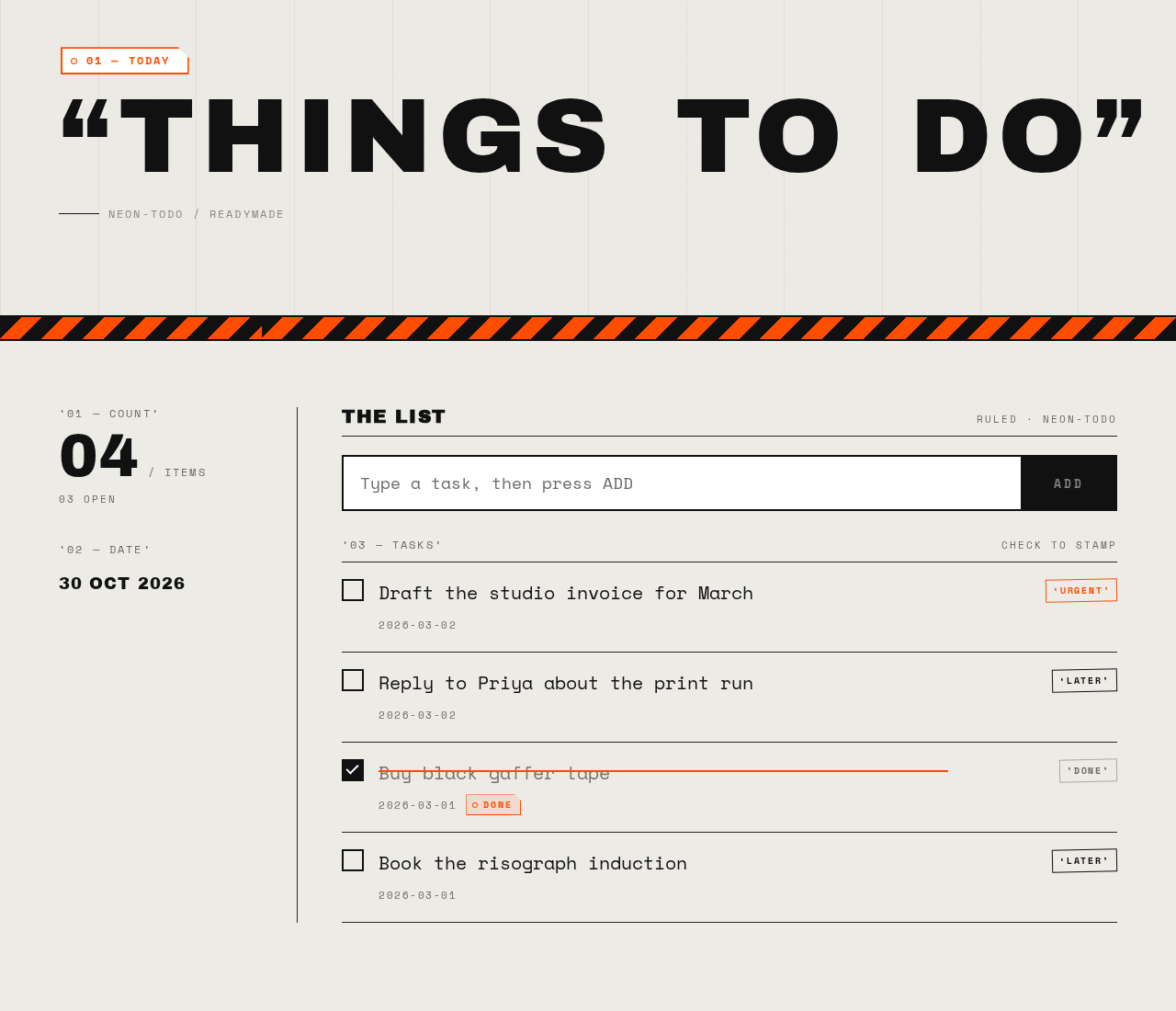
THINGS TO DO
The List
- ‘URGENT’Draft the studio invoice for March
- ‘LATER’Reply to Priya about the print run
- ‘DONE’Buy black gaffer tape
- ‘LATER’Book the risograph induction
THINGS TO DO
The List
- ‘URGENT’Draft the studio invoice for March
- ‘LATER’Reply to Priya about the print run
- ‘DONE’Buy black gaffer tape
- ‘LATER’Book the risograph induction
No comments yet. Be the first!