moon-todo
 Diya Trivedi
create a simple single page design of the todo application

Comments (0)
Sign in to leave a comment
System Requirements
System Requirements Document for moon-todo
1. Introduction
moon-todo is a simple, single-page todo application. The product intent is a calm, private, everyday object for one person to capture tasks, see what is still open, mark tasks done, and remove tasks they no longer need. The entire product is one page: there is no navigation, no account, no dashboard, and no second destination.
The audience is a single everyday person — the Todo User — using the page on a phone at night or at a desk in daylight. The page is the successful outcome of a working personal task list: it should feel like a well-made object resting on a warm surface rather than a productivity dashboard.
2. System Overview
moon-todo is delivered as exactly one custom page, Todo, which is also the anonymous entry surface. The page holds the whole accepted lifecycle in one cohesive workspace:
- An oversized wordmark and a capsule add-field where the user types a new task and adds it.
- A ruled meta row showing how many tasks are done out of the total, paired with a sage progress arc.
- One continuous task card listing the current tasks, divided by hairlines.
- Per-task completion control and per-task remove control.
- A quiet footer line with a "Clear done" text control.
The single active human actor is the Todo User. There are no other personas, no systems acting on the user's behalf, and no external or provider-owned surfaces. All state is local to the page and to the user's own session; nothing is shared, published, or sent to another participant.
2a. Product Interpretation and Delivery Boundary
Delivery ownership. The product is a first-party custom page. All accepted behavior — adding, viewing, completing, and removing todo items — is owned by the single Todo page. No capability is delegated to a provider surface, an external destination, or a headless delivery channel.
Access ownership. The page is anonymously reachable. The user is not asked to sign in, create an account, or verify identity, and no protected destination exists behind the page. The page's own state is the user's working state; there is no durable cross-session account state that must be bound to a verified identity, so no identity establishment or returning-verification interaction is introduced.
Current vs. future boundary. Everything described in this document is current. No future-horizon requirements were accepted. Nothing in this document should be read as authorizing adjacent capabilities such as accounts, sharing, collaboration, reminders, notifications, scheduling, categories, tags, filters, search, or multi-page navigation.
Explicit exclusions carried forward. The design must be a single page. The design must be simple. No blue or indigo primary/accent color and no white-first surface. No gradient-blob heroes or decorative color washes beyond the single soft warm radial light. No grid of identical rounded cards with hover-lift shadows. No centered hero headline with subtext and a pill CTA beneath it. No confetti, bounce, spring easing, or celebratory particles on task completion. No Inter, Roboto, Arial, Helvetica, Open Sans, Lato, Poppins, or system-ui for headings or body. No stock photography, character illustration, or 3D props. No dense dashboard chrome: sidebars, filter toolbars, stat tiles, or multi-column layouts.
2b. Source Content Inventory
Not applicable. No reference directive in this project declares content_source, so no source content inventory is produced.
2c. Page Content and Component Coverage
Todo
The single page of moon-todo, and its anonymous entry surface. It owns the complete accepted lifecycle: adding a task, viewing the current tasks, marking a task complete, and removing a task.
Information and state
- The current list of todo items, each with its task text and its completion state (open or done).
- The count of completed items and the total item count, expressed as tabular numerals in the form "3 of 7 done".
- A sage progress arc reflecting the real ratio of completed items to total items.
- The current contents of the add-field as the user types.
- An empty state when no todo items exist.
Primary actions
- Type a task into the capsule add-field and add it.
- Mark an individual task complete.
- Remove an individual task.
- Clear all completed tasks via the "Clear done" text control in the footer.
Supporting actions
- Re-read the list and the meta row at any time; both reflect current state without a separate refresh action.
- Continue adding tasks after any add, complete, remove, or clear operation.
Domain entities
- Todo item — the unit of work the user captures. Carries task text and a completion state. Created by the user, completed by the user, removed by the user.
- Task list — the ordered collection of todo items currently on the page. Its length and its completed count drive the meta row and the progress arc.
Component responsibilities
- Wordmark — oversized Fraunces "moon-todo", left-aligned, allowed to run near the viewport edge on mobile. Purely identity; carries no control.
- "TONIGHT" label — a single small uppercase sage label with 0.14em tracking, sitting above the wordmark.
- Add-field capsule — a full capsule input spanning the content measure, with the sage "Add" pill nested inside its right end. Owns task text entry and submission.
- Meta row — a ruled row pairing the tabular "3 of 7 done" numerals with the sage progress arc on the right. Read-only.
- Task card — one continuous warm-white card divided by hairlines, never a grid of separate cards. Owns the rendering of every todo item.
- Task row — a single todo item inside the card: completion control, task text, remove control.
- Completion control — a perfect circle with a 2px stroke that thickens to 3px on hover. Toggles the item's completion state.
- Remove control — the terracotta destructive affordance for a single task row.
- Footer line — a quiet line holding "Clear done" as a text control.
- Progress arc — the one drawn graphic gesture, pinned at the card's top-right, reflecting the real list.
States
- Loading — the page renders its ground, wordmark, add-field, and card frame immediately; the list area holds its space rather than collapsing.
- Empty — when no todo items exist, the card shows a centered empty state. The meta row reads zero of zero and the progress arc shows an empty stroke. The add-field remains the primary focus and remains usable.
- Success (add) — the new row slides in from 12px below with a fade and a brief sage underline sweep across the row; the meta row total increments and the progress arc re-animates.
- Success (complete) — the completion ritual runs: the circle fills sage, a thin sage ring expands outward once and dissolves, the text desaturates to muted taupe, and a hairline strike draws left-to-right over 300ms. The meta row completed count increments and the progress arc re-animates.
- Success (remove) — the row collapses its height over 260ms while the terracotta remove control fades first; the meta row total decrements and the progress arc re-animates.
- Success (clear done) — every completed row collapses in turn; the meta row completed count returns to zero and the progress arc re-animates.
- Error / recovery (empty submission) — submitting an empty or whitespace-only add-field does not create a todo item. The field keeps focus and the list is unchanged, so the user can simply type and submit again.
- Error / recovery (interrupted motion) — if a row's entry, completion, or removal animation is interrupted, the row settles into its correct final state rather than remaining mid-transition. Under
prefers-reduced-motion, all of these states appear instantly with no animation.
3. Functional Requirements
FR-1 — Single-page todo application (provenance: explicit) As a Todo User, I should get the whole todo application as one simple single page, so that I never have to navigate between screens to manage my tasks.
- Trigger: the user opens moon-todo.
- Observable result: exactly one page is presented, containing the add-field, the meta row, the task list, and the footer control.
- Constraint: the design must be a single page and must be simple.
- Continuation: every accepted action is available from this one page.
FR-2 — Add a todo item (provenance: explicit) As a Todo User, I should add todo items from the page, so that I can capture a task the moment I think of it.
- Trigger: the user types task text into the capsule add-field and submits via the sage "Add" pill.
- Observable result: a new todo item appears in the task list with the entered text, in an open (not completed) state; the meta row total increments; the progress arc re-animates.
- Access state: anonymous; no sign-in required.
- Failure/recovery: an empty or whitespace-only submission creates no item; the field keeps focus and the list is unchanged so the user can type and submit again.
- Continuation: the add-field clears and stays ready for the next task.
FR-3 — View the current todo items (provenance: explicit) As a Todo User, I should view the current todo items on the page, so that I can see what is still open and what I have already finished.
- Trigger: the user opens the page or returns attention to the task card after any change.
- Observable result: the task card lists every current todo item with its task text and its completion state; the meta row shows the completed count out of the total; the progress arc reflects the same ratio.
- Access state: anonymous; no sign-in required.
- Failure/recovery: when no items exist, the card shows its empty state and the meta row reads zero of zero rather than showing a stale or broken list.
- Continuation: the list stays current after every add, complete, remove, and clear operation without a separate refresh action.
FR-4 — Mark a todo item as completed (provenance: explicit) As a Todo User, I should mark todo items as completed, so that I can record what I have finished and feel the relief of clearing it.
- Trigger: the user activates the completion control on a task row.
- Observable result: the item's completion state becomes done; the circle fills sage, a thin sage ring expands once and dissolves, the text desaturates to muted taupe, and a hairline strike draws across the text; the meta row completed count increments and the progress arc re-animates.
- Access state: anonymous; no sign-in required.
- Failure/recovery: if the completion motion is interrupted, the row settles into its completed final state rather than remaining mid-transition; under
prefers-reduced-motionthe completed state appears instantly. - Continuation: the completed item remains visible in the list in its done state until the user removes it or clears done items.
FR-5 — Remove a todo item (provenance: explicit) As a Todo User, I should remove todo items, so that I can get rid of tasks I no longer need.
- Trigger: the user activates the terracotta remove control on a task row.
- Observable result: the row collapses its height over 260ms while the remove control fades first, and the item is gone from the list; the meta row total decrements and the progress arc re-animates.
- Access state: anonymous; no sign-in required.
- Failure/recovery: if the removal motion is interrupted, the row settles into its removed final state rather than remaining mid-collapse; under
prefers-reduced-motionthe removal appears instantly. - Continuation: the remaining items stay in place and the add-field remains ready.
FR-6 — Clear completed items (provenance: required_inference) As a Todo User, I should clear my completed items in one action from the footer, so that a finished batch does not clutter the list I am still working through.
- Trigger: the user activates the "Clear done" text control in the footer line.
- Observable result: every completed item is removed from the list; the meta row completed count returns to zero and the progress arc re-animates.
- Access state: anonymous; no sign-in required.
- Failure/recovery: when no items are completed, the control has nothing to clear and the list is unchanged.
- Continuation: open items are untouched and the add-field remains ready.
- Inference note: this is the indispensable completion of the accepted remove capability for the completed subset, expressed through the footer control named in the creative direction; it introduces no new destination or data operation.
FR-7 — Progress reflection (provenance: required_inference) As a Todo User, I should see how many tasks I have finished out of the total, so that I can tell at a glance how much is left.
- Trigger: any add, complete, remove, or clear operation, or first render of the page.
- Observable result: the ruled meta row shows tabular numerals in the form "3 of 7 done" and the sage progress arc shows the matching ratio, both animating on the same slow 600ms ease.
- Access state: anonymous; no sign-in required.
- Failure/recovery: with an empty list the meta row reads zero of zero and the arc shows an empty stroke.
- Continuation: the meta row and arc stay in step with the list after every subsequent change.
- Inference note: this is the observable result of the accepted view, complete, and remove capabilities, not a separate reporting feature.
4. User Personas
Todo User
Product context. The Todo User is one everyday person using moon-todo privately. They arrive on a phone at night or at a desk in daylight, often for a few seconds at a time, and they return to the page dozens of times a day. They are not managing a team, a project, or a backlog; they are holding a small personal list of things to do and clearing it.
Primary goal. Capture a task the moment it occurs to them, see what is still open, and clear finished work with a small, satisfying action — without operating a dashboard.
Distinct accepted responsibilities.
- Adding todo items by typing task text into the capsule add-field and submitting.
- Viewing the current todo items and their completion states.
- Marking individual todo items as completed.
- Removing individual todo items they no longer need.
- Clearing completed items in one action from the footer.
Relevant inputs and decisions. The task text they type; the decision of when a task is finished; the decision of whether a task should be removed rather than completed; the decision to clear the finished batch.
Interactions with other accepted participants. None. The Todo User is the only active human actor in moon-todo. No other persona, system, provider, or external destination participates in, receives, or is affected by the user's task state. The page itself is the whole product.
Observable success. The task they thought of is on the page; the list shows what is open and what is done; the meta row and progress arc agree with the list; completed tasks read as struck through and muted; removed tasks are gone; the page never asks them to sign in, navigate, or configure anything.
What makes this role's work different. The Todo User's work is a private daily ritual of capture and relief, not coordination. There is no one to hand off to, nothing to approve, and no shared state to reconcile — which is exactly why the product is one simple page and why the completion moment is the emotional center of the design.
5. Core User Flows
Flow 1 — Capture a task
- The Todo User opens moon-todo. The Todo page renders on the warm oat ground: the oversized Fraunces "moon-todo" wordmark left-aligned with the small uppercase sage "TONIGHT" label above it, the capsule add-field beneath overlapping the wordmark's baseline, the ruled meta row, and the task card.
- The user taps the capsule add-field and types the task text. The field is the hero's second subject and holds focus.
- The user submits via the sage "Add" pill nested inside the right end of the capsule.
- The new row slides in from 12px below with a fade and a brief sage underline sweep across the row. The meta row total increments and the progress arc re-animates on its slow 600ms ease.
- The add-field clears and stays ready. The user can immediately type the next task.
- Failure/recovery: if the user submits an empty or whitespace-only field, no item is created, the list is unchanged, and the field keeps focus so they can simply type and submit again.
Flow 2 — Review the current list
- The Todo User opens moon-todo or returns attention to the task card after any change.
- The Todo page shows the task card as one continuous warm-white surface divided by hairlines, listing every current todo item with its task text and completion state.
- The ruled meta row shows tabular numerals in the form "3 of 7 done" with the sage progress arc on the right, both reflecting the real list.
- Empty case: when no items exist, the card shows its centered empty state, the meta row reads zero of zero, and the arc shows an empty stroke. The add-field remains the primary focus and remains usable.
- The user continues from here into adding, completing, removing, or clearing.
Flow 3 — Complete a task
- From the Todo page, the Todo User activates the completion control — the perfect circle with a 2px stroke — on the task row they have finished.
- The completion ritual runs over 520ms: the circle fills sage, a thin sage ring expands outward once and dissolves, the task text desaturates to muted taupe, and a hairline strike draws left-to-right across the text over 300ms.
- The meta row completed count increments and the progress arc re-animates.
- The completed item remains visible in the list in its done state.
- Failure/recovery: if the motion is interrupted, the row settles into its completed final state rather than remaining mid-transition. Under
prefers-reduced-motion, the completed state appears instantly with no animation. - Continuation: the user can complete further tasks, remove this one, or clear the finished batch from the footer.
Flow 4 — Remove a task
- From the Todo page, the Todo User activates the terracotta remove control on the task row they no longer need.
- The terracotta control fades first, then the row collapses its height over 260ms and the item is gone from the list.
- The meta row total decrements and the progress arc re-animates.
- Failure/recovery: if the motion is interrupted, the row settles into its removed final state rather than remaining mid-collapse. Under
prefers-reduced-motion, the removal appears instantly. - Continuation: the remaining items stay in place and the add-field remains ready for the next task.
Flow 5 — Clear the finished batch
- From the Todo page, the Todo User activates the "Clear done" text control in the quiet footer line.
- Every completed row collapses in turn and is removed from the list.
- The meta row completed count returns to zero and the progress arc re-animates.
- Empty case: when no items are completed, the control has nothing to clear and the list is unchanged.
- Continuation: open items are untouched and the add-field remains ready.
6. Visuals Colors and Theme
The creative direction is authoritative for this section. Muse: Yves Béhar — humane technology: soft forms wrapped around serious utility, warm materials, and a wellbeing-first pace. Headline: a ceramic dish on a table, not a spreadsheet.
Color tokens (light mode)
| Role | Hex | Use |
|---|---|---|
| Background | #F3EEE4 | Warm oat ground carrying the whole page |
| Surface | #FBF7EF | Slightly lifted warm white for the task card and add-field |
| Text | #2B2A26 | Ink for all readable text |
| Primary | #4A5F4C | Sage — add button, completion ring, progress arc, "TONIGHT" label |
| Accent | #C4623C | Terracotta — destructive affordance (remove control) and the one completion pulse only |
| Muted | #8C8578 | Metadata, counts, placeholder copy, completed task text |
| Hairline | #E3DACB | 1px warm hairline on controls and card dividers |
No blue anywhere. Contrast of ink on oat is approximately 12:1; muted on oat approximately 4.6:1 at body size. Terracotta never becomes decoration — it is reserved for the remove control and the single completion pulse.
Typography
- Headings: Fraunces, light-to-soft optical settings (opsz large, weight 400–500, SOFT axis raised). Tracking −0.02em on display sizes, open tracking on small caps labels.
- Body and UI: Work Sans at 400/500 with 1.55 line-height. Task text is 500 at 17px mobile / 18px desktop so it reads as a written note.
- Scale: 1.25 modular — 96 / 64 / 40 / 28 / 20 / 17 / 14 / 12.
- Display wordmark:
clamp(56px, 11vw, 132px). Section heading:clamp(28px, 4vw, 40px). Labels: 12px uppercase with 0.14em tracking.
Shape language
Soft continuous curves everywhere. The task card has 28px radii; the add-field is a full capsule; chips and the completion control are perfect circles. Section boundaries are gentle arcs rather than straight rules — a subtle concave curve where the hero ground meets the list ground. Controls carry a 1px warm hairline (#E3DACB) and a low, wide, warm shadow (0 18px 40px -28px rgba(43,42,38,0.28)) so they read as physical rather than floating. No sharp corners anywhere except the ruled progress ticks.
Layout
Single column, max 640px content measure, centered with generous 96–140px vertical breathing room between zones; the page never becomes a wide dashboard. Order: oversized Fraunces wordmark left-aligned and allowed to run near the viewport edge on mobile; beneath it the horizontal inset capsule input with the sage "Add" pill inside the right end; then the ruled meta row ("3 of 7 done" with the sage progress arc on the right); then the task list as one continuous card divided by hairlines; then a quiet footer line with "Clear done" as a text control. On desktop the card is inset with visible oat ground on both sides; on mobile the card bleeds to 16px margins. Nothing is centered except the empty state.
Imagery
No photography and no illustration of people. The imagery is material and light: a large soft radial wash of warm light behind the wordmark (a barely-there gradient from #FBF7EF to the oat ground, no color blobs), a faint paper-grain texture at 3% opacity over the whole page, and the sage progress arc as the one drawn graphic gesture. The completion ring is the app's single pictogram — a hand-feeling circle with a 2px stroke that thickens to 3px on hover, drawn to feel pressed rather than rendered.
7. Signature Design Concept
A title page for a small daily ritual.
The first screen is not a centered headline over a button. It is a left-aligned editorial composition on the warm oat ground:
- The wordmark moon-todo set in Fraunces at
clamp(56px, 11vw, 132px), light weight, sitting high and running from the left margin toward the right edge so it dominates the viewport like a title page. - A single small uppercase sage label TONIGHT with 0.14em tracking sitting above it.
- Directly beneath the wordmark, overlapping its baseline by roughly 24px, the capsule add-field spanning the full content measure as a warm-white physical object with the sage Add pill nested inside its right end — the input is the hero's second subject, not an afterthought.
- Behind the wordmark, a soft radial warm light and 3% paper grain give the ground material depth.
- A thin sage progress arc pinned at the card's top-right, already reflecting the real list.
The task list below is rendered as one continuous warm-white card divided by hairlines — never a grid of identical hover-lift cards — so it reads as a single object resting on a surface. The completion ritual is the page's one moment of drama: a 520ms sage ring that expands once and dissolves while a hairline strike draws across the task text, which desaturates to muted taupe. The ruled meta row pairs tabular "3 of 7 done" numerals in Work Sans with a hand-drawn-feeling sage progress arc on the right, both animating on the same slow 600ms ease.
This concept only recomposes accepted content, states, and controls. It introduces no new behavior, page, or destination.
8. Interaction Model & Motion Direction
Interaction Model: Animated Motion Tempo: restrained Hero Dimensionality: layered_2d
Landing Hero Motion Brief
- Focal subject. The oversized Fraunces "moon-todo" wordmark on the warm oat ground, with the capsule add-field overlapping its baseline as the second subject.
- Input → transformation → outcome thesis. As the page settles, the soft radial warm light behind the wordmark breathes into place and the wordmark resolves from a slight vertical offset into its final left-aligned position; the capsule add-field then rises the last few pixels to overlap the wordmark's baseline and takes focus, and the sage progress arc draws its stroke to the real ratio of the user's list. The outcome is a title page that is already a working tool: the input is live and the arc already tells the truth.
- Motion vocabulary. Wellbeing pace — 420–560ms with ease-out-quint on entry, 180ms on interaction feedback. Adding a task slides the new row in from 12px below with a fade and a brief sage underline sweep across the row. Completing a task runs the 520ms ritual: the circle fills sage, a thin sage ring expands outward once and dissolves, the text desaturates to muted taupe, and a hairline strike draws left-to-right over 300ms. Removing a task collapses the row height over 260ms while the terracotta remove control fades first. The progress arc animates its stroke with a slow 600ms ease. No bounce, no spring, no confetti.
- Composed first frame. Warm oat ground with the soft radial warm light and 3% paper grain; the sage "TONIGHT" label above the oversized left-aligned wordmark; the capsule add-field overlapping the wordmark's baseline with the sage Add pill nested at its right end; the ruled meta row and the sage progress arc already reflecting the real list; the continuous task card below.
- Reduced-motion state. Under
prefers-reduced-motion, all motion stops and final states appear instantly: the wordmark, add-field, meta row, arc, and every task row render in their settled positions with no entry, sweep, ring, strike, or collapse animation.
9. Non-Functional Requirements
NFR-1 — Single-page constraint (provenance: explicit) The product must be delivered as exactly one page. No additional routes, screens, or navigable destinations may be introduced.
NFR-2 — Simplicity constraint (provenance: explicit) The design must be simple. The page carries only the accepted controls: the add-field with its Add pill, the per-task completion control, the per-task remove control, and the footer "Clear done" text control. No sidebars, filter toolbars, stat tiles, or multi-column layouts.
NFR-3 — Anonymous access (provenance: explicit via planning access contract) The page is anonymously reachable. No sign-in, account creation, or identity verification is required, and no protected destination exists behind the page.
NFR-4 — Readable text and controls stay whole (provenance: explicit creative direction)
Headlines, wordmarks, labels, numbers, card text, and controls stay entirely inside the viewport and their container at 375px, 768px, and 1280px, wrapping or scaling (for example font-size: clamp(...) with its mobile size) to fit. No other element covers any part of them. Where the direction asks readable text or a control to run off an edge, the gesture is carried by imagery or decoration instead.
NFR-5 — Reduced-motion support (provenance: explicit creative direction)
All motion stops under prefers-reduced-motion, which shows final states instantly.
NFR-6 — Motion ceiling (provenance: explicit creative direction) No bounce, no spring easing, and no confetti or celebratory particles on task completion. Entry motion is 420–560ms with ease-out-quint; interaction feedback is 180ms; the completion ritual is 520ms; row removal collapse is 260ms; the progress arc animates on a 600ms ease.
NFR-7 — Color and surface constraints (provenance: explicit creative direction)
No blue or indigo primary or accent color. No white-first surface — the ground stays warm oat (#F3EEE4). No gradient-blob heroes or decorative color washes beyond the single soft warm radial light. The generic indigo/blue-on-white SaaS template is forbidden.
NFR-8 — Typography constraints (provenance: explicit creative direction) Fraunces for headings and Work Sans for body and UI. Inter, Roboto, Arial, Helvetica, Open Sans, Lato, Poppins, and system-ui are excluded for headings and body.
NFR-9 — Imagery constraints (provenance: explicit creative direction) No stock photography, character illustration, or 3D props. Imagery is limited to the soft radial warm light, the 3% paper grain, and the sage progress arc.
NFR-10 — Responsive layout (provenance: explicit creative direction) Single column with a max 640px content measure. On desktop the card is inset with visible oat ground on both sides; on mobile the card bleeds to 16px margins. Nothing is centered except the empty state.
10. Tech Stack
No technology choices were specified by the user. The following are coherent defaults for a single-page client-side todo application and are labeled as such.
- Frontend: React with TypeScript, built as a single-page client application.
[Default — not specified by user] - Styling: CSS with custom properties for the color, type, radius, spacing, and shadow tokens defined in Section 6.
[Default — not specified by user] - Fonts: Fraunces and Work Sans, self-hosted or loaded as web fonts.
[Default — not specified by user] - State: In-page client state for the task list, the add-field contents, and the derived completed/total counts.
[Default — not specified by user] - Persistence: Local browser storage so the user's list survives a page reload.
[Default — not specified by user] - Backend: None required. The accepted behavior is entirely client-side and anonymous; no server, API, or database is introduced.
[Default — not specified by user] - Containerization and orchestration: Not required for this delivery.
[Default — not specified by user]
11. Assumptions and Constraints
Assumptions
- A1. The user's todo list is private to their own browser session; no sharing, collaboration, or multi-user access is assumed. (Assumption — narrow, consistent with the single anonymous persona and the single-page constraint.)
- A2. The "TONIGHT" label is a fixed piece of the hero composition as specified by the creative direction, not a dynamic time-of-day value. (Assumption — the direction names it as a label, not a computed state.)
- A3. The "Clear done" footer control is the accepted way to remove the completed subset in one action, as named by the creative direction. (Assumption — grounded in the direction's footer line.)
- A4. Local persistence across reloads is a reasonable default for a personal task list and does not introduce a new destination or identity requirement. (Assumption — labeled default in Section 10.)
Constraints
- C1. The design must be a single page. (Explicit.)
- C2. The design must be simple. (Explicit.)
- C3. The page is anonymously reachable; no sign-in or account is introduced. (Explicit via the planning access contract.)
- C4. No blue or indigo primary/accent; no white-first surface; the ground stays warm oat. (Explicit creative direction.)
- C5. No gradient-blob heroes or decorative color washes beyond the single soft warm radial light. (Explicit creative direction.)
- C6. No grid of identical rounded cards with hover-lift shadows; the task list is one continuous card divided by hairlines. (Explicit creative direction.)
- C7. No centered hero headline with subtext and a pill CTA beneath it. (Explicit creative direction.)
- C8. No confetti, bounce, spring easing, or celebratory particles on task completion. (Explicit creative direction.)
- C9. Fraunces and Work Sans only for headings and body; the listed sans-serif fallbacks are excluded. (Explicit creative direction.)
- C10. No stock photography, character illustration, or 3D props. (Explicit creative direction.)
- C11. No dense dashboard chrome: sidebars, filter toolbars, stat tiles, or multi-column layouts. (Explicit creative direction.)
- C12. Readable text and controls stay whole at 375px, 768px, and 1280px. (Explicit creative direction.)
- C13. All motion stops under
prefers-reduced-motion. (Explicit creative direction.)
12. Glossary
- Todo item — a single task the user has captured, carrying task text and a completion state of open or done.
- Task list — the ordered collection of todo items currently shown on the page; its length and completed count drive the meta row and the progress arc.
- Add-field — the full capsule input spanning the content measure, with the sage "Add" pill nested inside its right end; owns task text entry and submission.
- Completion control — the perfect circle with a 2px stroke (3px on hover) on each task row that toggles the item's completion state.
- Completion ritual — the 520ms sequence on completing a task: the circle fills sage, a thin sage ring expands once and dissolves, the text desaturates to muted taupe, and a hairline strike draws left-to-right over 300ms.
- Remove control — the terracotta destructive affordance on each task row that removes that single item.
- Clear done — the footer text control that removes every completed item in one action.
- Meta row — the ruled row pairing tabular "3 of 7 done" numerals with the sage progress arc on the right.
- Progress arc — the single drawn graphic gesture, pinned at the card's top-right, reflecting the real ratio of completed items to total items.
- Task card — the one continuous warm-white surface divided by hairlines that holds every task row.
- Todo User — the single active human persona of moon-todo; the anonymous everyday person who captures, views, completes, and removes tasks.
- Todo page — the single page of moon-todo and its anonymous entry surface; the whole product.
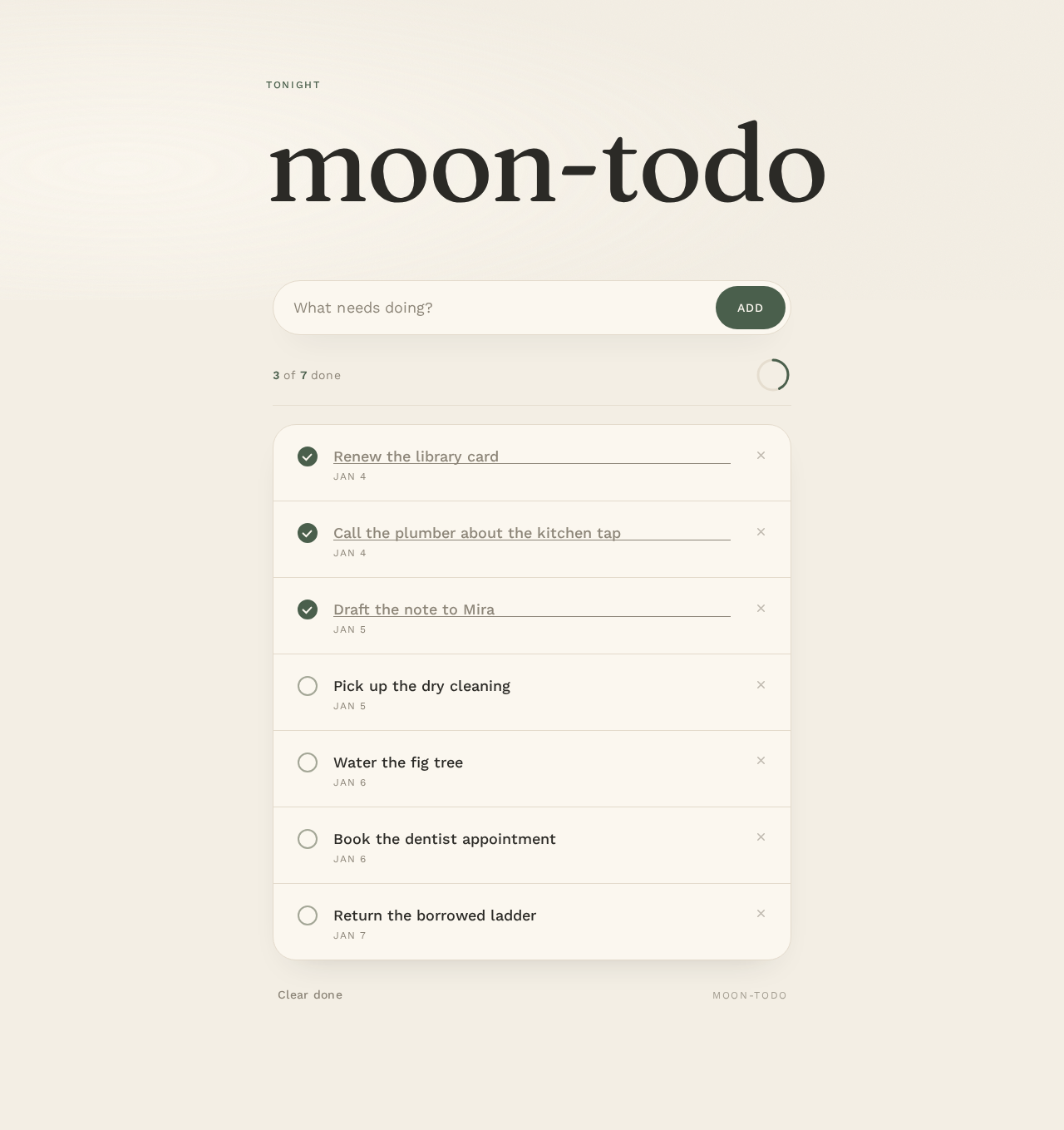
moon-todo
Your tasks
- Renew the library cardJan 4
- Call the plumber about the kitchen tapJan 4
- Draft the note to MiraJan 5
- Pick up the dry cleaningJan 5
- Water the fig treeJan 6
- Book the dentist appointmentJan 6
- Return the borrowed ladderJan 7
moon-todo
Your tasks
- Renew the library cardJan 4
- Call the plumber about the kitchen tapJan 4
- Draft the note to MiraJan 5
- Pick up the dry cleaningJan 5
- Water the fig treeJan 6
- Book the dentist appointmentJan 6
- Return the borrowed ladderJan 7
No comments yet. Be the first!