moon-start
 Diya Trivedi
start a project to build a simple single design of calculator

Comments (0)
Sign in to leave a comment
System Requirements
System Requirements Document for moon-start
1. Introduction
moon-start is a simple calculator with a single, consistent design. It exists so that an ordinary person — on a phone or a laptop — can do quick everyday arithmetic without noise, setup, or choice: enter numbers and arithmetic operators, see the current expression and the computed result, and clear the calculation to start over. The product is deliberately one design only; there are no layout variants, themes, or alternate calculator modes.
The audience is anyone who needs a fast, calm arithmetic utility. The experience is intentionally unremarkable in the best sense: it should feel like picking up a well-made object rather than opening a software product. There is no account, no saved history, and no marketing surface beyond a quiet first impression that introduces the calculator.
2. System Overview
moon-start is a small first-party web application delivered as a custom user interface. It has two current destinations:
- Landing — an anonymous first impression that introduces the simple single-design calculator and presents the calculator itself as the hero object, with one quiet line of orientation.
- Calculator — the single consistent calculator layout where a user enters numbers and arithmetic operators, sees the current expression and the computed result, and clears the calculation to start over.
Both destinations are anonymously reachable; no identity, account, or session continuity is required, because the calculator holds no durable actor-specific state, commitment, entitlement, or value transfer. The only human actor is the Calculator User. Computation is performed by the application itself; there is no external provider, no outbound recipient, and no background process that a human interacts with.
Current accepted behavior is limited to: entering numbers and arithmetic operators, seeing the current expression and the computed result, and clearing the calculation to start over — all within one simple, single design.
Removed from scope
- Multiple calculator design variants (also: layout variants, theme variants, alternate calculator modes).
2a. Product Interpretation and Delivery Boundary
moon-start is delivered as a first-party web application with a custom interface. The Landing and Calculator destinations are owned by the application and are reachable anonymously. There is no application-owned identity, no sign-in, no account management, and no differentiated permissions: nothing in the accepted behavior requires a user to be privately identified or to resume durable state, and no shared product state is controlled or hidden by role.
The current delivery horizon covers only the calculator described above. Nothing about saved calculations, history, scientific functions, unit conversion, or multi-user collaboration is part of the current product; those are not accepted requirements and are not represented in any page, flow, or requirement below.
2c. Page Content and Component Coverage
Landing
- Information and state: A warm paper-white field with the wordmark
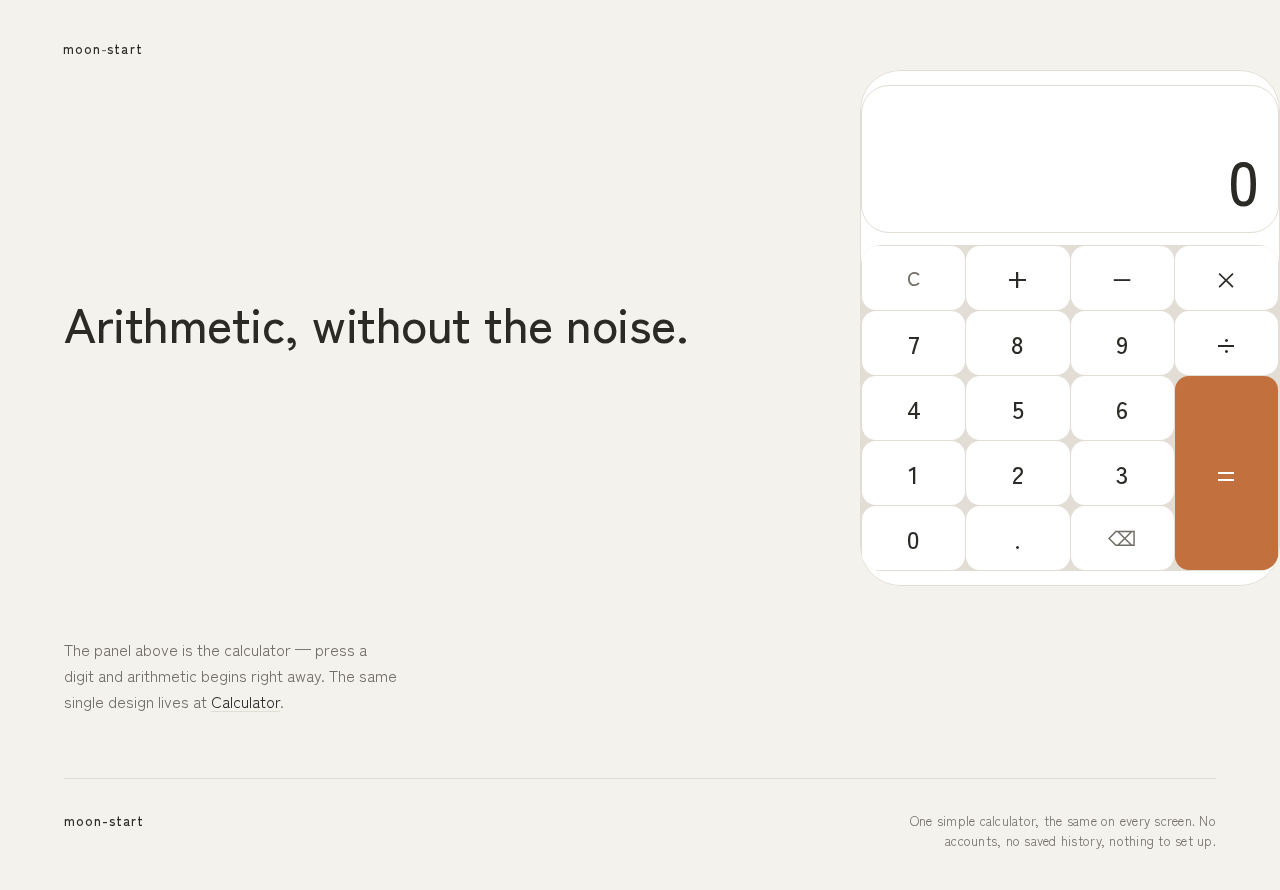
moon-startat top-left (13px, wide tracking). A single line of type — "Arithmetic, without the noise." — flush left on desktop at 49px, stacking above the calculator panel and shrinking to 31px on mobile. The calculator panel (maximum 420px wide) sits slightly below optical centre as the hero object, presented as a physical object with a single 1px soft edge rather than a card in a grid. One quiet sentence of orientation sits below the panel. No navigation bar, no subtext stack, no call-to-action button, no gradient. - Primary action: Begin using the calculator — the calculator panel on the Landing is the same single design as the Calculator destination, and interacting with it (or moving to the Calculator destination) starts arithmetic.
- Supporting actions: None beyond entering numbers and operators on the presented panel.
- Domain entities: Calculator expression, computed result, active operator state.
- Component responsibilities:
- Wordmark: static identity label, top-left, 13px with 0.08em tracking.
- Headline: single line of type, flush left, responsive size via clamp (49px desktop → 31px mobile).
- Calculator panel: display plate (28px radius) showing the current expression at 20px and the result at 61px desktop / 39px mobile, tabular and medium weight; 4×5 key grid beneath with hairline 1px
#E2DED6dividers; equals key in terracotta#C2703D. - Orientation sentence: one quiet line below the panel.
- States:
- Loading: static content renders immediately; no spinner or skeleton is needed for a client-side calculator.
- Empty: display shows a neutral starting state (a single
0result and an empty expression line). - Success: expression and result update as keys are pressed.
- Error: an invalid or incomplete expression shows a clear, non-destructive message in the display area and leaves the expression editable.
- Recovery: clearing resets the display to the empty starting state.
Calculator
- Information and state: The single consistent calculator layout: a white display plate at top showing the current expression (20px) and the computed result (61px desktop / 39px mobile, tabular, medium weight), and a 4×5 key grid beneath with hairline dividers. Keys carry 25px legends. The active operator key settles into terracotta
#C2703Dwith a 150ms fade; the equals key is terracotta. No alternate layouts, no theme switcher, no history panel. - Primary actions:
- Enter digits (0–9) and a decimal point to build a number.
- Enter arithmetic operators (+, −, ×, ÷) to build an expression; the active operator is visibly indicated.
- Press equals to compute and display the result.
- Clear the calculation to start over.
- Supporting actions: Correct the current entry before committing (for example by clearing and re-entering); the display remains editable until cleared.
- Domain entities: Current expression (sequence of numbers and operators), current operand entry, computed result, active operator state, error state.
- Component responsibilities:
- Display plate: renders the expression line and the result numeral; crossfades the result in 180ms when it changes; shows error messages in place without destroying the expression.
- Key grid: 4×5 grid of pressable keys with 14px continuous-curve radii and hairline dividers; keys depress 1px with a 120ms ease-out on press.
- Operator keys: reflect active-operator state via a 150ms terracotta fade.
- Equals key: the single saturated element; triggers computation.
- Clear key: resets expression, result, and active-operator state to the empty starting state.
- States:
- Loading: not applicable beyond initial render; the calculator is available immediately.
- Empty: result
0, expression line empty, no active operator. - Success: result numeral updates with a 180ms crossfade; expression line reflects the entered sequence.
- Error: division by zero or a malformed expression shows a clear message in the display area; the expression is preserved so the user can correct it.
- Recovery: pressing clear returns to the empty state; correcting the expression and pressing equals again produces a new result.
3. Functional Requirements
Each requirement is written as a story point with provenance, lifecycle facts, and observable acceptance.
FR-1 — Single simple design (explicit) As a Calculator User, I should use a calculator that has one simple, single design, so that the experience is consistent and I never have to choose between layouts or variants.
- Trigger/input: opening either destination.
- Observable result: the same single calculator layout appears on Landing and Calculator; there is no theme switcher, layout selector, or alternate mode.
- Access state: anonymous.
- Failure/recovery: not applicable; the single design is always the one presented.
- Continuation: the user proceeds to enter numbers and operators.
- Acceptance: only one calculator layout exists across the product.
FR-2 — Enter numbers and arithmetic operators (explicit) As a Calculator User, I should enter numbers and arithmetic operators, so that I can build the calculation I want to compute.
- Trigger/input: pressing digit keys, the decimal point, and operator keys (+, −, ×, ÷).
- Observable result: the current expression line updates to reflect the entered numbers and operators; the active operator key settles into terracotta with a 150ms fade.
- Access state: anonymous.
- Failure/recovery: an incomplete or malformed expression is shown as an error in the display area and remains editable so the user can correct it.
- Continuation: the user presses equals to compute, or continues entering.
- Acceptance: digits, decimal point, and the four arithmetic operators are enterable and visibly reflected in the expression.
FR-3 — See the current expression and the computed result (explicit) As a Calculator User, I should see the current expression and the computed result, so that I can read what I entered and what it evaluates to.
- Trigger/input: entering an expression and pressing equals.
- Observable result: the display plate shows the expression line at 20px and the result numeral at 61px desktop / 39px mobile, tabular and medium weight; the result crossfades in 180ms when it changes.
- Access state: anonymous.
- Failure/recovery: division by zero or an invalid expression shows a clear message in the display area without discarding the expression.
- Continuation: the user reads the result, then clears or continues.
- Acceptance: both the expression and the computed result are simultaneously visible and legible.
FR-4 — Clear the calculation to start over (explicit) As a Calculator User, I should clear the calculation, so that I can start a new calculation from a clean state.
- Trigger/input: pressing the clear key.
- Observable result: the expression line empties, the result returns to the neutral starting state (
0), and any active-operator state is removed. - Access state: anonymous.
- Failure/recovery: clearing from an error state also returns the display to the neutral starting state.
- Continuation: the user begins a new calculation.
- Acceptance: after clear, the display shows the empty starting state and accepts new input.
FR-5 — Anonymous access to both destinations (required_inference) As a Calculator User, I should reach the Landing and Calculator without signing in, so that I can do quick arithmetic immediately.
- Trigger/input: opening the application.
- Observable result: both destinations render fully without any identity prompt.
- Access state: anonymous; no account, session, or permission is required.
- Failure/recovery: not applicable.
- Continuation: the user uses the calculator.
- Acceptance: no sign-in, account creation, or permission gate appears anywhere in the current product.
4. User Personas
Calculator User
- Product context: An ordinary person doing quick everyday arithmetic on a phone or a laptop. They arrive with a small, concrete calculation in mind and expect to be done in seconds. They are not looking for a dashboard, a saved workspace, or a product to learn.
- Primary goal: Get an accurate result from a single, simple calculator design with as little friction as possible.
- Distinct accepted responsibilities: Enter numbers and arithmetic operators; read the current expression and the computed result; clear or correct the current calculation to start a new one.
- Relevant inputs or decisions: Which digits and operators to enter; when to press equals; whether to correct the current entry or clear and start over.
- Interactions with other accepted participants: None. The Calculator User is the sole human actor; computation is performed by the application itself, and there is no counterparty, recipient, or approver.
- Observable success: The expression and result are visible and legible, the result is accurate, and clearing returns the calculator to a clean starting state.
- What makes this role distinct: The role is defined by speed and calm rather than by authority or workflow position — the user's entire job is a short, self-contained arithmetic interaction with no durable state to manage and no one else to hand off to.
5. Core User Flows
Flow A — First visit and orientation (Landing)
- The Calculator User opens moon-start and lands on Landing anonymously.
- The page presents the wordmark
moon-starttop-left, the single line "Arithmetic, without the noise.", and the calculator panel as the hero object slightly below optical centre, with one quiet sentence of orientation below it. - The user reads the orientation and recognizes the calculator immediately; there is no navigation bar, no subtext stack, and no call-to-action button to interpret.
- The user either begins entering numbers and operators directly on the presented panel (continuing into Flow B) or moves to the Calculator destination.
- Observable result: the user understands what the product is and can start arithmetic without any setup.
Flow B — Perform a calculation (Calculator)
- The Calculator User opens Calculator anonymously; the display shows the empty starting state (result
0, empty expression line). - The user presses digit keys and the decimal point to enter the first number; the expression line updates.
- The user presses an arithmetic operator (+, −, ×, ÷); the active operator key settles into terracotta with a 150ms fade.
- The user enters the next number and any further operators, building the full expression; the expression line reflects each entry.
- The user presses the terracotta equals key.
- Observable result: the result numeral appears at 61px desktop / 39px mobile, tabular and medium weight, crossfading in over 180ms; the expression line remains visible above it.
- Continuation: the user reads the result and either clears to start over (Flow D) or continues entering a new expression.
Flow C — Correct or recover from an invalid calculation (Calculator)
- The Calculator User enters an expression that is incomplete or invalid (for example, division by zero or a trailing operator followed by equals).
- The user presses equals.
- Observable result: a clear, non-destructive message appears in the display area; the expression is preserved and remains editable.
- The user corrects the expression by entering the missing operand or operator, or clears and re-enters.
- The user presses equals again.
- Observable result: the corrected result appears with the 180ms crossfade; the error message is replaced.
- Continuation: the user reads the result and continues or clears.
Flow D — Clear and start over (Calculator)
- The Calculator User, having finished or abandoned a calculation, presses the clear key.
- Observable result: the expression line empties, the result returns to the neutral starting state (
0), and any active-operator state is removed. - Continuation: the user begins a new calculation from Flow B step 2.
6. Visuals Colors and Theme
The visual direction is Naoto Fukasawa's "super normal" language: a single-purpose everyday utility that feels like a well-made object rather than a software product. The headline for the direction is "Super normal arithmetic — a calculator that feels inevitable."
Color tokens (light mode):
| Role | Hex | Usage |
|---|---|---|
| Background | #F4F2ED | Warm paper-white ground |
| Surface | #FFFFFF | Keys and display plate |
| Text | #2B2A27 | Numerals and labels (ink) |
| Primary | #2B2A27 | Primary ink for key legends and wordmark |
| Accent | #C2703D | Terracotta — equals key and active-operator state only (~5% of surface) |
| Muted | #8C8880 | Secondary labels and hairline dividers |
| Hairline rule | #E2DED6 | 1px key dividers |
No gradients. No shadows beyond a 1px soft edge. No blue or indigo anywhere.
Typography: Zen Kaku Gothic New throughout. Headings at Medium weight (500) with wide tracking on small labels; no all-caps shouting. The display numerals are the real headline — large, medium weight, tabular, tight leading so the result reads as one calm object. Modular scale 1.25: 13 / 16 / 20 / 25 / 31 / 39 / 49 / 61. Result numerals at 61px desktop down to 39px mobile via clamp(); expression line at 20px; key legends at 25px; section labels at 13px with 0.08em tracking. Inter, Roboto, Poppins, and system-ui are excluded as the type voice.
Shape language: Soft rounded blocks with continuous-curve radii — 14px keys, 28px display plate, 40px outer shell. No sharp corners, no glossy highlights, no blobs. Affordances are obvious: a key looks pressable, a divider is a hairline, nothing is decorative that is not also functional.
Layout: Single column, centred, maximum 420px wide calculator panel on a 1280px canvas with vast empty margins. On mobile the panel fills the width with 20px gutters. No navigation bar — a single wordmark top-left and nothing else.
Imagery: No photography, no illustration, no 3D props. The calculator panel itself is the image — soft-lit white surfaces on the warm paper ground, with a single faint 1px edge to separate surface from ground. An optional macro detail of the equals key may appear as a small circular artefact on the Landing screen.
Readability constraint: Headlines, wordmarks, labels, numbers, and controls stay entirely inside the viewport and their container at 375px, 768px, and 1280px, wrapping or scaling (for example font-size: clamp(...) with its mobile size) to fit. No other element covers any part of them. Decoration may be cropped or bled off an edge, but never over readable text or controls.
7. Signature Design Concept
The Landing is not a marketing hero — it is a warm paper-white field (#F4F2ED) with a single 420px calculator panel sitting slightly below optical centre, lit as an object rather than a UI card. The panel has a white display plate at top showing a large tabular result, a 4×5 key grid beneath drawn with 1px #E2DED6 hairline rules, and a single terracotta equals key (#C2703D) as the only saturated colour on the screen. To the left on desktop, a single line of Zen Kaku Gothic New at 49px, flush left, reads "Arithmetic, without the noise." — no subtext, no button, no gradient. The wordmark moon-start sits top-left at 13px with wide tracking. On mobile the line stacks above the panel and shrinks to 31px.
The signature moves are: the calculator panel presented as a physical object on a warm paper ground with a single 1px edge; result numerals at 61px desktop / 39px mobile, tabular and medium-weight, so the number is the largest type on the page and reads as the object's face; a single terracotta equals key as the whole palette's one signal; hairline key dividers instead of individual key cards, giving a quiet instrument-panel feel; and no navigation bar — a 13px wide-tracked wordmark top-left, and the calculator is the page.
This concept recomposes only accepted content and controls: the expression, the result, the digit and operator keys, the equals key, and the clear key.
8. Interaction Model & Motion Direction
Interaction Model: Static (direction) Motion Tempo: still Hero Dimensionality: flat
Landing Hero Motion Brief
- Focal subject: The 420px calculator panel itself — white display plate with a large tabular result above a 4×5 hairline-divided key grid, with the single terracotta equals key as the only saturated element.
- Input → transformation → outcome thesis: A key press depresses the key 1px over 120ms ease-out; the entered digit or operator appears in the expression line; pressing equals crossfades the new result numeral in over 180ms; the active operator key settles into terracotta over 150ms. Nothing performs, nothing bounces, nothing loops.
- Motion vocabulary: Subtle tactile feedback only — 1px key depression (120ms ease-out), 180ms result crossfade, 150ms active-operator terracotta fade. All motion stays under 200ms and functional.
- Composed first frame: Warm paper-white field, wordmark top-left at 13px, the single line of type flush left at 49px on desktop, the calculator panel slightly below optical centre with a single 1px edge, result
0on the display plate, and the terracotta equals key at the bottom-right of the grid. - Reduced-motion state: With
prefers-reduced-motion, key presses, result updates, and active-operator changes apply instantly with no transition; the static arrangement remains fully usable and every readable element stays whole.
9. Non-Functional Requirements
- Single design (explicit): The calculator must use one simple, single design — one consistent layout, not multiple design variants. No theme switcher, layout selector, or alternate calculator mode may exist.
- Readability at every viewport (explicit, from creative direction): Headlines, wordmarks, labels, numbers, and controls stay entirely inside the viewport and their container at 375px, 768px, and 1280px, wrapping or scaling to fit; no other element covers any part of them.
- Motion restraint (explicit, from creative direction): Motion stays under 200ms and functional; no bouncy or springy key animations; a usable static arrangement is provided under
prefers-reduced-motion. - Accessibility (required_inference): Keys are operable by keyboard and pointer, carry accessible labels, and the display region announces result changes to assistive technology so the calculator is usable without a mouse.
- Performance (required_inference): The calculator responds to key presses without perceptible delay; computation is local to the application and requires no network round trip.
- Privacy (required_inference): No account, personal data, or calculation history is stored; the calculator holds no durable actor-specific state.
10. Tech Stack
- Frontend: React single-page application with the custom calculator interface; Zen Kaku Gothic New loaded as the type voice; CSS
clamp()for responsive type;prefers-reduced-motionmedia query for the static arrangement. - Computation: Client-side arithmetic evaluation within the application; no external calculation provider.
- Storage: None required — the calculator holds no durable state.
- Deployment: Static hosting of the built frontend; no backend service, database, or container orchestration is required for the current scope.
11. Assumptions and Constraints
- Assumption (narrow): The four arithmetic operators are addition, subtraction, multiplication, and division, entered via a 4×5 key grid that includes digits 0–9, a decimal point, the four operators, equals, and clear.
- Assumption (narrow): "Simple, single design" means one layout shared by Landing and Calculator, with no variants; it does not prohibit responsive reflow at different viewport widths.
- Constraint (explicit): The calculator must use a simple, single design — one consistent layout, not multiple design variants.
- Constraint (explicit, from creative direction): The palette stays warm-neutral with one terracotta signal; blue or indigo accents on white, gradient blobs, glass panels, glow effects, and marketing hero copy stacks are excluded.
- Constraint (explicit, from creative direction): Inter, Roboto, Poppins, and system-ui are excluded as the type voice.
- Boundary: No accounts, sign-in, saved history, scientific functions, unit conversion, or collaboration are part of the current product.
12. Glossary
- Calculator User: The sole human actor; a person performing quick everyday arithmetic.
- Expression: The sequence of numbers and arithmetic operators currently entered, shown on the expression line at 20px.
- Result: The computed value of the current expression, shown as the large tabular numeral on the display plate.
- Display plate: The white surface at the top of the calculator panel (28px radius) that shows the expression line and the result.
- Key grid: The 4×5 grid of pressable keys beneath the display plate, divided by 1px
#E2DED6hairline rules. - Active operator: The arithmetic operator most recently selected, indicated by a 150ms terracotta fade.
- Clear: The action that resets the expression, result, and active-operator state to the empty starting state.
- Single design: The constraint that the product presents exactly one calculator layout with no variants, themes, or alternate modes.
moon-start
Arithmetic, without the noise.
Expression
0
Result 0
The panel above is the calculator — press a digit and arithmetic begins right away. The same single design lives at Calculator.
moon-start
Arithmetic, without the noise.
Expression
0
Result 0
The panel above is the calculator — press a digit and arithmetic begins right away. The same single design lives at Calculator.
No comments yet. Be the first!