miva-lms-study-assistant
 Dieke Sydney
Here is the fully updated, complete master prompt reflecting all aspects of your system: the Miva SIS \rightarrow LMS SSO authentication redirect, Playwright PDF scraper, Vimeo caption network interceptor, pdfplumber document parser, and Gemini 2.5 Flash note generator. Master Prompt (Copy & Paste into Bolt.new, Replit Agent, or Cursor): Build a full-stack, modular web application called "Miva LMS Study Assistant" that automates logging into Miva Open University's portal, downloading PDF slides, intercepting closed-caption transcripts from embedded Vimeo video lectures, and generating comprehensive Markdown study notes using Gemini 2.5 Flash. --- ### 1. Technology Stack & Requirements - **Backend / Automation:** Python 3.11+ using `playwright` (Async API) - **PDF Extraction:** `pdfplumber` (with `pypdf` fallback) - **Video Transcript Capture:** Playwright background network listener filtering for `.vtt` / Vimeo text-track endpoints. - **AI Model:** `google-genai` SDK using `gemini-2.5-flash` - **Dashboard UI:** `streamlit` (or React/TypeScript full-stack equivalent) - **Environment & Secrets:** `PORTAL_USER`, `PORTAL_PASS`, and `GEMINI_API_KEY` stored in `.env`. --- ### 2. Multi-Stage Pipeline Architecture #### Stage A: SSO Authentication & Persistence (`scraper.py`) 1. **Login Flow:** Start at `https://sis.miva.university`. Fill in `PORTAL_USER` and `PORTAL_PASS`, submit the form, and wait for the cross-domain OAuth redirect to `https://lms.miva.university/**` using `page.wait_for_url()`. 2. **Session Storage:** Save the browser context to `miva_session.json` using `context.storage_state()`. 3. **Session Reuse:** On subsequent runs, check if `miva_session.json` exists. Load it into `browser.new_context(storage_state="miva_session.json")` to bypass the login form. If the session has expired, catch the error, delete `miva_session.json`, and re-authenticate. #### Stage B: Media & Material Extraction Engine 1. **Vimeo Transcript Interception:** - Attach an event listener to Playwright's network responses: `page.on("response", handle_response)`. - Inspect all incoming response URLs for `.vtt`, `texttrack`, or Vimeo caption tracks. - Extract raw WebVTT text and clean it by stripping `WEBVTT` headers, timestamp cues (`00:01:20 --> 00:01:23`), and inline HTML tags (`<c>`, `<i>`). - Find all embedded `<iframe>` elements matching `vimeo.com` on the LMS page and trigger play button clicks to force the player to load caption network requests. 2. **PDF Downloads:** - Locate all downloadable PDF links (`a[href*='.pdf']` or `a[href*='resource/view.php']`). - Download files into a local folder: `downloads/week_content/`. #### Stage C: Document Text Extraction (`pdf_processor.py`) - Read every PDF in `downloads/week_content/` using `pdfplumber`. Fall back to `pypdf` if `pdfplumber` fails. - Format all extracted PDF texts and intercepted Vimeo transcripts into a unified context payload: === VIMEO LECTURE TRANSCRIPT === [Cleaned transcript text from video] === DOCUMENT: Lecture_Slides_Week1.pdf === [Extracted PDF page text] - If a PDF yields zero characters, append: `[WARNING: Scanned/Image PDF detected for <filename>]`. #### Stage D: Gemini Synthesis Engine (`generator.py`) - Initialize the Google GenAI client: `from google import genai`. - Call `gemini-2.5-flash` with `temperature=0.2` and the following strict system instruction: ```text You are an academic tutor and research assistant. Analyze the provided PDF slides and Vimeo lecture transcripts for a given week and generate a unified, highly detailed study guide in clean Markdown. Structure: # [Course Name] — Week [Number] Study Notes ## 1. Executive Summary - 3 to 4 sentences synthesizing spoken lecture points and slide readings. ## 2. Key Terminology & Definitions - **Term**: Definition and context referenced in lectures or slides. ## 3. Core Concepts & Lecture Breakdown (Group topics logically into subsections. Synthesize slide theories alongside key verbal points or emphasis made by the lecturer during the video.) ## 4. Practice & Exam Review Questions (5 high-yield revision questions with brief answer hints to test comprehension.) 3. Dashboard UI & Workflows (app.py) * Sidebar Inputs: * Status check for PORTAL_USER, PORTAL_PASS, and GEMINI_API_KEY. * Fields for Course Name (e.g., "Data Science"), Week Identifier (e.g., "Week 1"), and Target LMS Week URL. * Button to "Clear Saved Session" (removes miva_session.json). * Main View & Progress Updates: * Action button: "Run Auto-Extraction & Generate Notes". * Live progress tracker showing: * Authenticating at sis.miva.university / Restoring session... * Intercepting Vimeo transcripts & downloading PDFs from LMS... * Parsing PDF text buffers & cleaning VTT captions... * Synthesizing notes with Gemini 2.5 Flash... * Output display with 3 tabs: * Tab 1: Study Notes — Rendered Markdown preview with a "Download Notes (.md)" button. * Tab 2: Extracted Context — View combined PDF text + intercepted Vimeo transcripts. * Tab 3: Downloaded Files — Summary list of saved PDF files and captured audio tracks. 4. Error Resilience & Setup * Execute playwright install chromium automatically if browser binaries are missing. * Ensure all directories (downloads/week_content/, output_notes/) are created if missing. * Wrap all network navigation and selector interactions in try/except blocks to prevent crashes on portal DOM updates.


Comments (0)
Sign in to leave a comment
System Requirements
System Requirements Document for miva-lms-study-assistant
1. Introduction
Miva LMS Study Assistant is a full-stack, modular web application that automates the study-material workflow for Miva Open University students. It logs into Miva Open University's portal through the SIS→LMS SSO redirect, downloads the week's PDF slides, intercepts closed-caption WebVTT transcripts from embedded Vimeo lecture videos, parses the PDF text, and synthesizes a comprehensive Markdown study guide using Gemini 2.5 Flash.
The product exists to remove four hours of manual re-reading and re-watching from a student's week. The student supplies a course name, a week identifier, and the target LMS week URL; the system performs authentication, extraction, parsing, and synthesis; the student reads the rendered study notes, inspects the raw extracted context, reviews the downloaded file list, and downloads the finished .md document.
Audience: Miva Open University students who are technically literate enough to run a Playwright-based pipeline, who study late and under time pressure, and who want the output to feel like a finished gift rather than a raw dump.
2. System Overview
The current delivery is a single-operator, self-service automation tool with an application-owned identity layer, a protected run workspace, and a protected results surface.
Actors
- Miva Open University Student — the sole active human persona. They enroll, verify, configure a run, start the pipeline, watch progress, and consume the results.
- Miva SIS (
https://sis.miva.university) — external identity provider and login surface. Owns credential verification and the OAuth handshake. - Miva LMS (
https://lms.miva.university/**) — external content host. Owns the week page, the PDF resources, and the embedded Vimeo players. - Vimeo — external caption-track provider. Owns the
.vtt/ text-track endpoints the pipeline listens for. - Google Gemini (
gemini-2.5-flash) — external synthesis provider. Owns note generation from the unified context payload. - Playwright / Chromium runtime — system process. Owns browser automation, network interception, and session persistence.
Accepted behavior in scope
- SSO authentication against
sis.miva.universitywith apage.wait_for_url()wait on the cross-domain redirect tolms.miva.university/**. - Session persistence to
miva_session.jsonviacontext.storage_state(), reuse viabrowser.new_context(storage_state="miva_session.json"), and expiry recovery that deletes the file and re-authenticates. - Vimeo caption interception via
page.on("response", handle_response")filtering for.vtt,texttrack, and Vimeo caption tracks, plus iframe discovery and play-button triggering. - WebVTT cleaning that strips
WEBVTTheaders, timestamp cues, and inline HTML tags. - PDF discovery and download into
downloads/week_content/. - PDF text extraction with
pdfplumberand apypdffallback, plus the zero-character scanned-PDF warning. - Unified context payload assembly with
=== VIMEO LECTURE TRANSCRIPT ===and=== DOCUMENT: <filename> ===markers. - Gemini 2.5 Flash synthesis at
temperature=0.2under a strict academic-tutor system instruction producing a four-section Markdown study guide. - A dashboard with sidebar inputs, environment status checks, a run button, a four-stage live progress tracker, and three output tabs.
- Error resilience: automatic
playwright install chromium, directory creation, andtry/exceptwrapping of navigation and selector interactions.
Narrow exclusions
- No photography, illustration, or 3D imagery is used anywhere in the product; the imagery is the interface's own artifacts.
- No blue or indigo appears in the palette.
- No centred hero with headline, subtext, and button.
- No gradient blobs, glassmorphism, or frosted panels.
- No rounded-pill buttons or 16px+ card radii.
- No hover-lift shadows on cards.
- No Inter, Roboto, Poppins, or
system-uitypefaces. - No confetti, celebration modals, or emoji in the pipeline tracker.
- No parallax on scroll, no bounces, no spring motion.
2a. Product Interpretation and Delivery Boundary
The product is delivered as a first-party web application with its own identity layer, because the student must privately own and resume durable generated study materials across sessions. The application owns the Landing, Sign Up, Login, Dashboard, Session, Pipeline, Notes, Context, and Files surfaces. The Miva SIS login form, the Miva LMS week page, and the Vimeo player remain provider-owned surfaces that the pipeline drives but does not replace; the student never types Miva credentials into this application's own forms — those credentials live in .env as PORTAL_USER and PORTAL_PASS and are consumed by the automation layer.
The application's own identity is separate from the Miva SSO session. Application identity governs access to saved run configuration and generated results. The Miva SSO session governs access to the LMS content and is persisted separately to miva_session.json.
Everything described in this document is current. No future-horizon capabilities are accepted.
2b. Source Content Inventory
Not applicable — no reference directive in this project declares content_source.
2c. Page Content and Component Coverage
Landing
- Information and state: Anonymous first impression. Explains what Miva LMS Study Assistant does, who it is for, and the automated study-note workflow (login → intercept → parse → synthesize) before identity establishment. No student-specific state is shown.
- Primary action: Proceed to Sign Up. Supporting action: Proceed to Login for returning students.
- Domain entities: Pipeline stage (AUTHENTICATING / INTERCEPTING / PARSING / SYNTHESIZING), study-note fragment, session file reference.
- Component responsibilities:
- Split hero: left 42% solid
#111318ink panel with four stacked monospace pipeline rows, each with a status dot; right 58%#F5F2ECpaper panel with an oversized real Markdown study-note fragment starting mid-sentence, headedData Science — Week 1. - Hard 2px vertical ink seam rule running the full hero height.
- Bottom-left 13px monospace caption reading
miva_session.json · valid. - Precise 1px ink line diagram of the SSO redirect:
sis.miva.university → [OAuth] → lms.miva.university/**with a small orange dot marking thewait_for_url()handshake. - Entry links to Sign Up and Login.
- Split hero: left 42% solid
- States: Loading (hero halves wipe in from the left over 400ms ease-out, paper half follows 120ms later, seam rule draws downward over 600ms). Empty, success, and error states do not apply to this static surface. Recovery: reduced-motion preference renders the composed first frame with no wipe.
Sign Up
- Information and state: Anonymous self-service enrollment form. Establishes the student's application identity so generated study materials can be privately owned and resumed.
- Primary action: Create the application account. Supporting action: Navigate to Login if already enrolled.
- Domain entities: Student identity, credential.
- Component responsibilities: Enrollment form fields, submit control, inline validation messaging, link to Login.
- States: Loading (submit in flight). Empty (untouched form). Success (identity established, continuation to Dashboard). Error (invalid or incomplete input, duplicate identity) with inline recovery and preserved input. Recovery: correct the flagged field and resubmit.
Login
- Information and state: Anonymous returning-verification form. Restores access to saved run configuration, generated notes, extracted context, and downloaded-file results.
- Primary action: Verify identity and continue. Supporting action: Navigate to Sign Up if not yet enrolled.
- Domain entities: Student identity, credential, session.
- Component responsibilities: Credential fields, submit control, inline error region, link to Sign Up.
- States: Loading (verification in flight). Empty (untouched form). Success (continuation to Dashboard). Error (unrecognized credentials) with inline recovery. Recovery: re-enter credentials or proceed to Sign Up.
Dashboard
- Information and state: Protected setup workspace. Shows environment status for
PORTAL_USER,PORTAL_PASS, andGEMINI_API_KEY, and holds the run configuration for the next pipeline execution. - Primary action: Save the run configuration and proceed to Pipeline. Supporting action: Navigate to Session to clear the persisted LMS session.
- Domain entities: Environment variable status, Course Name, Week Identifier, Target LMS Week URL, saved session file.
- Component responsibilities:
- Fixed 320px ink sidebar column mirroring the hero's left half, containing the environment status checks and the configuration fields.
- Course Name field (example placeholder:
Data Science). - Week Identifier field (example placeholder:
Week 1). - Target LMS Week URL field.
- Status indicators for each of the three environment variables.
- Navigation to Session and Pipeline.
- States: Loading (status checks resolving). Empty (no configuration saved yet, fields blank with placeholders). Success (configuration saved, continuation to Pipeline). Error (one or more environment variables missing, or a required field blank) with a clear indication of which item is unresolved. Recovery: populate
.envor fill the missing field and re-check.
Session
- Information and state: Protected destination for the persisted LMS session. Shows whether
miva_session.jsoncurrently exists and is being reused. - Primary action: Clear the saved session, removing
miva_session.json, so the next pipeline run authenticates again. Supporting action: Return to Dashboard. - Domain entities:
miva_session.json, session validity. - Component responsibilities: Session presence indicator, Clear Saved Session control, confirmation of removal, navigation back to Dashboard.
- States: Loading (session file check in flight). Empty (no saved session present — the next run will authenticate from scratch). Success (session file removed, confirmation shown). Error (removal failed) with retry. Recovery: retry the removal or proceed to Pipeline, where the run will re-authenticate.
Pipeline
- Information and state: Protected run workspace. Shows the four-stage live progress tracker and the current run's status.
- Primary action: Run Auto-Extraction & Generate Notes. Supporting action: Navigate to Notes, Context, or Files once a run produces results.
- Domain entities: Pipeline stage, run status, progress log line.
- Component responsibilities:
- Run Auto-Extraction & Generate Notes action button, styled as the single signal-orange run control.
- Live progress tracker with four stages, each rendered as a monospace row with a status dot:
Authenticating at sis.miva.university / Restoring session...Intercepting Vimeo transcripts & downloading PDFs from LMS...Parsing PDF text buffers & cleaning VTT captions...Synthesizing notes with Gemini 2.5 Flash...
- Active stage dot pulses at 1.2s ease-in-out; completed stage labels type forward character-by-character at ~28ms/char in JetBrains Mono.
- Horizontal rule-anchored tab bar linking to Study Notes, Extracted Context, and Downloaded Files.
- States: Loading (run in flight, stages advancing). Empty (no run started yet, tracker idle). Success (all four stages complete, results available). Error (a stage fails — expired session, missing PDF links, unreadable PDFs, or a Gemini call failure) with the failing stage identified and the run recoverable. Recovery: clear the session on Session and re-run, or correct the configuration on Dashboard and re-run.
Notes
- Information and state: Protected study-guide destination. Renders the generated Markdown study guide with its four required sections.
- Primary action: Download Notes (.md). Supporting action: Switch to Context or Files.
- Domain entities: Study guide Markdown, course name, week number, generated
.mdfile inoutput_notes/. - Component responsibilities:
- Rendered Markdown preview with the heading
# [Course Name] — Week [Number] Study Notes. - Section 1. Executive Summary — 3 to 4 sentences synthesizing spoken lecture points and slide readings.
- Section 2. Key Terminology & Definitions —
**Term**: Definition and context referenced in lectures or slides. - Section 3. Core Concepts & Lecture Breakdown — topics grouped into logical subsections synthesizing slide theories alongside key verbal points or lecturer emphasis.
- Section 4. Practice & Exam Review Questions — 5 high-yield revision questions with brief answer hints.
- Download Notes (.md) action styled as a flat ink rectangle with reversed paper type and a 1px
#FF4A1Ctop border that thickens to 3px on hover. - Tab underline on Study Notes carries the signal orange.
- Rendered Markdown preview with the heading
- States: Loading (synthesis in flight or notes being read from
output_notes/). Empty (no notes generated for this run yet). Success (notes rendered and downloadable). Error (synthesis failed or the output file is unreadable) with a route back to Pipeline. Recovery: re-run the pipeline from Pipeline.
Context
- Information and state: Protected inspection destination for the unified context payload that was sent to Gemini — combined PDF text plus intercepted Vimeo transcripts.
- Primary action: Read and scroll the payload. Supporting action: Switch to Notes or Files.
- Domain entities: Unified context payload,
=== VIMEO LECTURE TRANSCRIPT ===marker,=== DOCUMENT: <filename> ===marker, WebVTT cue, cleaned transcript sentence, scanned-PDF warning. - Component responsibilities:
=== DOCUMENT: Lecture_Slides_Week1.pdf ===rendered as a sticky monospace section header with a 1px ink rule, as literal UI chrome rather than escaped text.- Raw WebVTT cues (
00:01:20 --> 00:01:23) rendered struck through in muted grey directly above their cleaned sentence, so the cleaning step is shown rather than hidden. [WARNING: Scanned/Image PDF detected for <filename>]rendered inline where a PDF yielded zero characters.- Monospace treatment for all markers and file names.
- States: Loading (payload being assembled or read). Empty (no context captured for this run). Success (full payload displayed). Error (payload unavailable) with a route back to Pipeline. Recovery: re-run the pipeline from Pipeline.
Files
- Information and state: Protected run-results destination listing the downloaded PDFs and captured media files for the run.
- Primary action: Review the file list. Supporting action: Switch to Notes or Context.
- Domain entities: Downloaded PDF file, captured audio track, file name, file size, timestamp.
- Component responsibilities:
- Summary list of saved PDF files from
downloads/week_content/. - Summary list of captured audio tracks.
- File-tree presentation of
downloads/week_content/with hairline connectors. - Muted warm grey (
#7A756C) for timestamps, file sizes, and metadata rows. - Hover on a file row slides a 1px ink underline from left to right in 160ms.
- Summary list of saved PDF files from
- States: Loading (file list being read). Empty (no files downloaded for this run). Success (file list displayed). Error (directory unreadable) with a route back to Pipeline. Recovery: re-run the pipeline from Pipeline.
3. Functional Requirements
FR-1 — SSO login flow (explicit)
As a Miva Open University Student, I should have the pipeline start at https://sis.miva.university, fill in PORTAL_USER and PORTAL_PASS, submit the form, and wait for the cross-domain OAuth redirect to https://lms.miva.university/** using page.wait_for_url(), so that the automation reaches the LMS without me logging in by hand.
- Trigger: a pipeline run begins and no valid saved session is available.
- Observable result: the browser context lands on a
lms.miva.university/**URL. - Failure/recovery: if the redirect does not occur, the error is caught,
miva_session.jsonis deleted, and re-authentication is attempted. - Continuation: Stage B extraction begins.
FR-2 — Session storage (explicit)
As a Miva Open University Student, I should have the browser context saved to miva_session.json using context.storage_state() after a successful login, so that later runs do not repeat the login form.
- Trigger: successful completion of the SSO redirect.
- Observable result:
miva_session.jsonexists on disk. - Failure/recovery: a write failure is caught and the run continues with an in-memory session for that run.
- Continuation: subsequent runs attempt session reuse.
FR-3 — Session reuse (explicit)
As a Miva Open University Student, I should have subsequent runs check whether miva_session.json exists and load it into browser.new_context(storage_state="miva_session.json") to bypass the login form, so that repeat runs start faster.
- Trigger: a pipeline run begins.
- Observable result: the run proceeds without submitting the SIS login form.
- Failure/recovery: if the session has expired, the error is caught,
miva_session.jsonis deleted, and re-authentication is performed. - Continuation: Stage B extraction begins.
FR-4 — Vimeo transcript interception (explicit)
As a Miva Open University Student, I should have the pipeline attach page.on("response", handle_response") and inspect all incoming response URLs for .vtt, texttrack, or Vimeo caption tracks, so that lecture captions are captured automatically.
- Trigger: the LMS week page loads and its embedded players begin requesting caption tracks.
- Observable result: raw WebVTT text is captured for each matching response.
- Failure/recovery: a failed or non-matching response is ignored and interception continues.
- Continuation: captured WebVTT text is cleaned.
FR-5 — WebVTT cleaning (explicit)
As a Miva Open University Student, I should have raw WebVTT text cleaned by stripping WEBVTT headers, timestamp cues (00:01:20 --> 00:01:23), and inline HTML tags (<c>, <i>), so that the transcript reads as prose.
- Trigger: raw WebVTT text is captured.
- Observable result: cleaned transcript text with no headers, cues, or inline tags.
- Failure/recovery: malformed WebVTT is passed through with the strippable parts removed where possible.
- Continuation: cleaned text enters the unified context payload.
FR-6 — Vimeo iframe handling (explicit)
As a Miva Open University Student, I should have the pipeline find all embedded <iframe> elements matching vimeo.com on the LMS page and trigger play button clicks to force the player to load caption network requests, so that captions are requested even when the player has not been played.
- Trigger: the LMS week page is loaded.
- Observable result: caption network requests are emitted and intercepted.
- Failure/recovery: a failed click on one iframe is caught and the remaining iframes are still processed.
- Continuation: interception continues for the remaining players.
FR-7 — PDF downloads (explicit)
As a Miva Open University Student, I should have the pipeline locate all downloadable PDF links (a[href*='.pdf'] or a[href*='resource/view.php']) and download the files into downloads/week_content/, so that the week's slides are available locally.
- Trigger: the LMS week page is loaded.
- Observable result: PDF files exist in
downloads/week_content/. - Failure/recovery: a failed download is caught and the remaining links are still processed.
- Continuation: Stage C parsing begins.
FR-8 — PDF text extraction with fallback (explicit)
As a Miva Open University Student, I should have every PDF in downloads/week_content/ read using pdfplumber, falling back to pypdf if pdfplumber fails, so that slide text is extracted even from awkward files.
- Trigger: PDFs are present in
downloads/week_content/. - Observable result: extracted page text per PDF.
- Failure/recovery: a
pdfplumberfailure triggers thepypdffallback for that file. - Continuation: extracted text enters the unified context payload.
FR-9 — Unified context payload (explicit)
As a Miva Open University Student, I should have all extracted PDF texts and intercepted Vimeo transcripts formatted into a unified context payload using === VIMEO LECTURE TRANSCRIPT === and === DOCUMENT: <filename> === section markers, so that the synthesis input is legible and traceable.
- Trigger: extraction and parsing complete.
- Observable result: a single payload containing the transcript section and one document section per PDF.
- Failure/recovery: a missing section is omitted rather than blocking payload assembly.
- Continuation: the payload is sent to Gemini.
FR-10 — Scanned-PDF warning (explicit)
As a Miva Open University Student, I should have [WARNING: Scanned/Image PDF detected for <filename>] appended when a PDF yields zero characters, so that I know which slides contributed no text.
- Trigger: a PDF yields zero extracted characters.
- Observable result: the warning string appears in the payload for that filename.
- Failure/recovery: not applicable — the warning is the recovery signal.
- Continuation: payload assembly continues with the remaining documents.
FR-11 — Gemini synthesis call (explicit)
As a Miva Open University Student, I should have the Google GenAI client initialized with from google import genai and gemini-2.5-flash called with temperature=0.2 and the strict academic-tutor system instruction, so that the study guide is generated under controlled, low-variance conditions.
- Trigger: the unified context payload is ready.
- Observable result: a Markdown study guide is returned.
- Failure/recovery: a failed call is caught and surfaced as a pipeline error with a route back to Pipeline.
- Continuation: the guide is written to
output_notes/and rendered on Notes.
FR-12 — Required study-guide structure (explicit)
As a Miva Open University Student, I should receive a study guide structured as # [Course Name] — Week [Number] Study Notes with section 1. Executive Summary (3 to 4 sentences synthesizing spoken lecture points and slide readings), section 2. Key Terminology & Definitions (**Term**: Definition and context referenced in lectures or slides.), section 3. Core Concepts & Lecture Breakdown (topics grouped into logical subsections synthesizing slide theories alongside key verbal points or emphasis made by the lecturer during the video), and section 4. Practice & Exam Review Questions (5 high-yield revision questions with brief answer hints), so that the output is a consistent, exam-oriented revision document.
- Trigger: synthesis completes.
- Observable result: all four sections present in the rendered Markdown.
- Failure/recovery: a malformed response is surfaced as a pipeline error with a route back to Pipeline.
- Continuation: the guide is downloadable as
.md.
FR-13 — Environment status check (explicit)
As a Miva Open University Student, I should see a status check for PORTAL_USER, PORTAL_PASS, and GEMINI_API_KEY in the sidebar, so that I know whether the run can proceed before starting it.
- Trigger: Dashboard loads.
- Observable result: a per-variable status indicator.
- Failure/recovery: a missing variable is clearly flagged with guidance to populate
.env. - Continuation: the student corrects
.envor proceeds once all three are present.
FR-14 — Run configuration fields (explicit)
As a Miva Open University Student, I should have fields for Course Name (e.g., Data Science), Week Identifier (e.g., Week 1), and Target LMS Week URL, so that the run is scoped to the correct week.
- Trigger: Dashboard loads.
- Observable result: three populated configuration values available to the pipeline.
- Failure/recovery: a blank required field blocks the run and is flagged inline.
- Continuation: the configuration is used by the next pipeline run.
FR-15 — Clear Saved Session (explicit)
As a Miva Open University Student, I should have a Clear Saved Session button that removes miva_session.json, so that the next run authenticates again when the saved session is stale or belongs to the wrong account.
- Trigger: the student activates Clear Saved Session on Session.
- Observable result:
miva_session.jsonno longer exists. - Failure/recovery: a removal failure is surfaced with a retry.
- Continuation: the next pipeline run performs the full SSO login flow.
FR-16 — Run action (explicit) As a Miva Open University Student, I should have a Run Auto-Extraction & Generate Notes action button, so that I can start the whole pipeline with one action.
- Trigger: the student activates the button on Pipeline.
- Observable result: the pipeline begins and the progress tracker advances.
- Failure/recovery: a run that fails at any stage is surfaced with the failing stage identified.
- Continuation: results become available on Notes, Context, and Files.
FR-17 — Live progress tracker (explicit)
As a Miva Open University Student, I should see a live progress tracker showing Authenticating at sis.miva.university / Restoring session..., Intercepting Vimeo transcripts & downloading PDFs from LMS..., Parsing PDF text buffers & cleaning VTT captions..., and Synthesizing notes with Gemini 2.5 Flash..., so that I can tell which stage the run is in.
- Trigger: a run is in flight.
- Observable result: the active stage is marked and completed stages are shown as done.
- Failure/recovery: a failing stage is identified in place.
- Continuation: the tracker advances to the next stage or halts at the failure.
FR-18 — Study Notes tab (explicit) As a Miva Open University Student, I should see Tab 1: Study Notes as a rendered Markdown preview with a Download Notes (.md) button, so that I can read and keep the generated guide.
- Trigger: synthesis completes.
- Observable result: rendered Markdown plus a working download action.
- Failure/recovery: an unreadable output file is surfaced with a route back to Pipeline.
- Continuation: the student downloads the
.mdor switches tabs.
FR-19 — Extracted Context tab (explicit) As a Miva Open University Student, I should see Tab 2: Extracted Context showing the combined PDF text plus intercepted Vimeo transcripts, so that I can verify what the synthesis was based on.
- Trigger: extraction and parsing complete.
- Observable result: the unified payload is displayed with its section markers.
- Failure/recovery: an unavailable payload is surfaced with a route back to Pipeline.
- Continuation: the student inspects the payload or switches tabs.
FR-20 — Downloaded Files tab *(
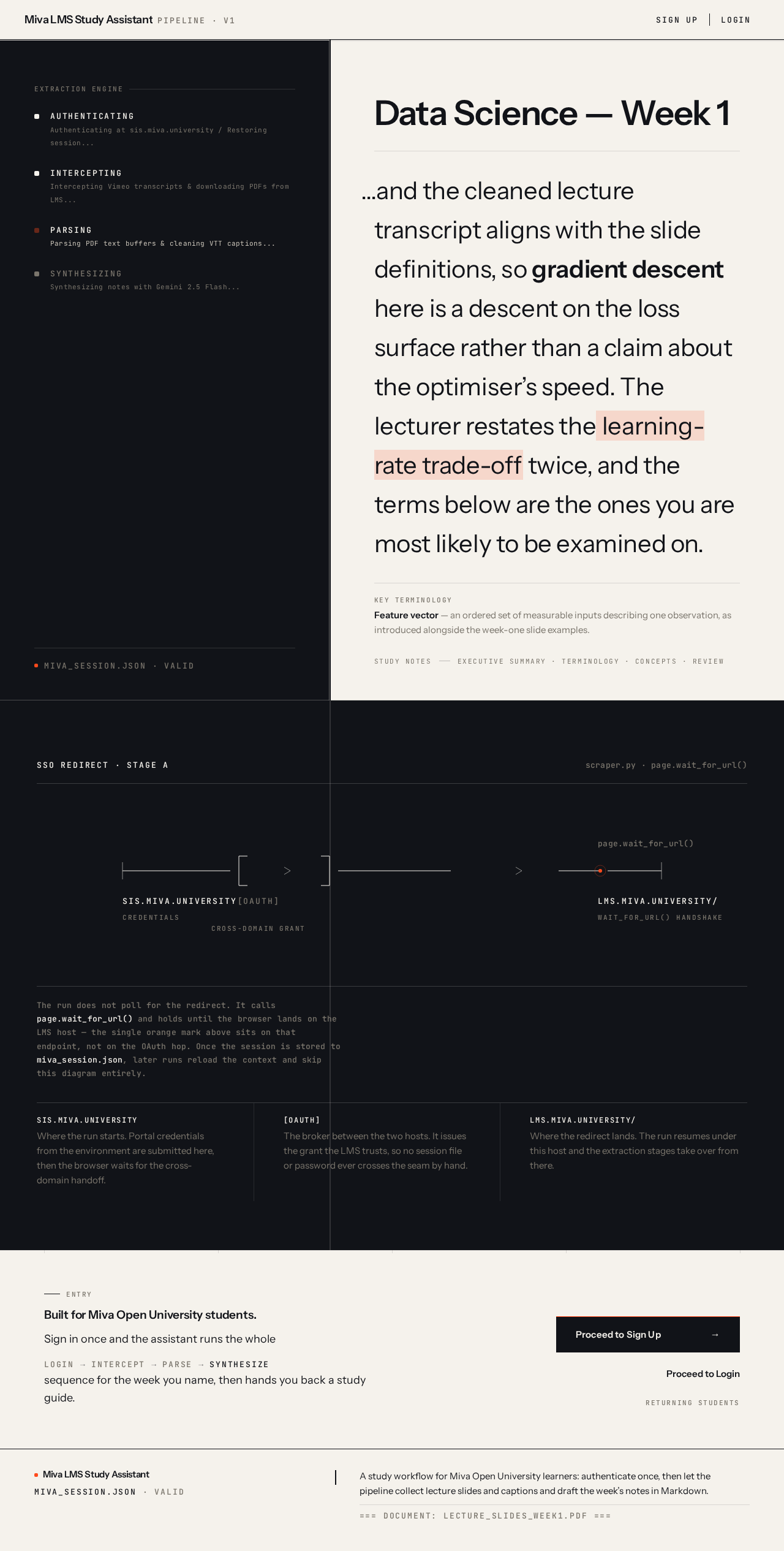
- AUTHENTICATINGAuthenticating at sis.miva.university / Restoring session...
- INTERCEPTINGIntercepting Vimeo transcripts & downloading PDFs from LMS...
- PARSINGParsing PDF text buffers & cleaning VTT captions...
- SYNTHESIZINGSynthesizing notes with Gemini 2.5 Flash...
miva_session.json · valid
Data Science — Week 1
…and the cleaned lecture transcript aligns with the slide definitions, so gradient descent here is a descent on the loss surface rather than a claim about the optimiser’s speed. The lecturer restates the learning-rate trade-off twice, and the terms below are the ones you are most likely to be examined on.
SSO Redirect · Stage A
The run does not poll for the redirect. It calls page.wait_for_url() and holds until the browser lands on the LMS host — the single orange mark above sits on that endpoint, not on the OAuth hop. Once the session is stored to miva_session.json, later runs reload the context and skip this diagram entirely.
Entry
Built for Miva Open University students.
Sign in once and the assistant runs the wholelogininterceptparsesynthesizesequence for the week you name, then hands you back a study guide.
- AUTHENTICATINGAuthenticating at sis.miva.university / Restoring session...
- INTERCEPTINGIntercepting Vimeo transcripts & downloading PDFs from LMS...
- PARSINGParsing PDF text buffers & cleaning VTT captions...
- SYNTHESIZINGSynthesizing notes with Gemini 2.5 Flash...
miva_session.json · valid
Data Science — Week 1
…and the cleaned lecture transcript aligns with the slide definitions, so gradient descent here is a descent on the loss surface rather than a claim about the optimiser’s speed. The lecturer restates the learning-rate trade-off twice, and the terms below are the ones you are most likely to be examined on.
SSO Redirect · Stage A
The run does not poll for the redirect. It calls page.wait_for_url() and holds until the browser lands on the LMS host — the single orange mark above sits on that endpoint, not on the OAuth hop. Once the session is stored to miva_session.json, later runs reload the context and skip this diagram entirely.
Entry
Built for Miva Open University students.
Sign in once and the assistant runs the wholelogininterceptparsesynthesizesequence for the week you name, then hands you back a study guide.
No comments yet. Be the first!