miva-lms-study-assistant
 Dieke Sydney
Here is the fully updated, complete master prompt reflecting all aspects of your system: the Miva SIS \rightarrow LMS SSO authentication redirect, Playwright PDF scraper, Vimeo caption network interceptor, pdfplumber document parser, and Gemini 2.5 Flash note generator. Master Prompt (Copy & Paste into Bolt.new, Replit Agent, or Cursor): Build a full-stack, modular web application called "Miva LMS Study Assistant" that automates logging into Miva Open University's portal, downloading PDF slides, intercepting closed-caption transcripts from embedded Vimeo video lectures, and generating comprehensive Markdown study notes using Gemini 2.5 Flash. --- ### 1. Technology Stack & Requirements - **Backend / Automation:** Python 3.11+ using `playwright` (Async API) - **PDF Extraction:** `pdfplumber` (with `pypdf` fallback) - **Video Transcript Capture:** Playwright background network listener filtering for `.vtt` / Vimeo text-track endpoints. - **AI Model:** `google-genai` SDK using `gemini-2.5-flash` - **Dashboard UI:** `streamlit` (or React/TypeScript full-stack equivalent) - **Environment & Secrets:** `PORTAL_USER`, `PORTAL_PASS`, and `GEMINI_API_KEY` stored in `.env`. --- ### 2. Multi-Stage Pipeline Architecture #### Stage A: SSO Authentication & Persistence (`scraper.py`) 1. **Login Flow:** Start at `https://sis.miva.university`. Fill in `PORTAL_USER` and `PORTAL_PASS`, submit the form, and wait for the cross-domain OAuth redirect to `https://lms.miva.university/**` using `page.wait_for_url()`. 2. **Session Storage:** Save the browser context to `miva_session.json` using `context.storage_state()`. 3. **Session Reuse:** On subsequent runs, check if `miva_session.json` exists. Load it into `browser.new_context(storage_state="miva_session.json")` to bypass the login form. If the session has expired, catch the error, delete `miva_session.json`, and re-authenticate. #### Stage B: Media & Material Extraction Engine 1. **Vimeo Transcript Interception:** - Attach an event listener to Playwright's network responses: `page.on("response", handle_response)`. - Inspect all incoming response URLs for `.vtt`, `texttrack`, or Vimeo caption tracks. - Extract raw WebVTT text and clean it by stripping `WEBVTT` headers, timestamp cues (`00:01:20 --> 00:01:23`), and inline HTML tags (`<c>`, `<i>`). - Find all embedded `<iframe>` elements matching `vimeo.com` on the LMS page and trigger play button clicks to force the player to load caption network requests. 2. **PDF Downloads:** - Locate all downloadable PDF links (`a[href*='.pdf']` or `a[href*='resource/view.php']`). - Download files into a local folder: `downloads/week_content/`. #### Stage C: Document Text Extraction (`pdf_processor.py`) - Read every PDF in `downloads/week_content/` using `pdfplumber`. Fall back to `pypdf` if `pdfplumber` fails. - Format all extracted PDF texts and intercepted Vimeo transcripts into a unified context payload: === VIMEO LECTURE TRANSCRIPT === [Cleaned transcript text from video] === DOCUMENT: Lecture_Slides_Week1.pdf === [Extracted PDF page text] - If a PDF yields zero characters, append: `[WARNING: Scanned/Image PDF detected for <filename>]`. #### Stage D: Gemini Synthesis Engine (`generator.py`) - Initialize the Google GenAI client: `from google import genai`. - Call `gemini-2.5-flash` with `temperature=0.2` and the following strict system instruction: ```text You are an academic tutor and research assistant. Analyze the provided PDF slides and Vimeo lecture transcripts for a given week and generate a unified, highly detailed study guide in clean Markdown. Structure: # [Course Name] — Week [Number] Study Notes ## 1. Executive Summary - 3 to 4 sentences synthesizing spoken lecture points and slide readings. ## 2. Key Terminology & Definitions - **Term**: Definition and context referenced in lectures or slides. ## 3. Core Concepts & Lecture Breakdown (Group topics logically into subsections. Synthesize slide theories alongside key verbal points or emphasis made by the lecturer during the video.) ## 4. Practice & Exam Review Questions (5 high-yield revision questions with brief answer hints to test comprehension.) 3. Dashboard UI & Workflows (app.py) * Sidebar Inputs: * Status check for PORTAL_USER, PORTAL_PASS, and GEMINI_API_KEY. * Fields for Course Name (e.g., "Data Science"), Week Identifier (e.g., "Week 1"), and Target LMS Week URL. * Button to "Clear Saved Session" (removes miva_session.json). * Main View & Progress Updates: * Action button: "Run Auto-Extraction & Generate Notes". * Live progress tracker showing: * Authenticating at sis.miva.university / Restoring session... * Intercepting Vimeo transcripts & downloading PDFs from LMS... * Parsing PDF text buffers & cleaning VTT captions... * Synthesizing notes with Gemini 2.5 Flash... * Output display with 3 tabs: * Tab 1: Study Notes — Rendered Markdown preview with a "Download Notes (.md)" button. * Tab 2: Extracted Context — View combined PDF text + intercepted Vimeo transcripts. * Tab 3: Downloaded Files — Summary list of saved PDF files and captured audio tracks. 4. Error Resilience & Setup * Execute playwright install chromium automatically if browser binaries are missing. * Ensure all directories (downloads/week_content/, output_notes/) are created if missing. * Wrap all network navigation and selector interactions in try/except blocks to prevent crashes on portal DOM updates.


Comments (0)
Sign in to leave a comment
Architecture
No Services Diagrams Yet
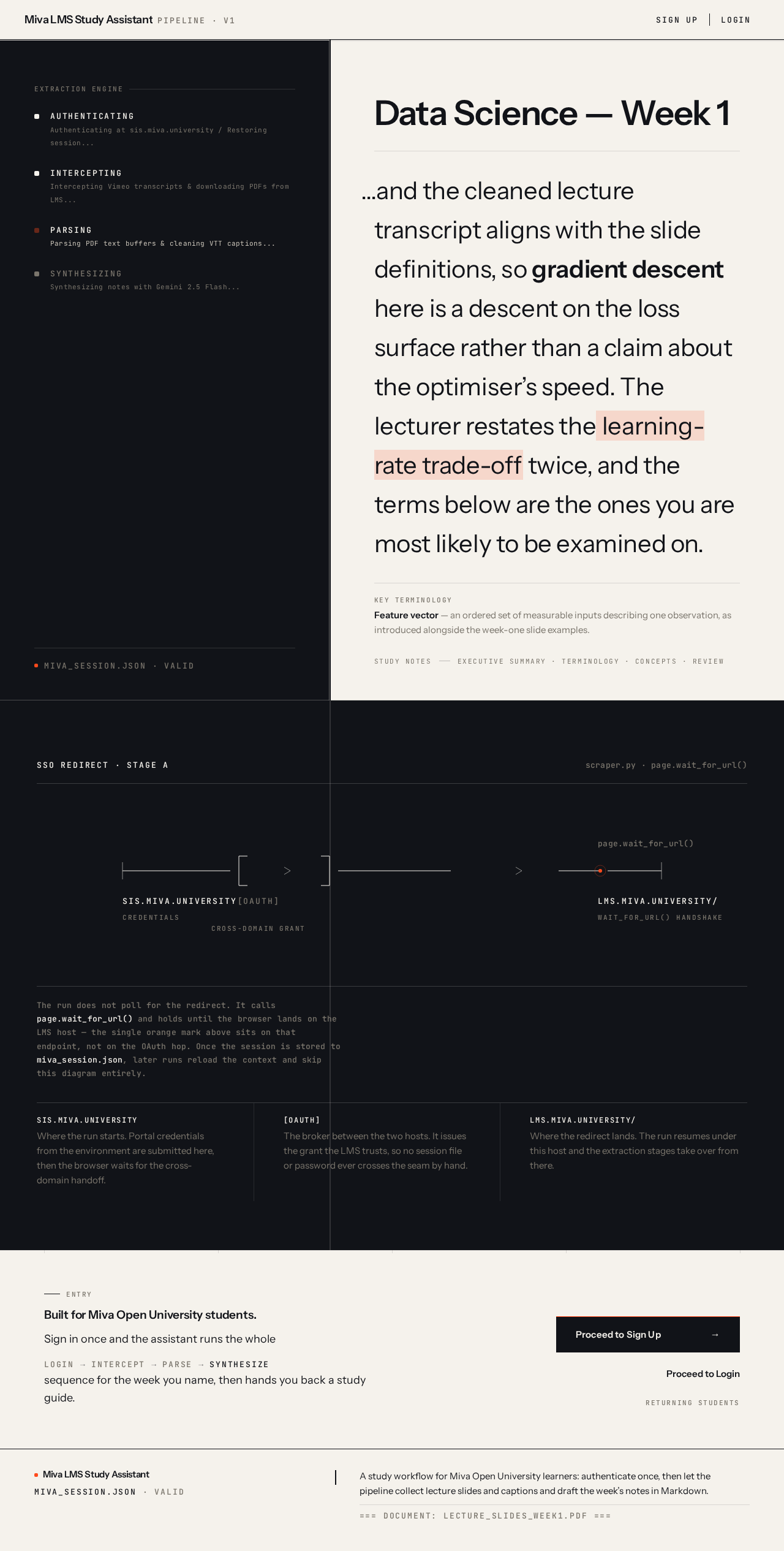
- AUTHENTICATINGAuthenticating at sis.miva.university / Restoring session...
- INTERCEPTINGIntercepting Vimeo transcripts & downloading PDFs from LMS...
- PARSINGParsing PDF text buffers & cleaning VTT captions...
- SYNTHESIZINGSynthesizing notes with Gemini 2.5 Flash...
miva_session.json · valid
Data Science — Week 1
…and the cleaned lecture transcript aligns with the slide definitions, so gradient descent here is a descent on the loss surface rather than a claim about the optimiser’s speed. The lecturer restates the learning-rate trade-off twice, and the terms below are the ones you are most likely to be examined on.
SSO Redirect · Stage A
The run does not poll for the redirect. It calls page.wait_for_url() and holds until the browser lands on the LMS host — the single orange mark above sits on that endpoint, not on the OAuth hop. Once the session is stored to miva_session.json, later runs reload the context and skip this diagram entirely.
Entry
Built for Miva Open University students.
Sign in once and the assistant runs the wholelogininterceptparsesynthesizesequence for the week you name, then hands you back a study guide.
- AUTHENTICATINGAuthenticating at sis.miva.university / Restoring session...
- INTERCEPTINGIntercepting Vimeo transcripts & downloading PDFs from LMS...
- PARSINGParsing PDF text buffers & cleaning VTT captions...
- SYNTHESIZINGSynthesizing notes with Gemini 2.5 Flash...
miva_session.json · valid
Data Science — Week 1
…and the cleaned lecture transcript aligns with the slide definitions, so gradient descent here is a descent on the loss surface rather than a claim about the optimiser’s speed. The lecturer restates the learning-rate trade-off twice, and the terms below are the ones you are most likely to be examined on.
SSO Redirect · Stage A
The run does not poll for the redirect. It calls page.wait_for_url() and holds until the browser lands on the LMS host — the single orange mark above sits on that endpoint, not on the OAuth hop. Once the session is stored to miva_session.json, later runs reload the context and skip this diagram entirely.
Entry
Built for Miva Open University students.
Sign in once and the assistant runs the wholelogininterceptparsesynthesizesequence for the week you name, then hands you back a study guide.
No comments yet. Be the first!