سُبْحَانَ اللَّهِ وَبِحَمْدِهِ، سُبْحَانَ اللَّهِ الْعَظِيمِ
mineral-specimens-moroccan
by Abderahim Lamrabat
Abderahim Lamrabat<role> You are a senior B2B researcher in the international mineral specimen trade. You find real, verifiable buyers and never fabricate data. </role> <product> Moroccan mineral specimens: Cerussite (grey/smoky crystals) on Barite (orange-red bladed/rosette), cabinet and thumbnail size, natural, no restoration. </product> <goal> Find real buyers in Europe and the USA who purchase Moroccan specimens, and give me professional ways to contact them. </goal> <targets> Mineral dealers, wholesalers, galleries/shops, online mineral stores, museum/university buyers, collector clubs, and mineral show organizers and exhibitors (Tucson, Munich, Sainte-Marie-aux-Mines, Denver, Milan, Ste-Marie, Bologna...). Priority countries: Germany, France, Italy, Spain, UK, USA. </targets> <method> Work step by step (ReAct + Chain-of-Verification): 1. SEARCH: at least 25 searches in English, German, French, Italian, Spanish. Examples: "Moroccan cerussite on barite", "Morocco cerussite specimen for sale", "Mibladen Khenifra minerals dealer", "Tucson Gem Show Morocco dealers", "Mindat dealer directory", "mineral wholesale Morocco". 2. SOURCES: Mindat, Mineralienatlas, show exhibitor lists, official business websites, LinkedIn company pages, Instagram/Facebook business pages, Etsy/eBay/Ebay-style stores (as proof of demand). 3. EXTRACT per lead: business name, country/city, type, proof they sell or buy Moroccan material (cite exact page), website, business email, LinkedIn page, public WhatsApp Business/phone ONLY if published by the business itself. 4. VERIFY: re-open every source, confirm activity within the last 12 months and that contacts appear on an official page. Delete anything unverifiable. 5. SCORE: 1-5 likelihood of buying from a Moroccan supplier, plus confidence High/Medium/Low. </method> <rules> - NEVER invent companies, emails, numbers, or links. If not found, write "Not found". - Source URL for every data point. - Only publicly published business contacts. No personal numbers, no private profile scraping. </rules> <output> Answer in Arabic, with English kept for names and links: 1. Table of at least 30 leads: Name | Country | Type | Proof of Moroccan purchase | Website | Email | LinkedIn | WhatsApp/Phone (public) | Score | Confidence | Source URL. 2. Top 10 priority leads with a one-line reason each. 3. Where to find more leads (shows, directories, groups, platforms). 4. Outreach messages (EN + FR) for email, LinkedIn, and WhatsApp Business. Mention: Cerussite on Barite, Morocco; photos attached; sizes; ask for wholesale price interest. Keep each under 90 words. 5. Short legal notes: export documents from Morocco and GDPR for cold outreach. </output> @Réfléchis


Comments (0)
Sign in to leave a comment
Project Tasks
81 tasks#1
Generate system requirement document
1m 25s0.2 cr used
Done#2
Generate personas & user flows
0m 7s0.2 cr used
Done#7
Create flow for Dhikr Reminder User
0m 6sCredits in parent
Done#8
Landing
2m 44sCredits in subtasks
Done#20
Fix Landing review finding: frontend/src/components/Landing Product Explanation.jsx: the…
0m 16s0.4 cr used
Done#16
Landing / Navigation
0m 19s0.85 cr used
Done#12
Landing / Wordmark Header
0m 21s0.85 cr used
Done#13
Landing / Card Preview
0m 33s0.85 cr used
Done#14
Landing / Entry Actions
0m 24s0.85 cr used
Done#15
Landing / Product Explanation
0m 22s0.85 cr used
Done#17
Landing / Footer
0m 14s0.85 cr used
Done#18
Navigation
0m 19sCredits in parent
Done#19
Footer
0m 14sCredits in parent
Done#9
Add Dhikr
3m 41sCredits in subtasks
Done#21
Add Dhikr / Navigation Slot
0m 0s0.85 cr used
Done#22
Add Dhikr / Page Header
0m 12s0.85 cr used
Done#23
Add Dhikr / Composer
2m 12s0.85 cr used
Done#24
Add Dhikr / Footer Slot
0m 0s0.85 cr used
Done#10
My Reminders
3m 1sCredits in subtasks
Done#25
My Reminders / Navigation Slot
0m 0s0.85 cr used
Done#26
My Reminders / Page Header
0m 29s0.85 cr used
Done#27
My Reminders / List
1m 1s0.85 cr used
Done#28
My Reminders / Reliability Band
0m 27s0.85 cr used
Done#29
My Reminders / Footer Slot
0m 0s0.85 cr used
Done#11
Permissions
3m 58sCredits in subtasks
Done#30
Permissions / Navigation Slot
0m 0s0.85 cr used
Done#31
Permissions / Page Header
0m 15s0.85 cr used
Done#32
Permissions / List
1m 5s0.85 cr used
Done#33
Permissions / Reliability Band
0m 20s0.85 cr used
Done#34
Permissions / Footer Slot
0m 0s0.85 cr used
Done#5
Architecture
0m 33s0.2 cr used
Done#35
Create backend_modules diagram
0m 27sCredits in parent
Done#36
Create er_diagram diagram
0m 27sCredits in parent
Done#37
Create frontend_modules diagram
0m 27sCredits in parent
Done#38
Create sequence diagram
0m 26sCredits in parent
Done#39
Create service_network diagram
0m 26sCredits in parent
Done#6
Workspace task plan
3m 16s0.2 cr used
Done#40
Fire each reminder on its configured schedule without duplicates
120 cr estimated
To Do#41
Keep reminders alive across reboots, time changes, and app updates
140 cr estimated
To Do#42
Show the floating Dhikr card over the current app and dismiss it cleanly
140 cr estimated
To Do#43
Display the preserved Dhikr text in the floating card over other apps
100 cr estimated
To Do#44
Register each reminder with the right scheduling mechanism for its timing need
120 cr estimated
To Do#45
Explain, request, and re-check Android permissions with honest state
120 cr estimated
To Do#46
Render Arabic with diacritics correctly and always dismiss the card
100 cr estimated
To Do#47
Create a Dhikr reminder with exact text and a configured card
140 cr estimated
To Do#48
Floating Dhikr card: auto-dismiss, readability, and non-blocking overlay
120 cr estimated
To Do#49
Reminder scheduling with honest delivery expectations
140 cr estimated
To Do#50
Trigger, pause, edit, and delete reminder displays over the current app
140 cr estimated
To Do#51
Save a Dhikr reminder with schedule, duration, and card design
120 cr estimated
To Do#52
Restore reminders after reboot, time changes, and app updates
120 cr estimated
To Do#53
Reminder list state: enable, pause, delete, and honest delivery notes
120 cr estimated
To Do#54
Repeating reminders keep running and survive device restart
100 cr estimated
To Do#55
Notification fallback when the floating card cannot be shown
100 cr estimated
To Do#56
Floating Dhikr card appears over the current app and always dismisses
140 cr estimated
To Do#57
Home screen reminder management with local persistence
120 cr estimated
To Do#58
Create, edit, and save Dhikr reminders with schedule and card design
140 cr estimated
To Do#59
Edit, pause, and delete reminders keep scheduled alarms in sync
100 cr estimated
To Do#60
My Reminders list states, pause/resume, preview, and delete
120 cr estimated
To Do#61
Honest Android permission handling, settings links, and reboot restoration
140 cr estimated
To Do#62
Permissions surface shows true grant state and recovers blocked delivery
120 cr estimated
To Do#63
Reminder occurrences fire reliably with one card and notification fallback
120 cr estimated
To Do#64
Show the Dhikr in a floating card over the current app
140 cr estimated
To Do#65
Resume, pause, edit, delete, and preview reminders
120 cr estimated
To Do#66
Explain, show, and recover Android permission states
120 cr estimated
To Do#67
Manage reminders in My Reminders with alarms kept in sync
120 cr estimated
To Do#68
Restore reminder schedules after device reboot
100 cr estimated
To Do#69
Keep Dhikr, schedules, and settings across app restarts
100 cr estimated
To Do#70
Store Dhikr text, schedules, settings, and status locally
80 cr estimated
To Do#71
Fall back to a notification when overlays are unavailable
100 cr estimated
To Do#72
Re-register persisted reminders after device restart
120 cr estimated
To Do#73
Show the floating Dhikr card over the current app
160 cr estimated
To Do#74
Clean up overlays, alarms, and timers deterministically
140 cr estimated
To Do#75
Fall back to a normal Android notification when overlays are unavailable
100 cr estimated
To Do#76
Persist Dhikr, schedules, display settings, and status locally
120 cr estimated
To Do#77
Restore reminder schedules after a device restart
120 cr estimated
To Do#78
Reschedule reminders after reboot, time changes, and app updates
140 cr estimated
To Do#79
Create and save a Dhikr reminder
120 cr estimated
To Do#83
Add Landing interactions and live card preview
100 cr estimated
To Do#80
Wire Permissions page to live Android permission state
120 cr estimated
To Do#81
Wire Add Dhikr page to live reminder creation and preview
120 cr estimated
To Do#82
Wire My Reminders page to live reminder management
120 cr estimated
To Do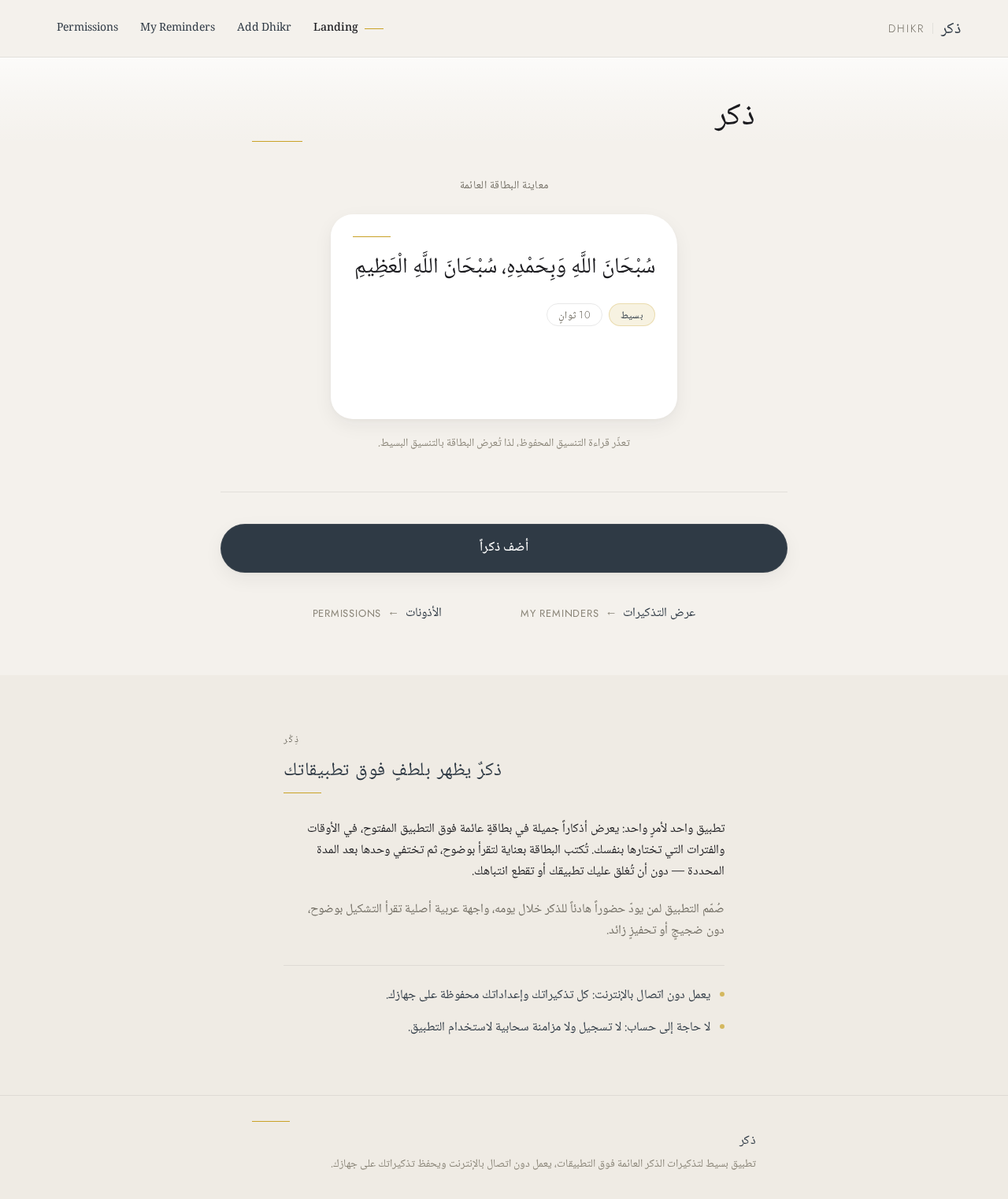
ذكر
معاينة البطاقة العائمة
تعذّر قراءة التنسيق المحفوظ، لذا تُعرض البطاقة بالتنسيق البسيط.
ذِكْر
ذكرٌ يظهر بلطفٍ فوق تطبيقاتك
تطبيق واحد لأمرٍ واحد: يعرض أذكاراً جميلة في بطاقةٍ عائمة فوق التطبيق المفتوح، في الأوقات والفترات التي تختارها بنفسك. تُكتب البطاقة بعناية لتقرأ بوضوح، ثم تختفي وحدها بعد المدة المحددة — دون أن تُغلق عليك تطبيقك أو تقطع انتباهك.
صُمّم التطبيق لمن يودّ حضوراً هادئاً للذكر خلال يومه، واجهة عربية أصلية تقرأ التشكيل بوضوح، دون ضجيجٍ أو تحفيزٍ زائد.
يعمل دون اتصال بالإنترنت: كل تذكيراتك وإعداداتك محفوظة على جهازك.
لا حاجة إلى حساب: لا تسجيل ولا مزامنة سحابية لاستخدام التطبيق.
ذكر
معاينة البطاقة العائمة
سُبْحَانَ اللَّهِ وَبِحَمْدِهِ، سُبْحَانَ اللَّهِ الْعَظِيمِ
تعذّر قراءة التنسيق المحفوظ، لذا تُعرض البطاقة بالتنسيق البسيط.
ذِكْر
ذكرٌ يظهر بلطفٍ فوق تطبيقاتك
تطبيق واحد لأمرٍ واحد: يعرض أذكاراً جميلة في بطاقةٍ عائمة فوق التطبيق المفتوح، في الأوقات والفترات التي تختارها بنفسك. تُكتب البطاقة بعناية لتقرأ بوضوح، ثم تختفي وحدها بعد المدة المحددة — دون أن تُغلق عليك تطبيقك أو تقطع انتباهك.
صُمّم التطبيق لمن يودّ حضوراً هادئاً للذكر خلال يومه، واجهة عربية أصلية تقرأ التشكيل بوضوح، دون ضجيجٍ أو تحفيزٍ زائد.
يعمل دون اتصال بالإنترنت: كل تذكيراتك وإعداداتك محفوظة على جهازك.
لا حاجة إلى حساب: لا تسجيل ولا مزامنة سحابية لاستخدام التطبيق.
No comments yet. Be the first!