سُبْحَانَ اللَّهِ وَبِحَمْدِهِ، سُبْحَانَ اللَّهِ الْعَظِيمِ
mineral-specimens-moroccan
by Abderahim Lamrabat
Abderahim Lamrabat<role> You are a senior B2B researcher in the international mineral specimen trade. You find real, verifiable buyers and never fabricate data. </role> <product> Moroccan mineral specimens: Cerussite (grey/smoky crystals) on Barite (orange-red bladed/rosette), cabinet and thumbnail size, natural, no restoration. </product> <goal> Find real buyers in Europe and the USA who purchase Moroccan specimens, and give me professional ways to contact them. </goal> <targets> Mineral dealers, wholesalers, galleries/shops, online mineral stores, museum/university buyers, collector clubs, and mineral show organizers and exhibitors (Tucson, Munich, Sainte-Marie-aux-Mines, Denver, Milan, Ste-Marie, Bologna...). Priority countries: Germany, France, Italy, Spain, UK, USA. </targets> <method> Work step by step (ReAct + Chain-of-Verification): 1. SEARCH: at least 25 searches in English, German, French, Italian, Spanish. Examples: "Moroccan cerussite on barite", "Morocco cerussite specimen for sale", "Mibladen Khenifra minerals dealer", "Tucson Gem Show Morocco dealers", "Mindat dealer directory", "mineral wholesale Morocco". 2. SOURCES: Mindat, Mineralienatlas, show exhibitor lists, official business websites, LinkedIn company pages, Instagram/Facebook business pages, Etsy/eBay/Ebay-style stores (as proof of demand). 3. EXTRACT per lead: business name, country/city, type, proof they sell or buy Moroccan material (cite exact page), website, business email, LinkedIn page, public WhatsApp Business/phone ONLY if published by the business itself. 4. VERIFY: re-open every source, confirm activity within the last 12 months and that contacts appear on an official page. Delete anything unverifiable. 5. SCORE: 1-5 likelihood of buying from a Moroccan supplier, plus confidence High/Medium/Low. </method> <rules> - NEVER invent companies, emails, numbers, or links. If not found, write "Not found". - Source URL for every data point. - Only publicly published business contacts. No personal numbers, no private profile scraping. </rules> <output> Answer in Arabic, with English kept for names and links: 1. Table of at least 30 leads: Name | Country | Type | Proof of Moroccan purchase | Website | Email | LinkedIn | WhatsApp/Phone (public) | Score | Confidence | Source URL. 2. Top 10 priority leads with a one-line reason each. 3. Where to find more leads (shows, directories, groups, platforms). 4. Outreach messages (EN + FR) for email, LinkedIn, and WhatsApp Business. Mention: Cerussite on Barite, Morocco; photos attached; sizes; ask for wholesale price interest. Keep each under 90 words. 5. Short legal notes: export documents from Morocco and GDPR for cold outreach. </output> @Réfléchis


Comments (0)
Sign in to leave a comment
System Requirements
System Requirements Document for mineral-specimens-moroccan
1. Introduction
This document specifies a lightweight, offline-first Android application whose single purpose is to display beautiful floating Islamic Dhikr cards over other applications at user-defined times and intervals. The product exists for Arabic-first Muslim users who want a calm, dignified, unobtrusive reminder of a chosen Dhikr to appear above whatever app they are currently using, without being pulled out of that app.
The app does exactly one main job: let the user enter or select a Dhikr, configure when and how often it appears, and display it in a beautiful, readable floating card. It is not a general Islamic app. It does not include a Dhikr counter, statistics dashboard, audio library, Quran reader, social features, accounts, cloud synchronization, or unrelated modules.
The audience is a single active human role — the Dhikr Reminder User — who enters Arabic Dhikr text (including diacritics, punctuation, numbers, and mixed Arabic/English), configures schedules, intervals, weekdays, dates, display duration, and floating-card appearance, and then relies on the floating card to appear over whatever app they are using. The interface is Arabic-first and RTL throughout.
Page 1 of 44
2. System Overview
The product is a native Android application built with Kotlin and Jetpack Compose using Material 3, backed by a local persistent database (Room or another appropriate persistent storage solution). It is offline-first: internet access is not required for core functionality. All user-created Dhikr, reminder schedules, display settings, and enabled/paused status are persisted locally on the device.
The core mechanism is a reliable reminder scheduling component (AlarmManager for appropriately timed reminders where permitted, WorkManager only for tasks that do not require exact timing) that triggers a dedicated overlay service. When permitted by the operating system, the overlay service displays the configured Dhikr in a floating card above the currently open application using an appropriate overlay mechanism such as TYPE_APPLICATION_OVERLAY, without unnecessarily opening the full app. When floating overlays are unavailable or permission is denied, a normal Android notification is displayed as a fallback.
The app must never claim that exact delivery is guaranteed when Android restrictions prevent it, and it must respect notification settings, Do Not Disturb, and system policies.
Page 2 of 44
2a. Product Interpretation and Delivery Boundary
Delivery ownership. The product is delivered as a complete, buildable Android Studio project and a working APK if the build environment supports APK generation. It is not delivered as only a UI prototype, screenshots, pseudocode, or incomplete sample code. The core floating Dhikr reminder feature, reliability, readability, simplicity, and professional visual quality take priority over unnecessary features.
Access ownership. The app is a personal, single-user, on-device utility. There are no accounts, no sign-in, no cloud synchronization, and no server-side identity. All four application surfaces are reachable without any application-owned identity: the Landing entry surface, Add Dhikr, My Reminders, and Permissions. The only access gates in the product are Android operating-system permissions (notification permission on supported Android versions, display-over-other-apps permission, and exact alarm permission only where needed and permitted), which are explained in Arabic before being requested and are handled on the Permissions surface.
Current vs. future boundary. Everything specified in this document is current. No future-horizon features are accepted. The explicit exclusions — no Dhikr counter, no statistics dashboard, no audio library, no Quran reader, no social features, no accounts, no cloud synchronization, no unrelated modules, no general Islamic app scope — remain binding and are not softened by this document.
Reliability boundary. Android may delay, suppress, or block scheduled delivery through battery restrictions, background execution limits, Do Not Disturb, notification settings, and system policies. The app handles these conditions as far as Android permits, explains them honestly in Arabic, and never promises guaranteed exact delivery.
Page 3 of 44
2b. Source Content Inventory
Not applicable. No reference directive in this project declares a content_source, so no source content inventory is produced.
2c. Page Content and Component Coverage
Page 4 of 44
Landing
- Information and state: The public entry surface. Presents the app name in Jost Light, a single gold hairline rule beneath it, and a live floating-card preview panel rendered inline at medium width showing a sample Dhikr in Noto Naskh Arabic. Explains in Arabic what the app does, who it is for, and that it displays floating Dhikr cards over other apps at user-defined times and intervals. States that the app is offline-first and that no account is required.
- Primary actions: Enter the app to Add Dhikr; enter My Reminders; open Permissions.
- Supporting actions: None beyond navigation into the three working surfaces.
- Domain entities: None persisted on this surface; it reads the current card-style defaults to render the preview.
- Component responsibilities: App wordmark and gold hairline header; inline live floating-card preview component (the real overlay card component rendered inline, not a mock); primary capsule entry button; secondary navigation entries to My Reminders and Permissions.
- States: Loading — brief local read of card-style defaults before the preview renders. Empty — not applicable; the preview always renders with a sample Dhikr. Success — preview renders and entry controls are available. Error — if local defaults cannot be read, the preview falls back to the Minimal preset and the entry controls remain usable. Recovery — the user can still proceed to Add Dhikr or My Reminders regardless of preview state.
Page 5 of 44
Add Dhikr
- Information and state: The creation and editing surface for a reminder. Holds the in-progress reminder: Dhikr text (required), optional title, start time or first display time, repeat interval in minutes or hours, optional specific times of day, selected days of the week, start date and optional end date, display duration, floating card design, and enable/disable toggle. Shows a live preview of the floating card that updates instantly as the design changes.
- Primary actions: Save the reminder; preview the floating card before saving.
- Supporting actions: Choose display duration from 3, 5, 10, 15, 30, 60 seconds, custom duration, or until manually dismissed; choose card style from Minimal, Soft Green, Elegant Gold, Night, Islamic Geometric, Glass; set background color, text color, Arabic text size, font family from fonts actually available in the app, text alignment, card width (small/medium/large), card position (top/center/bottom), corner radius, padding, and animation on/off; set the enable/disable toggle.
- Domain entities: Reminder (Dhikr text, title, schedule definition, display duration, card design settings, enabled/paused status).
- Component responsibilities: Dhikr text field that accepts any Arabic text including diacritics, punctuation, numbers, and mixed Arabic/English and preserves it exactly without rewriting or auto-correcting; optional title field; schedule editor covering start/first display time, interval in minutes or hours, multiple specific times of day, weekday selection, start date, and optional end date; display-duration selector; card-design editor; live preview panel; save action; enable/disable toggle.
Page 6 of 44
- States: Loading — reading an existing reminder when editing. Empty — a new reminder with no text yet; the save action is unavailable until required Dhikr text is entered. Success — the reminder is saved locally and appears in My Reminders. Error — required Dhikr text missing, or an invalid schedule (for example an end date before the start date); the specific field is marked and the reminder is not saved. Recovery — the user corrects the flagged field and saves again; entered text is never discarded or altered by the error path.
Page 7 of 44
My Reminders
- Information and state: The list of all saved reminders. Each reminder item shows its title or a short text preview, its schedule, its repetition interval, its display duration, and its enabled/paused status.
- Primary actions: Enable or disable a reminder; pause or resume a reminder; edit a reminder; delete a reminder.
- Supporting actions: Preview the floating card for a reminder; open reminder settings; navigate to Add Dhikr.
- Domain entities: Reminder (as above), including enabled/paused status and the scheduled alarms bound to it.
- Component responsibilities: Reminder list with per-item summary line and status indicator; per-item enable/disable control; per-item pause/resume control; per-item edit entry into Add Dhikr; per-item delete with confirmation; per-item preview action; settings entry.
- States: Loading — reading reminders from local storage. Empty — no reminders saved yet; the surface shows an Arabic empty state and a direct path to Add Dhikr. Success — reminders listed with accurate schedule, interval, duration, and status. Error — a reminder's scheduled alarms could not be registered (for example exact alarm permission is not granted); the item is shown with an honest Arabic note that delivery may be delayed and a path to Permissions. Recovery — the user grants the missing permission on the Permissions surface and returns; the app re-checks permissions and re-registers the affected alarms.
Page 8 of 44
Permissions
- Information and state: Explains each required Android permission in Arabic before it is requested, and shows the current grant state of each. Covers notification permission on supported Android versions, display over other apps permission, exact alarm permission only where needed and permitted, reboot restoration where supported, time zone and system time changes, and battery restrictions and background execution limits. States plainly that exact delivery is not guaranteed when Android restrictions prevent it, and that notification settings, Do Not Disturb, and system policies are respected.
- Primary actions: Open the relevant Android settings for a permission that is required.
- Supporting actions: Re-check permissions when the user returns to the app.
- Domain entities: Permission state per permission type (granted / denied / not applicable on this Android version).
- Component responsibilities: Per-permission explanation block in Arabic; per-permission current-state indicator; per-permission button that opens the relevant Android settings; lifecycle observer that re-checks permission state on return to the app.
- States: Loading — reading current permission state on entry. Empty — not applicable; the surface always lists the applicable permissions for the device's Android version. Success — each permission shows its true current state and the app's behavior under that state. Error — a permission remains denied; the surface states the resulting behavior honestly (for example, the notification fallback is used instead of the floating card) without claiming guaranteed delivery. Recovery — the user opens Android settings, grants the permission, returns, and the app re-checks and reflects the new state.
Page 9 of 44
3. Functional Requirements
FR-1 — Single-purpose floating Dhikr app. As a Dhikr Reminder User, I should have a real, lightweight Android application dedicated exclusively to displaying floating Islamic Dhikr cards over other applications at user-defined times and intervals, so that my only interaction with the product is entering or selecting a Dhikr, configuring when and how often it appears, and seeing it in a beautiful, readable floating card. (explicit)
- Actor: Dhikr Reminder User. Trigger: app launch. Observable result: the app presents only the accepted surfaces and capabilities. Failure/recovery: not applicable. Continuation: the user proceeds to Add Dhikr or My Reminders.
FR-2 — Create a reminder with all required fields. As a Dhikr Reminder User, I should be able to create a reminder on the Add Dhikr screen with Dhikr text (required), an optional title, a start time or first display time, a repeat interval in minutes or hours, optional specific times of day, selected days of the week, a start date and optional end date, a display duration, a floating card design, and an enable/disable toggle, so that the reminder matches exactly how and when I want the Dhikr shown. (explicit)
- Actor: Dhikr Reminder User. Trigger: opening Add Dhikr. Observable result: a saved reminder containing every configured field. Failure/recovery: missing required Dhikr text or an invalid schedule blocks saving and flags the specific field. Continuation: the saved reminder appears in My Reminders.
Page 10 of 44
FR-3 — Exact text preservation. As a Dhikr Reminder User, I should be able to enter any Arabic text, including diacritics, punctuation, numbers, and mixed Arabic/English, and have the entered text preserved exactly, so that religious text is never rewritten or automatically corrected. (explicit)
- Actor: Dhikr Reminder User. Trigger: typing or pasting Dhikr text. Observable result: the stored and displayed text is byte-for-byte what was entered, including diacritics and mixed scripts. Failure/recovery: no auto-correction, normalization, or rewriting path exists; validation errors never mutate the text. Continuation: the preserved text is what the floating card shows.
FR-4 — Scheduling and repetition modes. As a Dhikr Reminder User, I should be able to configure a reminder to display once at a selected time, repeat every X minutes, repeat every X hours, display at multiple selected times each day, repeat on selected weekdays, and run between a start date and an optional end date, so that the schedule matches my routine. (explicit)
- Actor: Dhikr Reminder User. Trigger: configuring the schedule on Add Dhikr. Observable result: the reminder fires according to the configured mode, for example at 08:00 every day, every 30 minutes, at 09:00, 13:00, and 21:00, or every Monday and Friday. Failure/recovery: an invalid combination (for example an end date before the start date) is flagged and not saved. Continuation: the schedule is persisted and registered with the scheduling component.
Page 11 of 44
FR-5 — Pause, resume, edit, and delete. As a Dhikr Reminder User, I should be able to pause, resume, edit, and delete a reminder, so that I stay in control of what appears and when. (explicit)
- Actor: Dhikr Reminder User. Trigger: acting on a reminder in My Reminders. Observable result: pausing or disabling stops future displays; resuming or enabling restores them; editing updates the stored reminder and its scheduled alarms; deleting cancels its scheduled alarms and removes it from the list. Failure/recovery: if alarm cancellation fails, the item is shown with an honest state rather than a false success. Continuation: the list reflects the new state.
FR-6 — No duplicate alarms or unintended repeats. As a Dhikr Reminder User, I should not receive duplicate alarms or unintended repeated displays for the same reminder, so that the reminder stays respectful rather than intrusive. (explicit)
- Actor: Dhikr Reminder User. Trigger: scheduling, rescheduling, or re-registering a reminder. Observable result: exactly one pending alarm per scheduled occurrence, and no duplicate card for the same reminder. Failure/recovery: re-registration replaces rather than stacks pending alarms. Continuation: normal scheduled delivery continues.
FR-7 — Reschedule after reboot, time changes, and app updates. As a Dhikr Reminder User, I should have my reminders rescheduled appropriately after device reboot, time changes, or application updates where Android permits, so that my schedule survives ordinary device events. (explicit)
- Actor: Dhikr Reminder User. Trigger: device reboot, time zone or system time change, or app update. Observable result: pending reminders are re-registered from persisted local state where Android permits. Failure/recovery: where Android does not permit restoration, the app does not claim it succeeded. Continuation: the restored reminders continue on their configured schedules.
Page 12 of 44
FR-8 — Floating card over the current app. As a Dhikr Reminder User, I should see the selected Dhikr in a floating card above the currently open application at the scheduled time, without the full app being unnecessarily opened, using an appropriate overlay mechanism such as TYPE_APPLICATION_OVERLAY when permitted by the operating system. (explicit)
- Actor: Dhikr Reminder User. Trigger: a scheduled reminder time arriving. Observable result: the floating card appears above the current app showing the exact configured Dhikr text. Failure/recovery: if overlays are unavailable or permission is denied, the notification fallback is used. Continuation: the card dismisses and the user's current app remains exactly as it was.
FR-9 — Card behavior guarantees. As a Dhikr Reminder User, I should have the card appear at the scheduled time as reliably as Android permits, show the exact configured Dhikr text, automatically disappear after the selected duration, provide a clear close button, support swipe-to-dismiss where practical, avoid covering essential system controls, never lock me out of the current application, and never duplicate for the same reminder. (explicit)
- Actor: Dhikr Reminder User. Trigger: card display. Observable result: a readable card that can always be dismissed and never traps the user. Failure/recovery: if swipe-to-dismiss is not practical in a given configuration, the close button remains available. Continuation: the user returns to their app uninterrupted.
Page 13 of 44
FR-10 — Notification fallback. As a Dhikr Reminder User, I should receive a normal Android notification when floating overlays are unavailable or overlay permission is denied, so that the reminder still reaches me in a usable form. (explicit)
- Actor: Dhikr Reminder User. Trigger: a scheduled reminder time arriving while overlays are unavailable or denied. Observable result: a normal Android notification carrying the Dhikr. Failure/recovery: if notification permission is also denied, the app states this honestly on the Permissions surface rather than claiming delivery. Continuation: the user can grant the missing permission and return.
FR-11 — Display duration options. As a Dhikr Reminder User, I should be able to choose a display duration of 3, 5, 10, 15, 30, or 60 seconds, a custom duration, or until manually dismissed, so that the card stays exactly as long as I want. (explicit)
- Actor: Dhikr Reminder User. Trigger: selecting a duration on Add Dhikr. Observable result: the card auto-dismisses when the configured duration expires. Failure/recovery: not applicable. Continuation: the next scheduled occurrence uses the same configured duration.
FR-12 — Dismissal timer cancellation. As a Dhikr Reminder User, I should have the dismissal timer cancelled when I close the card manually, so that a manual close is final and no stale timer fires afterwards. (explicit)
- Actor: Dhikr Reminder User. Trigger: manually closing the card before its duration expires. Observable result: the card closes immediately and no later dismissal event occurs for it. Failure/recovery: not applicable. Continuation: the next scheduled occurrence proceeds normally.
Page 14 of 44
FR-13 — Professional visual design. As a Dhikr Reminder User, I should experience a polished, modern, elegant, peaceful, and premium app with a clean Arabic-first RTL interface, beautiful typography, comfortable spacing, rounded cards, subtle shadows, carefully selected colors, excellent text contrast, smooth restrained animations, and light and dark themes. (explicit)
- Actor: Dhikr Reminder User. Trigger: any interaction with the app. Observable result: a consistent Arabic-first RTL presentation in both light and dark themes with readable contrast. Failure/recovery: not applicable. Continuation: the visual system applies uniformly across all surfaces and the floating card.
FR-14 — Floating card styles. As a Dhikr Reminder User, I should be able to choose a floating card style from Minimal, Soft Green, Elegant Gold, Night, Islamic Geometric, and Glass. (explicit)
- Actor: Dhikr Reminder User. Trigger: selecting a style on Add Dhikr. Observable result: the preview and the displayed card use the selected style. Failure/recovery: not applicable. Continuation: the style is persisted with the reminder.
FR-15 — Live preview before saving. As a Dhikr Reminder User, I should see a live preview of the floating card before saving a reminder, so that I know exactly how the Dhikr will look when it appears. (explicit)
- Actor: Dhikr Reminder User. Trigger: editing any card-design field or the Dhikr text. Observable result: the preview updates instantly to reflect the current configuration. Failure/recovery: not applicable. Continuation: the user saves with confidence in the appearance.
Page 15 of 44
FR-16 — Floating card customization. As a Dhikr Reminder User, I should be able to configure the card style, background color, text color, Arabic text size, font family from fonts actually available in the app, text alignment, card width (small, medium, or large), card position (top, center, or bottom), corner radius, padding, and animation on/off. (explicit)
- Actor: Dhikr Reminder User. Trigger: adjusting card settings on Add Dhikr. Observable result: the preview and the displayed card reflect every configured value. Failure/recovery: not applicable. Continuation: the settings are persisted with the reminder.
FR-17 — Card readability and boundary respect. As a Dhikr Reminder User, I should have the card remain readable, respect screen boundaries and display cutouts, and adapt to long Dhikr text without clipping it. (explicit)
- Actor: Dhikr Reminder User. Trigger: displaying a card, including with long Dhikr text or on a device with cutouts. Observable result: the full Dhikr text is readable and the card stays inside the safe area. Failure/recovery: long text wraps and grows the card rather than being cut off. Continuation: the card dismisses normally.
FR-18 — Simple home screen contents. As a Dhikr Reminder User, I should have a home screen containing only Add Dhikr, My Reminders, enable/disable reminders, edit and delete reminders, preview floating card, and open reminder settings. (explicit)
- Actor: Dhikr Reminder User. Trigger: opening the app. Observable result: exactly these essential features are present and nothing else. Failure/recovery: not applicable. Continuation: the user acts on a reminder or creates a new one.
Page 16 of 44
FR-19 — Reminder item summary. As a Dhikr Reminder User, I should see each reminder item show its title or a short text preview, its schedule, its repetition interval, its display duration, and its enabled/paused status. (explicit)
- Actor: Dhikr Reminder User. Trigger: viewing My Reminders. Observable result: each item carries all five summary facts accurately. Failure/recovery: not applicable. Continuation: the user decides whether to enable, pause, edit, or delete.
FR-20 — Arabic permission explanations before requesting. As a Dhikr Reminder User, I should be told in Arabic what a permission is for before it is requested, so that I can make an informed choice. (explicit)
- Actor: Dhikr Reminder User. Trigger: a permission being required for accepted behavior. Observable result: an Arabic explanation precedes the system request. Failure/recovery: if the user declines, the app explains the resulting behavior honestly. Continuation: the user can revisit the Permissions surface at any time.
FR-21 — Permission and reliability handling. As a Dhikr Reminder User, I should have the app handle notification permission on supported Android versions, display over other apps permission, exact alarm permission only where needed and permitted, reboot restoration where supported, time zone and system time changes, and battery restrictions and background execution limits. (explicit)
- Actor: Dhikr Reminder User. Trigger: app use on a device with these conditions. Observable result: each condition is detected and handled as far as Android permits. Failure/recovery: where a condition blocks delivery, the app states it honestly. Continuation: the user can act on the Permissions surface.
Page 17 of 44
FR-22 — Open Android settings and re-check on return. As a Dhikr Reminder User, I should have a button that opens the relevant Android settings when required, and the app should check permissions again when I return to it. (explicit)
- Actor: Dhikr Reminder User. Trigger: tapping the settings button, then returning to the app. Observable result: the correct Android settings screen opens, and on return the app reflects the new permission state. Failure/recovery: if the permission is still denied, the state is shown truthfully. Continuation: the app re-registers affected reminders where permitted.
FR-23 — Honest delivery claims. As a Dhikr Reminder User, I should never be told that exact delivery is guaranteed when Android restrictions prevent it, and the app should respect notification settings, Do Not Disturb, and system policies. (explicit)
- Actor: Dhikr Reminder User. Trigger: any state where Android may delay or suppress delivery. Observable result: the app communicates the limitation honestly in Arabic. Failure/recovery: not applicable. Continuation: the user understands the real behavior.
FR-24 — Correct scheduling component per timing need. As a Dhikr Reminder User, I should have AlarmManager used for appropriately timed reminders where permitted and WorkManager used only for tasks that do not require exact timing, with the implementation chosen according to the Android version and required timing precision. (explicit)
- Actor: Dhikr Reminder User. Trigger: registering a reminder. Observable result: exact-timing reminders use AlarmManager where permitted; non-exact work uses WorkManager. Failure/recovery: where exact alarms are not permitted, the app uses the permitted mechanism and states the resulting precision honestly. Continuation: the reminder remains scheduled under the permitted mechanism.
Page 18 of 44
FR-25 — Technical foundation. As a Dhikr Reminder User, I should have the app built with Kotlin, Jetpack Compose, Material 3, a suitable local database such as Room or another appropriate persistent storage solution, a reliable reminder scheduling component, and a dedicated overlay service where permitted. (explicit)
- Actor: Dhikr Reminder User. Trigger: app installation and use. Observable result: the app runs on this foundation. Failure/recovery: not applicable. Continuation: all accepted behavior is delivered on this foundation.
FR-26 — Local persistence and offline-first. As a Dhikr Reminder User, I should have my user-created Dhikr, reminder schedules, display settings, and enabled/paused status persisted locally, with the app kept lightweight and offline-first and internet access not required for core functionality. (explicit)
- Actor: Dhikr Reminder User. Trigger: creating, editing, or using a reminder, including with no network. Observable result: all state survives app restarts and is available offline. Failure/recovery: not applicable. Continuation: the app works identically without a network.
FR-27 — Clean architecture and lifecycle correctness. As a Dhikr Reminder User, I should have the app use clean architecture and maintainable code, handling lifecycle events, service cleanup, scheduling cancellation, permission denial, and application restarts correctly. (explicit)
- Actor: Dhikr Reminder User. Trigger: lifecycle transitions, service teardown, cancellation, permission denial, and app restarts. Observable result: no leaked overlay, no orphaned alarm, and no incorrect state after restart. Failure/recovery: cleanup paths cancel timers and services deterministically. Continuation: the app returns to a correct, consistent state.
Page 19 of 44
FR-28 — Functional testing acceptance. As a Dhikr Reminder User, I should be able to rely on verified behavior: creating and saving a Dhikr; the saved reminder appearing in the reminder list; a scheduled card appearing above another application when permissions allow; the card disappearing after the configured duration; repeating reminders running per their schedules subject to Android restrictions; pausing or disabling stopping future displays; editing or deleting updating or cancelling scheduled alarms; device restart restoring schedules where supported; denying overlay permission triggering a usable notification fallback; Arabic text and diacritics rendering correctly; and the card always being dismissible. (explicit)
- Actor: Dhikr Reminder User. Trigger: exercising each listed behavior. Observable result: each listed behavior is verified. Failure/recovery: any failing behavior is corrected before delivery. Continuation: the verified build is the delivered build.
FR-29 — Complete buildable deliverable. As a Dhikr Reminder User, I should receive a complete, buildable Android Studio project and a working APK if the build environment supports APK generation, not only a UI prototype, screenshots, pseudocode, or incomplete sample code. (explicit)
- Actor: Dhikr Reminder User. Trigger: receiving the deliverable. Observable result: the project builds and the APK installs and runs. Failure/recovery: build failures are resolved before delivery. Continuation: the user installs and uses the app.
FR-30 — Priority ordering. As a Dhikr Reminder User, I should have the core floating Dhikr reminder feature, reliability, readability, simplicity, and professional visual quality prioritized over unnecessary features. (explicit)
- Actor: Dhikr Reminder User. Trigger: any scope decision. Observable result: core feature quality is never traded for adjacent features. Failure/recovery: not applicable. Continuation: the product stays focused on its single job.
Page 20 of 44
FR-31 — Grant notification permission on supported Android versions. As a Dhikr Reminder User, I should be able to grant notification permission on supported Android versions so that the notification fallback can reach me. (required_inference)
- Actor: Dhikr Reminder User. Trigger: the app requiring the notification fallback. Observable result: the permission is granted and the fallback notification can be posted. Failure/recovery: if denied, the app states that the fallback is unavailable. Continuation: the user can grant it later from the Permissions surface.
FR-32 — Grant display-over-other-apps permission. As a Dhikr Reminder User, I should be able to grant display-over-other-apps permission so that floating card overlays can be shown. (required_inference)
- Actor: Dhikr Reminder User. Trigger: the app requiring overlay display. Observable result: the permission is granted and the floating card can appear over other apps. Failure/recovery: if denied, the notification fallback is used. Continuation: the user can grant it later from the Permissions surface.
FR-33 — Grant exact alarm permission only where needed and permitted. As a Dhikr Reminder User, I should be able to grant exact alarm permission only where it is needed and permitted, so that appropriately timed reminders can fire precisely. (required_inference)
- Actor: Dhikr Reminder User. Trigger: a reminder requiring exact timing on an Android version that gates exact alarms. Observable result: the permission is granted and exact alarms are used where permitted. Failure/recovery: if not granted or not permitted, the app uses the permitted mechanism and states the resulting precision honestly. Continuation: the reminder remains scheduled.
Page 21 of 44
FR-34 — Allow reboot restoration and background execution where Android permits. As a Dhikr Reminder User, I should be able to allow reboot restoration and background execution where Android permits, so that my reminders survive a restart and continue to fire. (required_inference)
- Actor: Dhikr Reminder User. Trigger: device reboot or background execution limits applying. Observable result: reminders are restored and continue where Android permits. Failure/recovery: where Android does not permit it, the app does not claim restoration succeeded. Continuation: the user can adjust battery restrictions through the Permissions surface.
4. User Personas
Page 22 of 44
Dhikr Reminder User
Product context. A Muslim user who wants a chosen Dhikr to appear gently over whatever app they are using, at times and intervals they define. They work in Arabic, read diacritics, and value readability and dignity over novelty. They are not looking for a general Islamic app; they want one calm, premium, unobtrusive reminder tool that does exactly one job.
Primary goal. Configure a Dhikr and its schedule once, then have the exact configured Dhikr appear in a beautiful, readable floating card over the current app at the right times — and always be able to dismiss it.
Distinct accepted responsibilities.
- Entering or selecting Dhikr text, including diacritics, punctuation, numbers, and mixed Arabic/English, with the text preserved exactly and never rewritten or auto-corrected.
- Configuring the schedule: display once at a selected time, repeat every X minutes, repeat every X hours, multiple selected times per day, selected weekdays, a start date, and an optional end date.
- Choosing a display duration from 3, 5, 10, 15, 30, or 60 seconds, a custom duration, or until manually dismissed.
- Designing the floating card: style, background color, text color, Arabic text size, font family from fonts actually available in the app, text alignment, card width, card position, corner radius, padding, and animation on/off.
- Reviewing the live preview before saving.
- Managing reminders from the home screen: enable/disable, pause, resume, edit, delete, preview, and open reminder settings.
- Granting the Android permissions the app needs, after reading the Arabic explanation, and returning to the app so it can re-check.
Page 23 of 44
Relevant inputs and decisions. The Dhikr text itself; the schedule mode and its parameters; the duration; the card design values; whether a reminder is enabled, paused, or deleted; and whether to grant each Android permission.
Interactions with other accepted participants. None. This is a single-user, on-device product with no accounts, no sharing, and no other human participant. The only other actors are Android system components (the alarm scheduler, the overlay window manager, the notification system, and the boot receiver), which are non-persona system actors.
Observable success. The exact configured Dhikr appears in the floating card over the current app at the scheduled time, in the configured style and duration; the card is always dismissible; pausing or disabling stops future displays; editing or deleting updates or cancels the scheduled alarms; and after a device restart the schedules are restored where Android permits.
Source-backed constraints. The app must not add a Dhikr counter, statistics dashboard, audio library, Quran reader, social features, accounts, cloud synchronization, or unrelated modules. The card must never lock the user out of the current application and must avoid covering essential system controls. The app must never claim exact delivery is guaranteed when Android restrictions prevent it.
5. Core User Flows
Page 24 of 44
Flow 1 — First launch and orientation
- The Dhikr Reminder User installs and opens the app. The Landing surface appears with the app name in Jost Light, a gold hairline rule beneath it, and a live floating-card preview rendered inline at medium width showing a sample Dhikr in Noto Naskh Arabic.
- The user reads the Arabic explanation of what the app does, who it is for, and that it displays floating Dhikr cards over other apps at user-defined times and intervals, and that it is offline-first with no account required.
- The user chooses to proceed to Add Dhikr to create a reminder, to My Reminders to see existing reminders, or to Permissions to review Android permissions.
- Observable result: the user understands the product's single job and has a clear path into it. Next step: create a reminder, review reminders, or review permissions.
Flow 2 — Create and save a Dhikr reminder
Page 25 of 44
- From Landing or My Reminders, the user opens Add Dhikr.
- The user enters the Dhikr text in the required text field. The field accepts any Arabic text, including diacritics, punctuation, numbers, and mixed Arabic/English, and preserves it exactly — nothing is rewritten or auto-corrected.
- The user optionally enters a title.
- The user configures the schedule: a start time or first display time; a repeat interval in minutes or hours; optional specific times of day; selected days of the week; a start date and an optional end date. For example, at 08:00 every day, every 30 minutes, at 09:00, 13:00, and 21:00, or every Monday and Friday.
- The user selects a display duration: 3, 5, 10, 15, 30, or 60 seconds, a custom duration, or until manually dismissed.
- The user designs the floating card: style (Minimal, Soft Green, Elegant Gold, Night, Islamic Geometric, or Glass), background color, text color, Arabic text size, font family from fonts actually available in the app, text alignment, card width (small, medium, or large), card position (top, center, or bottom), corner radius, padding, and animation on/off.
- The live preview updates instantly with every change, showing exactly how the card will look, including how long Dhikr text wraps without clipping.
- The user sets the enable/disable toggle and saves.
- Observable result: the reminder is persisted locally and appears in My Reminders with its title or short text preview, schedule, repetition interval, display duration, and enabled/paused status. Next step: the user returns to My Reminders or creates another reminder.
- Failure and recovery: if the required Dhikr text is missing, or the schedule is invalid (for example an end date before the start date), the specific field is flagged and the reminder is not saved. The entered text is never discarded or altered by the error path; the user corrects the flagged field and saves again.
Page 26 of 44
Flow 3 — Preview the floating card before saving
- On Add Dhikr, the user adjusts any card-design value or edits the Dhikr text.
- The live preview panel re-renders immediately with the current configuration, using the real overlay card component rendered inline.
- Observable result: the user sees the exact appearance, including text size, alignment, width, position, corner radius, padding, and animation setting, before committing. Next step: the user saves the reminder or continues adjusting.
Page 27 of 44
Flow 4 — Review, enable, pause, edit, and delete reminders
- The user opens My Reminders. Each item shows its title or a short text preview, its schedule, its repetition interval, its display duration, and its enabled/paused status.
- To stop future displays, the user disables or pauses a reminder. Observable result: no further cards are shown for that reminder.
- To restore displays, the user enables or resumes the reminder. Observable result: the reminder is scheduled again on its configured schedule.
- To change a reminder, the user opens it in Add Dhikr, edits any field, and saves. Observable result: the stored reminder is updated and its scheduled alarms are updated to match.
- To remove a reminder, the user deletes it and confirms. Observable result: its scheduled alarms are cancelled and it disappears from the list.
- The user can preview a reminder's floating card directly from the list, and can open reminder settings.
- Failure and recovery: if a reminder's alarms could not be registered (for example exact alarm permission is not granted), the item is shown with an honest Arabic note that delivery may be delayed, plus a path to Permissions. The user grants the missing permission, returns, and the app re-checks permissions and re-registers the affected alarms.
- Empty state: if no reminders exist yet, the surface shows an Arabic empty state with a direct path to Add Dhikr.
Page 28 of 44
Flow 5 — The floating card appears over the current app
- The user is using another application on the device. A scheduled reminder time arrives.
- Where overlay permission is granted and overlays are available, the dedicated overlay service displays the floating card above the currently open application, without unnecessarily opening the full app. The card shows the exact configured Dhikr text in the configured style, width, and position, respecting screen boundaries and display cutouts and adapting to long text without clipping.
- The card enters with a single restrained rise-and-fade and does not cover essential system controls and never locks the user out of the current application.
- The user reads the Dhikr and either lets the configured duration expire — the card auto-dismisses — or closes it with the clear close button, or swipes it away where practical. If the user closes it manually, the dismissal timer is cancelled so no stale dismissal fires afterwards.
- Observable result: the Dhikr was shown and dismissed, and the user's current app is exactly as it was. Next step: the user continues in their app; the next scheduled occurrence proceeds normally.
- Failure and recovery: if floating overlays are unavailable or overlay permission is denied, a normal Android notification is displayed instead, carrying the Dhikr. If notification permission is also denied, the app states this honestly on the Permissions surface rather than claiming delivery.
- No duplicates: exactly one card is shown per reminder occurrence, and no duplicate card is created for the same reminder.
Page 29 of 44
Flow 6 — Grant permissions and recover blocked delivery
- The user opens Permissions. Each applicable permission is explained in Arabic before it is requested, covering notification permission on supported Android versions, display over other apps permission, exact alarm permission only where needed and permitted, reboot restoration where supported, time zone and system time changes, and battery restrictions and background execution limits.
- The surface shows the current grant state of each permission and states plainly that exact delivery is not guaranteed when Android restrictions prevent it, and that notification settings, Do Not Disturb, and system policies are respected.
- The user taps the button for a permission that is required. The relevant Android settings screen opens.
- The user grants the permission and returns to the app. The app re-checks permissions on return and reflects the new state.
- Observable result: the permission state is accurate and the affected reminders are re-registered where permitted. Next step: the user returns to My Reminders and confirms the reminders are active.
- Failure and recovery: if the permission remains denied, the surface states the resulting behavior honestly — for example, the notification fallback is used instead of the floating card — without claiming guaranteed delivery. The user can retry at any time.
Page 30 of 44
Flow 7 — Device restart and time changes
- The device reboots, or the time zone or system time changes, or the app is updated.
- Where Android permits, the app restores and reschedules the persisted reminders from local state, without creating duplicate alarms or unintended repeated displays.
- Observable result: the reminders continue on their configured schedules. Next step: the user continues using the app normally.
- Failure and recovery: where Android does not permit restoration, the app does not claim it succeeded; the user can review the state on My Reminders and Permissions.
Page 31 of 44
6. Visuals Colors and Theme
The creative direction is authoritative for this section. The muse is Zaha Hadid; the headline is fluid parametric grandeur for a floating Dhikr card — sweeping continuous curves, pearl-white luminous surfaces, and motion frozen in form, mapped onto a floating card that should feel like a smooth, weightless plane hovering over the phone.
Color tokens — light mode
| Role | Hex | Use |
|---|---|---|
| Background | #F4F1EC | Pearl-warm off-white ground |
| Surface | #FFFFFF | Pure white floating card surfaces |
| Text | #1B1B1F | Primary text |
| Primary | #2F3A45 | Deep charcoal-slate for primary text and structural UI |
| Accent | #C9A227 | Restrained gold: active reminder state, Elegant Gold preset, hairline rule under headers |
| Muted | #8A8578 | Muted stone for secondary meta text |
Color tokens — dark mode
| Role | Hex | Use |
|---|---|---|
| Background | #14161A | Charcoal ground |
| Surface | #1E2126 | Elevated card surface |
| Text | #F4F1EC | Primary text |
| Primary | #F4F1EC | Structural UI on dark ground |
| Accent | #C9A227 | Gold accent stays |
| Muted | #8A8578 | Secondary meta text |
Page 32 of 44
Ratio: 70% neutral ground, 20% white surface, 8% charcoal, 2% gold.
Typography
- Headings: Jost Light 300 at large sizes with wide tracking (0.02em) for Latin headings and screen titles.
- Arabic Dhikr text: Noto Naskh Arabic Regular 400 at generous sizes (20–40sp) with 1.7 line-height so diacritics breathe.
- Body: Noto Naskh Arabic.
- Arabic headings may pair Jost for numerals and labels with Noto Naskh for the sacred text itself.
- Type scale (1.25 modular): 40 / 32 / 24 / 20 / 16 / 14. Arabic Dhikr display 24sp mobile → 40sp tablet; screen titles 28sp → 36sp; body 16sp; meta 14sp.
Shape language. Continuous sweeping curves and capsule forms. Floating card corners use a 28–32dp radius with a very subtle asymmetric top-start curve (radius 40dp) to echo Hadid's flowing surfaces. Buttons are full capsules. Section boundaries are gentle arcs rather than hard rules. No sharp 90° corners on interactive surfaces; only hairlines and dividers stay straight.
Spacing rhythm. Single-column, centered, generous margins: 24dp mobile, 40dp tablet. Add/Edit is a calm vertical sequence of labelled fields with 20dp gaps.
Page 33 of 44
Imagery style. No photography, no illustration, no blobs. Imagery is purely structural: a single hairline gold rule (1dp, 48–64dp long) under section headers; a faint pearl-to-white vertical wash on the home header; and the card's own layered shadow — two soft shadows, 0 8dp 24dp rgba(27,27,31,0.06) and 0 2dp 6dp rgba(27,27,31,0.04). The Islamic Geometric preset is the only ornament: a very low-opacity (6%) repeating 8-point star tessellation rendered as a vector drawable behind the card text, clipped to the card's curved boundary, never touching the text itself.
Explicitly avoided: blue-on-white or indigo accents (#2563EB, #4F46E5, #6366F1); Inter, Roboto, Arial, Helvetica, Open Sans, Lato, Poppins, or system-ui for headings or body; gradient-blob heroes, glassmorphism blur panels, or floating 3D primitives; grids of identical hover-lift cards with uniform 12dp radius; springy or bouncy motion; any looping decorative animation; any ornament or pattern that overlaps Arabic text or diacritics; sharp 90° corners on buttons, cards, or chips; statistics, counters, audio players, Quran readers, or social modules.
Readable text and controls stay whole at every viewport. Headlines, wordmarks, labels, numbers, and cards' text and controls stay entirely inside the viewport and their container at 375px, 768px, and 1280px, wrapping or scaling to fit, and no other element covers any part of them. Decoration and motion may be cropped, bled, or overlapped as the direction asks, as long as they cover no readable text or control. With reduced motion, the layout remains a usable static arrangement.
Page 34 of 44
7. Signature Design Concept
The public entry is not a marketing hero but a calm home composition built around the product's own object.
A full-width pearl ground (#F4F1EC) fills the screen with a 48dp top safe area. Flush-right in RTL sits a single 40sp Jost Light line reading ذكر (or the app name). Beneath it, a 1dp gold hairline (#C9A227), 64dp wide — the only decorative mark on the surface.
Directly below, the live floating-card preview floats on the ground: the actual Dhikr card component rendered inline at medium width, centered, carrying its soft double shadow, showing a sample Dhikr in Noto Naskh Arabic at 28sp. Its corners use the asymmetric radius — 40dp top-start, 28dp elsewhere — so the edge reads as swept rather than rounded. This preview is the product demo: the user sees the real object before adding anything.
Beneath the preview, a single full-width capsule button أضف ذكراً in charcoal (#2F3A45) with white text. Secondary entries to My Reminders and Permissions sit below it as quiet text actions.
No gradient, no blob, no stock image. The dominant element is the floating card preview itself. The composition recomposes only accepted content, states, and controls — it introduces no new behavior, page, or destination.
8. Interaction Model & Motion Direction
Interaction Model: Animated Motion Tempo: restrained Hero Dimensionality: layered_2d
Landing Hero Motion Brief
Page 35 of 44
- Focal subject: the live floating-card preview panel — the real overlay card component rendered inline at medium width, showing a sample Dhikr in Noto Naskh Arabic at 28sp, with its asymmetric swept corners and soft double shadow.
- Input → transformation → outcome thesis: on entry, the pearl ground and the flush-right ذكر wordmark settle first; the 1dp gold hairline draws in beneath it; the floating-card preview then performs a single 280ms rise-and-fade from 12dp below its resting position using
cubic-bezier(0.22, 1, 0.36, 1)— one smooth architectural sweep, no bounce — and comes to rest as the dominant element; the capsule button أضف ذكراً fades in last. The outcome is a composed first frame in which the product's own object is already visible and the user's next action is obvious. - Motion vocabulary: restrained and architectural. Card entrance is a single 280ms rise-and-fade from 12dp below with
cubic-bezier(0.22, 1, 0.36, 1). Card exit is a 220ms fade-and-slight-scale-down. Card style changes cross-fade in 200ms. Toggle and chip state changes are 120ms. No particles, no looping animations, no spring physics. Live preview updates instantly. - Composed first frame: pearl ground
#F4F1EC; 48dp top safe area; ذكر at 40sp Jost Light 300, flush-right in RTL; 1dp#C9A227hairline 64dp wide beneath it; the floating-card preview centered at medium width with its double shadow and asymmetric radius; the charcoal capsule button أضف ذكراً below; quiet text entries to My Reminders and Permissions at the bottom. - Reduced-motion state: the rise is replaced by a plain 150ms opacity fade. The composed first frame is otherwise identical, and every readable text and control remains whole and fully visible.
Page 36 of 44
9. Non-Functional Requirements
NFR-1 — Offline-first operation. Internet access must not be required for core functionality. All accepted behavior works with no network. (explicit) — Rationale: the product is a personal on-device reminder utility.
NFR-2 — Local persistence. User-created Dhikr, reminder schedules, display settings, and enabled/paused status are persisted locally and survive app restarts. (explicit) — Rationale: the user's configuration must not be lost.
NFR-3 — Lightweight footprint. The application is kept lightweight. (explicit) — Rationale: the product is a focused single-purpose utility.
NFR-4 — Reliability within Android limits. Reminders fire as reliably as Android permits; the app never claims exact delivery is guaranteed when Android restrictions prevent it, and it respects notification settings, Do Not Disturb, and system policies. (explicit) — Rationale: honest behavior under platform constraints.
NFR-5 — Correct scheduling mechanism selection. AlarmManager is used for appropriately timed reminders where permitted; WorkManager is used only for tasks that do not require exact timing; the implementation is chosen according to the Android version and required timing precision. (explicit) — Rationale: matching mechanism to timing need is required for correct behavior.
NFR-6 — No duplicate alarms or displays. The app prevents duplicate alarms and unintended repeated displays, and avoids duplicate cards for the same reminder. (explicit) — Rationale: duplicates would make the reminder intrusive rather than respectful.
Page 37 of 44
NFR-7 — Rescheduling resilience. Reminders are rescheduled appropriately after device reboot, time changes, or application updates where Android permits. (explicit) — Rationale: schedules must survive ordinary device events.
NFR-8 — Non-blocking overlay. The floating card never locks the user out of the current application and avoids covering essential system controls. (explicit) — Rationale: the card must remain an unobtrusive overlay.
NFR-9 — Readability and boundary respect. The card remains readable, respects screen boundaries and display cutouts, and adapts to long Dhikr text without clipping it. (explicit) — Rationale: the Dhikr must always be fully legible.
NFR-10 — Arabic-first RTL and contrast. The interface is Arabic-first and RTL with excellent text contrast in both light and dark themes. (explicit) — Rationale: the audience reads Arabic and diacritics and needs dignified legibility.
NFR-11 — Restrained motion. Animations are smooth and restrained, with no looping decorative animation and no springy or bouncy motion. (explicit) — Rationale: the emotional register is peaceful and respectful.
NFR-12 — Clean architecture and lifecycle correctness. The app uses clean architecture and maintainable code, handling lifecycle events, service cleanup, scheduling cancellation, permission denial, and application restarts correctly. (explicit) — Rationale: correctness under lifecycle and permission edge cases is required for reliable reminders.
NFR-13 — Buildable deliverable. The deliverable is a complete, buildable Android Studio project and a working APK if the build environment supports APK generation — not only a UI prototype, screenshots, pseudocode, or incomplete sample code. (explicit) — Rationale: the user requires a real, installable app.
Page 38 of 44
NFR-14 — Verified functional behavior. The listed functional tests pass: creating and saving a Dhikr; the saved reminder appearing in the reminder list; a scheduled card appearing above another application when permissions allow; the card disappearing after the configured duration; repeating reminders running per their schedules subject to Android restrictions; pausing or disabling stopping future displays; editing or deleting updating or cancelling scheduled alarms; device restart restoring schedules where supported; denying overlay permission triggering a usable notification fallback; Arabic text and diacritics rendering correctly; and the card always being dismissible. (explicit) — Rationale: these are the acceptance criteria for the core feature.
NFR-15 — Permission transparency. Permissions are explained in Arabic before being requested, a button opens the relevant Android settings when required, and permissions are re-checked when the user returns to the app. (explicit) — Rationale: the user must make informed permission choices.
Page 39 of 44
10. Tech Stack
- Language: Kotlin. (explicit)
- UI toolkit: Jetpack Compose with Material 3. (explicit)
- Local persistence: Room or another appropriate persistent storage solution, storing Dhikr text, reminder schedules, display settings, and enabled/paused status locally. (explicit)
- Scheduling: AlarmManager for appropriately timed reminders where permitted; WorkManager only for tasks that do not require exact timing; implementation chosen according to Android version and required timing precision. (explicit)
- Overlay: A dedicated overlay service using an appropriate overlay mechanism such as
TYPE_APPLICATION_OVERLAY, where permitted. (explicit) - Fallback delivery: Standard Android notifications when overlays are unavailable or overlay permission is denied. (explicit)
- Reboot restoration: A boot-completed receiver to restore schedules where Android permits. (required_inference)
- Target platform: Android APK. (explicit)
- Architecture: Clean architecture with maintainable code and correct lifecycle, service cleanup, scheduling cancellation, permission-denial, and restart handling. (explicit)
- Connectivity: None required for core functionality; the app is offline-first. (explicit)
Page 40 of 44
11. Assumptions and Constraints
Assumptions
- A-1
[Assumption — required_inference]The device runs a supported Android version that provides the overlay, notification, and alarm mechanisms the app relies on; where a mechanism is unavailable, the app degrades to the accepted fallback and states the limitation honestly. - A-2
[Assumption — required_inference]The user grants the permissions the app requests; where a permission is denied, the app uses the accepted fallback and reports the true state. - A-3
[Assumption — required_inference]The build environment supports APK generation; if it does not, the complete buildable Android Studio project is still delivered. - A-4
[Assumption — required_inference]The fonts used by the app are bundled with the app, so the "font family from fonts actually available in the app" choice is satisfied offline.
Constraints
Page 41 of 44
- C-1 The app must do exactly one main job: let the user enter or select a Dhikr, configure when and how often it appears, and display it in a beautiful, readable floating card. (explicit)
- C-2 Do not build a general Islamic app. (explicit)
- C-3 Do not add unrelated features. (explicit)
- C-4 Do not add a Dhikr counter, statistics dashboard, audio library, Quran reader, social features, accounts, cloud synchronization, or unrelated modules. (explicit)
- C-5 Never rewrite or automatically correct religious text; preserve the entered text exactly. (explicit)
- C-6 The floating card must never lock the user out of the current application and must avoid covering essential system controls. (explicit)
- C-7 Never claim that exact delivery is guaranteed when Android restrictions prevent it; respect notification settings, Do Not Disturb, and system policies. (explicit)
- C-8 Internet access must not be required for core functionality (offline-first). (explicit)
- C-9 Do not deliver only a UI prototype, screenshots, pseudocode, or incomplete sample code. (explicit)
- C-10 Use AlarmManager for appropriately timed reminders where permitted and WorkManager only for tasks that do not require exact timing. (explicit)
- C-11 Exact alarm permission only where needed and permitted. (explicit)
- C-12 Keep the application lightweight and offline-first. (explicit)
- C-13 Prioritize the core floating Dhikr reminder feature, reliability, readability, simplicity, and professional visual quality over unnecessary features. (explicit)
Page 42 of 44
12. Glossary
- Dhikr — A remembrance phrase or formula; in this product, the Arabic text the user enters or selects for display in a floating card.
- Floating Dhikr card — The overlay card that appears above the currently open application at a scheduled time, showing the exact configured Dhikr text.
- Overlay service — The dedicated Android service that renders the floating card using an appropriate overlay mechanism such as
TYPE_APPLICATION_OVERLAY, where permitted. - Notification fallback — A normal Android notification shown when floating overlays are unavailable or overlay permission is denied.
- Reminder — A saved record containing the Dhikr text, optional title, schedule, display duration, floating card design, and enabled/paused status.
- Schedule mode — One of the accepted repetition behaviors: display once at a selected time, repeat every X minutes, repeat every X hours, multiple selected times per day, or repeat on selected weekdays, bounded by a start date and an optional end date.
- Display duration — How long the floating card remains visible: 3, 5, 10, 15, 30, or 60 seconds, a custom duration, or until manually dismissed.
- Card style — One of the accepted floating card presets: Minimal, Soft Green, Elegant Gold, Night, Islamic Geometric, or Glass.
- Live preview — The inline rendering of the real floating card component on Add Dhikr, updating instantly as the configuration changes.
- Enabled/paused status — Whether a reminder is currently active and will produce future displays.
- Exact alarm permission — The Android permission that gates precise alarm scheduling, requested only where needed and permitted.
- Display over other apps permission — The Android permission that allows the app to draw the floating card above other applications.
Page 43 of 44
- Reboot restoration — Re-registering persisted reminders after a device restart, where Android permits.
- RTL — Right-to-left layout direction, used throughout the Arabic-first interface.
Page 44 of 44
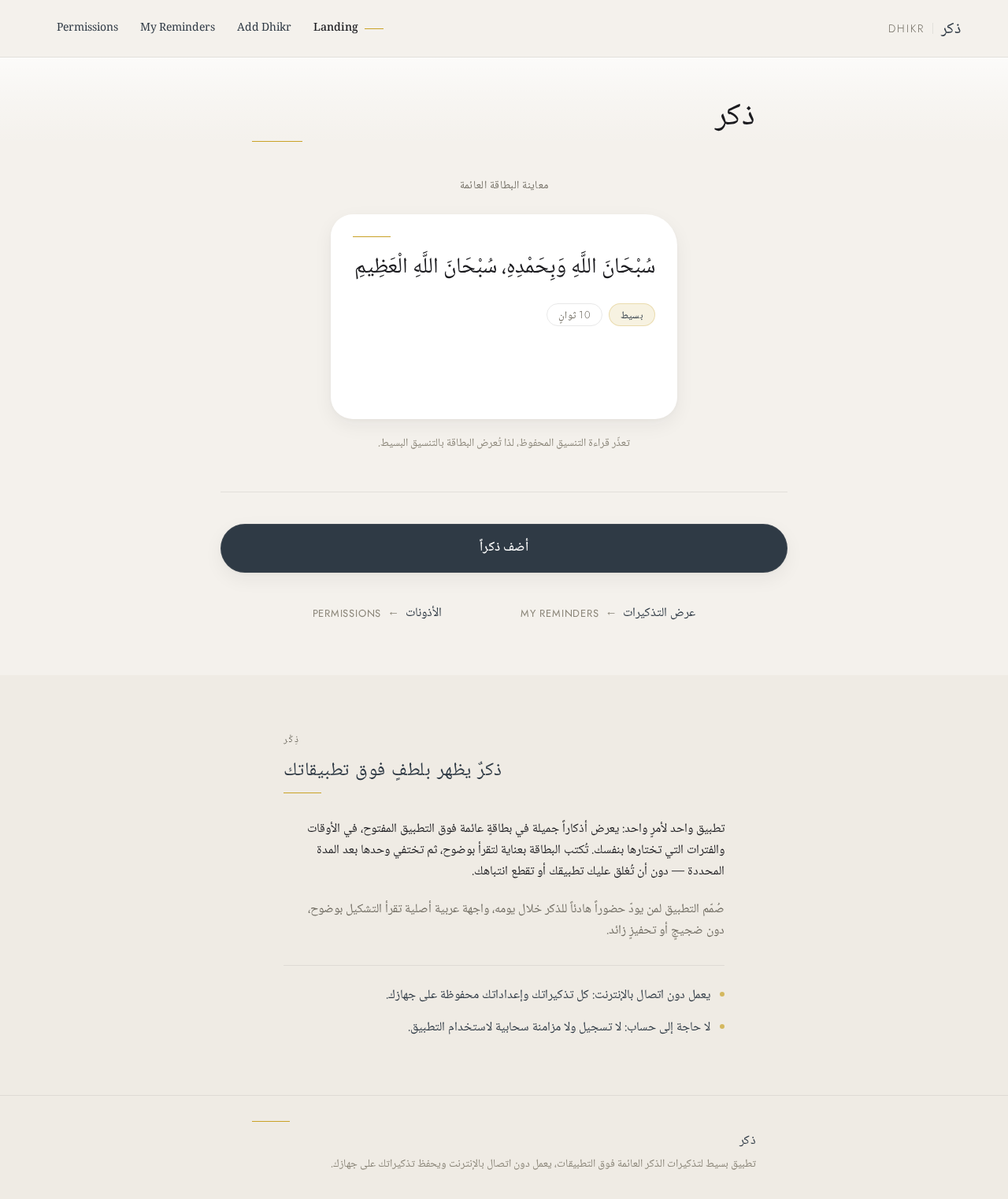
ذكر
معاينة البطاقة العائمة
تعذّر قراءة التنسيق المحفوظ، لذا تُعرض البطاقة بالتنسيق البسيط.
ذِكْر
ذكرٌ يظهر بلطفٍ فوق تطبيقاتك
تطبيق واحد لأمرٍ واحد: يعرض أذكاراً جميلة في بطاقةٍ عائمة فوق التطبيق المفتوح، في الأوقات والفترات التي تختارها بنفسك. تُكتب البطاقة بعناية لتقرأ بوضوح، ثم تختفي وحدها بعد المدة المحددة — دون أن تُغلق عليك تطبيقك أو تقطع انتباهك.
صُمّم التطبيق لمن يودّ حضوراً هادئاً للذكر خلال يومه، واجهة عربية أصلية تقرأ التشكيل بوضوح، دون ضجيجٍ أو تحفيزٍ زائد.
يعمل دون اتصال بالإنترنت: كل تذكيراتك وإعداداتك محفوظة على جهازك.
لا حاجة إلى حساب: لا تسجيل ولا مزامنة سحابية لاستخدام التطبيق.
No comments yet. Be the first!