Page 1 of 21
System Requirements Document for metro-booking
1. Introduction
metro-booking is a metro ticket booking application. It lets everyday riders find a journey between two stations, book and pay for a ticket, and carry a valid retrievable ticket for travel — and it lets the people who run the network maintain the stations, routes, schedules and fares that riders book against, and review the bookings and tickets the app issues.
The product intent is wayfinding software, not lifestyle software. A metro system is an origin, a destination, a line, a transfer, a fare and a platform; the app is built to make those facts legible at a glance, on a phone, at a platform, in a hurry. The audience is two-sided: Metro Rider (the travelling public, who book and hold tickets) and Metro Operator / Booking Administrator (the network side, who keep the bookable catalog accurate and monitor what was issued).
The application is delivered as a first-party web application with its own identity, its own persistent backend, and exactly 8 pages.
Page 2 of 21
2. System Overview
metro-booking is a single first-party web application with a persistent backend. It serves two accepted human actors — Metro Rider and Metro Operator / Booking Administrator — over eight pages: Landing, Login, Search, Booking, Tickets, Bookings, Services and Reviews.
Riders enter anonymously at Landing, establish or verify their own account, search the network by origin and destination, choose a departure, create a booking and complete payment, then retrieve the issued ticket from Tickets and revisit or manage it from Bookings. Operators are provisioned or invited rather than self-enrolling; once verified they maintain stations, routes, schedules and fares on Services and review issued bookings and tickets on Reviews.
The backend persists stations, routes, schedules, fares, bookings, payments and issued tickets. Riders only ever see and act on their own bookings and tickets; operators act on the shared service catalog and the shared issued-booking record. That difference in scope — private rider state versus shared network state — is the only differentiated control in the product.
Narrow exclusions. This document does not add adjacent capabilities that the source did not accept: no loyalty or rewards programme, no refunds-and-disputes workflow, no seat-map or coach allocation, no multi-modal or non-metro transport, no marketing or content-management surface, no operator analytics beyond reviewing issued bookings and tickets, and no account-management surface beyond first-use enrollment and returning verification. The page count is fixed at exactly 8; no additional page may be introduced.
Page 3 of 21
2a. Product Interpretation and Delivery Boundary
Delivery ownership. metro-booking is a first-party application. All eight pages are custom pages owned by the application, rendered by the application's own frontend, backed by the application's own persistent storage. There is no provider-owned or external-only surface in the current scope, and no headless delivery mode.
Identity and access ownership. The application owns identity. Two access boundaries exist:
- Anonymous entry. Landing is reachable with no identity, and Login is reachable with no identity — a protected destination cannot own the interaction that establishes access to itself, so returning verification lives on its own anonymously reachable surface. Landing and Login are the only pages reachable without identity.
- Protected destinations. Search, Booking, Tickets, Bookings, Services and Reviews require an established, verified identity. Rider-facing protected pages (Search, Booking, Tickets, Bookings) are restricted to the rider's own state. Operator-facing protected pages (Services, Reviews) are restricted to operators, who are provisioned or invited rather than self-enrolling.
Riders establish identity themselves on first use and verify it on return. Operators do not self-enroll; they are provisioned or invited before they can reach Services or Reviews. Application identity and session continuity establish whose state is being shown — they do not create any further permission tiers beyond rider-versus-operator scope over shared network state.
Current versus future. Everything described in sections 2 through 5 is current. Section 10 records technology choices; section 11 records assumptions and constraints. No future-horizon capability is included in current pages or acceptance.
2b. Source Content Inventory
Not applicable — no reference directive in this project declares content_source authority, so no source content inventory is rendered.
2c. Page Content and Component Coverage
Page 4 of 21
Landing
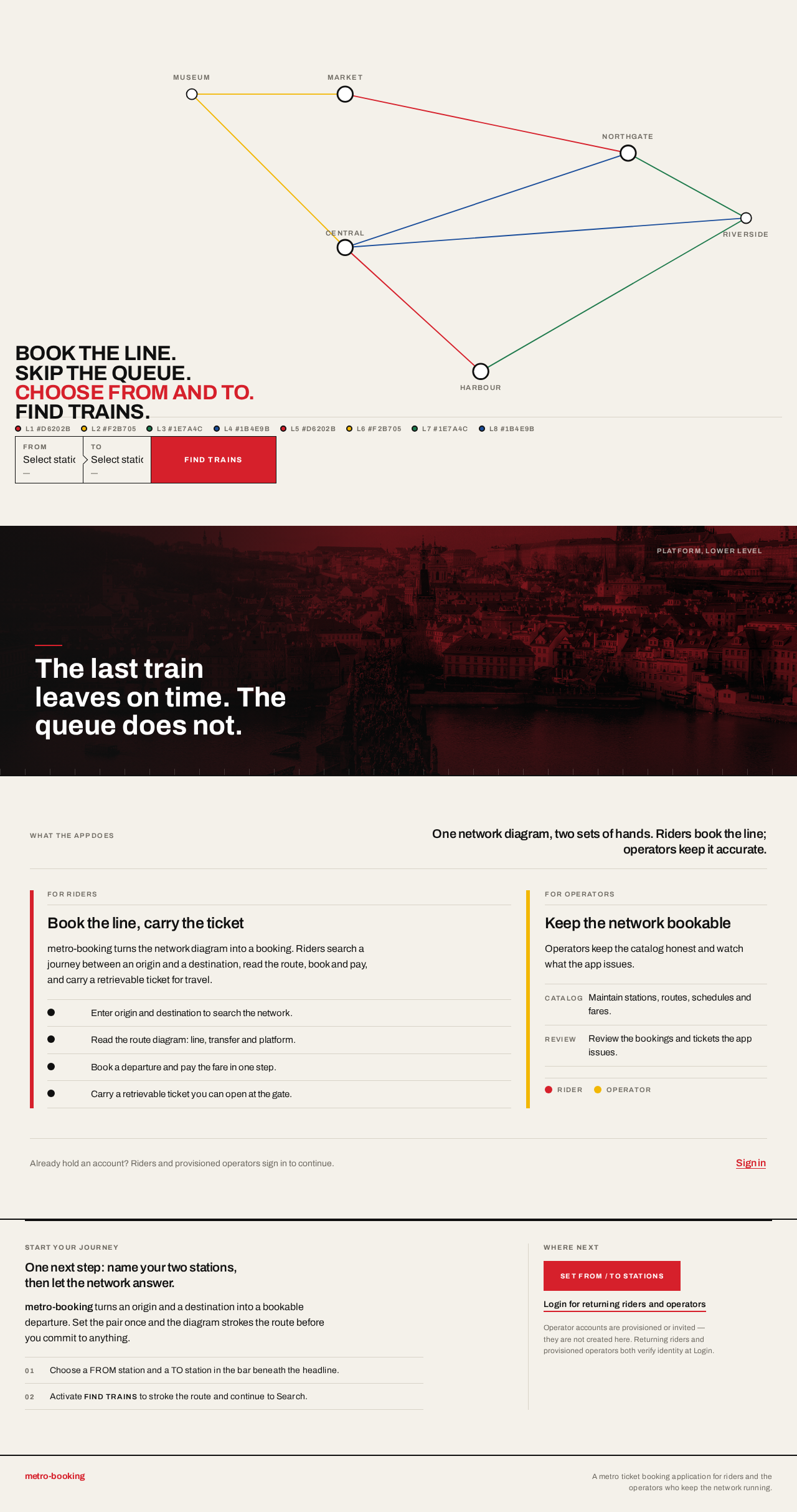
- Information and state. Anonymous public entry. A full-bleed 12-column band on
#F4F1EA holding a schematic metro map drawn in SVG: eight coloured lines with circular interchange bullets, station names set in 12px uppercase Archivo at each terminal. The headline BOOK THE LINE. SKIP THE QUEUE. sits flush-left in the lower-left quadrant, stacked over four lines, overlapping the diagram's empty upper-left cell. Beneath it, pinned to the same left edge, a red bar-form field pair — FROM / TO — with a sharp-cornered #D6202B FIND TRAINS button. A short explanatory block states what the app does for riders and what it does for operators. A single full-bleed duotone (black + Vignelli red) documentary platform photograph may occupy one band, cropped hard to the grid, with any headline knocked out in white.
- Primary actions. Choose FROM station; choose TO station; activate FIND TRAINS; proceed to Login to establish or verify identity.
- Supporting actions. Read the rider explanation; read the operator explanation; follow the link to Login.
- Domain entities. Station, Line, Interchange, Route segment.
- Component responsibilities. Network-diagram hero (SVG map, interactive station bullets, line-colour legend); FROM/TO field pair with station selection; FIND TRAINS action; rider/operator explanation block; optional duotone platform band; shared footer.
- States. Loading: the SVG diagram renders immediately as static markup; no data fetch blocks first paint. Empty: not applicable — the diagram is authored content. Success: selecting a station highlights its dot and strokes the connecting route in yellow; FIND TRAINS proceeds toward identity establishment. Error: if a station selection cannot be resolved, the field retains its prior value and shows an inline message; the diagram remains complete. Recovery: the rider re-selects either station; no state is lost.
Login
- Information and state. Anonymous, shared returning-verification surface for both riders and operators. A single centred column on
#F4F1EA with a white card, 1px #101010 hairline, zero radius. A full-width page title band closed by a 2px black rule reads SIGN IN. Two modes are presented as a segmented control: Create account (rider self-service enrollment) and Sign in (returning verification). Operator access is stated plainly: operator accounts are provisioned or invited and are not created here.
- Primary actions. Create account (rider): provide the required enrollment details and submit. Sign in: provide credentials and submit.
- Supporting actions. Switch between Create account and Sign in; read the operator-provisioning note.
- Domain entities. Account, Credential, Role (rider / operator).
- Component responsibilities. Mode segmented control; enrollment form; sign-in form; inline validation messaging; operator-provisioning note; shared footer.
- States. Loading: submit control enters a pending state and is disabled for the duration of the request. Empty: forms render empty with labels and no pre-filled values. Success: on enrollment, the rider's account is created and verified identity is established, then the rider continues to Search; on sign-in, verified identity is established and the actor continues to the destination appropriate to their role — riders to Search, operators to Services. Error: invalid credentials, an already-registered email, or a failed request show an inline message above the form; the entered values are preserved except any password field. Recovery: the actor corrects the field and resubmits; no partial account is created on a failed enrollment.
Search
- Information and state. Rider-only, identity required. A full-width page title band closed by a 2px black rule reads FIND TRAINS, with the FROM / TO pair repeated as a compact bar beneath it. The body is diagram-first: a two-column layout with the route diagram and result rows in the 8-column content area and journey meta in the 4-column status area. Results are ruled tabular rows aligned to shared column tracks — departure time, arrival time, line badge, duration, transfers, fare — with tabular numerals throughout. Each row carries a circular coloured line bullet plus an uppercase 11px letterspaced line code.
- Primary actions. Set or change origin and destination; run the search; select a result row to continue to Booking.
- Supporting actions. Adjust the search (swap origin and destination; change either station); read the route diagram.
- Domain entities. Station, Route, Line, Schedule, Departure, Fare, Transfer.
- Component responsibilities. FROM/TO search bar; route diagram with origin and destination bullets; result table with sticky header row; line-badge component; empty and error messaging; shared footer.
- States. Loading: the result table shows a ruled skeleton of rows at the shared column tracks; the diagram holds its frame. Empty: when no service matches the station pair, the table area shows a plain statement that no trains were found for that pair, with the FROM/TO bar still editable. Success: matching departures render as ruled rows; the booked line segment strokes from origin to destination in 600ms with a linear curve, and under
prefers-reduced-motion the diagram renders complete with no stroke animation. Error: a failed search shows an inline message with a retry action; the previously entered station pair is preserved. Recovery: the rider retries or edits the station pair and searches again.
Page 5 of 21
Booking
- Information and state. Rider-only, identity required. A full-width page title band closed by a 2px black rule reads BOOK. The body is a two-column layout: the 8-column content area holds the selected departure restated as a ruled summary (line badge, origin, destination, departure and arrival times, platform, transfers, fare) followed by the constrained booking flow; the 4-column status area holds the running fare total and the payment state. The flow is a short ordered sequence of steps, each a ruled block separated by a 2px rule.
- Primary actions. Confirm the selected departure; enter the required traveller and contact details; review the fare; complete payment; submit the booking.
- Supporting actions. Return to Search to change the departure; edit entered details before submitting.
- Domain entities. Booking, Departure, Fare, Payment, Ticket, Rider account.
- Component responsibilities. Departure summary block; ordered booking step blocks; fare total in the status column; payment form; submit action; confirmation block; shared footer.
- States. Loading: the departure summary renders from the selected result; the payment step shows a pending state while the payment request is in flight and the submit control is disabled. Empty: if the rider arrives without a selected departure, the page states that no departure is selected and offers a link back to Search; no booking can be submitted. Success: on successful payment the booking is created, a ticket is issued, and the page shows a confirmation block with the booking reference and a link to the issued ticket in Tickets. Error: a declined or failed payment shows an inline message in the status column, the booking is not created, and the entered details are preserved so the rider can retry payment. Recovery: the rider retries payment, edits details, or returns to Search to choose a different departure; no ticket is issued until payment succeeds.
Tickets
- Information and state. Rider-only, identity required. A full-width page title band closed by a 2px black rule reads TICKETS. The body is a stack of physical-feeling ticket stubs: white rectangles with two half-circle notches cut into the left edge, a 6px line-colour bar down the side, a monospace-style barcode strip, and the journey facts set in tabular numerals — line badge and line code, origin, destination, departure date and time, platform, fare, booking reference. Only the signed-in rider's own issued tickets appear.
- Primary actions. Open a ticket to retrieve it for travel; present the ticket at the gate.
- Supporting actions. Move from a ticket to its booking record in Bookings.
- Domain entities. Ticket, Booking, Departure, Line, Station, Fare.
- Component responsibilities. Ticket-stub component (notches, line-colour bar, barcode strip); ticket stack; link to the owning booking; empty and error messaging; shared footer.
- States. Loading: the stack shows ruled placeholder stubs at the ticket dimensions. Empty: when the rider has no issued tickets, the page states that no tickets have been issued yet and offers a link to Search to book a journey. Success: each issued ticket renders as a complete stub with all journey facts legible and the barcode strip intact. Error: if tickets cannot be loaded, an inline message with a retry action replaces the stack. Recovery: the rider retries; previously loaded tickets remain visible if the failure occurs on a refresh.
Bookings
- Information and state. Rider-only, identity required. A full-width page title band closed by a 2px black rule reads BOOKINGS. The body is a dense ruled table with a sticky header row, aligned to shared column tracks: booking reference, line badge and line code, origin, destination, departure date and time, fare, payment status, ticket status. Tabular numerals are mandatory for fares, times and counts. Selecting a row opens the booking's detail, including the issued ticket stub and the link to Tickets. Only the signed-in rider's own bookings appear.
- Primary actions. Review a booking's details; open the issued ticket for that booking; start a new booking.
- Supporting actions. Filter or sort the rider's own bookings by departure date; return to Tickets.
- Domain entities. Booking, Ticket, Payment, Departure, Line, Station, Fare.
- Component responsibilities. Ruled bookings table with sticky header; row selection; booking detail panel with embedded ticket stub; new-booking action; empty and error messaging; shared footer.
- States. Loading: the table shows ruled skeleton rows at the shared column tracks. Empty: when the rider has no bookings, the page states that no bookings exist yet and offers a link to Search. Success: bookings render as ruled rows with payment and ticket status visible per row. Error: a failed load shows an inline message with a retry action. Recovery: the rider retries; the table returns to its last successfully loaded state.
Page 6 of 21
Services
- Information and state. Operator-only, identity required, provisioned or invited. A full-width page title band closed by a 2px black rule reads SERVICES. The body is a dense ruled table with a sticky header row, organised into four maintained collections — Stations, Routes, Schedules and Fares — each presented as its own ruled section with a 2px rule above it and a 6px colour bar marking the left edge of any line-coded block. Column tracks are shared across sections so codes, times and amounts line up vertically. Tabular numerals are mandatory for times, platform numbers and fares.
- Primary actions. Add a station; edit a station; add or edit a route and its ordered station sequence; add or edit a schedule with departure times and platforms; add or edit a fare for a route or station pair.
- Supporting actions. Switch between the four collections; search or filter within a collection; deactivate an entry that should no longer be bookable.
- Domain entities. Station, Route, Route segment, Line, Schedule, Departure, Platform, Fare.
- Component responsibilities. Collection switcher; ruled editable tables with sticky headers; row editor; line-badge assignment; validation messaging; shared footer.
- States. Loading: each collection shows ruled skeleton rows at the shared column tracks. Empty: an empty collection states that no entries exist yet and offers the add action for that collection. Success: a saved entry appears in its collection with the entered values, and becomes available to riders on Search and Booking. Error: a validation failure (for example a route referencing an unknown station, or a fare with no route) shows an inline message on the offending row and the entry is not saved. Recovery: the operator corrects the row and resaves; unsaved edits to other rows are preserved.
Reviews
- Information and state. Operator-only, identity required, provisioned or invited. A full-width page title band closed by a 2px black rule reads REVIEWS. The body is a dense ruled table with a sticky header row, aligned to shared column tracks: booking reference, rider account reference, line badge and line code, origin, destination, departure date and time, fare, payment status, ticket status, issued timestamp. Tabular numerals are mandatory for fares, times and counts. Selecting a row opens the booking and its issued ticket for inspection. This is the shared issued-booking record across all riders.
- Primary actions. Review issued bookings and tickets; open a booking's detail; filter the record by date, line or status.
- Supporting actions. Sort by issued timestamp or departure date; return to Services to correct a catalog entry that produced a bad booking.
- Domain entities. Booking, Ticket, Payment, Rider account, Departure, Line, Station, Fare.
- Component responsibilities. Ruled reviews table with sticky header; row selection; booking-and-ticket detail panel; filter and sort controls; empty and error messaging; shared footer.
- States. Loading: the table shows ruled skeleton rows at the shared column tracks. Empty: when no bookings have been issued, the page states that no bookings have been issued yet. Success: issued bookings render as ruled rows with payment and ticket status visible per row. Error: a failed load shows an inline message with a retry action. Recovery: the operator retries; the table returns to its last successfully loaded state.
Page 7 of 21
3. Functional Requirements
Each requirement is a distinct story point. Provenance is marked explicit, basic_default, or required_inference.
FR-1 — Rider self-service enrollment (required_inference)
As a Metro Rider, I should be able to create my own account on first use so that I can book and hold tickets under my own identity.
- Trigger/input: the rider opens Login anonymously and selects Create account, then supplies the required enrollment details.
- Observable result: the account is created and verified identity is established for that rider.
- Access state: Login is anonymously reachable; the rider's protected state remains unavailable until identity is established.
- Failure/recovery: an already-registered email or a failed request shows an inline message and preserves entered values except the password; no partial account is created.
- Continuation: the rider continues to Search.
FR-2 — Returning verification (required_inference)
As a Metro Rider or Metro Operator / Booking Administrator, I should be able to verify my identity on return so that I can reach my protected work.
- Trigger/input: the actor opens Login anonymously and selects Sign in, then supplies credentials.
- Observable result: verified identity is established and the actor reaches the destination appropriate to their role — riders to Search, operators to Services.
- Access state: Login is anonymously reachable; protected destinations remain unavailable until verification succeeds.
- Failure/recovery: invalid credentials show an inline message above the form and preserve the entered identifier.
- Continuation: the actor proceeds to their role's protected destination.
FR-3 — Operator provisioning or invitation (required_inference)
As a Metro Operator / Booking Administrator, I should be provisioned or invited rather than self-enrolling so that operator access to the service catalog and the issued-booking record is controlled.
- Trigger/input: an operator account is provisioned or an invitation is accepted; the operator then verifies identity on Login.
- Observable result: the operator reaches Services and Reviews.
- Access state: operator accounts are not created on Login; the operator-provisioning note on Login states this.
- Failure/recovery: an unprovisioned actor cannot reach Services or Reviews and is returned to Login.
- Continuation: the provisioned operator proceeds to Services.
FR-4 — Search journeys by origin and destination (required_inference)
As a Metro Rider, I should be able to search for a journey by origin and destination so that I can see which trains serve my trip.
- Trigger/input: the rider sets FROM and TO and runs the search.
- Observable result: matching departures render as ruled rows showing departure time, arrival time, line badge, duration, transfers and fare.
- Access state: identity required; the rider sees only public network data.
- Failure/recovery: a failed search shows an inline message with a retry action and preserves the station pair; no matches shows a plain no-trains-found statement with the FROM/TO bar still editable.
- Continuation: the rider selects a result row to continue to Booking.
FR-5 — Route-draw on search results (required_inference)
As a Metro Rider, I should see the connecting route drawn on the diagram when I search so that I can confirm the line and transfer at a glance.
- Trigger/input: a search returns results for a station pair.
- Observable result: the booked line segment strokes from origin to destination in 600ms with a linear curve; the origin and destination bullets are highlighted.
- Access state: identity required.
- Failure/recovery: under
prefers-reduced-motion the diagram renders complete with no stroke animation.
- Continuation: the rider reads the diagram and selects a departure.
FR-6 — Select a departure (required_inference)
As a Metro Rider, I should be able to select a specific departure so that I book the train I intend to travel on.
- Trigger/input: the rider selects a result row on Search.
- Observable result: the selected departure is carried into Booking and restated as a ruled summary with line badge, origin, destination, times, platform, transfers and fare.
- Access state: identity required.
- Failure/recovery: arriving at Booking without a selected departure states that no departure is selected and offers a link back to Search; no booking can be submitted.
- Continuation: the rider proceeds through the booking flow.
FR-7 — Create a booking (required_inference)
As a Metro Rider, I should be able to create a booking for a selected departure so that I hold a claim on that journey.
- Trigger/input: the rider confirms the departure and supplies the required traveller and contact details in the ordered booking flow.
- Observable result: a booking record is created with a booking reference, bound to the rider's account and the selected departure.
- Access state: identity required; the booking is bound to the signed-in rider.
- Failure/recovery: a validation failure shows an inline message on the offending step and the booking is not created; entered details are preserved.
- Continuation: the rider proceeds to payment.
FR-8 — Complete payment (required_inference)
As a Metro Rider, I should be able to pay for my booking so that my ticket is issued.
- Trigger/input: the rider submits payment for the reviewed fare total.
- Observable result: on success the payment is recorded against the booking and a ticket is issued.
- Access state: identity required; the payment is bound to the signed-in rider's booking.
- Failure/recovery: a declined or failed payment shows an inline message in the status column, the booking is not created, and entered details are preserved so the rider can retry.
- Continuation: the rider retries payment, edits details, or returns to Search; no ticket is issued until payment succeeds.
FR-9 — Booking confirmation (required_inference)
As a Metro Rider, I should see a confirmation with my booking reference and a link to my issued ticket so that I know the booking succeeded and can retrieve the ticket.
- Trigger/input: successful payment.
- Observable result: a confirmation block shows the booking reference and a link to the issued ticket in Tickets.
- Access state: identity required.
- Failure/recovery: if the confirmation cannot be rendered, the booking and ticket still exist and remain reachable from Bookings and Tickets.
- Continuation: the rider opens the ticket or continues to Tickets.
FR-10 — Retrieve issued tickets (required_inference)
As a Metro Rider, I should be able to view and retrieve my issued tickets so that I can present a valid ticket for travel.
- Trigger/input: the rider opens Tickets.
- Observable result: the rider's own issued tickets render as ticket stubs with line badge and line code, origin, destination, departure date and time, platform, fare, booking reference and a barcode strip.
- Access state: identity required; only the signed-in rider's own tickets appear.
- Failure/recovery: a failed load shows an inline message with a retry action; no tickets shows a plain statement with a link to Search.
- Continuation: the rider presents the ticket at the gate or opens its booking in Bookings.
FR-11 — Revisit and manage own bookings (required_inference)
As a Metro Rider, I should be able to revisit my own bookings so that I can review what I booked and reach the ticket for each one.
- Trigger/input: the rider opens Bookings.
- Observable result: the rider's own bookings render as ruled rows with booking reference, line badge and line code, origin, destination, departure date and time, fare, payment status and ticket status; selecting a row opens the booking detail with its issued ticket stub.
- Access state: identity required; only the signed-in rider's own bookings appear.
- Failure/recovery: a failed load shows an inline message with a retry action; no bookings shows a plain statement with a link to Search.
- Continuation: the rider opens the ticket, starts a new booking, or returns to Tickets.
FR-12 — Maintain stations (required_inference)
As a Metro Operator / Booking Administrator, I should be able to maintain stations so that riders can search and book against accurate station data.
- Trigger/input: the operator adds or edits a station in the Stations collection on Services.
- Observable result: the saved station appears in the collection and becomes available to riders on Search and Booking.
- Access state: operator identity required; provisioned or invited.
- Failure/recovery: a validation failure shows an inline message on the offending row and the entry is not saved; unsaved edits to other rows are preserved.
- Continuation: the operator continues to routes, schedules or fares.
FR-13 — Maintain routes (required_inference)
As a Metro Operator / Booking Administrator, I should be able to maintain routes and their ordered station sequences so that riders can book valid journeys.
- Trigger/input: the operator adds or edits a route and its ordered station sequence in the Routes collection on Services.
- Observable result: the saved route appears in the collection and becomes bookable on Search and Booking.
- Access state: operator identity required; provisioned or invited.
- Failure/recovery: a route referencing an unknown station shows an inline message on the offending row and the entry is not saved.
- Continuation: the operator continues to schedules or fares.
FR-14 — Maintain schedules (required_inference)
As a Metro Operator / Booking Administrator, I should be able to maintain schedules with departure times and platforms so that riders see real departures.
- Trigger/input: the operator adds or edits a schedule with departure times and platforms in the Schedules collection on Services.
- Observable result: the saved schedule appears in the collection and its departures appear in rider search results.
- Access state: operator identity required; provisioned or invited.
- Failure/recovery: a validation failure shows an inline message on the offending row and the entry is not saved.
- Continuation: the operator continues to fares.
FR-15 — Maintain fares (required_inference)
As a Metro Operator / Booking Administrator, I should be able to maintain fares for routes or station pairs so that riders are charged the correct amount.
- Trigger/input: the operator adds or edits a fare for a route or station pair in the Fares collection on Services.
- Observable result: the saved fare appears in the collection and is applied to rider search results and booking totals.
- Access state: operator identity required; provisioned or invited.
- Failure/recovery: a fare with no route shows an inline message on the offending row and the entry is not saved.
- Continuation: the operator continues to reviewing issued bookings.
FR-16 — Deactivate a catalog entry (required_inference)
As a Metro Operator / Booking Administrator, I should be able to deactivate a catalog entry so that it stops being bookable without destroying the record behind existing bookings.
- Trigger/input: the operator deactivates a station, route, schedule or fare on Services.
- Observable result: the entry is marked inactive and no longer appears in rider search results or booking flows; existing bookings and tickets that reference it remain intact.
- Access state: operator identity required; provisioned or invited.
- Failure/recovery: a failed deactivation shows an inline message and the entry remains active.
- Continuation: the operator continues maintaining the catalog.
FR-17 — Review issued bookings and tickets (required_inference)
As a Metro Operator / Booking Administrator, I should be able to review bookings and tickets issued through the app so that I can keep the network honest and resolve problems.
- Trigger/input: the operator opens Reviews.
- Observable result: issued bookings render as ruled rows with booking reference, rider account reference, line badge and line code, origin, destination, departure date and time, fare, payment status, ticket status and issued timestamp; selecting a row opens the booking and its issued ticket.
- Access state: operator identity required; provisioned or invited; this is the shared issued-booking record across all riders.
- Failure/recovery: a failed load shows an inline message with a retry action; no issued bookings shows a plain statement.
- Continuation: the operator filters or sorts the record, or returns to Services to correct a catalog entry that produced a bad booking.
FR-18 — Persistent backend storage (required_inference)
As the application, I should persist stations, routes, schedules, fares, bookings, payments and issued tickets so that rider and operator work survives across sessions.
- Trigger/input: any create or update of a catalog entry, booking, payment or ticket.
- Observable result: the record is durably stored and is retrievable on a later visit by the correct actor.
- Access state: rider records are retrievable only by their owning rider; catalog and issued-booking records are retrievable by operators.
- Failure/recovery: a failed write surfaces as an inline error on the originating page and the record is not partially stored.
- Continuation: the actor retries the action.
FR-19 — Exactly eight pages (explicit)
As the product owner, I should have the application delivered as exactly 8 pages so that the information architecture stays bounded.
- Observable result: the application consists of Landing, Login, Search, Booking, Tickets, Bookings, Services and Reviews — eight pages, no more and no fewer.
- Failure/recovery: not applicable — this is a structural constraint on the delivered application.
Page 8 of 21
4. User Personas
Page 9 of 21
Metro Rider
Product context. The rider is the primary human actor in a metro booking app. They arrive at the app with a specific trip in mind — a station pair and a time — usually on a phone, often in a hurry, sometimes at a platform. They are not browsing; they are trying to get a valid ticket for a journey they have already decided to make.
Primary goal. A valid, retrievable ticket for the intended journey.
Distinct accepted responsibilities. The rider searches for a journey by origin and destination; reads the route diagram to confirm the line and any transfer; selects a specific departure; creates a booking for that departure; completes payment; retrieves the issued ticket for travel; and revisits their own bookings to review what they booked and reach the ticket for each one. Their recurring responsibility is managing their own bookings and tickets — a private, rider-scoped body of state that no other rider sees.
Relevant inputs and decisions. Origin and destination stations; which departure to take, judged on departure time, duration, transfers and fare; the traveller and contact details for the booking; whether to complete payment; and, on return, whether to sign in to reach their existing bookings and tickets.
Interactions with other accepted participants. The rider's work is the counterpart of the operator's. Every station, route, schedule and fare the rider books against was maintained by a Metro Operator / Booking Administrator on Services, and every booking and ticket the rider creates appears in the operator's shared record on Reviews. The rider never sees the operator's surfaces, and the operator never sees another rider's private booking list — but the two roles are bound together through the shared catalog and the issued-booking record.
Observable success. A ticket stub in Tickets carrying the correct line badge and line code, origin, destination, departure date and time, platform, fare and booking reference — presentable at the gate — and the same booking visible in Bookings with its payment and ticket status.
Source-backed constraints. The rider self-enrolls on first use and verifies identity on return; rider-facing protected pages are restricted to the rider's own state.
Page 10 of 21
Metro Operator / Booking Administrator
Product context. A booking app that sells metro tickets requires someone on the operator side to maintain the metro service information riders book against, and to oversee the bookings and tickets issued. This role works in the same visual dialect as the rider side — ruled tables, coded colours, tabular numerals — but their working context is the network, not a single trip.
Primary goal. Riders can book valid journeys without errors or disputes.
Distinct accepted responsibilities. The operator maintains four collections on Services — stations, routes (with their ordered station sequences), schedules (with departure times and platforms) and fares (for routes or station pairs) — and can deactivate an entry that should no longer be bookable without destroying the record behind existing bookings. On Reviews, the operator inspects the shared issued-booking record across all riders, including payment and ticket status and issued timestamps, and can trace a bad booking back to the catalog entry that produced it.
Relevant inputs and decisions. Station names and codes; route definitions and their ordered station sequences; departure times and platform numbers; fare amounts and the route or station pair they apply to; line-badge assignment; and, on Reviews, which bookings to inspect and how to filter or sort the record.
Interactions with other accepted participants. The operator's work directly determines what every Metro Rider can find and book. A catalog error on Services becomes a rider-visible error on Search or Booking; a rider's completed booking becomes a row the operator can inspect on Reviews. The operator does not act on any individual rider's private booking list, and does not create rider accounts.
Observable success. A catalog that produces no booking errors or disputes, and a Reviews record in which issued bookings and tickets can be inspected and traced back to their originating catalog entries.
Source-backed constraints. Operators are provisioned or invited rather than self-enrolling; operator-facing protected pages are restricted to provisioned or invited operators.
Page 11 of 21
5. Core User Flows
Flow A — Metro Rider books a journey for the first time
- The rider opens Landing anonymously. The network diagram renders complete; the headline BOOK THE LINE. SKIP THE QUEUE. sits over the diagram's empty upper-left cell, with the FROM / TO pair and the red FIND TRAINS button beneath it.
- The rider selects a FROM station and a TO station. Each selected station's dot highlights and the connecting route strokes in yellow across the diagram.
- The rider activates FIND TRAINS. Because no identity is established yet, the rider is taken to Login.
- On Login, the rider selects Create account, supplies the required enrollment details, and submits. The account is created and verified identity is established. (If the email is already registered, an inline message appears and the entered values are preserved except the password; the rider corrects the field and resubmits, and no partial account is created.)
- The rider arrives at Search with the station pair carried over. The result table shows matching departures as ruled rows — departure time, arrival time, line badge, duration, transfers, fare — with tabular numerals. The booked line segment strokes from origin to destination in 600ms; under
prefers-reduced-motion the diagram renders complete. (If no service matches, the table states that no trains were found and the FROM/TO bar stays editable; the rider edits the pair and searches again.)
- The rider selects a departure row and continues to Booking. The selected departure is restated as a ruled summary with line badge, origin, destination, times, platform, transfers and fare; the fare total appears in the status column.
- The rider works through the ordered booking steps, supplying the required traveller and contact details, and reviews the fare. (If a step fails validation, an inline message appears on that step and the booking is not created; entered details are preserved.)
- The rider submits payment. On success the booking is created and a ticket is issued; the confirmation block shows the booking reference and a link to the issued ticket. (If payment is declined, an inline message appears in the status column, no booking is created, and the entered details are preserved so the rider can retry. No ticket is issued until payment succeeds.)
- The rider follows the link to Tickets, where the issued ticket renders as a stub with two half-circle notches cut into the left edge, a 6px line-colour bar, a barcode strip, and the journey facts in tabular numerals.
- The rider presents the ticket at the gate. Next step: on a later visit, the rider returns to Bookings to review the booking and reach the ticket again.
Flow B — Metro Rider returns and retrieves an existing ticket
- The rider opens Login anonymously and selects Sign in, supplying credentials. Verified identity is established and the rider continues to Search. (If credentials are invalid, an inline message appears above the form and the entered identifier is preserved; the rider corrects it and resubmits.)
- The rider opens Tickets. Their own issued tickets render as stubs. (If the load fails, an inline message with a retry action replaces the stack; the rider retries. If the rider has no tickets, the page states that none have been issued yet and offers a link to Search.)
- The rider opens the ticket for the intended journey and presents it at the gate.
- Next step: the rider opens Bookings to review the booking behind the ticket, or starts a new booking from Search.
Flow C — Metro Rider revisits and manages their own bookings
- The rider opens Bookings with verified identity. Their own bookings render as ruled rows with booking reference, line badge and line code, origin, destination, departure date and time, fare, payment status and ticket status. (If the load fails, an inline message with a retry action appears; the rider retries and the table returns to its last successfully loaded state. If the rider has no bookings, the page states that none exist yet and offers a link to Search.)
- The rider filters or sorts their own bookings by departure date to find the journey they want.
- The rider selects a row. The booking detail opens with the issued ticket stub embedded.
- The rider opens the ticket for travel, or starts a new booking from Search.
- Next step: the rider returns to Tickets, or continues to Search for a new journey.
Page 12 of 21
Flow D — Metro Operator is provisioned and maintains the service catalog
- The operator is provisioned or invited. They open Login anonymously and select Sign in, supplying credentials. Verified identity is established and, because their account is an operator account, they continue to Services. (An unprovisioned actor cannot reach Services or Reviews and is returned to Login. Operator accounts are not created on Login; the operator-provisioning note states this.)
- On Services, the operator works in the Stations collection. They add a station and save. The saved station appears in the ruled table and becomes available to riders on Search and Booking. (If validation fails, an inline message appears on the offending row and the entry is not saved; unsaved edits to other rows are preserved.)
- The operator switches to Routes and adds a route with its ordered station sequence. (A route referencing an unknown station shows an inline message on the offending row and is not saved.)
- The operator switches to Schedules and adds departure times and platforms for the route. The saved schedule's departures become visible in rider search results.
- The operator switches to Fares and adds a fare for the route or station pair. The saved fare is applied to rider search results and booking totals. (A fare with no route shows an inline message on the offending row and is not saved.)
- When a service is withdrawn, the operator deactivates the relevant station, route, schedule or fare. The entry stops appearing in rider search results and booking flows, while existing bookings and tickets that reference it remain intact. (A failed deactivation shows an inline message and the entry remains active.)
- Next step: the operator continues maintaining the catalog, or moves to Reviews.
Flow E — Metro Operator reviews issued bookings and tickets
- The operator opens Reviews with verified operator identity. Issued bookings render as ruled rows with booking reference, rider account reference, line badge and line code, origin, destination, departure date and time, fare, payment status, ticket status and issued timestamp. (If the load fails, an inline message with a retry action appears; the operator retries. If no bookings have been issued, the page states so plainly.)
- The operator filters the record by date, line or status, and sorts by issued timestamp or departure date.
- The operator selects a row. The booking and its issued ticket open for inspection.
- If the booking reveals a catalog problem, the operator returns to Services and corrects the offending station, route, schedule or fare. The correction takes effect for subsequent rider searches and bookings; the existing booking and ticket remain intact.
- Next step: the operator returns to Reviews to continue inspecting the record.
6. Visuals, Colors and Theme
Muse: Massimo Vignelli. The interface reads like the network diagram itself — wayfinding software, not lifestyle software. Colour is information: if it isn't coding a line, a status or an action, it stays black on paper.
Page 13 of 21
Colour tokens
| Role | Token | Value |
|---|
| Background (light mode) | --bg | #F4F1EA |
| Surface | --surface | #FFFFFF |
| Text | --text | #101010 |
| Primary (action, line 1, wordmark, active states, primary buttons, header rule) | --primary | #D6202B |
| Accent (transfers, warnings, "limited service") | --accent | #F2B705 |
| Muted (metadata, timestamps, table captions) | --muted | #6E6A62 |
| Hairline (cards, inputs, row dividers) | --hairline | #D8D3C8 |
| Line identity — green (diagrams and badges only) | --line-green | #1E7A4C |
| Line identity — blue (diagrams and badges only) | --line-blue | #1B4E9B |
Green and blue exist only as metro line identities inside diagrams and badges — never as UI chrome. Red is the primary action and line-1 colour; yellow is transfer and attention. No colour is used decoratively.
Typography
- Headings: Archivo, 600–700, tracking
-0.02em, flush-left ragged-right, sentence case for headings. Uppercase only for micro-labels, line codes and table headers at 11–12px with +0.12em letterspacing.
- Body: Archivo.
- Scale: 1.25 modular on a 4px baseline — 12 / 14 / 16 / 20 / 25 / 31 / 39 / 49 / 61.
- Display headline:
clamp(34px, 7.2vw, 92px).
- Page titles:
clamp(26px, 3.6vw, 44px).
- Body text: 16px / 1.55.
- Numerals:
font-variant-numeric: tabular-nums is mandatory for fares, times, platform numbers and counts.
- Hierarchy comes from weight, rules and column position — not from a dozen sizes. No more than four type sizes on a single page.
Page 14 of 21
Shape language
Hard edges, zero decorative radii. Cards and inputs are rectangles with 1px #101010 or #D8D3C8 hairlines; buttons are sharp-cornered bars. The only rounded shapes are the circular line bullets and the ticket's punched-notch motif (a half-circle cut into the ticket edge). Rules are structural: 1px hairlines divide every row, 2px rules separate sections, and a 6px colour bar marks the left edge of any line-coded block. No shadows, no blur, no glass.
Layout
A visible 12-column grid with 24px gutters (16px at 375px) and a persistent left rail on desktop carrying the network mark, line legend and section index. Every page is built from three repeating modules: a full-width page title band with a hairline under it, a two-column body (content 8 cols, meta/status 4 cols), and tabular rows aligned to shared column tracks so fares, times and platforms line up vertically across the whole app. Search and Booking are diagram-first; Tickets is a stack of physical-feeling ticket stubs; Services and Reviews are dense ruled tables with sticky header rows.
Imagery
Diagrams, not photography. Station dots, line strokes, transfer ticks, platform pictograms and a small icon set drawn on a 24px grid with 2px strokes. One photographic exception: a high-contrast, duotone (black + Vignelli red) documentary shot of a metro platform may occupy a full-bleed band on Landing only, cropped hard to the grid with the headline knocked out in white. No stock people smiling at phones, no 3D blobs, no gradients.
Page 15 of 21
Readability guarantee
Headlines, wordmarks, labels, numbers, card text and controls stay entirely inside the viewport and their container at 375px, 768px and 1280px, wrapping or scaling (for example font-size: clamp(...) with its mobile size) to fit, and no other element covers any part of them. Imagery and decoration may be cropped, bled off an edge, rotated, overlapped or cut exactly as the direction asks, as long as they cover no readable text or control.
Page 16 of 21
7. Signature Design Concept
The network-diagram hero. Landing does not open with a centred headline over a gradient. It opens as a live network diagram.
A full-bleed 12-column band on #F4F1EA holds a schematic metro map drawn in SVG: eight coloured lines with circular interchange bullets, station names set in 12px uppercase Archivo at each terminal. The headline BOOK THE LINE. SKIP THE QUEUE. sits flush-left in the lower-left quadrant at clamp(34px, 7.2vw, 92px) in #101010, stacked over four lines, overlapping the diagram's empty upper-left cell rather than sitting above it. Directly beneath the headline, pinned to the same left edge, a single red bar-form field pair — FROM / TO — with a sharp-cornered #D6202B FIND TRAINS button.
The station bullets and line colours are interactive. Selecting a station highlights its dot and strokes the connecting route in yellow, so the hero is not a picture of a transit system — it is the first step of booking one. The whole hero is flat, diagrammatic and unmistakably a transit system.
This concept recomposes only accepted content, states and controls: the FROM/TO selection, the route highlight, and the FIND TRAINS action that leads to identity establishment and Search. It introduces no new behaviour, page or destination.
Page 17 of 21
8. Interaction Model & Motion Direction
Interaction Model: Static (direction)
Motion Tempo: still
Hero Dimensionality: flat
The direction specifies a still tempo with exactly two functional exceptions, and this document copies that tempo rather than re-deciding it.
Landing Hero Motion Brief
- Focal subject. The SVG network diagram — eight coloured lines with circular interchange bullets and terminal station names — with the FROM / TO field pair and the red FIND TRAINS button pinned to the same left edge beneath the headline.
- Input → transformation → outcome thesis. The rider selects a FROM station and a TO station; each selected station's dot highlights and the connecting route strokes in yellow across the diagram; the rider activates FIND TRAINS and proceeds toward identity establishment and Search. The hero's transformation is the route becoming visible — the diagram answering the rider's question before any page change.
- Motion vocabulary. Two functional exceptions only. (1) A 120ms instant state change on hover/focus — colour fill, no easing theatrics, no lift. (2) A single route-draw animation on the Search results diagram where the booked line segment strokes from origin to destination in 600ms with a linear curve. No scroll reveals, no parallax, no marquees.
- Composed first frame. The diagram renders complete at first paint as static markup — no data fetch blocks it. The headline sits over the diagram's empty upper-left cell, flush-left, stacked over four lines. The FROM / TO pair and FIND TRAINS sit beneath it on the same left edge. Nothing overlaps readable text or a control.
- Reduced-motion state. Under
prefers-reduced-motion, the route-draw animation is disabled and the diagram renders complete with the route already stroked. The 120ms state change remains as an instantaneous colour change with no transition.
No 3D or WebGL scene is required or requested: hero dimensionality is flat, and no user 3D request exists.
Page 18 of 21
9. Non-Functional Requirements
NFR-1 — Page count is fixed at exactly 8 (explicit)
The application consists of exactly eight pages: Landing, Login, Search, Booking, Tickets, Bookings, Services and Reviews. No additional page may be introduced, and no page may be removed, merged, split or renamed. Rationale: explicit hard constraint in the authoritative user evidence.
NFR-2 — Persistent backend storage (required_inference)
Stations, routes, schedules, fares, bookings, payments and issued tickets are durably persisted so that rider and operator work survives across sessions. Rationale: required to make accepted journeys executable — a booking and its ticket must remain retrievable on a later visit.
NFR-3 — Rider data isolation (required_inference)
A rider's bookings and tickets are retrievable only by that rider. Operators act on the shared service catalog and the shared issued-booking record, not on any individual rider's private booking list. Rationale: required to keep a booking, payment and ticket bound to the correct participant.
NFR-4 — Operator access is provisioned, not self-service (required_inference)
Operator accounts are provisioned or invited; they are not created on Login. Rationale: required to keep operator control over the service catalog and the issued-booking record.
NFR-5 — Readability at every viewport (explicit, from the creative direction)
Headlines, wordmarks, labels, numbers, card text and controls stay entirely inside the viewport and their container at 375px, 768px and 1280px, wrapping or scaling to fit, and no other element covers any part of them. Rationale: the direction's readability guarantee, which takes precedence over any cropping or overlap gesture for readable text and controls.
NFR-6 — Reduced-motion support (explicit, from the creative direction)
Under prefers-reduced-motion, the route-draw animation is disabled and the diagram renders complete. Rationale: the direction specifies this exception explicitly.
NFR-7 — Tabular numerals for numeric data (explicit, from the creative direction)
Fares, times, platform numbers and counts use font-variant-numeric: tabular-nums so that values align vertically down shared column tracks. Rationale: the direction makes this mandatory; it is what lets a rider scan a schedule or a fare column under pressure.
NFR-8 — No decorative colour, shadow, blur or glass (explicit, from the creative direction)
Colour codes only lines, statuses and actions. No shadows, no blur, no frosted glass, no gradients, no rounded pill buttons. Rationale: the direction's shape and colour language; it is what keeps the interface legible as wayfinding software.
NFR-9 — No motion beyond the two functional exceptions (explicit, from the creative direction)
The only motion is the 120ms instant state change on hover/focus and the single 600ms route-draw on Search results. No scroll reveals, no parallax, no marquees. Rationale: the direction's still tempo.
Page 19 of 21
10. Tech Stack
The user did not specify a technology stack. The following are coherent defaults, labeled as such, chosen to satisfy the accepted requirements and the creative direction.
- Frontend: React — a single-page application rendering the eight pages, with the SVG network diagram, ticket-stub components and ruled tables built as reusable components.
[Default — not specified by user]
- Backend: Python / FastAPI — serving the catalog, search, booking, payment and ticket endpoints, and enforcing rider-scoped versus operator-scoped access.
[Default — not specified by user]
- Storage: a relational database for stations, routes, schedules, fares, bookings, payments and issued tickets, with foreign keys binding each booking and ticket to its owning rider and its departure.
[Default — not specified by user]
- Containerization: Docker with docker-compose for local development and a single deployable stack.
[Default — not specified by user]
- Orchestration: Kubernetes is not required by any accepted requirement and is not included.
[Default — not specified by user]
- Shared footer: the
implement-shared-footer skill renders the shared Footer component across all declared pages without duplicating local variants.
Page 20 of 21
11. Assumptions and Constraints
Constraints (binding).
- The application must have exactly 8 pages. This is an explicit hard constraint from the authoritative user evidence and is not negotiable.
- The eight pages are Landing, Login, Search, Booking, Tickets, Bookings, Services and Reviews — copied exactly from the page contract, in that order, with no additions, removals, merges, splits, renames or reordering.
- The generic indigo/blue-on-white SaaS template is forbidden for this project.
- The creative direction's palette, typography, shape language, layout, imagery and motion rules are authoritative for section 6, 7 and 8, and the readability guarantee takes precedence over any cropping or overlap gesture for readable text and controls.
Assumptions (narrow, labeled).
- Rider self-enrollment. Riders establish their own accounts on first use. This is inferred as indispensable: a booking, payment and ticket must remain bound to the correct rider across sessions, and no source-backed provider or external identity owner exists.
[required_inference]
- Returning verification. Riders and operators verify identity on return. Login is anonymously reachable because a protected destination cannot own the interaction that establishes access to itself.
[required_inference]
- Operator provisioning. Operators are provisioned or invited rather than self-enrolling, because operator access controls the shared service catalog and the shared issued-booking record.
[required_inference]
- Payment. The booking flow includes a payment step that must succeed before a ticket is issued. The source does not name a payment provider; the payment step is treated as part of the application's own booking flow, with no external provider surface assumed.
[required_inference]
- Catalog deactivation. Operators can deactivate a catalog entry without destroying the record behind existing bookings, because a withdrawn service must stop being bookable while issued tickets remain valid.
[required_inference]
- No differentiated permissions beyond rider-versus-operator scope. Application identity and session continuity establish whose state is shown; they do not create additional permission tiers.
[required_inference]
Explicit exclusions (binding).
- No loyalty or rewards programme.
- No refunds-and-disputes workflow.
- No seat-map or coach allocation.
- No multi-modal or non-metro transport.
- No marketing or content-management surface.
- No operator analytics beyond reviewing issued bookings and tickets.
- No account-management surface beyond first-use enrollment and returning verification.
- No additional page beyond the eight named.
Page 21 of 21
12. Glossary
- Booking — a rider's claim on a specific departure, created after the booking flow is completed and bound to the rider's account. Carries a booking reference, a fare, a payment status and a ticket status.
- Booking reference — the identifier a rider uses to recognise and retrieve a booking and its issued ticket.
- Departure — a specific scheduled train on a route at a specific time and platform, which a rider selects and books.
- Fare — the amount charged for a route or station pair, maintained by an operator and applied to rider search results and booking totals.
- Interchange — a station where two or more lines meet, drawn as a circular bullet on the network diagram.
- Issued ticket — the ticket produced when payment for a booking succeeds; the object a rider presents at the gate.
- Line — a coloured metro line, identified by a circular coloured bullet and an uppercase 11px letterspaced line code. Line identities use red, yellow, green and blue inside diagrams and badges only.
- Line badge — the circular coloured bullet plus uppercase line code that marks a route, ticket or booking row, so a rider identifies their journey by the same mark on Search, Booking, Tickets and Bookings.
- Metro Operator / Booking Administrator — the network-side actor who maintains stations, routes, schedules and fares, and reviews issued bookings and tickets. Provisioned or invited; does not self-enroll.
- Metro Rider — the travelling-public actor who searches, books, pays for and retrieves metro tickets, and manages their own bookings and tickets.
- Platform — the numbered boarding point for a departure, shown in tabular numerals.
- Route — an ordered sequence of stations served by a line, maintained by an operator and bookable by riders.
- Schedule — the set of departure times and platforms for a route, maintained by an operator and surfaced in rider search results.
- Station — a point on the network with a name and code, maintained by an operator and selectable by riders as an origin or destination.
- Ticket stub — the visual form of an issued ticket: a white rectangle with two half-circle notches cut into the left edge, a 6px line-colour bar down the side, a monospace-style barcode strip, and the journey facts in tabular numerals.
- Transfer — a change of line within a journey, marked with a transfer tick on the diagram and coded in signal yellow.




No comments yet. Be the first!