mellow-webapp
build a todo webapp with single page design and minimalist logic and design

Comments (0)
Sign in to leave a comment
Project Tasks14
Implement Navbar for Home
As a frontend developer, implement the Navbar section for the Home page. The component uses useState for mobileOpen and scrolled states, useScroll and useTransform from framer-motion to drive a glowOpacity transform on the animated SVG logo (drop-shadow filter tied to scrollY [0,400] → opacity [0.25,0.6]). The logo SVG uses three motion elements: a zen wave path with logoPathVariants (pathLength draw-on, 1.8s), a stone circle with logoCircleVariants (1.2s, 0.6s delay), and a dot accent. A scroll event listener sets the nb-scrolled class at >20px. Includes AnimatePresence-driven mobile menu with mobileMenuVariants (opacity+y, 0.25s). Task count badge uses spring badgeVariants. NAV_PAGES array links to /Home. iconHoverProps provides #4A90E2 color + scale hover on nav icons. Note: this Navbar component is specific to the Home page; check if a shared Navbar exists from prior pages before creating a new one.
Task DB Model and Migration
As a Backend Developer, define the SQLAlchemy Task model with fields: id (UUID/int PK), text (string), tags (JSON array), completed (bool, default false), starred (bool, default false), created_at, updated_at. Set up Alembic migration for the tasks table in MySQL/MariaDB. Include a seed script with sample tasks matching INITIAL_TASKS used in the frontend (7 items with varied tags, completed, and starred values).
Setup Theme and Design System
As a Frontend Developer, configure the global theme and design system for mellow-webapp. Define CSS custom properties (or a Tailwind/CSS-in-JS theme config) for all SRD colors: primary (#4A90E2), primary_light (#A6C8F0), secondary (#F5A623), accent (#E94E77), highlight (#F8E71C), bg (#F7F9FC), surface (rgba(255,255,255,0.9)), text (#333333), text_muted (#888888), border (rgba(200,200,200,0.5)). Set up global base styles, typography scale, and shared animation constants used across components. Install and configure framer-motion and gsap/ScrollTrigger dependencies.
Implement ZenGardenHero for Home
As a frontend developer, implement the ZenGardenHero section for the Home page. The component uses useRef for rootRef, canvasRef, animFrameRef, scrollProgressRef, bambooRefsB/M, leafRefsB/M, and particleRefs. It renders a multi-layer parallax scene with BAMBOO_BG (6 stalks) and BAMBOO_MID (6 stalks) arrays, LEAVES_BG and LEAVES_MID arrays, and 18 PARTICLES (green/blue/light types with random left, size, duration, delay). A water ripple canvas animation runs via requestAnimationFrame using canvasRef and a 2D context. A handleMouseMove callback computes tilt state ({x, y} from normalized mouse position * 4/3 degrees) applied to the 3D parallax layers. GSAP + ScrollTrigger are registered (gsap.registerPlugin(ScrollTrigger)) for scroll-driven bamboo animations. framer-motion drives particle float animations with per-particle duration/delay from the PARTICLES config. This is a complex 3D/canvas section requiring careful performance optimization.
Implement TaskWelcome for Home
As a frontend developer, implement the TaskWelcome section for the Home page. The component uses useRef (sectionRef) and useInView from framer-motion (once: true, margin: '-60px') to gate all animations. It renders: (1) a motion.h2 headline 'Your Peaceful Task Garden' with tw-headline-accent span, animating opacity+y (0.7s easeOut); (2) an SVG brush stroke underline using a hand-drawn calligraphic BRUSH_PATH constant, with the motion.path animating pathLength 0→1 (0.8s, cubic-bezier, 0.35s delay); (3) a motion.p subheadline with staggered fade (0.6s, 0.65s delay); (4) three tw-zen-dot spans wrapped in a motion.div with scale+opacity entrance (0.5s, 0.9s delay). Two CSS parallax layers (tw-deco-bg, tw-deco-mid) use CSS custom property --scroll with -0.2px and -0.4px multipliers for depth.
Implement TaskInputSection for Home
As a frontend developer, implement the TaskInputSection for the Home page. The component manages taskText, activeTags (array), isFocused, magneticOffset ({x,y}), and particles state. QUICK_TAGS array (personal/work/health/errands/focus) renders toggleable tag chips via handleTagToggle (set inclusion/exclusion). A magnetic button effect uses handleMouseMove to compute pull offset when cursor is within MAGNETIC_RADIUS (60px): pull = (1 - distance/60) * 0.35, applied as x/y transform to the submit button via btnRef. handleAddTask triggers generateParticles(originX, originY) which spawns PARTICLE_COUNT (14) particles with random angle, distance (40-90px), size (4-10px), and one of 5 colors (#E94E77, #F5A623, #4A90E2, #A6C8F0, #F8E71C) keyed by Date.now(). A useEffect cleans up particles post-animation. AnimatePresence wraps particle elements. inputRef.current.focus() is called after task submission to restore input focus.
Implement TaskFilters for Home
As a frontend developer, implement the TaskFilters section for the Home page. The component manages activeFilter ('all'), hoveredFilter, mobileOpen, underlinePos ({left,width}), and hoverPos ({left,width}) state. FILTERS array has 4 entries (all/active/completed/starred) each with id, label, count, and inline SVG icon. A measureButton callback uses btnRefs (ref map keyed by filterId) and barRef to compute relative left/width from getBoundingClientRect for the animated underline indicator. Two useEffects keep underlinePos in sync with activeFilter and window resize events. handleFilterClick sets activeFilter and closes mobile drawer. handleMouseEnter updates hoverPos via measureButton when hoveredFilter !== activeFilter. AnimatePresence wraps the mobile dropdown. The sliding underline and hover highlight are driven by animated motion.div elements using underlinePos/hoverPos left+width values.
Implement TaskListContainer for Home
As a frontend developer, implement the TaskListContainer section for the Home page. The component uses sectionRef and panelRef with useInView (once: false, margin: '-10% 0px -10% 0px') and useScroll (target: sectionRef, offset: ['start end', 'center center']). scrollYProgress drives two transforms: panelOpacity ([0,0.4,1] → [0,0.85,1]) and panelScale ([0,0.4,1] → [0.95,1.0,1.0]) applied to a motion.div panel. The panel receives a tlc-panel-breathing CSS class when isInView is true. Inside the panel, a tlc-label ('Your Tasks') and a tlc-rhythm-line decorative divider are rendered. Two parallax CSS layers (tlc-deco-bg at -0.2px, tlc-deco-mid at -0.4px) use --scroll custom property. The component is a layout wrapper; TaskFilters, TaskListDisplay, and EmptyStateGarden render as siblings outside this container per the JSX comment.
Implement Footer for Home
As a frontend developer, implement the Footer section for the Home page. The component renders a ftr-root footer with a parallax ftr-deco-bg layer (--scroll * -0.15px). FooterLink is a sub-component using useState (hovered bool) with onMouseEnter/Leave handlers; it renders an anchor tag and a motion.div ftr-underline that animates width '0%'→'100%' on hover (0.3s easeInOut). footerLinks array has two entries: 'Privacy Policy' (/Privacy) and 'Terms of Service' (/Terms). The footer content displays ftr-brand ('mellow-webapp'), the two FooterLink components separated by an ftr-dot span, and a copyright paragraph using dynamic currentYear (new Date().getFullYear()). Note: this Footer may already exist from a prior page — verify before creating a duplicate.
Tasks CRUD API Endpoints
As a Backend Developer, implement the FastAPI endpoints for task management: GET /tasks (list all tasks with optional filter query param: all/active/completed/starred), POST /tasks (create task with text, tags, completed, starred fields), PUT /tasks/{id} (update task fields), DELETE /tasks/{id} (delete task). Use SQLAlchemy ORM models with MySQL/MariaDB. Return appropriate HTTP status codes and JSON responses. Ensure input validation with Pydantic schemas.
Setup Global Task State
As a Frontend Developer, implement the global state management layer for tasks. Create a TaskContext (React Context + useReducer or Zustand store) that holds the tasks array, activeFilter, and loading/error states. Expose actions: addTask, updateTask, deleteTask, toggleComplete, toggleStar, setFilter. This shared state bridges TaskInputSection, TaskFilters, TaskListDisplay, and EmptyStateGarden components, replacing local INITIAL_TASKS with API-fetched data. Note: this task should depend on temp_backend_tasks_api being available for integration.
Implement TaskListDisplay for Home
As a frontend developer, implement the TaskListDisplay section for the Home page. The component initializes INITIAL_TASKS (7 items with id, text, tags array, completed bool, starred bool). cardVariants define hidden (opacity:0, y:20), visible (staggered by index*0.08s, 0.45s cubic-bezier), and exit (opacity:0, y:-12, scale:0.97) states for AnimatePresence-wrapped task cards. Each TaskCard component manages rippleKey (counter) and showRipple state; handleCheckboxChange increments rippleKey, sets showRipple true to trigger a ripple CSS animation on the checkbox. Inline SVG icon components: EditIcon (pencil/square), DeleteIcon (trash with lines), StarIcon (polygon, fill toggled by 'filled' prop). Task cards expose onToggle (completed flip), onDelete (filter out), and onStar (starred flip) callbacks. Cards receive a custom index prop for stagger delay calculation in cardVariants visible transition.
Implement EmptyStateGarden for Home
As a frontend developer, implement the EmptyStateGarden section for the Home page. The component uses useState to cycle between two MOTIVATIONAL_STATES entries (headings: 'Your garden awaits…' / 'All tasks complete, well done!') with matching ctaText. Eight PARTICLES are defined with color variants ('amber'/'blue'/'green'), size (3-6px), left/bottom positions, and individual dur/delay for floating animations. BambooIllustration is an inline motion.svg (200x200 viewBox) with a continuous rotate [-3,0,3,0] animation (3s, infinite easeInOut) containing: two ellipse pond layers + an animated ripple ellipse (rx 45→55→45, 3.5s infinite), a second larger ripple ellipse (rx 65→75→65, 4s, 0.5s delay), two bamboo rect stalks with segment line accents, and leaf path elements. AnimatePresence wraps the motivational state content for transition between empty-state variants. The CTA button triggers the state toggle.
Integrate Task Management Feature
As a Tech Lead, verify the end-to-end integration between the task management frontend implementation and the tasks backend API. Ensure data flows correctly from the API into the global state store, API responses are handled properly in TaskListDisplay/TaskInputSection/TaskFilters, all CRUD interactions (add, edit, delete, complete, star, filter) work end-to-end, and empty/loading/error states are handled gracefully in the UI. Note: depends on temp_backend_tasks_api, temp_global_state_management, and all Home page section tasks (5e03f409, 6a5e33b7, cfea4e7f, fbf5dfe8).
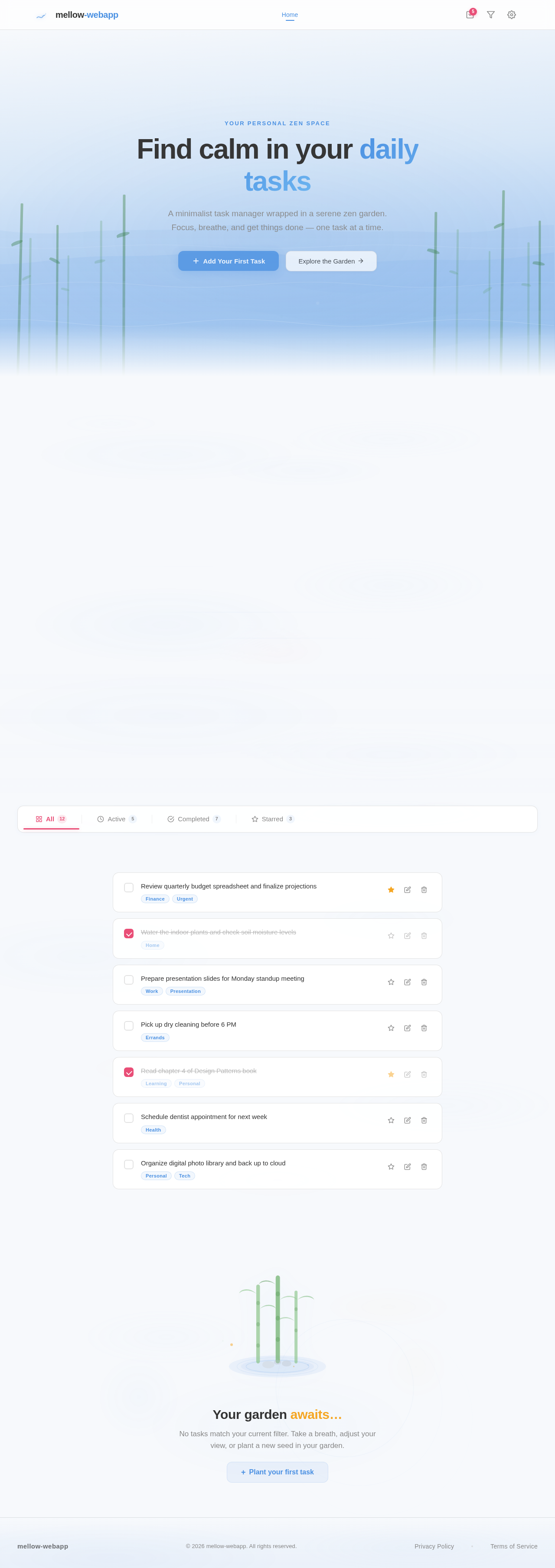
Your personal zen space
Find calm in your daily tasks
A minimalist task manager wrapped in a serene zen garden. Focus, breathe, and get things done — one task at a time.
Your Peaceful Task Garden
A serene space to organize your thoughts and tasks. Focus in calm, accomplish with clarity.
Your garden awaits…
No tasks match your current filter. Take a breath, adjust your view, or plant a new seed in your garden.
No comments yet. Be the first!